TL;DR
- An agent template is a reusable blueprint: instructions, model settings, tools, knowledge, guardrails and, ideally, evaluation criteria.
- Templates standardise the build. They stop every team from starting from a blank page.
- A good enterprise template goes beyond prompts. It carries ownership, version, risk level, tool permissions, evaluation requirements and deployment rules.
- Separate the business layer from the control layer. Teams customise context and knowledge. Security, identity, guardrails and audit stay protected.
- Versioning, evaluation, approval and runtime monitoring become necessary the moment templates are used by more than one team.
- Opencontroller is not a template library. It is the control layer around agents, connecting identity, governance, evaluation, deployment, observability and lifecycle management.
One team builds an HR agent in Copilot Studio. Another builds a research agent with LangChain. A third works in Claude Code, and a fourth ships an n8n workflow that calls a model.
All four agents work. They also have different prompts, tool permissions, model settings, naming conventions, evaluation methods, approval processes and monitoring.
That is the point where “we have an agent template library” stops being enough. Agent templates make the starting point repeatable. Standardising how agents are created, approved, deployed, monitored and updated takes a shared architecture around those templates. This guide covers what a good enterprise template contains, how to build a template system that survives scale, and where an AI control plane such as Opencontroller fits.
What are agent templates?
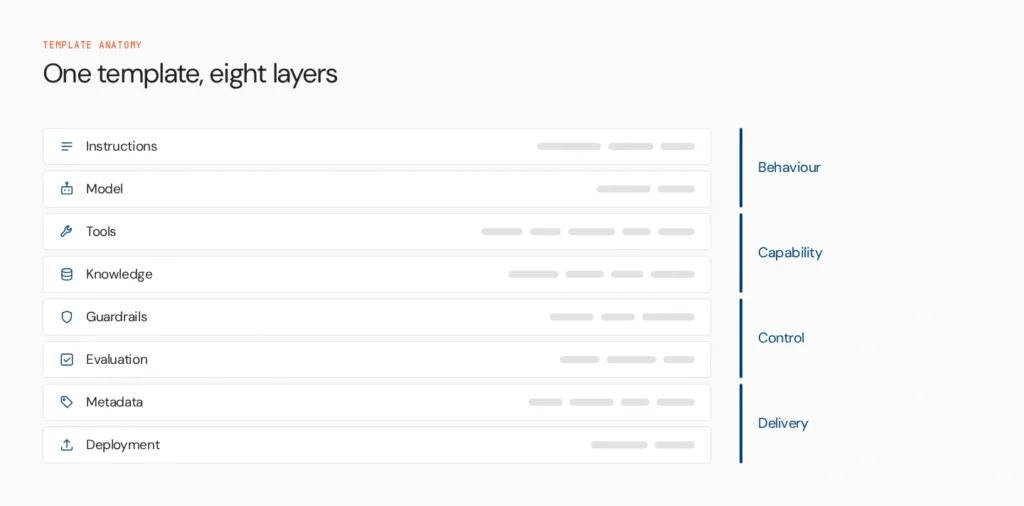
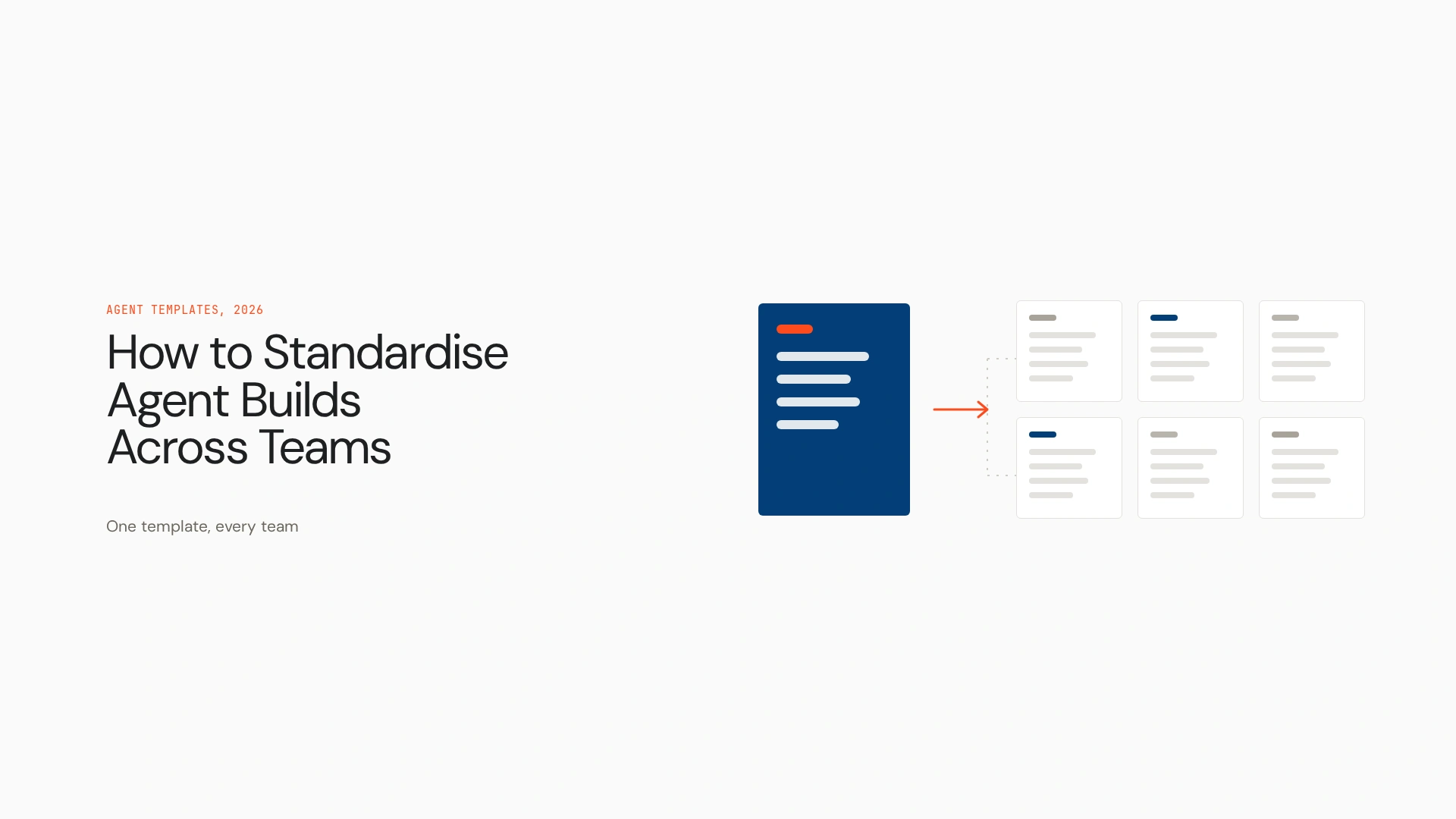
An agent template is a reusable blueprint for creating agents with a predefined combination of instructions, role, model configuration, tools, data sources, workflow logic, guardrails, output requirements and, where applicable, evaluation criteria. It reduces repeated engineering work and gives teams a common starting point.
Templates look different across ecosystems. One might be a visual configuration in a no-code builder, another a YAML or JSON definition, a code scaffold, a prompt package, a workflow export or a markdown file in a repository. They are not portable across platforms by default. A Copilot Studio template can’t be dropped into LangChain, and treating them as interchangeable is the first mistake teams make.
What should an enterprise AI agent template contain?
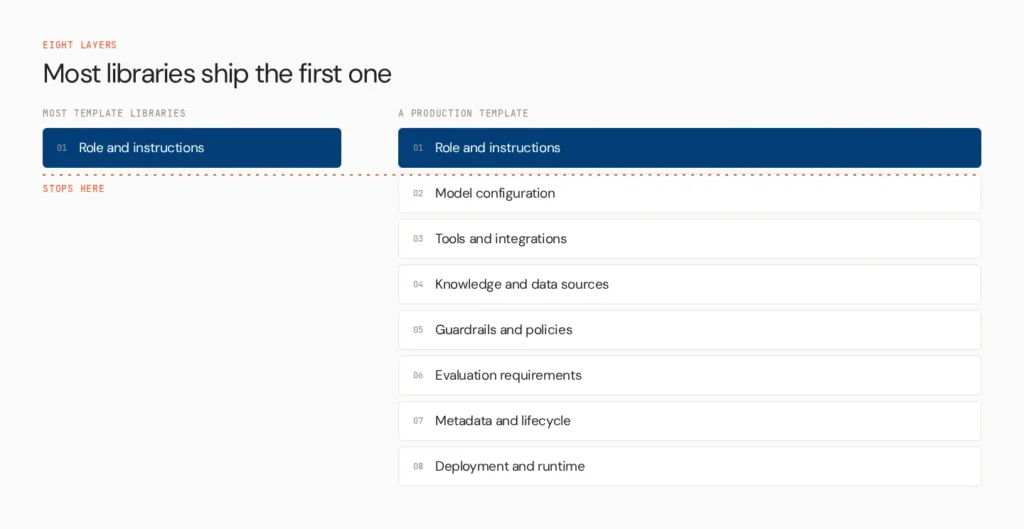
Most template libraries stop at the prompt. A production template needs eight layers.
1. Role and instructions. Purpose, role, operating rules, expected behaviour and escalation conditions. Think of this as the agent’s behavioural contract. It matters, but it is only one layer.
2. Model configuration. The approved model, tier, generation parameters where relevant, context needs and a fallback. Standardise this centrally. If every team picks its own model, cost, behaviour and risk vary without anyone deciding they should.
3. Tools and integrations. Approved tools, API connectors, internal services, databases and SaaS systems, with scoped permissions and authentication requirements. Tool access should be explicit. An agent should hold only the access its template grants.
4. Knowledge and data sources. Approved sources, retrieval settings, data access boundaries, freshness requirements and source restrictions.
5. Guardrails and policies. PII handling, content safety, relevance checks, tool-use restrictions, human approval thresholds and controls for high-risk actions.
6. Evaluation requirements. The template should say how agents built from it will be judged: task success, accuracy, groundedness, tool-use correctness, safety, and latency or cost where relevant. A template that defines how to build an agent but leaves quality undefined hands the problem to every team separately. See AI agent evaluation for tooling.
7. Metadata and lifecycle. Owner, version, business function, environment, dependencies, risk classification, review date and change history.
8. Deployment and runtime requirements. Target environment, promotion requirements, observability, audit needs, rollback expectations and runtime policies. This is where the conversation shifts from templates to lifecycle.
How agent templates look across platforms
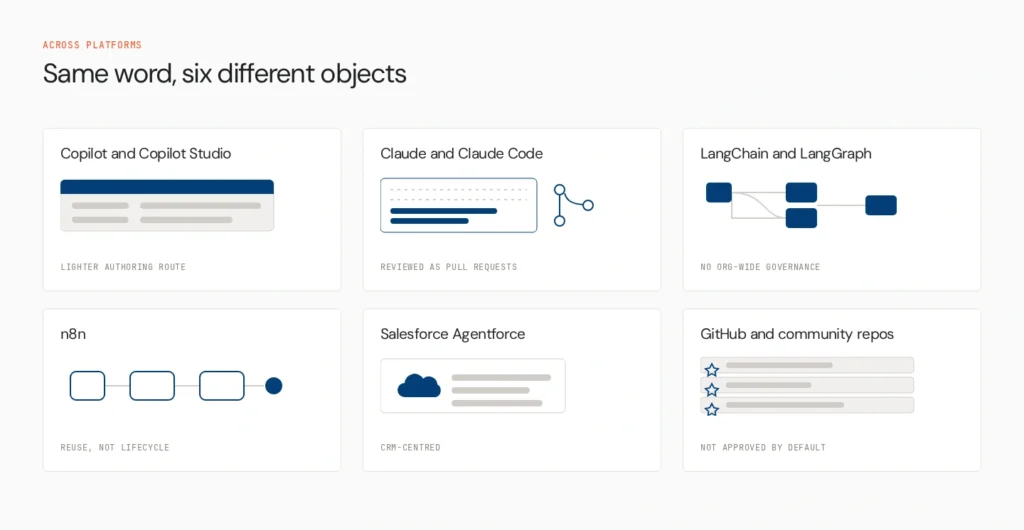
Every major platform now offers some form of template, and each one implies a different governance model. Most of these descriptions come from vendor documentation, which is worth reading directly because products change quickly.
Microsoft Copilot and Copilot Studio. Agent Builder in Microsoft 365 Copilot includes templates preconfigured with a description, instructions and prompts. You can choose a template on the Configure tab and the name, description, instructions and starter prompts prepopulate, after which you add knowledge sources and capabilities.
The question many teams search is what the instructions section does. It holds specific instructions to the model that extend Copilot’s behaviour for that agent, covering its role, task boundaries, tone and rules. It is one component of the agent definition, alongside knowledge (up to 20 sources, including SharePoint sites and connectors) and capabilities. Treat instructions as necessary but not sufficient. Microsoft describes Agent Builder as a lighter authoring route, and richer actions and management sit in full Copilot Studio.
Claude and Claude Code. Claude Code skills are SKILL.md files, YAML frontmatter plus markdown instructions, stored in project, personal or plugin folders, and they follow the open Agent Skills standard. Subagents are also defined as markdown files with frontmatter. For code-based teams, version-controlled files make natural templates, because the review process is already pull requests.
LangChain and LangGraph. Templates here are usually reference architectures, starter repositories and scaffolds that define prompts, tools and graph structure. They speed up engineering but don’t provide organisation-wide governance.
n8n. Workflow templates and reusable AI agent workflows let teams copy a working pattern quickly. Workflow reuse is not lifecycle governance.
Salesforce Agentforce. Templates and configurations for CRM-centred use cases, with reusable actions, instructions, knowledge and business context.
GitHub and community repositories. Open collections are useful starting points, and many are free to download. They are not enterprise-approved by default. Free can mean a free template, a free repository, a free-to-use platform or a free tier, and these are different things. Review a community template for security and data handling before it becomes a standard.
Templates are a common pattern, but their governance varies. Platform-specific templates can create lock-in, and the same pattern can’t be assumed to carry across ecosystems.
How to build an internal agent template library
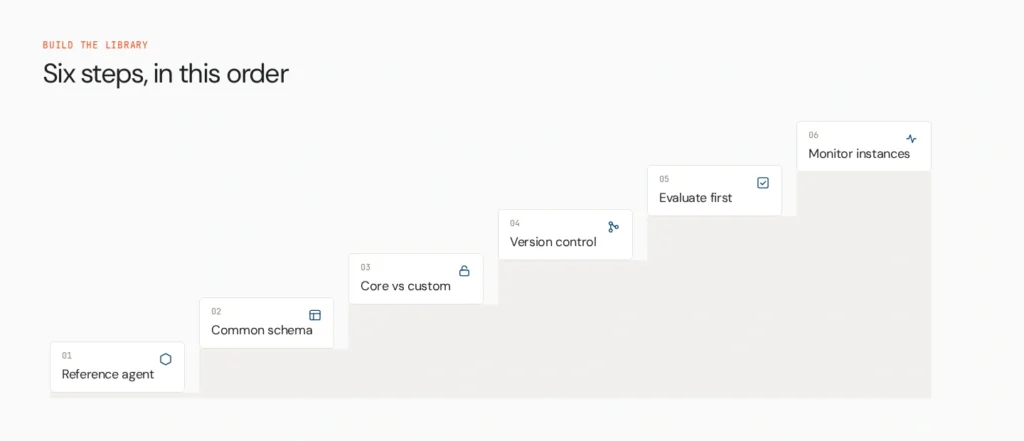
Step 1: Start with a reference agent. Pick one high-value, repeatable use case, ideally a proven production pattern rather than an experiment. Document its role, instructions, tools, data, model, guardrails, evaluation and deployment requirements. A weak reference build becomes a standardised weak build, so choose carefully.
Step 2: Define a common template schema. Every template should follow one metadata structure: name, purpose, owner, version, agent type, model, instructions, tools, data sources, permissions, guardrails, evaluation criteria, risk level, deployment requirements and dependencies. The implementation can differ by framework. The enterprise metadata shouldn’t.
Step 3: Separate core architecture from customisation. Teams should be able to adjust business context, knowledge sources, persona, department instructions and approved tools. They shouldn’t be able to silently change security boundaries, identity, required guardrails, evaluation requirements, audit settings or production controls. Customise the business layer. Protect the control layer.
Step 4: Put templates under version control. Treat them as software: git, pull requests, named owners, change history, release notes, an approval workflow and a deprecation policy.
Step 5: Evaluate before promotion. Give every template a baseline evaluation set. An agent built from it should pass required tests before reaching production.
Step 6: Monitor every deployed instance. A template library answers “how should we build this?” Runtime governance answers “what is this agent doing now?” The second question is the one that arrives with scale.
How to standardise agents without forcing one framework
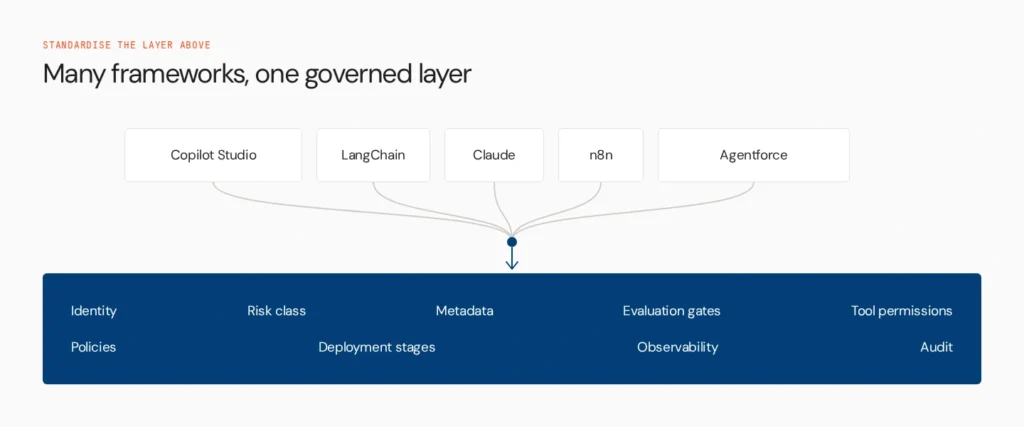
Standardisation doesn’t require every team to use the same framework. It can happen at the control and metadata layer. Teams keep working in Copilot Studio, LangChain, Claude, n8n, Agentforce or custom code, while the organisation standardises identity, risk classification, required metadata, evaluation gates, tool permissions, governance policies, deployment stages, observability and audit.
This is the strongest argument for a control layer. Forcing one framework fights how engineering teams actually work, and the framework they need for a CRM workflow is rarely the one they need for a research agent. Standardising the layer above lets teams keep that choice. Whether any given template integrates with a control plane depends on the platform and the integration, so check support before assuming it.
A practical enterprise template schema
This is a conceptual structure, not a claim that every framework uses YAML or these exact fields.
template:
name: research-agent
version: 1.2
owner: ai-platform
model:
approved_model:
fallback:
instructions:
role:
task:
boundaries:
tools:
- name:
permission:
knowledge:
sources:
–
guardrails:
pii: required
content_safety: required
human_approval:
required_for:
evaluation:
required: true
criteria:
– task_success
– groundedness
– tool_accuracy
deployment:
approval_required: true
environments:
– staging
– production
governance:
risk_level:
audit: required
How to choose or design an agent template system
Test any template system, whether you buy it or build it, against ten questions.
- Reusability: can teams create many agents from one proven architecture?
- Customisation boundaries: can teams adapt business logic without bypassing enterprise controls?
- Versioning: can templates and the agents built from them be tracked independently?
- Framework support: does it work across the frameworks you actually use?
- Tool governance: can tool and API access be defined explicitly?
- Evaluation: does every agent inherit the required standards?
- Deployment: can agents move through controlled environments?
- Runtime visibility: can you see what happens after deployment?
- Governance: can policy be enforced consistently?
- Lifecycle: can agents be updated, deprecated or rolled back without losing track of dependencies?
If the system only answers how to build the agent, it solves the first part of standardisation.
Be honest about the limits too. Templates go stale as models, tools, APIs and policies change. Community templates may lack security review. Too much standardisation stops teams adapting agents to legitimate needs. The aim is standardisation with controlled flexibility, not identical agents everywhere. The Agents to Production playbook covers how teams stage that.
How Does an AI Control Plane Work With Agent Templates?

An agent template is a reusable blueprint. An AI control plane is the operational layer that governs the agents created from those blueprints.
Once several teams build from several templates, the enterprise needs visibility and control across the resulting estate. Opencontroller is Lyzr’s control plane for that. It isn’t a template library, a prompt library or an agent framework, and it doesn’t replace Copilot Studio, LangChain, Claude, n8n or Agentforce. It provides the layer around agents built in those systems: registry and discovery, identity, policy, evaluation, controlled promotion, runtime observability, audit and lifecycle governance.
Here is how it maps onto the template lifecycle:
- Template: defines the approved starting architecture.
- Build: a team customises the approved template.
- Evaluate: the agent is tested against required quality and safety criteria.
- Promote: the agent moves through controlled environments.
- Run: runtime behaviour is monitored.
- Govern: policy, identity, access and audit controls apply.
- Improve: feedback and runtime data shape the next version.
The template defines the starting point. The control plane governs what happens across the agent’s lifecycle.
Where the template library ends and the control layer begins
Agent templates turn one successful build into a reusable starting point. Scale then raises a different problem. With dozens or hundreds of agents built from different templates, teams need to know what exists, who owns it, what it can access, which version is running, whether it passed evaluation, which policies apply, what it is doing in production, and when it should be changed or retired.
That is where the template library ends and the control layer begins. Lyzr’s Opencontroller connects the lifecycle around your agent templates, from identity and evaluation to policy enforcement, deployment, runtime observability and continuous improvement. See how it fits into your existing agent stack, or book a demo to assess how a control plane can standardise governance across your agent estate.
FAQs
Reusable blueprints for creating agents. They bundle instructions, model settings, tools, knowledge sources and guardrails so teams start from a proven configuration, not a blank page.
They give every team the same starting architecture, so prompts, tools and settings are consistent. Standardising the whole lifecycle also needs versioning, evaluation, approval and monitoring around the templates.
Instructions, approved model, scoped tools, knowledge sources, guardrails and evaluation criteria, plus metadata such as owner, version, risk level and deployment requirements.
Platform libraries, GitHub repositories and community collections offer free templates. Free can mean a free download, a free repository or a free tier of a paid platform. Review security and data handling before using any in production.
Preconfigured starting points in Agent Builder for Microsoft 365 Copilot. They prepopulate the description, instructions and starter prompts, and you add knowledge sources and capabilities before creating the agent.
It holds the instructions that shape the agent’s behaviour: role, task boundaries, tone and rules. It works alongside knowledge sources and capabilities, and it isn’t sufficient on its own for production control.
Rarely as-is. Each platform defines templates differently. You can standardise metadata, policy and evaluation across frameworks, even when the templates themselves stay platform-specific.
Define a common template schema, separate customisable business settings from protected controls, version templates, require evaluation before promotion, and monitor deployed agents. A control plane can apply this across frameworks.
A template is a reusable blueprint for building an agent. A control plane governs agents once they exist, covering registry, identity, policy, evaluation, promotion, observability and audit.
Give each agent an owner, identity and risk level, require evaluation gates before promotion, scope tool access, monitor runtime behaviour and keep an audit trail. Update every agent when the template or policy changes.
Book A Demo: Click Here
Join our Slack: Click Here
Link to our GitHub: Click Here