TL;DR
- Set limits at the right scope. Don’t rely on one shared team pool.
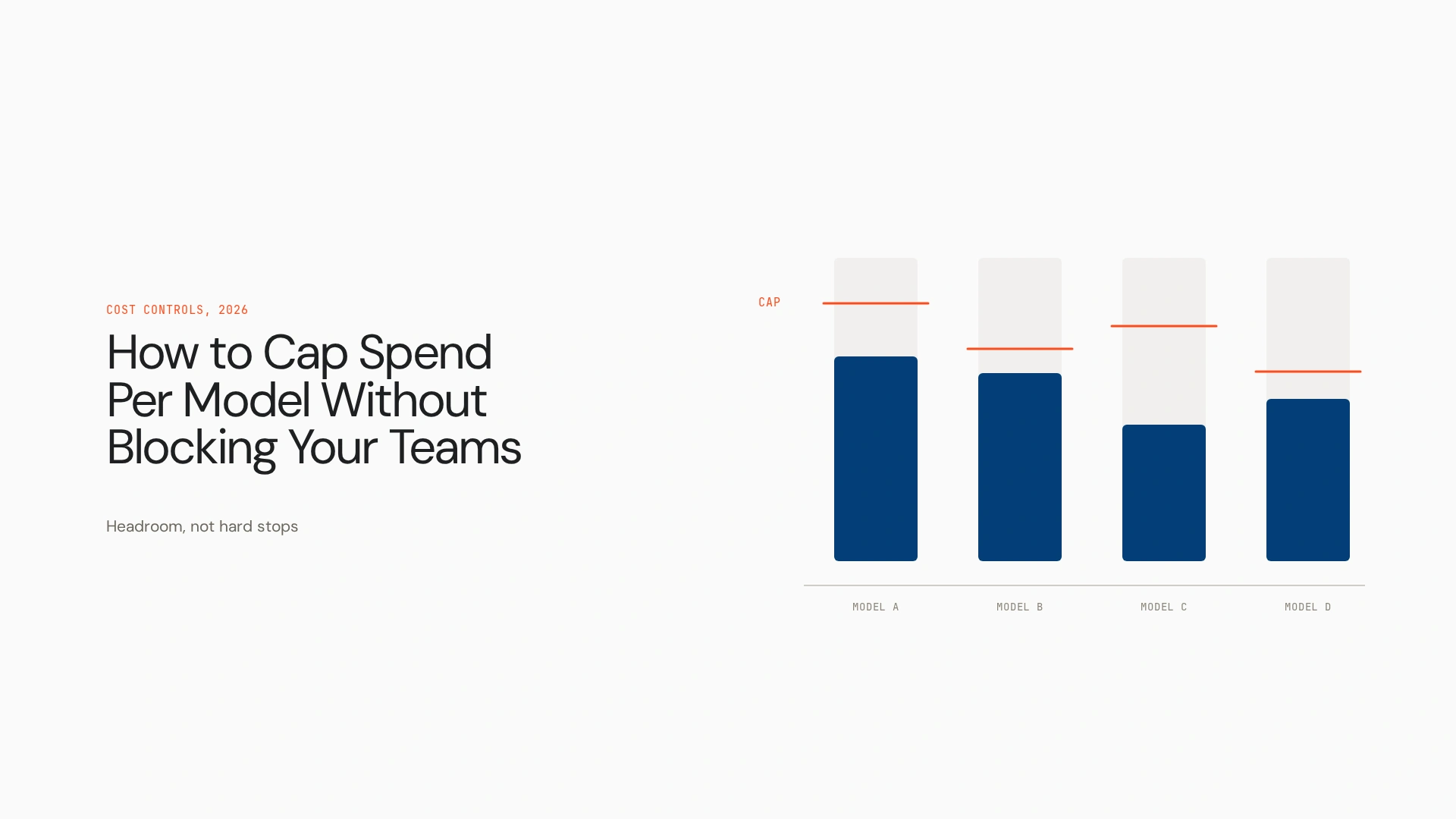
- Cap expensive models independently from cheaper ones.
- Define a fallback model before the primary model reaches its limit.
- Use per-user or per-project sub-limits so one workload can’t consume everyone’s allowance.
- Add approval gates for exceptional, high-cost requests.
- Treat spend controls as policy decisions that are observable, auditable and centrally governed.
Your company gives engineers access to several AI models. One team needs a high-reasoning model for architecture work. Another uses a cheaper model for summarization. A third runs agents that make dozens of model calls per task. Then someone reaches the expensive model’s monthly limit.
If that limit sits on a shared team pool, the problem is no longer cost. The budget has become an availability incident. The answer isn’t removing the cap. It’s designing what happens before, at and after it. This guide explains how to cap spend per model without blocking your teams, using routing, sub-limits, approval gates and policy-driven fallbacks.
What does an AI model spend cap actually control?
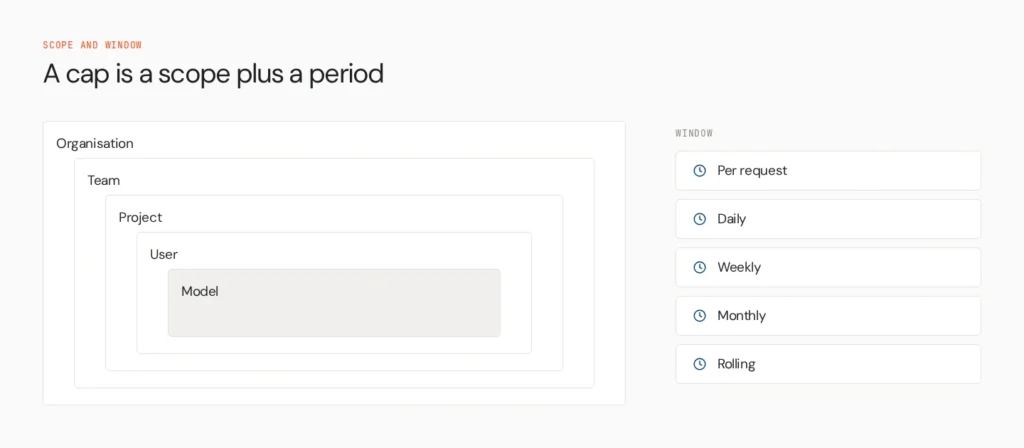
A spend cap limits the money a defined scope can spend on inference over a period. The scope can be a model, provider, API key, user, team, project, application, agent or workspace. The window can be per request, daily, weekly, monthly or rolling.
Platforms differ in which scopes they support, so this guide covers policy design, not one vendor’s feature set. Cloudflare’s AI Gateway shows the range: its spend limits scope by model, provider or custom metadata such as user, team or application, and can split by value so each user gets an independent budget bucket.
Why a single shared AI budget fails
Say five teams share a $10,000 monthly pool. Two consume most of it early, and everyone else is blocked. The budget worked financially and failed operationally.
| Team | Usage pattern | Result under a shared hard cap |
|---|---|---|
| Research | High-cost reasoning | Consumes a large share |
| Support | High volume, lower cost | Still affected |
| Product | Moderate experimentation | Loses access |
| Finance | Occasional high-value use | May be blocked unexpectedly |
This example is conceptual, not data. The problem isn’t the cap. It’s the scope and the failure action. Per-member budgets avoid it, so one person hitting a limit doesn’t use up another’s allowance. OpenRouter’s team controls describe this model.
The five layers of AI spend control
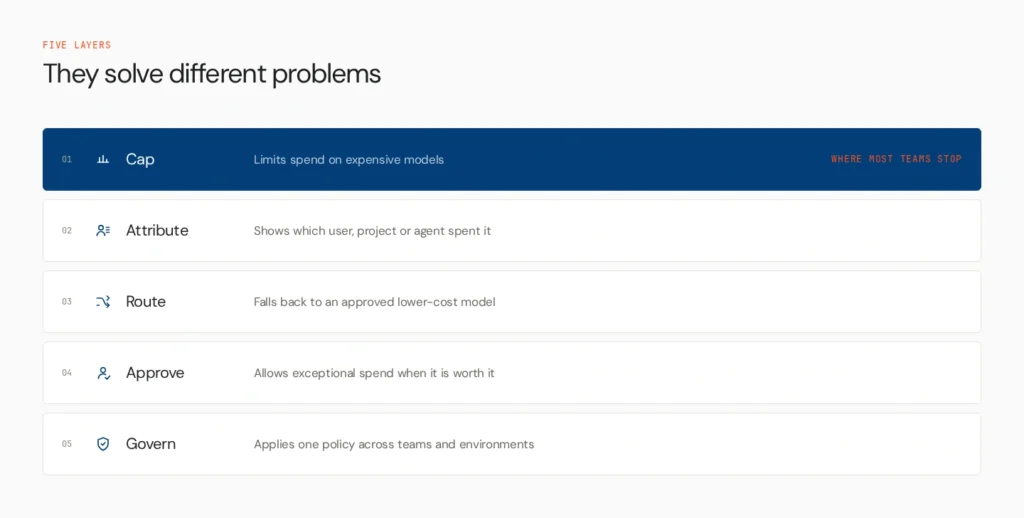
Cap, attribute, route, approve, govern.
- Model caps limit spend on expensive models.
- Attribution shows which user, project, agent or application generates spend.
- Graceful fallback routes to an approved lower-cost alternative.
- Approval allows exceptional usage when the value justifies it.
- Governance applies policy consistently across teams, models and environments.
These layers solve different problems. Most teams stop at layer one.
A spend cap needs a failure policy
A cap answers “how much can this scope spend?” It doesn’t answer “what happens at the limit?” Those are separate decisions, and the second matters more. For every cap, define the action: alert, throttle, route to a cheaper model, require approval, queue or block.
Gateways increasingly separate these. Cloudflare documents that when a primary model’s budget is exceeded, the gateway can route requests to a fallback model instead of blocking them. MLflow’s gateway distinguishes alerting from rejection when budgets are exceeded.
How to cap an expensive model without blocking the workflow
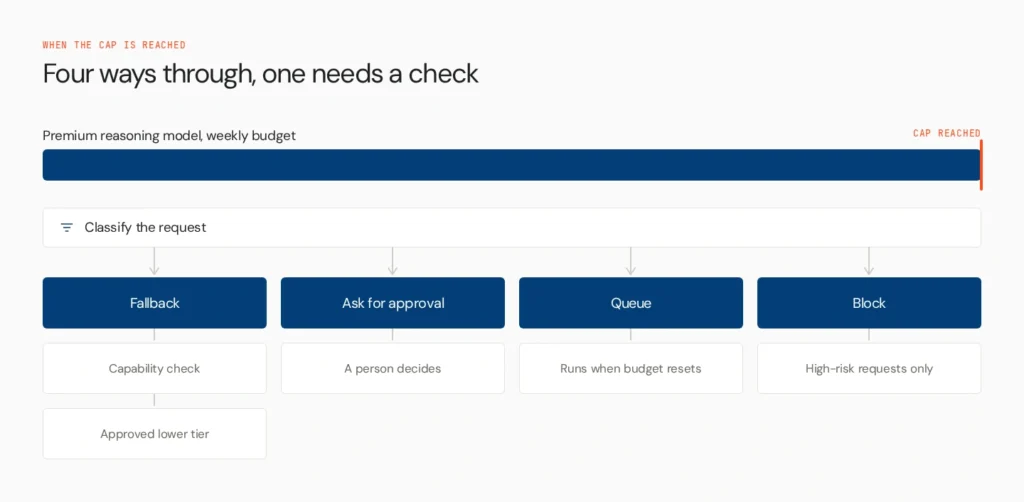
Suppose a high-cost reasoning model has a weekly cap and a lower-cost general model sits behind it. When the cap is reached, you have four options:
- Fall back automatically for eligible requests.
- Ask for approval when the task needs the premium model.
- Queue work that can tolerate delay.
- Block selectively for requests above a risk or cost threshold.
Fallback isn’t always safe. A cheaper model may be unsuitable for complex reasoning, regulated decisions, long-context tasks, tool-heavy workflows or high-risk actions. A fallback has to be capability-aware: task requirements map to an approved model tier, and the fallback must meet them. A fallback that saves money but degrades the task isn’t a successful fallback.
Route by task, not by habit
A model cap works better when requests are classified.
| Task | Default model | Premium? |
|---|---|---|
| Summarization, classification, simple extraction | Lower-cost | No |
| Complex reasoning | Premium | Yes |
| High-impact decision support | Premium plus approval | Yes |
| Experimental workload | Restricted | Maybe |
The aim is the cheapest model that can reliably complete the task. A cheaper model that fails, retries or needs extra agent steps can cost more overall, so optimise cost per successful task, not cost per token.
Isolate budgets by user, team and project
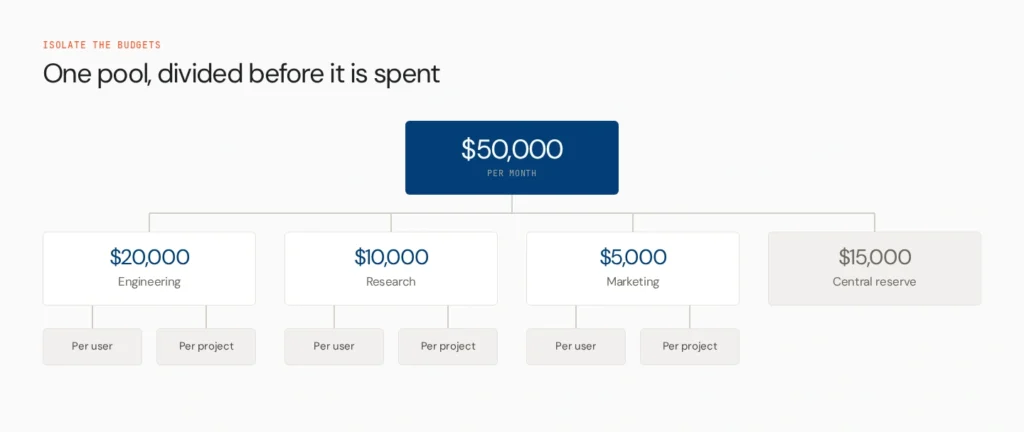
A shared pool makes everyone depend on everyone else. A per-seat allocation gives each user an allowance. A hierarchical allocation runs organisation, team, user, project or agent.
For example, a company with $50,000 a month might allocate $20,000 to engineering, $10,000 to research, $5,000 to marketing and keep the rest as a central reserve. Teams then set per-user or per-project limits. This guards against runaway individual usage and against overly restrictive central budgets.
Cloudflare’s documentation gives a concrete shape: its changelog example gives each user a $200 daily budget, caps total gateway spend at $10,000 a day and limits a specific model to $50 a day per user. Vercel and AWS gateway guidance describe similar scopes.
Add approval gates for exceptional spend
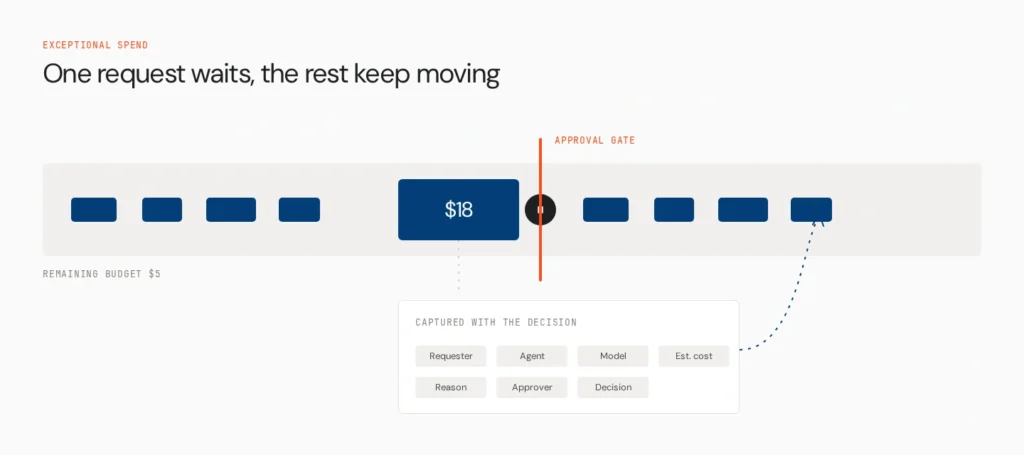
Some requests are expensive for good reasons: a large research task, complex codebase analysis, a long-running agent, a high-value customer workflow or an incident investigation. A hard cap treats them like any other request. An approval gate adds a third option: this is expensive, but it may be worth it.
Consider this case. Estimated request cost is $18, the user has $5 left, a fallback exists but lacks the capability. Approval is required. Capture the requester, agent, model, estimated cost, business reason, approver and decision.
Few gateways offer interactive approvals out of the box. Treat this as an architecture pattern you can build through middleware, agent orchestration or a control plane.
What should happen when a spend cap is reached?
Don’t make “block” the default for every model and workflow. Set the action by the task’s risk and the available fallbacks.
| Situation | Recommended action |
|---|---|
| Cheap task, premium cap reached | Fall back |
| Complex task, capable fallback exists | Fall back with monitoring |
| High-value task, no suitable fallback | Approval |
| Regulated or high-risk task | Approval or block |
| Runaway agent loop | Circuit breaker |
| Unknown behaviour | Pause and investigate |
| No safe alternative | Block |
Hard blocking is right when no safe fallback exists, the request exceeds a high-risk threshold, the model is restricted by policy, an agent shows runaway behaviour, the request breaks data or security policy, or spend has no approved justification. It should be a deliberate outcome, not the only mechanism.
Tie caps to agent behaviour
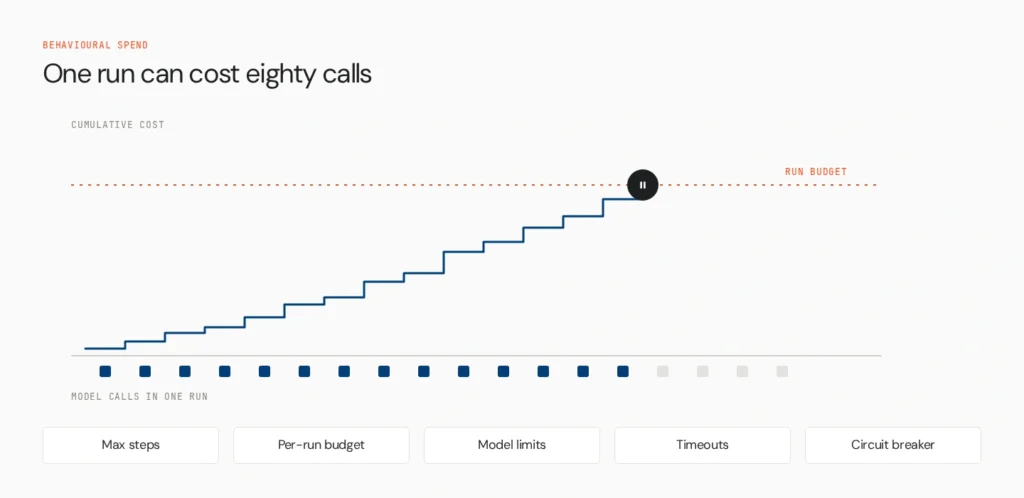
An agent can spend through repeated model calls, long contexts, tool-call loops, retries, multi-agent delegation and parallel calls. It might stay under a per-request limit and still call the model 80 times. That spend problem is behavioural.
Add agent-level controls:
- Maximum steps and model calls to stop loops
- Per-run budgets that cap each execution
- Model and tool restrictions so premium models don’t serve low-value tasks
- Timeouts for agents that run past expectations
- Circuit breakers that pause execution when spend or errors deviate sharply from baseline
Track cost per run, per user, per model, per workflow and per successful outcome, so you can see what generated the spend and not only how much.
Move from budgets to model policy
Instead of “everyone gets $100 of Model X,” write a policy: “Model X is available for high-complexity tasks, with a $100 user budget and a $2 per-run limit. Lower-complexity tasks route to Model Y.” A policy can combine user, team, agent, task type, model, cost, environment, risk and approval status. This is where spend management becomes AI governance, not simple budgeting.
Where does an AI control plane fit?
A budget tool tells you how much was spent. A gateway can enforce a request-level restriction. An AI control plane provides the context to decide which agent, model, workflow and policy should govern that request.
A spend dashboard answers “where did our AI budget go?” A gateway answers “can this request reach this model?” A control plane answers “given this agent, identity, task, policy and environment, what should happen to this request?”
An Opencontroller-style policy might read: Agent A, Team B, production, premium model, estimated cost over threshold, so route to an approved fallback, require approval or block, depending on policy.
Lyzr’s Opencontroller centres on agent registry, identity, evaluation, staged promotion, observability and governance across the agent lifecycle. It isn’t a billing platform or a FinOps tool. Whether it performs dollar-level enforcement or model routing itself should be confirmed against current documentation, and routing and fallback are best framed as patterns inside a governed stack.
| Spend control | AI control plane |
|---|---|
| Sets budget | Governs policy |
| Tracks usage | Connects usage to agent identity |
| Caps spend | Controls what agents can access |
| May reject requests | Determines the right policy action |
| Focuses on cost | Connects cost with risk, identity and lifecycle |
| Often scoped to keys and users | Operates across the agent estate |
Spend controls answer how much. A control plane adds the context to decide what happens next.
Design a team budget that doesn’t bottleneck work
- Set the organisation budget.
- Create model tiers: standard, advanced, premium.
- Assign default models, with a lower-cost model for most work.
- Reserve premium models for tasks where the benefit justifies the cost.
- Add user and team sub-limits.
- Set per-run limits for agents.
- Define fallback behaviour before the cap.
- Define approval rules for exceptions.
- Monitor spend and outcomes together.
- Review the policy periodically, since prices, capabilities and usage change.
An illustrative policy
All dollar figures below are illustrative.
- Team: Product Engineering, $15,000 monthly allocation
- Standard models: lower-cost general models
- Premium model: complex reasoning and architecture tasks
- Premium per-user limit: $300 a month
- Per-run premium limit: $10
- Fallback: an approved lower-cost model
- Approval: required above $10 when no suitable fallback exists
- Agent limit: 40 model or tool steps per run
- Emergency action: circuit breaker if spend per task exceeds baseline by a set margin
This stops one engineer consuming the team budget, simple tasks using premium models and runaway loops draining spend, while legitimate high-value work still gets through.
Measure whether the controls work
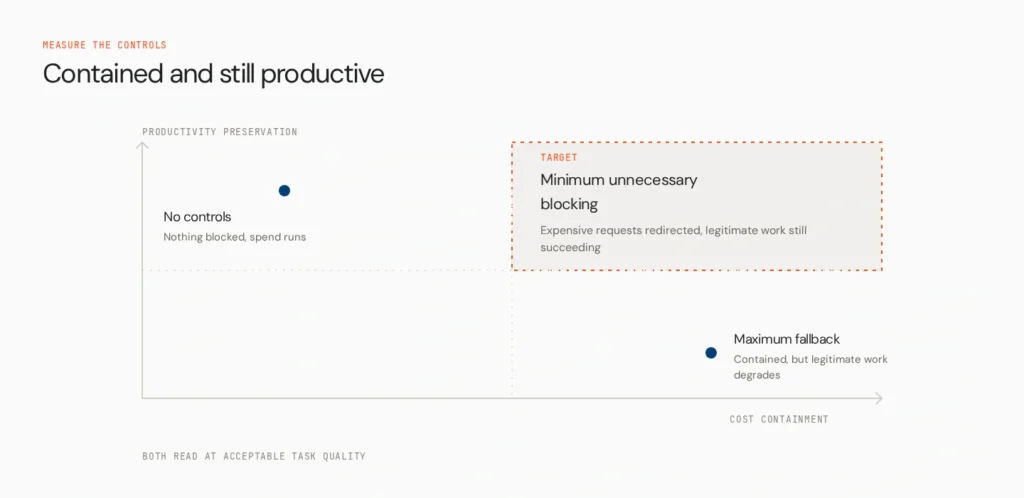
Track spend per model, team, user and agent, cost per successful task, premium-model utilisation, fallback rate, approval rate, block rate, cost anomalies, failed requests after budget exhaustion and budget utilisation. Add two metrics:
- Cost containment rate: the share of potentially expensive requests redirected or controlled without a hard failure.
- Productivity preservation rate: the share of legitimate requests that keep succeeding after a threshold is reached.
Balance both against task quality. The goal isn’t maximum fallback. It’s minimum unnecessary blocking at acceptable cost and quality.
Common mistakes
- One giant shared cap, which creates a tragedy of the commons
- Hard-blocking everything at the threshold
- Giving everyone premium models without evidence of benefit
- No fallback, which turns a budget event into an outage
- No per-run limit, so one runaway agent takes a disproportionate share
- Tracking dollars without outcomes
- Unlimited API keys, which defeat attribution
- Treating budget and governance as separate systems
Make cost policy part of the agent lifecycle
Cost governance should run across register, evaluate, deploy, run, observe, optimise and retire. Assign an owner and cost centre at registration. Measure expected cost per task in evaluation. Attach a model and budget policy at deployment. Enforce limits and fallback at runtime. Track cost and outcomes through AI agent observability. Adjust routing from evidence, and remove unused model access and keys at retirement. The Agents to Production playbook covers the wider lifecycle.
Make expensive usage intentional
The goal of an AI spend cap isn’t to make teams afraid of expensive models. It’s to make expensive usage intentional. Cap the model. Allocate the user. Route the workload. Approve the exception. Observe the outcome.
As AI moves from experiments to production agent fleets, spend policy needs more context than a billing dashboard has. Teams need to know which agent is spending, which model it uses, what policy applies, what happens at the limit and whether the cheaper alternative still meets the task. See how Opencontroller can connect model access, agent identity, runtime policy, evaluation and observability across your AI estate, or book a demo to see how spend controls fit into your agent governance architecture.
FAQs
A rule limiting how much a defined scope, such as a model, user or team, can spend over a period. It should come with a defined action at the limit.
A spend cap limits dollars used within a scope and period. A credit limit reflects available account balance. Hitting either fails requests, but for different reasons.
It depends on policy. Requests can be blocked, throttled, queued, routed to a fallback model or sent for approval. Cloudflare’s gateway, for instance, can route to a fallback instead of blocking.
Cap expensive models separately, give users their own sub-limits, define capability-aware fallbacks and add approval for exceptions.
Per-user or hierarchical limits are usually safer for larger groups, because one heavy user can’t exhaust a shared pool. A small team may still use a shared pool with alerts.
They send eligible requests to a cheaper approved model once a premium budget is reached. Savings only count if the fallback still completes the task acceptably.
Set step and model-call limits, a per-run budget, timeouts and circuit breakers, and restrict premium models and expensive tools for low-value tasks.
It ties spend policy to agent identity, model access, evaluation and runtime context, so the response at a threshold depends on who is spending, on what and why.
Book A Demo: Click Here
Join our Slack: Click Here
Link to our GitHub: Click Here