What to Keep in Mind
- Contain first. Stop new traffic or autonomous actions before you investigate.
- Revert the whole release bundle, not just application code.
- Keep the previous known-good version ready to activate, not to rebuild.
- Handle side effects separately. Rollback doesn’t unsend emails, reverse refunds or undo database writes.
- Validate behaviour, not just HTTP 200.
- Make rollback a versioned, auditable control-plane operation, so it works the same way for every agent.
When an agent starts misbehaving in production, the instinct is to open the prompt and start debugging. That is the wrong first move.
The first five minutes are for stopping exposure, returning traffic to the last known-good release, preserving evidence and preventing more side effects. Agent rollback also differs from reverting a normal application, because behaviour lives across prompts, models, tools, permissions and runtime configuration, so reverting code alone can leave the problem in place.
This guide gives you a production sequence to roll back a bad AI agent deployment in under five minutes, plus the controls that make it reliable. The target covers stopping the damage and restoring a known-good version, assuming you designed for it beforehand. Cleaning up side effects can take longer.
Why agent rollback differs from a normal deployment
A deployment can be technically healthy while behaviour is materially worse. Containers stay up, latency stays normal and every health check returns 200, yet the agent picks the wrong tool, escalates too often or acts outside its scope.
| Traditional application | AI agent |
| Code version | Code, prompt, model, tools, policies |
| Health check | Health, behaviour, task success |
| API response | Response, tool calls, downstream actions |
| Revert deployment | Revert agent release state |
| Logs | Traces, action history, deployment identity |
| Rollback fixes the version | Rollback stops future behaviour; side effects may need reconciliation |
What exactly should you roll back?
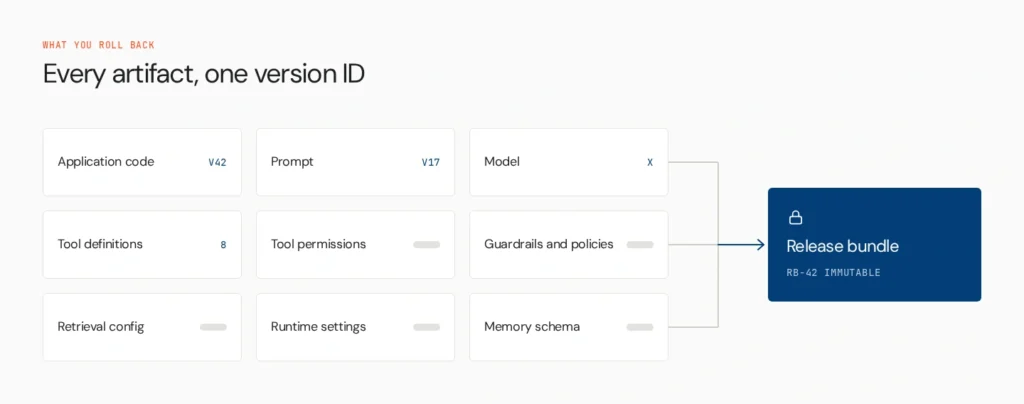
Treat the production agent as a release bundle: the complete versioned configuration that determines its behaviour. At minimum that covers application code, prompt version, the exact model version, tool definitions and schemas, tool permissions, guardrails and policies, retrieval configuration, runtime settings and any memory schema. Include every artifact that can materially change behaviour. Your bundle may differ.
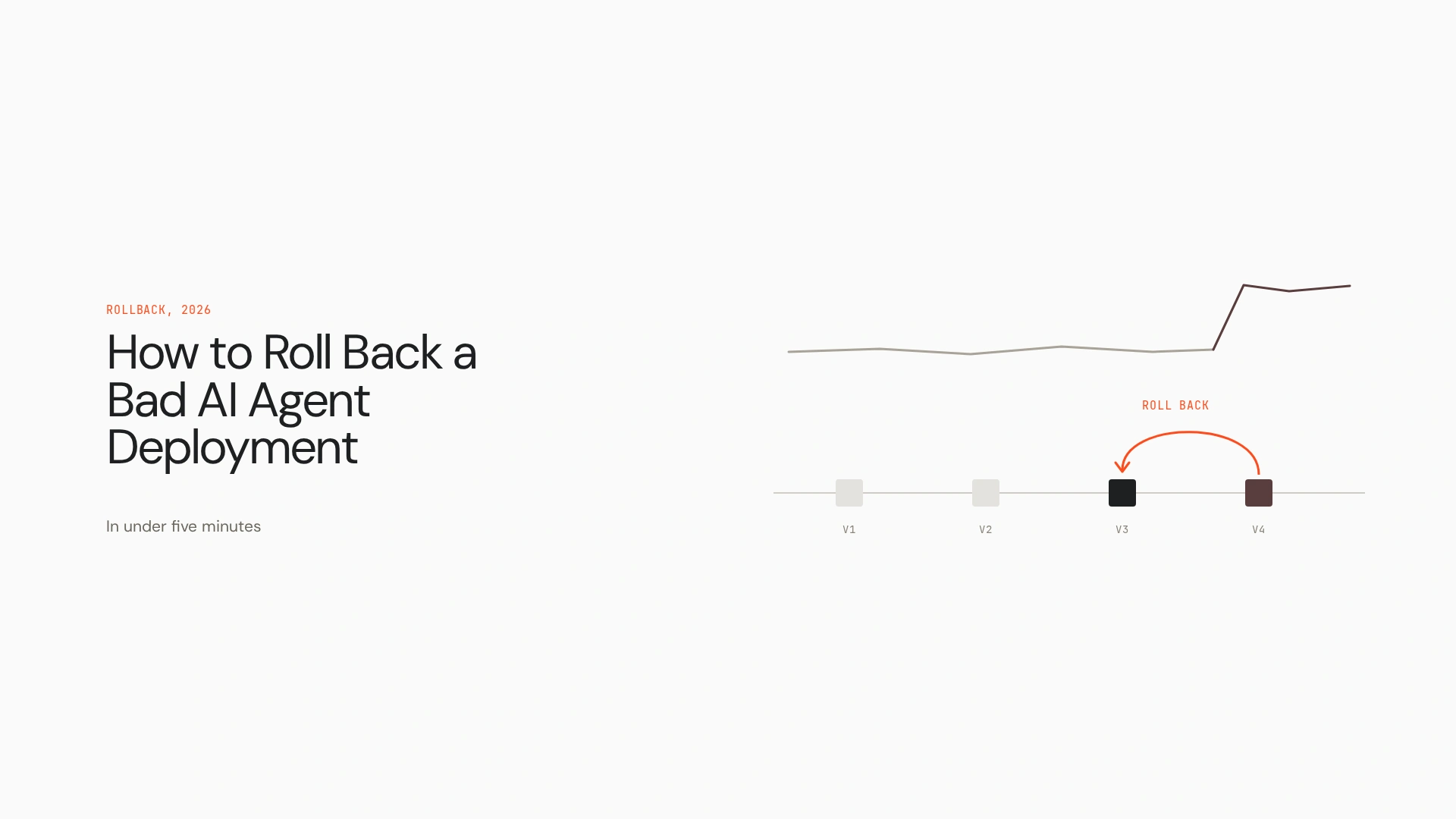
Consider this release identity: code v42, prompt v17, model X, tool schema 8. Rolling back should return production to code v41, prompt v16, model X, tool schema 7. Nobody should have to reconstruct what “the previous version” looked like during an incident. Rolling back only the code is a common failure, because the broken prompt or tool schema stays live.
The five-minute AI agent rollback playbook
The sequence is Contain, Revert, Reconcile, Validate.
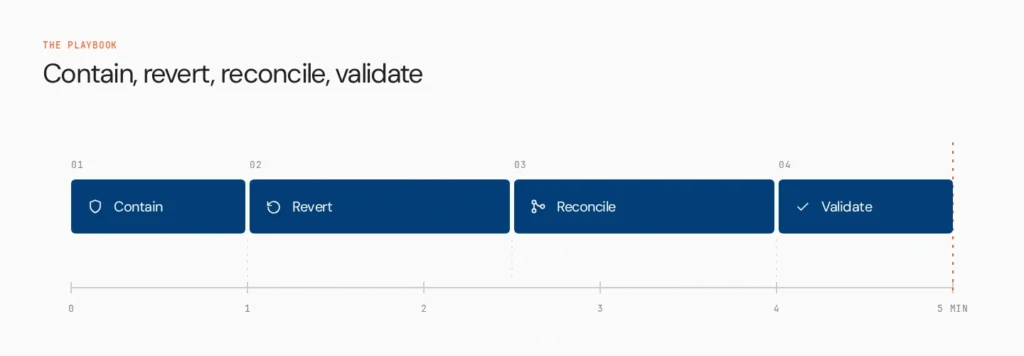
Minute 0 to 1: Contain

Goal: stop the bad version from causing further impact.
Containment and rollback are different. A kill switch stops or restricts the agent. Rollback returns production to a known-good version. Contain first, because activating the rollback target takes time and you may not yet know whether the previous version is safe.
Pick the mechanism that fits the agent’s autonomy and risk. Options include stopping new traffic, disabling autonomous execution, routing requests to a human review queue or a safe fallback, disabling high-risk tools, restricting write permissions, pausing queued jobs and tripping a circuit breaker. You won’t need all of them.
What not to do: start debugging the prompt. The first minute is about reducing blast radius.
Minute 1 to 3: Revert
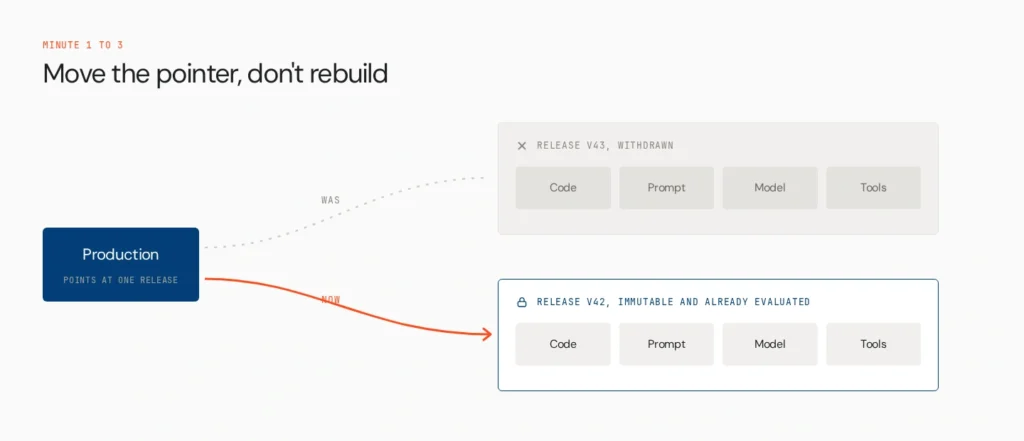
Goal: restore traffic to a known-good release.
The ideal rollback is a pointer move, not a rebuild. Production should point at an immutable, previously evaluated release bundle.
- Orchestrated agents: use the platform’s previous immutable version, such as a deployment rollback in your runtime. Commands vary by platform.
- Git-managed agents: a revert works for code, but Git alone won’t restore prompts, models or tool configuration managed elsewhere.
- Model: pin the exact model version. Floating aliases like “latest” can silently change what you restore.
- Prompt: repoint to the approved previous version. Don’t retype it from memory.
- Tools and schemas: restore the previous definitions and permissions as part of the bundle.
Minute 3 to 4: Reconcile side effects
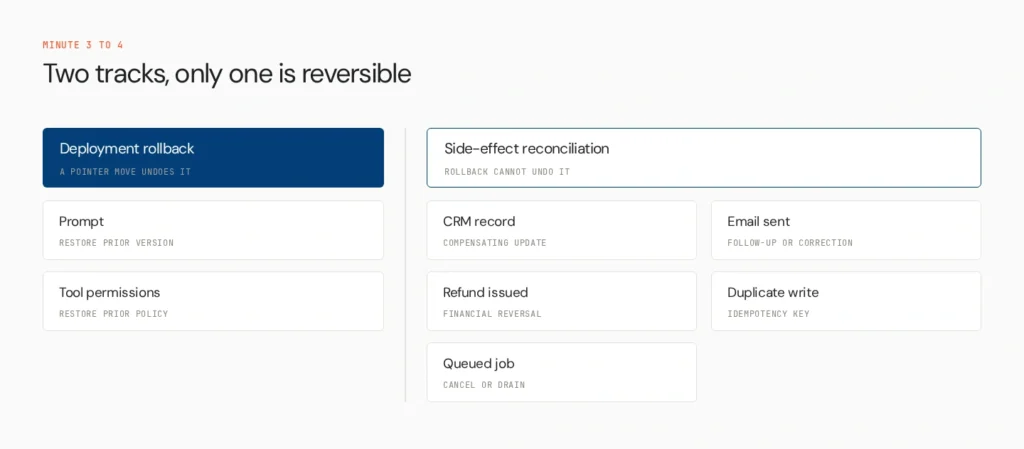
Goal: work out what the bad agent already did.
Restoring the old version doesn’t reverse external actions. Emails stay sent and refunds stay issued.
| Side effect | Can rollback undo it? | Recovery |
| Prompt changed | Yes | Restore prior prompt |
| Tool permission changed | Yes | Restore prior policy |
| CRM record updated | No | Compensating update |
| Email sent | No | Follow-up or correction |
| Refund issued | No | Financial reversal workflow |
| Duplicate API write | Sometimes | Idempotency key, reconciliation |
| Queued job | Sometimes | Cancel or drain queue |
Four controls make this manageable: idempotent actions, compensating actions, append-only action logs and clear action traceability. For the architecture behind them, see AI agent rollback patterns for enterprise. In the incident itself, your job is only to establish scope: what happened, to whom, under which version.
Minute 4 to 5: Validate
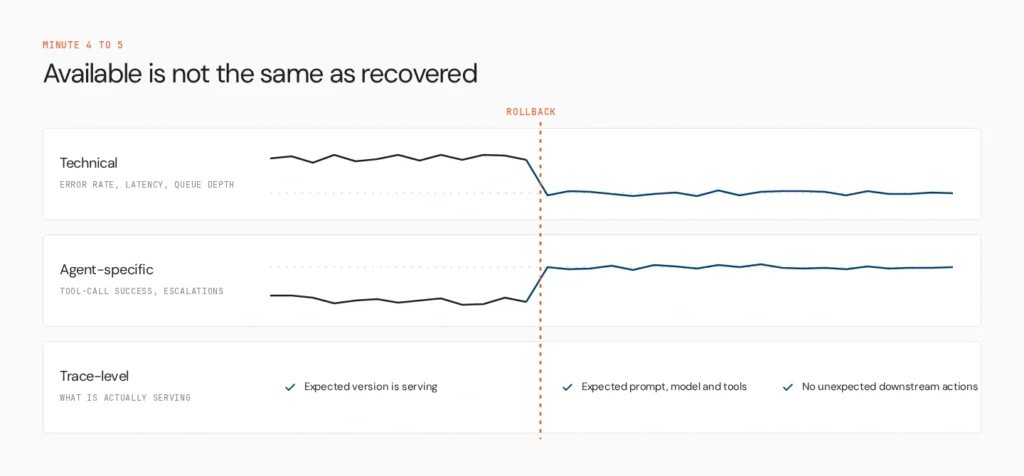
Goal: confirm the restored version behaves as expected.
Service availability isn’t proof of recovery. Check three layers.
- Technical: error rate, latency, queue depth, infrastructure health.
- Agent-specific: task completion, tool-call success, tool-selection accuracy, escalation rate, policy violations, guardrail triggers, cost per task, loop length.
- Trace-level: the expected agent version is serving traffic, the expected prompt, model and tool configuration is active, and no unexpected downstream actions continue.
Rollback is complete when you can say: traffic is on the known-good release and behaviour has returned to an acceptable baseline. See AI agent observability for what to instrument.
| Time | Action | Objective |
| 0 to 1 min | Contain | Stop further exposure |
| 1 to 3 min | Revert | Restore known-good release |
| 3 to 4 min | Reconcile | Identify and contain side effects |
| 4 to 5 min | Validate | Confirm behavioural recovery |
What if the previous version is also unsafe?
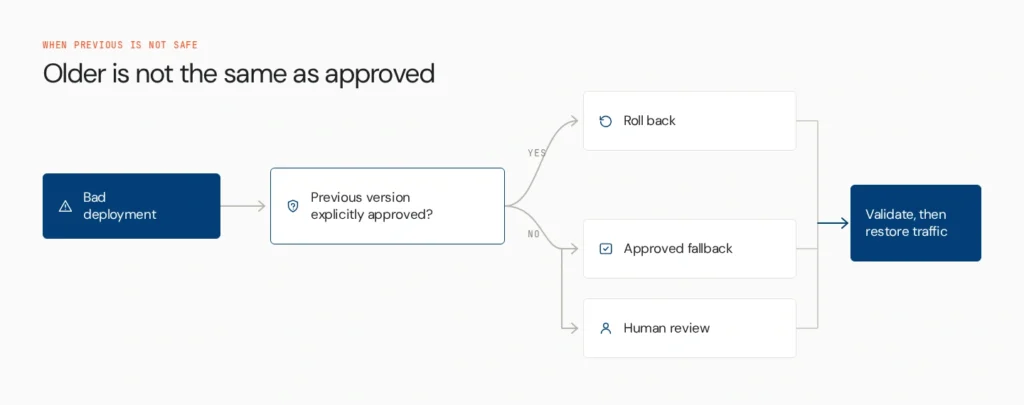
“Previous” doesn’t mean “safe.” The earlier version may have a known security flaw, a deprecated model, expired tool permissions, a changed downstream API or a changed data source. The incident may also come from an external dependency, not your release.
In those cases, contain, choose an explicitly approved fallback, validate, then restore normal traffic. Don’t roll back just because an older version exists.
Five-minute rollback is an architecture property
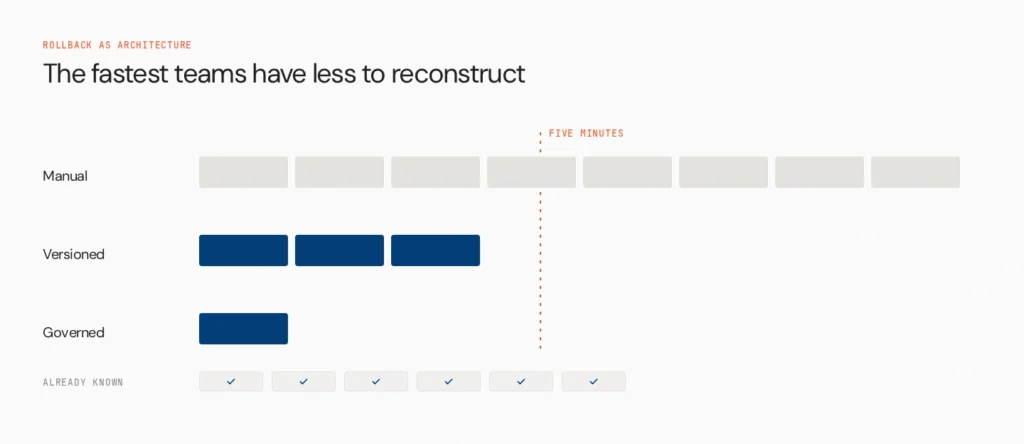
Compare two teams. In the manual case, an engineer investigates, finds the previous commit, reconstructs the prompt, checks which model was live, rebuilds, deploys, waits and validates. That takes a long time and invites errors. In the versioned case, the operator identifies the release, flips production to the known-good version and validates.
In the governed case the system already knows which version is live, who owns it, what configuration belongs to it, which version passed evaluation, what tools and permissions it has, what actions it took and which earlier versions are approved rollback targets. The fastest teams don’t debug faster. They have less to reconstruct.
Where an AI control plane makes rollback repeatable
Deployment infrastructure ships the agent. Observability shows what happened. A rollback mechanism returns configuration to a previous version. An AI control plane connects identity, versioning, evaluation, deployment state, runtime policy and observability, so rollback becomes an operational control across the agent estate. It turns rollback from a runbook into a repeatable system capability.
Lyzr’s Opencontroller is built around that idea: discovery, governed promotion, immutable snapshots, runtime policy enforcement, traceability and rollback through version state. The lifecycle looks like this:
- Discover: know which agents exist and who owns them.
- Evaluate: test candidate versions before production.
- Promote: move an approved release through environments.
- Run: enforce identity and policy at runtime.
- Observe: connect production behaviour to the deployed version.
- Revert: return production to a known-good version.
- Learn: feed the incident into evaluation and deployment gates.
The rollback mechanism restores the deployment. The control plane provides the identity, version, policy and context around that rollback. It reverts versions, not business actions. Reversing third-party side effects still needs compensating workflows. For the wider picture, see AI agent governance.
How to design for five-minute rollback before production
- Give every release an immutable identity, so you can always answer “what configuration is live?”
- Keep a known-good target warm. Don’t make the previous version something you rebuild mid-incident.
- Version the whole behaviour bundle.
- Separate containment from rollback, so the kill switch works even if rollback is unavailable.
- Preserve action history, attributing every high-impact tool call to an agent, version, identity, tool, timestamp, task and relevant approval.
- Define rollback triggers before launch, such as task success below baseline, tool error spikes, policy violations over threshold, rising human overrides, cost per task over threshold or unexpected tool usage.
- Test the rollback path. An untested plan is an assumption. Run drills in staging and periodically in production-safe conditions.
Staged rollouts help here. See canary and blue-green deployments for AI agents, and the Agents to Production playbook for readiness.
The five-minute rollback readiness test
Answer yes or no:
- Can we stop this agent without deploying new code?
- Can we identify exactly which release is serving traffic?
- Can we point production to a previously evaluated release immediately?
- Can we see what the bad version already did?
- Can we prove the restored version is behaving normally?
Five yeses mean your rollback path is operational. Three or four mean you have mechanisms but still depend on manual incident work. Two or fewer means you have a deployment process, not a rollback system.
Avoid making rollback dangerous
- Rolling back only code, while prompt, model or tool configuration stays broken
- Using “latest,” which can pull in a newer model
- Treating health checks as recovery
- Forgetting asynchronous work, since queues, scheduled jobs and webhooks can continue after the agent stops
- Assuming previous means safe
- Reconstructing a version by hand under pressure
- Deleting traces and logs while cleaning up
Measure behavioural recovery
Track time to containment, time to restore a known-good version, time to behavioural validation, the share of deployments with a tested rollback target, the share of agents with immutable release IDs, and incidents that needed manual reconstruction or manual reconciliation.
Define rollback MTTR as the time from confirmed deployment failure to confirmed behavioural recovery. The goal isn’t a reverted deployment. It’s restored behaviour.
A better operating model
A five-minute rollback isn’t a faster engineer. It’s a better operating model. A production agent should always have a known identity, version and owner, a known rollback target, a way to stop it, a way to observe it and a way to understand what it already did.
A runbook helps one team recover from one incident. A control plane makes controlled deployment and recovery repeatable across the whole estate. See how Opencontroller connects versioned deployments, evaluation, runtime governance and observability across your agent estate, or book a demo to see how a governed rollback path can fit your production architecture.
FAQs
Yes, if the release is versioned as a bundle. Rollback returns production to a known-good version of code, prompt, model, tools and policies. It doesn’t undo actions already taken.
Contain the agent, point production at the last known-good release bundle, account for side effects, then validate behaviour. Treat it as a pointer change to an immutable version, not a rebuild.
Contain it. Stop new traffic or autonomous actions, or route to a fallback or human queue. Debug afterwards.
A kill switch stops or restricts the agent. Rollback restores a known-good version. Use the kill switch first, so exposure ends even if rollback takes longer.
No. Emails, refunds and database writes stay in place. Recovery needs compensating actions, follow-ups or reconciliation, which an action log makes far easier.
Give each release an immutable ID covering code, prompt, exact model version, tool schemas, permissions and policies, and avoid floating aliases like “latest.”
Containment and restoring a known-good version can often be minutes when designed in advance. Side-effect reconciliation may take longer. Test the path to find your real number.
It tracks which version is live, who owns it, what passed evaluation and what policies apply, so rollback becomes a governed, repeatable action across agents, not a one-off scramble.
Book A Demo: Click Here
Join our Slack: Click Here
Link to our GitHub: Click Here