It is a common scenario for a mid-sized enterprise to one day find out that seven of their AI agents hadn’t been registered by anyone and eleven sets of credentials associated with agents that had no owner. These situations are unintentional.
A marketing analyst had whipped together a summarization bot over a weekend using a no-code tool. Support had a script quietly making API calls to an LLM using a key sitting in a shared config file. No one set out to create shadow AI like this; it just happened, and that’s exactly how it’s happening in most enterprises right now, one convenient integration at a time.
That’s what a read-only cloud scanning for AI agent discovery is designed to detect, and it’s more of a gap than most security playbooks are currently planning for.
Key takeaways
- Read-only cloud scanning maps every AI agent through scoped, permission-limited connections (AWS IAM read-only roles, GCP viewer permissions, OAuth consent flows) that never write to or alter anything, so it carries zero production risk.
- Most enterprises have no centralized registry for AI agents the way they do for headcount. Gartner projects 40% of enterprise apps will carry task-specific agents by the end of 2026, up from under 5% in 2025.
- Credentials and configs end up scattered across repos, .env files, and consoles. IBM’s 2025 Cost of a Data Breach Report found that 63% of organizations have no AI governance policy, and shadow AI adds $670,000 to the average breach cost.
- A scan’s findings are ranked by severity and confidence, not flagged as pass or fail, and the hardest part is telling a true autonomous agent apart from a script that just calls a model once.
- A scan is a snapshot. Discovery only reduces risk when it runs continuously and feeds directly into governance, not when it sits in a quarterly report.
- OpenController turns discovery into enforcement, connecting Find, Ship, Run, and Improve into one system so a newly found agent gets governed immediately instead of logged and forgotten.
What is read-only cloud scanning for AI agent discovery?
Read-only cloud scanning for AI agent discovery is the practice of using scoped, read-only connections, like AWS IAM read-only roles, GCP viewer permissions, or OAuth consent flows, to automatically discover every AI agent running in an organization’s cloud and SaaS environments without ever writing to or modifying anything it discovers.
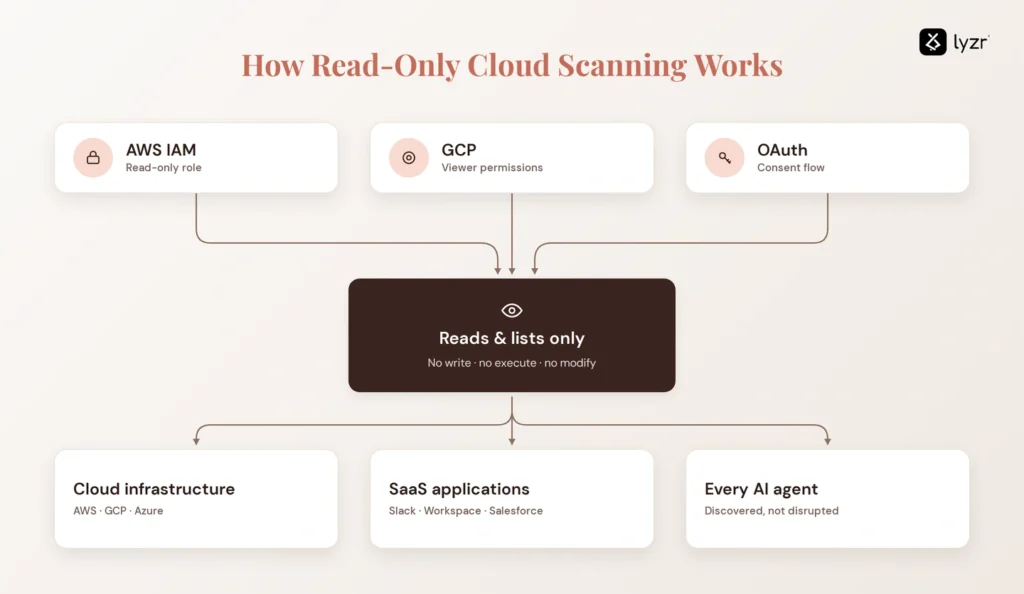
The important word there is “read-only”; something that can only read, and not write, execute, or modify. It doesn’t require a security team to set aside a maintenance window and assemble a rollback plan before they point it at production. There’s nothing to roll back! That one property is what makes wide-sweeping, continuous scanning even possible in the first place. Anything with write access needs review cycles and sign-off. Something that only lists and reads doesn’t, and that’s why it’s become the entry point to AI agent governance rather than just one piece of the puzzle.
Why most enterprises can’t see their own AI agents
Most security and platform teams know how many employees they have. But very few know how many AI agents they have running against their systems right now, and this discrepancy is growing faster than it is accounted for.
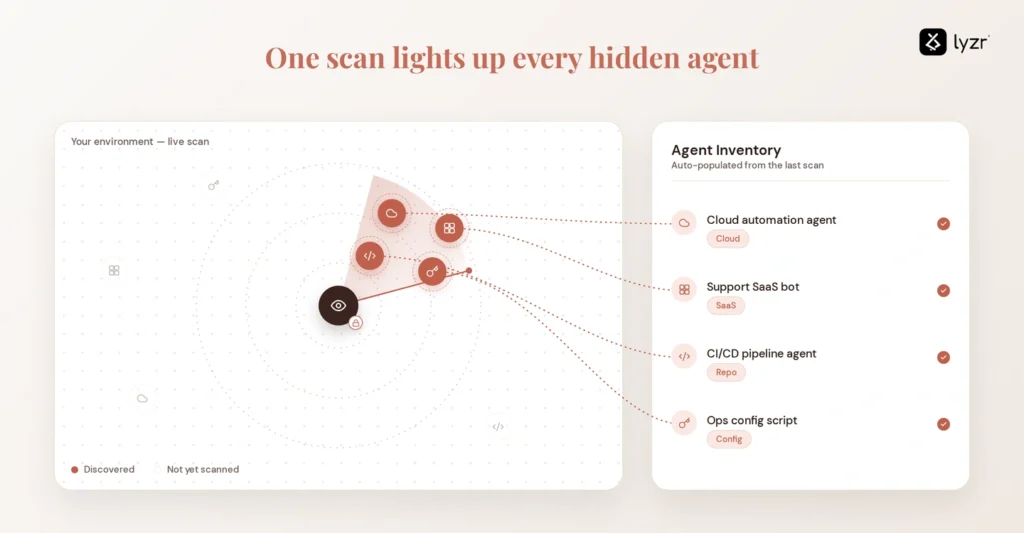
No centralized registry for AI agents
When someone starts a new job, HR knows about it on day one. When someone spins up an agent, most organizations don’t have an equivalent event. Agents are spun up in no-code tools, individual cloud consoles, and as add-ons to SaaS applications, often by people who aren’t on security or platform teams and don’t even bother to file a ticket. Gartner predicts that 40% of total enterprise applications will have task-specific AI agents at year-end 2026, up from under 5% in 2025, an increase of roughly eight times in just the last year.
Governance and change-management processes built for a world with a handful of agents don’t scale to that kind of growth by being executed with more rigor. They scale by being replaced with something that doesn’t require people to remember to register things.
Credentials and configs are scattered across code repos, environment variables, and cloud consoles
The second piece of the puzzle is where the access is sitting. Agent credentials constantly end up in code repos, .env files, and individual cloud consoles rather than a centralized identity system, so no single audit ever sees all of it at once. IBM’s 2025 Cost of a Data Breach Report found that 63% of organizations have no AI governance policy in place to govern AI or prevent employees from using unapproved tools, and that shadow AI added an average of $670,000 to the cost of a breach where it was involved. This isn’t just some theoretical threat.
How a read-only scan closes the gap
Most enterprises are trying to govern something they don’t even know exists, and that’s backwards. You can’t apply a policy to something you don’t even know exists. Read-only scanning isn’t a solution to governance, but it’s the only practical first step to building an accurate playbook before you try.
How a read-only scan connects to the cloud without touching anything
Cloud platforms already have finely grained, read-only permission levels built for exactly this kind of access: viewer roles, read-only IAM policies, and OAuth scopes limited to specific read endpoints. A scanner connects to the same systems using the same mechanisms, just with its keys cut down to a single function: listing and reading configuration and activity data without ever being able to trigger a write, delete, or execute action.
The technical core
On a platform like AWS, this usually means a read-only IAM role assumed cross-account via STS, scoped to list and read agent configurations, action groups, knowledge bases, CloudWatch metrics, and CloudTrail logs, with no write permissions allowed at any point.
On Google Cloud, it’s typically a viewer-level IAM role or workload identity federation, which avoids having service account keys sitting anywhere at all.
For SaaS agent builders like Copilot Studio or Salesforce’s agent tools, the connection runs through OAuth with admin consent, scoped to specific read endpoints rather than full account access.
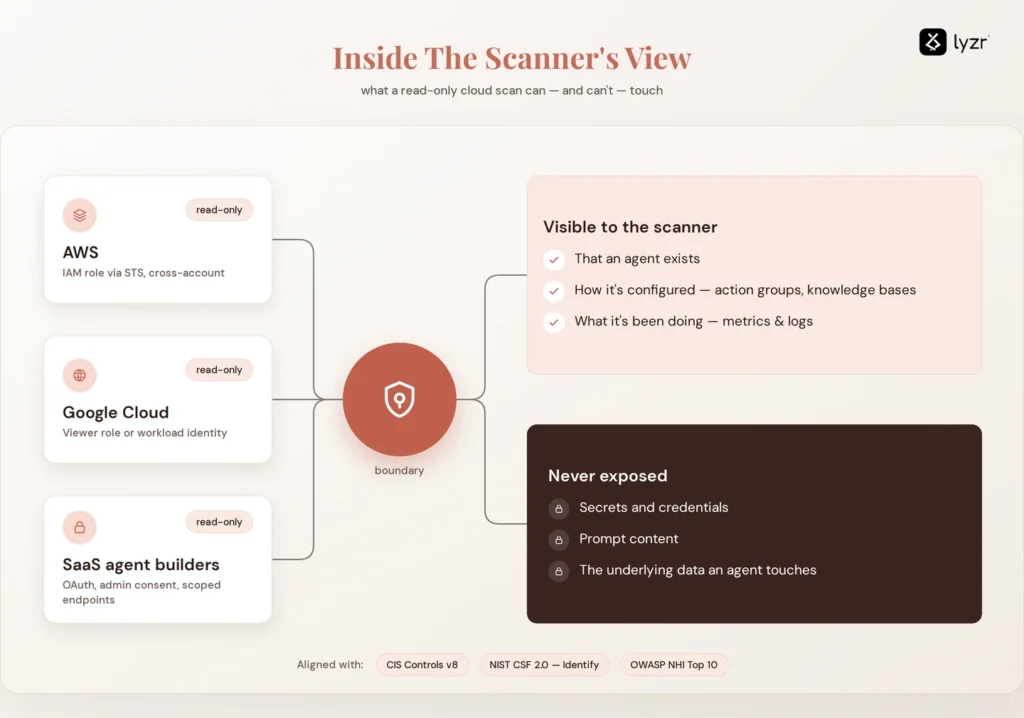
Scanners in all three categories cannot see secrets, prompt content, or the underlying data an agent interacts with. What it can see is that an agent exists, how it’s configured, and what it’s been doing recently. That boundary isn’t an arbitrary limit or a marketing talking point. It’s the same thing CIS Controls v8 is asking for under asset inventory, the “Identify” function in NIST’s Cybersecurity Framework 2.0, and OWASP’s Non-Human Identities Top 10 is calling out exactly this kind of unmanaged, ownerless credential as one of the top risks in the category.
From a single scan to a continuous, governed inventory
What a single read-only scan actually finds
A read-only scan doesn’t return a yes/no list. The findings are scored by severity and confidence, because pinging an LLM once a day to summarize a document is not in the same risk category as an agent with standing access and write capabilities to a CRM. The scan at the top of this piece had seven agents and eleven flagged credentials, but it was one part of a total of twenty-nine findings, scored, not flagged as a pass or fail. It’s worth saying directly that telling a true autonomous agent apart from a script or workflow that calls a model once is much harder than most vendors care to admit, and errors in either direction carry costly consequences.
Calling every model call an agent, and the findings are noise. Missing the distinction the other way around, and you’ve classified a genuinely autonomous agent as a harmless script. What you actually get back from a scan here is configuration and activity metadata: what’s there, what it’s connected to, and what it’s done. Not the secrets or the underlying data covered in the section above.

From one scan to a continuous, governed estate map
Scanning is a snapshot, and the estate being scanned is dynamic. Someone merrily updates an agent’s permissions on a Tuesday. Someone else fires up a new one on a Friday afternoon with fifteen minutes to spare before a demo. Doing discovery annually or even quarterly means the map you’re reading is already stale before you finish the first page. The alternative is having every agent, model, tool, and data source you scan become a live input into the systems that manage the rest of your AI estate, updated on the frequency the estate changes, not the frequency you happen to check a compliance calendar.
How OpenController turns discovery into control
Discovery has to be an input, not a report. OpenController, the control plane for AI agent sprawl by Lyzr, is designed around this handoff. Its Find capability automatically discovers agents, models, tools, data, and workflows across your entire AI estate across clouds, regions, SaaS services, Kubernetes, and the edge, not one platform at a time.
The difference here from a scan and report tool is what you do after you run Find. Ship evaluates and governs an agent before it gets to production, so a discovered agent isn’t sitting in a spreadsheet waiting for someone to look at it. Run watches agents, apps, APIs, and infrastructure as it runs. Improve turns usage, cost, and security signals into action, not a dashboard that no one looks at weekly. A dashboard without action can’t stop an agent from doing things it shouldn’t.
OpenController enforcement is in the request path; it works for any cloud, framework, model, or runtime, including agents running in other vendors’ environments: a materially different claim than “we’ll show you a chart.” Teams typically have this up and running in under a week, taking no work to rewrite the agents they already have.
If discovery and enforcement are different systems, someone has to manually connect what you find to what you govern, and that’s exactly the gap shadow AI has been slipping through. Book a demo of OpenController to see what it discovers in your environment.
Rolling out read-only Cloud scanning: what to do with what you find
A first scan is a floor, not a final count. Coverage increases the more platforms you connect, so take that first number as a floor, not a verdict on how bad things are.
From there, the rollout is simple in theory, if it actually works in practice:
- Run the first scan against your clouds and SaaS platforms in use today, not just the ones official IT sanctioned.
- Triage by risk and confidence, not raw number of findings. Twenty-nine findings sounds bad until you realize most are low severity.
- If an agent has no owner, route it to a human or claim it yourself.
- Re-scan at a frequency that matches the rate of change of your estate, not the frequency you check in on from a compliance calendar.
- Take what you find and feed it directly into whatever already governs policy, guardrails, and audit trails, so a discovered agent is a managed agent within hours, not months.
Most teams nail the first step and trip up on the last. Counting agents is hard. Doing something with that count to actually reduce risk is where the work starts, and it’s also the step most audits quietly stop at.
None of the five steps above have to happen as separate tools stitched together by hand. OpenController runs the scan, ranks the findings, and routes them straight into governance as one continuous process. Book a demo and point it at your own environment. Most teams see what it finds in the first session.
FAQ
Read-only cloud scanning for AI agent discovery uses scoped, read-only connections, such as AWS IAM roles, GCP viewer permissions, or OAuth consent flows, to automatically find every AI agent across an organization’s cloud and SaaS environments. It never writes to, executes, or modifies anything it finds, so it can run against production without a change-management review.
Not quite. An audit is typically a point-in-time exercise run quarterly or annually, while a read-only scan can run continuously without disrupting production. Treating discovery as an annual audit means the inventory is stale before anyone reads it; a continuous scan keeps the map current as agents get added or changed.
A read-only scanner is built to never see secrets, prompt content, or the underlying data an agent processes. What it can see is that an agent exists, how it’s configured, and what it’s done recently, configuration and activity metadata rather than the content flowing through the agent itself.
Discovery is the first step, not the whole system. A read-only scan finds and ranks every agent, but OpenController is what turns that finding into control, evaluating agents before production, monitoring them in real time, and enforcing policy in the request path rather than leaving it in a report.
Book A Demo: Click Here
Join our Slack: Click Here
Link to our GitHub: Click Here