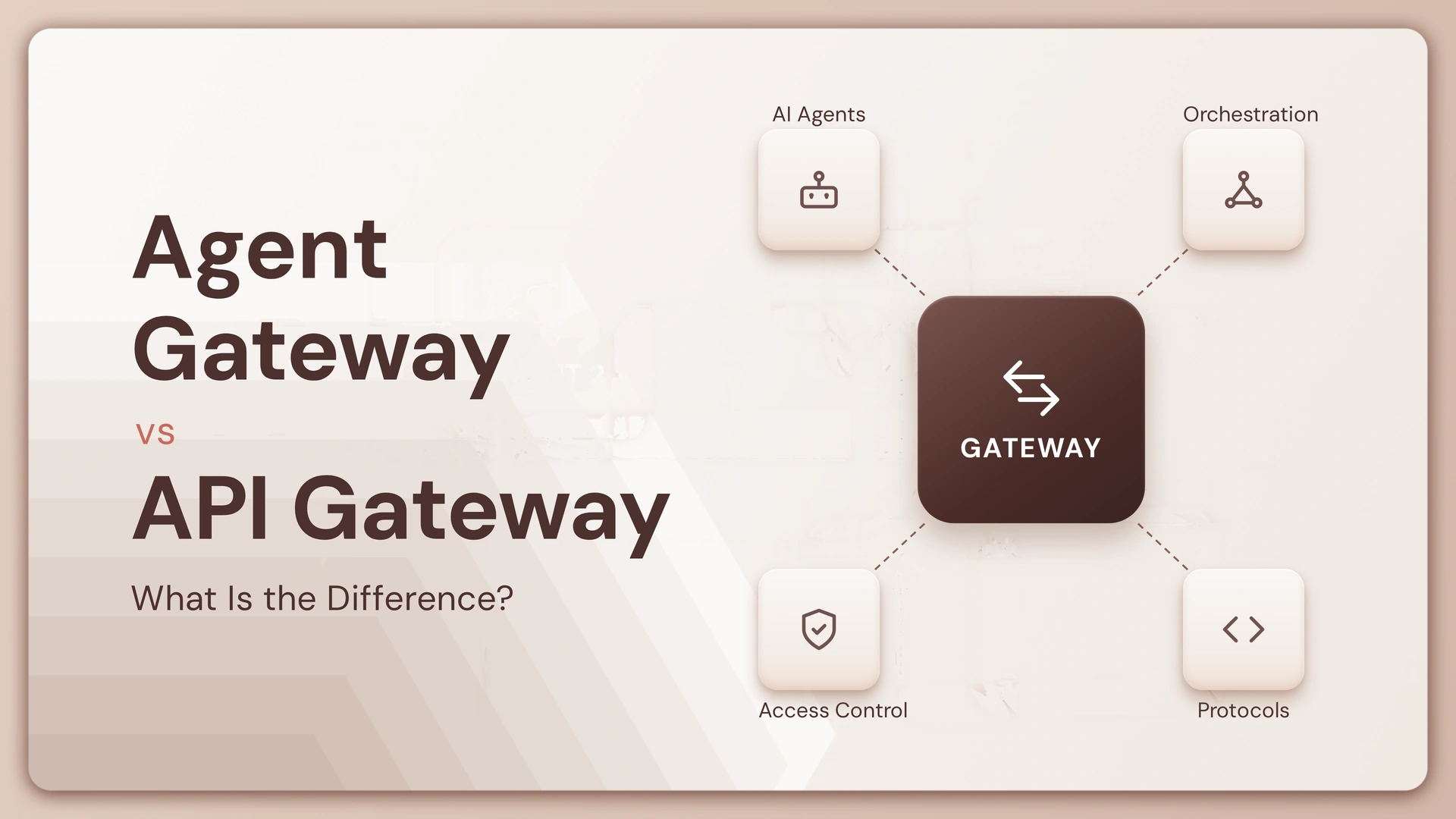
If you already have an API gateway, you might be wondering why you need something called an Agent Gateway.
After all, APIs still need authentication, rate limits, routing, and monitoring. So what exactly changes when the caller is an AI agent?
Quite a lot.
An API gateway is built around predictable requests between applications and services. An Agent Gateway has to deal with agents that can reason, choose tools, carry context, make multiple calls, and sometimes act on behalf of a user.
This guide breaks down the difference between the two, where they overlap, and when an Agent Gateway actually makes sense.
First, what does a gateway actually do?
Before comparing the two, it helps to look at the job a gateway is doing.
At a basic level, a gateway sits between clients and backend services. It controls how requests enter your system, where they go, and what happens before and after they reach the destination.
What an API Gateway handles
An API gateway typically sits in front of your APIs and manages things such as authentication, authorization, routing, rate limiting, traffic management, and monitoring.
The interaction is generally predictable: a client sends a request to an API, the gateway applies its rules, and the request reaches the appropriate service.
That model works extremely well for traditional applications.
What changes when an agent becomes the caller?
An AI agent introduces another layer of complexity.
A user may ask an agent to complete one task, but the agent could need several tools or APIs to complete it. It may also decide which tool to use, in what order, and whether another action is required.
That means the system needs to understand more than simply where a request should go.
It may also need to understand:
- Which agent is making the request
- Which user the agent is acting for
- Which tools that agent can access
- What actions the agent is allowed to perform
- Whether an action requires approval
- What happened across the entire task
That is where an Agent Gateway starts to become useful.
Agent Gateway vs API Gateway: what’s the actual difference?
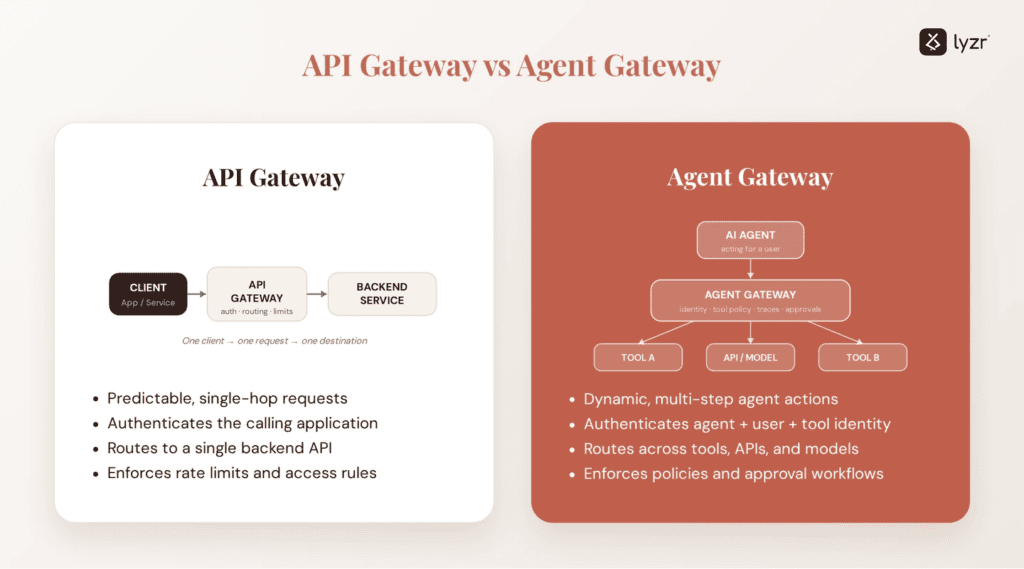
The simplest distinction is this:
An API Gateway manages access to APIs. An Agent Gateway manages access and interactions for AI agents and the tools, APIs, models, and services they use.
There is plenty of overlap between the two. Both can handle authentication, authorization, traffic controls, routing, and observability.
The difference is the workload they are designed to govern.
| Area | API Gateway | Agent Gateway |
|---|---|---|
| Primary consumer | Applications, services, clients | AI agents |
| Primary target | APIs and backend services | Tools, APIs, agents, models, services |
| Request pattern | Usually predictable | Often dynamic and multi-step |
| Authentication | ✓ | ✓ |
| Authorization | ✓ | ✓ |
| Rate limiting | ✓ | ✓ |
| API routing | ✓ | ✓ |
| Tool governance | Limited | Core capability |
| Agent identity | Limited | Core capability |
| Agent-to-agent communication | Usually not designed for it | Supported |
| Tool-level permissions | Basic/API-based | Fine-grained |
| Agent traceability | Limited | Important |
| Model/provider routing | Usually outside scope | Often relevant |
| Agent-specific policy enforcement | Limited | Core capability |
The important part is that an Agent Gateway does not make an API Gateway obsolete.
In many architectures, they work together.
Why isn’t an API Gateway enough for AI agents?
This is where the distinction becomes practical.
Imagine an AI support agent that can search a customer’s account, look up an order, issue a refund, create a support ticket, and send an email.
An API Gateway can protect all of those APIs.
But it may not understand that several API calls are part of one agent task.
That distinction matters when you need to answer questions such as:
Which agent initiated these calls?
Was that agent acting for an authenticated user?
Was it actually allowed to use the refund API?
Did the agent make five tool calls to complete one request?
Should the refund have required human approval?
These are agent-governance questions, not just API-routing questions.
One user request can involve several actions

Consider a simple support request:
“My order arrived damaged. Can you arrange a replacement?”
The agent might need to:
- Identify the customer
- Retrieve the order
- Check replacement eligibility
- Check inventory
- Create a replacement order
- Send confirmation
The API Gateway can protect each API involved.
But the Agent Gateway can provide a layer for governing the agent responsible for those actions.
What does an Agent Gateway add?
An Agent Gateway is not simply an API Gateway with an AI label attached.
The additional layer is about governing agent behavior and agent interactions.
1. Agent identity
With traditional APIs, you may authenticate an application, service account, or user.
With agents, you may also need to answer:
Which agent is making this request?
For example:
| Request | Identity you may care about |
|---|---|
| Web app → API | User/application |
| Service → API | Service identity |
| Agent → API | User + agent |
| Agent → Tool | Agent + user + tool |
| Agent → Agent | Calling agent + originating user |
This becomes especially important when an agent can act on behalf of a human.
You may not want every agent to have access to every tool.
2. Tool-level authorization
Suppose an enterprise has 20 tools available to its agents.
An HR agent might need access to the employee directory, leave management, and payroll lookup.
It probably should not have access to production databases, payment processing, or infrastructure administration.
An Agent Gateway can provide a centralized place to enforce those boundaries.
A useful principle here is:
A prompt tells an agent what it should do. A gateway policy can enforce what it is allowed to do.
That distinction becomes increasingly important as agents gain the ability to take real-world actions.
3. Agent-aware policies
Traditional API policies often look like:
Can this client access this endpoint?
Agent policies can be more contextual:
Can this agent perform this action for this user under these conditions?
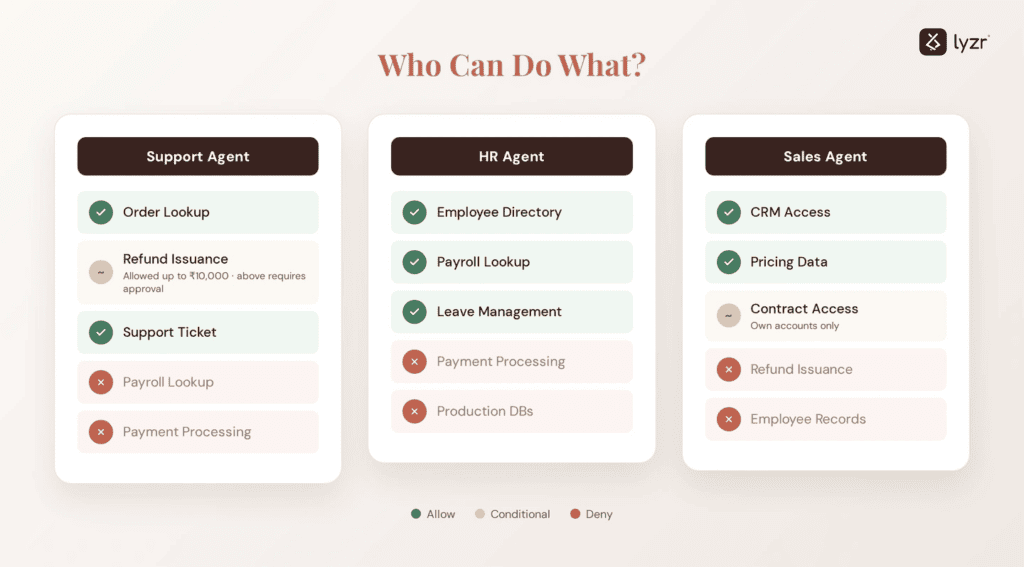
For example, a customer-support agent might be allowed to issue refunds up to ₹10,000 without approval, while anything above that requires a human review.
| Condition | Policy |
|---|---|
| Support Agent + refund ≤ ₹10,000 | Allow |
| Support Agent + refund > ₹10,000 | Human approval |
| HR Agent + payroll lookup | Allow |
| HR Agent + payment processing | Deny |
| Sales Agent + CRM access | Allow |
| Sales Agent + employee records | Deny |
This is closer to agent governance than traditional API access control.
Agent Gateway vs API Gateway: how do security responsibilities differ?
Security is where the distinction becomes especially important.
An API Gateway typically asks:
Is this client allowed to call this API?
An Agent Gateway may need to ask:
Is this agent allowed to use this tool, for this user, for this task, under these conditions?
Those are different questions.
Compare the security model
| Security concern | API Gateway | Agent Gateway |
|---|---|---|
| Authentication | ✓ | ✓ |
| API authorization | ✓ | ✓ |
| IP restrictions | ✓ | ✓ |
| Rate limiting | ✓ | ✓ |
| User identity | ✓ | ✓ |
| Agent identity | ✓ | |
| Tool permissions | ✓ | |
| Agent-to-agent permissions | ✓ | |
| Task-level policies | ✓ | |
| Human approval for sensitive actions | Limited | ✓ |
| Agent action tracing | Limited | ✓ |
An Agent Gateway doesn’t replace your existing security stack.
Instead, it adds controls that become useful when an AI agent itself becomes an active participant in the system.
What about observability?
This is another area where agent workloads create new requirements.
An API Gateway might tell you that:
- An endpoint was called
- The response was successful
- The request took 143 ms
- The request returned a 200 status
That is useful.
But imagine an agent completes a task using five tools and the final response is wrong.
You now need to know which part of the agent’s execution caused the problem.
Agent observability needs more context
Depending on your system, you may want to track:
- Agent identity
- User identity
- Tool invoked
- Model used
- Input and output
- Latency
- Token usage
- Errors
- Policy decisions
- Tool-call sequence
- Human approvals
- Trace IDs
This is why agent observability increasingly goes beyond traditional API metrics.
For teams building production agents, AI observability and How to Instrument AI Agents With OpenTelemetry are useful starting points for understanding what needs to be tracked.
Does an Agent Gateway replace an API Gateway?
Usually, no.
The two solve different parts of the problem.
An API Gateway remains useful for protecting and managing backend APIs. An Agent Gateway can sit at the agent layer and govern how agents interact with those APIs, tools, and other services.
Think about their responsibilities this way
| Layer | Main question |
|---|---|
| Agent Gateway | What can this agent do? |
| API Gateway | What API can this caller access? |
| Backend service | What operation should actually happen? |
| Policy layer | Is this action allowed? |
| Observability layer | What happened during the task? |
There can be some overlap between these responsibilities depending on the technology you use.
The important thing is not to assume that an API Gateway automatically handles every agent-specific requirement.
When should you use an Agent Gateway?
You probably don’t need one simply because you added an LLM to your application.
A simple chatbot that calls one backend API may be perfectly fine with your existing API gateway.
The need becomes clearer when agents start acting rather than simply generating text.
Use this checklist
Ask yourself:
- Does the agent call multiple tools?
- Can the agent access sensitive APIs?
- Can different agents have different permissions?
- Does the agent act on behalf of users?
- Can the agent perform actions rather than just retrieve information?
- Do you need centralized policies for tool access?
- Do you need end-to-end traces across agent actions?
- Are multiple teams deploying agents?
- Do you need approval workflows for high-risk actions?
- Are agents calling other agents or external tools?
If you checked 0–2 boxes, your API Gateway may be enough for now.
If you checked 3–5, it is worth evaluating whether you need an agent-specific governance layer.
If you checked 6+, an Agent Gateway deserves serious consideration.
These are not hard architectural thresholds. They are simply a quick way to assess how much agent-specific governance your system needs.
What if you’re building multiple agents?
This is where centralized governance becomes more useful.
Imagine an enterprise running separate agents for:
- Customer support
- Sales
- Finance
- HR
- Research
- Operations
Each agent may have different tools, permissions, models, data sources, users, and risk levels.
Managing those permissions independently can quickly become difficult.
A simple permission matrix can reveal the problem
| Agent | Tool | Permission |
|---|---|---|
| Support Agent | Order lookup | Allow |
| Support Agent | Refund | Allow up to a defined limit |
| Support Agent | Payroll | Deny |
| HR Agent | Employee directory | Allow |
| HR Agent | Payroll | Allow |
| Sales Agent | CRM | Allow |
| Sales Agent | Refund | Deny |
The benefit of centralized governance is not just convenience.
It gives security and platform teams a consistent way to answer:
Who can do what?
That question becomes much harder when every agent team implements its own rules.
Agent Gateway vs API Gateway vs Service Mesh
There is one more distinction worth making.
An API Gateway is not the same thing as a service mesh, and neither is automatically an Agent Gateway.
| Capability | API Gateway | Service Mesh | Agent Gateway |
|---|---|---|---|
| API routing | ✓ | ✓ | ✓ |
| Service-to-service traffic | ✓ | ||
| Load balancing | ✓ | ✓ | ✓ |
| Authentication | ✓ | ✓ | ✓ |
| API rate limiting | ✓ | ✓ | ✓ |
| Agent identity | ✓ | ||
| Tool governance | ✓ | ||
| Agent policy enforcement | ✓ | ||
| Agent-to-agent communication | Limited | ✓ | |
| Model/provider routing | ✓ | ||
| Agent traces | Limited | ✓ | ✓ |
A service mesh focuses heavily on service-to-service communication.
An API Gateway focuses heavily on API access and traffic management.
An Agent Gateway focuses on agent interactions, tools, permissions, policies, and agent-aware governance.
The boundaries can overlap, but the underlying use cases are different.
What happens if you don’t have agent-specific governance?
Nothing necessarily breaks on day one.
That is what makes this architectural decision tricky.
You can absolutely build an agent using your existing API Gateway, especially when the system is small and the agent has limited access.
The problems tend to appear as the system grows.
Watch for these warning signs
| Warning sign | What it may indicate |
|---|---|
| Every agent has different tool permissions | Governance is becoming fragmented |
| Tool access is controlled mostly through prompts | Enforcement needs to move outside the model |
| You cannot trace a user request across tools | Observability is incomplete |
| Agents share broad API credentials | Identity boundaries need work |
| Sensitive actions have no approval path | Policy controls may be missing |
| Every team implements its own agent security | Central governance may help |
| You cannot quickly disable one agent’s access | Centralized controls may be needed |
The goal isn’t to add another infrastructure component just because AI is involved.
The goal is to add agent-specific controls when agent behavior has become a governance problem.
How do you decide which gateway you actually need?
If you’re still unsure, evaluate your system across these five questions.
1. Is the application primarily exposing APIs?
If your main concern is authentication, routing, rate limiting, and protecting APIs, an API Gateway may be all you need.
2. Is an AI agent calling those APIs?
That alone does not mean you need an Agent Gateway.
Start by understanding how many tools the agent can access and how much autonomy it has.
3. Can the agent choose between multiple tools?
If the agent can dynamically select tools, an agent-specific governance layer becomes more relevant.
You now need to think about tool permissions, policies, and monitoring.
4. Can the agent take sensitive actions?
If the agent can modify records, issue refunds, send external communications, access confidential data, or perform other high-impact actions, stronger agent-specific controls become much more important.
5. Are you operating multiple agents?
If several agents are being developed across teams, centralized identity, permissions, policies, and observability can become much easier to manage through an agent-focused gateway.
Your 30-second decision checklist
Use this before adding another infrastructure layer.
| If you’re saying… | Start with… |
|---|---|
| “We just need to protect our APIs.” | API Gateway |
| “The model needs access to our APIs.” | API Gateway + appropriate authentication |
| “The agent can use several tools.” | Evaluate an Agent Gateway |
| “Different agents need different tools.” | Agent-specific authorization |
| “Agents can take sensitive actions.” | Agent policies + approval controls |
| “We can’t trace what an agent did.” | Agent observability |
| “We have many agents across teams.” | Centralized agent governance |
| “We need to manage agent-to-agent interactions.” | Agent Gateway |
| “We need current/private information.” | Retrieval/data-access layer |
| “We need to protect backend services.” | API Gateway |
If your answers increasingly fall into the middle rows, you are moving beyond a traditional API management problem.
The easiest way to remember the difference
Don’t think of an Agent Gateway as “an API Gateway for AI.”
Think about the question each one is trying to answer.
| Gateway | Core question |
|---|---|
| API Gateway | Can this caller access this API? |
| Agent Gateway | What can this agent do, which tools can it use, and under what conditions? |
That distinction is small on paper but significant in production.
An API Gateway is primarily concerned with API traffic and access.
An Agent Gateway is concerned with agent identity, tool access, policies, interactions, and agent behavior at the system boundary.
The bottom line
An API Gateway is still an important part of an AI architecture.
Adding agents doesn’t mean you should throw it away.
But once agents start selecting tools, making multi-step decisions, acting for users, accessing sensitive systems, or interacting with other agents, you have a new governance problem to solve.
That’s where an Agent Gateway can add another layer of control.
The goal isn’t to put a gateway in front of everything.
The goal is to make sure the right layer controls the right thing.
For teams building production AI agents, that means thinking beyond the gateway itself. You also need observability, evaluations, guardrails, identity, access controls, and reliable agent orchestration. Lyzr brings these capabilities together for teams building and operating enterprise AI agents.
Frequently asked questions
Is an Agent Gateway the same as an API Gateway?
No. They overlap in areas such as authentication, authorization, routing, and traffic management, but an Agent Gateway is designed around AI-agent interactions, including tool access, agent identity, agent policies, and multi-step workloads.
Do I need an Agent Gateway if I already have an API Gateway?
Not necessarily. If your agent has limited capabilities and only calls a few existing APIs, your API Gateway may be sufficient. An Agent Gateway becomes more relevant when you need centralized control over agents, tools, permissions, and agent-to-agent interactions.
Can an Agent Gateway replace an API Gateway?
Usually, you should not think of it as a direct replacement. The two can operate at different layers. An Agent Gateway can govern the agent and its tools, while an API Gateway continues to protect and manage access to backend APIs.
What is the main benefit of an Agent Gateway?
The main benefit is centralized governance for agent interactions. It can help control which agents can use which tools, enforce policies, track agent actions, and provide visibility into multi-step agent workloads.
Does an Agent Gateway improve AI security?
It can provide additional security controls around agent behavior, particularly tool-level permissions, agent identity, policy enforcement, and approval workflows. It should complement rather than replace application security, API security, authentication, and authorization.
Is an Agent Gateway needed for every AI application?
No. A simple AI application with one model and a small number of predictable API calls may not need one. The need becomes stronger as agents become more autonomous and gain access to more tools, services, and sensitive actions.
How is an Agent Gateway different from a service mesh?
A service mesh primarily manages communication between services, including traffic management, security, and observability. An Agent Gateway focuses on interactions involving AI agents, their tools, permissions, policies, and workloads.
Can an Agent Gateway manage multiple AI agents?
Yes. One of the stronger use cases is centralized governance across multiple agents. Different agents can have different tool permissions, policies, identities, and access levels.
What should I monitor through an Agent Gateway?
Useful signals can include agent identity, user identity, tool calls, policy decisions, latency, errors, token usage, model/provider information, and the actions taken during a task. End-to-end tracing is especially useful for debugging multi-step agent workloads.
Does an Agent Gateway work with MCP tools?
It can. As agents increasingly use tool protocols such as MCP, a gateway can provide a centralized point for controlling access to tools and enforcing policies around how agents interact with them. Exact capabilities depend on the gateway implementation and MCP architecture.
Book A Demo: Click Here
Join our Slack: Click Here
Link to our GitHub: Click Here
Got a use case in mind?
8 weeks from use case to agents running in production.
Platform, people and FDEs, all in. Bring your environment. We'll co-build and stay until it's live.
Talk to UsFree resource
101 AI Agents Use Cases
100+ production-ready AI agent use cases across Marketing, Sales, HR, Banking, Insurance, Operations and a lot more
Download now