Key takeaways
- Streaming works when every layer in the delivery path preserves incremental delivery. A backend that streams correctly does not guarantee the user sees a stream – any gateway, proxy, or client in the path can buffer it.
- Most API gateways default to buffering. Streaming has to be explicitly configured, not assumed.
- Streaming does not remove timeouts. It changes which timeout matters – integration timeout, idle timeout, backend timeout, and client timeout all behave differently.
- Streaming can bypass a gateway’s response payload size limit, but bandwidth limits still apply once you cross the threshold.
- Token streaming and agent streaming are not the same problem. Agentic systems need meaningful events, not just raw model output.
An LLM starts generating its first token in under 500 milliseconds.
The client is built to render tokens as they arrive.
And the user still stares at a blank screen for fifteen seconds before the whole answer appears at once.
Nobody wrote a bug. The backend streamed correctly. The client-side code was fine. Somewhere between the two, something buffered the entire response, held it, and released it in one block. That “somewhere” is often the gateway sitting between them, but it can be any intermediary in the path.
This is the mistake worth naming directly: streaming through a gateway isn’t a flag you flip once. It’s an end-to-end property. Every hop between the producer and the client has to preserve the connection, flush data as it arrives, and tolerate however long the stream runs. Miss one hop and the whole chain reverts to request-response behavior, no matter how well the rest of the system streams.
This article walks through why that happens, what actually breaks it, and how to fix it, using AWS API Gateway and Lambda as the concrete, well-documented example, without assuming every gateway behaves identically.
What does streaming through a gateway mean?
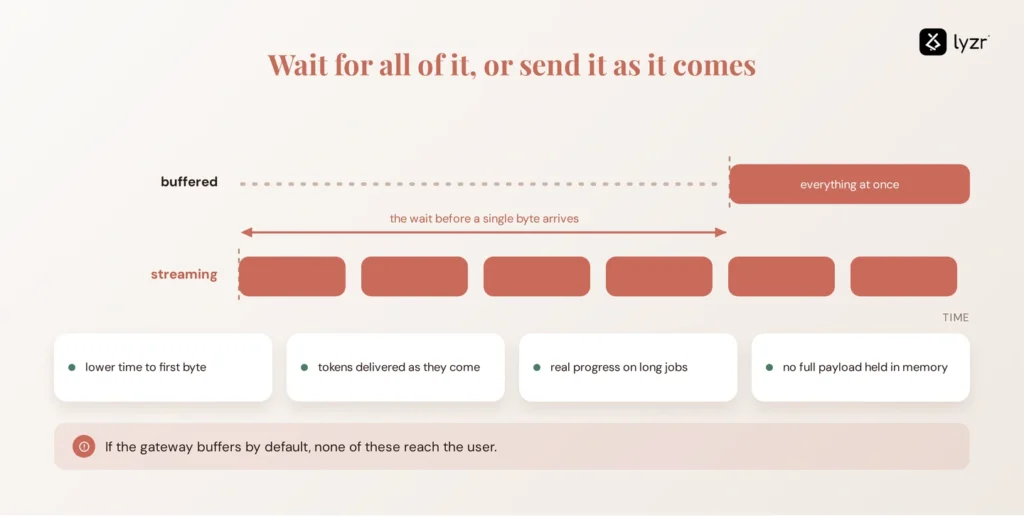
Streaming through a gateway means the gateway forwards response data to the client in chunks as the backend produces them, instead of waiting for the full response before sending it.
The benefit is lower time to first byte, incremental delivery for LLM responses, and progress updates for long-running operations. But streaming only works when every layer in the path preserves it. If the gateway, proxy, or client buffers the response, the user receives everything at once.
How does API Gateway response streaming actually work?
The important question is not whether the backend can stream. It’s whether the entire request path can preserve that stream.
For an AI application, that path might look like:
Client → agent gateway → API gateway → application or Lambda → model → API gateway → agent gateway → client
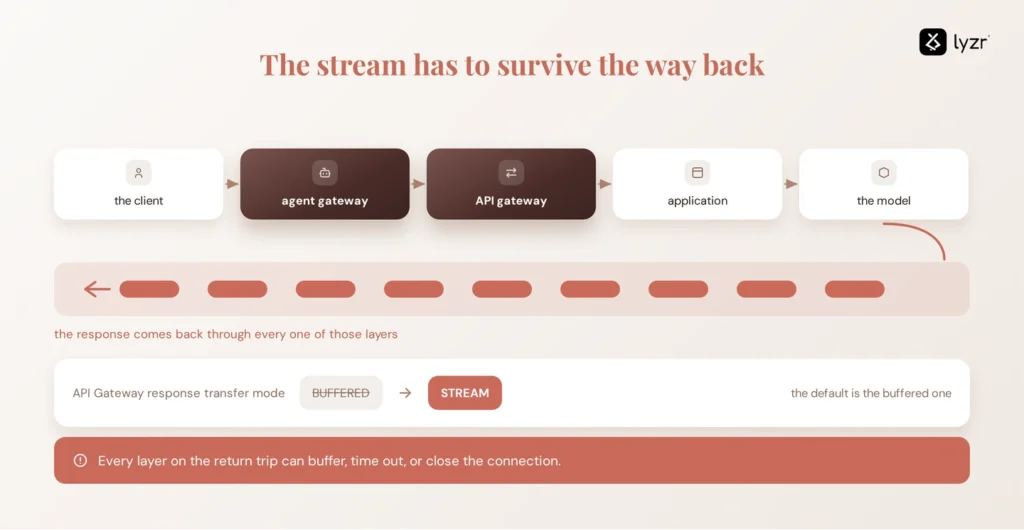
Each layer has a chance to introduce buffering, enforce a timeout, or close the connection. An agent gateway can sit between the client and the underlying model or tools, so its streaming behavior matters just as much as the API gateway’s configuration.
With a streaming-capable gateway, the backend produces a chunk, the gateway receives it, and the gateway forwards it without waiting for the rest of the response. The client can then render that chunk while the backend continues generating the next one.
That makes the gateway configuration the first thing to check when a supposedly streaming endpoint delivers everything at once. On AWS specifically, API Gateway’s response transfer mode determines whether the response is buffered or streamed. The default is BUFFERED; switching to STREAM tells API Gateway to forward the response incrementally.
Streaming protocols compared
| Approach | Connection | Direction | Typical use |
|---|---|---|---|
| HTTP response streaming | Standard HTTP request/response | Server to client | LLM token output, file downloads, progress reporting |
| Server-Sent Events (SSE) | Long-lived HTTP connection | Server to client | Status updates, notifications, incremental progress |
| WebSockets | Persistent, two-way | Client and server | Chat UIs, live collaboration, bidirectional interaction |
| Buffered response | Standard request/response | One-shot | Conventional REST APIs |
Most LLM output and agent status updates only need one-way delivery. HTTP streaming or SSE can handle that without the connection-management overhead of a persistent WebSocket. WebSockets make more sense when the client also needs to send messages back while the connection remains open.
On AWS, API Gateway response streaming is enabled by setting the response transfer mode to STREAM. The capability is available for REST APIs using supported HTTP_PROXY or AWS_PROXY integrations, including Lambda proxy integrations and private integrations.
Why does streaming break through a gateway?
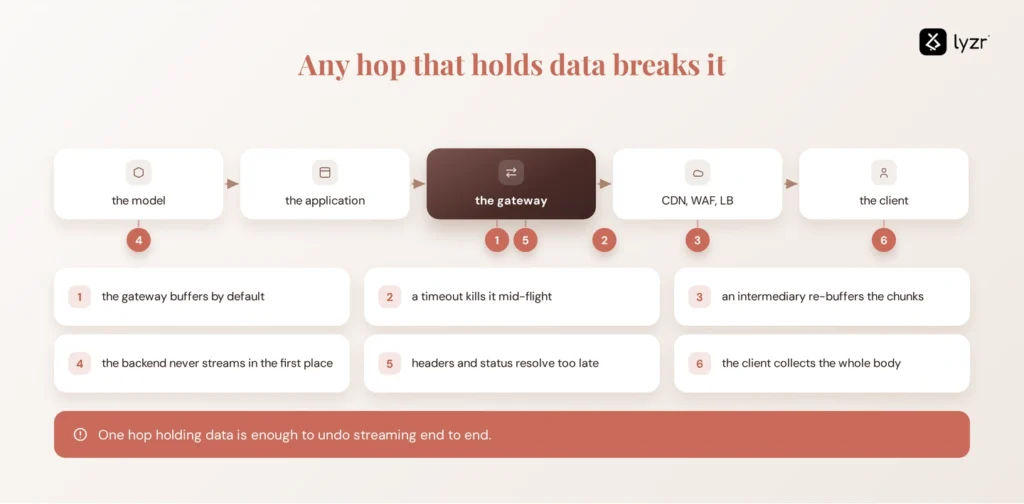
A stream breaks the moment any single hop between producer and client decides to hold data instead of forwarding it immediately. The important thing to understand is that streaming can fail at any layer, even when the backend itself is streaming correctly.
Here’s where that happens in practice:
1. The gateway buffers by default. API Gateway, for example, defaults to BUFFERED, so its response transfer mode must be explicitly changed to STREAM. Other gateway products have their own defaults and configuration models, so don’t assume streaming is enabled simply because the backend supports it.
2. A timeout kills the stream mid-flight. Integration timeout, idle timeout, backend execution timeout, and client timeout are four different clocks. Confusing them is the single most common debugging mistake in this category, covered in detail below.
3. An intermediary buffers the chunks. The real path is rarely just client-to-gateway-to-backend. It’s often client, CDN, WAF, gateway, load balancer, application, model. Reverse proxies and CDNs frequently buffer responses to inspect, compress, or cache them, and any one of those layers can silently undo streaming.
4. The backend isn’t actually producing incremental output. The gateway can only forward data that the backend actually produces incrementally. If the application code waits for the full LLM generation or a complete database read before writing anything, there’s nothing to forward yet.
5. Headers arrive too late. Streaming protocols still need the initial HTTP status and headers before the body can flow. A standard Lambda proxy integration waits for Lambda to finish entirely before sending anything back. With response streaming enabled, API Gateway starts forwarding the body as soon as it confirms the response is properly formed, headers and status resolved. That confirmation step is exactly why a slow-to-resolve status code stalls everything behind it.
6. The client buffers on its own. The server side can be streaming perfectly while a browser fetch call, an HTTP client library, or an SDK collects the full body before exposing anything to application code. This is worth isolating separately, because it looks identical to a server-side bug from the outside.
API Gateway streaming timeout: what actually matters?
There is no single “streaming timeout” – there are several, and they don’t extend together. Streaming through a gateway app doesn’t mean the connection is exempt from time limits; it means the limits shift and multiply.
On API Gateway specifically: a standard integration is capped at 29 seconds without requesting an integration timeout limit increase, but with response streaming enabled, you can stream a response for up to 15 minutes. That extended ceiling doesn’t mean the connection can sit silent, though. Streams are subject to idle timeouts: 5 minutes for Regional or private endpoints, and 30 seconds for edge-optimized endpoints.
Streaming extends how long a response can stay active. It does not mean the connection can stay idle indefinitely. A 45-second gap before your model produces its first token will get terminated on an edge-optimized endpoint well before the client sees anything.
That idle window is fixable at the architecture level, but only deliberately. Pairing a Regional REST API with your own CloudFront distribution in front of it, and raising that distribution’s response timeout setting, is how teams push the idle ceiling past 30 seconds. It’s a configuration choice you have to make, not something that happens by default.
Lambda response streaming: what changes?
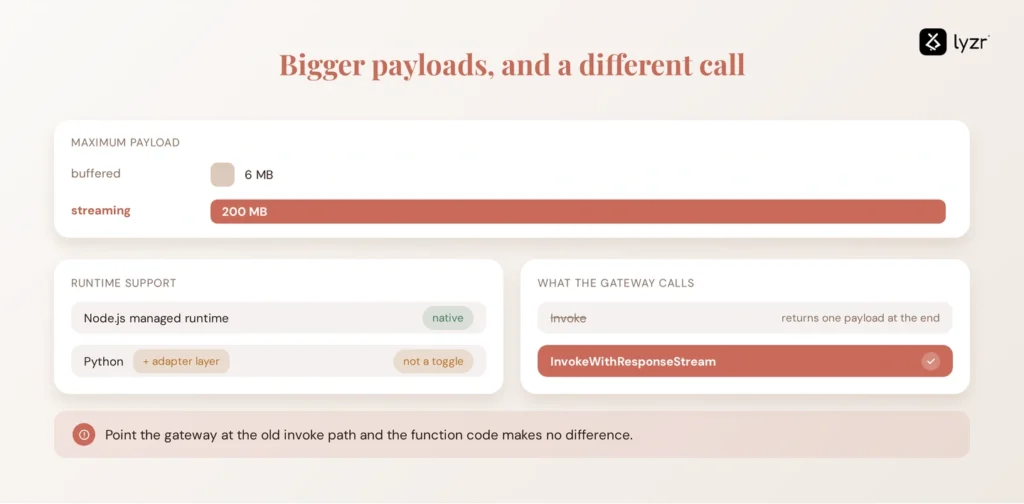
Ordinary Lambda invocations return one complete payload once the function finishes; response streaming lets the function write chunks back over an open connection as it runs.
The size difference alone is the reason most teams look into this: response streaming functions can return payloads up to 200 MB, compared to the 6 MB maximum for buffered responses. Bandwidth isn’t unlimited past that point, though. Node.js managed runtimes support Lambda response streaming directly. For Python and other managed runtimes without native streaming support, teams can use a custom runtime or an adapter such as the Lambda Web Adapter.
That distinction matters for anyone searching specifically for python lambda streaming: it’s achievable, but it isn’t a runtime toggle the way it is on Node.js. Plan for the adapter layer rather than assuming parity.
The invocation model also changes. With API Gateway response streaming and a Lambda proxy integration, API Gateway invokes Lambda through InvokeWithResponseStream rather than the standard buffered invocation path. If the integration is still configured for the regular invocation path, the function’s streaming behavior will not reach the client.
API Gateway response size limit vs. streaming
Streaming raises the ceiling on how much data a gateway can deliver in one response, but it doesn’t remove bandwidth limits entirely.
The standard payload cap is well known as a pain point: response streaming lets you exceed API Gateway’s 10 MB response payload limit. Within that streamed response, though, the first 10 MB of payload isn’t subject to any bandwidth restrictions, but data exceeding 10 MB is restricted to 2 MB/s. For most LLM output, which rarely exceeds a few hundred kilobytes of text, this never comes into play. It matters when the response is a generated image set, a large export, or a media file, large enough that the 2 MB/s cap after the first burst becomes the limiting factor rather than the 10 MB threshold itself.
Why streaming matters more for AI applications than most APIs
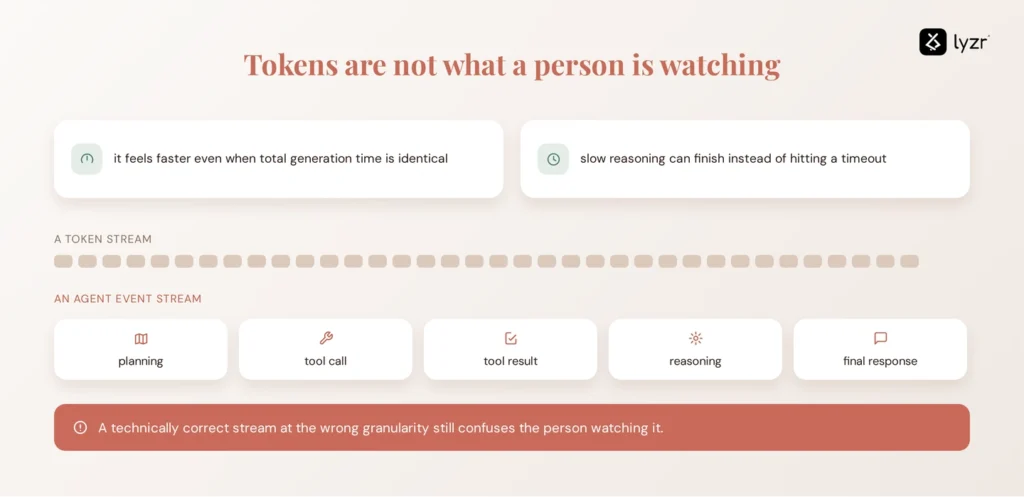
LLMs generate output token by token, so any layer that waits for the full generation before sending anything is adding latency the model itself never asked for.
For generative AI, the distinction becomes especially important because the response itself is produced incrementally. A gateway that buffers a conventional API response may delay a few seconds of data; a gateway that buffers an LLM response can make an interactive agent appear completely unresponsive.
Agentic systems need a second layer on top of it. Token streaming is not agent streaming. A user watching an agent work doesn’t need raw model tokens mid-tool-call, they need meaningful events: planning, then tool call, then tool result, then reasoning, then final response. Streaming the wrong granularity through a gateway built for LLM traffic produces a technically correct stream that still confuses the person watching it. Designing for events, not just tokens, is what separates a chatbot demo from a production agent interface.
How to troubleshoot streaming through a gateway
Symptom, cause, and fix
| Symptom | Likely cause | What to check |
|---|---|---|
| Everything arrives at once | Buffering | Gateway transfer mode, proxy buffering settings |
| First token is slow | Backend generation, header delay | Time to first byte, when status/headers are written |
| Stream suddenly stops | Timeout | Integration timeout vs. backend execution limit |
| Connection closes after inactivity | Idle timeout | Gateway/proxy idle settings, heartbeat frequency |
| Works locally, fails in production | Intermediary buffering | CDN, WAF, load balancer configuration |
| Backend streams, browser doesn’t | Client-side buffering | HTTP client/SDK behavior |
| Large streams fail partway | Payload/bandwidth limit | Gateway size and throughput limits |
| Lambda finishes, client sees nothing | Wrong invocation mode | InvokeWithResponseStream vs. standard Invoke |
How to design a gateway for reliable AI streaming
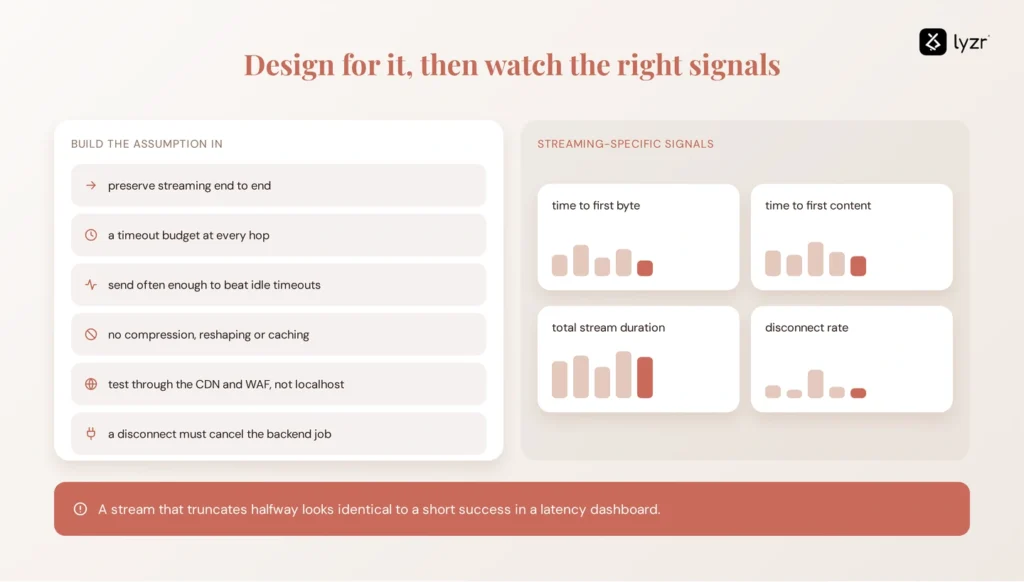
Move past fixing individual failures and build the assumption in from the start. Preserve streaming end-to-end rather than hoping each new layer inherits it. Set explicit timeout budgets at every hop instead of relying on defaults. Send data frequently enough that idle timeouts never trigger during normal operation. Avoid transformations at the gateway layer – compression, response reshaping, and caching typically require buffering the full response first.
Monitoring needs to track streaming-specific signals, not just request/response latency: time to first byte, time to first content, total stream duration, and disconnect rate. This is also where AI agent observability tooling earns its place, since a stream that silently truncates halfway through looks identical to a successful short response in a standard latency dashboard. Finally, test through the actual production network path, CDN and WAF settings, not just localhost, and make sure a client disconnect actually cancels the backend job instead of letting it run to completion unattended.
Streaming through a gateway for AI agents
As agent workloads shift from single request/response calls to long-running, tool-using workflows, the gateway stops being pure network plumbing and starts becoming part of the control surface between users, models, and tools.
The gateway is responsible for delivering the stream reliably. A control plane answers the governance questions around the activity generating that stream: which agent ran, what it was authorized to access, which policies applied, and what happened during the run.
Getting the stream itself right, transfer modes set correctly, timeouts budgeted per hop, no silent buffering, is table stakes. It doesn’t answer the harder question that shows up once agents are actually running: which agent opened this connection, what was it authorized to do with the model and tools it reached through the stream, and can you prove that after the fact. That’s the layer Opencontroller sits at, above the gateway, governing agent identity, permissions, and the audit trail for what ran, regardless of whether the response came back as one block or a thousand incremental chunks.
Explore Opencontroller to see how it governs agent activity across your streaming infrastructure, or book a demo to walk through it against your own gateway and agent stack.
AI Streaming Gateway Readiness Checklist
Run through this before shipping a streaming endpoint to production:
- Backend produces genuinely incremental output, not a single write at the end
- Gateway integration is explicitly set to a streaming transfer mode
- Protocol choice (HTTP streaming, SSE, WebSocket) matches actual communication needs
- Integration timeout covers the longest expected generation time
- Idle timeout behavior is understood and heartbeats are sent if needed
- Client timeout is configured to match, not shorter than, expected stream duration
- CDN, WAF, and proxy buffering are disabled or explicitly accounted for
- Response size and bandwidth limits are known for the expected payload sizes
- Time to first byte and stream disconnects are actively monitored
- Client disconnects correctly cancel backend work
- Authentication is enforced for the full duration of the stream
- The full production network path has been tested, not just localhost
If your team is earlier in the production journey than this checklist assumes, the playbook on taking agents to production covers the broader rollout process this fits into.
Frequently asked questions
It’s the practice of a gateway forwarding response data to a client in chunks as a backend produces them, rather than waiting for the complete response before sending anything.
It’s a transfer mode where the gateway begins sending data to the client before the backend integration has finished computing the full response, instead of the default buffered behavior.
When response transfer mode is set to STREAM, API Gateway doesn’t wait for a response to be completely computed before sending it to the client. By default it stays in buffered mode until you change that setting.
Yes. Server-Sent Events run over a standard long-lived HTTP connection, and response streaming supports long-running operations that report incremental progress using protocols like SSE.
Yes, but through a separate feature: API Gateway WebSocket APIs, which provide persistent, two-way connections, distinct from the one-way HTTP response streaming used for LLM output.
There isn’t one universal number. Streams can run for up to 15 minutes, but they’re subject to idle timeouts of 5 minutes for Regional or private endpoints and 30 seconds for edge-optimized endpoints.
It lets you exceed the 10 MB response payload limit, but data beyond the first 10 MB is throttled to 2 MB/s, so it’s an extended limit, not an unlimited one.
The function writes response chunks to an open connection instead of returning one complete payload, invoked through the InvokeWithResponseStream API rather than the standard Invoke call.
Yes, but not natively the way Node.js can. Node.js managed runtimes support response streaming out of the box, while Python needs a custom runtime or the Lambda Web Adapter.
The most common cause is a gateway, proxy, or CDN still configured for buffered transfer. Check the gateway’s transfer mode setting before assuming the backend code is at fault.
Isolate the layer: confirm the backend writes incrementally, confirm the gateway transfer mode is STREAM, test through the actual production network path including CDN and WAF, and check whether the client library itself buffers the body.
SSE is a one-way, server-to-client stream over a long-lived HTTP connection. WebSockets are a persistent, two-way connection that allows the client to send data back mid-session.
Configure the backend to emit tokens as they’re generated, set the gateway integration to a streaming transfer mode, size the timeout budget to the model’s expected generation time, and use a client library that processes chunks incrementally instead of waiting for the full body.
Book A Demo: Click Here
Join our Slack: Click Here
Link to our GitHub: Click Here