Running AI models on-premises is often framed as the “safe” alternative to cloud AI. No data leaves the building, no third-party API sees your prompts, and compliance teams sleep a little easier. But there’s a common misconception baked into that comfort: on-prem doesn’t mean ungoverned.
Moving inference in-house solves a data-residency problem. It does not automatically solve the harder problems of who used what model, why, at what cost, and with what guardrails.
Those problems don’t disappear when you swap a cloud API endpoint for a local GPU cluster, they just become invisible until something breaks.
This is where a governance control plane comes in: a centralized layer that sits between your users and applications on one side, and your AI infrastructure on the other, enforcing policy, recording activity, and controlling spend, regardless of whether the model runs in AWS, Azure, or a rack in your own data center.
This guide walks through why the control plane matters, what it actually does, how the three pillars (audit trails, cost controls, guardrails) work in practice, common implementation patterns, and the pitfalls organizations run into when they skip this layer.
The On-Prem AI Myth: “It’s Local, So It’s Safe”
Security and compliance teams frequently greenlight on-prem AI projects faster than cloud ones, on the assumption that keeping data inside the perimeter closes most of the risk. That assumption is only partially true, and the gap between “partially true” and “fully governed” is exactly where incidents happen.
| Assumption | Reality |
| Data never leaves the network, so there’s nothing to govern | Internal misuse, model drift, and shadow deployments are still risks |
| Fewer vendors means fewer compliance obligations | Internal audit and regulators (SOC 2, HIPAA, GDPR, PCI-DSS, financial regs) still require evidence of controls, not just data location |
| Local infra is easier to monitor | Without a control plane, local infra is often less observable than a metered, logged cloud API |
| IT already knows who’s using what | In practice, model access sprawls across teams within weeks — via notebooks, internal tools, forked scripts, and “temporary” prototypes that become permanent |
| On-prem is inherently cheaper | Idle GPU capacity, duplicated environments, and lack of chargeback often make on-prem more expensive per useful inference than expected |
| Self-hosted models are inherently safer in output | Open-weight and internally fine-tuned models still hallucinate, leak training data, and produce biased or non-compliant output — nothing about self-hosting changes model behavior |
Why this matters in practice
Consider three scenarios that play out inside organizations that treat “on-prem” as synonymous with “governed”:
- Shadow deployment: A data science team spins up a local Llama or Mistral instance on a spare GPU box to test a use case. Six months later, three other teams are quietly using that same endpoint in production workflows nobody signed off on. No one owns uptime, no one logs who’s calling it, and no one knows what data has flowed through it.
- Silent cost creep: A batch summarization job scheduled to run nightly ends up consuming 80% of shared GPU capacity because no one set resource limits. Other teams’ interactive workloads slow to a crawl, and it takes weeks to trace the cause because there’s no per-team usage visibility.
- Compliance blind spot: An auditor asks the security team to demonstrate that customer PII was never included in prompts sent to an internally hosted model. Without logging or input filtering, the honest answer is “we believe so, but we can’t prove it” — which, in most regulated industries, is treated the same as “no.”
On-prem AI removes one attack surface, data leaving your perimeter over the public internet. It does nothing on its own to address governance, cost, or safety. Those have to be built in deliberately, and that’s the job of the control plane.
What Exactly Is a Governance Control Plane?
A governance control plane is a policy enforcement and observability layer that intercepts every request to an AI model, regardless of where that model lives, and applies a consistent set of rules before, during, and after inference.
Think of it as the AI equivalent of an API gateway, but purpose-built for the specific risks of model usage: prompts and completions instead of generic payloads, token-based cost instead of simple request counts, and content risk instead of just schema validation.
At minimum, a control plane should provide:
| Function | Description |
| Identity & access management | Authenticate every caller (human or service) and authorize which models/datasets they may use |
| Policy enforcement | Apply input/output guardrails, redact sensitive data, block disallowed use cases |
| Metering | Track tokens, compute-time, and requests per user, team, application, and model |
| Logging & audit | Record prompts, responses, model versions, and decisions in a tamper-resistant store |
| Routing | Direct requests to the appropriate backend (on-prem cluster, private cloud, external API) based on policy, cost, or capacity |
| Reporting | Surface usage, cost, and risk dashboards to engineering, finance, and compliance stakeholders |
Critically, none of this is specific to where the model runs. That’s the point: the control plane is the constant, and the infrastructure underneath it can change without governance having to be rebuilt each time.
The Three Pillars of an AI Governance Control Plane
3.1 Audit Trails
An audit trail answers the question every compliance officer, auditor, or incident responder eventually asks: “Prove it.”
Prove that:
- A specific model version generated a specific output at a specific time
- A user was authorized to access that model or dataset
- Sensitive data wasn’t included in a prompt sent to a model that shouldn’t see it
- A decision made with AI assistance can be reconstructed after the fact
- A given output wasn’t tampered with after generation
3.1.1 Core components
| Audit Trail Component | What It Captures | Why It Matters |
| Request logging | Prompt, model, user/service identity, timestamp, session/trace ID | Reconstructs “who did what, when” |
| Response logging | Output, token counts, latency, finish reason | Supports incident investigation and quality review |
| Model version tracking | Which checkpoint/weights/adapter served the request | Reproducibility, rollback, and liability tracing |
| Access logs | Authentication events, authorization decisions, denied requests | Detects privilege misuse or credential compromise |
| Configuration change logs | Guardrail policy changes, quota changes, model deployment changes | Establishes accountability for policy drift |
| Immutable storage | Write-once, hash-chained, or WORM-compliant logs | Prevents tampering after the fact, satisfies chain-of-custody requirements |
What “good” looks like
A mature audit trail should let you answer, within minutes, questions like:
- “Show me every request that touched customer record #48213 in the last 90 days.”
- “Which model version produced this specific piece of generated text?”
- “Did any prompt in the last quarter contain a detectable social security number pattern?”
- “Who changed the content filter policy on March 3rd, and what did it change from/to?”
If any of those questions requires manually grepping through scattered application logs, or can’t be answered at all — the audit layer isn’t sufficient yet.
3.1.3 Retention and access considerations
Audit logs themselves become sensitive data, since they may contain prompts and outputs with confidential information. This creates a secondary governance requirement:
- Retention policy: how long logs are kept should be driven by regulatory requirements (e.g., 7 years for some financial records) balanced against data minimization principles.
- Access to the logs: audit trails should have their own strict access control — the team investigating an incident usually shouldn’t be the same team that can quietly edit the evidence.
- Redaction on read: dashboards used for cost or usage reporting typically shouldn’t display raw prompt/response content to every viewer; separate the “did this happen” view from the “what exactly was said” view.
Cost Controls
On-prem AI is frequently sold as a way to escape the unpredictable per-token billing of cloud APIs. In practice, on-prem introduces a different — and often harder to see — cost problem: fixed capacity, variable demand.
Cloud vs. on-prem cost risk profiles
| Cloud AI Cost Risk | On-Prem AI Cost Risk |
| Runaway per-token spend from a buggy loop | GPU contention starving priority workloads |
| Surprise invoice at end of month | Capacity purchased for peak load sits idle most of the time |
| Easy to attribute cost per API key | Hard to attribute shared GPU cost per team/project without instrumentation |
| Vendor throttles you automatically | Nothing throttles you — a single job can monopolize the cluster |
| Cost scales roughly with usage | Cost is largely fixed (hardware, power, cooling) regardless of usage — utilization becomes the real efficiency metric |
| Easy to shut off | Sunk capital cost means “shutting off” doesn’t save much — the goal shifts to maximizing utilization, not minimizing spend |
What a cost control layer actually does
A control plane addresses this by adding a metering and quota layer even in the absence of a per-call bill:
- Chargeback/showback: attribute compute-hours, GPU-hours, and token throughput to specific teams, cost centers, or products — so “AI infrastructure” stops being an undifferentiated line item on the central IT budget.
- Quotas and rate limits: cap usage per user, team, or application to prevent one workload from starving others. This is as much about fairness and reliability as it is about cost.
- Scheduling and prioritization: route latency-sensitive production traffic ahead of exploratory or batch workloads, using priority queues or dedicated capacity pools.
- Right-sizing signals: usage data over time tells you whether you’re under- or over-provisioned before the next hardware refresh cycle — turning a capital-planning guess into a data-driven decision.
- Idle detection: flag GPU capacity sitting unused so it can be reallocated, powered down, or offered to other teams/workloads.
A simple maturity model for cost governance
| Level | Description |
| 0 — No visibility | Usage is unmeasured; cost is a single shared infrastructure bill |
| 1 — Aggregate metering | Total tokens/GPU-hours are tracked, but not attributed to teams |
| 2 — Per-team attribution | Chargeback/showback reports exist per team or project |
| 3 — Policy-enforced quotas | Teams operate within budgets/quotas enforced in real time, not just reported after the fact |
| 4 — Predictive optimization | Usage trends inform capacity planning and auto-scaling/scheduling decisions |
Most organizations that skip a control plane get stuck at Level 0 or 1 indefinitely — not because the problem is hard, but because nothing is forcing the instrumentation to happen.
Guardrails
Guardrails are the real-time policy enforcement layer — the difference between “we have an AI model” and “we have a governed AI system.”
Categories of guardrails
| Guardrail Type | Example | Failure Mode Without It |
| Input filtering | Block PII/PHI or credentials from entering prompts | Sensitive data gets embedded in logs, caches, or fine-tuning sets |
| Output filtering | Block harmful, biased, or non-compliant content before it reaches the user | Legal/reputational exposure from unreviewed model output |
| Access control | Role-based or attribute-based access to specific models or datasets | Unauthorized use of restricted models (e.g., HR, legal, medical, financial) |
| Rate/behavior limits | Detect anomalous usage patterns (e.g., scripted scraping of a chat endpoint) | Undetected misuse, automated abuse, or exfiltration attempts |
| Content provenance | Watermark or tag AI-generated content | Inability to distinguish AI output from human work later, complicating liability |
| Jailbreak/prompt-injection detection | Detect attempts to override system instructions | Model can be manipulated into ignoring safety policies or leaking system prompts |
| Groundedness / hallucination checks | Flag outputs not supported by retrieved context in RAG systems | Confident but false answers get treated as authoritative |
Where guardrails sit in the request lifecycle
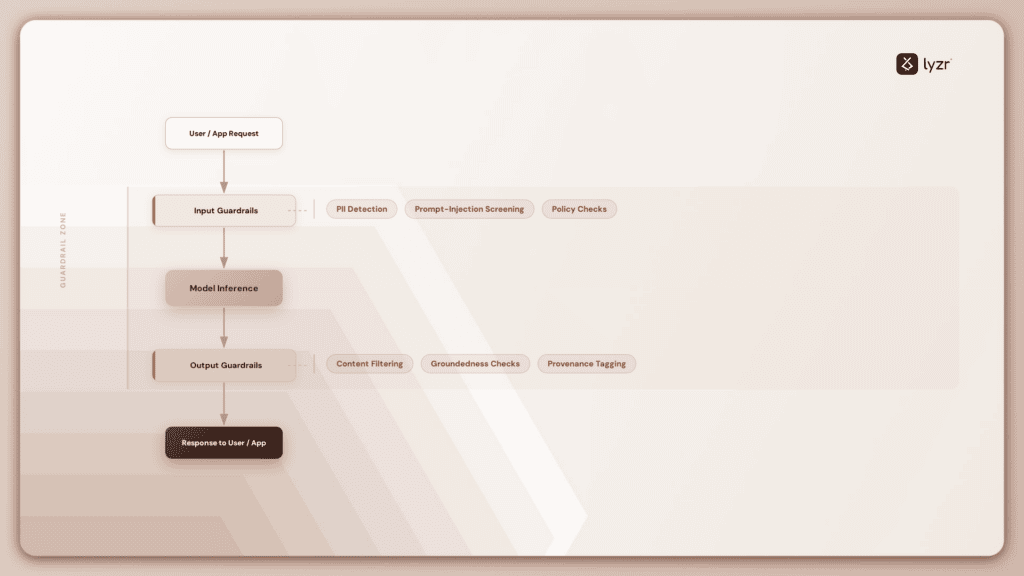
Both stages matter independently. Input guardrails prevent sensitive data from ever reaching the model (and therefore from ever appearing in logs, caches, or downstream fine-tuning data). Output guardrails prevent unsafe or non-compliant content from reaching the end user, regardless of what caused the model to generate it.
Why guardrails matter more, not less, on-prem
When you use a commercial cloud AI API, the vendor typically layers its own trust & safety filtering underneath yours — an extra safety net you didn’t have to build. When you self-host, that net disappears. You own the entire stack, which means you own every failure mode too: there is no vendor to catch what your own guardrails miss.
Where the Control Plane Sits
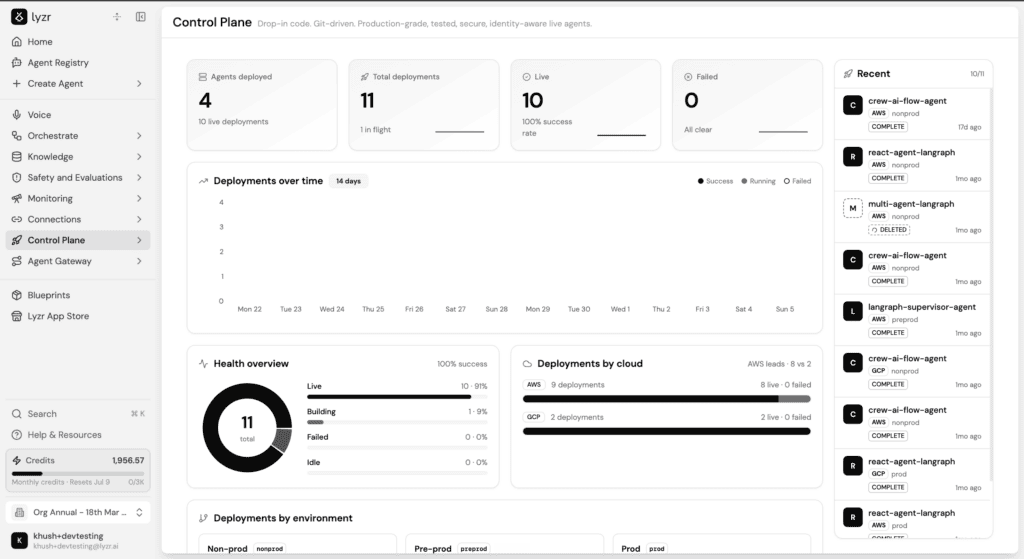
The key architectural principle: the control plane is infrastructure-agnostic. It enforces the same policies whether the request is served by an on-prem vLLM cluster, a private cloud endpoint, or an external API — so governance doesn’t fragment as your deployment topology grows.
Typical technology building blocks
| Layer | Common approaches |
| Gateway / proxy | LLM-aware API gateways (open-source or commercial) that sit in front of model endpoints |
| Identity | Existing enterprise IdP (e.g., SSO/OIDC) extended with model- and dataset-level scopes |
| Guardrail engine | Rule-based filters, classifier models, regex/PII detectors, or a combination |
| Metering store | Time-series database for usage metrics, tied to a cost-attribution service |
| Audit log store | Append-only log store or SIEM integration with tamper-evidence (e.g., hash chaining) |
| Dashboards | BI tool or purpose-built observability dashboard for usage, cost, and risk |
Organizations don’t need to build all of this from scratch — many pick a mix of open-source components (for the gateway and guardrail engine) and existing enterprise tooling (for identity, logging, and dashboards), stitched together rather than adopting a single monolithic product.
Implementation Approach: A Phased Rollout
Trying to implement all three pillars at once, across every model and team, tends to stall. A phased approach gets value sooner and builds organizational buy-in.
| Phase | Focus | Typical Outcome |
| Phase 1 | Centralize routing — put every model call through a single gateway, even without policy enforcement yet | Immediate visibility into who is calling which model |
| Phase 2 | Add logging and basic metering | Usage and cost attribution becomes possible |
| Phase 3 | Add input/output guardrails for the highest-risk use cases first | Reduces exposure on the workloads most likely to cause harm |
| Phase 4 | Add quotas, chargeback, and dashboards | Cost governance becomes proactive rather than reactive |
| Phase 5 | Extend policy consistently across on-prem, private cloud, and external APIs | Governance becomes infrastructure-agnostic, ready to scale |
A common mistake is treating this as a one-time compliance project rather than an operating capability — guardrail rules, quotas, and access policies need regular review as usage patterns, regulations, and threat models evolve.
Minimum Viable Governance Checklist
| Capability | On-Prem Only (No Control Plane) | With Governance Control Plane |
| Who used which model, when | Scattered across app logs, if logged at all | Centralized, queryable, immutable |
| Cost attribution by team | Manual estimation or none | Automated chargeback/showback |
| PII/PHI leakage prevention | Dependent on each application’s own code | Enforced centrally and consistently |
| Model access control | Ad hoc, per-application | Centralized RBAC/ABAC |
| Incident reconstruction | Difficult or impossible | Full audit trail available |
| Regulatory audit readiness | Reactive, scramble-mode | Continuous, evidence-ready |
| Capacity planning | Guesswork based on complaints | Data-driven, based on real utilization trends |
| Guardrail consistency across teams | Varies by whoever built the app | Uniform policy enforced at the gateway |
Common Pitfalls
- Treating logging as governance. Logs that no one reviews and that aren’t tamper-resistant satisfy neither security nor compliance requirements — they’re a starting point, not the finish line.
- Bolting guardrails onto each application separately. This guarantees inconsistency: one team’s chatbot filters PII, another’s doesn’t, and no one can say with confidence what the org-wide policy actually is.
- Ignoring the cost of shared capacity. “It’s already paid for” is not the same as “it’s free” — contention, latency, and opportunity cost are real even without a per-token invoice.
- Governance as an afterthought. Retrofitting audit trails and guardrails onto a system already in production is significantly harder — and more disruptive — than designing them in from the start.
- No ownership. A control plane needs a clear owner (often a platform or MLOps team) with authority to enforce policy; without one, it degrades into a shared, unmaintained utility.
Key Takeaways
- On-prem solves data residency, not governance. Bringing AI in-house removes one risk vector and leaves the rest, cost sprawl, misuse, compliance evidence, fully intact.
- Audit trails are your insurance policy. When (not if) someone asks “why did the model do that,” you need an answer that doesn’t start with “we’re not sure.”
- Cost controls prevent capacity from becoming chaos. Fixed on-prem infrastructure needs active metering and quotas just as much as elastic cloud infrastructure needs a budget alarm.
- Guardrails are your responsibility now. Without a vendor’s safety layer in the loop, every filtering and access-control decision is yours to build and maintain.
- A control plane should be infrastructure-agnostic. As deployments span on-prem, private cloud, and public APIs, governance needs to travel with the request, not live separately in each environment.
- Roll it out in phases. Centralized routing and logging first, guardrails on high-risk workloads next, then quotas and cross-environment consistency, trying to do everything at once tends to stall.
Book A Demo: Click Here
Join our Slack: Click Here
Link to our GitHub: Click Here