Most developers building an AI agent start the same way: pick one LLM, wire it into the agent, and ship. It’s simple, predictable, and easy to reason about.
But look at what that agent actually receives in production. One user says “hi.” The next asks “What is an API?” A third pastes in a requirement and asks for a scalable authentication design with failure-mode analysis. Three very different requests, all handled by the same model.
That single choice creates a quiet trade-off:
- Use a powerful model for everything, and you pay premium prices (and wait for premium latency) on requests that never needed that capability.
- Use a small model for everything, and the hard requests, the ones your users remember, get weaker answers.
Neither option is wrong. They’re just both compromises. The better question is: why should one agent be locked into one model at all?
That’s the idea behind Auto Model Routing in Lyzr: instead of fixing a single model per agent, Lyzr selects the appropriate model for each request, dynamically, at inference time.
What Is Auto Model Routing?
Model routing means deciding, per request, which model should handle it. Rather than the developer choosing a model once at configuration time, a routing step sits in front of your models and evaluates each incoming request before any response is generated.
The reasoning is straightforward: requests vary in complexity, even within the same agent. A customer support agent might handle a greeting, a policy lookup, and a multi-step troubleshooting scenario in the same hour. Each of those has different capability requirements.
Lyzr’s four routing tiers
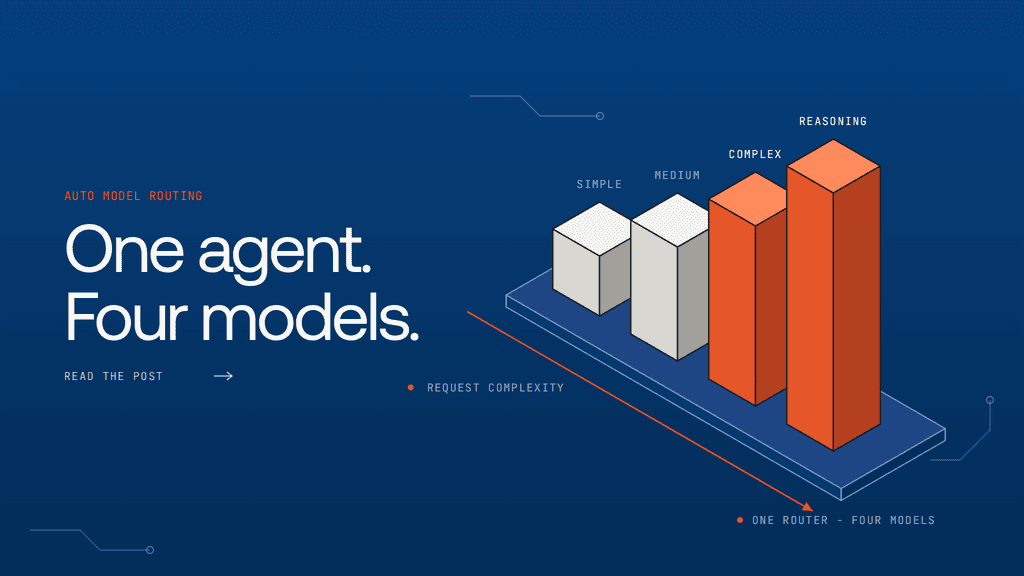
Lyzr organizes requests into four complexity tiers, and each tier maps to a model you configure:
| Tier | Model | Example request |
| SIMPLE | gpt-5.6-luna | “What is an API?” |
| MEDIUM | gpt-5.6-terra | “Write a Python function to validate email addresses.” |
| COMPLEX | claude-sonnet-5 | “Design a scalable authentication service using Redis and PostgreSQL.” |
| REASONING | claude-opus-5 | “Analyze these three distributed system architectures step by step, compare their failure modes, and recommend the best design.” |
Note: These model mappings are examples. Developers can configure which model is used for each tier, so you can match the tiers to the models, providers and budgets that make sense for your agent.
How Auto Model Routing Works in Lyzr
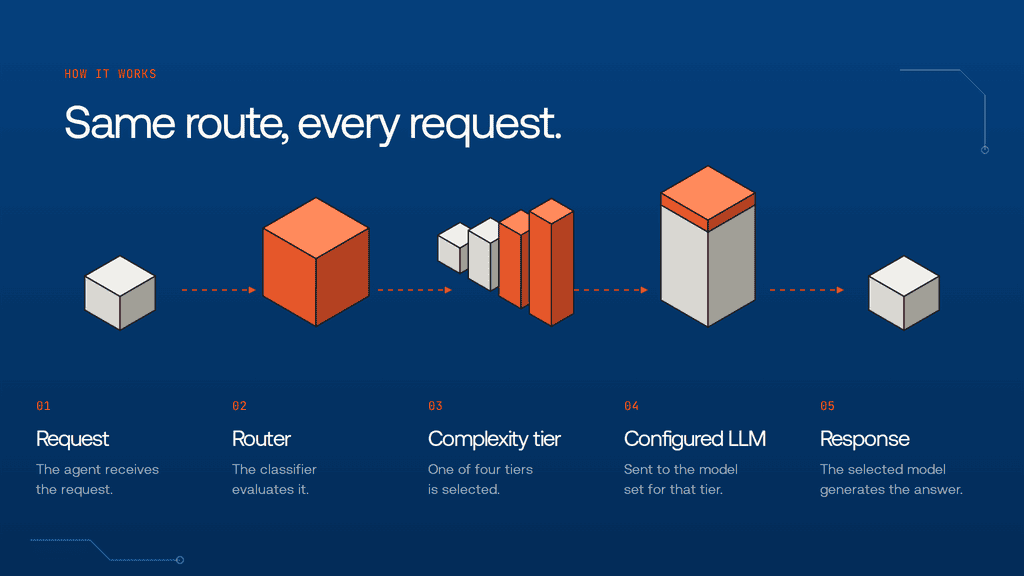
At a high level, every request follows the same lifecycle:
- The agent receives a request.
- The routing classifier evaluates the request.
- The classifier selects one of the four complexity tiers.
- Lyzr sends the request to the model configured for that tier.
- The selected model generates the response.
User Request → Router → Complexity Tier → Configured LLM → Response
From the user’s side, nothing changes. They send a message and get an answer. The routing decision happens in between, invisibly.
The interesting part is step 2: how does the classifier decide? Lyzr gives you two options:
- Lyzr Heuristic Classifier
- Jev Model by TypeSafe
Both end in the same place, a tier and its configured model, but they get there in very different ways.
Option 1: Lyzr’s Heuristic Classifier
The heuristic classifier is the default option. Its defining trait is that it classifies requests without making another LLM call.
How it works
- Zero additional API calls. Classification doesn’t consume model inference of its own.
- Sub-millisecond classification. The decision is effectively instant, so it adds no meaningful latency.
- Weighted scoring across seven dimensions. Each dimension contributes to a score, and the combined score determines the tier.
The seven dimensions
| Dimension | What it detects |
| tokenCount | Short prompts under 15 tokens, or long prompts over 400 |
| codePresence | Keywords such as function, class, API, database |
| reasoningMarkers | Phrases like “step by step”, “think through”, “analyze” |
| technicalTerms | Words like architecture, distributed, encryption |
| simpleIndicators | “What is”, “define”, greetings |
| multiStepPatterns | “First… then…”, numbered instructions |
| questionComplexity | Multiple question marks |
Some of these push a request toward a simpler tier (a short prompt, “what is”, a greeting). Others push it toward a more demanding one (code keywords, technical terms, multi-step structure, long input).
Special handling for reasoning requests
There’s one deliberate exception to the weighted scoring. If a request contains two or more reasoning markers, it is routed straight to REASONING, overriding the standard weighted score.
The logic is simple: a prompt that says “analyze” and “step by step” is explicitly asking the model to think. That signal is strong enough that it shouldn’t be diluted by the other dimensions.
Example routing decisions
Here’s how the dimensions play out on three representative inputs. (These are illustrative walk-throughs of the rules above.)
| Input | Dimensions triggered | Routed to |
| “What is an API?” | Short prompt (tokenCount), “what is” (simpleIndicators) | SIMPLE |
| “Write a Python function to validate email addresses.” | Keywords like function (codePresence) | MEDIUM |
| “Analyze these three architectures step by step and compare their failure modes.” | “analyze” and “step by step” (reasoningMarkers ×2), architectures (technicalTerms) | REASONING (two or more reasoning markers override the weighted score) |
Key takeaway
The heuristic classifier gives you extremely fast, cost-efficient classification with no additional model inference. For agents where request patterns are predictable, it’s often all you need.
Option 2: Jev by TypeSafe, Model-Based Routing
Keywords only get you so far. Some requests can’t be judged by their surface patterns, and that’s where the second option comes in.
How Jev works
Jev is a lightweight model designed specifically for fast routing decisions. Unlike the heuristic classifier, it evaluates a request using a model rather than predefined keyword rules.
Jev receives three primary inputs:
- The four configured model options, so it knows what’s available to route to.
- The agent’s system instructions, so it knows what the agent is for.
- The user’s input, so it knows what’s actually being asked.
Based on this combined context, Jev selects the model best suited for the request.
Why system instructions matter
Consider a deceptively short message: “Review this.”
- For a writing assistant, that probably means a quick grammar and clarity check, a task a small, fast model handles well.
- For a security agent, the same two words might mean a detailed vulnerability analysis of a block of code, which calls for a far more capable model.
The user’s words are identical. The right model is not. A keyword-based approach sees the same short prompt both times. A routing model that also reads the agent’s system instructions can tell the difference.
When Jev is useful
Jev is a good fit when:
- Complexity can’t be determined through keywords alone.
- Your agent handles several different types of tasks.
- System instructions influence the model requirements of a request.
Key takeaway
Jev makes routing decisions with an understanding of both the agent’s purpose and the user’s request, not just the shape of the prompt.
Heuristic Classifier vs. Jev: Which Should You Use?
Both classifiers do the same job: choose an appropriate LLM from your four configured tiers. They differ in how.
| Criteria | Heuristic Classifier | Jev |
| Approach | Weighted rules | Model-based classification |
| Additional model inference | No | Yes |
| Routing latency | Sub-millisecond | Dependent on Jev inference |
| Context considered | Prompt patterns | System instructions + user input + model options |
| Best suited for | Fast, predictable classification | Context-aware model selection |
A practical way to choose:
- Start with the heuristic classifier if your agent’s requests are fairly predictable and you want routing to add essentially zero overhead.
- Reach for Jev when the same words can mean very different things depending on the agent’s purpose, or when one agent covers a wide range of tasks.
Getting Started with Auto Model Routing in Lyzr Agent Studio
Setting up Auto Model Routing happens in Lyzr Agent Studio, where you configure the routing behavior for your agent. At a conceptual level, setup comes down to three decisions:
- Choose the model for each tier. Assign a model to SIMPLE, MEDIUM, COMPLEX and REASONING.
- Choose your classifier. Pick the Lyzr Heuristic Classifier (the default) or Jev by TypeSafe.
- Test with real requests. Try a mix of simple, moderate and demanding prompts and check that each lands on the tier you’d expect.

Why Auto Model Routing Matters for Production AI Agents
Routing isn’t just a convenience feature. It maps directly to three engineering concerns that show up once an agent is under real traffic.
- Cost optimization
Premium models cost more per request. When a large share of your traffic is straightforward, such as greetings, definitions and simple lookups, sending all of it to your most expensive model is spend that buys nothing. Routing lets those requests go to a lighter, cheaper model.
- Latency optimization
Smaller models are generally faster. Routing simpler requests to them means users get quicker responses where speed is noticeable, without slowing down the requests that genuinely need more time.
- Task-appropriate intelligence
The flip side of saving money on easy requests is being able to spend it where it counts. Reserving your most capable models for requests that require them means hard problems still get strong answers.
- Evaluate your routing
One caveat deserves real attention: a cheaper model is only a win if it can perform the task reliably. Routing a request to a smaller model saves money, but if the answer is worse, you’ve traded quality for cost without noticing.
So treat routing like any other production component. Review which requests land in which tier, compare response quality across tiers, and adjust your tier-to-model mappings (or your classifier choice) if you see requests being under-served.
The Right Model for the Right Task
AI agents shouldn’t need to rely on one model for every type of request. A greeting and an architecture review are different problems, and treating them identically means overpaying for one or underserving the other.
Auto Model Routing introduces the flexibility to balance capability, cost and latency on a per-request basis. And Lyzr gives you two ways to do it: the fast, rule-based heuristic classifier, or Jev’s context-aware, model-based approach, depending on what your agent needs.
If you’re running agents in production, it’s worth asking how many of your requests really need your biggest model. Try Auto Model Routing in Lyzr Agent Studio and find out.
Book A Demo: Click Here
Join our Slack: Click Here
Link to our GitHub: Click Here