TL;DR
- Skills vs tools vs prompts comes down to three jobs: what to do now, how to do a type of work, and how to act on real systems.
- Prompts are one-off instructions that tell an agent what to do right now.
- Skills are reusable, versioned procedures, usually a SKILL.md file, loaded only when a task needs them.
- Tools are functions, APIs, or MCP connections that let an agent act on real systems.
- Mixing up the three is why agents drift and break in production.
- Prompts and skills shape what an agent intends. Only a control in the request path, like Opencontroller, can stop what it does.
Your support agent demo runs on one 2,000-word system prompt. Three months later, five teams have copied it, every copy has drifted, and nobody knows which one is live. The fix for any AI agent isn’t a better prompt. It’s putting each instruction in the right layer.
Why “just write a better prompt” stops working
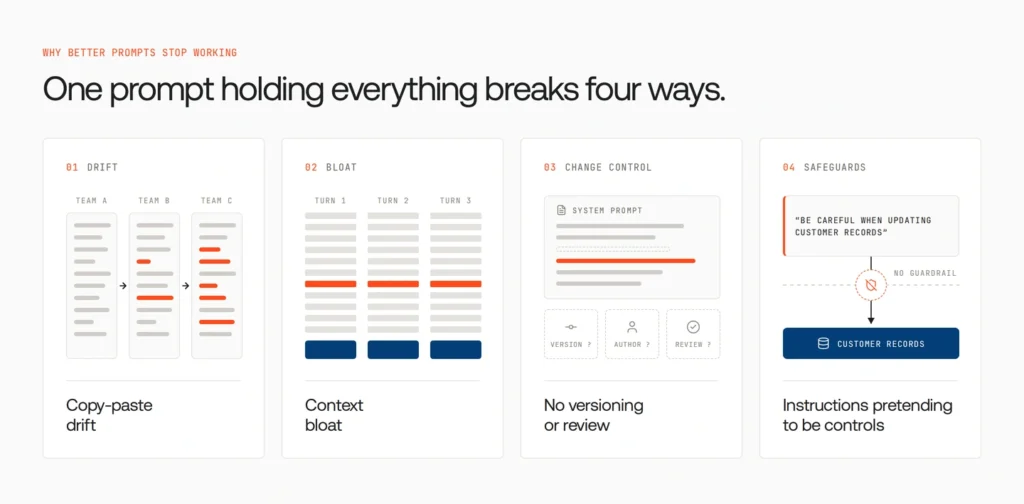
A better prompt can’t fix an architecture problem. A prompt is the smallest, least reusable unit in an agent stack, with no permissions, tools, or versioned process. When it holds everything, four problems appear:
- Copy-paste drift. Instructions spread across teams and slowly diverge.
- Context bloat. Every turn pays for every instruction, and key rules get buried.
- No versioning or review. A one-line edit changes production behavior, with no record of who made it.
- Instructions pretending to be controls. “Be careful when updating customer records” is a hope, not a safeguard.
MindStudio offers a useful test: if you’ve written the same prompt more than twice, it probably shouldn’t be a prompt. Prompt engineering still matters, but agents need three kinds of input, and each needs its own home.
Skills vs tools vs prompts: the taxonomy at a glance
Think of an agent as a new hire. A prompt is today’s request, a skill is the handbook, and a tool is the system access that lets them do the work. The three-layer diagram below maps each to its job.
| Prompt | Skill | Tool | |
| Role | Instruction for the current task | Reusable procedure and know-how | Action in external systems |
| Lifespan | One-off | Versioned, reusable | Persistent capability |
| Triggered by | The user | The agent, via the skill’s description | The agent, via the tool’s schema |
| Context cost | Paid every turn | Small until used | Can be large with many tools |
| Changes the world? | No | No | Yes |
| Best for | Ad-hoc requests, refinement | Team standards, repeatable workflows | Live data, integrations, deterministic actions |
| Analogy | A verbal request | An SOP handbook | A system login |
In one line: prompts carry intent, skills carry expertise, tools carry capability.
Prompts: the intent layer
Anthropic describes prompts as ephemeral and reactive: you supply direction in the moment, and it doesn’t persist. They suit one-off requests (“summarize this thread”), refinement (“make it more formal”), and context that only matters now.
Where they break is repetition: they don’t persist, don’t scale across teams, and cost tokens every turn. Prompts are where workflows are discovered, not where they should live.
Skills: the expertise layer
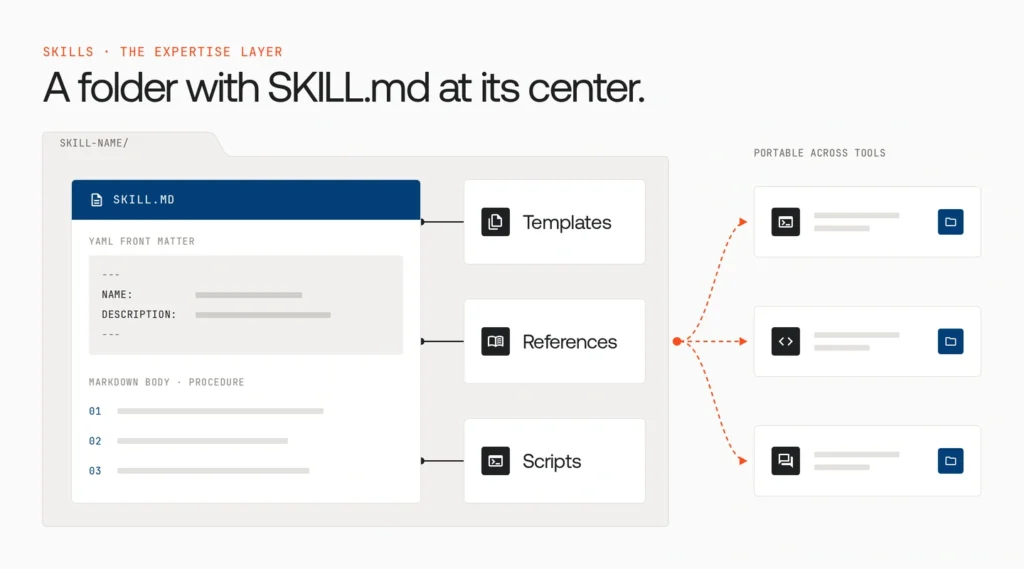
What is a skill?
A skill is a folder with a SKILL.md file at its center: YAML front matter (a name and description) plus a markdown body holding the procedure. The folder can also hold templates, reference documents, and scripts. Builder.io notes that a growing number of tools follow the shared Agent Skills format, so a well-written skill is increasingly portable.
markdown

---
name: refund-policy
description: Use when processing, approving, or replying to a customer refund.
---
## Steps
1. Read the ticket; identify order, plan, and amount.
2. Check eligibility against the refund window.
3. If the amount is above the approval threshold, request human approval.
4. Process the refund and reply using the template.

## Stop and escalate if
- The customer mentions a chargeback or legal action.
How progressive disclosure works
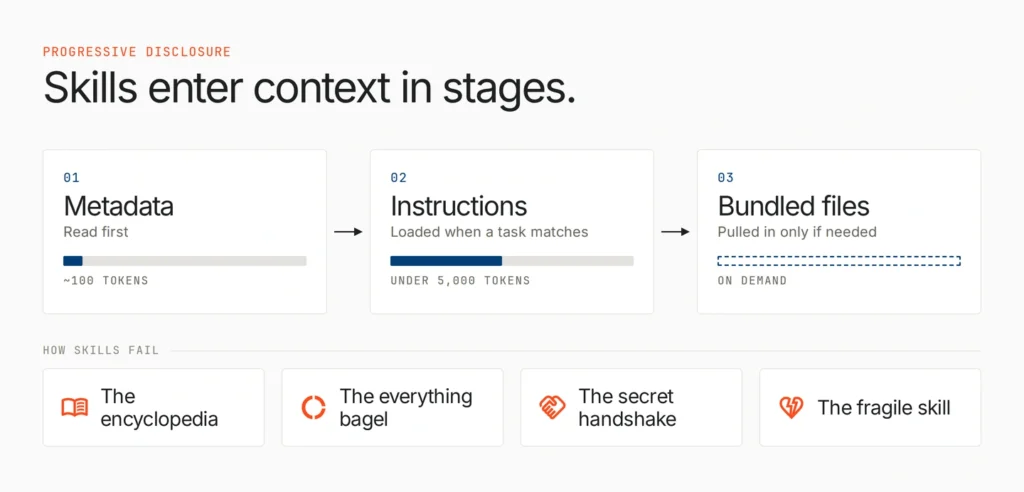
What separates a skill from a long prompt is when it enters context. According to Anthropic, the agent first reads only each skill’s metadata (about 100 tokens), loads the full instructions (usually under 5,000 tokens) only when a task matches, and pulls in bundled files only if needed. Builder.io calls this lazy loading for context. It’s practical context engineering: dozens of skills stay available without crowding the context window, which keeps agentic workflows lean at scale.
How skills fail
Builder.io names four failure modes:
- The encyclopedia: the skill reads like a wiki. Split it and link to reference files.
- The everything bagel: it applies to every task, so it’s really an always-on rule.
- The secret handshake: the description is too vague, so the agent never loads it.
- The fragile skill: hard-coded details break whenever the system changes.
A good skill defines its trigger, inputs, steps, checks, stop conditions, and recovery. But skills only make an agent know how to work. To act, it needs tools.
Tools: the action layer
A tool is an executable function with defined inputs, outputs, and side effects. Arcade frames the split simply: tools are how an agent acts, skills are what it knows. Most tools now reach agents through function calling or MCP servers, the open standard for connecting agents to systems like Google Drive, GitHub, Slack, and internal databases.
Use tools for live data, external systems, and deterministic work. As MindStudio puts it, don’t ask a model whether JSON is valid; run a validator.
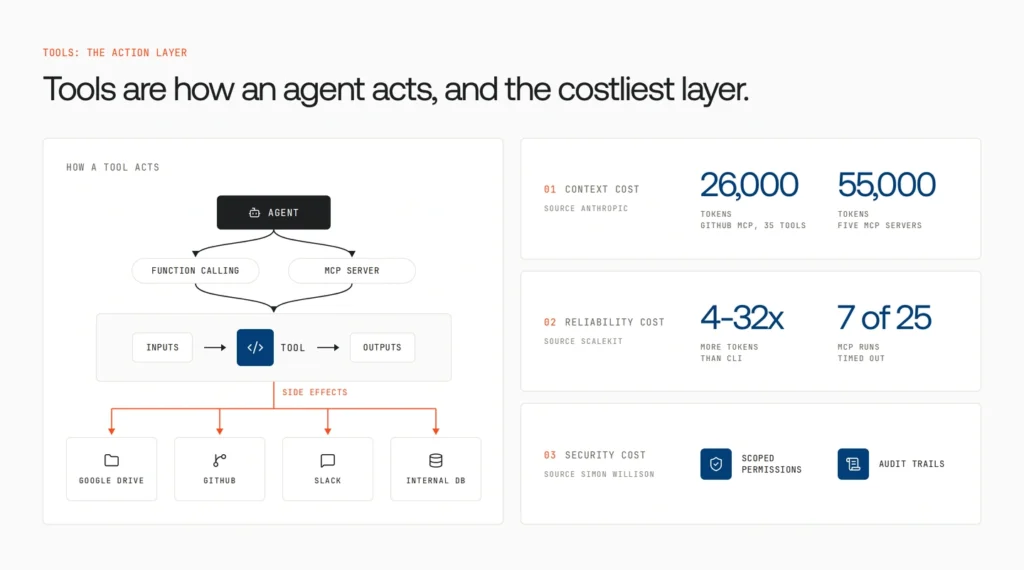
Tools are also the most expensive layer:
- Context cost. In Anthropic’s own measurements, GitHub’s MCP server alone exposes 35 tools worth about 26,000 tokens of definitions, and five servers reach roughly 55,000 tokens before a conversation starts.
- Reliability cost. Arcade observes that successful coding agents often use fewer than ten tools. In a Scalekit benchmark, GitHub’s MCP server used 4 to 32 times more tokens than the CLI on the same read-only tasks, and 7 of 25 MCP runs failed with connection timeouts.
- Security cost. Tools are the only layer that changes the outside world, so they need scoped permissions and audit trails. Simon Willison highlights MCP risks like tool definitions changing after installation and malicious servers intercepting calls meant for trusted ones.
How prompts, skills, and tools work together
Here’s the support agent’s refund request, rebuilt with each layer doing its own job. The swimlane diagram below traces the six steps.
| Step | Layer | What happens |
| 1 | Prompt | A lead writes: “Process the refund on ticket #4821. Enterprise customer.” |
| 2 | Skill | The agent loads refund-policy: eligibility, thresholds, reply template. |
| 3 | Tool | It reads the ticket and checks billing history through two tools. |
| 4 | Skill | The skill says enterprise refunds need human approval. |
| 5 | Tool | It drafts the refund and posts an approval request in Slack. |
| 6 | Prompt | The lead replies: “Approved. Add a goodwill credit.” |
The skill decided whether and how. The tools did it. The prompts supplied the intent. Remove any layer and the agent improvises policy, can’t act, or has nothing to act on.
Other terms fit the same model. Rules are always-on skills, commands are saved prompts, plugins bundle skills and tools, and subagents are specialized agents with their own prompts and tool permissions. Agents that coordinate over A2A still run on these three layers.
Where does this instruction belong? A decision framework
Place an instruction by asking what it needs to do, in this order:
- Does it read or change something outside the model? Make it a tool.
- Does it need a guaranteed result? Make it a script or tool, not an instruction.
- Must it apply to every task? Make it a short always-on rule.
- Will the team need it again, done the same way? Make it a skill.
- Does it only matter right now? Keep it a prompt.
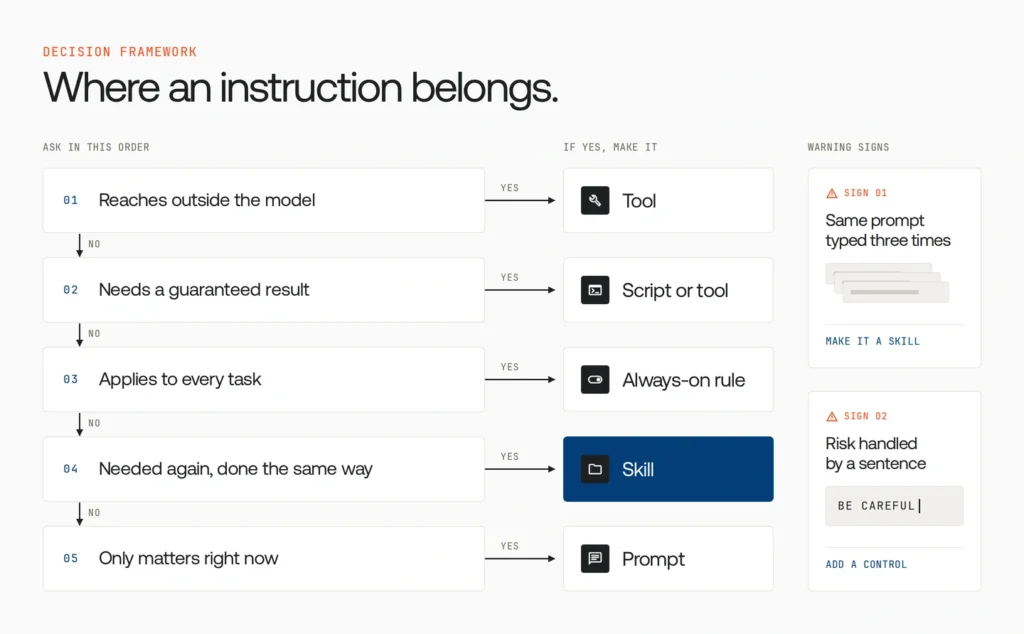
Warning signs: you’ve typed the same prompt three times (make a skill), or an instruction says “be careful” about something risky. That last one needs a control, not a sentence.
The production problem: what happens when every team adopts this taxonomy
The taxonomy works, so other teams copy it. A year later you have dozens of agents across frameworks, hundreds of skills edited in repositories, and a growing list of MCP servers across clouds, SaaS, and laptops. That’s agent sprawl, and each layer brings its own risk:
| Layer | What goes wrong at scale |
| Prompts | System prompt changes reach production without review. |
| Skills | A small SKILL.md edit quietly changes behavior, with no evaluation before release. |
| Tools | Over-broad permissions, runaway spend, untrusted MCP servers, no audit trail. |
The deeper issue: prompts and skills shape intent; neither can stop an action. A skill can say “never refund above the threshold without approval,” but if the agent is manipulated by injected content, nothing in the skill blocks the API call. Arcade agrees: authorization, not agent logic, stalls agents on the way to production.
So how do you see every agent, skill, and tool across the organization, and enforce policy on what they do?
How much sprawl is already in your agent estate? Take the AI Agent Sprawl Audit to see how many agents, tools, and integrations you’re running without central visibility. Take the audit
Governing prompts, skills, and tools with Opencontroller
Opencontroller is Lyzr’s open control plane for AI agents. In Lyzr’s words, every agent starts as a prompt and moves through the organization before production, and Opencontroller governs that whole journey. The final diagram shows it wrapped around all three layers.
| What you govern | The need | How Opencontroller helps |
| Prompts and skills | Test changes before they ship | Evaluations, approvals, and release controls around the deployment handoff |
| Tools and models | Stop risky actions, not just log them | Agent and LLM gateways that check identity, authorization, budgets, guardrails, and tool and model policy, and can refuse, mask, or redirect a call before it completes |
| The whole estate | Know what exists | Discovery of agents, models, tools, data, and workflows across cloud, SaaS, Kubernetes, and devices |
| Developer machines | Govern before production | Basecode extends visibility and policy to developer devices and coding agents |
Its architecture also fits how teams already build:
- Control in the path. A dashboard or alert can’t stop an agent; gateways enforce policy where calls happen.
- Open standards. OpenAI-compatible APIs, MCP, A2A, and OpenTelemetry, with no proprietary agent SDK.
- No rewrites. It governs existing containerized agents in place, across frameworks.
- Your boundary. It runs in your cloud, private infrastructure, or on-prem, including air-gapped setups.
- Full lifecycle. Find, Ship, Run, and Improve.
You’ve organized each agent into prompts, skills, and tools. Opencontroller lets you see, test, and control them. Book a demo to see it with your own agents.
Conclusion
The opening team now runs a short prompt, three versioned skills, and four scoped tools. The skills vs tools vs prompts distinction comes down to one line: prompts carry intent, skills carry expertise, tools carry capability. That makes one agent reliable. Governing all three across every team is what makes a hundred agents safe to run, and that’s where Opencontroller comes in.
FAQ
A prompt is a one-off instruction for the current task, and it doesn’t carry over to the next conversation. A skill is a reusable, versioned package of instructions, usually a SKILL.md file, that the agent loads automatically when a task matches its description.
A skill shapes how an agent reasons: the steps, standards, and judgment calls for a type of work. A tool is code, an API, or an MCP connection that lets the agent act, such as querying a database or updating a record. Skills provide expertise, tools provide capability, and most production agents need both.
In agent building, skills usually fall into seven types: orientation skills that explain how a system is organized, domain knowledge, workflow procedures, review and QA, style and formatting, tool usage, and safety and compliance. Each should have a clear trigger so the agent loads it only when relevant.
For teams building agents, five skills matter most: prompt and context design, skill authoring, tool and MCP design with tightly scoped interfaces, agent evaluation, and governance. Governance covers permissions, policy, cost, and observability across every agent running in production.
No. Tools and MCP give an agent access to systems, while skills teach it what to do with that access. A skill might say “filter orders by date first,” but the agent still needs a database tool to run the query.
Book A Demo: Click Here
Join our Slack: Click Here
Link to our GitHub: Click Here