Most companies today rent their AI. Every prompt goes to someone else’s model, on someone else’s servers, at someone else’s price.
That’s a great way to start. But as AI moves into the core of a business, more teams are asking a different question: what if we owned it?
Owning your intelligence means running AI models on infrastructure you control. Your data, your models, your rules.
I’ve built and run this in production, and here’s what it gives you, and what it really takes.
What owning your intelligence gives you
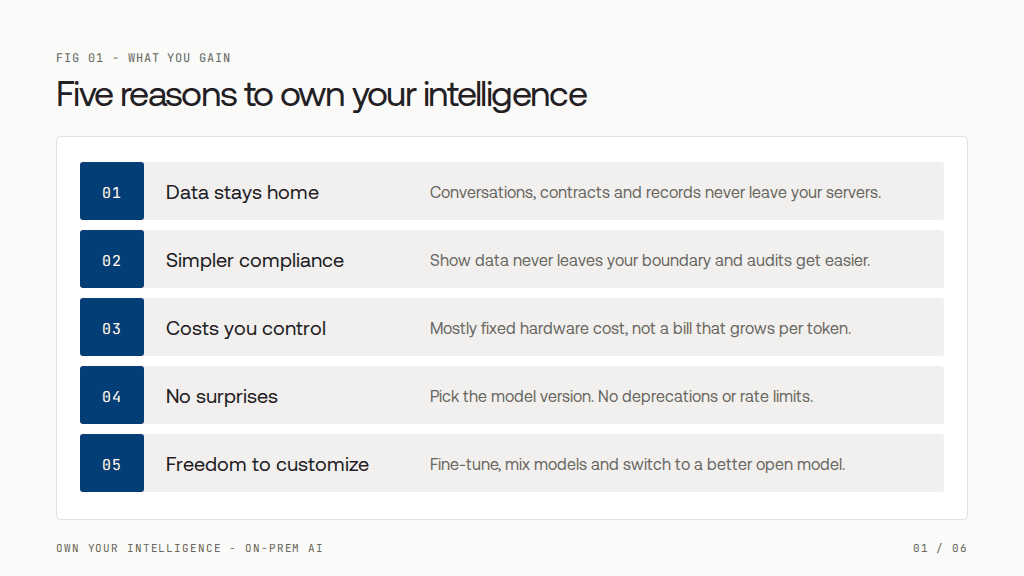
1. Your data never leaves your servers
Customer conversations, contracts and records are processed where they already live. No third party sees them, logs them or trains on them. For banks, healthcare and any business handling personal data, this is often the deciding factor.
2. Compliance becomes simpler
When you can show that data never leaves your boundary, privacy reviews, audits and regulations like GDPR become far easier to satisfy, and enterprise deals close faster.
3. Costs you control
APIs charge per token, so the bill grows with every call. Your own models cost mostly a fixed amount for hardware. At low volume, APIs win. At high, steady volume, owning wins, and the gap keeps widening.
4. No surprises
You pick the exact model version. No sudden deprecations, no behavior changes overnight, no rate limits during your busiest hour.
5. Freedom to customize
Fine-tune on your own data, mix specialized models, and switch to a better open model the day it’s released, without rewriting your product around one vendor.
What it really takes: the challenges
Downloading a model is the easy part. Running it reliably, for real users, is where teams struggle. These are the challenges I’ve seen most, with examples from a multi-tenant platform I built that handles customer conversations across email, chat and phone.
1. Data leaking out through the side doors
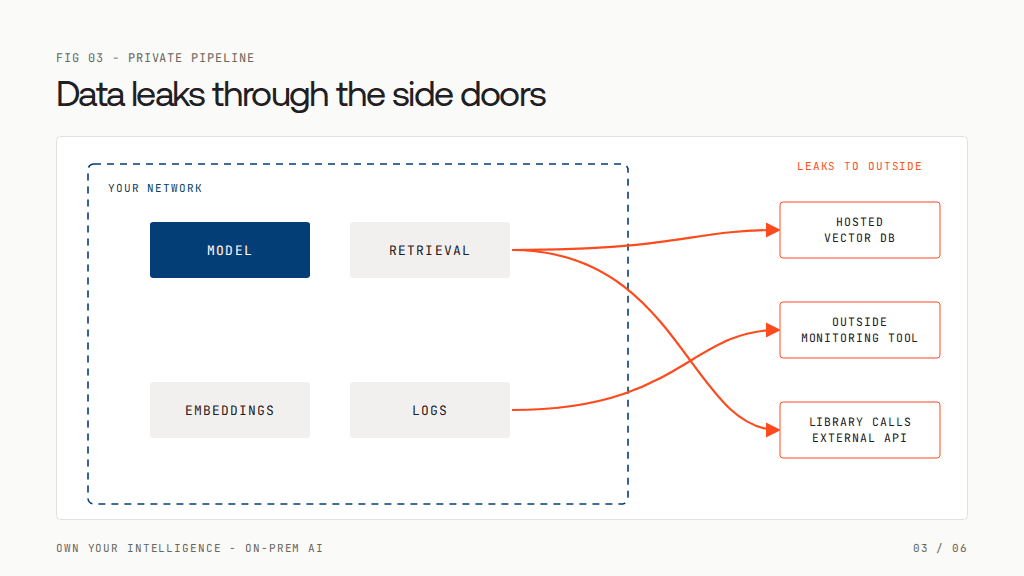
Teams move the model in-house, then leak data anyway. Documents go to a hosted vector database. Logs full of customer text go to an outside monitoring tool. A library quietly calls an external API.
What works: treat the whole pipeline as private, not just the model. Keep retrieval, embeddings and logs inside your network, control every outbound connection, and isolate tenants so one customer’s data can never reach another’s prompts.
2. Hosting different models on limited GPUs
No single model fits every task, but GPU memory is scarce and expensive. A small model that tags intent doesn’t need the same hardware as a large model drafting a reply.
What works: quantize models (4-bit or 8-bit versions cut memory needs dramatically with little quality loss). Pack small models together, so one GPU can serve two of them at once. For models too big for one GPU, split the weights across 2, 4 or 8 GPUs that work as one.
3. Routing each request to the right model
Send everything to your biggest model and you waste GPUs. Send everything to the smallest and quality drops.
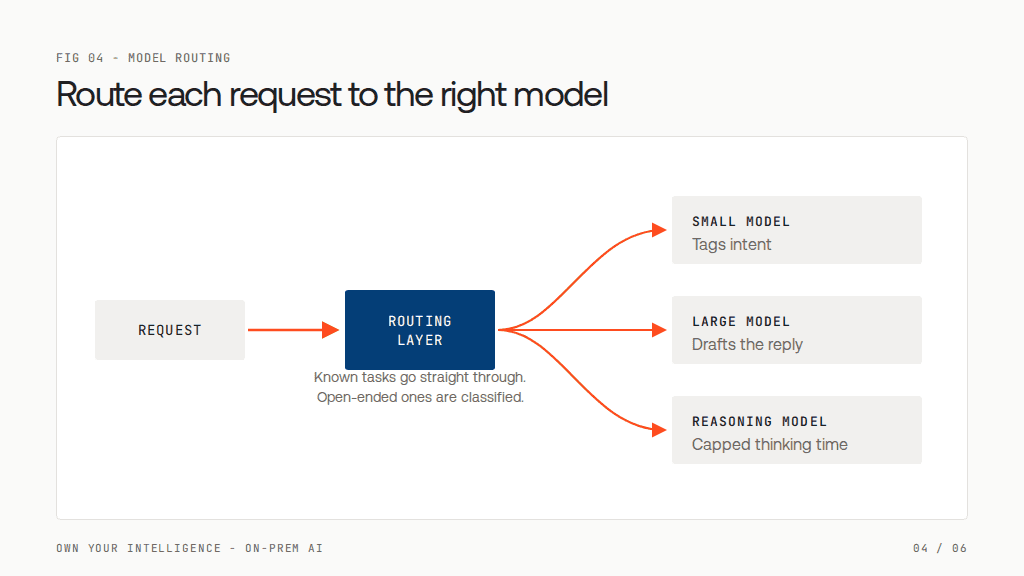
What works: a routing layer. Route known tasks, like “summarize this call,” straight to their assigned model. Use a fast small model to classify open-ended requests. Keep each model warm for its job, and shift low-priority work to a smaller model when the big one is busy.
4. Concurrency: when everyone asks at once
An API absorbs your traffic spikes. Your own GPUs don’t. And AI features multiply load, because one user action can trigger several model calls.
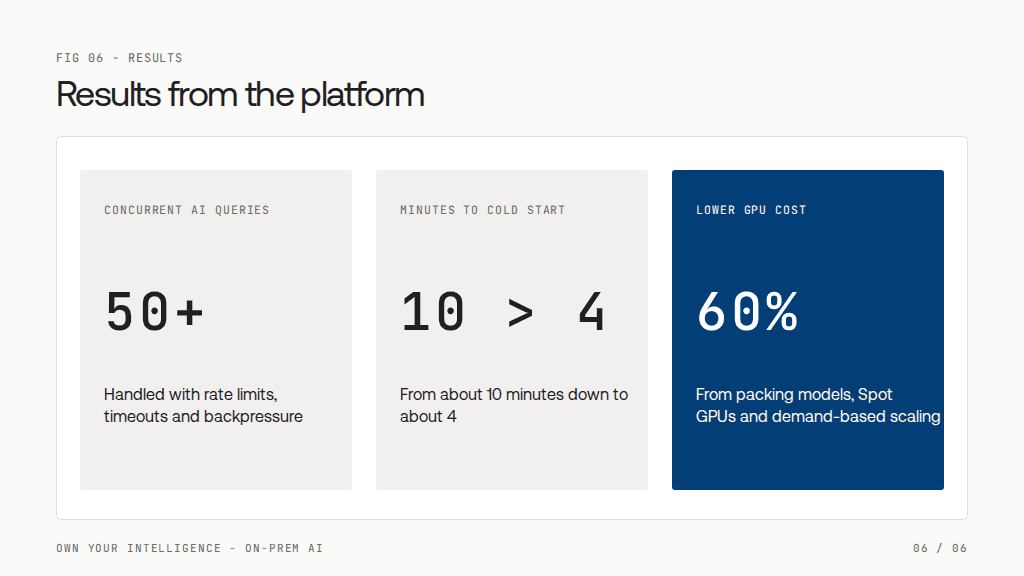
What works: per-customer rate limits, timeouts on every model call, capped retries, and backpressure, which means rejecting early with a clear “busy” signal instead of letting requests pile up. Our platform handled 50+ concurrent AI queries this way without falling over.
5. Cold starts measured in minutes
A new GPU machine has to boot, set up drivers and load gigabytes of model weights before it answers anything. Ours took about 10 minutes, which is useless during a sudden spike.
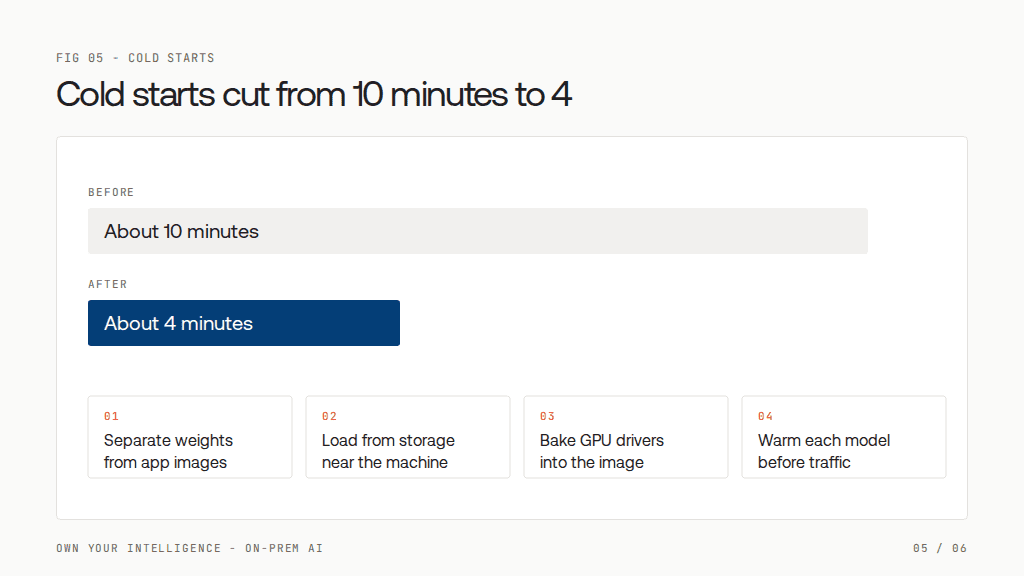
What works: keep model weights separate from application images, load them from storage close to the machine, bake GPU drivers into the machine image, and warm each model before it takes traffic. We cut our cold start to about 4 minutes.
6. Scaling up without burning money
Idle GPUs are the most expensive thing in your stack. Standard autoscaling watches CPU, which tells you almost nothing about an AI workload.
Models also don’t scale equally. Small, fast models generate many tokens per second and finish quickly, so one GPU can serve many requests.
Reasoning models “think” before they answer, producing long chains of hidden tokens, so each request holds the GPU far longer. A GPU that handles dozens of quick classification calls might handle only a handful of reasoning requests in the same time. Counting requests alone hides this: capacity really depends on how many tokens each model generates and how fast.
What works: scale on real demand, like how many requests are waiting, not CPU. Scale up fast and down slowly. Scale each model on its own, since a reasoning model needs more GPUs for the same traffic than a fast model, and send only the requests that truly need reasoning to it, with a cap on how long it can think. Use cheaper spare-capacity (Spot) GPUs, which becomes safe once cold starts are short. Together with packing models, this cut our GPU costs by about 60%.
Challenges at a glance
| # | Challenge | What works |
| 1 | Data leaking out through the side doors | Treat the whole pipeline as private; keep retrieval, embeddings and logs inside your network; control outbound connections; isolate tenants |
| 2 | Hosting different models on limited GPUs | Quantize models (4-bit or 8-bit); pack small models together; split large models across 2, 4 or 8 GPUs |
| 3 | Routing each request to the right model | A routing layer: direct known tasks, classify open-ended requests with a small model, keep models warm, shift low-priority work when busy |
| 4 | Concurrency: when everyone asks at once | Per-customer rate limits, timeouts, capped retries, and backpressure |
| 5 | Cold starts measured in minutes | Separate weights from app images, load from nearby storage, bake in GPU drivers, warm models before traffic |
| 6 | Scaling up without burning money | Scale on real demand, not CPU; scale up fast and down slowly; scale each model independently; use Spot GPUs |
Results from the platform described
The bottom line
Renting intelligence is fast. Owning it is strategic.
If your data is sensitive, your volume is high, or AI is core to your product, owning your models is worth serious thought. Just go in knowing that the model is the easy part. The real work is the platform around it: keeping data in, matching models to tasks, and scaling to real demand.
Are you renting your AI or owning it? I’d love to hear what pushed your team one way or the other.
Own your intelligence, without building it from scratch.
Lyzr Optimus is an on-prem hardware appliance that comes pre-loaded with open-source models and the full Lyzr agent platform, in sizes from a single team up to enterprise scale. Your data stays on your premises, and the platform work above comes ready to run.
Book A Demo: Click Here
Join our Slack: Click Here
Link to our GitHub: Click Here