Every vendor page ranking for this term will tell you multi-cloud is a strategic advantage.
None of them will tell you what it costs to run.
That gap is worth noticing before you read another slide deck about “avoiding lock-in” and “best-of-breed flexibility.” This guide covers what multi-cloud architecture actually is, the three layers that make it work, the patterns enterprises actually build, and the costs that show up on the bill six months after the architecture diagram got approved. It also covers, plainly, when a single cloud provider is the better answer.
TL;DR
- Multi-cloud architecture uses services from two or more public cloud providers to run different workloads, structured across three layers: infrastructure, platform, and management.
- The real benefits are workload optimization, resilience, and data residency compliance, not vendor lock-in avoidance alone.
- The real costs are egress fees, duplicated tooling, skill fragmentation, expanded security surface, and diluted volume discounts.
- Multi-cloud earns its complexity when a specific constraint requires it (a regulation, a capability, a merger). It rarely earns it as a default posture.
- AI workloads change the calculus: GPU scarcity, model availability, and data gravity make deliberate multi-cloud more defensible than it’s been for traditional workloads.
What is multi-cloud architecture?
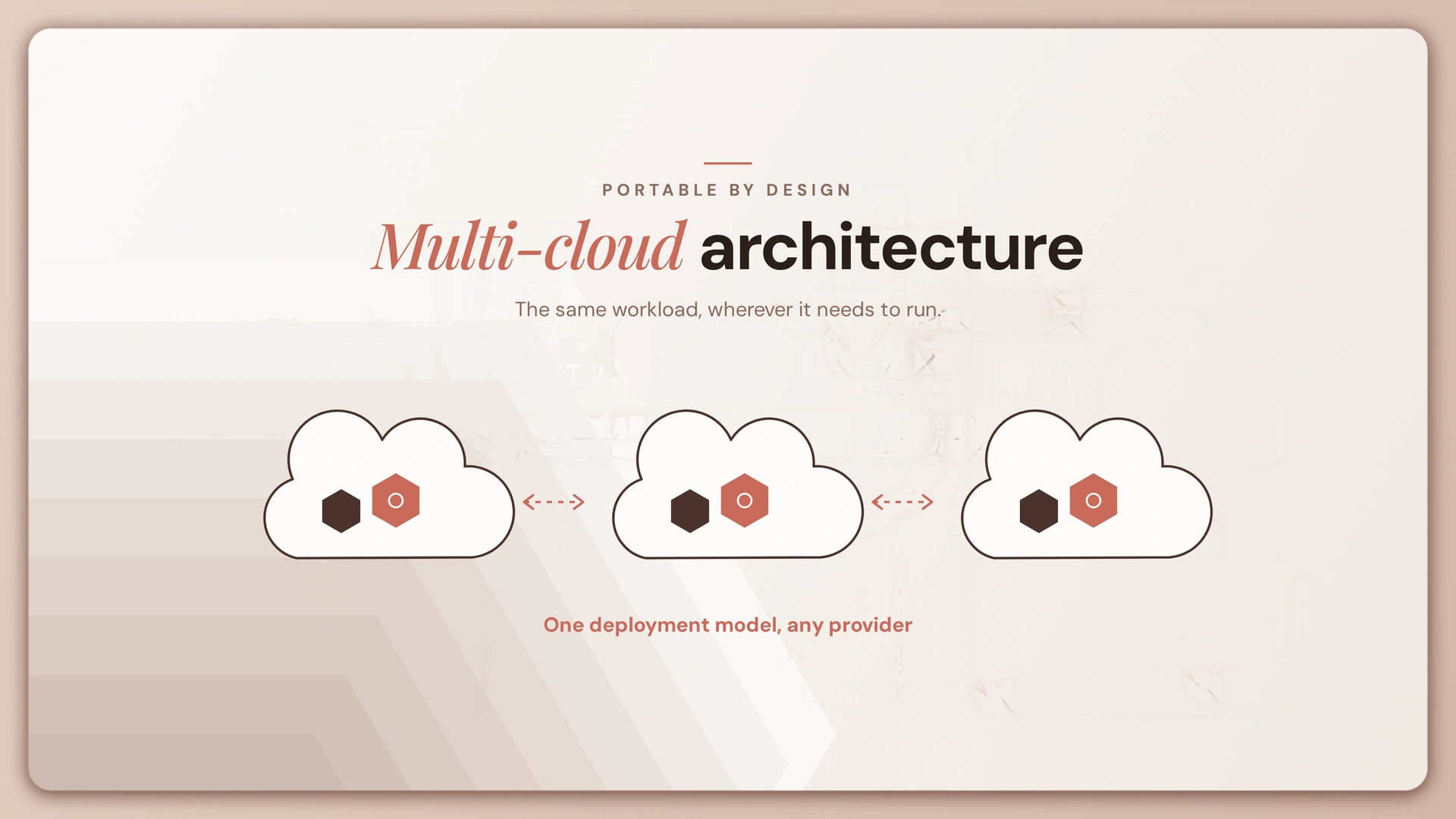
Multi-cloud architecture is a strategy that uses services from two or more public cloud computing providers, such as AWS, Microsoft Azure, and Google Cloud, to run different applications and workloads rather than committing everything to one vendor.
Most organizations are already living some version of this, whether they planned it or not.
According to the Flexera 2026 State of the Cloud Report, 89% of organizations have a multicloud strategy in place, while 73% operate hybrid cloud environments. That number includes plenty of companies that never sat down and designed a multi-cloud architecture. They acquired a company that ran on a different provider. A team signed up for a SaaS tool that happens to run on GCP. Someone spun up an AWS account for a proof of concept that never got decommissioned.
There’s a real difference between an architecture and an accumulation, and it’s worth naming early, because it reframes the whole question. The question isn’t “should we adopt multi-cloud.” For most enterprises past a certain size, it’s “we’re already multi-cloud, so should we make it deliberate.”
Three distinctions get conflated constantly, and clearing them up matters before anything else:
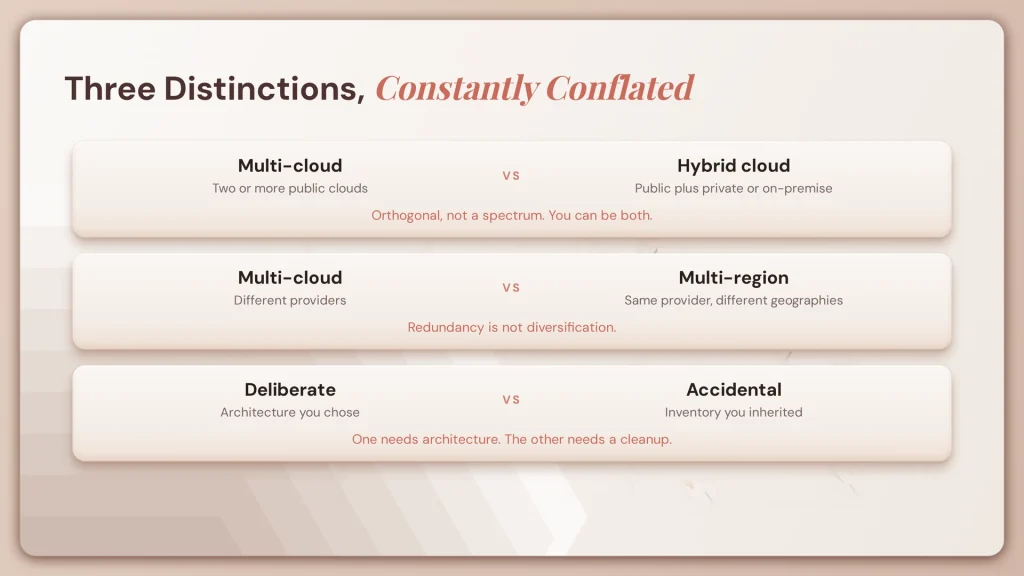
Multi-cloud vs hybrid cloud. Multi-cloud means two or more public clouds. Hybrid cloud combines public cloud with private cloud or on-premise infrastructure. They’re orthogonal concepts, not a spectrum, and an enterprise can be both at once. That combination, hybrid multi-cloud, is increasingly the default enterprise reality rather than the exception.
Multi-cloud vs multi-region. Multi-region deploys workloads across geographic regions within a single provider. It solves availability and latency, not concentration risk or vendor lock-in. Running redundant infrastructure in us-east and eu-west on the same cloud is not a multi-cloud architecture, no matter how resilient it makes you.
Deliberate vs accidental multi-cloud. The accidental version is an inventory problem wearing an architecture’s clothes. Mergers introduce platforms already committed to different providers, legacy contracts limit standardization, and shadow procurement adds accounts nobody centrally tracks. Recognizing which one you have determines whether your next step is architecture work or a cleanup project.
The three layers of multi-cloud architecture
Every multi-cloud environment, deliberate or accidental, breaks down into three layers. Understanding where portability actually lives, and where it doesn’t, is the difference between an architecture that works and one that just adds bills.

Infrastructure layer. This is compute, storage, and networking, the raw primitives every provider sells. They look interchangeable on a feature comparison chart and behave very differently in production. Instance families have different price-performance curves. Storage classes have different lifecycle semantics, and current 2026 pricing has both AWS and Azure pushing hot-tier storage near $0.02 to $0.023 per GB, with GCP close behind. Networking is where multi cloud architecture in cloud computing actually gets hard: connecting environments requires the public internet, a paid provider interconnect, or a dedicated network fabric, and each option trades cost against latency differently.
Platform layer. This is the portability layer, and Kubernetes is the dominant answer to it. Containers make application code deployable across any provider’s managed Kubernetes service, which is the foundation of a kubernetes multi-cloud architecture. But containers portable does not mean the system portable. A workload built on a provider’s managed database, message queue, or identity service is not actually movable just because the application shell runs in a container, and that’s where most real lock-in sits. Infrastructure-as-code tools like Terraform add reproducibility, letting you define provisioning once and apply it across providers. That’s not the same as provider-agnostic. It makes the process repeatable, not the outcome interchangeable.
Management layer. This is centralized governance: identity federation, unified observability, cost attribution, policy enforcement, and security posture across every provider in the estate. It’s also where multi-cloud programs most often stall. Each provider ships its own IAM model, its own tagging conventions, its own billing granularity, and its own security defaults. Tools like Azure Arc and Google Anthos extend a single management plane across providers, and Lyzr’s own management layer for AI agents specifically, the Control Plane, works on the same principle applied to agent governance rather than raw infrastructure. But no tool purchase substitutes for the sustained operational commitment of unifying three different providers’ worth of controls.
Common multi-cloud architecture patterns

Enterprises don’t adopt multi-cloud for one universal reason. They adopt it for five recurring ones, and each carries a distinct trade-off.
Best-of-breed by workload. Analytics on one provider, application hosting on another, machine learning on a third, each chosen for a specific capability. The difficulty is data movement between them, and that movement is rarely free.
Redundancy and failover. The same workload deployed across two providers to survive a provider-level outage. This is the most expensive pattern to run correctly, and most organizations discover their failover path was never actually tested when the outage they were insuring against finally happens.
Data residency and sovereignty. Regional workloads placed wherever a provider has compliant regional presence. Of the five patterns, this is the most defensible reason to run multi-cloud, because the constraint is a regulation, not a preference. It’s also the pattern behind most sovereign AI deployments and a driver of interest in private AI agents.
Cost arbitrage. Placing workloads wherever price-performance is best at a given moment, including spot pricing and committed-use discounts. The theory is sound. In practice, the savings frequently don’t survive contact with egress fees and the engineering overhead of building genuinely portable, price-aware workloads.
Acquisition-driven and organic. The accidental case again, but as a pattern to manage rather than a starting question. The initial work here is not architecture, it’s inventory: discovering what exists, consolidating identity, and unifying security policy before deciding on integration.
The costs nobody puts on the slide
This is the part every vendor selling into multi-cloud has an incentive to underplay.
Data egress fees. This is the most consistently underestimated cost, because it scales with usage rather than sitting as a fixed line item. Current 2026 published rates put AWS S3 at $0.09 per GB for the first 10TB of internet egress each month, Azure Blob Storage at $0.087 per GB, and Google Cloud Storage at $0.12 per GB for the first terabyte. Industry analysis puts egress fees at 6 to 12% of total cloud bills, and hidden surcharges compound it further. AWS NAT Gateway alone adds $0.045 per GB in processing fees on top of standard egress, and Azure and GCP run comparable NAT charges. The underlying asymmetry is structural, not accidental: cloud providers charge four to six times more to retrieve data than to store it, which is the exact mechanism that makes leaving a provider expensive regardless of what the contract says about portability. Rates change, so verify current pricing directly before budgeting against these figures.

Duplicated tooling and operational surface. Monitoring, IAM, CI/CD, and cost management each need a per-provider solution or a cross-cloud abstraction layer. Both cost money and both cost engineering time. A tool built specifically to track this, like a cloud cost analyzer agent, helps with visibility, but visibility isn’t the same as the underlying spend going away.
Skill fragmentation. Deep expertise in one cloud platform is already scarce and expensive to hire for. Expertise across three is rarer still, and teams stretched across providers tend to run shallow everywhere rather than deep anywhere, which shows up later as slower incident response and suboptimal architecture decisions.
Expanded security surface. Every additional provider means another IAM model, another set of default configurations, and another audit scope. Misconfiguration risk grows faster than provider count, not linearly with it.
Diluted committed-spend leverage. Enterprises earn real discounts by committing to volume with a single provider. Splitting workloads across three providers splits that negotiating position three ways, and Flexera’s 2026 data shows the consequence at scale: wasted cloud spend has ticked back up to 29%, driven by the cost complexity of AI and new PaaS adoption.
A page that’s honest about these costs loses all credibility the moment its numbers are wrong, which is why every figure above carries a source and a date, and why it’s worth re-verifying pricing before it goes into a budget.
When multi-cloud is the wrong choice
No vendor selling cloud services is going to write this section, which is exactly why it matters.

You’re below the scale where the complexity pays off. For most organizations, one provider run well outperforms three run adequately. The operational tax of multi-cloud is a permanent, recurring cost. The migration risk it’s meant to hedge against is a one-time event that may never happen.
Your reason is theoretical lock-in, not a named constraint. Lock-in is a real cost. So is the ongoing overhead of avoiding it. Paying an operational tax indefinitely to hedge against a hypothetical future migration is frequently the worse trade, and it’s worth running the arithmetic rather than assuming.
You can’t staff it for the long haul. Multi-cloud is an ongoing operational commitment, not a project with an end date. If the team can’t sustain it eighteen months from now, don’t start it today. This is the same discipline that shapes decisions around private AI adoption, where the deployment model has to match the team that will actually operate it.
Your workloads depend on managed services, not just infrastructure. If the value comes from a provider’s managed database, identity stack, or AI tooling, portability is mostly illusory. Running the application shell somewhere else while the dependencies stay locked to one provider is theater, not architecture.
The honest counterpoint: the cases where multi-cloud genuinely is right are data residency requirements, a specific capability available on exactly one provider, real regulatory concentration-risk rules, and the acquisition realities covered earlier. Those are constraints. Everything else is preference, and preference doesn’t justify the ongoing cost.
Governance across providers
Multi-cloud without governance isn’t an architecture. It’s several unrelated environments that happen to share a budget line.
Five controls make up the working version of multi cloud architecture and governance:

Identity federation. A single identity provider as the source of truth, federated into each cloud’s native IAM system, so access decisions are made once rather than three times.
Unified tagging and cost attribution. A consistent tagging policy enforced across every provider. Without it, attributing spend back to a team or product is close to impossible once the estate grows past a handful of accounts.
Policy as code. Security and compliance rules defined once and applied consistently across environments, preventing the slow configuration drift that happens when each cloud team sets its own defaults. The same discipline applies directly to AI agent governance, where policy needs to travel with the agent regardless of which cloud it’s deployed on.
Centralized observability. Logs, metrics, and traces from every provider funneled into one place, because troubleshooting an issue that spans two clouds is nearly impossible without it.
A defined provider-selection process. A formal, documented process for deciding which workloads land on which provider, so placement is a decision rather than a habit. This is the layer that separates deliberate multi-cloud from the accidental kind described earlier, and it’s a core responsibility for platform teams specifically. Practices developed for governance in AWS environments translate directly here, just applied across more than one provider at once.
The DevOps implication is worth stating plainly: multi-cloud multiplies pipeline surface. Teams that succeed standardize the pipeline itself and abstract the deployment target, rather than maintaining a separate pipeline per provider. That’s the difference between multi cloud architecture and devops done deliberately and done by accretion.
Multi-cloud for AI workloads
Everything above applies to traditional workloads. AI changes the calculus in ways worth treating separately, because the constraints are genuinely different, not just a scaled-up version of the same problem.

AI workload placement diagram showing GPU availability, model access, and data location varying across three cloud providers, with an agent orchestration layer sitting above all three. Alt text: Multi cloud architecture diagram for AI workloads showing GPU availability, model access, and data gravity across cloud providers✨ Generate Image
GPU availability is regional and scarce. The provider with the right accelerator, in the right region, at the right moment, is frequently not the provider running everything else. That’s a hard capability constraint, and it’s the strongest argument for deliberate multi-cloud that AI workloads introduce.
Model availability differs by provider. Frontier models ship with different exclusivity and terms depending on the cloud: OpenAI’s models integrate most tightly with Azure, Google’s Gemini models are native to Vertex AI, and Anthropic’s Claude is available through both Bedrock and Vertex. A model-portfolio strategy, the kind covered in depth in multi-LLM platforms in enterprise AI, is frequently incompatible with a single-cloud commitment.
Inference economics behave differently from storage economics. Chatty, low-latency inference traffic across a cloud boundary, embeddings and retrieval context moving back and forth, racks up egress costs in a way that periodic backup replication never does.
Data gravity applies harder. Training and retrieval-augmented generation want to sit next to the data they’re using. Since enterprise data already lives across multiple clouds and on-premise systems, the AI workload tends to follow the data rather than the reverse, which pushes enterprise AI toward wherever that data already sits.
The practical architectural answer isn’t duplicating infrastructure across clouds. It’s abstraction at the model and orchestration layer, so the agent or application layer is cloud-agnostic without every underlying system needing to be. This is the design principle behind Lyzr’s approach to model deployment: an agent platform built to run on any cloud with any model, deployable inside a customer’s own environment rather than a shared one. That includes direct support through the AWS, Google Cloud, and Microsoft Azure partnerships, patterns for deploying agents on AWS specifically, and coordination patterns like the hybrid flow AI architecture for workloads that split across environments. It’s the same principle discussed in model flexibility vs vendor lock-in, extended from the model layer down to the infrastructure layer. For teams evaluating generative AI in cloud-based solutions more broadly, the same question applies: which layer are you actually making portable, and is that the layer where the real constraint lives?
How to decide
Skip “should we go multi-cloud.” Ask these four questions instead.
What specific constraint requires a second provider? If you can’t name one, a regulation, a capability gap, an acquisition, you probably don’t need one yet.
Can you staff the operational commitment for the next two years? Be honest about current headcount and budget for specialized tooling, not the headcount you’re planning to hire.
Which layer are you actually abstracting? Raw infrastructure portability is genuinely hard. Platform-layer portability through Kubernetes is more achievable but limited by managed-service dependencies. Model-layer abstraction, for AI specifically, is usually the most practical of the three.
What would migration cost if you stayed single-cloud and had to move in three years? Compare that one-time number against the annual cost of running multi-cloud starting today. This is the question that turns an abstract fear of lock-in into an actual comparison, and it’s the one CIO and CTO stakeholders should be asking before signing off on the architecture, not after.
If the answer to question one is genuinely a named constraint, a well-governed multi-cloud architecture is worth building. If it isn’t, the better use of the same budget is usually making one cloud provider work harder.
Frequently asked questions
What is multi-cloud architecture?
An architecture using services from two or more public cloud providers to run different applications and workloads, typically for capability, resilience, or data residency reasons.
What is the difference between hybrid cloud and multi-cloud?
Multi-cloud means two or more public clouds. Hybrid combines public cloud with private or on-premise infrastructure. Many enterprises run hybrid multi-cloud, which is both at once.
What is a multicloud strategy?
A deliberate approach to which workloads run on which provider, backed by governance, cost attribution, and a defined selection process, as distinct from accumulating providers by accident.
What are the three layers of cloud architecture?
In a multi-cloud context: infrastructure (compute, storage, network), platform (containers and orchestration for portability), and management (governance, identity, cost, and observability).
What are the four types of cloud deployment?
Public, private, hybrid, and community cloud. Multi-cloud is a pattern that can span public deployments and combine with hybrid.
What is IaaS, PaaS, and SaaS?
Infrastructure, platform, and software as a service. They describe how much of the stack the provider manages, from raw compute up to complete applications.
What are the five pillars of cloud architecture?
Frameworks vary by provider, but commonly cited pillars are operational excellence, security, reliability, performance efficiency, and cost optimization. Multi-cloud tends to strain the last two hardest.
What is DevOps with multi-cloud?
Standardizing pipelines, infrastructure as code, and deployment practices so the target provider becomes a parameter rather than requiring separate tooling per cloud.
Is multi-cloud more expensive?
Usually, in operational terms, even when raw compute pricing is cheaper somewhere else. Egress, duplicated tooling, staffing, and lost volume-discount leverage typically outweigh unit-price arbitrage.
Do you need Kubernetes for multi-cloud?
No, but it’s the most common portability layer available. Containers make applications portable, not the managed services underneath them, which is where most real lock-in actually sits.
Where this leaves you
Multi-cloud isn’t a maturity milestone, and it isn’t a mistake either. It’s a trade you make on purpose, for a reason you can name, or it’s a cost you’re paying without knowing why.
If you’re already running workloads across more than one provider, the useful next step isn’t a bigger diagram. It’s an honest audit: which workloads landed there deliberately, which arrived through an acquisition or a shadow account, and which one, if you’re being precise about it, is being kept “for flexibility” that nobody has actually used. Run the migration-cost comparison from the decision framework above against your own environment before the next budget cycle locks in another year of the current setup.
For teams whose multi-cloud reality is increasingly an AI reality, specifically GPU placement, model portfolio decisions, and data gravity, the architecture question and the AI deployment question are converging. Lyzr’s guide to sovereign AI covers that convergence in more depth, and the agents to production playbook is the practical next read if you’re deciding where those agent workloads should actually run.
How to Take Agents to Production
Book A Demo: Click Here
Join our Slack: Click Here
Link to our GitHub: Click Here