You ship a new version of your support agent on a Friday afternoon. The health checks pass. CPU is normal. Response times look fine. Three days later, someone on the escalation team notices the agent has started recommending a refund policy that doesn’t exist. Nothing crashed. Nothing alerted. The agent was “up” the entire time.
That gap, between a system that’s technically healthy and a system that’s behaviorally wrong, is why canary and blue-green deployments for AI agents matter more than they ever did for ordinary web services. A stalled checkout page throws an error you can see immediately. A degraded agent just quietly gets worse at its job, one conversation at a time, while every dashboard stays green.
This guide walks through how canary and blue-green deployments work, how they change when the thing you’re releasing is an agent rather than a stateless service, and how to build a rollout process that catches a behavioral regression before it reaches your entire user base.
The short version
- Canary and blue-green deployments for AI agents control how much traffic touches a new agent version before you commit to it fully.
- Blue-green gives you a full environment switch and a fast rollback. Canary gives you gradual, observed exposure under real traffic.
- With AI agents, a successful deployment isn’t just uptime. It’s task completion, tool accuracy, cost per task, and safety staying within bounds.
- Canary and A/B testing are not the same thing. One asks if a release is safe. The other asks which version performs better.
- A deployment strategy controls exposure. An AI Control Plane governs the agent being exposed, before, during, and after the rollout.
What are canary and blue-green deployments?
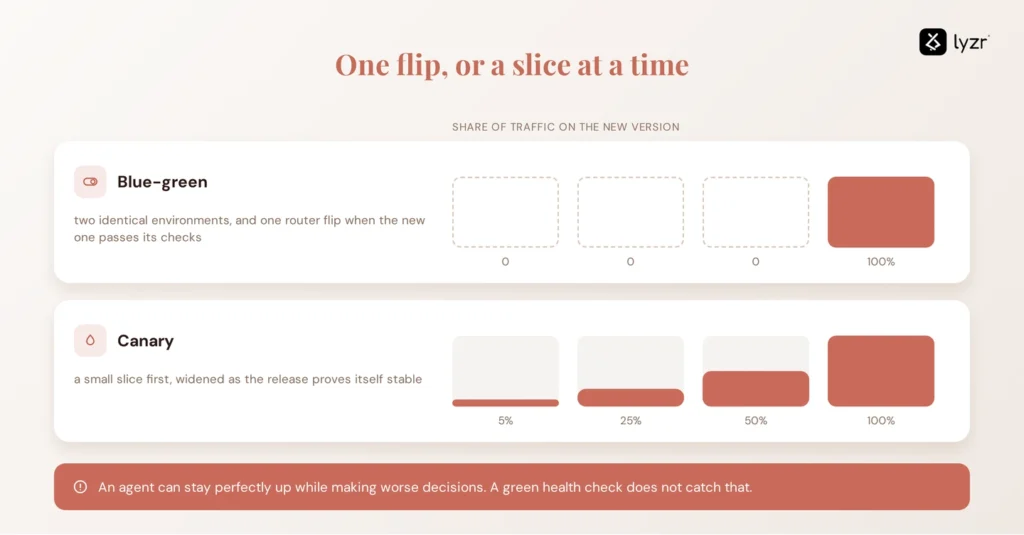
Canary and blue-green deployments are two ways of controlling how much traffic reaches a new software version before you trust it completely. They reduce release risk, but they manage exposure in different ways.
A blue-green deployment runs two identical production environments. One serves live traffic (Blue). The other holds the new version (Green).
Once Green passes its checks, a router flips 100% of traffic over in one move.
A canary deployment takes the opposite shape.
A canary deployment sends a small percentage of production traffic to the new version first, then increases exposure as the release proves stable.
Both patterns exist to answer the same question: how do you change a running system without betting the whole user base on the first try. With a conventional web application, that question is mostly about uptime and error codes. With an AI agent, it’s a much bigger question, because the application can stay perfectly “up” while the agent itself starts making worse decisions. That’s the problem this guide is really about, and it’s why taking AI agents to production requires more validation than a green health check.
What is a blue-green deployment for AI agents?
A blue-green deployment for an AI agent means running your current agent version (Blue) alongside a new candidate version (Green), validating Green against agent-specific criteria, then switching traffic over in one move.
The mechanics look like this:
- Deploy the new agent version to a parallel, isolated environment (Green).
- Run it against a structured evaluation set before any live user sees it. This is where AI agent evaluation does the heavy lifting.
- Send representative traffic or replayed production tasks to Green, not live users.
- Compare Green against Blue on quality, latency, cost, and safety.
- Switch the router to Green once thresholds are met.
- Keep Blue idle and ready in case you need to reverse the switch immediately.
- Decommission Blue once Green has held steady for a defined observation period.

The step that traditional blue-green playbooks skip is step 2 and 4. A conventional rollback trigger is an error rate or a failed health check. For an agent, that’s not enough. Validation before the switch needs to cover:
- Task completion: Does Green finish the job at the same rate as Blue?
- Tool-call accuracy: Is it selecting the right tools and passing the right arguments?
- Factual accuracy: Has the hallucination or error rate increased?
- Latency: Is the new version noticeably slower per task?
- Cost: Is it consuming more tokens or budget for the same outcome?
- Safety: Is it staying within defined policy and permission boundaries?
- Escalation rate: Are more conversations being handed off to humans?
None of these show up in a standard uptime dashboard. All of them determine whether Green is actually safe to become the new Blue.
What is a canary deployment for AI agents?
A canary deployment for an AI agent exposes the new version to a small, real slice of production traffic first, then expands that exposure gradually as the agent proves itself. A typical progression might look like 1% to 5% to 10% to 25% to 50% to 100%, though those numbers are illustrative, not a formula to copy. The right starting percentage depends on your traffic volume and how expensive a mistake would be.r traffic volume and how expensive a mistake would be.

Canary is particularly valuable for agents because staging environments cannot replicate the full distribution of real user prompts, which means a canary can surface behavioral regressions that synthetic evaluation missed entirely. Real users generate prompt phrasing, edge-case context, and tool combinations that are genuinely difficult to reproduce in a test harness, no matter how thorough that harness is.
There’s a practical limit worth naming here, though. If your traffic volume is low, a tiny canary slice won’t tell you much.
A 1% canary at ten requests per second would see roughly six requests a minute, which may be too small a sample to draw reliable conclusions about many error or quality metrics.
The same logic applies to agent quality metrics. If your canary group is too small to generate a meaningful sample of tasks, you’re not really validating anything, you’re just delaying the risk.
This is where AI agent observability becomes important: the rollout needs visibility into both technical performance and agent behavior.
During the rollout, keep watching:
- Agent success rate against the stable baseline
- Tool failures and unexpected tool sequences
- User feedback signals, including thumbs-down and abandonment
- Escalation rate to human agents
- Latency and cost per task
- Safety and policy violations
- Any behavior that wasn’t anticipated in testing
Canary vs blue-green vs rolling vs A/B testing
These four terms get used interchangeably, but they answer different questions.
Canary vs blue-green vs rolling vs A/B testing: quick comparison
| Strategy | How traffic moves | Primary purpose |
| Blue-green | Full switch between two environments | Safe cutover with fast rollback |
| Canary | Gradual percentage rollout | Risk reduction under real traffic |
| Rolling | Instances replaced progressively | Resource-efficient, no duplicate environment |
| A/B testing | Users segmented between variants | Compare outcomes between versions |
A rolling deployment replaces the old version with the new one in batches, keeping part of the existing fleet running while the update progresses.
It’s well suited for both monolithic and microservices applications, though it requires less additional infrastructure than blue-green.
The tradeoff is that a clean rollback is harder, since old and new instances run side by side for a stretch of time.
Canary and A/B testing look almost identical from the outside, both split traffic between two versions, but they’re solving different problems.
Canary asks: is the new version safe enough to roll out?
A/B testing asks: which version performs better against a defined outcome?
If you need to know whether a change is safe, run a canary test. If you need to know whether a change is better, run an A/B test.
For an AI agent, you might use a canary to confirm a new model version hasn’t introduced a hallucination regression, then later run an A/B test to see whether a revised system prompt actually improves customer satisfaction scores. Same infrastructure, different question, different success criteria.
How do you choose between canary and blue-green for an AI agent?
Choose the strategy that matches how much you already trust the new version and how expensive a mistake would be.
Choose blue-green when:
- Rollback speed is critical and you need to reverse a bad release in seconds
- You can afford to run duplicate infrastructure, even temporarily
- The new version has already cleared extensive offline evaluation
- You need a clean cutover with no mixed-version period
Choose canary when:
- The agent’s behavior is genuinely hard to predict from offline testing
- Real-user traffic is the only way to validate certain prompt patterns
- The agent holds high-risk tools or write permissions
- You want exposure to expand only as confidence builds
- Infrastructure cost rules out running a full duplicate environment
You don’t have to pick one forever. Teams can combine the approaches when their infrastructure supports it, using a parallel environment for validation and controlled traffic exposure for the production rollout. Blue-green earns the confidence. Canary spends it carefully.
What should you monitor during an AI agent deployment?
A deployment isn’t successful just because the new container is healthy. The agent itself has to stay inside the behavioral and policy boundaries you set before you ever pushed the release. That means monitoring across four distinct categories, not one.

Reliability, error rate, availability, timeout rate. The metrics a conventional service would track.
Agent quality, task completion rate, tool-call accuracy, evaluation score, hallucination or error rate. This is where AI agent observability earns its place in the stack, because traditional monitoring tells you if something broke, not why an agent made a specific decision.
Operations, latency, token usage, cost per task, throughput. Numbers that determine whether the new version is sustainable at scale, not just whether it works once.
Governance, policy violations, permission failures, unexpected tool calls, audit events tied to agent identity. This is the category most conventional deployment checklists skip entirely, and it’s the one that gets escalated to legal and compliance when it goes wrong. Getting this layer right often overlaps with how teams already approach keeping enterprise data secure across agent workflows.
A practical, safe AI agent rollout checklist
Before deployment
- Register the new agent version in a central AI agent registry.
- Run it against a structured AI agent evaluation set before any live user sees it. This is where evaluation does the heavy lifting.
- Define explicit success and failure thresholds for quality, cost, and latency, not just “it looks fine.”
- Confirm tool permissions match least-privilege expectations for this version.
- Establish rollback conditions before the first user ever sees the new version.
During deployment
- Start with controlled exposure, whether that’s a canary slice or a validated green environment.
- Monitor technical metrics and behavioral metrics side by side, not sequentially.
- Compare the new version against the stable baseline continuously, not just at the end.
- Automate the stop-and-rollback trigger rather than relying on someone noticing in time.
After deployment
- Keep monitoring past the point where the rollout “finished.” Regressions surface late.
- Record the deployment outcome against the agent’s version history.
- Update the agent’s status and retire the previous version once confidence holds.
How does an AI control plane fit into agent deployments?
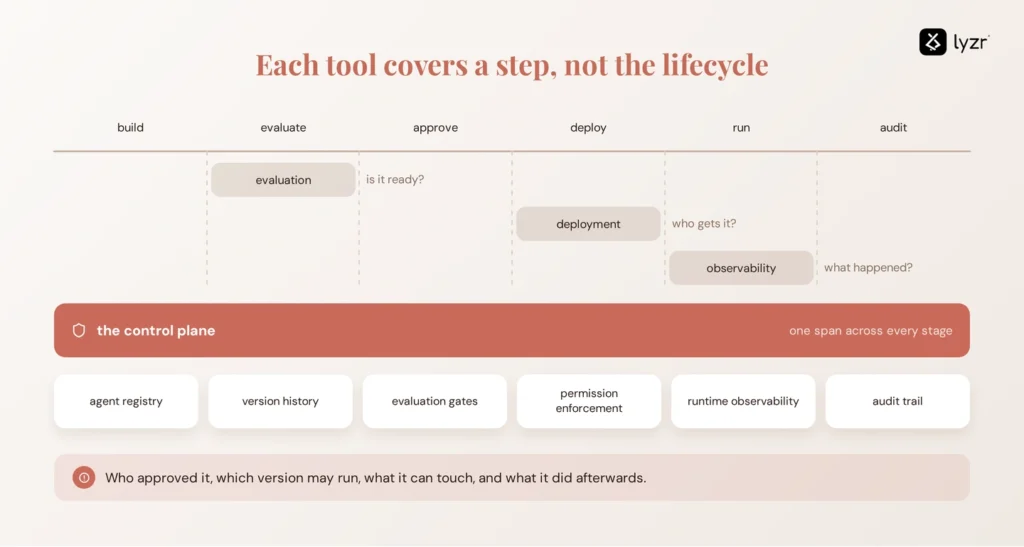
Deployment infrastructure controls how a new agent version reaches production. A blue-green switch, canary progression, or Kubernetes rolling update manages exposure. Evaluation determines whether the version is ready. Observability shows what happens after it goes live.
But none of these mechanisms answers the governance questions around the agent itself: who approved the release, which version is authorized to run, what tools it can access, and what happened after deployment.
An AI Control Plane connects those pieces to the agent’s full lifecycle: a central agent registry, version and configuration history, evaluation gates that block a promotion until thresholds are met, permission enforcement over what tools an agent can touch, runtime observability, and an audit trail that survives past the deployment itself.
For a deeper look at this architecture, see Lyzr’s AI Control Plane architecture.
How does Lyzr Opencontroller fit?
This is where an AI Control Plane becomes useful alongside deployment infrastructure. Lyzr’s Opencontroller provides that governance layer around the rollout process.
It evaluates, validates, and governs every agent and workflow before it reaches production, and monitors agents, applications, APIs, and infrastructure in real time from one control plane.
It also gives teams a working answer to the permission question before a canary or blue-green rollout even starts, which matters when an agent’s tool permissions carry real operational risk.
The workflow runs in a straight line: agent change, evaluation, approval, deployment, runtime monitoring, audit. Opencontroller doesn’t replace Kubernetes, your cloud deployment platform, or your CI/CD pipeline. It adds the agent-level governance layer that sits around them, the layer that answers questions a routing rule or a health check was never built to answer.
If your team is running canary or blue-green rollouts on agents with real permissions and real cost exposure, that governance layer is worth seeing directly. Explore Opencontroller or book a demo to walk through how it plugs into a rollout you’re already running.
Frequently asked questions
A canary deployment releases a new version to a small subset of traffic first, then expands that exposure gradually as the version proves stable, limiting the blast radius of any issue.
A blue-green deployment runs two identical environments, one live and one idle, deploys the new version to the idle one, validates it, then switches all traffic over at once with a fast rollback path if needed.
Blue-green shifts all traffic in one move and depends on pre-cutover validation. Canary shifts traffic gradually and depends on continuous observation while live users are already involved.
Blue-green switches everything at once for a clean cutover. Canary shifts traffic gradually to reduce risk. Rolling replaces instances progressively without needing a duplicate environment, trading a clean rollback for lower infrastructure cost.
Canary asks whether a new version is safe to release. A/B testing asks which version performs better against a defined outcome. They can share the same traffic-splitting infrastructure but answer completely different questions.
Neither is universally better. Blue-green wins when rollback speed and a clean cutover matter most. Canary wins when you need to validate unpredictable behavior against real production traffic before expanding exposure.
Deploy AI agents safely by validating behavior, not just uptime, before and during rollout, using controlled exposure through canary or blue-green strategies, and enforcing permission and policy checks through a governance layer around the deployment.
Monitor reliability metrics like error rate and availability, agent quality metrics like task completion and hallucination rate, operational metrics like latency and cost per task, and governance metrics like policy violations and audit events.
Book A Demo: Click Here
Join our Slack: Click Here
Link to our GitHub: Click Here