Launching an AI agent feels like crossing the finish line.
The prompts are ready. The Knowledge Base is connected. Workflows are configured. Evaluations pass. Production deployment happens.
For a few days, everything looks good.
Then small things start showing up.
A customer asks a question and receives an incomplete response.
A tool call fails because an argument format changed.
The Knowledge Base retrieves context, but not the right context.
Task completion quietly starts dropping.
None of these failures are dramatic enough to trigger alarms. But together, they create a bigger problem:
The agent that worked during testing is no longer behaving the same way in production.
That is exactly the gap Lyzr’s Agent Improvement Engine is designed to solve.
Instead of simply telling teams whether an agent is running, it continuously monitors agent behavior, detects quality issues from live traces, and suggests improvements to strengthen performance over time.
Why AI agents need improvement loops
Traditional applications usually behave predictably.
AI agents don’t.
The same agent interacts with different users, different contexts, changing knowledge, and evolving workflows. As production traffic increases, small quality issues become difficult to spot manually.
Most teams eventually run into questions like:
- Why did task completion suddenly drop?
- Why is the agent hallucinating occasionally?
- Why are responses becoming less relevant?
- Why did tool usage suddenly change?
Looking through hundreds of traces manually isn’t realistic.
That creates a new requirement:
Agents need continuous improvement after deployment.
What happens after an agent is registered in Lyzr?
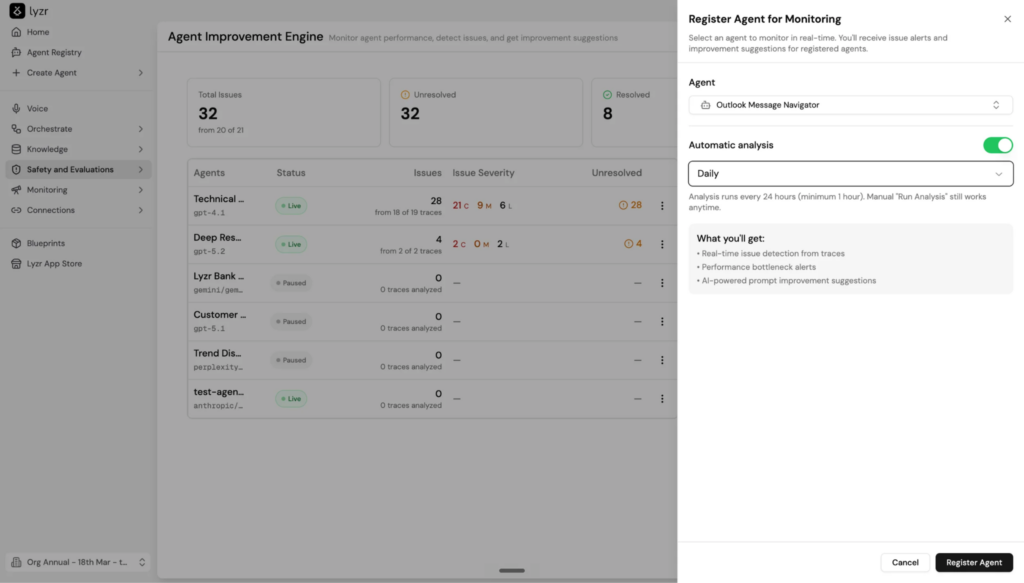
The process starts with something simple.
- Register an agent.
- Enable automatic analysis.
- Choose a schedule.
Once registered, Lyzr continuously analyzes live traces and starts surfacing issues automatically.
| What Lyzr tracks | What it looks for |
| Task Completion | Whether the user’s request was fully completed |
| Hallucinations | Fabricated or unsupported responses |
| Tool Correctness | Whether the correct tool was selected |
| Argument Correctness | Whether tool inputs were accurate |
| Contextual Relevancy | Whether retrieved context was useful |
| Answer Relevancy | Whether the response actually answered the question |
| Knowledge Retention | Consistency across multi-step interactions |
Instead of waiting for users to report problems, the system starts identifying them as traces arrive.
A dashboard that shows behavior, not just metrics
Many monitoring systems stop at operational metrics.
You get numbers like:
- Latency: 2.3 seconds
- Cost: Stable
- Requests processed: 2,500
Everything appears healthy.
But quality can still decline.
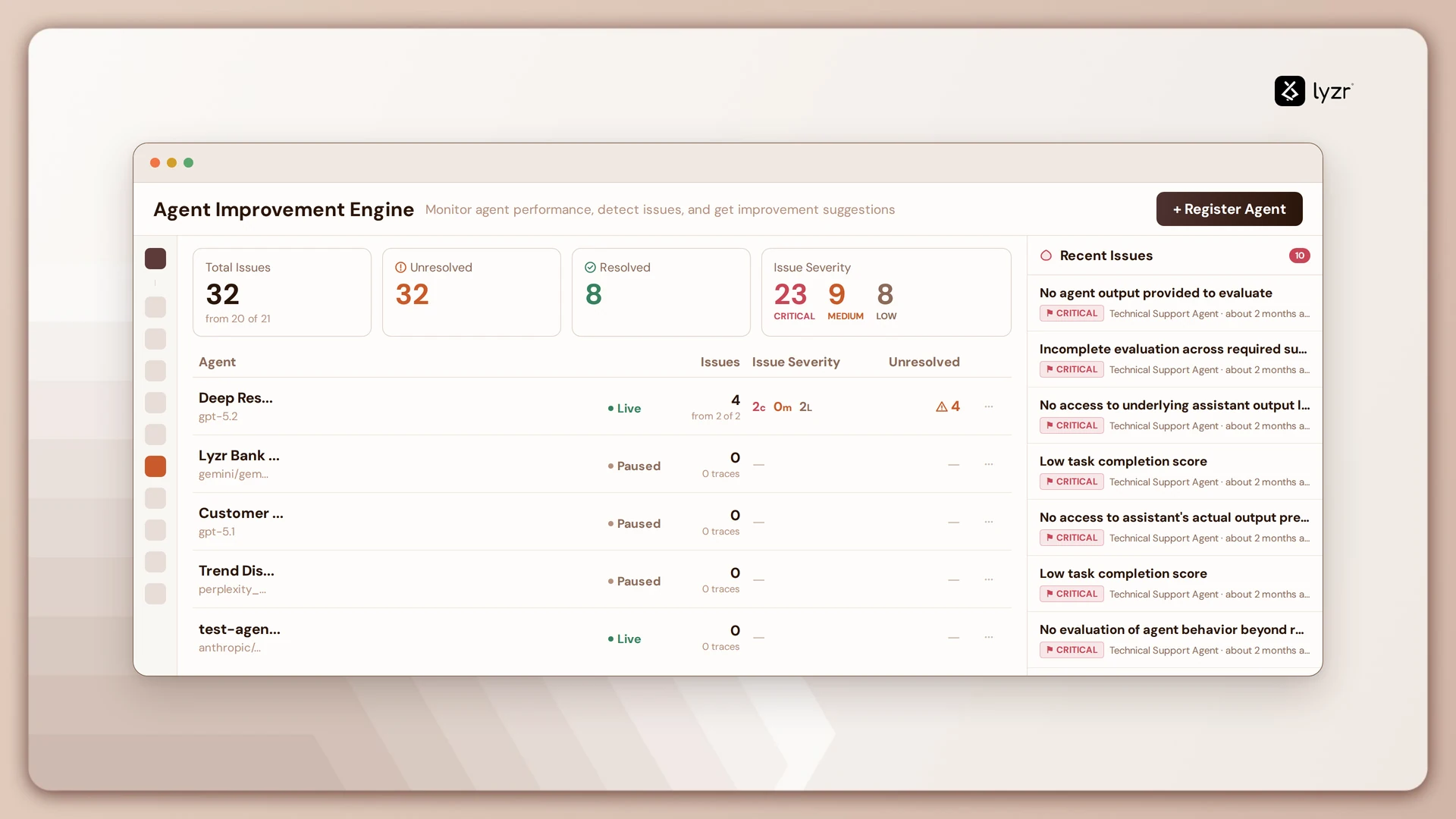
The Agent Improvement Engine dashboard adds another layer:
- Total issues detected
- Resolved vs unresolved issues
- Severity breakdown
- Recent issues across agents
- Agent-level health status
A dashboard might reveal:
| Severity | Count |
| Critical | 21 |
| Medium | 9 |
| Low | 6 |
Now the conversation changes.
Instead of:
“Something feels wrong.”
Teams can say:
“Task completion is repeatedly failing across multiple traces and needs investigation.”
From traces to actual root causes
A single failed interaction does not tell much. Patterns do.
Lyzr observes multiple traces and detects:
| Trace Pattern | Possible Impact |
| Low task completion scores | Users not reaching desired outcomes |
| Missing outputs | Incomplete evaluations |
| Knowledge retrieval failures | Irrelevant answers |
| Hallucination signals | Loss of trust |
The Improvement Engine links these issues directly back to traces.
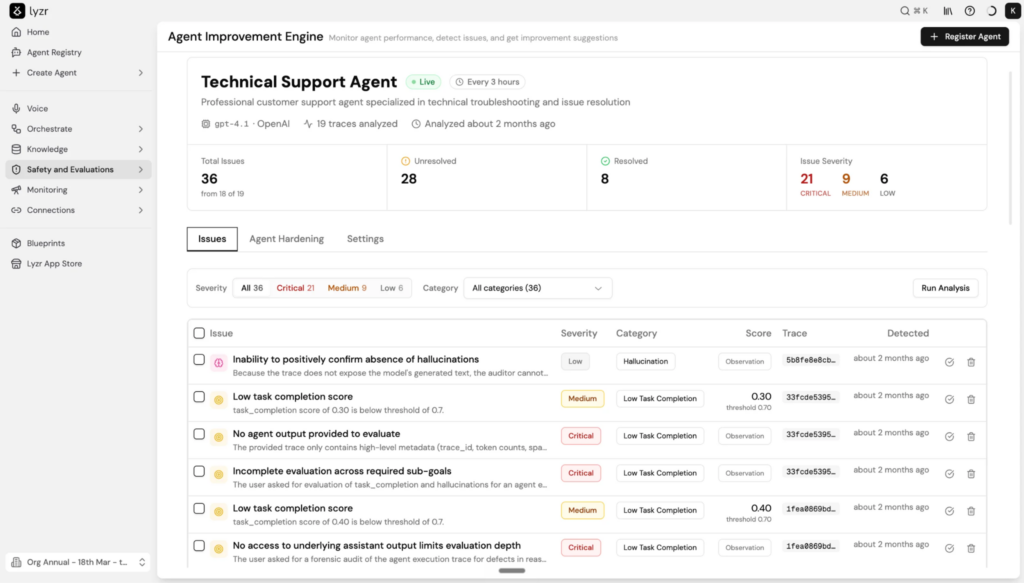
Selecting a trace reveals:
- Evidence for why the issue was flagged
- Trace duration
- Token usage
- Tool calls
- Cost
- Full conversation history
This turns debugging from guesswork into investigation.
The interesting part: Agent Hardening
Finding issues is useful. Fixing them automatically is where things become interesting.
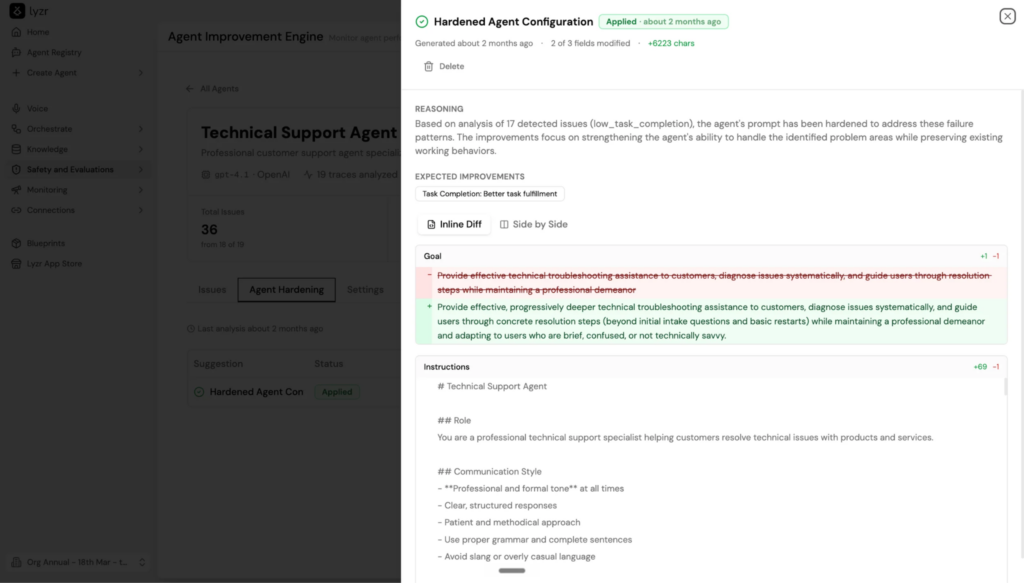
The Agent Hardening layer analyzes patterns across multiple failures and generates AI-powered recommendations.
Rather than saying: “Task completion is low.”
It suggests: “Update the goal and instructions to improve completion rates and reduce ambiguity.”
And instead of replacing everything, Lyzr shows a structured diff view.
| Current Configuration | Suggested Configuration |
| Generic troubleshooting instructions | Progressive troubleshooting steps with clearer user guidance |
| Broad response goals | More specific completion behavior |
| Missing context rules | Explicit instructions for uncertain scenarios |
Teams can compare changes side-by-side before applying them.
One click later:
- Push to Production.
- The configuration updates.
- A new version is created.
The improvement becomes part of the agent lifecycle.
Guardrails matter too
Monitoring itself consumes resources.
If left unchecked, evaluation costs can grow unexpectedly.
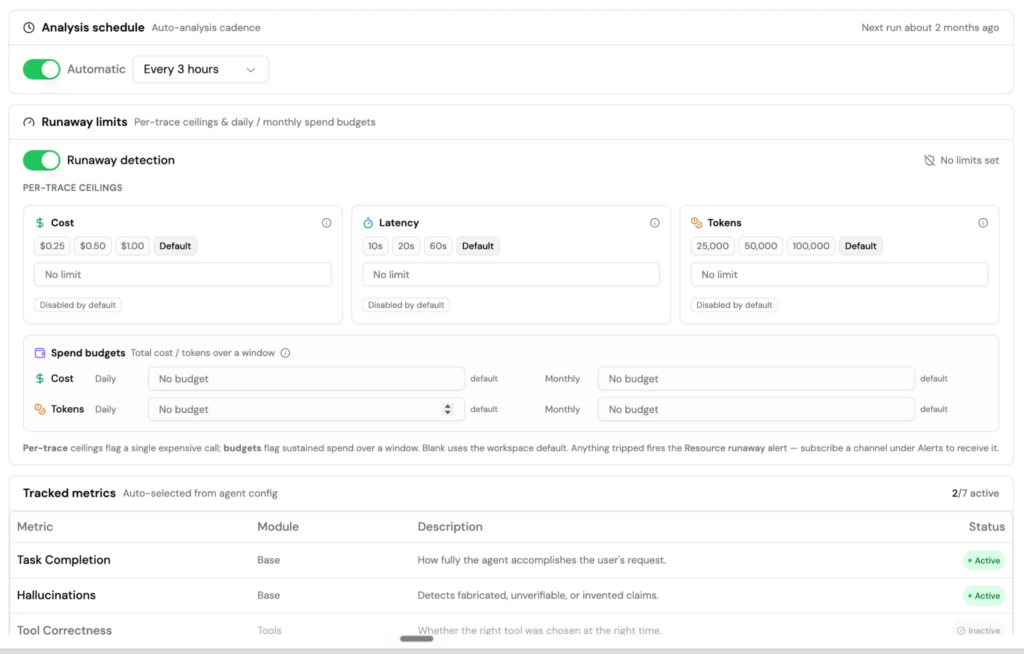
Lyzr includes runaway limits to control this.
Teams can set:
✓ Per-trace cost ceilings
✓ Token limits
✓ Latency thresholds
✓ Daily and monthly budgets
Think of it as setting spending boundaries before usage surprises appear.
Quick check: How healthy is an agent environment?
Answer these:
□ Are agent traces continuously monitored?
□ Is task completion measured automatically?
□ Are hallucinations being tracked?
□ Can recurring issues be connected back to traces?
□ Can improvements be suggested automatically?
If more than two boxes remain unchecked, the agent is likely operating without a continuous improvement loop.
AI agents should improve after every deployment
Production should not be the point where visibility ends.
It should be the point where learning starts.
AI agents change as conversations change. They interact with scenarios that testing environments never anticipated.
Lyzr’s Agent Improvement Engine closes that gap by continuously observing behavior, surfacing issues, identifying patterns, and generating improvements.
Because the goal isn’t just getting agents into production.
The goal is helping them become better after they get there.
Book A Demo: Click Here
Join our Slack: Click Here
Link to our GitHub: Click Here