TL;DR
- Build and deploy AI agents for business workflows: Lyzr Agent Studio.
- Quick app-to-app automation: Zapier.
- Visual design and complex routing: Make.
- Self-hosted, flexible AI workflows: n8n.
- Open-source visual automation: Activepieces.
- Enterprise RPA and process orchestration: UiPath, Appian, Power Automate or ServiceNow, depending on your environment.
An invoice arrives as a PDF. It needs matching against a purchase order, a check against policy, an approval, and an entry in the finance system. Employee onboarding, customer support and IT requests follow the same pattern: several systems, unstructured information, exceptions and manual handoffs. Automating one task doesn’t remove the work of completing the whole process.
AI-driven business process automation combines workflow rules, AI capabilities, application integrations and agent-driven decisions to handle more of that process. The market splits into tools that connect apps, platforms built around RPA and enterprise process management, and platforms for building AI agents that act across systems.
This guide compares the best platforms for AI-driven business process automation, including Lyzr Agent Studio, by use case, technical effort, flexibility and production requirements.
What is AI-driven business process automation?
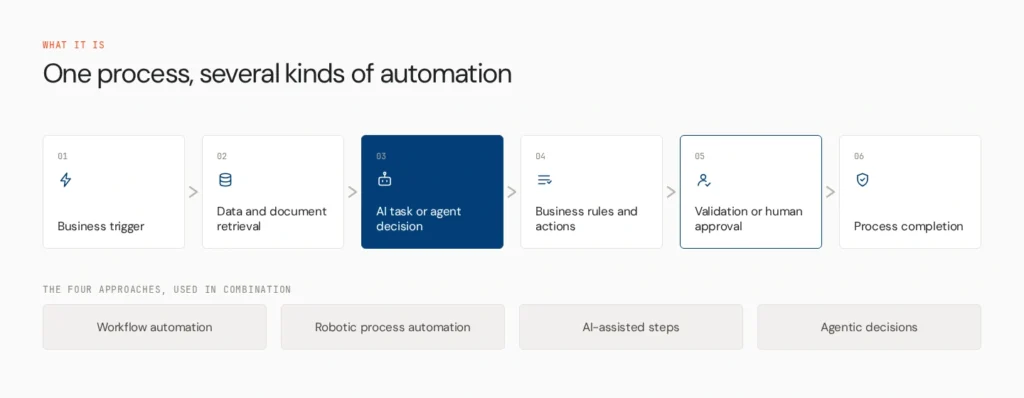
AI-driven business process automation uses AI, workflow automation, integrations and business rules to run multi-step processes with less manual work. Four approaches sit under that umbrella:
- Traditional workflow automation moves work through predefined triggers, conditions and actions.
- RPA automates repetitive digital tasks, often through existing application interfaces.
- AI-assisted automation adds AI for classification, extraction, summarisation or drafting inside a workflow.
- Agentic automation uses agents that select tools, retrieve information and make bounded decisions.
They work together. A reliable process might use deterministic steps for calculations, an agent to interpret a document and a human approval for exceptions.
What should buyers look for?
- Workflow design: can teams map triggers, conditions and dependencies visually or in code?
- AI and agent capabilities: can it handle documents, natural language, context-based decisions and tool use?
- Integrations: can it reach the applications, databases and APIs your process needs?
- Reliability and oversight: testing, exception handling, approval steps and failure inspection.
- Deployment and operations: fit with your infrastructure, access controls and maintenance capacity.
Connector counts and AI feature lists alone are a weak basis for choosing.
How we compared them
We assessed workflow complexity, AI and agent capabilities, integrations, ease of use, approvals and testing, deployment options and licensing, using official documentation and pricing pages. This is a feature-and-fit comparison, not an identical hands-on test of every platform.
The 10 platforms
1. Lyzr Agent Studio
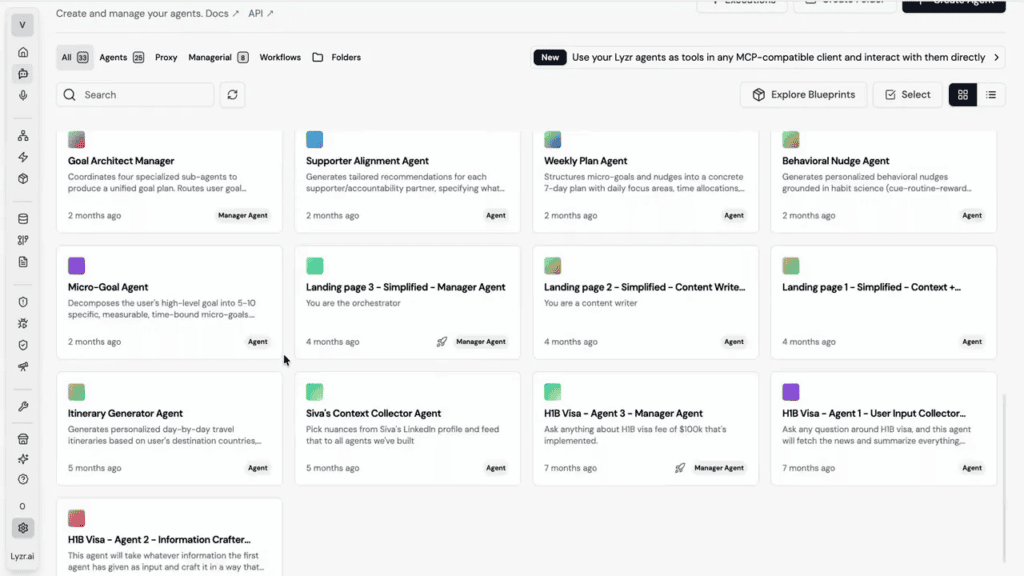
Lyzr Agent Studio is a no-code and low-code environment for building, testing, deploying and monitoring agents. Agents can use connected tools and knowledge bases, including RAG, a Neo4j knowledge graph and text-to-SQL. Multi-agent work runs through a dynamic Manager Agent or SuperFlow, a visual DAG workflow, and every agent is reachable through a REST API.
In an invoice process, an agent can extract details from a document, pull purchase-order data, flag discrepancies and route exceptions for approval. Agentic automation works best with clear boundaries, validation and human oversight.
- Strengths: build, test and deploy in one place, with fixed and adaptive orchestration
- Limits: advanced governance across many teams may need other Lyzr components, and custom systems need configuration
Best for: teams building AI agents for workflows with several steps, tools and decisions.
2. Zapier

Zapier is built for accessible app-to-app automation, with AI-assisted workflow creation, agents and MCP support.
- Strengths: speed to first automation, the largest app ecosystem
- Limits: task-based pricing climbs at volume, and deep custom logic is harder
Best for: teams automating routine work across common SaaS applications.
3. Make

Make gives teams a visual canvas for multi-step scenarios with data transformation and conditional routing, and now supports AI agents inside scenarios. Operation-based pricing takes some modelling.
- Strengths: clear visual control, easier troubleshooting
- Limits: large scenarios get hard to maintain
Best for: teams needing visual control over cross-application workflows.
4. Activepieces
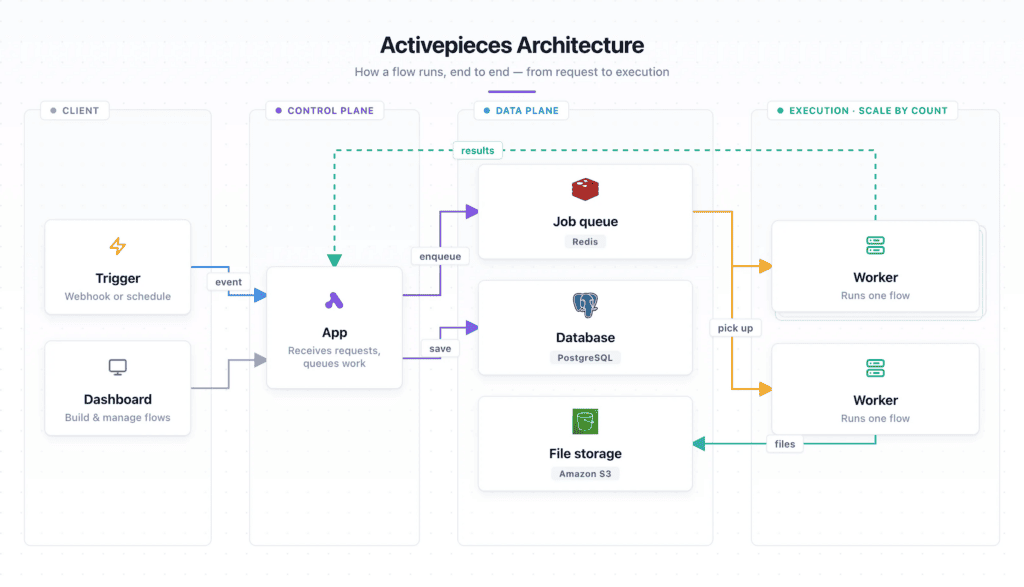
Activepieces is an open-source automation platform built on modular pieces, with roughly 760 pieces and native MCP support, available hosted or self-hosted. Its core is MIT-licensed, while enterprise directories carry a separate licence.
- Strengths: permissive core, self-hosting, modern AI features
- Limits: no-code pieces are more limited than Zapier or Make, and you own operations when self-hosting
Best for: teams wanting visual automation with open-source or self-hosted options.
5. n8n
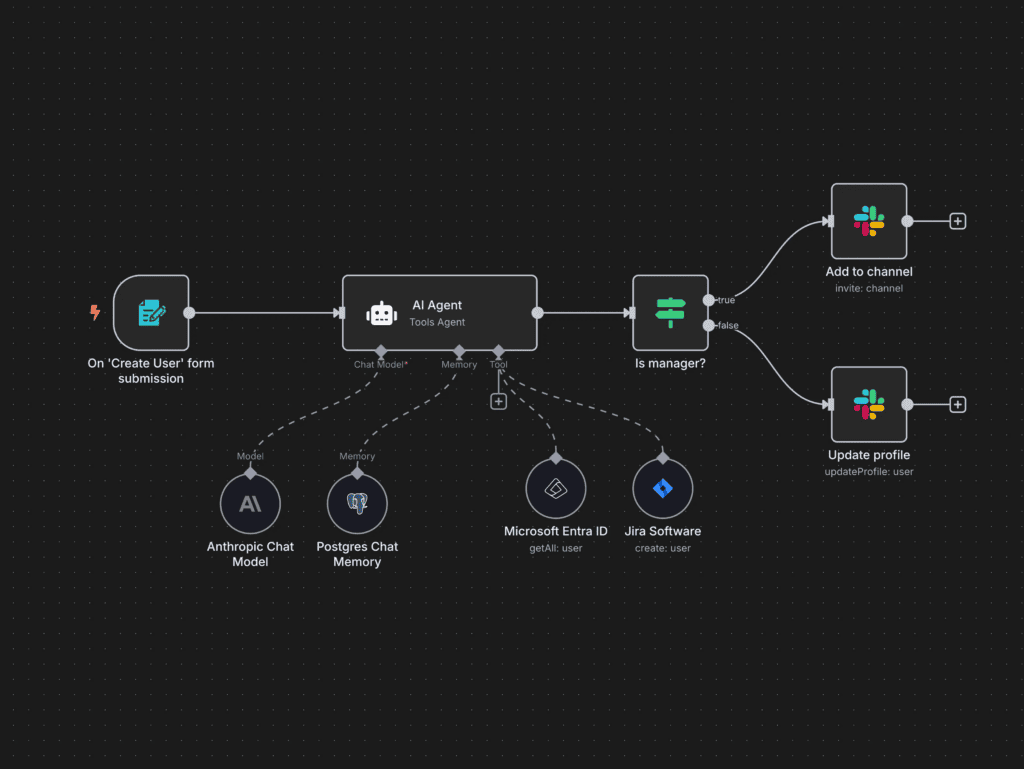
n8n offers flexible workflows with 400+ integrations, an AI Agent node and custom code. Its fair-code Sustainable Use License makes it source-available and self-hostable, but not classic open source.
- Strengths: flexibility, deployment control
- Limits: hosting and maintenance costs, licence restrictions on commercial reuse
Best for: technical teams that want control over AI workflows and deployment.
6. Gumloop

Gumloop is an AI-native visual platform for chaining LLM calls, web data, processing and API actions into workflows. Third-party reviews report it is cloud-only and that credit consumption can be hard to forecast.
- Strengths: accessible to non-technical teams, strong for LLM-heavy tasks
- Limits: no self-hosting, governance features sit at higher tiers
Best for: business teams assembling AI-powered workflows visually.
7. UiPath
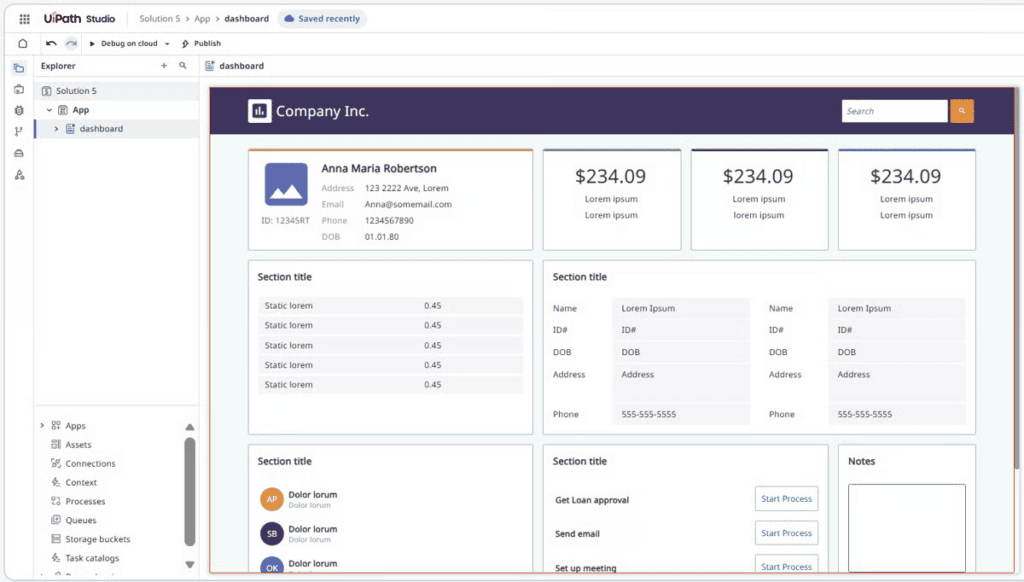
UiPath combines RPA, AI and orchestration, with capabilities in process mining, document processing and agentic automation.
- Strengths: legacy application coverage, established enterprise programmes
- Limits: licensing and implementation can be heavy
Best for: enterprises extending RPA into AI-enabled operations.
8. Appian
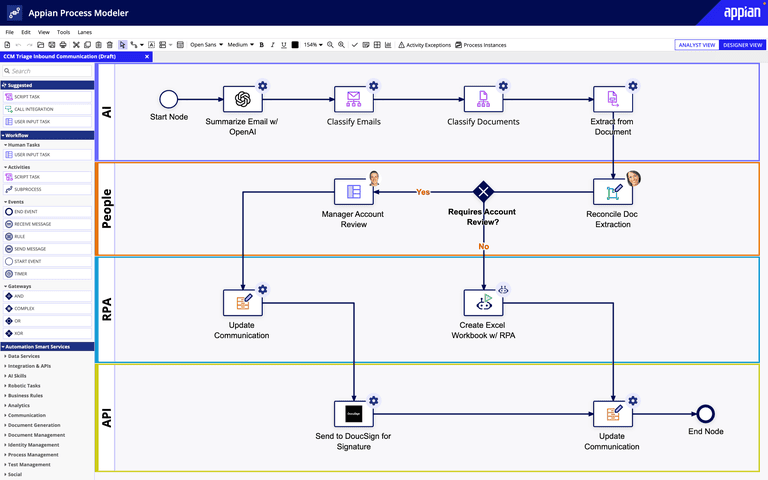
Appian focuses on enterprise process management and low-code applications, with orchestration, case management and governance.
- Strengths: traceability, access controls and structured approvals
- Limits: a defined process model means more setup
Best for: regulated enterprises needing structured process governance.
9. Microsoft Power Automate
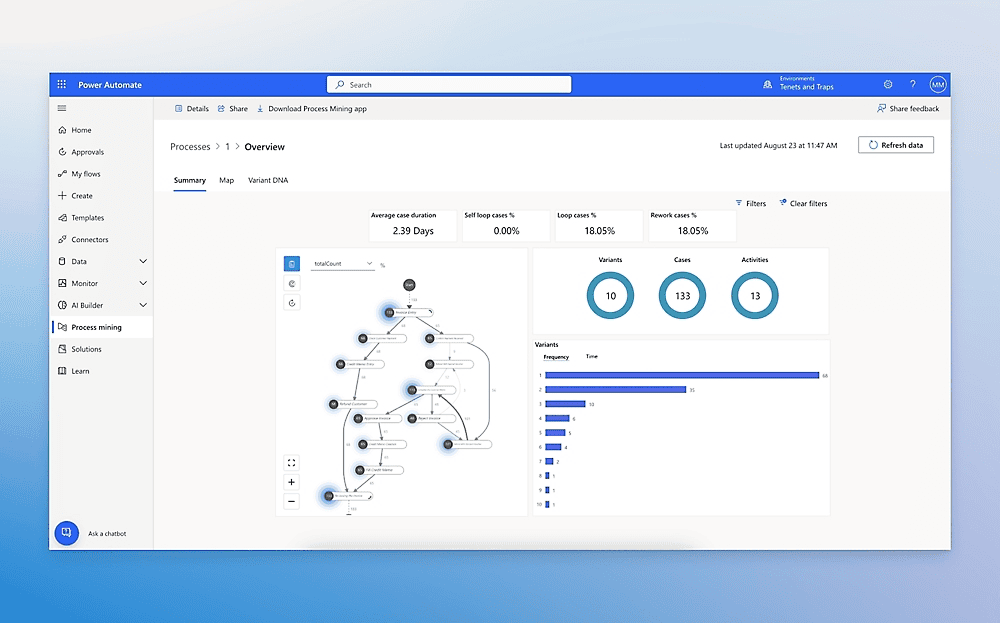
Power Automate automates workflows across Microsoft applications and supported external systems, with triggers, connectors and approvals. Copilot Studio is a separate product for building agents that can work with Power Platform flows.
- Strengths: native fit with Microsoft 365
- Limits: licensing and connector scope vary
Best for: organisations automating across Microsoft 365 and connected applications.
10. ServiceNow

ServiceNow centres on IT service management, employee services and operational workflows, with AI and agent capabilities tied to its records and approval structures.
- Strengths: automation connected to established service workflows
- Limits: value depends on an existing deployment
Best for: enterprises automating within ServiceNow service workflows.
Side-by-side comparison
| Platform | Primary strength | Automation approach | Best-fit team | Key consideration |
| Lyzr Agent Studio | Building and deploying agents | Agents, tools, workflows | Business and technical teams | Needs defined boundaries and review |
| Zapier | App-to-app automation | No-code triggers and actions | Business teams | Task-based pricing at volume |
| Make | Visual multi-step workflows | Visual canvas | Operations teams | Complexity grows with scale |
| Activepieces | Open-source visual automation | No-code flows, MCP | Teams wanting control | You own self-hosting |
| n8n | Flexible AI workflows | Nodes plus code | Technical teams | Fair-code licence, you run infrastructure |
| Gumloop | AI-native visual workflows | Node-based AI chains | Business and ops teams | Cloud only, credit pricing |
| UiPath | RPA plus AI | Robots, orchestration | Large enterprises | Licensing, implementation effort |
| Appian | Process management | Low-code process models | Regulated enterprises | Structured, heavier setup |
| Microsoft Power Automate | Microsoft ecosystem | Flows and connectors | Microsoft-centred orgs | Licensing and ecosystem fit |
| ServiceNow | Service and IT workflows | Platform workflows | Existing ServiceNow users | Strongest inside ServiceNow |
What business processes can AI platforms handle?
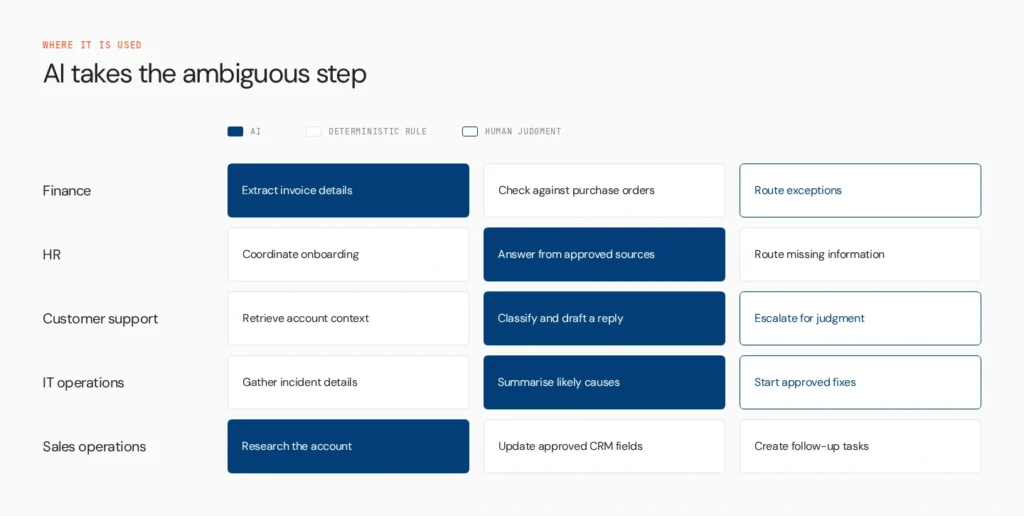
Finance: extract invoice details, check them against purchase orders and route exceptions.
HR: coordinate onboarding, answer policy questions from approved sources and route missing information.
Customer support: retrieve account context, classify a request, draft a response and escalate cases needing judgment.
IT operations: gather incident details, summarise likely causes and recommend or start approved fixes.
Sales operations: research an account, update approved CRM fields and create follow-up tasks.
In each case AI handles ambiguity, while deterministic rules and human approval cover consequential steps. For related reading, see AI agents for workflow automation and AI agents for enterprise workflows.
How to choose
- Choose a visual automation platform to connect apps and coordinate routine steps.
- Choose an open-source or self-hosted option if deployment control matters and you can maintain the infrastructure.
- Choose an enterprise RPA or process platform for legacy applications, case management or an established ecosystem.
- Choose an agent-building platform when the workflow needs agents that retrieve context, use tools and make bounded decisions.
Prioritise testing and oversight when workflows touch sensitive data, financial approvals or customer communications. Start with one high-value process, map its steps and exceptions, and test platforms against that real workflow. The Agents to Production playbook covers rollout.
Where Opencontroller fits
Agent Studio helps teams build and deploy agents for business processes. When an organisation runs agents across teams, frameworks and environments, Opencontroller addresses the separate challenge of governing and monitoring that estate.
Choose the platform that fits the process
The best platforms for AI-driven business process automation depend on process complexity, the role of AI, existing systems and the control you need in production. Start with the process you want to improve, then find where AI can handle unstructured information, decisions and exceptions. For teams building workflows around agents, Lyzr Agent Studio provides a way to configure, test and deploy agents that work with business tools and data. Explore it for your use case, or book a demo to discuss your requirements.
FAQs
It depends on the need. Zapier and Make suit visual automation, n8n and Activepieces suit self-hosting, UiPath and Appian suit enterprise processes, and Lyzr Agent Studio suits building agents.
There’s no universal best. The right choice depends on the process, data, applications, team skills and required oversight.
Map the process, find suitable AI tasks, connect the systems, configure logic and permissions, test exceptions, and deploy with monitoring.
Rankings depend on criteria such as legacy support, process management and AI features. UiPath, Automation Anywhere, Blue Prism, Appian and Microsoft Power Automate appear often, but check current research before treating that as a ranking.
Yes. n8n and Activepieces offer free self-hosted editions, and several tools have free plans. Self-hosting still carries infrastructure and maintenance costs.
AI workflow automation is the broader category of AI-enhanced workflows. Agentic automation uses agents that choose tools and make bounded decisions during a task.
Book A Demo: Click Here
Join our Slack: Click Here
Link to our GitHub: Click Here