Building an AI workflow is easy.
Keeping it reliable in production is where things fall apart.
A simple flow that starts with an LLM call quickly turns into retries, approvals, branching logic, observability, webhook handling, scheduling, memory management, and recovery systems. Teams often spend more time building orchestration infrastructure than the actual workflow itself.
That’s where SuperFlow comes in.
SuperFlow is a visual workflow orchestration layer inside Lyzr built for AI agents, LLM pipelines, approvals, and long-running enterprise workflows. It combines visual workflow building with durable execution infrastructure so teams can build production-ready AI systems without stitching together orchestration frameworks manually.
What Exactly is SuperFlow?
SuperFlow is a drag-and-drop workflow builder that lets teams visually orchestrate:

- AI agents
- LLM calls
- HTTP requests
- Human approvals
- Conditional routing
- Loops and retries
- Scheduled workflows
- Multi-agent systems
Instead of writing orchestration code from scratch, workflows are assembled visually on a canvas and executed on a durable runtime.
The key difference is this: Most workflow builders help create flows.
SuperFlow is designed to run those flows reliably in production.
Why Most AI Workflows Break in Production??

But real-world enterprise workflows introduce problems quickly.
| Problem | What Usually Happens |
| Model timeouts | Entire workflow crashes |
| Deployment restart | In-progress tasks disappear |
| Human approvals | Workflow state gets lost |
| API retries | Duplicate emails or charges |
| Scheduled workflows | Missed executions |
| Multi-agent coordination | Logic becomes difficult to maintain |
Most teams end up building infrastructure around the workflow:
- Retry systems
- Persistence layers
- Approval handling
- Observability
- Audit trails
- Queue management
- State recovery
SuperFlow handles these out of the box.
How SuperFlow Works
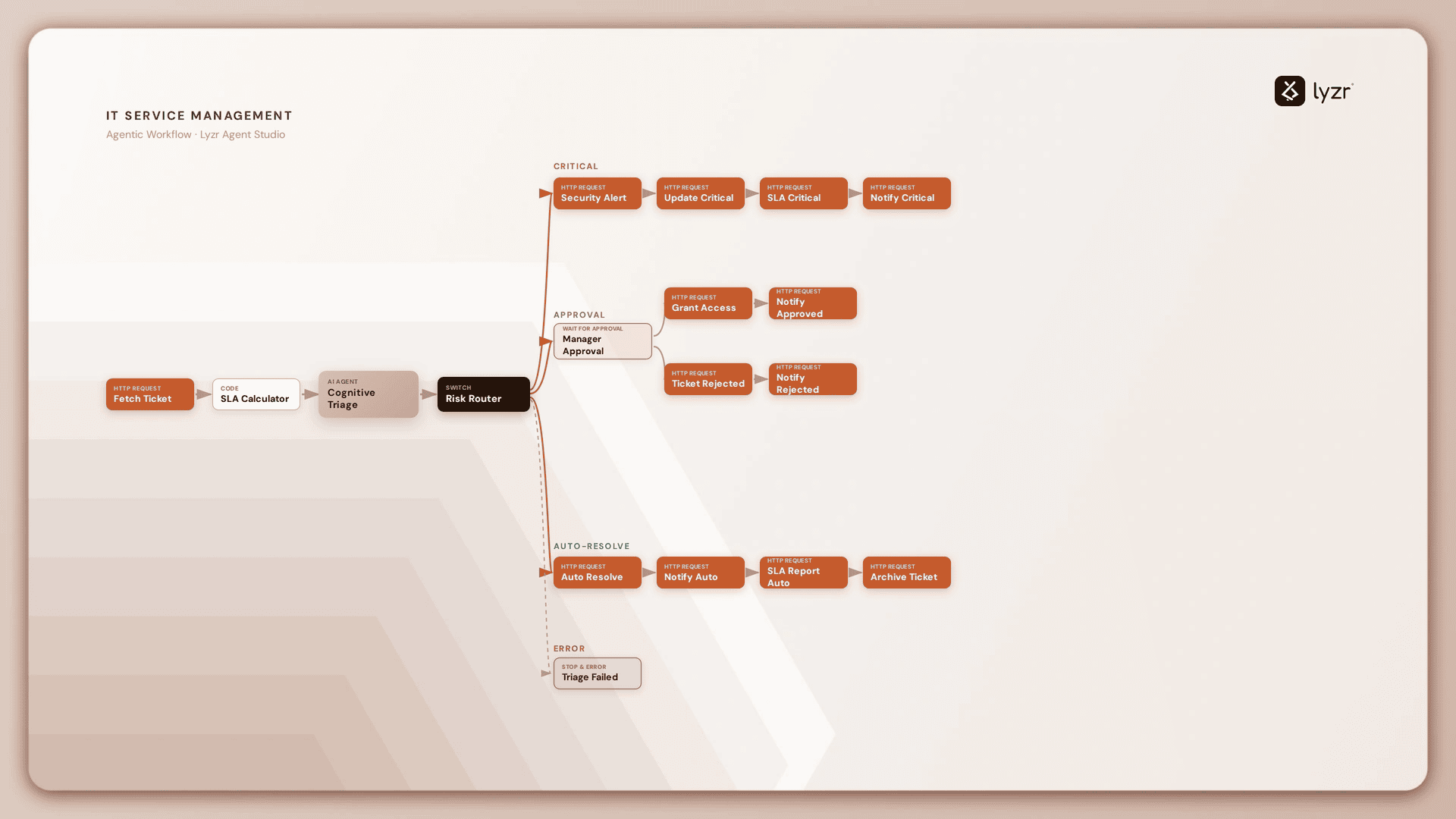
At its core, SuperFlow works like a visual orchestration canvas.
Teams drag nodes onto the canvas and connect them together into workflows.
Typical nodes include:
| Node Type | Purpose |
| Trigger | Starts the workflow |
| LLM | Makes model calls |
| AI Agent | Runs configured agents |
| HTTP Request | Connects external systems |
| If / Switch | Adds conditional branching |
| Loop | Repeats execution logic |
| Wait for Approval | Pauses for human review |
| Code Block | Runs JavaScript transformations |
Every workflow starts with a Trigger node.
From there, workflows can branch into multiple paths, invoke agents, pause for approvals, or call APIs.
Building Your First SuperFlow
The fastest way to understand SuperFlow is to build one.
Inside Lyzr Studio, teams can create a working AI workflow in minutes without writing orchestration code.
Step 1: Open SuperFlow
Inside Agent Studio, open the SuperFlow section from the sidebar.

You’ll land on the workflow list page where existing flows, templates, and execution history are available.
Step 2: Create a New SuperFlow
Click New SuperFlow.
| Step | Action |
|---|---|
| 1 | Choose Start Blank or begin with a Template |
| 2 | For a quickstart workflow, select Start Blank |
| 3 | Name your workflow |
| 4 | Open the Canvas to start building |
Step 3: Understand the Canvas
The SuperFlow editor includes:
| Area | Function |
| Node Palette | Add workflow components |
| Canvas | Build and connect workflows |
| Toolbar | Run, save, align, inspect history |
| Execution Panel | Watch workflows execute live |
The editor auto-saves changes continuously.
Step 4: Add a Trigger
Every workflow needs exactly one Trigger node, which acts as the entry point into the workflow. For a basic flow, no additional configuration is required. During execution, any message entered automatically becomes the workflow input.
Step 5: Add an LLM Node
Next, drag an LLM node onto the canvas.
The LLM node performs a direct model call:
- Choose a provider
- Select a model
- Add a system prompt
- Return a response
Example system prompt:
“You are a helpful assistant. Answer concisely in one or two sentences.”
This is the fastest way to create a working AI workflow without configuring a full agent first.
Step 6: Connect the Nodes
Connect the Trigger output to the LLM input.
Once connected:
- The Trigger passes data forward
- The LLM automatically receives the message
- The workflow becomes executable
SuperFlow validates workflow reachability automatically, ensuring every node traces back to the Trigger.
Step 7: Run the Workflow
Click the Run button. The execution panel opens on the right side.
Enter a prompt like: “What is SuperFlow in one sentence?”
Then click Run. The workflow executes immediately.
Step 8: Watch Live Execution
During execution:
- Running nodes pulse amber
- Completed nodes show green checks
- Failed nodes show errors
- Active edges animate as data flows
The execution panel preserves outputs from every node.
This makes debugging significantly easier compared to traditional orchestration systems.
What Makes SuperFlow Different?
Most orchestration systems stop at workflow design.
SuperFlow focuses heavily on runtime reliability.
1. Durable Execution
| Workflow Component | What Happens |
|---|---|
| LLM calls | Each step is persisted to durable storage |
| Tool calls | Execution state is saved and can resume after a failure |
| Loops | Progress is persisted so completed iterations aren’t repeated |
| HTTP requests | Execution state is retained across service interruptions |
| Agent executions | Completed steps are preserved and never re-run |
2. Human-in-the-Loop Approvals
SuperFlow supports approval gates directly inside workflows.
A workflow can pause indefinitely while waiting for:
- Compliance approval
- Manager review
- Risk validation
- Manual intervention
While paused, workflows consume essentially zero compute resources.
Once approved, execution resumes from the exact same point.
This is especially useful for:
- Financial workflows
- Enterprise procurement
- Customer onboarding
- Escalation systems
3. Multi-Agent Orchestration

SuperFlow supports orchestration across different agent systems and frameworks.
That includes compatibility with:
- LangChain
- CrewAI
- Claude agents
- GitClaw
- Internal Lyzr agents
Instead of replacing existing systems, SuperFlow acts as a coordination layer across them.
Teams can visually compose planner agents, worker agents, tools, and routing logic in one canvas.
4. Crash-Safe Scheduling
Traditional cron jobs can fail silently when infrastructure goes down, causing scheduled executions to be missed.
SuperFlow ensures scheduled executions are persisted durably, so even during temporary outages, runs remain queued and automatically resume once the infrastructure is back online.
No workflow execution gets lost, making durable scheduling especially critical for billing systems, reporting workflows, daily data syncs, and other enterprise automations.
Where SuperFlow Works Best
SuperFlow is particularly useful for workflows that involve:
| Use Case | Why SuperFlow Fits |
| Customer support automation | Prevent duplicate actions |
| Multi-agent orchestration | Coordinate planner + worker agents |
| Document processing | Parse, classify, route |
| Human approvals | Pause safely for reviews |
| Long-running workflows | Persist execution state |
| Scheduled enterprise jobs | Crash-safe execution |
SuperFlow vs Traditional Workflow Builders
| Traditional Workflow Builders | SuperFlow |
| Focus on visual logic | Focus on runtime reliability |
| Limited recovery systems | Durable execution |
| Weak approval handling | Native HITL support |
| Stateless retries | Exactly-once execution |
| External orchestration required | Built-in orchestration runtime |
| Difficult multi-agent coordination | Visual agent orchestration |
Why Enterprises Are Looking at SuperFlow
Enterprise AI adoption is shifting from experimentation to operational reliability.
The challenge is no longer:
“Can a workflow call an LLM?”
The challenge is:
“Can this workflow survive production?”
SuperFlow addresses the infrastructure gap between AI demos and enterprise-grade execution.
Instead of spending months building orchestration systems internally, teams can start with:
- Durable workflows
- Human approvals
- Scheduling
- Multi-agent coordination
- Runtime observability
- Crash recovery
Already built into the platform.
Final Thoughts
AI workflows are becoming more complex:
- Multiple agents
- Long-running tasks
- External APIs
- Human approvals
- Scheduled automations
The orchestration layer is becoming just as important as the model itself.
SuperFlow gives teams a way to visually build AI workflows while still getting the reliability expected from production infrastructure.
Instead of building orchestration scaffolding from scratch, teams can focus on the workflow itself.
And that changes how quickly enterprise AI systems can actually move into production.

Explore SuperFlow inside Lyzr Studio or browse the documentation at Lyzr Docs.
Book A Demo: Click Here
Join our Slack: Click Here
Link to our GitHub: Click Here