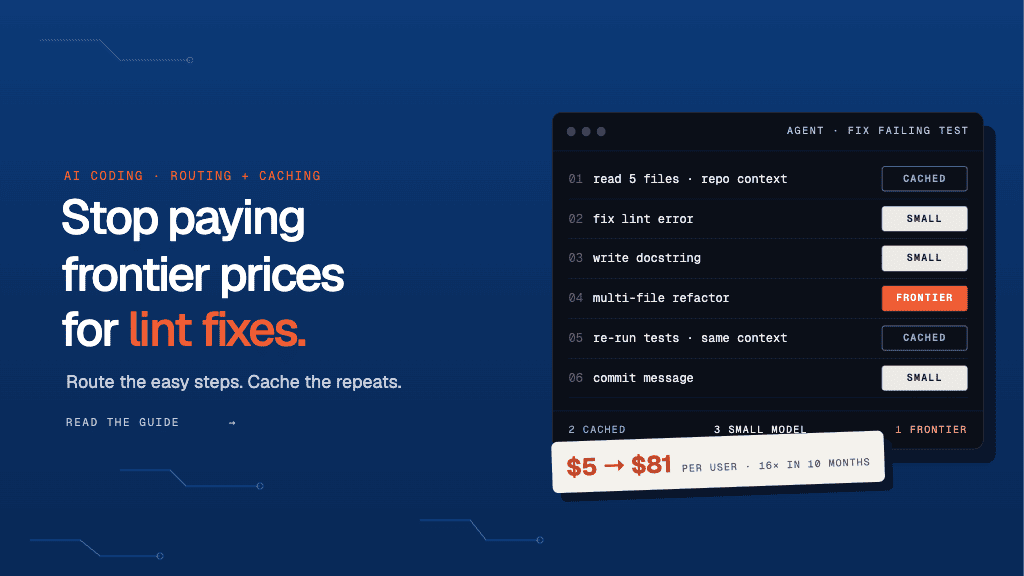
AI coding spend has stopped being a rounding error. Jellyfish’s H1 2026 report found that an AI coding user’s monthly bill rose from about $5 to $81 in ten months, a 16x increase. Most enterprises can bring that number down without asking developers to use agents any less. So where is the money going?
Much of it pays for frontier models to do simple work and for context the model has already seen. Routing and caching in AI coding workflows fix both: routing sends each task to the cheapest model that can handle it, and caching stops you from paying full price for the same context twice.
If you run Claude Code, Cursor or custom coding agents, a lint fix and a multi-file refactor mostly go to the same frontier model. The same repo context gets resent with every step of every task. Routing and caching tools handle this at different layers, from LLM gateways to workflow automation platforms like Lyzr that orchestrate the agents themselves. Here’s how they compare, so you can pick the one that fits the way you ship code.
TL;DR
- Routing sends simple steps like lint fixes and commit messages to small, cheap models. Caching stops you from paying full price for repo context the model has already seen. Together they also help speed up responses and keep spend predictable.
- Choose a tool by how well it fits your coding workflow. Look for routing rules for each task type, support for exact-match, semantic and provider prompt caching, and cache clearing when code changes.
- Lyzr covers the full agent workflow stack. Agent Studio and SuperFlow build multi-step workflows and assign models by task complexity, with up to three fallback models. OpenController adds caching for each application, provider failover and budgets.
- Lyzr keeps your code and your models inside your own network. Openfinetuner tunes small open-weight models so more routine work stays on the cheap tier. Sovereign AI and Optimus run the whole stack in your data center, private cloud or fully air-gapped.
Benefits of using tools for routing and caching in AI coding workflows
Ask any coding agent to fix a failing test, and it may read five files, run the test suite, edit two functions and run the tests again. Each of those steps is a separate model call. Each one sends your repo context to a frontier model at full price. A routing and caching tool picks the model for each step and skips any call it has already answered.
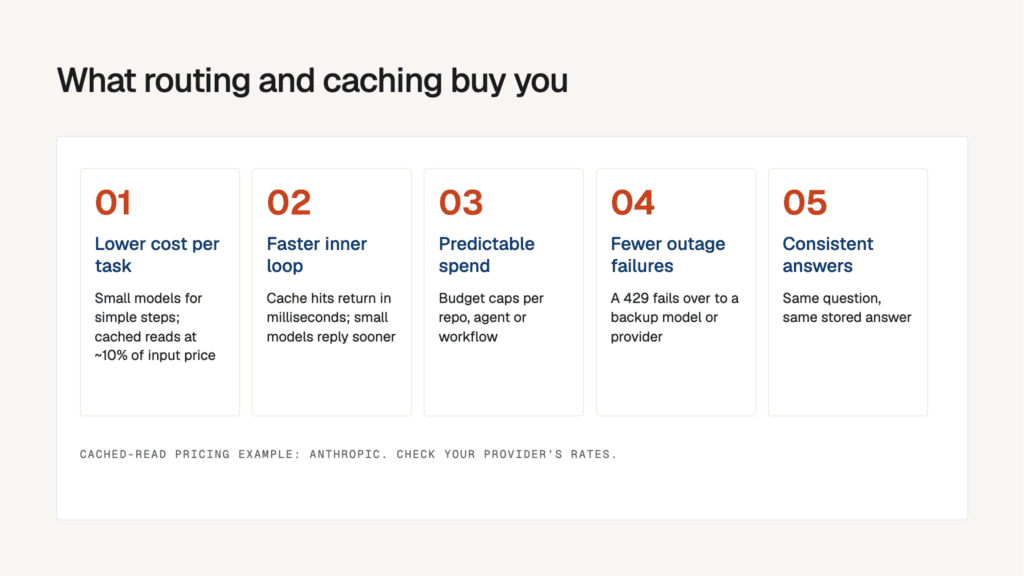
- Lower cost per task: Most steps in a coding workflow are simple. Renaming a variable, writing a docstring or fixing a lint error doesn’t need a frontier model. A router sends these steps to a smaller model at a fraction of the price. Caching cuts costs further. Anthropic, for example, charges about 10% of the normal input price for cached prompt reads, so re-sending the same repo context costs far less.
- Faster responses in the inner loop: Speed matters most when you’re waiting on autocomplete or a quick fix. A cache hit returns in milliseconds because no model runs. A small model also replies faster than a large one. For example, routing inline completions to a lightweight model makes suggestions appear while you’re still typing.
- Predictable monthly spend: Agent loops can burn through tokens without warning. A single runaway refactor can cost more than a week of normal use. Routing tools can set budget caps for each repo, agent or workflow. For example, you can limit a nightly test-generation job to a fixed daily spend and move it to a cheaper model once it hits that limit.
- Fewer failures from outages and rate limits: Every provider has downtime and rate limits. Without a router, a 429 error from one provider stops your agent mid-task. With a router, the call fails over to a backup model or provider. For example, if Claude hits a rate limit during a long debugging session, the router can retry the call on GPT-5 or a self-hosted model.
- Consistent answers to repeated questions: Ask a model the same question twice and you may get two different answers. A semantic cache returns the stored answer when a new request matches an earlier one. For example, three developers who ask “how do we handle auth in this service?” get the same explanation. That keeps code reviews and onboarding answers aligned.
Routing vs caching in AI coding workflows
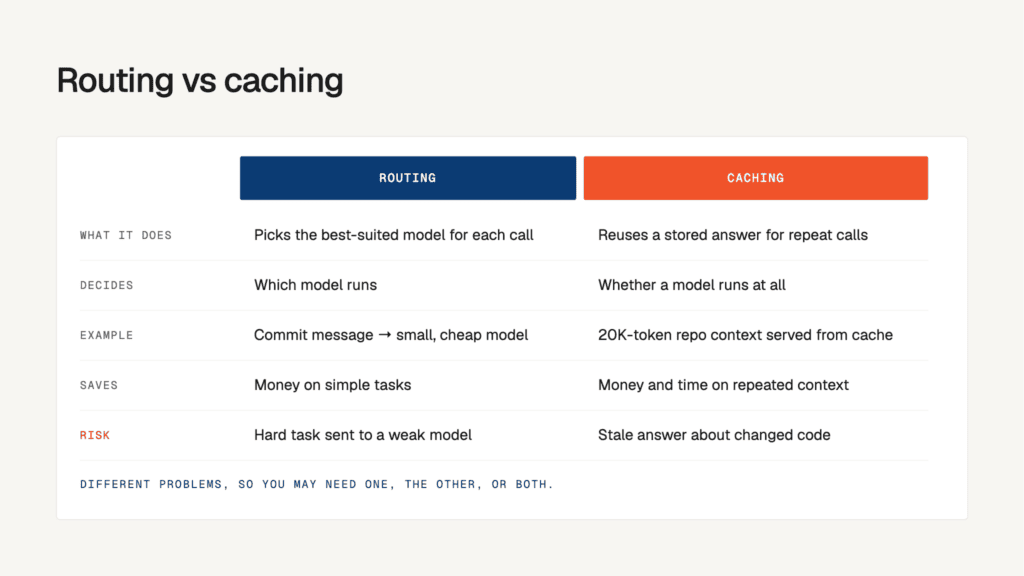
Routing and caching cut your AI coding costs in different ways, so they fix different problems. If you know which problem you have, you can tell whether you need a router, a cache or both.
| Aspect | Routing | Caching |
| Definition | Sends each model call to the model best suited for it, based on rules such as task type, prompt length or cost limits. | Stores the answers to earlier model calls and returns a stored answer when the same or a similar request comes in, so the model doesn’t run again. |
| Decision scope | Picks the right model for each call | Skips calls that already have a stored answer. |
| Example | Claude Code asks for a commit message. The router sends it to a small, cheap model instead of a frontier model. | Coding agent sends the same 20,000-token repo context with every step of a bug fix. After the first call, the cache serves that context at a much lower price. |
| Main savings | Money on simple tasks that don’t need a top-tier model. | Money and time on repeated prompts and context. |
| Risk factors | Weak routing rules send a hard task to a small model, and the output quality drops. | Stale cache entries return answers about code that has since changed. |
Confused between caching techniques? Explore our detailed breakdown of exact-match vs semantic vs provider prompt caching article to understand the pricing, run order and use cases.
How to choose the perfect tools for routing and caching in AI coding workflows
The right tool depends on where your token spend goes. If your coding agent re-reads the same repo context all day, start with caching. If it sends every lint fix to a frontier model, start with routing. Check each option against these five points before you compare vendors.
- Task-level routing rules: Pick a tool that routes by task type, not by app or user. Autocomplete, test generation and commit messages can run on a small, fast model. Multi-file refactors and debugging across services still need a frontier model. You should be able to set these rules for each step in the agent loop, not only for each API key.
- Support for caching layers: Exact-match caching catches prompts that repeat word for word. Semantic caching catches requests that are worded differently but ask the same thing. Provider prompt caching, from Anthropic and OpenAI, cuts the cost of re-sending long system prompts and repo context. If a tool covers only one layer, you miss the savings from the other two.
- Cache invalidation tied to code changes: A cached answer about a function goes stale as soon as someone edits that function. Check whether the tool clears cache entries on a new commit, a branch switch or a file-hash change. Without this, your agents may act on outdated code.
- Drop-in compatibility with your coding agents: Claude Code, Cursor and most custom agents expect OpenAI- or Anthropic-compatible endpoints. The tool should work after you change only the base URL, with no edits to your prompts or SDKs. Also confirm that streaming responses and tool calls still work through it.
- Cost and quality visibility for each step: Routing to a cheaper model saves money only if output quality holds. Choose a tool that logs cost, latency, cache hit rate and error rate for every step of a workflow. Automatic fallback to a stronger model when an output fails is also worth having.
Does every agent call need a frontier model? NTT Data didn’t think so. To review thousands of daily change entries, its Lyzr-built system runs on a self-deployed GPT-4o-mini, a small, low-cost model, instead of a flagship one. High volume and narrow tasks are where routing to a small model pays off most.
Best tools for routing and caching in AI coding workflows
Each tool takes different approach to the same goal: lower AI coding costs without slowing developers down. Some are gateways that sit between your coding agents and model providers, while others are workflow platforms that manage routing and caching across the whole agent pipeline.
| Tool | Use case | Key features |
| Lyzr | Routing and caching across your full agent workflow stack | Complexity-tier auto-routing; Per-application caching and budgets; Air-gapped deployment |
| LiteLLM | Self-hosted complexity routing in Claude Code | Claude Code auto router; Prompt-cache-aware routing; Redis, S3 or disk caching |
| Portkey | Config-driven fallbacks and caching on a managed gateway | JSON-config fallbacks and retries; Weighted load balancing; Exact-match caching with Time to Live (TTL) |
| OpenRouter | Multi-provider failover with no proxy to run | Base-URL setup, no proxy; Automatic provider failover; Cache-aware sticky sessions |
| Bifrost | Self-hosted load balancing and failover across provider keys | Weighted key load balancing; Cross-provider failover; Exact-match and semantic caching |
- Lyzr for routing and caching across your full agent workflow stack
Lyzr combines Agent Studio and SuperFlow for building agent workflows with OpenController for governing the model traffic behind them. Auto-routing sorts each request into a simple, medium, complex or reasoning tier and sends it to the model you assigned to that tier. Openfinetuner tunes small open-weight models on your own data, so more routine steps stay on the cheap tier. OpenController adds caching for each application, provider failover and budgets on virtual keys. With Lyzr Sovereign AI, the whole stack runs in your data center, private cloud or on a Lyzr Optimus device, fully air-gapped if needed.
Developers spend 30 to 40% of their time navigating codebases instead of building features. Saksoft built Lyzr coding agents that search repos in plain language and generate code that follows project conventions.
- LiteLLM for self-hosted complexity routing in Claude Code
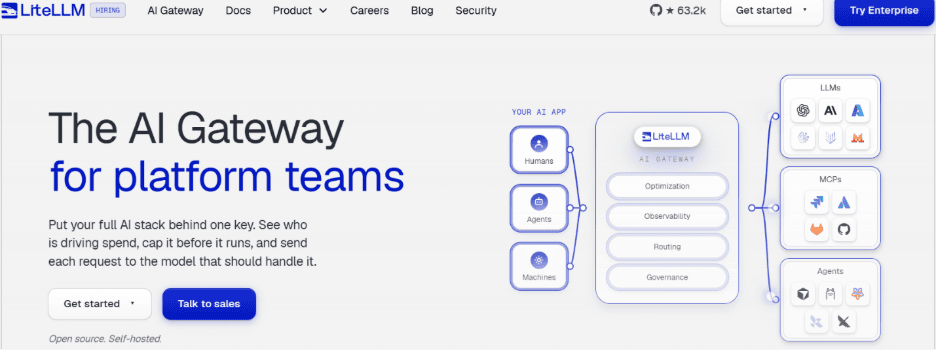
LiteLLM is an open-source proxy that puts many LLM providers behind one OpenAI-style API. Auto router sorts each Claude Code request into simple, medium, complex or reasoning tiers and sends it to the smallest model that can handle it. A prompt-cache routing check keeps follow-up calls on the same deployment that wrote the cache, and response caching runs on Redis, S3 or disk. Basic virtual keys and budgets are free, but SSO beyond five users, audit logs, key rotation and team- or org-level access controls require an enterprise license.
Your AI gateway holds every API key you own, and LiteLLM faced two serious security incidents in 2026. If your coding agents run through it, explore LiteLLM alternatives to find the one that fits your workflow.
- Portkey for config-driven fallbacks and caching on a managed gateway
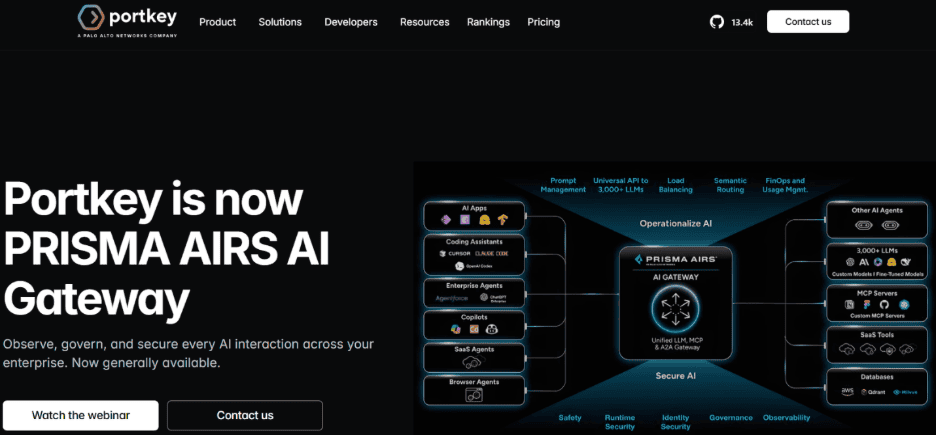
Portkey is a hosted and self-hostable AI gateway, now branded as Prisma AIRS AI Gateway (following Palo Alto Networks’ acquisition). You connect to Claude Code by changing its base URL and adding a provider header. One JSON config then sets fallbacks, weighted load balancing, retry and exact-match caching with a TTL ( governs how long cached model responses, prompt prefixes, and session states stay valid before expiring ). Semantic caching is limited to select Enterprise plans and to requests under 8,191 tokens with four messages or fewer, and most coding agent sessions might go past those limits.
95% of enterprise GenAI initiatives fail to deliver measurable business impact, according to MIT. Lyzr’s playbook names rigid, single-model pilots as one reason, because they break when workflows change. The fix is to stay LLM-agnostic, benchmarking models continuously and routing each query by cost, latency or accuracy.
- OpenRouter for multi-provider failover with no proxy to run
OpenRouter is a hosted API that routes one model name across many upstream providers and bills against prepaid credits. You connect Claude Code by changing its base URL, and you don’t need to run a local proxy. If one provider is down or rate-limited, the request moves to another, and follow-up calls stay with the same provider while its prompt cache is warm. Claude Code is only guaranteed to work with the Anthropic first-party provider, so routing to other providers might break sessions.
Not every task needs your most powerful model. Siva Surendira, CEO, Lyzr, builds a grammar-correcting agent. Watch the video to understand how the model choice applied the rule to a real agent.
- Bifrost for self-hosted load balancing and failover across provider keys
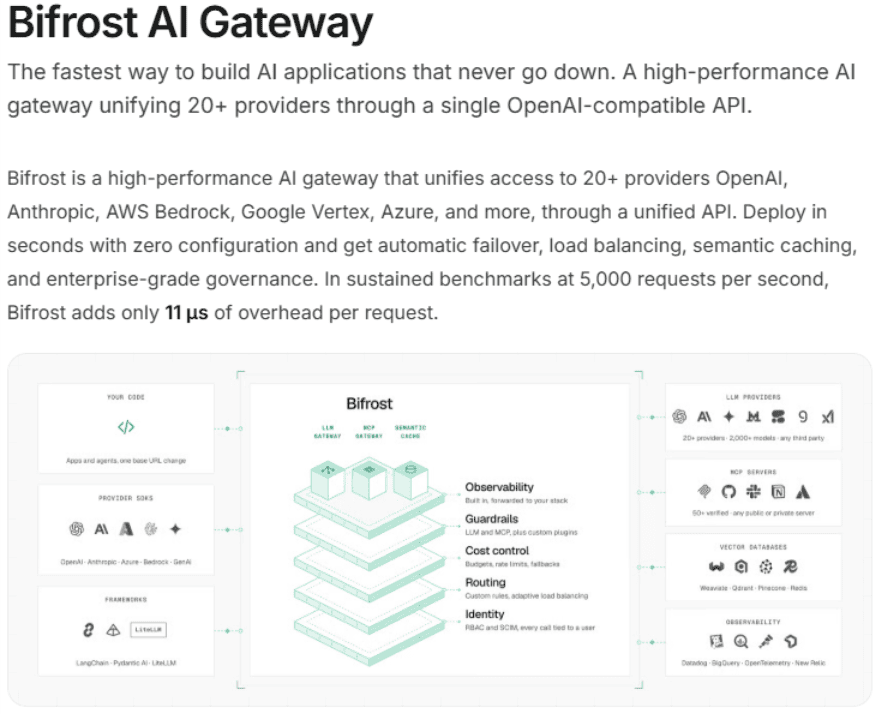
Bifrost is an open-source, self-hosted AI gateway from Maxim AI that connects to 20+ model providers through one API. Claude Code connects through Bifrost’s Anthropic endpoint with a virtual key, and you can map model aliases to the models you choose. Bifrost spreads requests across your API keys by weight, fails over between providers, and supports both exact-match and semantic caching, including for streamed responses. Responses that carry tool calls aren’t cached by default, and caching might be skipped once a conversation passes three messages, so long agent sessions might miss the cache.
Every prompt your coding agent sends carries a slice of your source code. Lyzr’s guide to taking agents to production lists data leakage fear as one of the main barriers to production and recommends a hybrid setup. Sensitive work stays inside your environment, while low-risk tasks use cheaper cloud inference.
Route every step of your AI workflows to the right model with Lyzr
Your coding agents don’t need a frontier model for every step, and your budget shouldn’t pay as if they do. Lyzr Agent Studio and SuperFlow give you one place to build multi-step agent workflows, assign models by task complexity and keep a cap on spend.
- Auto-routing by complexity: Each request is sorted into a simple, medium, complex or reasoning tier and sent to the model you assigned to that tier.
- Model choice for each node: In SuperFlow, every LLM node runs on the provider and model you pick, so a summary step and a code-review step can use different models.
- Logic-based routing nodes: If, Switch and Decide nodes send each item down the right path. If nodes can use a rule or an LLM to make the call.
- No repeat runs of finished steps: SuperFlow records each completed node, so a run never executes the same step twice.
- Spend limits at four levels: Cap credits and tokens over a rolling window for an organization, a sub-organization, an agent or an individual user.
- Full run tracing: Watch runs live on the canvas, replay past runs node by node and export OpenTelemetry traces with token usage and latency.
- Version control with rollback: Save each workflow as a numbered version, deploy it when it’s ready and roll back to an older version in one step.
- Framework-agnostic agents: Bring agents built with LangChain, CrewAI or Claude agents into the same workflow, and call any Studio agent through its REST API.
Start building in Agent Studio or book a free 72-hour prototype to see it running on your own workflow.
Best tools for routing and caching in AI coding workflows FAQs
What is the difference between routing and caching in AI coding workflows?
Routing decides which model handles each call. For example, a commit message goes to a small model and a multi-file refactor goes to a frontier model. Caching decides whether a call needs to run at all, by reusing a stored answer or cached context. Lyzr Agent Studio covers the routing side with auto-routing by task complexity, and Lyzr OpenController adds caching that you switch on for each application.
Will routing to smaller models lower the quality of generated code?
It can if the router sends a hard task to a weak model with no check on the output. The safer approach is to try the small model first, check its output against rules or a classifier, and pass failed answers to a frontier model. Lyzr OpenController follows this approach, and Lyzr Openfinetuner tunes small open-weight models on your own data so they can handle more routine coding steps.
Is semantic caching safe for coding agents?
Use it with care. Two prompts can look almost the same yet need different answers, such as the same function name in two different repos. In Lyzr’s own tests, semantic caching returned the wrong customer’s answer 981 times out of 1,000 when prompts differed only by small details, while exact-match caching returned none. For coding workflows, start with exact-match caching and provider prompt caching, and use semantic caching only for low-risk, repetitive questions.
Do I need a separate routing tool if I already use Claude Code or Cursor?
Coding assistants don’t route between providers or cache responses across users on their own. A gateway you connect by changing the base URL adds those controls without changing how you work. If your workflows go beyond the IDE, such as automated code reviews, test generation or ticket triage, Lyzr SuperFlow chains those steps and sets a model for each node, with up to three fallback models.
Can I run routing and caching on-prem for sensitive source code?
Yes, if you choose a self-hosted gateway rather than a hosted one. Lyzr OpenController deploys in your VPC, on-prem or air-gapped, so prompts and code never have to reach an outside service. With Lyzr Sovereign AI or a Lyzr Optimus device, open-weight models such as Llama, Mistral and Qwen can run on your own hardware as the low-cost tier your router sends work to.
Book A Demo: Click Here
Join our Slack: Click Here
Link to our GitHub: Click Here
Got a use case in mind?
8 weeks from use case to agents running in production.
Platform, people and FDEs, all in. Bring your environment. We'll co-build and stay until it's live.
Talk to UsFree resource
101 AI Agents Use Cases
100+ production-ready AI agent use cases across Marketing, Sales, HR, Banking, Insurance, Operations and a lot more
Download now