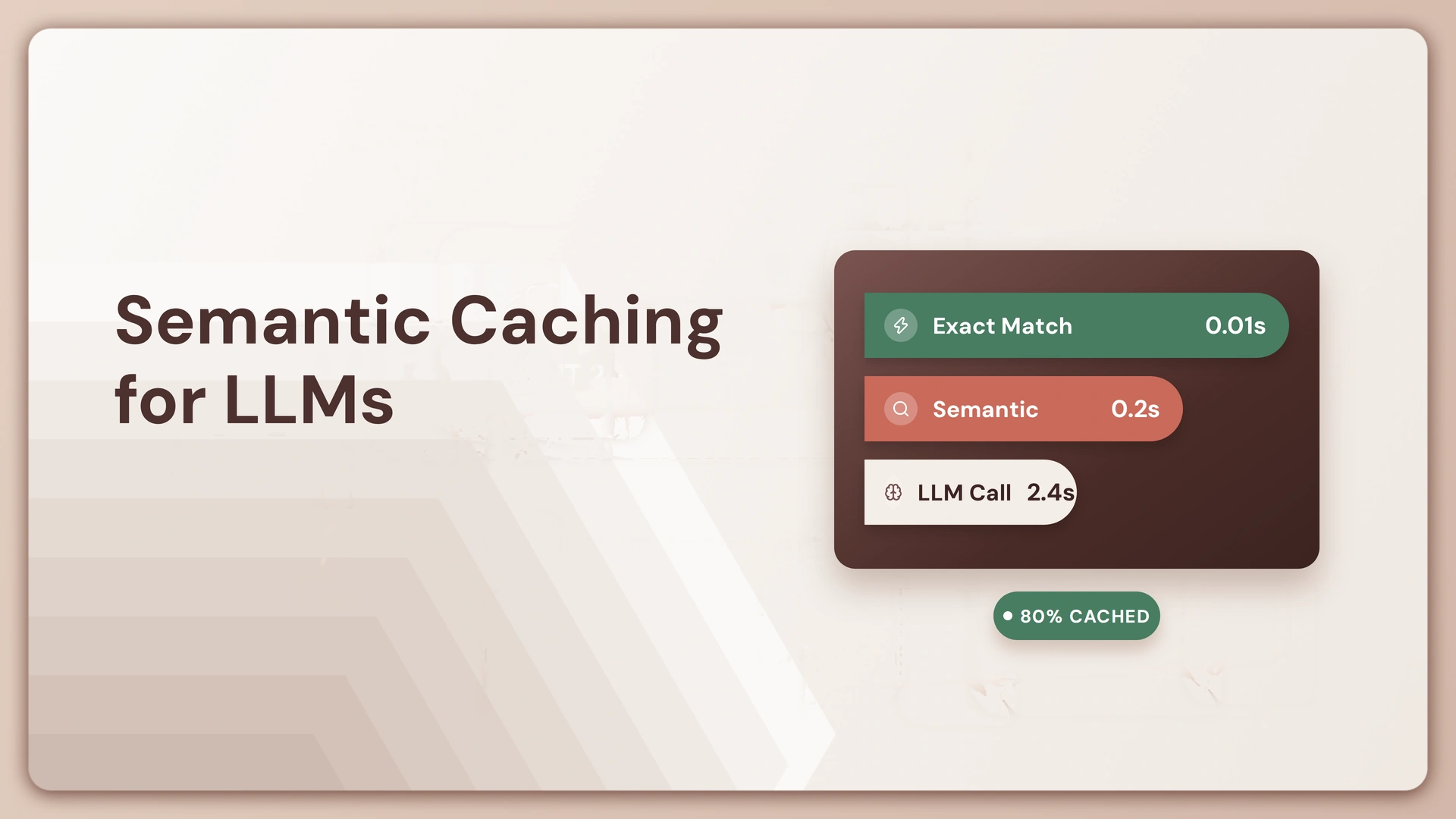
Within the same hour, a support bot gets asked “how do I reset my password,” “I forgot my password,” and “password reset help.” Three different sentences. One question. Without anything smarter than an exact-match lookup, each one triggers a full round trip to the model: tokens billed, seconds spent, an answer generated from scratch that’s functionally identical to the one generated ten minutes earlier. Nobody typed the same words twice, so nothing about that repetition ever got caught.
That’s what semantic caching for LLMs is built to catch. Let’s understand this better.
Key Takeaways
- Semantic caching matches incoming prompts by meaning, using vector embeddings, instead of requiring the exact text a traditional cache needs.
- It intercepts a request before it reaches the model, not after, so a hit skips the model call entirely.
- The similarity threshold, not the embedding model, is what actually decides whether a cache helps or hurts. A 2026 ICLR paper on the problem found that a static threshold, the kind most semantic caches use, gives no formal correctness guarantee and produces unpredictable error rates no matter where it’s set.
- It works best on traffic that repeats in substance but not phrasing, like support tickets and FAQs, and poorly on anything time-sensitive, personalized, or exact, like prices, account-specific answers, or code.
- A miss isn’t a failure. It’s just how a genuinely new question gets answered and added to the cache for next time.
What is semantic caching for LLMs?
Semantic caching for LLMs is a technique that stores a prompt and its response together, then reuses that stored response for a new prompt when the two are close enough in meaning, rather than requiring an identical string match. That last part is the whole difference from a traditional cache. A traditional cache is a lookup table: identical key in, identical value out, nothing else recognized. Semantic caching replaces that exact key with a fuzzy one, a vector representing what the prompt actually means, so “how do I reset my password” and “I forgot my password” can point to the same cached answer even though the characters barely overlap.
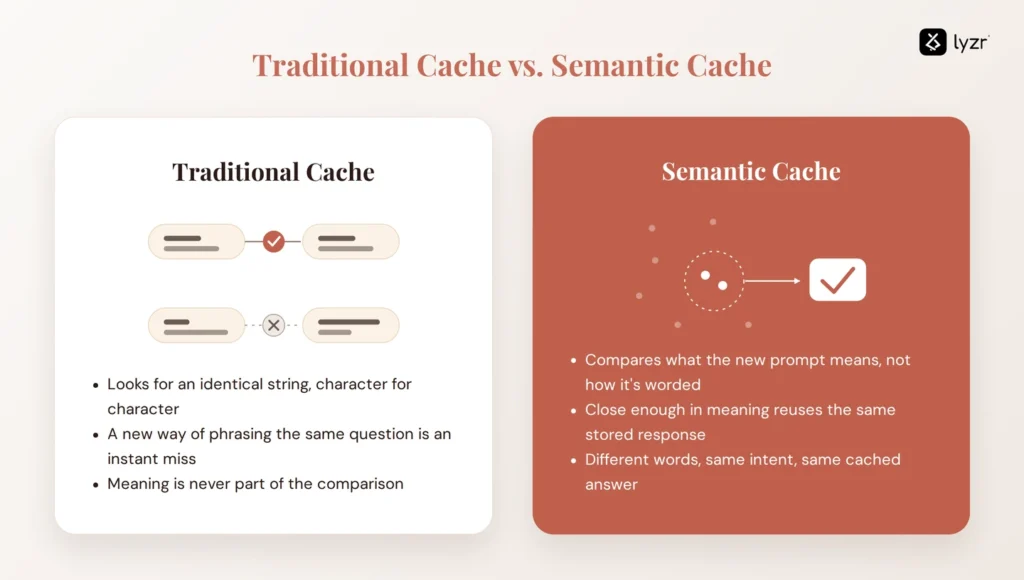
This matters more as an LLM sits behind more of a product. Users don’t coordinate on wording. The same underlying question shows up as a dozen different sentences over a week, and a system built to only recognize literal repetition catches almost none of it. Semantic caching is what closes that gap.
How semantic caching actually works
The flow is mechanical end to end except for one step. A prompt gets intercepted before it reaches the model. An embedding model converts it into a vector, a set of numbers that represents its meaning rather than its exact wording. That vector gets compared against previously stored query vectors in a vector database, using a similarity search that scores how close it lands to anything already on file, typically on a scale from 0, no similarity, to 1, an exact match. If the closest match scores above a set threshold, it’s a hit: the system returns the stored response and skips the model call entirely. If nothing clears the threshold, it’s a miss: the prompt goes to the LLM as normal, and the new prompt, its response, and its vector all get written into the cache for next time.
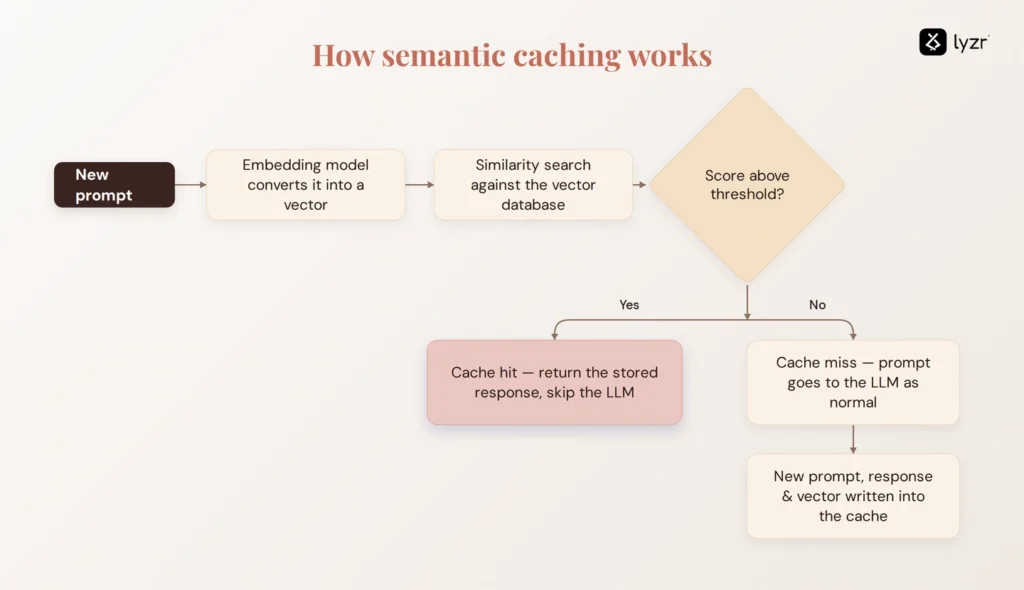
Every part of that is deterministic once it’s running. The one part that isn’t mechanical is the threshold itself: deciding how close two prompts need to be before the system treats them as asking the same thing. That decision is where the real design work lives, and it’s worth more space than most explanations of semantic caching give it.
The threshold problem: where semantic caching can quietly return the wrong answer
A semantic cache doesn’t fail loudly. It fails by confidently returning a plausible-sounding answer to a question that wasn’t quite the one asked, and nothing downstream necessarily notices, because the response reads like a real answer. It usually is a real answer. It’s just the answer to something slightly different.
Set the threshold too loose and “what’s your refund policy for electronics” can return the cached answer for “what’s your refund policy for subscriptions,” a real, costly mismatch that looks correct on the surface. Set it too tight and the cache barely fires at all, and a team ends up maintaining a system that saves almost nothing for the engineering effort it cost to build.
This isn’t just a tuning nuisance that goes away with more testing. A paper on the problem published as a conference paper at ICLR 2026, vCache, found that a static similarity threshold, the approach most semantic caches use today, doesn’t give any formal correctness guarantee: it produces unpredictable error rates and suboptimal cache hit rates regardless of where it’s set. A threshold tuned on last month’s traffic is, at best, an estimate for next month’s, not a fixed setting that stays correct.
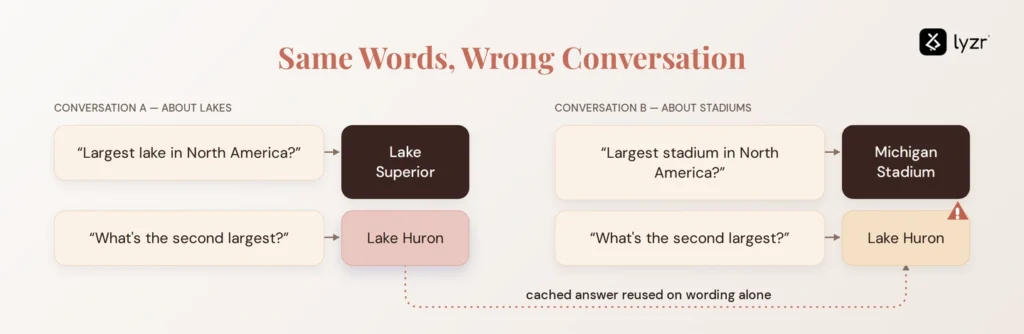
There’s a second, quieter way the same problem shows up, and it has nothing to do with where the threshold is set. Microsoft’s own Azure Cosmos DB documentation walks through a case where a cache has to track a conversation, not just a single prompt in isolation. One user asks “what’s the largest lake in North America,” gets “Lake Superior,” then asks “what’s the second largest,” and because that follow-up carries the conversation’s context, correctly gets “Lake Huron.” Both exchanges get cached. Later, a different user in a different conversation asks “what’s the largest stadium in North America,” gets “Michigan Stadium,” then asks “what’s the second largest.” A cache that only looks at that second question in isolation finds a close match, the earlier “what’s the second largest” entry, and returns “Lake Huron,” a lake, in answer to a question about stadiums. Looked at on its own, that follow-up question is nearly identical to the earlier one. In context, the two aren’t related at all. No threshold adjustment fixes that kind of miss. What has to change is what the cache is allowed to compare in the first place.
If you want a sense of how exposed your own systems are to this kind of confidently-wrong-answer risk more broadly, not just in a cache, Lyzr’s hallucination risk assessment walks through it in about ten minutes.
When semantic caching is worth using, and when it isn’t
| Traffic type | Cache it? | Why |
|---|---|---|
| High-redundancy support or FAQ traffic | Yes | Same underlying questions, endless rephrasings. This is the exact redundancy this piece opened on. |
| Stable reference or knowledge-base content | Yes | The answer doesn’t shift out from under the cache while it’s sitting there. |
| Real-time or fast-changing data (prices, inventory, live status) | No | A correct answer an hour ago can be a wrong one now, and a similarity score has no way to know that. |
| Precise code generation or exact technical syntax | No | Small wording differences change what’s actually being asked for; a near-match isn’t a correct match. |
| Personalized or account-specific responses | Caution | The match needs the user or account scoped in, not just the text, or two different customers can end up with each other’s cached answers. |
| Multi-turn conversations | Caution | The cache needs conversational context tracked, not just the latest prompt on its own, per the lake-and-stadium example above. |
The deciding question isn’t how often a query repeats. It’s whether a stale, approximate, or context-blind answer would still be an acceptable one. For most support and FAQ traffic, it is. For most of what sits in the “no” and “caution” rows, it isn’t, and no amount of threshold tuning changes that.
Rolling out semantic caching without shipping bad answers
Start on the narrowest, most repetitive slice of traffic, one FAQ or support flow, rather than caching everything at once. Set the threshold conservatively and tune it against real query logs, not a default left untouched from a tutorial. Log every hit and miss somewhere a person actually reviews, since a threshold that looked right in testing can drift once real phrasing starts hitting it at volume. And build in a way to bypass or invalidate the cache for anything time-sensitive, personalized, or multi-turn before it ever gets stored, rather than trying to catch the mismatch after the fact.
Keeping a semantic cache accurate and governed: Lyzr Opencontroller
Picking a threshold and deciding what’s cacheable is an engineering decision, usually made once, mostly at build time. Making sure that decision still holds once real traffic is hitting it, across every team and application pulling from the same cache, is a different problem, and it’s an ongoing one, not a one-time setup step.
Lyzr Opencontroller is built for that kind of ongoing question, though worth saying plainly: it’s a general governance layer for AI agents and workflows, and nothing on its own product page is specific to caching, thresholds, or vector databases. Its four stated capabilities are Find, which automatically discovers agents, models, tools, data, and workflows across the entire AI estate; Ship, which evaluates, validates, and governs every agent and workflow before it reaches production; Run, which monitors agents, applications, APIs, and infrastructure in real time from one control plane, with its own positioning built around the idea that control has to happen in the request path itself, not only in a dashboard after the fact; and Improve, which turns real-world usage, performance, cost, and security signals into actionable insights. None of that is a caching feature. All of it is the kind of general infrastructure oversight a caching layer, like any other live piece of an AI system, would sit inside of once it’s actually deciding what gets served to real users.
That’s the honest version of the connection: Opencontroller doesn’t tune a threshold or inspect a cache. It’s what keeps a team from finding out about a bad caching decision only after a customer does. If that’s currently a gap in how your team runs its own AI infrastructure, booking a demo is a reasonable next step.
FAQ
Semantic caching for LLMs is a technique that stores a prompt and its response together, then reuses the stored response for a new prompt when the two are close enough in meaning, using vector embeddings, rather than requiring an identical string match.
A normal cache only returns a stored result on an exact match. Semantic caching converts prompts into vectors and compares them by meaning, so different phrasings of the same question can hit the same cached answer.
It’s tuned against real traffic rather than set once and left alone. Teams typically start conservative, log hits and misses, and adjust as they see how actual phrasing behaves, since a threshold that works in testing can still drift once live traffic hits it at scale.
Yes, in at least two distinct ways: a threshold set too loosely can match two genuinely different questions as if they were the same, and a cache that only looks at a single prompt in isolation, without conversation context, can misfire on follow-up questions specifically, even with a well-tuned threshold.
Generally not well. Real-time data can go stale between when it was cached and when it’s served, and personalized answers need the user or account scoped into the match itself, not just the wording, or the cache risks serving one customer’s answer to another.
Book A Demo: Click Here
Join our Slack: Click Here
Link to our GitHub: Click Here