An AI compliance checklist gives enterprise IT, security, and legal teams a working process for inventorying every AI tool and agent in use, closing data governance gaps, and mapping controls to frameworks like NIST AI RMF, ISO 42001, and the EU AI Act. It is a checklist to execute, not a policy to file away, and it starts with finding the AI you don’t already know about.
Key takeaways
- Start with an inventory. You can’t govern AI you can’t see, so a full accounting of tools and agents, including shadow AI, comes first.
- AI compliance is data compliance. Classification, access controls, and vendor training-data terms carry most of the actual risk.
- Map controls to named frameworks (NIST AI RMF, ISO 42001, EU AI Act, SOC 2) instead of building a compliance program from scratch.
- Ownership has to be explicit. A RACI split across IT, legal, and an executive sponsor prevents the “everyone assumed someone else owned it” failure mode.
- Treat this as a sprint, then a cadence. A time-boxed first review beats an open-ended audit that never finishes.
Most enterprises are no longer managing AI tools. They’re managing AI agents that act on their own, inside systems that were never built with that in mind.

Gartner predicts that by 2030, more than 40% of enterprises will experience security or compliance incidents linked to unauthorized shadow AI. Having a high level of shadow AI adds an extra $670,000 to the average cost of a data breach, according to an IBM report.
For example, Sales teams are already using AI agents to handle parts of their jobs, whether IT approved the rollout or not, and support and recruiting functions are following the same pattern. This checklist builds toward the kind of defensible AI governance for enterprises that can survive a board question or a regulator’s request.
Why Most IT Teams Are Already Behind on AI Compliance
AI adoption inside enterprises moves fast, while compliance frameworks are moving slowly. The challenge is to close that gap before a regulator, auditor, or breach does it for you. Regulations like the EU AI Act, GDPR, HIPAA, and SOC 2 are starting to explicitly address AI systems. Auditors are asking about them. Boards are asking about them.
The good news is that building a solid AI compliance posture doesn’t require starting from scratch, it requires being systematic. Let’s walk through each layer.
Step 1: Build your AI inventory first
The inventory is the checklist’s foundation, and skipping it is the single most common reason compliance programs stall. You cannot classify risk, enforce access controls, or map to NIST or ISO 42001 for a tool your GRC team has never heard of.
What a proper AI inventory tracks
A usable AI inventory goes well beyond a list of vendor names. For every tool and agent, track:
- Tool or agent name and business owner
- Data reach: what it can read, write, or send externally
- Approval status (sanctioned, pending review, or unapproved)
- Vendor data policy and DPA reference
- Access level (read, write, delete, execute)
- Integrations, touchpoints and connected systems
- Where outputs and logs are stored
Platforms like Lyzr Studio maintain this metadata at the agent level automatically, since every agent built or connected through it carries its own permission scope and log trail from day one.
Naming and expanding shadow AI
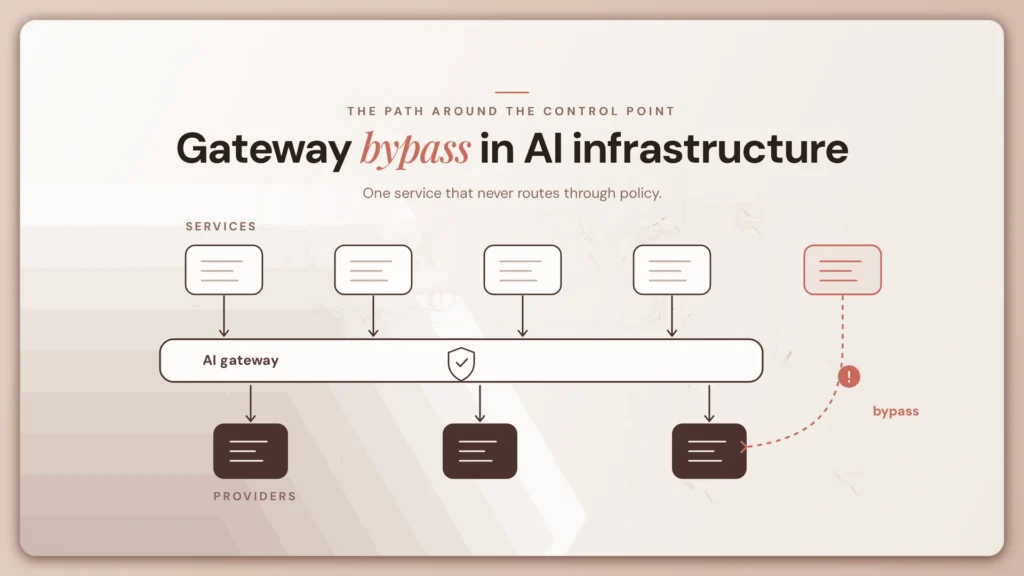
Shadow AI is any AI tool, API, or agent running in your environment without IT or security’s knowledge. It is the fastest-growing item on any AI compliance checklist for enterprise teams, because employees don’t need procurement approval to connect a free chatbot to a spreadsheet. Moreover, one common mistake in enterprise AI rollouts is treating every tool like email: everyone gets access, and governance gets figured out later.
The underlying security risk is the same one security teams have flagged with consumer chat tools for years: sensitive data pasted into a system nobody vetted, with no record of where it went afterward.
Gartner’s shadow AI incident prediction cited above and IBM’s US breach-cost figure both describe the same underlying problem: AI nobody signed off on, running with nobody watching it.
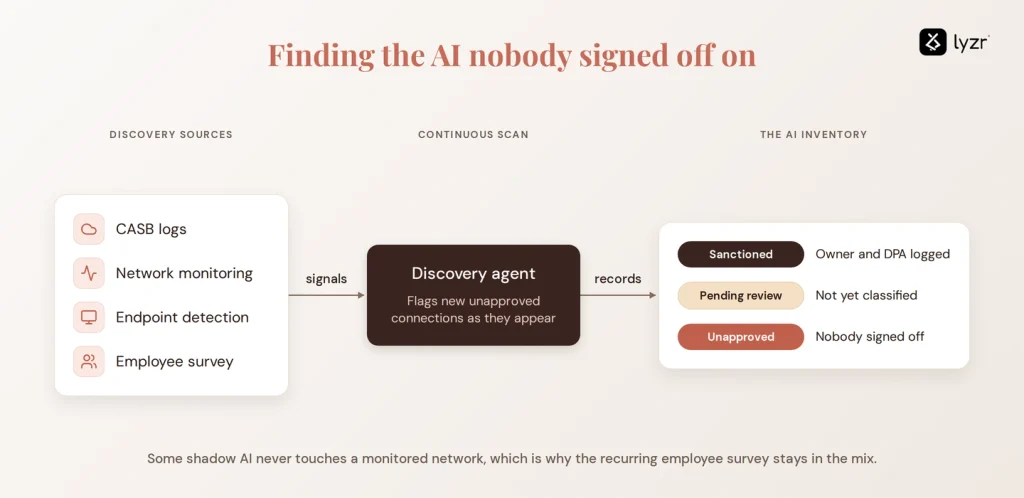
Discovery combines CASB logs, network monitoring, and endpoint detection with a recurring employee survey, since some shadow AI use never touches a monitored network at all. AI agents for compliance checks can automate a large share of this scanning, flagging new unapproved connections as they appear rather than waiting for the next quarterly review.
Step 2: Close the data governance gaps
Once you know what AI exists, the next question is what it can touch. AI agents move data faster and further than the traditional SaaS tools your Data Loss Prevention (DLP) rules were written for.
Classification and DLP
Confirm your existing data classification tags (confidential, internal, public) are actually enforced against AI endpoints, not just email and file shares. DLP rules should block confidential data from reaching unapproved AI services, and the same rules should extend to AI prompts, since a prompt containing customer PII is a data export whether or not anyone thinks of it that way.
Vendor data processing agreements and deletion procedures
Every approved AI vendor needs a signed DPA covering data deletion timelines, named sub-processors, and the security controls protecting your data in transit and at rest. Adopting a compliance management solution that enforces these terms automatically reduces how much of this falls on manual contract review.
AI compliance checklist for training data
This is the item most enterprise checklists skip, and it creates the most durable risk. Before approving any AI vendor, confirm in writing:
- Whether your prompts and outputs are used to train or fine-tune the vendor’s underlying model, by default. The exact opt-out procedure if zero-retention isn’t the default setting.
- Retention schedules for AI-generated outputs, as they often count as business records.
- Where a fine-tuned model built on your data is hosted, and whether it’s logically separated from other customers
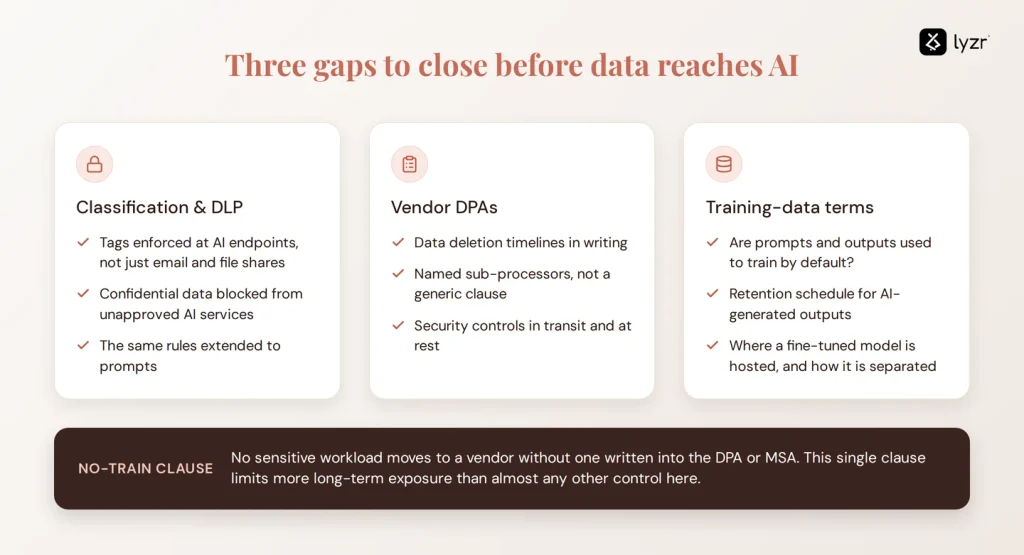
Don’t move sensitive workloads to a vendor without a contractual no-train clause in the DPA or MSA. This single clause does more to limit long-term exposure than almost any other control on this list.
Step 3: Set risk and access controls
The regulatory landscape for AI is evolving fast, but certain frameworks are already directly affecting enterprise IT teams. Here’s a practical map of what applies to whom and the key AI-specific controls each one requires.
| Framework | Who It Affects | Key AI Requirement | Where IT Leads |
| EU AI Act | Any org using “high-risk” AI in EU | Risk classification, transparency, logging | Risk assessment, documentation |
| GDPR | Any org handling EU resident data | Automated decision-making disclosure, data minimization | Data governance, vendor DPAs |
| HIPAA | Healthcare organizations (US) | PHI must not be input into non-BAA AI tools | Tool approval, BAA procurement |
| SOC 2 | SaaS and tech companies (US) | AI systems in scope for availability, confidentiality | Audit logging, access controls |
| ISO 27001 | Enterprises seeking certification | AI as part of information security risk management | Risk register, controls mapping |
| CCPA | Orgs with CA consumer data (US) | AI-driven profiling disclosure requirements | Privacy notices, data mapping |
Incident response and fairness review
Extend your existing incident response plan to cover AI-specific failure modes: data leakage through an agent, a hallucination that triggers a business error, or a compromised model endpoint. For any AI used in hiring, lending, or other sensitive decisions, this is also where a formal risk assessment and bias review belongs, run against the datasets the model was tested on, with results documented and dated. Human-in-the-loop checkpoints on high-risk agent actions, meaning a person must approve before the agent executes, remain the most reliable backstop until your monitoring catches up.
Step 4: Map your AI stack to the frameworks that matter
You don’t need to build a compliance framework from scratch. Your job is mapping the controls from Steps 1 through 3 onto the frameworks regulators and auditors already recognize, and using them as a shared NIST AI RMF Checklist and EU AI Act checklist your legal team can point to directly.

AI compliance frameworks at a glance
| Framework | Key focus for AI | Relevant to |
|---|---|---|
| NIST AI RMF | Map, measure, and manage AI risk; the strongest starting point for a nist ai rmf checklist | All US organizations using AI |
| ISO 42001 | The first international standard for AI management systems | Organizations seeking formal AI governance certification |
| ISO 27001 | Information security management extended to AI-specific assets | Enterprises with a mature ISMS |
| SOC 2 | Security, availability, confidentiality, processing integrity, privacy | SaaS vendors providing AI services to other businesses |
| EU AI Act | Risk classification, transparency, and documentation, phasing in through 2027-2028 | High-risk categories (credit scoring, hiring, biometric identification) for organizations with EU users or data |
| GDPR | Data protection and rights around automated decision-making | Organizations processing EU resident data |
| HIPAA | Protection of protected health information | Healthcare organizations and their AI vendors |
| CCPA | California consumer rights, including automated decision-making | Organizations doing business in California above CCPA thresholds |
Third-party vendor review
Your compliance posture is only as strong as your weakest AI vendor’s. Request current compliance documentation (ISO 42001 certification, SOC 2 Type II report) from every critical vendor annually, and review their data handling and model-training policies against Step 2’s requirements, not just at signing but at renewal.
Step 5: Train your people and set policy
You can have perfect technical controls and still have a compliance failure, because someone, a well-meaning employee who just wanted to move faster, did something your policy didn’t anticipate.
The human layer of AI compliance is often treated as an afterthought. It shouldn’t be. It’s where most real-world incidents originate. The policy and training checklist:
| Item | What “Done” Looks Like | Priority |
| AI Acceptable Use Policy published | Written, approved, accessible to all staff | Critical |
| Approved AI tools list maintained | Living document, updated when tools are added/removed | Critical |
| Policy covers what data cannot be shared with AI | Explicit categories, not vague language | Critical |
| AI compliance training for all employees | Not a 45-minute generic e-learning — role-specific scenarios | High |
| Incident reporting process for AI misuse defined | Employees know how to flag issues without fear | High |
| AI output review requirements defined by role | Especially for customer-facing or regulated outputs | High |
| AI ethics/bias policy documented | Especially for AI used in hiring, lending, or scoring | Medium |
| AI policy review cadence set (e.g. quarterly) | The landscape changes fast, policies need to keep up | Medium |
Who owns AI compliance?
Ownership has to be explicit, or it defaults to no one. A simple RACI split works:
- Responsible: IT and security implement controls and maintain the inventory; legal and compliance interpret regulations and draft policy
- Accountable: a named executive sponsor, typically the CISO, CRO, or General Counsel, owns program outcomes
- Consulted: business unit leaders deploying the AI, plus data science or engineering teams building it
- Informed: the board and broader employee base, on a regular reporting cycle
“Who owns this” is usually the first question that stalls a program, not the last.
Step 6: Run your first AI compliance checklist review
If you’re reading this and thinking “we need to do all of this,” start here. You don’t need to fix everything at once. You need a structured starting point.
Here’s a 4-week sprint that gets you from zero to a working baseline:
- Week 1, Discover: Run the AI inventory exercise. Survey department heads. Use your SSO logs to find OAuth-connected apps. The goal is a complete picture of what’s running.
- Week 2, Classify: Map each tool to its data types and risk level. Flag anything touching PII, PHI, or confidential IP. These become your highest-priority action items.
- Week 3, Control: Implement quick wins, enforce MFA where missing, confirm vendor training opt-outs, draft your Acceptable Use Policy if you don’t have one.
- Week 4, Document: Formalize your risk register, assign owners to each compliance area, and set a review cadence. This becomes your audit evidence if you ever need it.

The most common mistake here is treating this as a one-time project. AI compliance is an ongoing function. The tools change, regulations evolve, and your employee base does things you don’t expect. Build the habit, not just the checklist.
Once this first pass is done, move to a quarterly or semiannual cadence rather than treating it as a one-time project. Automating parts of this cycle with AI agents for compliance audits turns what was a scramble every audit season into a running record you can pull from at any point, which is closer to what an AI compliance toolkit should actually feel like day to day.
That kind of continuous review is also where a platform built for agent governance and audit trails earns its place, since the underlying agent logs don’t need to be reconstructed after the fact. If your team is ready to see how the Control Plane’s logging and the inventory work together in practice, book a demo and walk through your own AI stack against this checklist.
FAQs
An AI compliance checklist is a structured, repeatable sequence enterprises use to inventory AI tools and agents, govern the data they touch, and map controls to regulatory and security frameworks. It replaces ad hoc, one-off AI risk reviews with a documented process that produces audit-ready evidence on a fixed schedule.
An AI compliance policy needs a data classification rule stating what can never enter a public AI tool, a current list of approved tools, a request process for new ones, and named consequences for bypassing it. It should also reference the inventory and training-data controls it enforces, so the policy stays tied to what’s actually running.
The regulations that apply depend on your data and geography: GDPR and the EU AI Act for EU user or resident data, HIPAA for health data, and CCPA for California consumers. Frameworks like NIST AI RMF, ISO 42001, and SOC 2 aren’t laws but are what auditors and enterprise customers expect you to demonstrate against.
Auditing AI systems means reviewing access logs, checking that DLP and classification rules actually held, and confirming vendor DPAs match what’s contractually promised. It also includes documented bias and fairness testing for high-stakes models and a check that every tool in production is actually in the inventory, not just the ones someone remembered.
An AI inventory is a centralized, continuously updated catalog of every AI tool and agent in use, tracking owner, data access, approval status, vendor policy, permissions, integrations, and output storage. It’s the single source of truth that every other compliance control, from DLP to framework mapping, depends on.
Responsibility splits across roles rather than sitting with one team: IT and security implement technical controls, the CISO or Head of GRC is accountable for overall posture, legal and business leaders are consulted on requirements, and an executive sponsor stays informed. This RACI structure prevents any single team from being blamed for a gap nobody was actually assigned to close.
Article 50 transparency obligations take effect August 2, 2026. Annex III high-risk system obligations, originally due the same date, were pushed to December 2, 2027 by the EU’s 2026 Digital Omnibus. AI embedded in regulated products under Annex I follows in August 2028.
Book A Demo: Click Here
Join our Slack: Click Here
Link to our GitHub: Click Here