A support team at a mid-size SaaS company recently realized none of them could answer a simple question: how many AI agents were actually running across their systems that week. Some handled tickets. Some updated CRM records. One had quietly started drafting refund emails on its own. Nobody had a single place to check.
That’s not a rare story anymore. It’s becoming the default state for companies scaling up AI agents faster than they’re scaling up ways to watch them. This is the gap an Agent Command Center is built to close.
What an Agent Command Center Actually Is
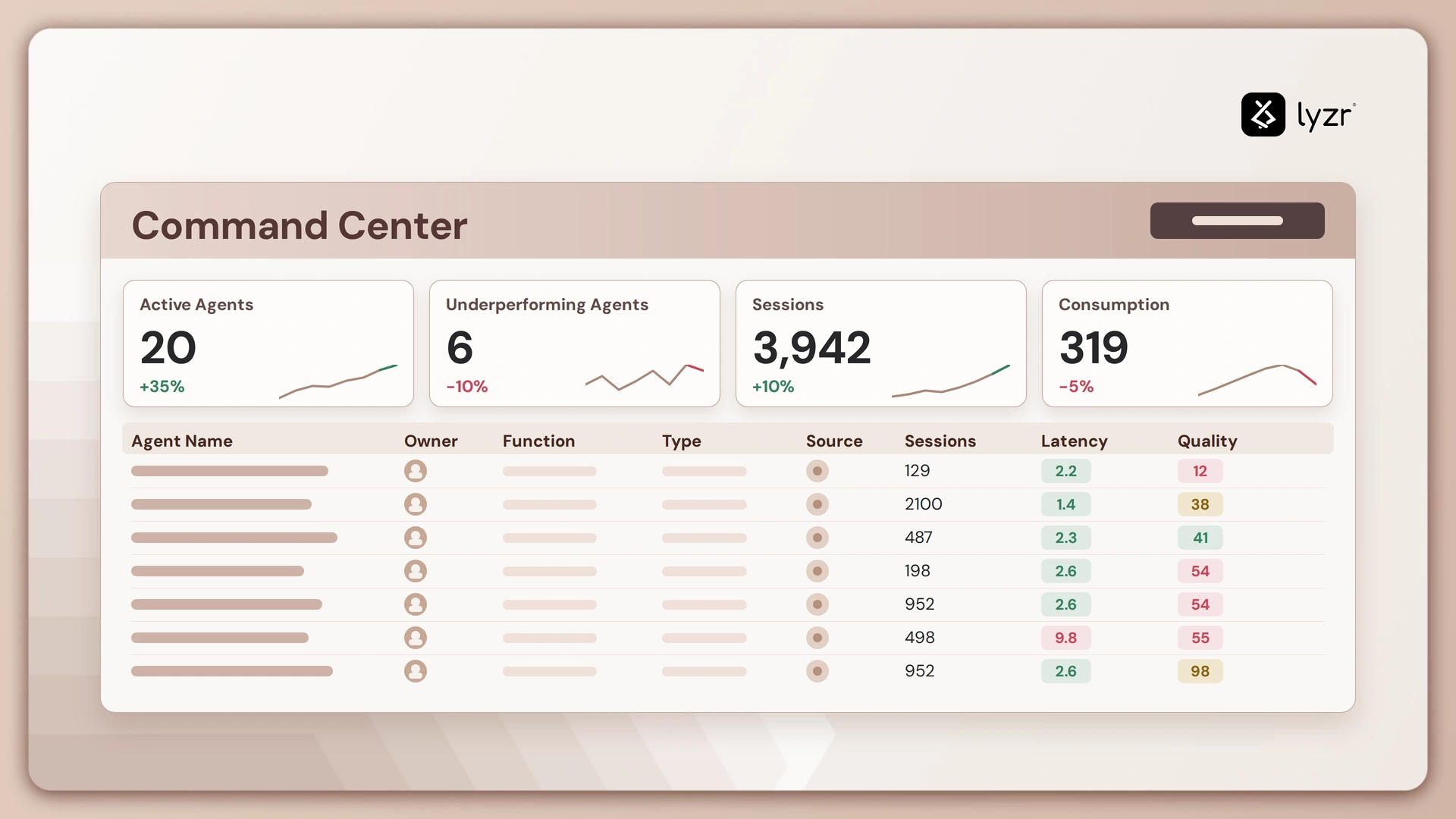
An Agent Command Center is a centralized dashboard for overseeing, coordinating, and controlling a fleet of AI agents. Think of it as mission control: one place to see what every agent is doing right now, what it’s about to do next, what it has access to, and whether a human needs to step in.
It’s usually built from four core capabilities:
| Capability | What It Does | Why It Matters |
| Visibility | Live, aggregated view of every active agent and its status | No more checking each agent’s own interface one by one |
| Control | Pause, redirect, approve, or shut down any agent mid-task | Stops small issues before they compound |
| Permissions | Clear map of what data and systems each agent can touch | Keeps access scoped to the job, not granted broadly |
| History | Persistent audit trail of every action taken | Makes any decision traceable after the fact |
Why This Kind of Oversight Has Become Necessary
Managing a single AI output used to mean reading generated text and deciding whether to use it. Managing an agent is a different problem entirely, because agents take actions. They send emails, edit files, call APIs, move money, and chain decisions together, often without a person approving each individual step.
A few pressures make this shift concrete:
Scale. Watching one agent in a chat window is easy. Watching twenty agents running in parallel, each with its own task queue and its own failure modes, is not something anyone can do across twenty browser tabs.
Expanding autonomy. Agents are increasingly given loose instructions like “handle the vendor dispute” instead of “send this exact email.” The more open-ended the task, the more valuable it is to have checkpoints where a human can look in.
Accountability. When an agent sends the wrong invoice or replies to the wrong customer, someone has to reconstruct what happened. Without a central record, that becomes forensic work across a dozen disconnected systems.
Earned trust. Teams hand agents more responsibility once they can watch them work, not just take the outcome on faith.
What a Well-Built Command Center Tends to Include
Different implementations converge on a similar set of components, because they’re solving the same problems:
| Feature | Purpose |
| Live activity feed | Shows each agent’s current step, not just the final output, so problems get caught mid-task |
| Interrupt and override controls | Pause or redirect an agent without killing the whole session |
| Scoped per-agent permissions | A scheduling agent can’t touch finance systems; a coding agent can’t send external email |
| Escalation rules | Automatically routes a decision to a human when confidence is low or stakes are high |
| Cross-agent handoff tracking | Records who owns what when one agent passes work to another |
| Retrospective logs | Turns debugging a bad decision into reading a timeline, not reverse-engineering a black box |
The Human Role Shifts. It Doesn’t Vanish.
A command center isn’t about removing humans from the loop. It’s what makes real oversight possible once there are too many agents for anyone to watch individually.
The shift usually looks like this:
- A person does the task directly.
- A person reviews how the agent did the task.
- A person monitors a summary, and zooms in only when something looks off.
This isn’t a new pattern. Air traffic control, network operations centers, and trading floors all hit the same wall once activity outgrew what one person could track by hand. The fix was never fewer people watching. It was better instrumentation, so the people watching could see what actually mattered.
Where This Is Headed
As agents get better at long, multi-step work, the real bottleneck won’t be what an agent can do. It’ll be whether a team trusts it enough to let it run unsupervised.
Closing that gap depends less on smarter models and more on better tooling for the humans working alongside them. The organizations that get the most out of AI agents won’t be the ones with the most capable agents. They’ll be the ones that can see clearly what their agents are doing, catch problems early, and expand autonomy one well-supervised step at a time.
Book A Demo: Click Here
Join our Slack: Click Here
Link to our GitHub: Click Here