TL;DR
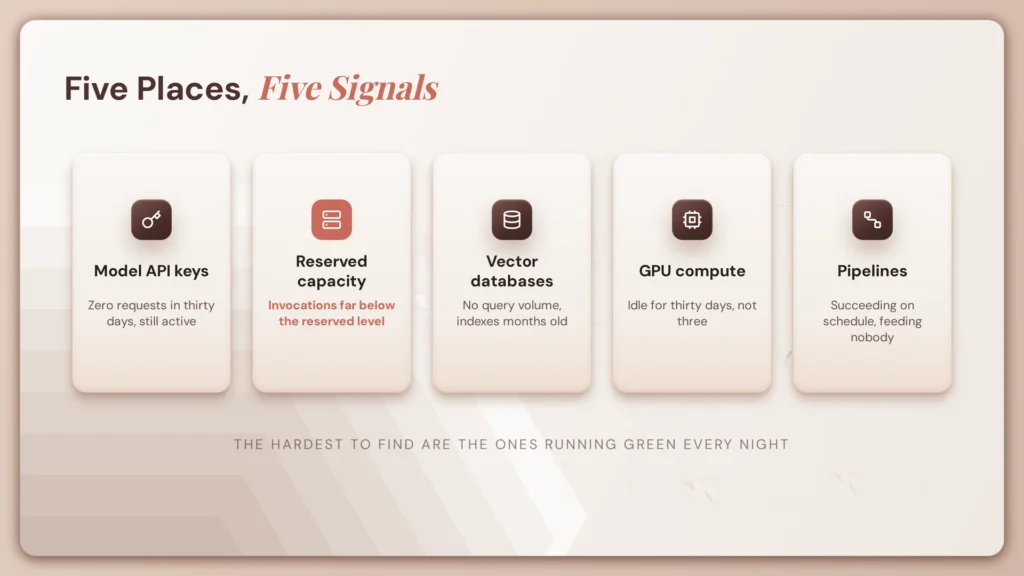
- Orphaned AI spend hides in five places: active provider API keys with no owner, provisioned throughput and reserved model capacity, idle vector databases and their storage, running GPU and inference instances, and scheduled pipelines feeding nothing.
- Audit them in order of findings per hour, which means starting with reserved commitments rather than the long tail of small idle instances. The savings number is the least interesting output.
- The list of resources nobody could account for is the real one, because every line on it is an ownership failure that will recur next quarter unless the provisioning path changes.
Why Does LLM Spend Become Orphaned?
Almost none of this is carelessness. It is ordinary organisational entropy meeting infrastructure that is unusually easy to create and unusually expensive to leave running.
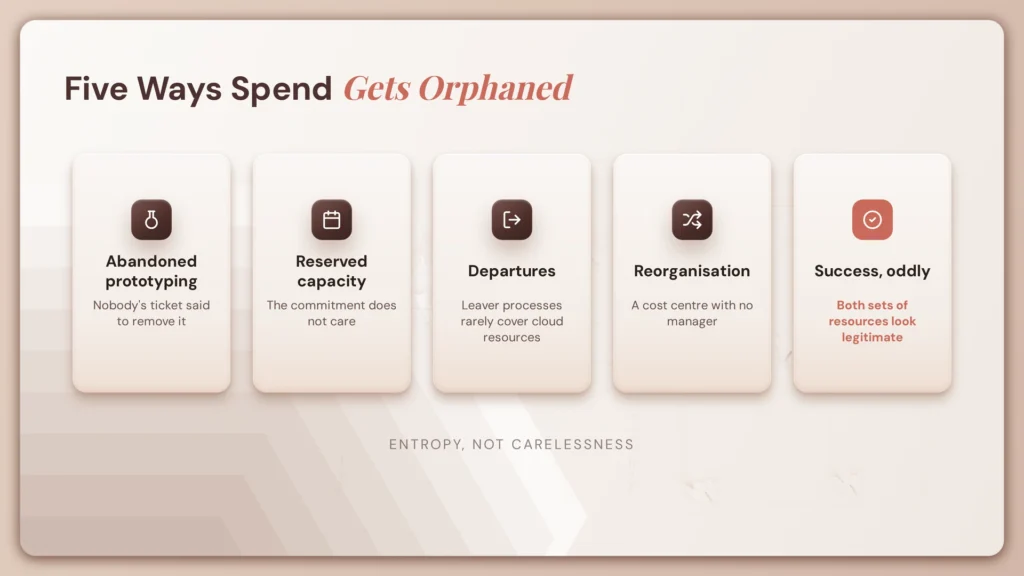
Abandoned prototyping. A team evaluates an approach over six weeks. The evaluation concludes, the decision gets made, and the infrastructure that supported it keeps running because nobody’s ticket said to remove it.
Reserved capacity outliving the workload. Provisioned throughput or committed-use capacity bought for a project that shipped differently, shipped smaller, or did not ship. The commitment does not care.
Departures. The person who created the resource left. Most leaver processes deprovision accounts and mailboxes. Very few cover cloud resources that person provisioned or API keys they issued.
Reorganisation. A team dissolved or merged and ownership of its infrastructure was never explicitly transferred. The resources belong to a cost centre that no longer has a manager.
Success, oddly. A pilot worked, got rebuilt properly for production, and the pilot infrastructure stayed running alongside the production version. This one is common and it is almost never caught, because both sets of resources look legitimate.
Why AI spend is particularly prone to this
AI infrastructure gets provisioned quickly, often during experimentation, frequently outside the normal architecture review path that catches this sort of thing for conventional workloads.
It is also expensive per unit. A forgotten small VM costs a rounding error and nobody notices for years. A forgotten GPU instance or an unused provisioned-throughput commitment does not, which means AI orphans are simultaneously more likely to be created and more costly to leave in place.
The same organisational dynamics that produce shadow AI agents produce orphaned AI spend, and for the same underlying reason: the provisioning path is fast and the ownership record is optional. Teams working through enterprise AI agent challenges will recognise the pattern.
Where Does Orphaned AI Spend Hide? 5 Places to Check
Generic cloud waste tooling was built for unattached volumes, idle VMs, and orphaned load balancers. It will not tell you that a vector index has not been queried since March. These five categories are AI-specific and they need to be checked deliberately.
1. Model API keys and provider accounts
What it is. Keys issued for a project or a person, still enabled, still attached to a billing account. Depending on the provider and the agreement, an idle key may carry a platform fee, sit against a committed spend arrangement, or simply represent an open credential rather than a direct cost.
The signal. Keys with zero requests over a 30-day window that remain active. Most providers expose key-level usage under an organisation account, though the granularity varies considerably by vendor and plan tier.
The trap. A key with zero usage is not automatically dead. Some exist for disaster recovery, seasonal workloads, or a quarterly batch job. Confirm before revoking. That said, revoking a key nobody can account for is the fastest known method of identifying its owner, and it is worth doing deliberately rather than by accident.
This audit overlaps with the one described in our guide to detecting LLM calls that bypass your AI gateway. The same key reconciliation serves both purposes, so run it once and use the output twice.
2. Provisioned throughput and reserved model capacity
What it is. Committed capacity on managed model endpoints. Bedrock provisioned throughput, Azure OpenAI provisioned units, and equivalent commitment products on other platforms. Verify the current product naming before you go looking, because these get renamed.
The signal. Provisioned capacity with invocation metrics far below the reserved level, sustained over weeks.
The trap. This is usually the single largest orphaned line and the most commonly missed, because it does not look like waste on an invoice. It looks like a legitimate committed cost, sitting in the same column as every other commitment the finance team already approved. Nothing about the line item says the workload it was bought for stopped running in April.
If your organisation is deliberately multi-provider, check every provider. Commitments made during an evaluation of a model you subsequently moved away from are a specific and common case, and one of the practical costs of model flexibility that rarely gets counted.
3. Vector databases and index storage
What it is. Managed vector database instances, self-hosted clusters running on VMs, and the storage underneath both.
The signal. Instances with no query volume, indexes not updated in months, and clusters sized for a load test that ended.
The trap. Compute and storage are usually separate line items. Deleting a cluster frequently leaves the volume behind, still billing, now with no console entry pointing at it. This is the AI version of the unattached persistent volume, and generic waste tooling often does catch the volume while having no idea the cluster it belonged to was a vector store.
Anyone running RAG systems at scale accumulates these quickly, because each experiment with a different chunking strategy or embedding model tends to produce a new index. Our guide to building a RAG engine covers why teams end up with several.
4. GPU and inference compute
What it is. Instances provisioned for fine-tuning, evaluation, or self-hosted inference, plus the persistent volumes attached to them.
The signal. Sustained low or zero GPU utilisation on running instances, and unattached volumes left over from deleted training pods.
The trap. Utilisation needs a long enough observation window. An instance idle for three days may sit between scheduled jobs. Idle for thirty days is orphaned. Teams that check over a short window get false negatives and conclude the fleet is healthy.
Self-hosted inference deserves particular attention in organisations running models on-premise or in a sovereign deployment, where the capacity was sized for a projected load that may never have arrived.
5. Pipeline and orchestration infrastructure
What it is. Scheduled embedding jobs running against a corpus nobody reads. Evaluation pipelines for a model no longer served. Data pipelines feeding a decommissioned index.
The signal. Jobs completing successfully on schedule with no downstream consumer.
The trap. These are the hardest category to find, because they are working correctly. Nothing errors. Nothing alerts. The pipeline runs green every night. The only signal is that the output goes nowhere, and no monitoring system is watching for that.
| Category | Signal to look for | Cost profile | Attribution difficulty |
| Provider API keys | Zero requests over 30 days, key still active | Variable; often indirect | Low if keys are named |
| Provisioned throughput | Invocations far below reserved level | Large and continuous | Medium |
| Vector databases | No query volume, stale indexes, orphaned volumes | Continuous, compute plus storage | Medium |
| GPU and inference | Sustained low utilisation, unattached volumes | Large and continuous | Medium |
| Pipelines | Jobs succeeding with no consumer | Small individually, accumulates | High |
How to Find Orphaned LLM Spend in Your Cloud Bill
Ordered by findings per hour rather than by thoroughness. Most teams work this list backwards, starting with the long tail of small idle instances because they are the easiest to enumerate. The money and the insight are both at the top.

1. Start with reserved and provisioned commitments. Highest value per minute of anything on this list. One comparison of provisioned capacity against actual invocation usually surfaces the largest single line in the whole audit.
2. Filter the bill by AI and ML service families, then sort by cost descending and by owner tag. Anything material with no owner tag becomes your working list. This is a two-column output and it is more useful than any dashboard.
3. Reconcile provider-side keys against what the organisation believes it has. Any key the organisation cannot account for is either orphaned spend or an ungoverned credential, and usually both.
4. Check utilisation, not existence. A running resource is not a used resource. Pull utilisation over a 30-day window minimum, longer if the workload has any seasonality.
5. Trace each candidate to a human before deleting anything. Commit history, resource tags, IAM audit logs, and the ticket that created it. This is the slow step, it is where the real finding lives, and it is the step most audits skip in favour of the deletion.
6. Record what you could not attribute. The unattributable set is the actual output of this exercise. More on that below.
If you want to automate the recurring parts of this, the cloud cost analyzer agent blueprint covers the pattern, and platform teams inheriting the audit as a quarterly obligation will want it scripted rather than manual.
One note on multi-provider environments: if your AI workloads span more than one cloud, run the audit per provider rather than trying to normalise first. The service families and metric names differ enough that a unified view usually loses the detail you need. Our guide to multi-cloud architecture covers why cost visibility fragments across providers.
What Does Unattributable AI Spend Tell You About Ownership?
The savings figure is the least interesting output of this audit. It is the one that gets reported, and it is the one that changes nothing.
The interesting output is the list of resources nobody could account for.

Every unattributable resource is an ownership failure, not a cost failure. It was provisioned without an owner recorded, or the owner left and nothing transferred, or the team reorganised and the infrastructure did not follow. Deleting it recovers the money and leaves the process that produced it completely intact.
Finance found what security did not. An active provider key with no owner is a credential sitting outside identity governance. An unregistered agent burning tokens is shadow AI. A GPU instance nobody claims is an untracked asset with network access. These are security findings that arrived through a finance workflow, and they arrived that way because invoices come monthly and security reviews do not.
Worth saying plainly to an executive audience: if you are discovering your AI estate by reading the bill, the bill is doing your asset inventory for you. It is doing it badly, and three weeks late.
The same finding will recur next quarter. Every organisation that runs this audit annually finds the same categories annually, in roughly the same proportions. Detection after the fact does not change the rate at which orphans are created. It just tells you what the rate is.
That is the argument for treating this as a governance problem rather than a cost problem, and it connects directly to how AI agent governance and risk and compliance approach the same underlying gap. It is also the same visibility problem described in gateway bypass in AI infrastructure, surfacing through a different reporting line.
How to Prevent Orphaned AI and LLM Spend
Five controls, ordered by durability rather than by ease of implementation.

1. Owner tags enforced at provisioning, not audited afterwards. Policy-as-code that rejects an untagged AI resource at creation. This is the single control that closes the category, and it is the one most organisations defer because it requires touching the provisioning path rather than adding a report.
2. Per-project or per-agent credentials rather than shared keys. Attribution is impossible with a shared key, and attribution is the entire problem. This is the same principle applied to agents in agent governance: a shared credential destroys the link between spend and owner before the spend even happens.
3. Expiry by default on experimental infrastructure. Development and evaluation resources provisioned with a time-to-live that requires an explicit renewal. This makes abandonment the default outcome rather than persistence, which inverts the failure mode. Nobody has to remember to clean up.
4. Anomaly detection on flat baselines, not just spikes. Most cost tooling alerts on increases. Orphaned spend is a flat line that never decreases, which is precisely the pattern anomaly detection is tuned to treat as normal. This is the control almost nobody has configured, and it would have caught most of what your audit just found.
5. Extend the leaver process to cloud resources and API keys. Most organisations deprovision accounts and not infrastructure. Adding a resource-and-credential step to offboarding closes one of the five causes outright.
For a broader sequence covering how ownership, permissions, and lifecycle fit together, our playbook on taking agents to production covers the full arc, and it is the framing a CTO will want when this becomes a recurring obligation rather than a one-off exercise.
How AI Agent Governance Helps Prevent Unattributed AI Spend

To be direct about the boundary: Lyzr is not a FinOps tool. It does not analyse cloud bills, detect waste, or optimise spend. Cloud cost platforms do that and they do it well, and nothing in the audit above is solved by an agent platform.
The connection is narrower and worth stating precisely: the attribution problem underneath the cost problem is the same one that makes agents ungovernable.
Agent registration and ownership. Every agent inventoried with a named human owner and a stated purpose, recorded at creation rather than reconstructed from commit history during an audit. See agent types in production for how this works at scale.
Per-agent credential scoping. Credentials issued to the agent rather than shared across an environment, which means consumption is attributable by construction rather than by investigation.
The consequence for cost. An agent you can govern is an agent you can bill correctly. Attribution stops being a quarterly forensic exercise and becomes a property of how the agent was created.
The OpenController provides agent registration, ownership, and permission scoping, with Responsible AI controls applied at the behavioural layer. The Lyzr documentation covers the registration and permission model.
Where to go next: if the audit surfaced resources nobody could account for, the governance question matters more than the savings number. Start with AI agent governance for the control framework, or shadow AI agents if the unattributable set looked like more than infrastructure. If you would rather talk it through, book a demo.
Frequently asked questions
What is orphaned LLM spend?
Cloud and provider costs for AI resources that no longer serve an active workload: idle provisioned capacity, unused vector databases, running GPU instances, and active API keys with no owner.
How do I find unused AI resources in my cloud bill?
Filter by AI and ML service families, sort by cost, and check each material line for an owner tag and recent utilisation. Start with reserved and provisioned commitments rather than small idle instances.
Why is AI spend more prone to becoming orphaned?
It is provisioned quickly during experimentation, often outside the normal architecture review path, and it is expensive per unit. A forgotten GPU instance costs far more than a forgotten small VM.
What is provisioned throughput and why does it get orphaned?
Reserved capacity on a managed model endpoint that bills continuously whether or not you invoke it. It is commonly the largest orphaned line because it appears on the invoice as a legitimate committed cost.
How do I find idle vector databases?
Look for instances with no query volume and indexes not updated recently. Check whether storage volumes remain after the compute was deleted, since they are usually separate line items.
What GPU utilisation counts as idle?
Use a 30-day window at minimum. An instance idle for a few days may sit between scheduled jobs. Sustained near-zero utilisation across a month is orphaned.
Should I just delete unused AI resources?
Trace each to an owner first. Some low-usage resources are intentional, including disaster recovery and seasonal workloads. The attribution exercise is more valuable than the deletion.
How do I stop AI resources becoming orphaned?
Enforce owner tags at provisioning through policy-as-code, use per-project credentials, set expiry on experimental infrastructure, and extend your leaver process to cloud resources and API keys.
Is orphaned LLM spend the same as shadow AI?
Frequently the same finding from a different reporting line. An unowned resource that costs money is waste to finance and shadow AI to security.
Why doesn’t cost anomaly detection catch this?
Most anomaly detection alerts on spikes. Orphaned spend is a flat baseline that never decreases, which is exactly the pattern anomaly detection is designed to treat as normal.
Book A Demo: Click Here
Join our Slack: Click Here
Link to our GitHub: Click Here
Got a use case in mind?
8 weeks from use case to agents running in production.
Platform, people and FDEs, all in. Bring your environment. We'll co-build and stay until it's live.
Talk to UsFree resource
101 AI Agents Use Cases
100+ production-ready AI agent use cases across Marketing, Sales, HR, Banking, Insurance, Operations and a lot more
Download now