A prompt used to be a line of text a developer tweaked and shipped. In a production AI system, that same prompt now decides what an agent says, what it retrieves, how it reasons through a task, which tools it calls, and how much the request costs. Change the prompt, and you change the behavior of the system, often in ways nobody notices until something breaks downstream.
That shift is why a prompt registry exists. It gives teams a controlled system for storing, versioning, retrieving, comparing, and promoting prompts, the same way a package registry manages code dependencies or a model registry manages trained models. As prompts move from experimental text to production configuration, treating them informally stops being an option.
This article covers what a prompt registry actually does, how it differs from just storing prompts in Git, how major platforms approach the category, and where a registry’s job ends and broader AI governance begins.
What Is a Prompt Registry?
A prompt registry is a centralized system for storing, versioning, and managing the prompts used by AI applications and agents. It tracks every version of a prompt, along with metadata like who changed it, when, why, and how it performed, so teams can retrieve, compare, roll back, and promote prompts across environments with the same discipline they’d apply to code or models.
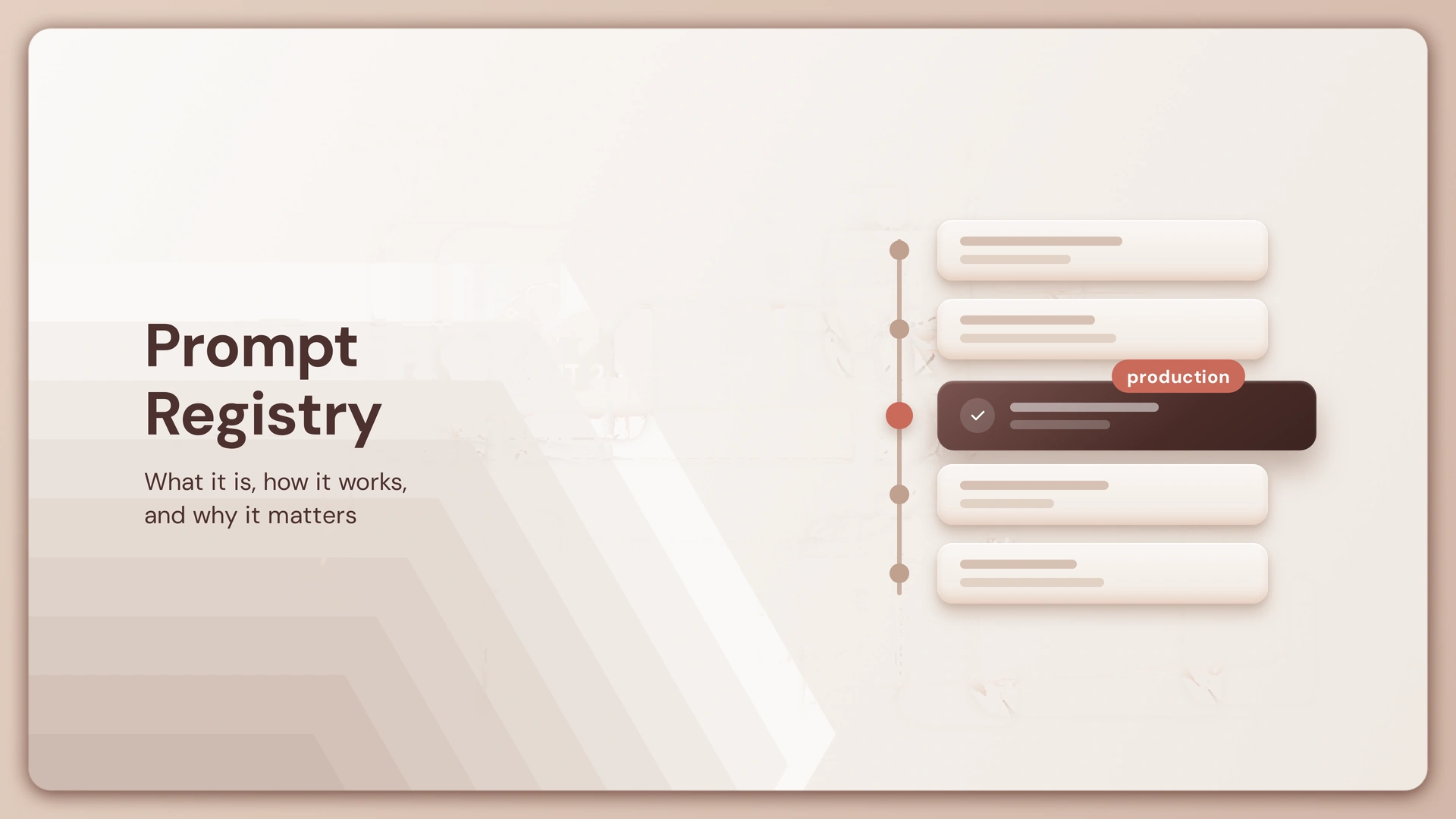
Most registries provide a consistent set of capabilities: version history for every prompt, tagging or aliasing (so an application can request “production” rather than a specific version number), retrieval by ID or tag at runtime, side-by-side comparison between versions, and a promotion path from development to staging to production.
How a Prompt Registry Works, and Why It Matters
At a basic level, a prompt registry sits between where a prompt is written and where it’s actually used. A developer or prompt engineer writes and tests a version, the registry stores it under a name and version number, and the application or agent retrieves the approved version by name or tag rather than having it hardcoded into the codebase. When a new version is ready, it goes through the same store, test, and tag cycle before it replaces the one currently live.
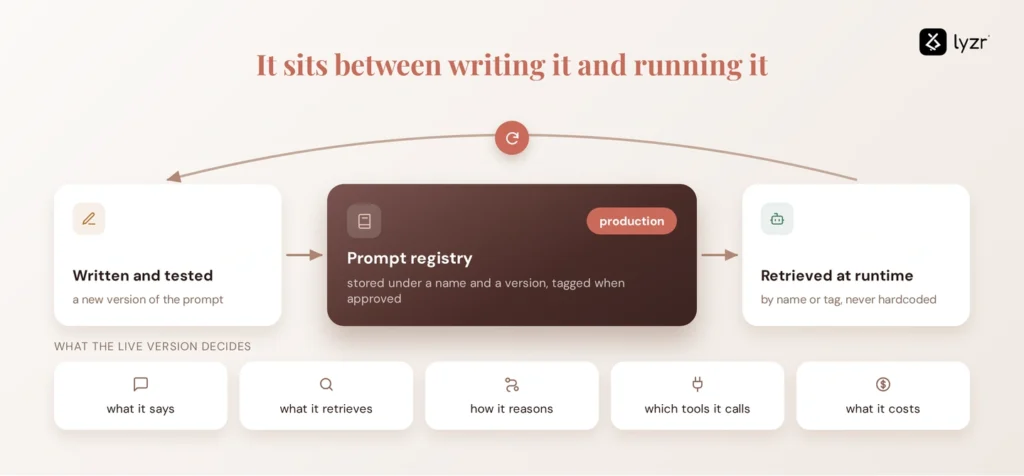
That workflow matters because of what a prompt actually controls once it’s in production. A prompt decides what an agent says, what it retrieves, how it reasons, which tools it calls, and how much a request costs. Change any of that without a record of the change, and a team ends up debugging a shift in behavior with no way to answer the first question an incident review always asks: what changed, and when. A registry exists so that question always has an answer.
Why Prompts Need Real Version Control, Not Just a Text File
Once you know what a prompt registry is supposed to track, the obvious next question is whether you need a separate tool for it at all. Most engineering teams already have a version control system, and a prompt is just text. Why not commit it to the same repository as everything else?
It’s tempting to treat a prompt registry as “Git for prompts.” That’s a reasonable entry point, but it undersells what’s actually needed. Git tracks changes to code. A prompt registry has to track a prompt in the context of an AI application: which version is live in which environment, what evaluation results that version produced, which agent is calling it, and what changed in the model’s output when the wording changed.
A one-line edit to a system prompt can shift an agent’s tone, break a formatting contract a downstream system depends on, or quietly change the tools it decides to call. None of that shows up in a diff the way a code change does. A registry built for AI has to surface it anyway, through evaluation scores, comparison views, and deployment history attached to the version itself.
Prompt Registry vs Git
| Git | Prompt Registry | |
| Tracks changes | Yes | Yes |
| Understands prompt-specific metadata (evaluations, environments, model version) | No | Yes |
| Runtime retrieval by tag/alias | No | Yes |
| Built-in comparison of output quality between versions | No | Often |
| Deployment/promotion workflow | Manual | Native |
Git is a fine place to store a prompt as a file. It has no concept of what that prompt does once it’s running.
What Should a Production Prompt Registry Manage?
A useful prompt registry needs to do more than store text.
Versioning and history
Every meaningful prompt change should create a new version rather than silently replacing the previous one.
Metadata and ownership
Teams should be able to identify who owns a prompt, what it does, which application or agent uses it, and where it is deployed.
Retrieval and reuse
A registry should make approved prompts available to applications without requiring developers to duplicate prompt text across codebases.
Comparison and rollback
Teams should be able to compare versions and restore a known-good version when a change causes problems.
Evaluation context
Prompt versions become much more useful when they can be associated with evaluation results, test cases, or quality metrics.
Promotion
Moving a prompt from experimentation into production should be controlled rather than treated as an informal copy-and-paste operation.
These capabilities turn a prompt from an unmanaged string into a production artifact with traceability.
Where Does a Prompt Registry Fit in the AI Stack?
A prompt registry is one layer in a larger AI infrastructure stack, not the whole thing. Laid out simply, that stack looks like this:
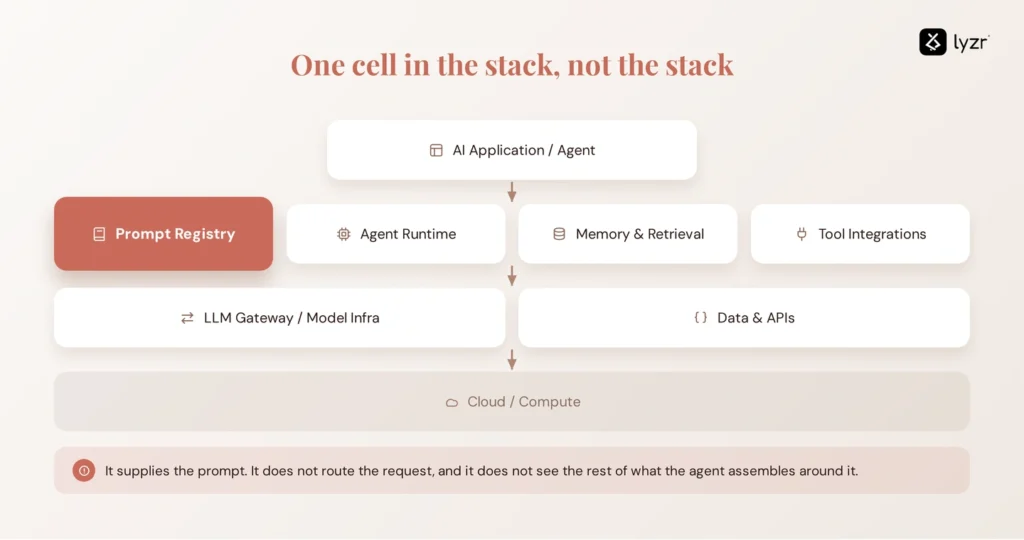
A prompt registry manages the prompt artifact an application or agent consumes. Other layers handle the rest of the execution model routing, runtime execution, retrieval, observability, identity and infrastructure.
When an agent needs a prompt, it retrieves the appropriate version from the registry, typically by name, tag or alias. Everything after that, which model actually handles the request, how the call gets routed and secured, what gets logged for later, belongs to a different layer. A registry supplies the prompt. It doesn’t route the request, and it doesn’t watch what happens once the model responds.
This distinction becomes clearer when you compare a prompt registry with an LLM gateway.
Prompt Registry vs LLM Gateway
| Prompt Registry | LLM Gateway | |
| Manages | Prompt versions and metadata | Model traffic and routing |
| Answers | “Which version of this prompt is live?” | “Which model handles this request?” |
| Typical use | Version, compare, promote prompts | Route, rate-limit, and secure model calls |
The two are frequently used together. A gateway routes the request; a registry determines which prompt version goes into it.
A running agent may then add another layer of complexity. A running agent typically combines that prompt with retrieved context, conversation memory, tool instructions, policy constraints, and the user’s own input, all assembled at runtime. The registry manages the prompt, it does not manage the full runtime context assembled around it. It has no visibility into the other four, or into how they interact once the agent is actually running.
That’s an important distinction : a prompt registry versions and manages one layer of the AI infrastructure stack while the others manage the execution of the agent.
How MLflow, Databricks, Azure, and Others Approach Prompt Registries
The category isn’t standardized yet, and different platforms come at it from different starting points.
MLflow added a dedicated Prompt Registry as part of its broader move into GenAI tooling, extending the versioning and tracking model it already used for ML models to prompts specifically, with support for aliases, tags, and lineage back to the runs that used a given version.
Databricks builds on MLflow’s prompt registry natively, integrating it with Unity Catalog so prompt versions inherit the same governance, access control, and lineage tracking Databricks already applies to data and models. It’s the same open registry concept, with enterprise access control layered on top.
Azure approaches prompt management through AI Foundry, where prompt versions live alongside the broader application and evaluation tooling rather than as a fully standalone registry product.
LangChain and LangSmith offer a prompt hub with versioning, tagging, and the ability to pull a specific prompt version at runtime, aimed at teams already building on the LangChain ecosystem.
Langfuse treats prompt management as part of its broader observability platform, versioning prompts alongside the traces and evaluations generated by the applications using them.
Open-source options exist at both ends of the spectrum: dedicated, lightweight prompt-versioning libraries, and prompt management features bundled inside larger LLM observability or development platforms. Worth distinguishing the two before choosing one. A platform with a “prompt management” tab isn’t automatically a dedicated registry, and a dedicated registry usually won’t give you the observability a fuller platform does.
Where Prompt Registry Ends and Governance Begins
A registry answers a narrow, important question well: which version of this prompt is running, and what did the version before it look like. It does not answer the questions that come right after:
Which agent is actually using this prompt in production? Was this version evaluated before it shipped? Who approved the change? Where is it deployed, and is that consistent across environments? What happened to agent behavior after the change went live? If something looks wrong, can it be rolled back cleanly, and will that rollback actually take effect everywhere the prompt is used?
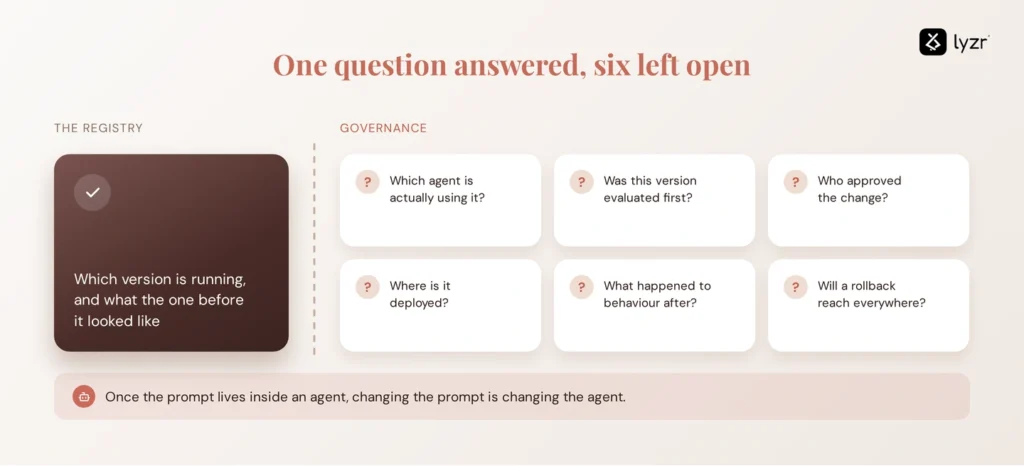
None of those are registry questions. They’re governance questions, and they only get harder as prompts stop being standalone text and become one component embedded inside a larger agent, which itself calls tools, accesses data, and takes actions with real consequences. At that point, a change to a prompt is really a change to agent behavior, and it needs to be evaluated and approved the same way any other change to that agent would be.
From Prompt Management to Agent Governance
A prompt registry solves an important problem: it gives teams control over the prompt as a production artifact. It can tell you which version is running, what changed, who changed it, and, in some cases, how that version performed.
But a production agent is more than its prompt.
An agent may use multiple prompts alongside a model, memory, retrieved context, tools, APIs, policies, and external data. It may also have its own identity, permissions, deployment history, and evaluation results. Once that agent is operating in production, knowing which prompt it uses is only one part of knowing whether the agent itself is behaving as intended.
That’s where an AI Control Plane differs from a prompt registry. The registry manages the artifact. A Control Plane governs the lifecycle of the agent that uses that artifact, from evaluation and deployment to observability, access, policy enforcement, and audit.
Prompt Registry vs AI Control Plane
| Prompt Registry | AI Control Plane | |
| Governs | Prompt artifacts | The full agent lifecycle |
| Tracks | Prompt versions and metadata | Identity, evaluation, deployment, observability, audit across agents |
| Scope | One artifact type | Every agent, regardless of what’s inside it |
The distinction becomes important when something changes in production. A registry can tell you that a prompt was updated from version 12 to version 13. But it doesn’t necessarily tell you whether that change was evaluated against the agent’s real behavior, who approved its deployment, which agents are using it, what tools those agents can access, or what happened after the change went live.
That is the practical gap between prompt management and agent governance. Versioning tells you what changed. Governance tells you whether the change should have happened, what it affected, and what you can do about it.
A prompt registry therefore doesn’t need to be replaced when an organization adopts a Control Plane. It can remain an important part of the AI stack, while the Control Plane provides the governance layer around the agents using it.
Where Lyzr’s OpenController Fits
Lyzr’s OpenController is designed to govern agents across this broader lifecycle rather than replace the infrastructure teams already use for prompts, models, or frameworks.
When an agent’s prompt changes, that change can be evaluated, approved, observed, and audited as part of the agent’s broader lifecycle. The same governance layer can provide visibility into the agent’s identity, deployment, behavior, and access across the systems it interacts with.
In other words, the registry manages the prompt. The Control Plane manages the agent around it.
If your registry already tells you what changed, the next question is whether you can currently prove who approved that change, whether it was evaluated, and what actually happened to the agent’s behavior once it shipped. If the honest answer is no, that’s the exact gap a Control Plane is built to close, sitting above the registry you already use rather than replacing it.
Explore Lyzr’s OpenController to see how prompt changes, evaluations, and deployment approvals show up in one governed view, or book a demo to walk through it against your own agent stack.
Frequently Asked Questions
A prompt registry is a centralized system for storing, versioning, and managing the prompts used in AI applications, tracking every version along with who changed it, when, and how it performed, so teams can retrieve, compare, and promote prompts with the same discipline applied to code.
Without one, prompt changes happen informally, scattered across files, chat messages, or ad hoc edits, with no record of what changed, who approved it, or how to roll back a version that made things worse. A registry adds version control, collaboration, controlled deployment, rollback, and an audit trail.
A financial services team running a customer support agent versions its escalation-detection prompt, tests a new version against historical tickets, tags the version that performs better as “production,” and rolls it out. When a complaint pattern shifts two weeks later, they can compare the current version against the previous one to see exactly what changed.
A registry is the infrastructure for storing and versioning prompts. Prompt management is the broader lifecycle around that infrastructure, writing, testing, evaluating, and iterating on prompts, of which the registry is one part.
Git can store and version a prompt as a text file, but it has no concept of prompt-specific context: which version is live in which environment, its evaluation results, or its runtime retrieval by tag. A dedicated registry adds those AI-specific layers on top of version control.
Yes, both as dedicated lightweight libraries and as a feature inside broader open-source AI development and observability platforms. It’s worth confirming which category a given tool actually falls into before assuming it covers full registry functionality.
A prompt registry manages one artifact: the prompt. A Control Plane governs the broader lifecycle of the AI agent that prompt lives inside, including identity, evaluation, deployment, observability, and audit, across every agent an enterprise runs, not just the prompts inside them.
Book A Demo: Click Here
Join our Slack: Click Here
Link to our GitHub: Click Here
Got a use case in mind?
8 weeks from use case to agents running in production.
Platform, people and FDEs, all in. Bring your environment. We'll co-build and stay until it's live.
Talk to UsFree resource
101 AI Agents Use Cases
100+ production-ready AI agent use cases across Marketing, Sales, HR, Banking, Insurance, Operations and a lot more
Download now