TL;DR
- Monitor production traces, tool calls, outcomes, latency, cost and user feedback.
- Define quality and task-completion criteria before changing anything.
- Turn recurring failures into reproducible evaluation and regression cases.
- Change one meaningful component at a time and compare against a baseline.
- Test safety, reliability and existing capabilities before rolling out an improvement.
- Use production monitoring and governance to track outcomes and control changes over time.
An agent passes its launch tests and goes live. Then real users surface incomplete answers, failed tool calls, the wrong retrieved document, inconsistent decisions and rising costs. The usual response is to edit the prompt or swap the model. That can fix one problem and quietly create another, and without production visibility and repeatable evaluations nobody can tell whether the agent is getting better.
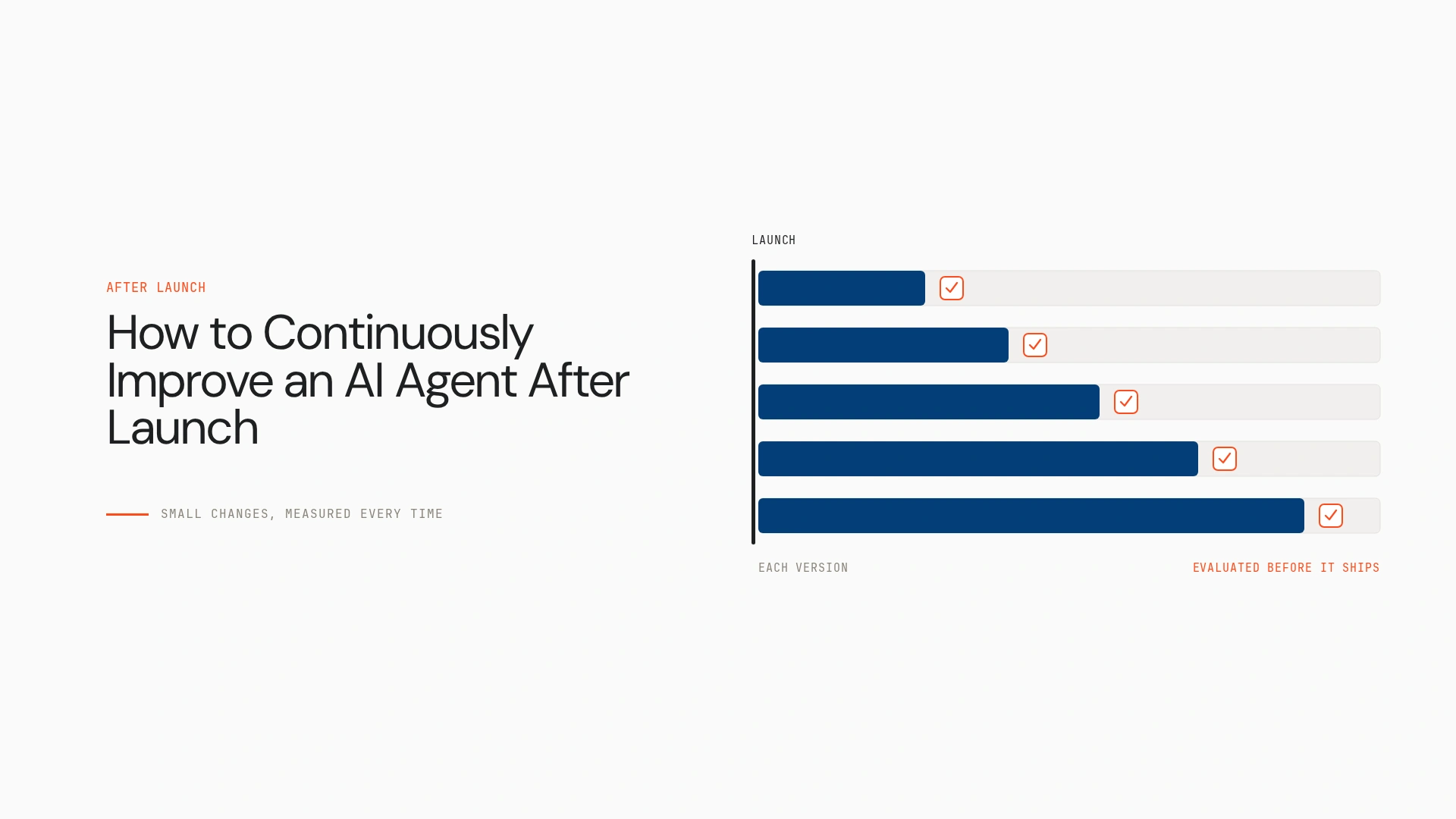
To continuously improve an AI agent after launch, monitor its real-world behaviour, turn failures into test cases, make targeted changes, validate them against a regression suite, and monitor the results after release. This guide lays out that loop step by step, with the governance it needs once you run more than one agent.
What does continuous agent improvement mean?
Continuous agent improvement is the recurring use of production evidence to make an agent more reliable, useful, efficient and safe. It builds on four neighbouring practices. Initial testing checks requirements before launch. Monitoring shows what the agent is doing. Evaluation measures performance against criteria. Improvement uses those findings to implement and validate changes.
Continual or online learning, where a model updates from data, is one specific method and isn’t part of every improvement process. An agent doesn’t get better just by handling more conversations. It needs a feedback mechanism, an evaluation method and a controlled way to change and verify. You can improve an agent without retraining the model, through prompts, retrieval, tool descriptions, permissions, routing, workflow logic or model selection.
The improvement loop
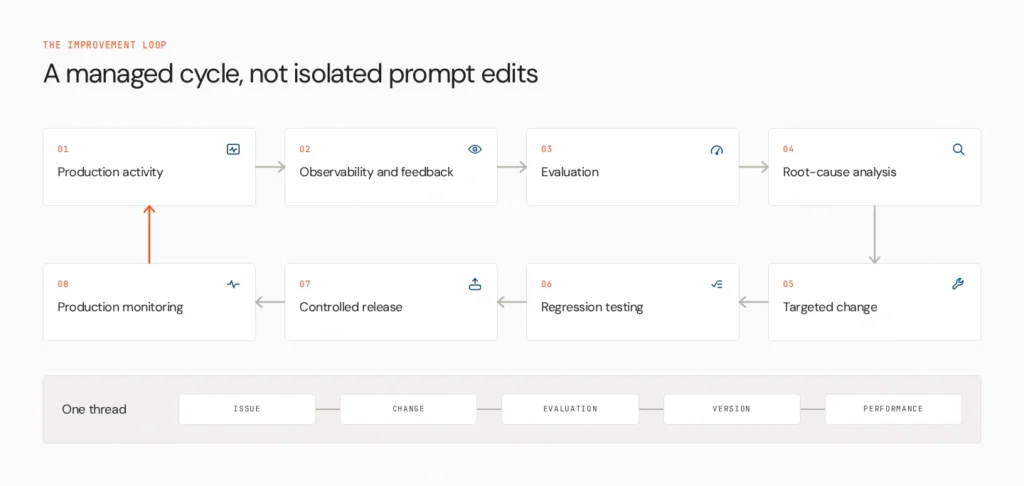
Improvement works as a managed cycle, not a series of isolated prompt edits. The team should be able to link a production issue to a proposed change, its evaluation results, the released version and its later performance.
Step 1: Establish a production baseline
Define what success means for the agent’s actual task, and track a focused set of measures:
- Task completion or success rate
- Answer quality, accuracy or faithfulness where relevant
- Tool-call success and correct tool selection
- Retrieval relevance for knowledge-based agents
- Latency and cost per task
- Safety, policy adherence and escalation rates
The right metrics depend on the use case. A research agent, a support agent and a workflow agent have different success criteria. Record a baseline before you change anything, so improvement is measured and not felt.
Step 2: Collect production traces and feedback
Combine system signals with human feedback. Traces show model calls, tool calls, intermediate steps and outcomes. User corrections, ratings, complaints and escalation reasons show what the traces miss. Domain experts can judge whether a technically valid answer is right for the business. Lyzr’s guide to monitoring in Agent Studio shows one approach.
Suppose a support agent gets negative feedback on an answer. The trace shows it retrieved an outdated policy document, so the model didn’t invent the error. Minimise the data you store, and control access to conversations and traces that contain sensitive information.
Step 3: Turn failures into evaluation cases
Every recurring failure should become a reproducible test where practical:
- Pick a representative failure from a trace or report.
- Recreate the input, relevant context and expected outcome.
- Define the evaluation criteria.
- Add the case to a versioned test set.
- Run it against every proposed change.
Evaluation should cover more than whether the final answer sounds good. It can measure task completion, tool selection, retrieval quality, policy compliance or the correct sequence of actions. Automated evaluators and human review complement each other. An LLM judge isn’t infallible, and an agent shouldn’t simply grade its own work without an independent method. See AI agent evaluation.
Step 4: Find the root cause before changing the agent
Match symptoms to likely causes:
- Wrong answers often trace to outdated or irrelevant retrieved context.
- Failed workflows can come from tool schema changes or malformed arguments.
- High latency may come from unnecessary tool calls or repeated model invocations.
- Rising cost often points to long contexts, redundant steps or poor routing.
- Inconsistent behaviour can come from ambiguous prompts, model changes or variable upstream data.
Fix the underlying cause. Adding an instruction for every isolated edge case makes prompts long and brittle.
Step 5: Make targeted improvements
The main levers are system prompts, model selection and routing, tool definitions and selection logic, retrieval quality and source freshness, memory and context management, workflow design and stopping conditions, and guardrails, escalation rules and approval requirements.
Change one clearly defined component, state the hypothesis and compare against the baseline. Autonomous suggestions can help, but an agent shouldn’t rewrite its own core instructions, change its permissions or deploy new capabilities without controls. Validate a proposed change before release. Lyzr’s Agent Improvement Engine is one product implementation of this step, surfacing issues from live traces and proposing configuration changes as diffs. This guide covers the wider method around it.
Step 6: Run regression tests before release
A change that fixes one failure can break a task that worked. Test the revised agent against the original core scenarios, known production failures, edge cases, safety and policy tests, and tool-use and workflow tests. Compare it with the baseline on quality, reliability, latency and cost. Version prompts, models, configurations, tools and evaluation datasets so results are reproducible and a bad change can be rolled back. See AI agent rollback patterns.
Step 7: Roll out and measure impact
Match the release to the risk. Use staged deployment, canary or shadow testing where they fit, human approval for consequential changes, and rollback when performance drops below an agreed threshold. Afterward, check whether the original failure declined and whether the change caused new ones. Passing a test suite doesn’t guarantee perfect production behaviour, so evaluation and monitoring do different jobs. Feed what you learn into the next cycle.
How to measure whether the agent is improving
| Signal | What it reveals | Typical response |
| Task success rate | Whether users reach their goal | Review failing traces, add test cases |
| Evaluation pass rate | Quality against defined criteria | Expand or refine the test set |
| Tool-call error rate | Tool selection and argument problems | Fix tool descriptions and schemas |
| Retrieval relevance or faithfulness | Whether context supports answers | Update sources and retrieval settings |
| Latency and cost per task | Efficiency | Trim steps, adjust routing |
| Policy violations | Safety and compliance gaps | Tighten guardrails, add approvals |
| Feedback and escalation rate | User-perceived quality | Prioritise recurring complaints |
No single metric tells the whole story. An agent can get faster and less accurate, or produce better answers through a costlier workflow. Judge changes against the baseline and the trade-offs that matter for the task. Don’t borrow universal thresholds from other agents.
A worked example: an enterprise knowledge agent
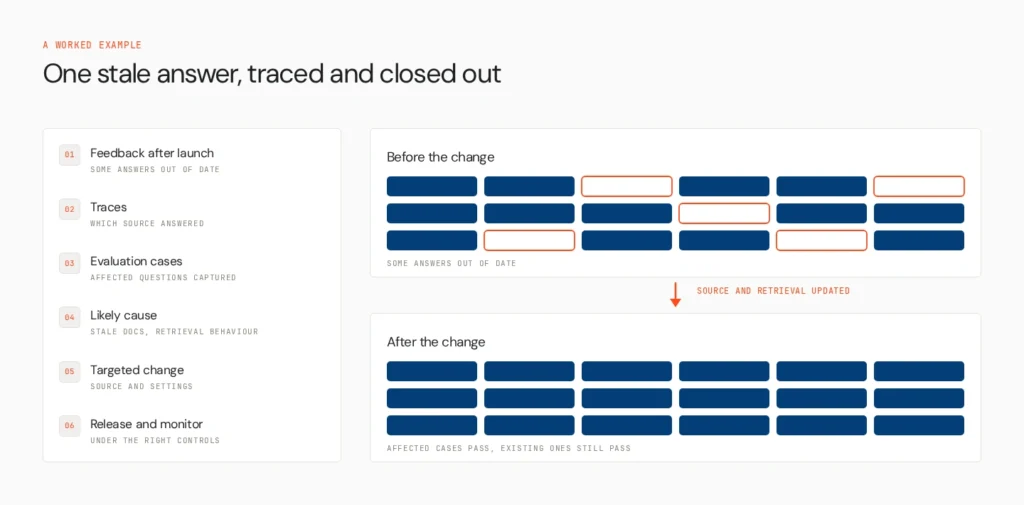
An internal policy agent answers well at launch, but feedback shows some answers are out of date. Traces reveal which knowledge source produced the wrong answers. The team turns the affected questions into evaluation cases and identifies stale documents and retrieval behaviour as the likely cause. They update the source and retrieval settings, then test against the affected questions and the existing passing cases. They release the revised version under the right controls and monitor whether the errors decline without new ones appearing.
What to do when an agent stops improving
Repeated prompt edits aren’t always the answer. Reconsider the design when the required information isn’t available to the agent, when the workflow is too complex for the chosen model and tool setup, when evaluation criteria don’t reflect business outcomes, when the same issue appears across many prompts, when gains in one metric keep degrading another, or when the task or its source data has changed. Revisit knowledge sources, tools, workflow boundaries, model choice, the evaluation dataset or the human escalation path.
Where Opencontroller fits
Improving one agent is a technical task. Keeping many agents reliable across teams and environments is a governance problem. Opencontroller is Lyzr’s AI agent control plane, built to discover agents and their surrounding systems, evaluate and govern them before production, and monitor agents, applications, APIs and infrastructure at runtime.
In this loop it gives visibility into which agents are operating and their production activity, governance through policies and controls around behaviour, and operational context linking performance, usage, cost and security signals. It doesn’t replace evaluation methodology, metrics, regression tests or human judgment, and monitoring alone doesn’t make an agent improve. See agent lifecycle management, AI agent governance and the AI control plane.
How to choose the right approach
- Problems are hard to reproduce: improve tracing, data capture and failure reporting first.
- The team can’t agree whether a change helped: set explicit metrics, a baseline and repeatable evaluations.
- Fixes keep breaking existing behaviour: expand regression testing and version control.
- Problems span several tools or steps: review end-to-end traces, not only the final answer.
- Many agents run across environments: add central visibility, governance and operational control.
A new platform isn’t the answer to every problem. The right approach depends on where failures originate, how critical the task is and how many agents you manage. The Agents to Production playbook covers the wider path.
Close the loop
Production improvement depends on a repeatable feedback loop, measurable evaluation, controlled changes and continued monitoring. As agents multiply, teams also need visibility into behaviour and a way to govern them as they evolve. See how Opencontroller helps teams monitor and govern agents across production environments, or book a demo to see how it fits your stack.
FAQs
Define success metrics, monitor production traces and feedback, diagnose root causes, make targeted changes and validate them against regression tests before release.
Agents add retrieval, tools, workflow logic and feedback loops around a model, so changes to those parts can improve results without retraining the model.
Only through a feedback and evaluation mechanism. More interactions alone don’t help, so teams need measurement and controlled updates.
Monitor continuously, and review traces and metrics on a regular cadence tied to the agent’s risk and traffic.
Book A Demo: Click Here
Join our Slack: Click Here
Link to our GitHub: Click Here
Got a use case in mind?
8 weeks from use case to agents running in production.
Platform, people and FDEs, all in. Bring your environment. We'll co-build and stay until it's live.
Talk to UsFree resource
101 AI Agents Use Cases
100+ production-ready AI agent use cases across Marketing, Sales, HR, Banking, Insurance, Operations and a lot more
Download now