TL;DR
- Layer your detectors. Regex with validation, named entity recognition and custom health-record rules each catch what the others miss.
- PHI depends on context. A room number next to a discharge date can identify a patient, so dates need rules of their own.
- Don’t hash PHI into placeholders. HIPAA bars re-identification codes derived from the person’s data. Use random tokens scoped to the session.
- Redaction doesn’t end at the prompt. Responses, tool-call arguments, streamed output and logs need the same checks.
- Enforce it in one place. Redaction only protects you if every call passes through it, and every change is tested before release.
Your discharge-summary agent is live. A nurse pastes in a note: “Pt in 412, MRN 0048291, daughter Priya called re: d/c on 3/14, cb 555-0147.” Your redaction regex swaps out the phone number. The model still receives a room number, a medical record number, a relative’s name and a discharge date. The regex only knew how to find phone numbers.
In IBM’s 2026 Cost of a Data Breach research, roughly one in five organizations reported a breach of an AI model or application, and 92% of those lacked proper AI access controls. Here’s how to build PII redaction in layers, each catching what the last one missed.
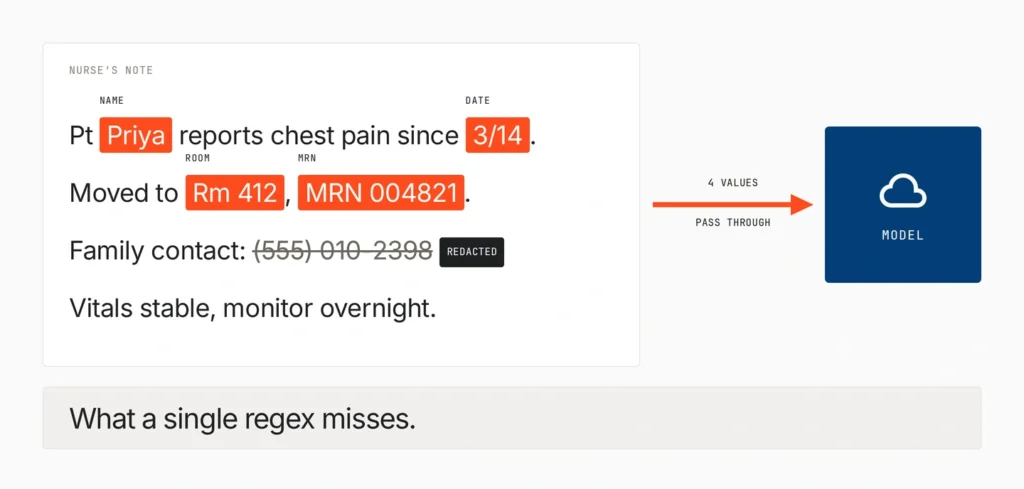
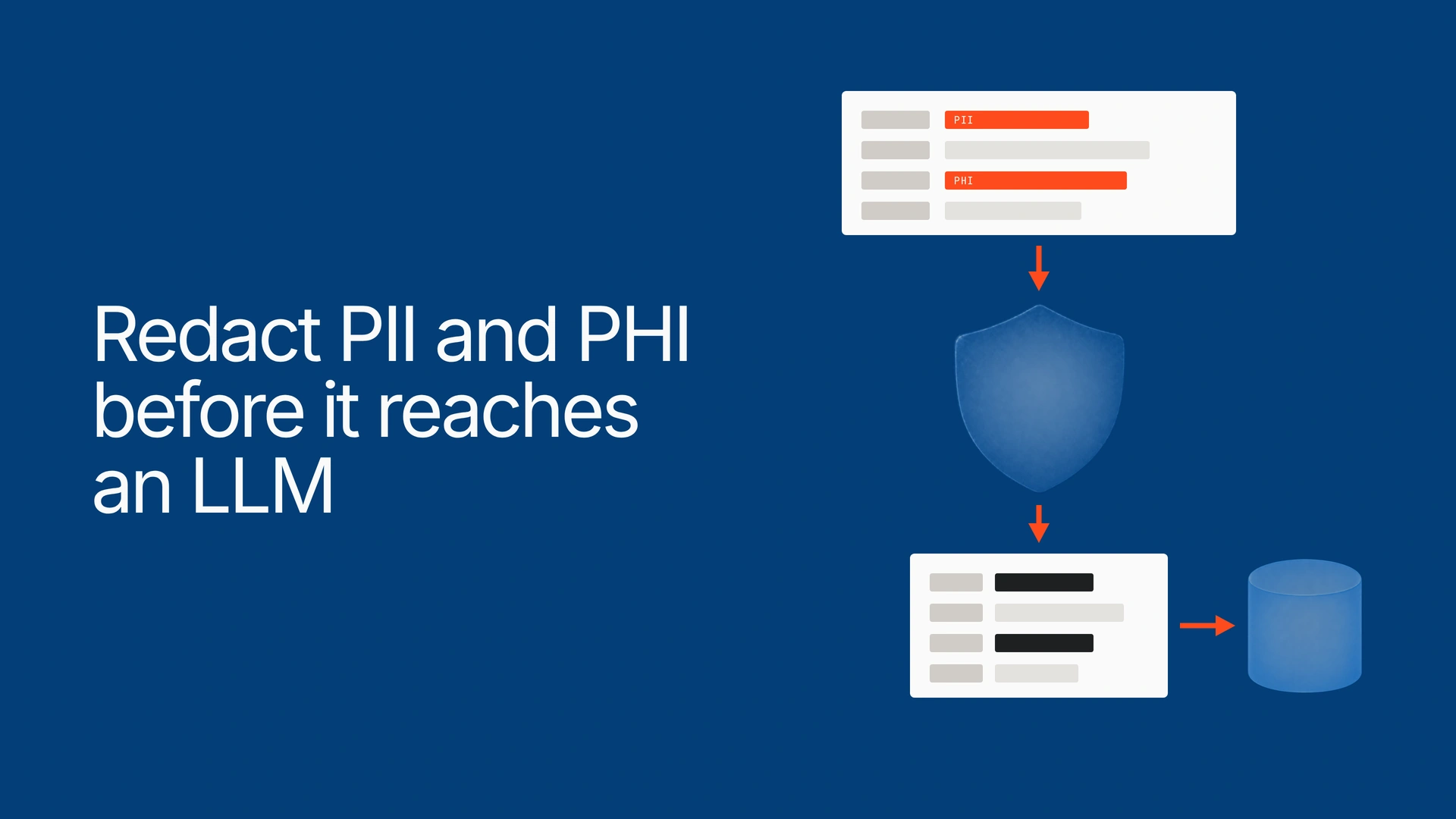
To redact PII and PHI before it reaches an LLM, run every request through layered detection: regex with validation for structured IDs, named entity recognition for names and places, and custom recognizers for health identifiers. Replace each match with a placeholder, restore values in the response, and enforce it all at one gateway.
What it takes to redact PII and PHI before it reaches an LLM
PII is any information that can identify a person, alone or combined with other data. PHI is identifiable health information that HIPAA protects when a covered entity or its business associate handles it. “Before it reaches an LLM” means before it leaves your trust boundary, where a provider’s logs are out of your control.
Redaction isn’t automatically de-identification. If any PHI still reaches the model provider, that provider receives PHI on your behalf, which makes it a business associate under HIPAA, so you still need a BAA. Our guide to HIPAA-safe AI agents covers that side. A working pipeline has six layers:
| Layer | What it catches | What it misses | Cost to run |
| 1. Regex + validation | Card numbers, IBANs, emails, phone numbers, SSN-shaped strings | Anything without a fixed format | Very low, runs in-process |
| 2. Named entity recognition | Names, streets, cities, organizations | Unlabeled IDs, clinical shorthand, some uncommon names | Moderate, a model call per request |
| 3. Custom recognizers | MRNs, encounter IDs, dates of service, room numbers in context | Formats your schema didn’t anticipate | Build and maintenance time |
| 4. Replacement | Swaps matches for typed placeholders | Anything the detectors missed | Very low |
| 5. Round trip | Restores values in responses and tool calls, scans output | Placeholders the model rewrites | Low, plus buffering for streams |
| 6. Gateway enforcement | Every call, from every app | Calls that bypass the gateway | One deployment for all callers |
The team’s single regex was layer one, half built. The steps below add the rest.
Step 1: Catch structured identifiers with regex and validation
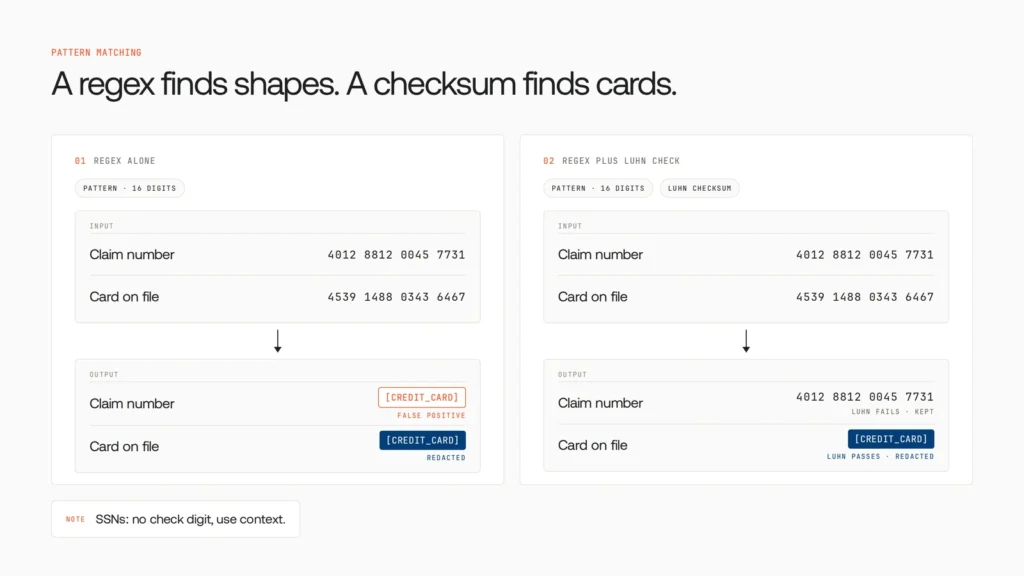
Use regular expressions for anything with a fixed format, then validate each match so you only redact real values.
- Card numbers: run the Luhn check digit.
- IBANs: run the mod-97 check.
- SSNs: there’s no check digit, so lean on context words.
- Emails and phone numbers: match the format, and trust it more when a word like “cb” or “phone” sits nearby.
Without the Luhn check, the team’s card pattern flagged every 16-digit claim number, filling summaries with [CREDIT_CARD]. A pattern without a validator mostly produces false positives.
But “0048291” with no label is just a number. That’s layer three’s job.
Step 2: Add named entity recognition for names and places
Named entity recognition (NER) uses a trained model to find names, addresses and organizations that follow no fixed pattern. It catches “Priya.”

Microsoft Presidio is an open-source framework: its analyzer detects PII entities, its anonymizer redacts, hashes or encrypts them, and you can add your own recognizers. Azure AI Language PII detection is a managed option where domain=phi returns only PHI entities. That narrows the output; it doesn’t certify de-identification.
Two details most guides leave out:
- The detector is a recipient too. A cloud NER API sees the raw PHI you send it. Run detection inside your network, or keep it under the same BAA and region as the rest of the pipeline.
- Tune thresholds per entity type. Presidio’s own FAQ warns “there is no guarantee that Presidio will find all sensitive information.”
In testing, NER caught “Priya” but tagged the hospital wing “Mercy West” as a person.
Step 3: Build custom recognizers for PHI and the 18 Safe Harbor identifiers
For PHI, treat HIPAA’s Safe Harbor list of 18 identifiers as your detection spec, and write recognizers for the ones generic tools miss: MRNs, encounter IDs, plan numbers and dates tied to care.
| Safe Harbor identifiers | Usually caught by | Watch for |
| Phone, fax, email, SSN, URLs, IP addresses | Layer 1 (regex + validation) | Claim numbers shaped like SSNs |
| Names, street addresses, cities | Layer 2 (NER) | Clinician names, wards named after people |
| Medical record, health plan, account, certificate or license, device and vehicle numbers | Layer 3 (recognizers built on your schema) | Unlabeled IDs, formats that differ between systems |
| All date elements except year; ages over 89 | Layer 3 (date parser plus rule) | “d/c 3/14,” “POD 2,” “92 y/o” |
| ZIP codes | Layer 3 (keep the first three digits only where that area has more than 20,000 people) | Low-population areas, which become 000 |
| Any other unique identifying number, characteristic or code | Layer 3 plus human review | Room and bed numbers, rare diagnoses |
| Full-face photos, biometric identifiers | Not text redaction | Images and audio need their own pipeline |
Dates are easy to miss. Under 45 CFR 164.514, Safe Harbor keeps the year, drops month and day, and turns ages over 89 into “90 or older.” A discharge date plus a room number can single out one patient.
Safe Harbor also requires no actual knowledge that what’s left could identify someone, so review samples of free text too. The alternative, Expert Determination, relies on a qualified expert. Either way, your privacy officer makes the final call.
Your EHR’s ID formats will be the most valuable rules you write, and no vendor ships them.
Step 4: Replace values with placeholders, but don’t hash PHI
Replace each match with a typed placeholder so the model still knows what was there. If you’ll need the value back, use a random, session-scoped token mapped in your own vault, not a hash.
| Strategy | Example | Model can track the same person? | Reversible? | Fit for PHI? |
| Typed replace | [EMAIL] | No | No | Yes, when you never need the value back |
| Mask | [EMAIL:***********] | No | No | Yes, though length can hint at format |
| Hash | [EMAIL:8c7dd922ad47494f] | Yes | Can be recomputed from a list of likely values | No, it’s derived from the person’s data |
| Indexed token + vault | [PATIENT_1], [EMAIL_1] | Yes | Yes, inside your boundary only | Yes, when the mapping stays in your vault |
Hashed placeholders are a trap. The EDPB’s 2025 pseudonymisation guidelines give the example of a pseudonym that is just a SHA-256 hash of a name: an attacker hashes candidate names and matches the results. The same guidelines treat pseudonymised data as personal data. For PHI, the rule is stricter. HIPAA allows a re-identification code only if it’s “not derived from or related to information about the individual.” A hash of an MRN is derived from exactly that.
Instead, number entities per conversation ([PATIENT_1], [RELATIVE_1]), store the mapping encrypted in your environment, and delete it when the session ends. The model still tracks who’s who, and nothing it sees traces back.
If a placeholder can be recomputed from the patient’s data, it’s still the patient’s data.
Step 5: Close the round trip: responses, tool calls, streams and logs
Redacting the prompt is half the job. In IBM’s 2026 research, model inversion, which reconstructs sensitive training data, such as personal information, from a model’s outputs, was the costliest attack on AI models or applications, at USD 6.07 million on average, with prompt injection close behind.
- Restore on the way back. Swap [PATIENT_1] back only inside your network, and only for callers allowed to see it.
- Check tool-call arguments. The model writes them as JSON, which a scrubber reading only message text misses. Check each value before the tool runs, and check results before they return.
- Buffer streamed responses. [PATI can arrive in one chunk and ENT_1] in the next. Hold output until each placeholder is complete.
- Keep raw values out of logs. Record the entity type, action and policy version, never the raw value or the vault mapping, including in your agent observability stack.
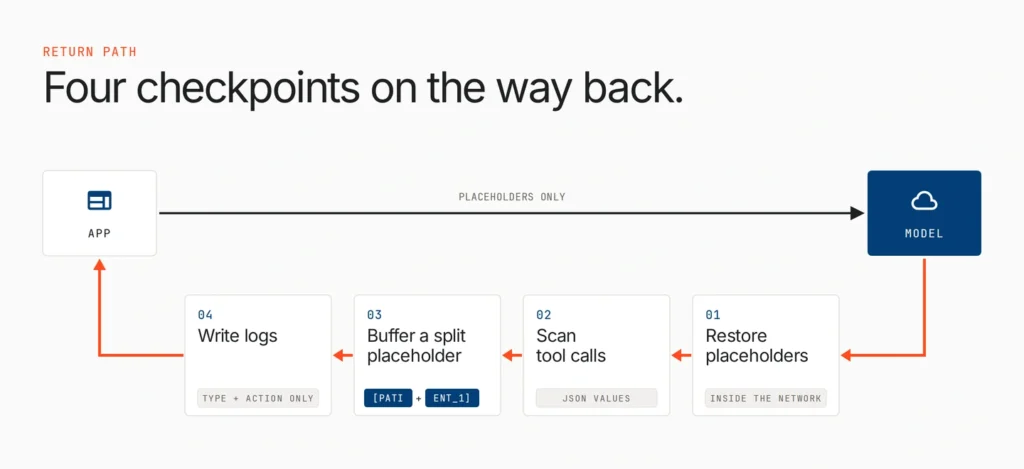
In testing, the model wrote “Patient 1” instead of [PATIENT_1], and the summary went out with a dangling label. The fix: tell the model to keep placeholders verbatim, and flag near-misses for review.
Step 6: Enforce redaction at one gateway, and test it like a release
Put the whole pipeline in one LLM gateway or proxy that every model and tool call must pass through. Redaction written into each app depends on every team remembering it.
That’s where the team’s pipeline broke. Billing, scheduling and research shipped their own agents, and one called the model SDK directly. Its notes went out unredacted for two weeks before anyone noticed.
How many of your agents call a model without passing your redaction checks? One agent that skips the gateway is enough to leak PHI. Take the AI Agent Sprawl Audit to see how many agents are running across your teams and clouds without central control. Take the audit:
Measure misses per identifier type
A single accuracy score hides the failures that matter. Build a labeled test set from synthetic notes and real formats, and track misses separately for dates, MRNs, names and emails. Roll new rules out in log-only mode, then enforce. Rerun the set whenever a detector, prompt or model changes.
A redaction rule that isn’t in your regression suite will quietly stop working.
How Lyzr Opencontroller keeps one redaction policy on every call
The team’s problem is no longer detection. It’s making sure every team’s agents pass the same checks, and proving it. That’s the gap Lyzr Opencontroller fills: it “sits between your agents and everything they call, so policy applies before a call lands.”
| What the redaction pipeline needs | What Lyzr Opencontroller provides |
| No call skips the checks (Step 6) | Run: “Enforce policy on every call.” |
| Coverage beyond the prompt (Step 5) | “Screen every input, output and tool call,” with “prompt injection, PII, secrets, groundedness and per-tool limits, checked in the path both ways.” |
| Finding the agent that called the SDK directly (Step 6) | Find: “Read-only scans across clouds, clusters and developer laptops surface shadow agents and build one live inventory.” |
| Redaction tested before release (Step 6) | Ship: “Multi-turn, red-team and regression evals gate every release, and the evidence ships with the version.” |
| Raw PHI stays inside your boundary (Step 2) | “Deploy in your VPC, on-prem or air-gapped.” Control-plane data, credentials and telemetry “never need to reach Lyzr.” |
| Misses turn into new rules (Step 6) | Improve: “Failures are clustered, fixes are proposed and validated on held-out evals, and each resolved issue joins the suite.” |
Your detection rules stay yours. Opencontroller is where that policy runs on every call, in both directions, as part of one control plane for AI agents. And adoption doesn’t mean rewriting agents: “Change an endpoint, not your application.”
For the team, all four agents now point at an Opencontroller endpoint inside their VPC. The agent that called the SDK directly shows up in the inventory, and the MRN recognizer joins the release evals, so a regression blocks the release. Still choosing detectors? Compare the PII redaction tools for LLM calls.
Book a demo to see Opencontroller on your own agents.
Where to start this week
Label the identifiers in a few hundred real prompts by Safe Harbor category. That’s your test set and gap list. Replace any hashed placeholders with session-scoped tokens. Then route every direct model call through one gateway.
Do that, and you’ve done what it takes to redact PII and PHI before it reaches an LLM on every call, not only the ones you remembered.
Frequently asked questions
Run layered detection inside your boundary: regex with validation, named entity recognition and custom recognizers for health identifiers. Replace matches with placeholders, restore values in the response, and enforce it all at one gateway.
Names, sub-state geography, date elements except year, phone and fax numbers, emails, SSNs, medical record, health plan and account numbers, certificate and license numbers, vehicle and device identifiers, URLs, IP addresses, biometrics, full-face photos, and any other unique identifying code.
No. European regulators treat hashed values as pseudonymised personal data, and guessable values can be recomputed. For PHI, HIPAA bars re-identification codes derived from the person’s data, so use random, session-scoped tokens.
If anything identifiable can still reach the provider, yes. Under HIPAA, a provider that receives or maintains PHI on your behalf is a business associate. Only properly de-identified data removes that requirement.
At a gateway every call must pass through. App-level redaction depends on each team remembering it, and any agent that calls a model directly skips it.
Opencontroller screens every input, output and tool call in the request path, with PII among the checks it runs in both directions. It runs in your VPC, on-prem or air-gapped, and gates releases with evals.
Book A Demo: Click Here
Join our Slack: Click Here
Link to our GitHub: Click Here
Got a use case in mind?
8 weeks from use case to agents running in production.
Platform, people and FDEs, all in. Bring your environment. We'll co-build and stay until it's live.
Talk to UsFree resource
101 AI Agents Use Cases
100+ production-ready AI agent use cases across Marketing, Sales, HR, Banking, Insurance, Operations and a lot more
Download now