TL;DR
- Hand-editing a production prompt isn’t inherently reckless. it’s often the fastest way to fix a live incident, and that’s a reasonable trade-off in the moment.
- The real risk is configuration drift: when the prompt actually running no longer matches what was documented, tested, or approved, nobody can reliably say what’s live or roll back to a known-good state.
- Small prompt edits can have outsized, non-linear effects on model behavior, tone, tool selection, escalation logic, cost, in ways a typical config change wouldn’t.
- Drift is detectable: compare the live prompt against the last approved version, check for a missing evaluation record, and watch for behavior changes with no matching code or model update.
- The fix isn’t “never edit production.” It’s giving every prompt a version, an owner, and a path for fast, guardrailed emergency changes instead of an invisible overwrite.
A prompt looks like a sentence. In production, it behaves like configuration, the kind of thing that determines what a system does, not just what it says. Most teams don’t treat it like either. Prompts are often edited more casually than code and tracked less carefully than other production configuration.
That mismatch is the actual subject of this article. Not whether someone should ever hand-edit a prompt in production, sometimes that’s the right call, but what it means for a team’s understanding of its own system once the edit happens outside the process everyone assumes is being followed.
What Are Hand-Edited Prompts in Production?
A hand-edited prompt is a production prompt changed outside the team’s normal development, evaluation, and deployment process. That covers more than someone typing directly into a database. It includes editing a value through an internal admin interface, changing a prompt stored in a production CMS or config service, or modifying a system prompt without it passing through the pipeline that would normally test and approve it.
The defining feature isn’t how the edit was made. It’s that the production value changed outside the controlled path the team believes changes are supposed to take.
Why Do Teams Edit Prompts Directly in Production?
This happens for reasons that make sense, and any honest article on the topic has to start there instead of treating every hand edit as a mistake.
Immediate incident response. A prompt is producing harmful, inaccurate, or unusable output right now, and someone needs to change the behavior before the next deployment window, which might be hours or days away.
Avoiding a full deployment. Prompts are often stored separately from application code specifically so they can change without redeploying the whole application. That flexibility is the point, and it works exactly as designed.
Business-driven changes. Product, operations, or support teams frequently want to adjust wording, qualification rules, or escalation instructions without waiting on an engineering sprint.
Prompt experimentation. Teams sometimes discover a better instruction by watching production behavior and want to test it immediately rather than wait for a formal cycle.
The convenience is real. The problem is what gets lost once the production value becomes the source of truth instead of whatever the team thinks it deployed.
What Is Configuration Drift, and Why Does It Matter?
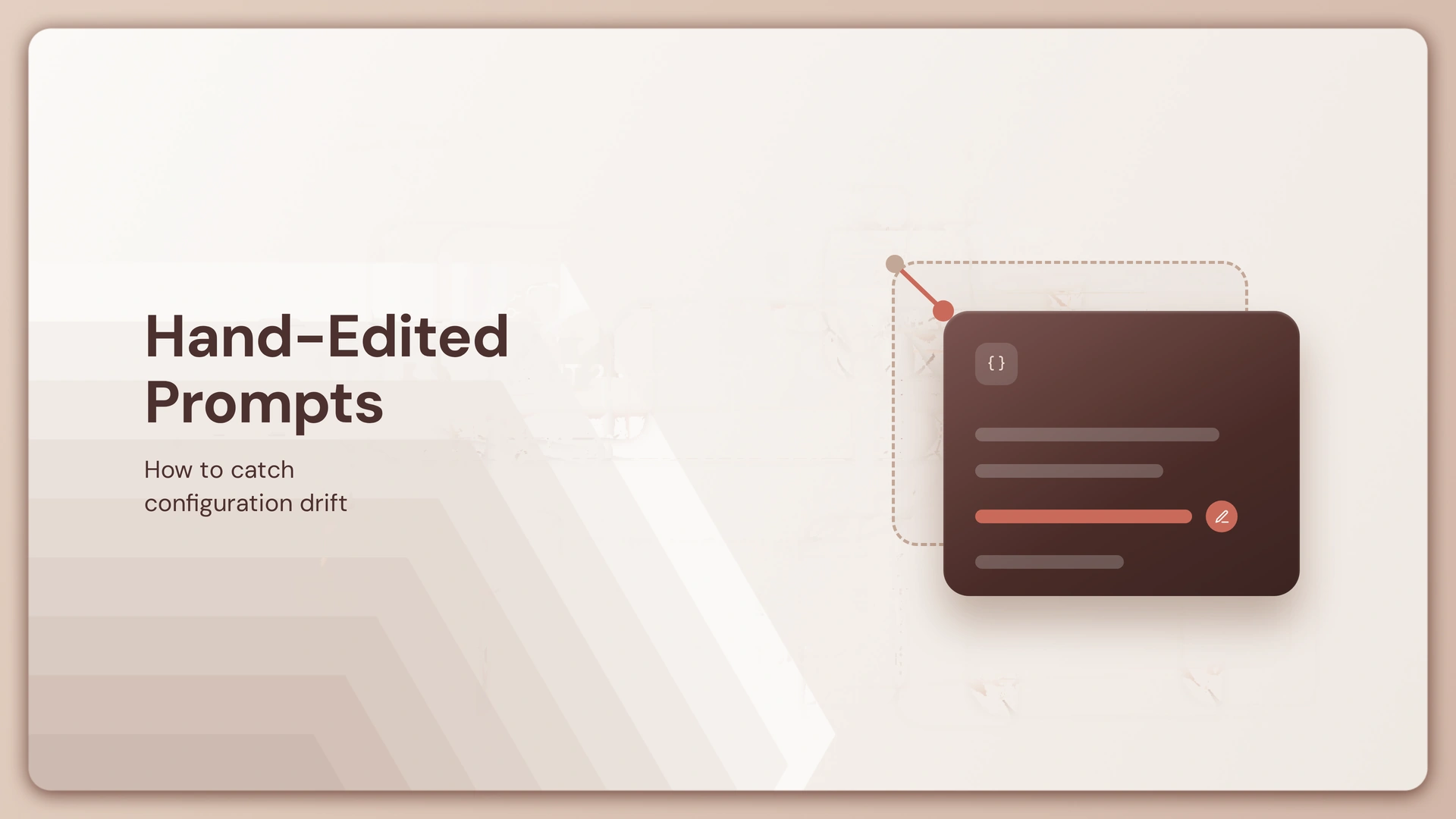
This is the conceptual center of the whole problem. Configuration drift happens when what’s documented, evaluated, and approved no longer matches what’s actually running.
Picture a prompt that has been versioned, evaluated, and approved as customer_support_v12. Your records say that customer_support_v12 is the production version. But someone edits the production prompt directly, adding three lines without creating a new version or recording the change. Production is now running a modified version of customer_support_v12, while Git, evaluation records, and approval records still point to the original.
At that point, the team no longer has a single source of truth. Engineers troubleshooting an issue may be looking at the wrong prompt entirely. Rollback becomes ambiguous, since “roll back to the previous version” assumes everyone agrees what the previous version was. A future deployment can silently overwrite the emergency fix, reintroducing the exact problem it solved. Audit trails go incomplete. Nobody can say with confidence whether the current behavior is intentional. And evaluation results, whatever they showed before the edit, no longer describe what users are actually experiencing.
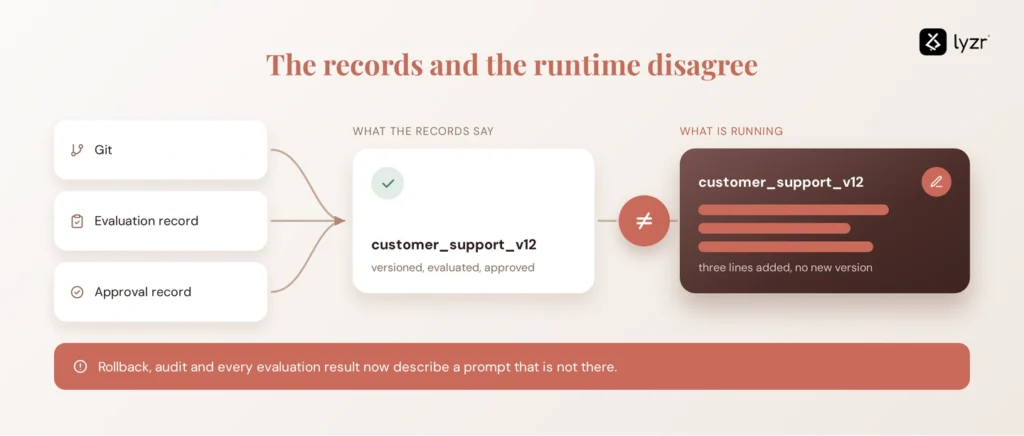
Prompt drift is configuration drift with model behavior attached to it.
Why a Small Prompt Edit Can Cause a Large Behavioral Change
A traditional configuration change usually has a fairly predictable blast radius. Prompt changes don’t reliably work that way, which is what makes uncontrolled edits harder to reason about than they look.
A small wording change can shift output format, tone, or refusal behavior. It can change which tool the model decides to call, or how it prioritizes one instruction over another elsewhere in the same prompt. It can affect how heavily the model leans on retrieved context, how often it hallucinates, whether it escalates a conversation appropriately, and how many tokens a typical response consumes.
Take something as small as changing “Answer the customer’s question directly” to “Always provide a detailed explanation before answering.” On paper that looks harmless. In a support agent, it can lengthen responses, change latency and cost, and shift whether the model still honors an escalation instruction written somewhere else in the same prompt. None of this is deterministic, and a given edit won’t always cause a problem. The point is that prompt changes can have non-linear effects, which is exactly why losing track of what changed and when is riskier here than it would be for most configuration values.
How to Detect Prompt Configuration Drift?
Detecting drift means comparing what should be running against what’s actually running, systematically rather than by memory.
| Signal | What it can reveal |
| Production prompt differs from the approved version | Unauthorized or undocumented change |
| Prompt version has no evaluation record | Untested production configuration |
| Production timestamp predates the latest deployment | Possible manual override |
| Prompt changed with no associated deployment | Out-of-band modification |
| Output behavior changes with no code or model change | Possible prompt or configuration change |
| Different environments running different prompt versions | Environment drift |
These checks can also be automated. An immutable version ID or configuration hash attached to each prompt can make several of them nearly automatic: if the hash running in production doesn’t match the hash of the last approved version, the system can flag drift immediately.
How to Fix Prompt Drift Without Blocking Fast Changes
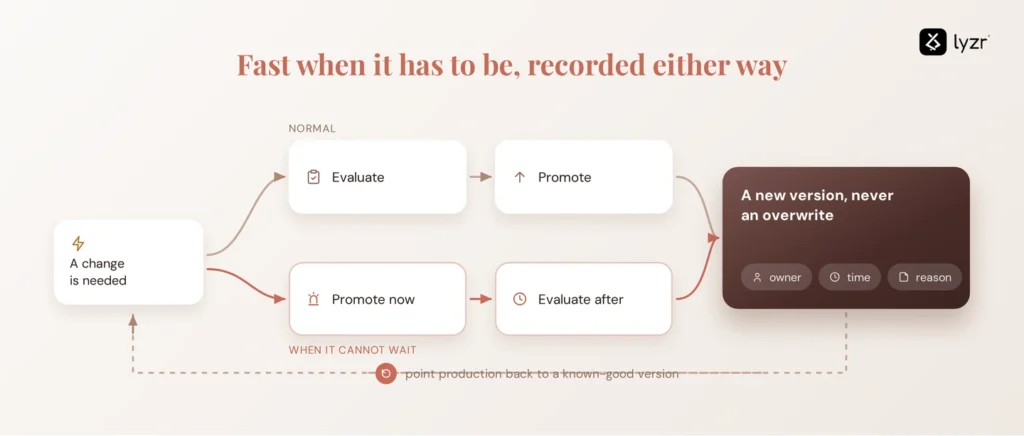
The answer isn’t “never change production prompts.” That guidance gets ignored the first time there’s a real incident, for good reason. The better goal is making emergency changes possible without making them invisible.
Separate prompt artifacts from application code. A prompt registry or managed configuration layer gives prompts their own versioned home instead of living as an unversioned value buried in a database.
Give every production prompt a version. Never overwrite the existing one. Each change creates a new version instead of erasing the last.
Record who changed it and why. Attach an owner, a timestamp, and a reason to every version, the same metadata you’d expect on any production code change.
Evaluate before promotion where time allows. Run a targeted regression or evaluation set against the new version before it goes live, not after.
Allow emergency promotion with guardrails. When an incident genuinely can’t wait, mark the change explicitly as an emergency version and evaluate it retrospectively rather than skipping evaluation altogether.
Make rollback deterministic. A team should be able to point production back to a known-good version directly, instead of reconstructing the previous prompt from memory or an old Slack message.
What a Managed Prompt Workflow Changes
A controlled prompt workflow doesn’t prevent teams from making urgent changes. It makes those changes visible and reversible. Instead of treating the production prompt as a value that can simply be overwritten, each change becomes a version with an owner, evaluation history, approval state, and known deployment status.
| Unmanaged Production Change | Managed Prompt Workflow | |
| Version history | May be incomplete | Explicit |
| Evaluation | May be bypassed | Attached to the version |
| Approval | Often informal | Defined |
| Rollback | Manual or ambiguous | Version-based |
| Ownership | Can be unclear | Assigned |
| Production state | Can drift | Traceable |
One qualification matters here. A prompt registry doesn’t automatically eliminate configuration drift on its own. If teams can still freely overwrite production versions without evaluation or approval, the same problem has just moved into a different interface, one that looks more official without actually being more controlled.
What Else Needs to Be Controlled Beyond the Prompt?
A managed prompt solves the drift problem, but it doesn’t solve the agent governance problem.
A hand-edited prompt creates configuration drift. A prompt registry solves the next layer of that problem, giving you real versioning and artifact control. But neither one, on its own, answers the questions that come once that prompt belongs to an autonomous agent rather than a static application.
An agent is rarely just a prompt. It typically has its own identity, a set of tools it can call, defined permissions, memory that persists across sessions, model configuration, access to external data, a specific deployment state, and a history of evaluation results. So when a prompt changes, the more complete set of questions is: which agent actually uses this prompt? Was the agent, not just the prompt in isolation, evaluated with the new version? Who approved the change? What tools can that agent invoke now that it couldn’t before, or vice versa? And what actually happened to its behavior after the new version deployed?
That’s the point where prompt management stops being sufficient by itself, and where the conversation naturally moves to governing the agent the prompt lives inside.
What You Need to Govern an AI Agent in Production
Once prompts become part of agents with their own identities, tools, permissions, and deployment states, teams need a way to govern those moving parts together, not manage each one in isolation.
Lyzr’s OpenController provides the governance layer around agents and the configuration that shapes their behavior. Prompt changes can move through the same evaluation and approval workflow as any other change to an agent, while that agent’s identity, deployment history, behavior, and audit trail all stay visible in one place.
The distinction worth holding onto: a prompt registry manages the prompt. A Control Plane governs the agent, the prompt that lives inside, and everything else that the agent is doing.
If your team has already lived through the “wait, which version is actually running” conversation, that’s usually the moment worth acting on rather than waiting for the next incident to force the question.
Explore Lyzr’s OpenController to see how prompt changes, evaluations, and approvals show up in one governed view, or book a demo to walk through it against your own agents.
Frequently Asked Questions
Configuration drift in AI happens when the prompt, model settings, or other configuration actually running in production no longer matches the version that was documented, tested, or formally approved, so the team’s understanding of the system and the system’s actual behavior fall out of sync.
Most often for immediate incident response, to avoid waiting for a full application deployment, to make business-driven wording or policy changes quickly, or to test a promising change directly against real production behavior.
It depends less on whether an edit happens and more on whether it’s tracked. An edit that’s versioned, attributed to an owner, and evaluated, even retrospectively during an incident, is manageable. An edit with none of that recorded creates configuration drift that surfaces later as a harder problem.
Evaluation results no longer describe what users are actually experiencing, rollback becomes ambiguous because there’s no agreed “previous version,” and a future deployment can silently overwrite the change, sometimes reintroducing the exact issue it was meant to fix.
By comparing what should be running against what’s actually running: checking the production prompt against the last approved version, confirming an evaluation record exists for the live version, and watching for output behavior changes that don’t correspond to any known code or model update.
By giving every prompt change a version instead of an overwrite, and by making the currently deployed version explicit and traceable. It reduces drift meaningfully, but only if teams actually route changes through it rather than continuing to hand-edit production values in parallel.
No. A prompt registry manages one artifact, the prompt. Full AI governance covers the entire agent that prompt lives inside, including its identity, permissions, evaluation history, deployment state, and audit trail, which is a broader scope than any registry is built to manage on its own.
Book A Demo: Click Here
Join our Slack: Click Here
Link to our GitHub: Click Here
Got a use case in mind?
8 weeks from use case to agents running in production.
Platform, people and FDEs, all in. Bring your environment. We'll co-build and stay until it's live.
Talk to UsFree resource
101 AI Agents Use Cases
100+ production-ready AI agent use cases across Marketing, Sales, HR, Banking, Insurance, Operations and a lot more
Download now