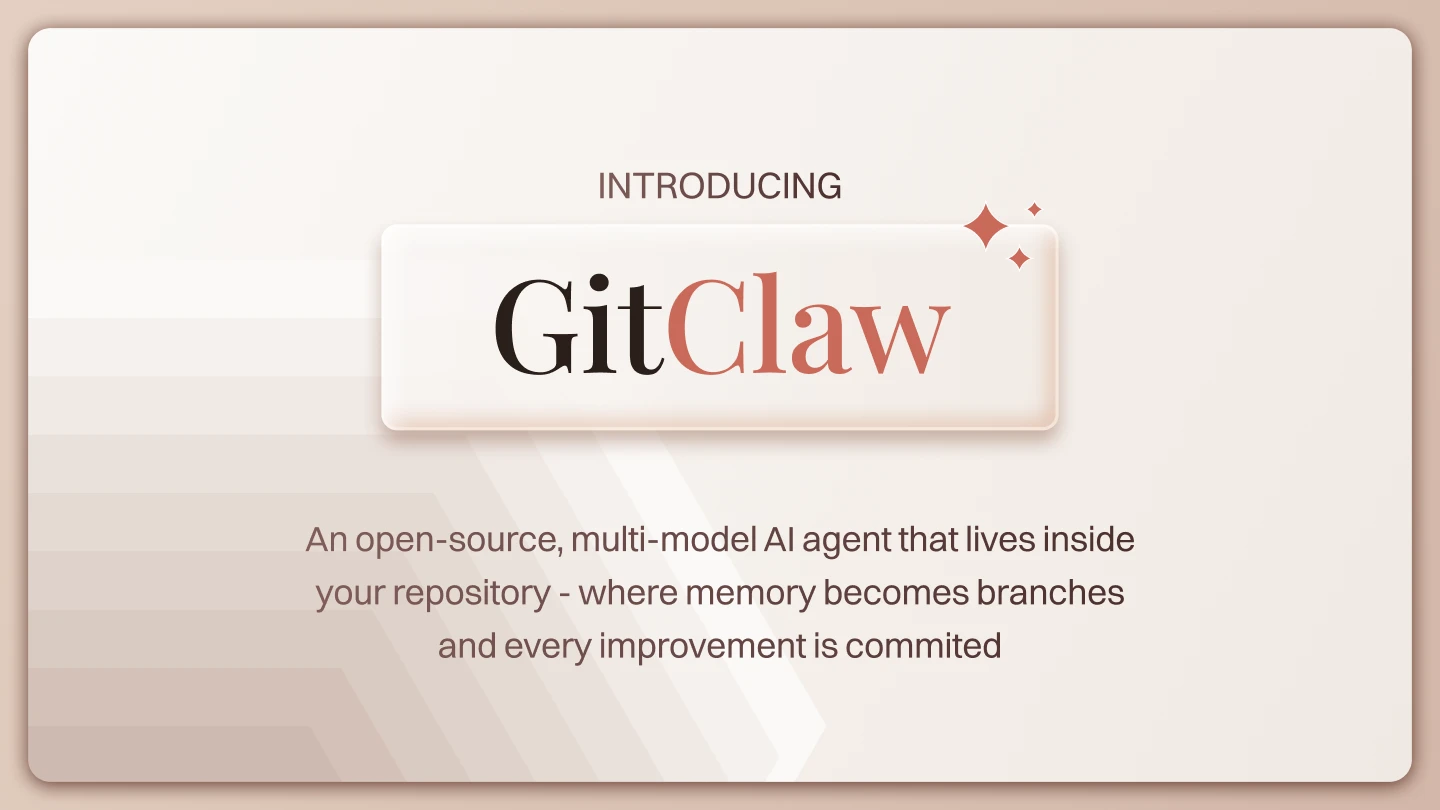
GitClaw is the runtime that brings a GitAgent repo to life.
If GitAgent is the specification, GitClaw is the engine. GitAgent defines how an agent is represented as files in a folder; GitClaw reads that folder, loads the agent at runtime, executes its skills, manages memory, and supports learning loops that write back into the repo.
Together, they create a git-native architecture for AI agents that can evolve over time instead of resetting every session.
That distinction matters.
GitClaw is not just another model wrapper. It is the execution layer for agents whose identity, behavior, and capabilities live in files like SOUL.md, RULES.md, skills/, memory/, and knowledge/.
Why GitClaw exists
Most agent setups begin simply and then get messy.
A prompt gets embedded in code. A few tools are added. Some memory is stored somewhere else. Then the system becomes hard to inspect, hard to improve, and hard to reuse.
The GitAgent architecture calls out the common failures clearly: agents forget everything, cannot learn from mistakes, require code changes for new expertise, work only when asked, and are difficult for non-developers to understand or modify.
GitClaw exists to solve that by making the repository itself the workspace.
Instead of hardcoding identity and behavior into a runtime, GitClaw reads those decisions from the repo, loads them dynamically, and executes them in place. That gives developers a cleaner, git-native way to build agents that are versioned, portable, and easier to maintain.
GitClaw in one sentence
GitClaw reads a GitAgent repo and runs it as a living AI agent.
That sounds simple, but it changes the architecture in a major way.
You stop asking:
“Which prompt should I send?”
And start asking:
“What does this repo say the agent is?”
That shift moves the mental model from prompt engineering to system design.
The core idea: the repo is the workspace
GitClaw does not treat a repo as passive storage.
It treats the repo as the agent’s workspace. The runtime reads the folder, builds the system prompt from the files, connects to the model, executes tools, and dynamically loads skills at runtime. If the agent needs SEO expertise, GitClaw can read the SEO skill file in that moment. The filesystem is not a frozen snapshot; it is a live part of the runtime.
This is one of the biggest ideas in the architecture: the agent does not just read files, it can also write to them. When it learns something useful, it can persist memory or even crystallize learning into new skill files. That makes the repo an evolving workspace rather than a static configuration folder.
GitClaw vs. GitAgent
The relationship is straightforward:
GitAgent defines the format.
GitClaw executes it.
The repo is the actual agent workspace.
A useful analogy is:
- GitAgent = the blueprint
- GitClaw = the engine
- the repo = the vehicle
GitAgent gives you the structure. GitClaw turns that structure into behavior.
What GitClaw actually does
GitClaw handles the agent runtime across several layers:
| Component | What it does |
| LLM conversation | Manages the conversation loop with the model |
| Dynamic skill loading | Reads skill files on demand, allowing the agent to gain expertise at runtime |
| Memory with git | Writes and versions memory across sessions so the agent can remember |
| Skill learning loop | Converts successful approaches into reusable skill files |
| Tool execution | Runs tools, APIs, and automations |
| Integrations | Connects to apps via Composio (Slack, Notion, GitHub, Salesforce, etc.) |
That combination makes GitClaw feel less like a wrapper and more like a runtime environment for durable agents.
The fundamental difference: build time vs. run time
This is the key idea in the GitAgent architecture.
A traditional agent decides its capabilities at build time. Identity, rules, and expertise are baked into one prompt blob, written by a developer, and deployed once.
If you want to change something, you edit code and redeploy the whole agent. Day 1 and Day 100 look the same.
A GitClaw agent decides its capabilities at run time through the files in the repo. Add a skill file, and the agent can gain expertise without a code change. Change SOUL.md, and the agent can read the new identity on the next turn. The architecture explicitly describes this as a live filesystem, not a frozen deploy artifact.
That is the major shift.
GitClaw agents can read and write their own files. That means the agent can evolve in place instead of being reset whenever the system restarts.
What a GitClaw repo looks like
A GitAgent repo that GitClaw can run in may include files like:
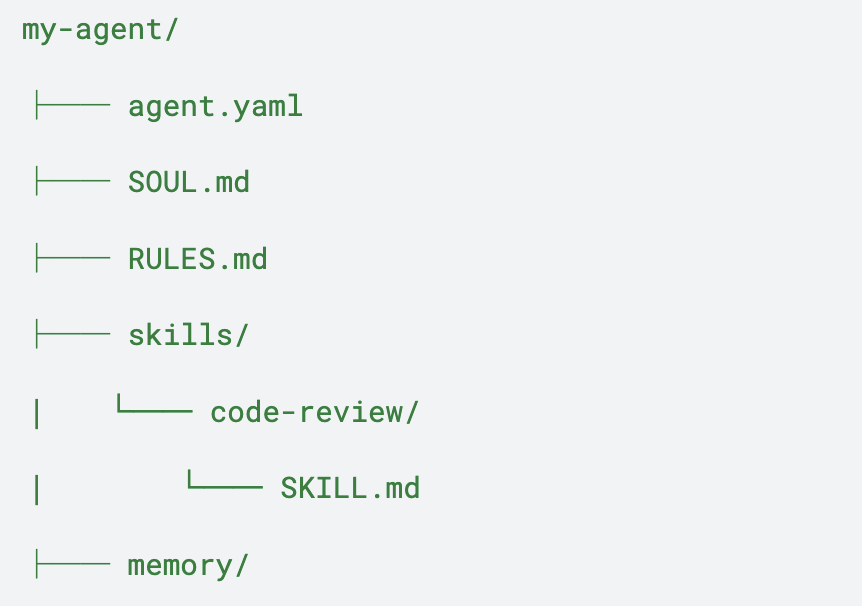
The architecture material also notes that a richer repo may include schedules/, compliance/, and hooks/ as well.
You do not need everything on day one. A minimal repo is enough to start:
- agent.yaml
- SOUL.md
- RULES.md
- one skill in skills/
That is already enough to define a working agent structure.
The most useful mental model: task vs. role
GitClaw is not meant to replace every kind of AI use case.
The architecture makes a clear distinction between tasks and roles.
Use traditional agents when you need:
- stateless, one-shot tasks
- tight multi-agent pipelines
- rapid prototyping
- embedded product features
- single-purpose tools like a translator or extractor
Use GitClaw agents when:
- the agent is the product
- domain expertise must grow over time
- autonomy is required
- compliance and auditability matter
- the agent needs to learn and remember
A simple question helps:
Is this a task, or is it a role?
Tasks usually fit traditional agents. Roles fit GitClaw AgenticOS-style systems.
A simple example: the code review agent
A code review agent is a good first GitClaw project because it matches the git-native model naturally.
It can:
- read repository files
- inspect code for bugs and edge cases
- flag maintainability issues
- explain risks clearly
- improve over time as the skill files improve
That gives you a practical demo and a clean use case for testing GitClaw’s runtime behavior.
How to get started: two paths for builders
The architecture material shows two different ways to start, depending on what you are building.
Product team / PM path
This path is for people who want to build an AgenticOS from files.
npm install gitclaw
gitagent init –template standard
Then:
- edit SOUL.md
- add skills/
- add knowledge/
- run it with GitClaw
The important point here is that you can get started with no application code. Just files.
Engineering path
This path is for teams embedding GitClaw into their product.
import { query } from “gitclaw”;
Then you:
- call it from server code
- add approval gates and hooks
- add Composio for integrations
- build plugins for custom tools
- deploy with your server and UI
The architecture specifically says GitClaw runs in-process here, with no subprocess and no IPC.
A minimal GitClaw example
A developer usually wants to see the smallest possible runnable example. The current SDK flow uses query(), so a minimal example looks like this:
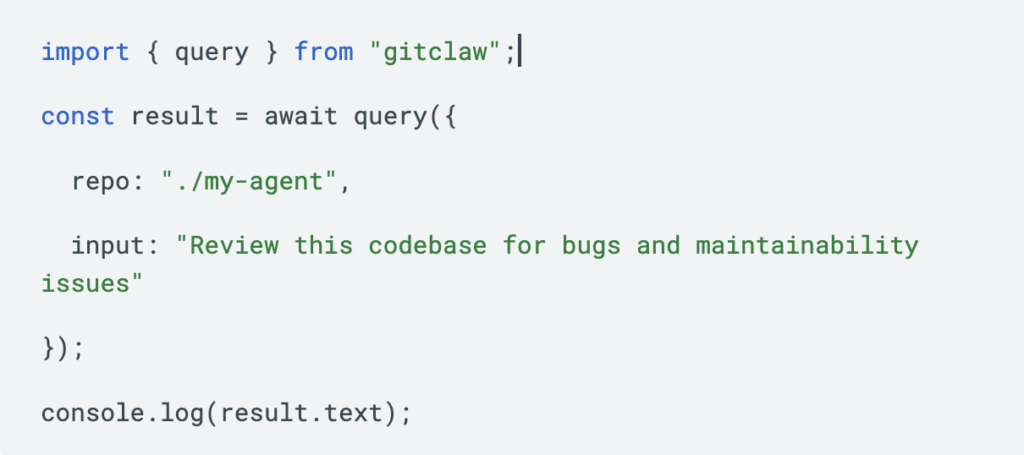
That example makes the architecture concrete:
- the repo defines the agent
- the runtime loads the repo
- the agent executes from that definition
It is simple, but it captures the whole model.
How GitClaw learns
One of the strongest parts of the architecture is the learning loop.
When the agent learns something useful, GitClaw can write it back into the repo. That means memory can persist, and successful behavior can become part of the system itself. The runtime is not just reading state; it is actively helping the agent improve in place.
That is a big deal because it makes the agent better on day 100 than on day 1. A normal agent may need the same fixes again and again. A GitClaw agent can keep the lessons.
GitClaw and skills
GitClaw dynamically loads skills from the repo.
A skill is typically a focused SKILL.md file with YAML frontmatter and instructions. The runtime can load the right skill at the right time, which means the agent’s expertise is modular instead of frozen into one prompt.
Example:
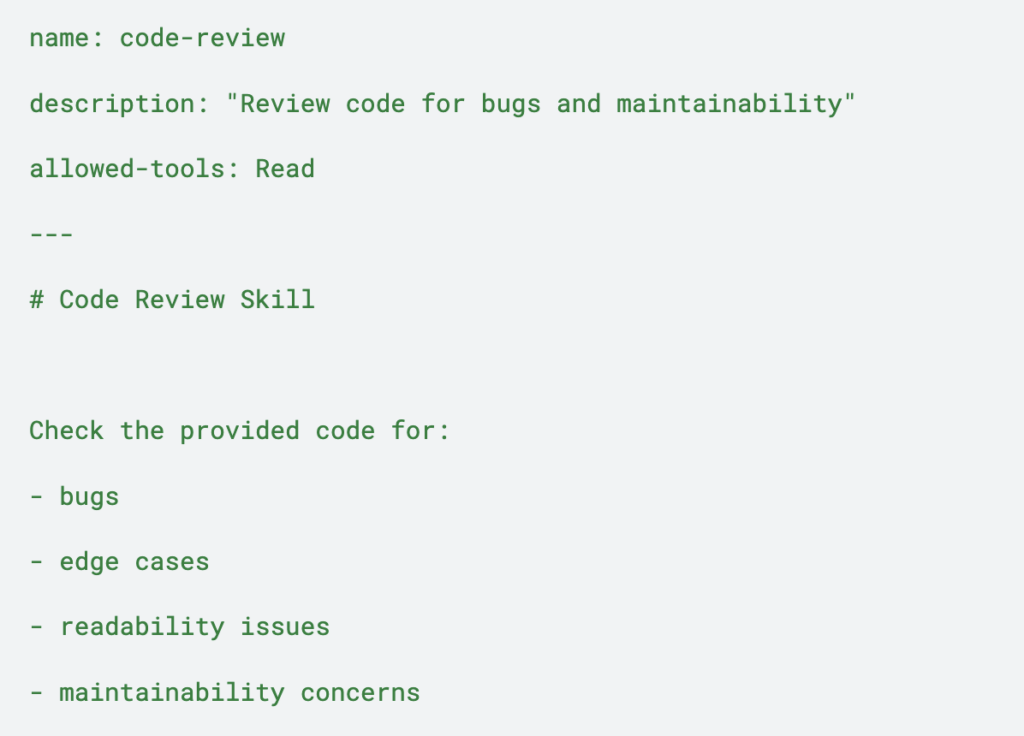
That small file can change the agent’s behavior in a meaningful way.
GitClaw and memory
Memory is one of the main reasons GitClaw feels different.
The architecture describes a memory/ folder whose contents persist across sessions and are versioned with git. That gives the agent continuity without hiding memory in a black box.
Instead of wondering what the agent remembers, you can inspect the repo.
That makes memory easier to manage, easier to audit, and easier to evolve.
GitClaw and the filesystem
The strongest line in the architecture might be this:
The filesystem is the workspace. The workspace is the agent.
That is the core conceptual shift.
You are not just storing configuration. You are defining an active environment that the agent reads from, writes to, and improves through.
That is why GitClaw feels closer to an operating model than a prompt library.
Common setup issues to watch for
A few real-world issues are worth calling out early because they can save time for other developers.
1. Use the correct SDK entry point
The current flow uses query(). If you try an older or assumed class-style API such as GitClaw.fromRepo(), it may not work depending on the version you installed.
2. Model names often need a provider prefix
In agent.yaml, the model string may need to include the provider name, such as:
model: anthropic:claude-sonnet-4-5-20250929
3. Environment variable names must match the provider
Different providers may expect different API key names. For example, Gemini-based setups may expect GEMINI_API_KEY. Using a different variable name can cause the runtime to fail even when the key itself is valid.
4. Rate limits are normal during testing
If you see a 429 error, it is often a quota or free-tier limit rather than a code bug. The fix may simply be switching providers, using a paid key, or retrying after quota resets.
Common mistakes to avoid
A few mistakes are worth avoiding:
- making the repo too large too early
- writing vague identity files
- skipping hard rules
- treating memory like a dump
- overcomplicating the first demo
- forgetting that the repo is the product
GitClaw works best when the repository is clean, intentional, and reviewable.
Final thoughts
GitClaw is the runtime engine for git-native AI agents.
It reads a GitAgent repo, loads skills dynamically, manages memory, executes tools, and supports a learning loop that writes back into the workspace. That makes it a strong fit for agents that need identity, persistence, autonomy, and evolution over time.
If GitAgent is the blueprint, GitClaw is the engine that makes the blueprint real. And if the repo is the workspace, then git becomes the system that keeps the agent alive.
Recommended call to action
npm install gitclaw
gitagent init –template standard
Then point GitClaw at your repo and start with one focused skill.
Book A Demo: Click Here
Join our Slack: Click Here
Link to our GitHub: Click Here