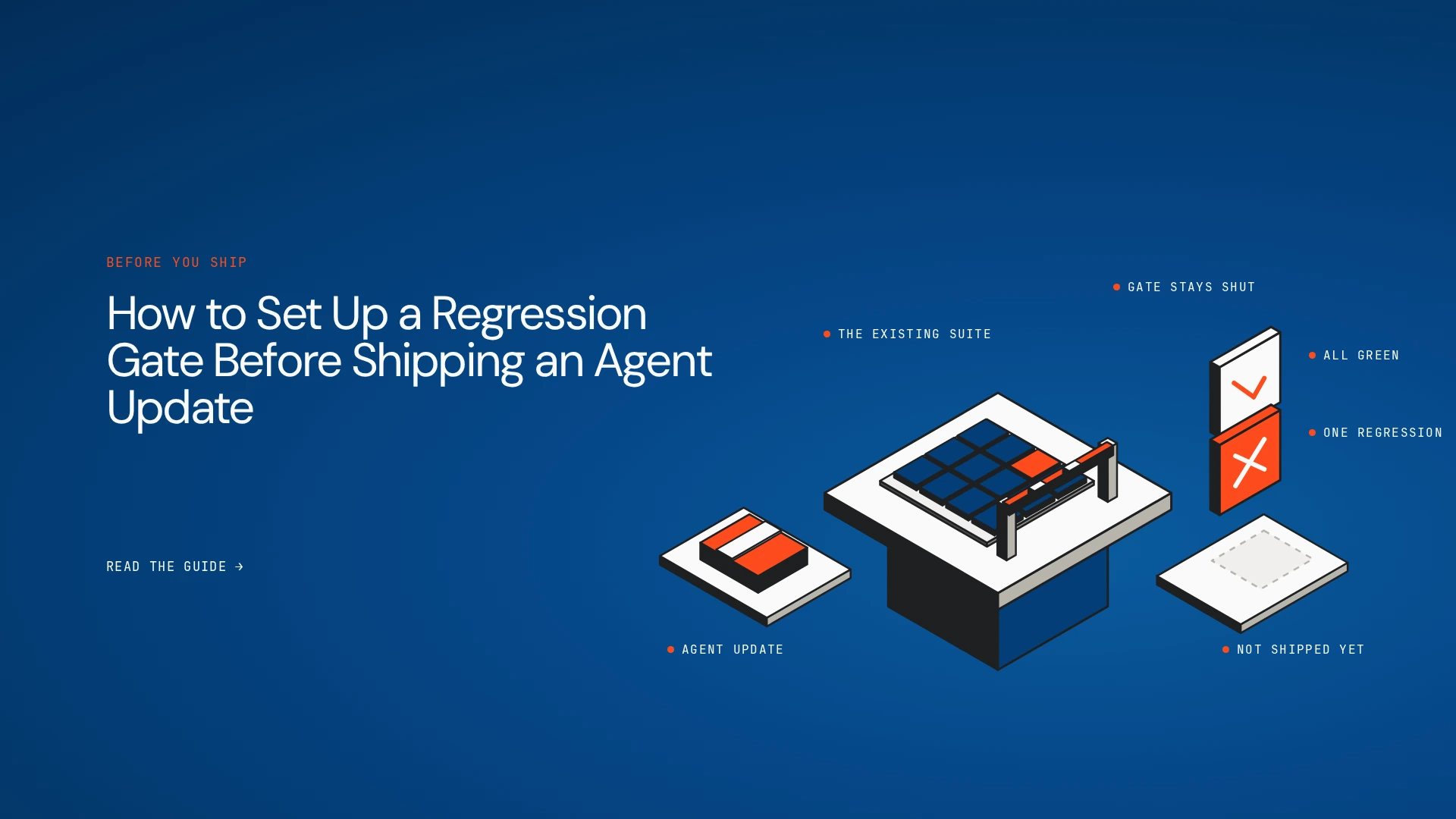
When an aircraft returns from maintenance, nobody certifies the whole plane from scratch, and nobody waves it off on the strength of the mechanic’s confidence either. A defined set of checks has to pass before it returns to service. The checks cover the part that was changed and the systems around it that still need to work. If a mandatory check fails, the aircraft stays on the ground, whatever else looks fine.
Agent updates deserve the same discipline. A prompt tweak that improves one category of answers can quietly break a tool call, drop a required field or skip a verification step in a workflow that previously worked. Passing a few new examples says nothing about that. This guide shows how to build a regression gate for AI agent regression testing, so an update ships only when it has shown it didn’t break what already worked.
The short answer
A regression gate runs a versioned suite of representative agent scenarios whenever a meaningful change is proposed. It compares the candidate version with a baseline, applies deterministic assertions and suitable quality evaluations, and blocks deployment when a mandatory test fails or an agreed threshold is breached. The gate should judge the behaviour relevant to the agent’s job, including tool use and multi-step execution, and not only the final text response.
Why do AI agents need regression gates?
Conventional tests aren’t enough on their own. An agent’s behaviour can change when its prompt, model version, retrieved context, tool definitions, permissions or workflow configuration changes. A final answer can look right while the agent calls the wrong tool, passes malformed arguments, skips a verification step or fails to recover from an error.
Suppose a support agent is updated to give shorter replies. Readability improves, but a required disclosure disappears and refund requests start routing differently. Nobody asked for either change.
Teams fall into familiar traps:
- Testing the new feature and none of the old scenarios
- Relying on a few hand-picked examples
- Comparing text outputs while ignoring tool calls and business rules
- Treating one successful run as proof of reliability
- Running the tests and letting deployment proceed anyway
A common misconception: better on average means safe to ship
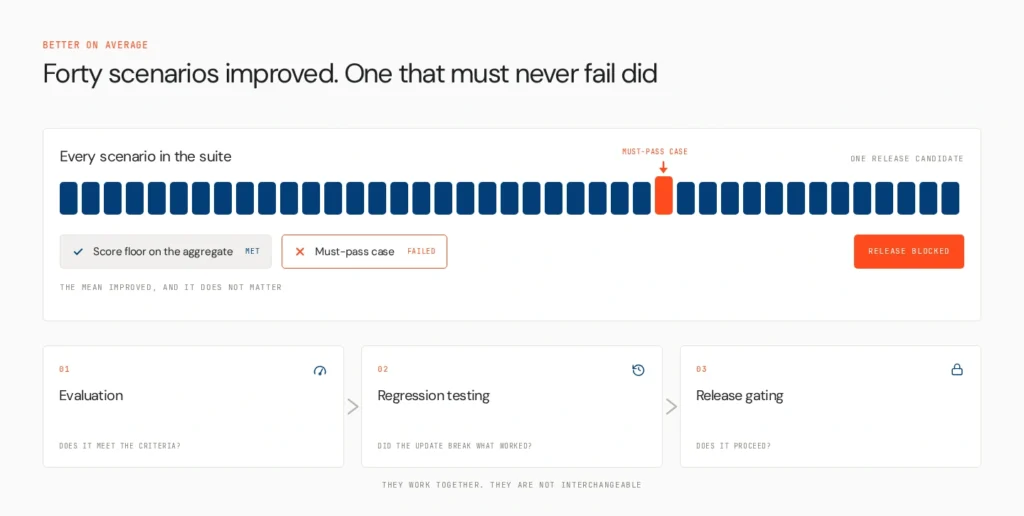
A candidate can score higher overall and still fail one case that must never fail. An average hides that. If the update improves forty scenarios and drops the supplier-approval check, the mean looks great and the release is unsafe. This is why the gate needs two kinds of criteria: must-pass cases that block on any failure, and score floors on aggregate metrics.
Three terms are easy to blur. Evaluation measures whether an agent meets defined criteria. Regression testing checks whether an update broke behaviour that used to work. Release gating uses those results plus policy to decide whether the update proceeds. They work together and aren’t interchangeable. For the broader context, see why software QA doesn’t work for agents and how to continuously improve an agent after launch.
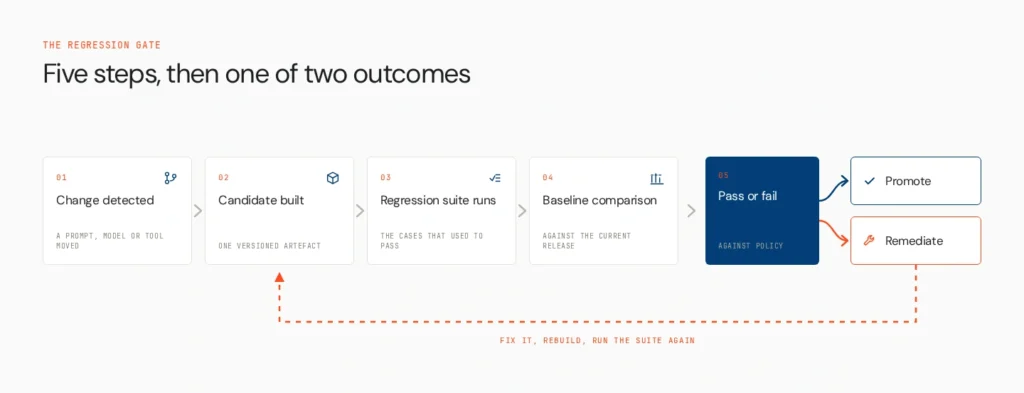
How to set up a regression gate: five steps
Step 1: Build a versioned golden dataset
The dataset should reflect the agent’s actual responsibilities and known failure modes, not only easy wins. Include:
- High-impact business workflows and critical write actions
- Common requests and edge cases
- Failures seen in production
- Tool-selection and tool-argument scenarios
- Multi-step workflows and error-recovery cases
- Safety, privacy and policy cases where relevant
Use staging environments, mocked tools or stubbed services so a test can’t trigger a real action. Version the dataset and mark which cases are mandatory. The suite should grow as you discover failures, while a stable core keeps comparisons meaningful. Size it to run on every change. Tens to low hundreds of cases is a practical range for a pre-merge gate, and a larger set can run before releases. With very few cases, one flaky output moves an average a long way and makes thresholds noisy.
Step 2: Define assertions, metrics and score floors
Pick the evaluation method for what each test must verify.
Deterministic assertions suit anything you can check precisely: valid JSON or schema compliance, required fields, exact business rules, correct tool selection in a defined scenario, required approval before a consequential action, and prohibited tool calls.
Semantic evaluation or an LLM judge suits qualities that resist exact matching, such as relevance or completeness. Start with deterministic checks, then add a judge after you’ve compared its verdicts with human labels. Binary pass or fail verdicts with an explicit rubric tend to be steadier than a ten-point scale. Human review still has a place for ambiguous or high-impact cases.
Track task success, tool-call correctness, safety and relevant latency or cost as separate measures, and don’t merge them into one score that hides a serious failure.
Be honest about variability. Record or pin model versions, configuration and evaluation settings. Repeat stochastic tests where needed, and use tolerances. Temperature zero reduces variation on some models, but it doesn’t make every agent fully deterministic. Set thresholds with a margin below your baseline to absorb ordinary noise.
Step 3: Compare the candidate with the baseline
Run both versions against the same cases under comparable conditions.
| Test area | What to verify |
|---|---|
| Task completion | Does the agent still complete critical tasks? |
| Output structure | Are required fields and schemas preserved? |
| Tool use | Are the right tools and arguments used? |
| Safety and policy | Does it stay inside defined boundaries? |
| Reliability | Does it recover from expected failures? |
| Cost and latency | Did the update add unacceptable overhead? |
Beyond comparing averages, flag newly failing cases, meaning those that passed on the baseline and fail on the candidate. That is how you separate a genuine regression from expected variation, and how a mandatory failure stays visible when overall quality improves.
Step 4: Wire the gate into CI/CD
Run the suite automatically when anything that shapes behaviour changes: prompts, model versions, retrieval settings, tool schemas, agent logic, memory configuration or workflow definitions. A pipeline might work like this:
- Detect a relevant change.
- Build or identify the candidate version.
- Run the regression suite in a safe environment.
- Compare results against the baseline and release criteria.
- Publish a report with failures and supporting traces.
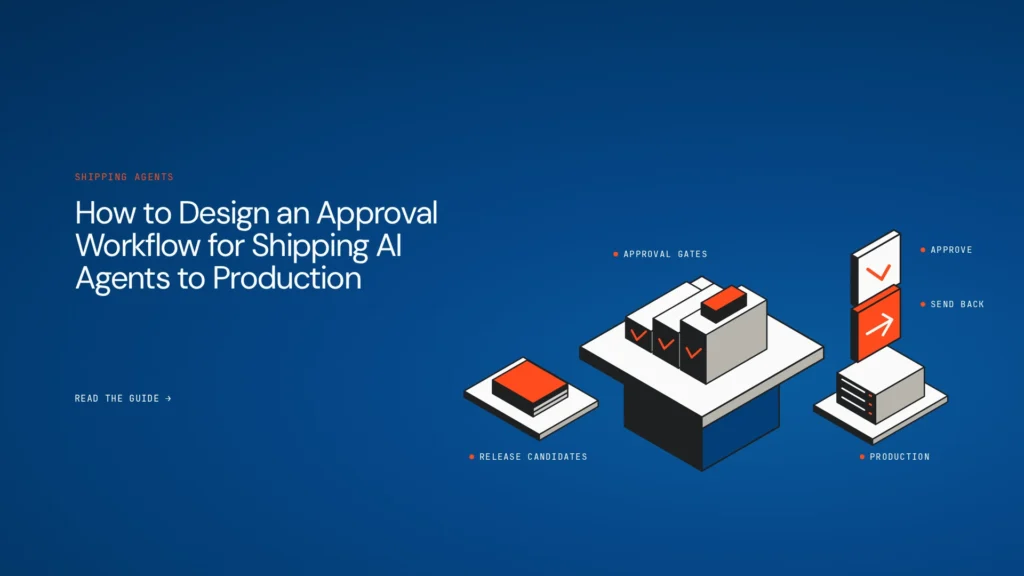
- Allow promotion only when mandatory conditions pass.
Make the behaviour explicit. A conceptual policy might read:
text
must_pass: [supplier_approval_check, refund_routing, required_disclosure]
score_floors: { task_success: 0.90, tool_call_correctness: 0.95 }
on_fail: block_promotion
override: requires authorised approver and recorded reason
This is a conceptual shape, not any tool’s syntax. Teams can implement it with their existing CI/CD platform and evaluation tooling, and they don’t need a specific framework or a rebuilt pipeline. Any override needs an authorised person, a recorded reason and an audit trail. Lowering the threshold to get a candidate through isn’t an override. It’s a change to policy.
Step 5: Diagnose failures and grow the suite
A failing test calls for investigation. Traces, session replay, tool-call records and evaluation details show whether the regression came from a prompt change, retrieval behaviour, a model update, tool arguments or workflow orchestration. Fix the cause, rerun the relevant tests, and confirm the wider suite still passes. Add reproducible production failures to the dataset so the next release is checked against them. See AI agent observability and how to roll back a bad deployment.
Prompt edits are the most common trigger and the easiest to miss, which is why unreviewed changes matter. See hand-edited prompts in production.
A worked example: a customer-support agent
A customer-support agent is updated to make its responses shorter and resolve routine queries faster. The new version performs well on common questions, but the team needs to verify that the change hasn’t affected escalation rules or required disclosures. The scenario below is illustrative and contains no real measurements.
| Test case | Baseline behaviour | Candidate result | Gate decision |
|---|---|---|---|
| Common order-status query | Retrieves the correct status | Retrieves the correct status | Pass |
| Request requiring human support | Escalates to a human | Attempts to resolve it autonomously | Fail (mandatory) |
| Refund-policy question | Includes required policy conditions | Omits a key condition | Fail (mandatory) |
| Unclear customer request | Asks a clarifying question | Asks a clarifying question | Pass |
Although the candidate handles routine queries correctly, it fails two mandatory checks. The pipeline blocks promotion. The team reviews the traces, identifies that the prompt changes weakened the escalation and disclosure instructions, corrects them, and reruns the full regression suite. The update can proceed only when all required checks pass. wider suite passes, and the gate releases the fix. The old case now stays in the dataset permanently.
Where Opencontroller fits
Detecting a regression and controlling a release are related but separate jobs. The test suite defines and runs checks. The CI/CD pipeline executes them and consumes the results. Release policy decides which failures block promotion and who can authorise an exception. Opencontroller is Lyzr’s control plane for governing agents across frameworks, models, runtimes and environments, linking visibility, evaluation and governance with the operational decisions involved in running agents at scale.
On the promotion side, Lyzr documents Approval Flows in the Control Plane of Agent Studio: branch-based gates that move an agent between environments only after the required reviewers approve. Regression evidence is the kind of input a reviewer needs at such a gate. Opencontroller doesn’t replace your test framework, create a golden dataset on its own or integrate with every CI/CD system. Its value is enterprise-wide. When several teams run agents on different stacks, regression evidence and release decisions should fit one governance model instead of staying in separate pipelines. See AI agent governance.
Common mistakes to avoid
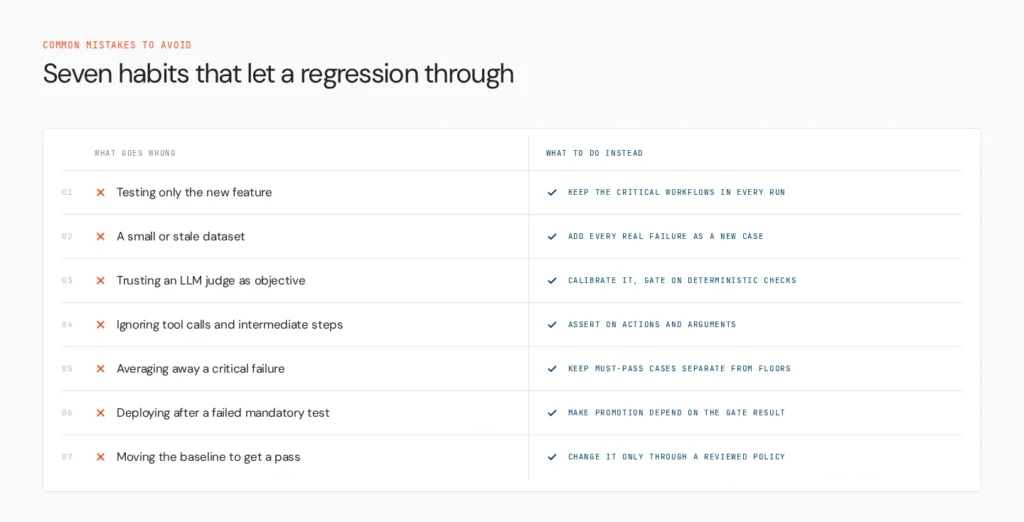
- Testing only the new feature. Keep the critical existing workflows in every run.
- Using a small or stale dataset. Add each real failure as a new case and review the set regularly.
- Treating an LLM-judge score as objective. Calibrate it against human labels and keep deterministic checks as the blocking gate.
- Ignoring tool calls and intermediate steps. Assert on actions and arguments, not just text.
- Averaging away a critical failure. Keep must-pass cases separate from score floors.
- Deploying after a failed mandatory test. Make promotion depend on the gate result.
- Moving the baseline or thresholds to get a pass. Change them only through a reviewed policy update.
Make updates measurable
A regression gate makes agent updates repeatable. Teams can improve behaviour while checking that critical workflows still work. The Agents to Production playbook is a practical next step, and teams that need consistent governance across a growing fleet can see how Opencontroller fits their stack by booking a demo.
FAQs
Checking that an update didn’t break behaviour that used to work, by running a fixed set of scenarios against a candidate version and comparing the results with a baseline.
Run it against a versioned dataset of representative and failure-mode scenarios in a safe environment, check tool use and multi-step behaviour as well as outputs, and compare with the current version.
Trigger the suite on changes to prompts, models, retrieval, tools or logic, compare against the baseline and make promotion depend on mandatory checks and score floors.
Critical workflows, common requests, edge cases, past production failures, tool-selection and argument cases, recovery scenarios and relevant safety cases. Version it and mark which cases are mandatory.
Pin versions and settings where possible, repeat stochastic tests, use tolerances and thresholds with a margin, and lean on deterministic checks for blocking decisions. That reduces uncertainty without guaranteeing identical runs.
Book A Demo: Click Here
Join our Slack: Click Here
Link to our GitHub: Click Here
Got a use case in mind?
8 weeks from use case to agents running in production.
Platform, people and FDEs, all in. Bring your environment. We'll co-build and stay until it's live.
Talk to UsFree resource
101 AI Agents Use Cases
100+ production-ready AI agent use cases across Marketing, Sales, HR, Banking, Insurance, Operations and a lot more
Download now