“Can we just try this once?”
It starts small.
A dataset gets uploaded.
A few internal documents go into a public AI model.
The output looks sharp. Useful. Almost too good.
Then comes the pause.
“Wait… are we allowed to send this data outside?”
A follow-up meeting appears. Legal joins. Security joins.
And just like that, the question changes:
“What can AI do?” → “Where should this AI actually run?”
The shift no one planned for
Most teams didn’t begin with internal deployments in mind.
They started with speed:
- Quick API calls
- Fast results
- Minimal setup
But over time, patterns start showing up.
- Sensitive data keeps getting involved
- Compliance teams ask harder questions
- Costs become unpredictable
- Visibility into what’s happening drops
So the conversation shifts,not out of curiosity, but out of necessity.
“Can we run this inside our own environment?”
What “running AI internally” really means
There’s a common assumption that this involves building models from scratch.
It doesn’t.
The reality is far simpler,and far more practical:
- Take an existing model
- Host it inside your infrastructure (VPC or on-prem)
- Connect it directly to your internal systems
That’s it.
It’s less like research.
More like deploying software that happens to be intelligent.
How the setup actually comes together
Inside most enterprises, this unfolds as a series of very real conversations.
“Which model are we even using?”
The first instinct is predictable:
“Let’s use the most advanced model available.”
But that quickly turns into:
- Do we really need a large general-purpose model?
- Would a smaller, task-specific model work better?
For example:
- Summarizing support tickets → small model does the job
- Analyzing legal documents → larger model may be required
The takeaway becomes clear:
Bigger models increase cost and latency.
Right-sized models improve control and efficiency.
“Where is this going to run?”
Now the infrastructure conversation begins.
Options come up:
- On-premise servers
- Private cloud environments
- GPU-backed clusters
And then someone asks the practical question:
“Do we even have the capacity for this?”
Because now this isn’t an API call anymore.
It’s:
- Compute planning
- Scaling decisions
- Resource allocation
“What about our data?”
This is where the entire approach flips.
Instead of:
Sending data → to the model
It becomes:
Bringing the model → to the data
So the model connects directly to:
- Internal databases
- Knowledge bases
- Enterprise systems like CRM, ERP, logs
Nothing leaves the environment.
That’s the whole point.
“How will teams actually use this?”
Because no team wants raw model endpoints.
They want something usable:
- A chat interface for internal queries
- AI embedded inside existing workflows
- Automation tied to real actions
For example:
Instead of:
“Here’s an AI endpoint”
It becomes:
“Summarize this incident and suggest next steps”, inside the system they already use
That’s when adoption starts to feel natural.
Let’s make this tangible
Here’s how the same workflow looks in two different setups:
| Step | Public AI Setup | Internal AI Setup |
| Data flow | Sent to external provider | Stays within enterprise systems |
| Processing | Happens outside | Happens inside VPC/on-prem |
| Control | Limited visibility | Full control |
| Risk | Possible exposure | Minimal exposure |
| Latency | Depends on external APIs | Optimized internally |
Where this becomes non-negotiable
Here’s a cleaner, better-structured version with a mix of flow + light formatting (without making it feel like a checklist):
Financial services: where the conversation stops early
A risk team analyzing transaction data is working with highly regulated information—account activity, behavioral patterns, identifiers.
Now imagine someone suggests:
“Let’s send this to an external AI model.”
That idea doesn’t even get considered seriously.
Not because it won’t work.
But because it’s not allowed.
Healthcare: where the question changes
A system summarizing patient records isn’t just handling text—it’s handling deeply personal, regulated information.
So even if an external model performs better, the real question isn’t about accuracy.
It becomes:
“Can this data leave the system at all?”
And in most cases, the answer is no.
Legal and compliance: where the risk is different
Contracts, internal policies, regulatory documents, these are core to how a business operates.
Sending them outside introduces risks that go beyond data privacy:
- Exposure of confidential clauses
- Loss of control over proprietary knowledge
- Uncertainty around storage and reuse
So the conversation shifts again:
“How do we ensure this never leaves our environment?”
Enterprise IT: where “harmless” data isn’t harmless
Logs, incident reports, system alerts—they might look operational.
But they often reveal:
- Internal architecture
- System vulnerabilities
- Operational workflows
And that’s not something most organizations are comfortable sharing externally.
What all of this leads to
Across all these scenarios, something important changes.
The conversation is no longer about:
- Features
- Speed
- Model quality
It comes down to a single constraint:
“This data cannot leave.”
And once that constraint exists, the direction becomes obvious:
Run the model where the data already lives.
The part that sounds simple,but isn’t
Once teams decide to move internally, new challenges show up.
Performance questions
- Why is latency higher than expected?
- Are models optimized for the workload?
With real-time voice agents, carrier-grade call quality lives or dies by end-to-end timing—streaming STT/TTS, low jitter, and fewer network hops between client and inference endpoints. For a practical breakdown of techniques for reducing AI inference latency across model choices, hardware, and regional/colocated deployment, see this deep-dive.
Cost questions
- Are GPUs being used efficiently?
- Is the model size justified for the task?
Governance questions
- Who has access to what?
- Are interactions being logged?
- Can outputs be audited?
There’s no external provider handling this anymore.
Everything sits within the enterprise.
What actually works in practice
The teams that get this right don’t try to build everything at once.
They start with a single question:
“What is one problem worth solving internally?”
And then:
- Focus on one workflow
- Deploy a model for that specific use case
- Measure impact
- Expand gradually
A simple progression
| Stage | What happens | Outcome |
| Experiment | Teams use public AI APIs | Quick results, low control |
| Realization | Sensitive data gets involved | Risk becomes visible |
| Internal deployment | Critical workflows move in-house | Control increases |
| Scale | More teams adopt internal AI | Consistency improves |
A real-world scenario
Let’s take a support team.
Before
- Tickets sent to external AI
- Responses generated outside
- Customer data leaves the system
After
- Model hosted inside private infrastructure
- Connected to internal knowledge base
- Responses generated locally
Same workflow.
Very different level of control.
“Do we need to build all of this ourselves?”
This is where most teams slow down.
Because putting everything together means handling:
- Model hosting
- Data connections
- Interfaces
- Governance layers
And that’s not trivial.
Where LyzrGPT fits in
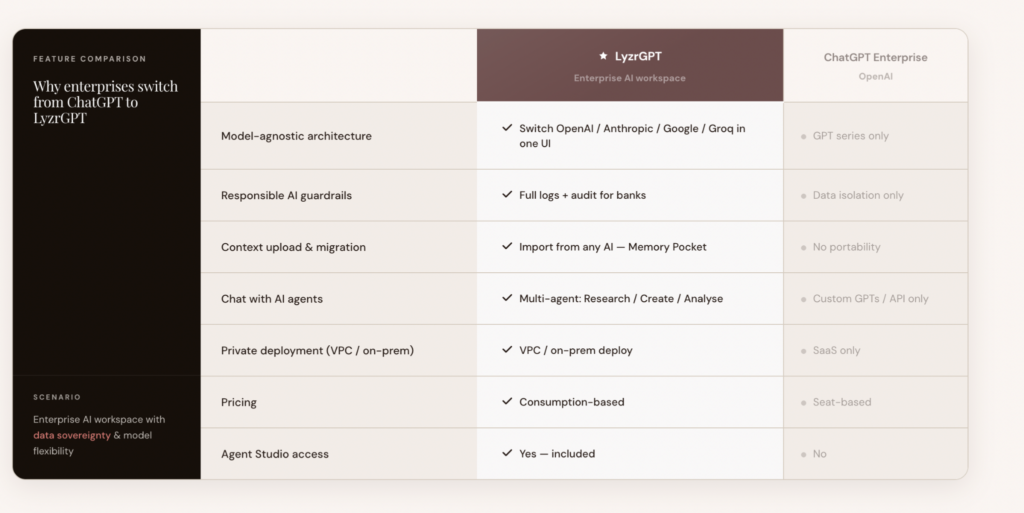
Instead of assembling every layer from scratch, platforms like LyzrGPT give enterprises a structured way to:
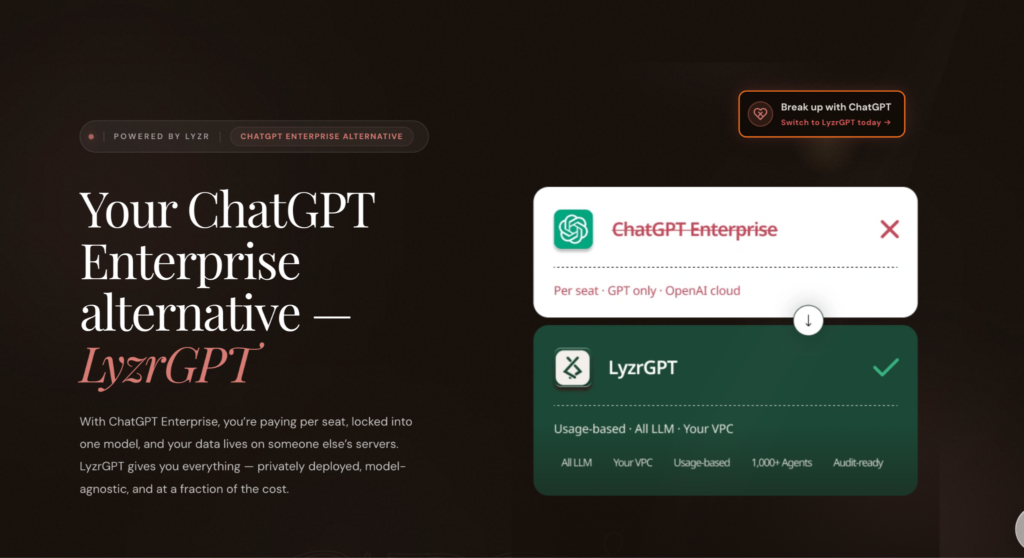
- Run models within their own infrastructure
- Connect directly to internal systems
- Control access, logs, and outputs
- Deploy real workflows instead of raw endpoints
So the effort shifts from:
“How do we build this?”
to
“What do we want to solve next?”
Final thought
At some point, every enterprise experimenting with AI runs into the same wall:
“We like what this can do… but we can’t let our data leave.”
That’s not a blocker.
It’s a direction.
And that direction is clear:
Run AI where the data already lives.
Book A Demo: Click Here
Join our Slack: Click Here
Link to our GitHub: Click Here