Modern AI agents are no longer single-turn question–answer systems. They are expected to hold conversations, track intent across multiple exchanges, and respond consistently as discussions evolve.
This is especially critical in enterprise use cases, compliance advisory, policy interpretation, legal review, or operational guidance, where losing context can lead to incorrect responses or repeated clarifications.
Memory management is what enables this continuity.
In Lyzr Agent Studio, memory management is designed to give developers explicit control over conversational context, how much the agent remembers, where that memory is stored, and how long it persists. Rather than abstracting memory behind opaque defaults, Lyzr exposes configuration options that allow teams to balance accuracy, performance, and governance.
This blog focuses specifically on Short-Term Memory, also referred to as context coherence, and explains how to configure it for a multi-turn agent such as a Compliance Advisor Bot.
Why Memory Matters in Multi-Turn Conversations?
Without memory, an agent treats every message as a new request. This works for isolated queries but fails in real workflows.
Consider a compliance conversation:
- User asks about data retention rules
- Follows up with an exception scenario
- Then asks how the rule applies across regions
Each question depends on what came before. If the agent does not retain recent exchanges, it must either:
- Ask the user to restate information, or
- Guess context, increasing the risk of errors
Short-Term Memory solves this by keeping a rolling window of recent messages available to the agent during inference.
In Lyzr Agent Studio, this memory is session-scoped, configurable, and provider-agnostic.
Understanding Short-Term Memory in Lyzr
Short-Term Memory is designed to support contextual continuity within a single conversation session. It stores a defined number of the most recent messages exchanged between the user and the agent.
Key characteristics:
- Session-bound: Memory exists only for the duration of the active conversation
- Message-based: Memory is measured in conversational turns, not tokens
- Explicit limits: Developers choose how many messages are retained
- Pluggable storage: Memory can live in Lyzr’s native store or an external system such as AWS
This design ensures predictable behavior and avoids uncontrolled memory growth.
Configuring Short-Term Memory
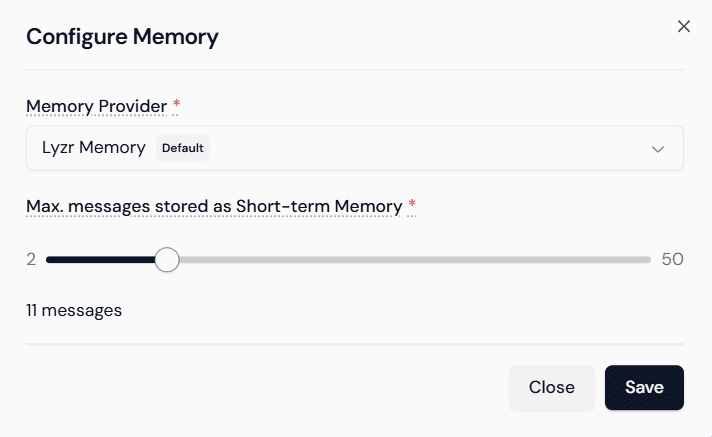
All memory configuration happens during agent creation or editing. The process is intentionally explicit, so teams know exactly how context is handled.
Step 1: Enable Memory and Select a Provider
In the Create Agent view:
- Locate the Memory toggle under Core Features
- Toggle Memory ON
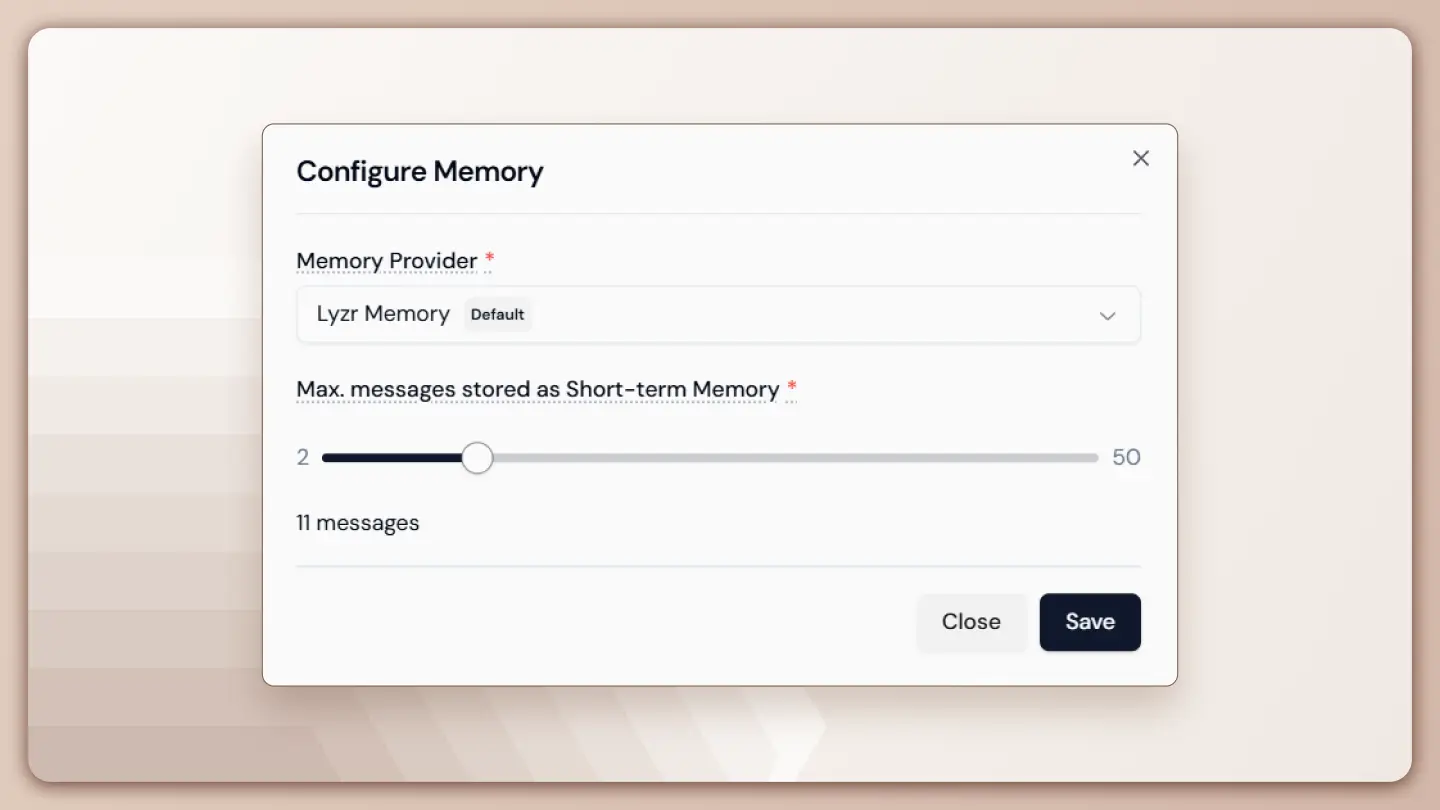
- Click the settings icon next to Memory to open the Configure Memory modal
At this stage, memory is enabled but not yet defined. The next step is choosing where memory is stored.
Choosing a Memory Provider
Lyzr Agent Studio supports multiple memory providers to accommodate different deployment and governance needs.
Option 1: Lyzr Memory (Default)
This is Lyzr’s built-in memory store and is suitable for most use cases.
Characteristics:
- Managed by Lyzr
- No external credentials required
- Optimized for low-latency conversational access
- Ideal for fast setup and standard enterprise deployments
This option works well when:
- Memory does not need to persist beyond sessions
- Data residency is already covered by the platform’s compliance posture
- Teams want minimal operational overhead
Option 2: AWS AgentCore (BYOA)
For organizations with strict infrastructure or compliance requirements, Lyzr supports Bring Your Own Account (BYOA) via AWS.
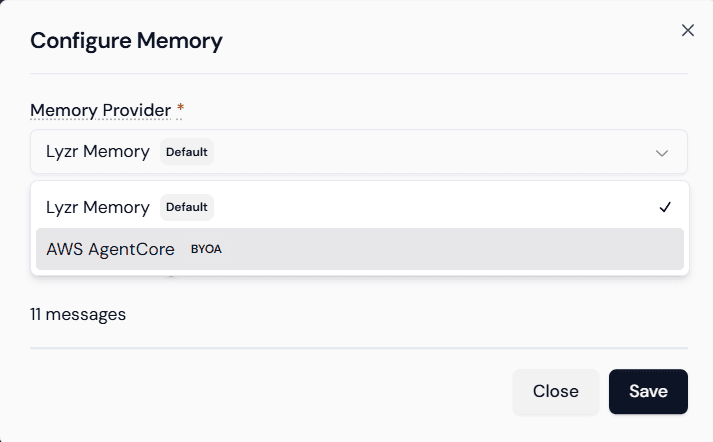
Characteristics:
- Memory stored in customer-owned AWS infrastructure
- Full control over encryption, access policies, and retention
- Alignment with existing AWS security architecture
This option is preferred when:
- Memory data must remain inside a specific cloud account
- Audit and governance controls are mandatory
- Centralized logging and monitoring are required
Step 2: Set the Short-Term Memory Limit
Once a provider is selected, the next configuration determines how much context the agent remembers.
Conversation Length Setting
The Max messages stored as Short-Term Memory slider controls the number of recent messages retained in the session.
- Typical range: 2 to 50 messages
- This includes both user and agent messages
- Older messages are dropped as new ones arrive
For a Compliance Advisor Bot, a value of around 25 messages is recommended.
Why 25?
- Compliance discussions often involve layered clarification
- Policies are referenced, refined, and applied across scenarios
- A smaller window may truncate relevant context
- A much larger window can introduce noise and affect performance
The goal is to preserve relevant conversational state without overloading the model with unnecessary history.
Once set, click Save to apply the configuration.
Step 3: External Memory Configuration (AWS BYOA)
If AWS AgentCore is selected as the provider, additional configuration is required.
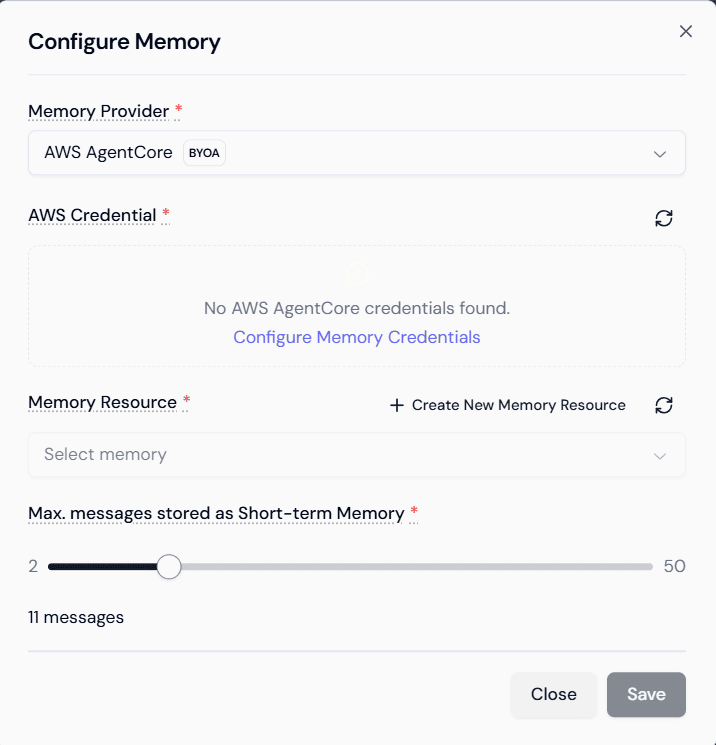
Providing AWS Credentials
Click Configure Memory Credentials and supply:
- Access credentials with permissions to the selected memory resource
- Credentials are used only for memory operations
- No broader access is assumed or required
This step ensures Lyzr can securely read and write memory data to the specified AWS environment.
Selecting or Creating a Memory Resource
After credentials are validated:
- Choose an existing memory resource, or
- Create a new memory resource directly from the interface
This resource defines:
- Where memory entries are stored
- How they are isolated per session
- How they integrate with AWS logging and monitoring
The short-term message limit is still enforced at the agent level, regardless of storage backend.
How Short-Term Memory Behaves at Runtime
Once configured, Short-Term Memory operates automatically during conversations.
Context Assembly During Inference
For every user message:
- The agent retrieves the most recent messages up to the configured limit
- These messages are injected into the model context
- The model generates a response based on current input plus recent history
This ensures:
- Follow-up questions are understood correctly
- References to earlier statements remain intact
- The agent does not contradict itself mid-conversation
Session Scope and Lifecycle
Short-Term Memory is not persistent.
- Memory exists only for the active conversation session
- Once the session ends, memory is discarded
- New sessions start with a clean context
This design is intentional and aligns with:
- Privacy expectations
- Predictable agent behavior
- Reduced risk of cross-conversation leakage
Persistent memory, when needed, is handled separately through long-term or knowledge-based mechanisms.
Performance and Optimization Considerations
Memory configuration directly affects agent performance.
Trade-offs to Consider
- Too few messages
- Loss of important context
- Repetitive clarification requests
- Too many messages
- Increased inference latency
- Higher token usage
- Potential dilution of relevant context
The recommended approach is to:
- Start with a moderate value (20–30 messages)
- Test real conversational flows
- Adjust based on observed behavior
Because memory is message-bounded, tuning is predictable and easy to reason about.
Why This Matters for Compliance and Enterprise Agents
In regulated environments, conversational consistency is not just a UX concern, it is a correctness requirement.
Short-Term Memory enables:
- Accurate policy interpretation across multiple turns
- Reduced ambiguity in follow-up questions
- Clear traceability of conversational logic
Combined with controlled storage options (such as AWS BYOA), teams can deploy agents that are both context-aware and governable.
Wrapping Up
Short-Term Memory is the foundation of context coherence in Lyzr agents.
Key takeaways:
- Memory must be explicitly enabled and configured
- Developers control how much conversation history is retained
- Storage can be managed by Lyzr or hosted in customer-owned AWS accounts
- Memory is session-scoped, predictable, and optimized for multi-turn dialogs
By designing memory as a first-class configuration, not an implicit behavior, Lyzr Agent Studio enables teams to build agents that reason clearly, respond consistently, and behave reliably across complex conversations.
Book A Demo: Click Here
Join our Slack: Click Here
Link to our GitHub: Click Here