TL;DR
- An AI agent inventory is one current record of every AI agent that can read data, call tools or take actions in your organization, each with a named owner.
- Most counts run low, because agents live in code, SaaS platforms, vendor products and laptops, and few announce themselves.
- The test: if software can pick a tool or act without a person approving each step, it goes on the list.
- Sweep four channels: contracts, credentials, platform consoles and live traffic. Only traffic shows what actually runs.
- Record owner, purpose, tools, data, triggers and risk tier for every agent. No owner, no production.
- An inventory is a list, not a control. Pair it with something that can stop an agent’s next call.
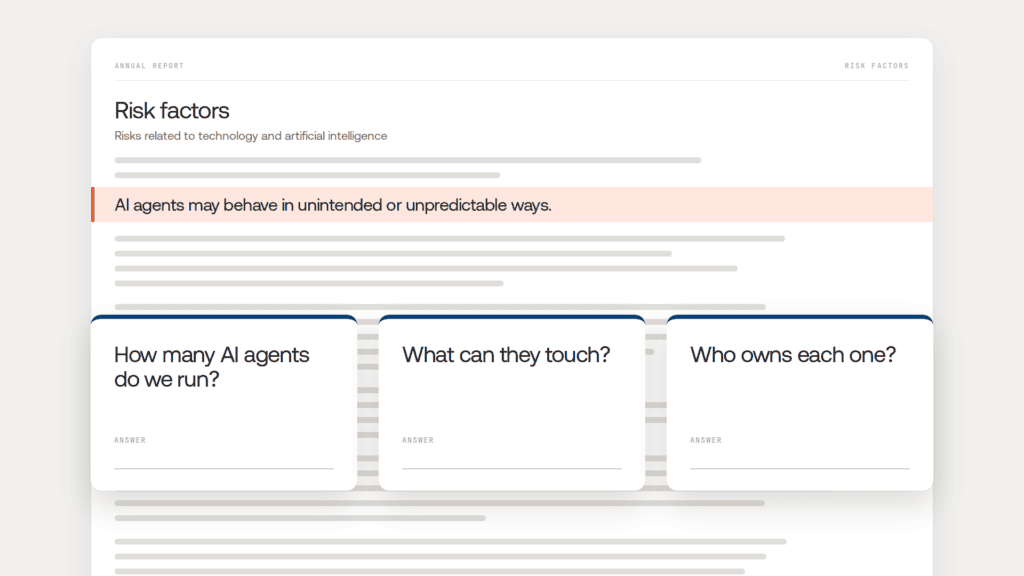
On November 3, Apple’s annual report warned investors that AI agents “may behave in unintended or unpredictable ways.” A week later, the audit committee chair at a 5,000-person logistics company sent her CIO three questions. How many AI agents do we run? What can they touch? Who owns each one?
The AI team’s spreadsheet said 23.
That spreadsheet listed the agents people remembered. An AI agent inventory lists the agents that exist, and the gap keeps growing: Gartner expects an average Fortune 500 company to run over 150,000 agents by 2028, up from fewer than 15 in 2025. Nobody keeps that list by hand, which is how agent sprawl starts.
An AI agent inventory is a single, current record of every AI agent in an organization that can read data, call tools or take actions. Each entry names an accountable owner and records the agent’s purpose, model, tools, data access, credentials, triggers and risk tier, so the organization can prove what runs and who answers for it.
What is an AI agent inventory, and what isn’t it?
It’s the system of record for agents: what exists, who owns it and what it can do. It overlaps with an AI agent registry and a model inventory.
| Question it answers | Typical gap | |
| Model inventory | Which models do we use? | Misses tools, data and actions |
| AI agent registry | Which agents were approved? | Lists what was registered, not what runs |
| AI agent inventory | Which agents exist, what can they reach, who owns them? | Only as good as its discovery |
A registry is what you approved. An inventory is what you’ve actually got. Gartner ranks building one second in its six steps for managing agent sprawl, because every later control depends on it.
Why your AI agent count is probably wrong
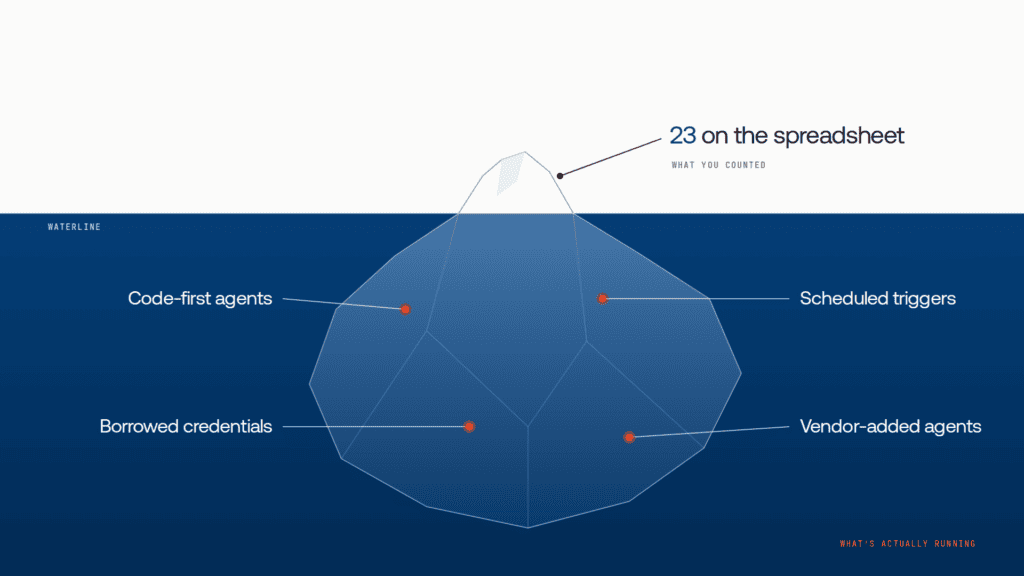
Agents arrive through many doors, and most skip the review that would list them.
- They don’t announce themselves: A code-first agent can be a few lines in a repo. Nothing registers it.
- They borrow access: Many run on a person’s token or a shared service account, so logs show a human or an app.
- They wake themselves up: Schedules, webhooks and event subscriptions start agents with nobody watching.
- Vendors add them for you: A SaaS update can switch on agent features in a tool you already pay for.
IBM’s Institute for Business Value found only 18% of organizations maintain a complete AI inventory. The rest is where shadow AI agents come from.
The CIO’s 23 were the agents people were proud of. Nobody thought to mention the rest.
How many agents is your spreadsheet missing? Take the AI Agent Sprawl Audit to see how many agents, tools and integrations are running in your organization without an owner or central visibility. Take the audit:
How to inventory every AI agent in five steps
Step 1: Decide what counts as an agent
Use one test everywhere: if software can choose a tool or take an action without a person approving each step, it’s an agent. A script that sends text to a model and returns the answer isn’t. A workflow whose LLM step decides which system to update is. A vendor’s built-in agent is too, because you still answer for what it does.
Then look across all four origins:
| Origin | Examples |
| Homegrown | Agents built on Amazon Bedrock AgentCore, Microsoft Foundry, Gemini Enterprise Agent Platform or open-source frameworks |
| Platform-built | Low-code agents in Copilot Studio, Salesforce Agentforce or ServiceNow |
| Vendor-embedded | Agent features inside software you license |
| Desk-level | Desktop assistants and IDE agents with local tools and MCP servers |
Step 2: Sweep the four discovery channels
Skip the survey; it only finds agents people remember. Pull four channels into one list.
| Channel | What it finds | What it misses |
| Contracts and procurement | Vendor and SaaS agents you pay for | Homegrown agents on existing accounts |
| Credentials and identities | Anything with its own API key, service account or agent identity | Agents on a person’s or a shared credential |
| Cloud and platform consoles | Agents on managed platforms and SaaS admin centers | Code-first agents in containers or on laptops |
| Traffic and call paths | Calls to models and tools, schedules, webhooks, MCP connections | Agents that haven’t run yet |
The first three show intent: what someone bought, created or granted. Traffic shows behavior. Read-only cloud scanning and discovery tools keep the first pass safe.
The sweep took the CIO’s count from 23 to 71. The biggest jump came from traffic: agents calling a model provider on keys nobody had tagged.
Step 3: Record the same fields for every agent
| Field | What to record |
| Stable identity | A unique ID or dedicated identity |
| Owner | A named person, not a team |
| Purpose | The business process and its limits |
| Model | Provider, model and version |
| Tools and data | Every API, database, SaaS app and MCP server it can reach |
| Credentials | What it authenticates as, and whose access it uses |
| Triggers | Schedules, events, webhooks and loops that start it |
| Risk tier and state | Low, medium or high; live, paused or retired; who can stop it |
This record is what auditors will ask for. Treat a new trigger like a new permission. An agent that wakes itself at 2 a.m. has more authority than one that waits to be asked.
Step 4: Give every agent an owner and a risk tier
No owner, no production. An unowned agent is paused until someone accepts it.
Tier by what an agent can do. As a working rule, low-tier agents read non-sensitive data, medium-tier agents touch customer data or write to internal systems, and high-tier agents move money, change production or message outsiders. The tier sets review depth and approval gates. Regulated firms have extra rules, covered in our guide for banks.
Eleven of the CIO’s 71 agents had no owner. One was an orphaned agent built by a contractor who left in March. It still ran every night on his old API key.
Step 5: Keep the inventory current

A one-off inventory is stale within weeks. Mature programs move from a spreadsheet to automated sweeps, then to continuous discovery where nothing reaches production unregistered.
Two rules keep it honest. When an owner changes role or leaves, the agent’s owner and access change too, or it’s paused. And reconcile the record against what’s running. For a schema, follow a 30-day rollout plan.
Where an AI agent inventory falls short
Even a complete inventory has blind spots, and it can’t act.
Code-first and vendor agents are hard to see: A container running an open-source framework doesn’t report itself, and vendors rarely show their tools or data paths.
A record isn’t an identity: Platform registries can hold entries for agents with no identity of their own, so a clean count can overstate your control.
A list can’t refuse a call: The inventory knew the contractor’s agent existed and had no owner. It couldn’t stop that night’s run.
The CIO could answer her chair’s first question, but not the other two: what each agent touches, and who stops it if it misbehaves. The inventory has to start governing.
How Lyzr Opencontroller turns your AI agent inventory into control
Lyzr Opencontroller is a control plane for AI agents, built around three jobs, in Lyzr’s words: “Find every AI agent. Give each one an owner. Control what it can call, spend and touch.” A registry, Lyzr says, “tells you an agent exists. It does not deploy it, promote it, or refuse its next call.” Opencontroller is built to do the refusing too.
| Inventory step | How Opencontroller handles it |
| Find (steps 1-2) | Discovers agents, models, tools, data and workflows across clouds and frameworks, including agents built outside Lyzr |
| Record (step 3) | One system of record for registry, policy, approvals and evidence |
| Own and tier (step 4) | Every agent gets an owner and its own non-human identity in your identity provider, with budgets and approvals matched to risk |
| Keep current (step 5) | Registers and observes agents wherever their traffic passes through its gateways |
| Act | Model and tool calls reach only destinations you authorize; one agent can be stopped, restricted or isolated |
Agents stay on their current runtimes, with no proprietary SDK. The control plane runs in your VPC, on-prem or air-gapped, and control-plane data, credentials and telemetry never need to reach Lyzr.
Under that setup, the contractor’s agent shows up unowned and is paused until finance accepts it. The CIO sends her chair one list: 71 agents, 71 owners, and what each can reach.
Book a demo to see Opencontroller find and govern your own agents.
Frequently asked questions
A current record of every AI agent that can read data, call tools or take actions in an organization, each with a named owner, purpose, tools, data access and risk tier.
A stable ID, named owner, purpose, model, every tool and data source the agent can reach, its credentials, triggers, risk tier and lifecycle state.
A registry lists agents that were approved or published. An inventory lists every agent that exists, approved or not. Most organizations need both, with discovery feeding the registry.
Check contracts, credentials, cloud and SaaS consoles, and live traffic, then compare the results with your list. Traffic matters most because it shows what runs.
Yes. If an agent inside licensed software can act on your data, you’re accountable for it. Ask the vendor for its tools, data access and controls.
Continuously if you can. At minimum, re-sweep quarterly and update records whenever an owner changes role or leaves.
Book A Demo: Click Here
Join our Slack: Click Here
Link to our GitHub: Click Here
Got a use case in mind?
8 weeks from use case to agents running in production.
Platform, people and FDEs, all in. Bring your environment. We'll co-build and stay until it's live.
Talk to UsFree resource
101 AI Agents Use Cases
100+ production-ready AI agent use cases across Marketing, Sales, HR, Banking, Insurance, Operations and a lot more
Download now