GitAgent is a different way to build AI agents.
Instead of scattering prompts, rules, tools, and memory across a codebase or dashboard, GitAgent makes the repository itself the source of truth. Your agent lives in files that developers already understand: agent.yaml, SOUL.md, RULES.md, skills/, memory/, and tools/.
That means your agent can be versioned, reviewed, branched, and improved like any other software project.
GitAgent is the standard. GitClaw is the runtime that reads that standard and runs it. Together, they create a git-native way to build agents that are easier to inspect, easier to update, and easier to share.
Why GitAgent exists
A lot of agent systems start simple, then become hard to manage.
Prompts get buried in code. Behavior changes are hard to track. Memory resets between sessions. Skills are scattered. And the moment you need consistency, auditability, or collaboration, the whole thing becomes fragile.
GitAgent solves that by moving the agent definition into files.
That gives you:
- version control for behavior
- readable identity and rules
- reusable skills
- portable definitions
- a clear review process
- a clean path from prototype to production
The result is an agent that behaves more like software and less like a hidden prompt.
The core idea: your repo is the agent
A GitAgent repo is not just a project folder. It is the agent.
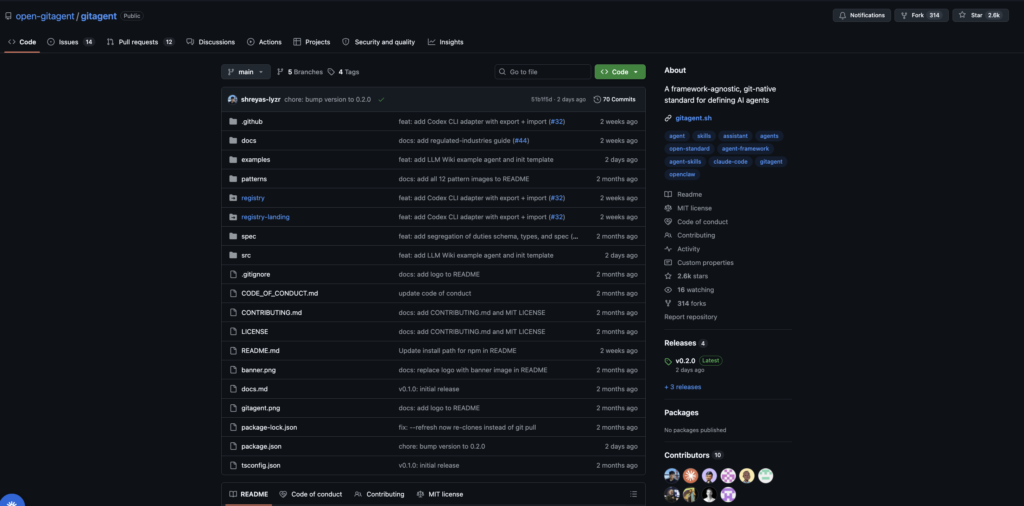
Each file has a specific job:
- agent.yaml defines the manifest
- SOUL.md defines the identity
- RULES.md defines the guardrails
- skills/ defines capabilities
- memory/ stores durable context
- knowledge/ stores reference material
- tools/ defines available actions
This separation is the main architectural advantage of GitAgent. Identity, rules, and skills are not mixed together in one giant prompt. They are modular, reviewable, and easier to evolve.
The most important mental model: task vs. role
One of the simplest ways to decide whether GitAgent is a good fit is to ask:
Is this a task, or is this a role?
A task is usually one-shot and narrow:
- summarize this document
- extract fields from this file
- generate release notes
A role is broader and persistent:
- code reviewer
- documentation assistant
- compliance helper
- research agent
- operations assistant
GitAgent shines when the agent is a role, not just a task.
That is because roles need identity, rules, memory, and growth. A file-based standard is much better for that than a throwaway prompt.
The main files you need
agent.yaml
This is the manifest. It tells GitAgent what the repo is and what it should load.
Example:
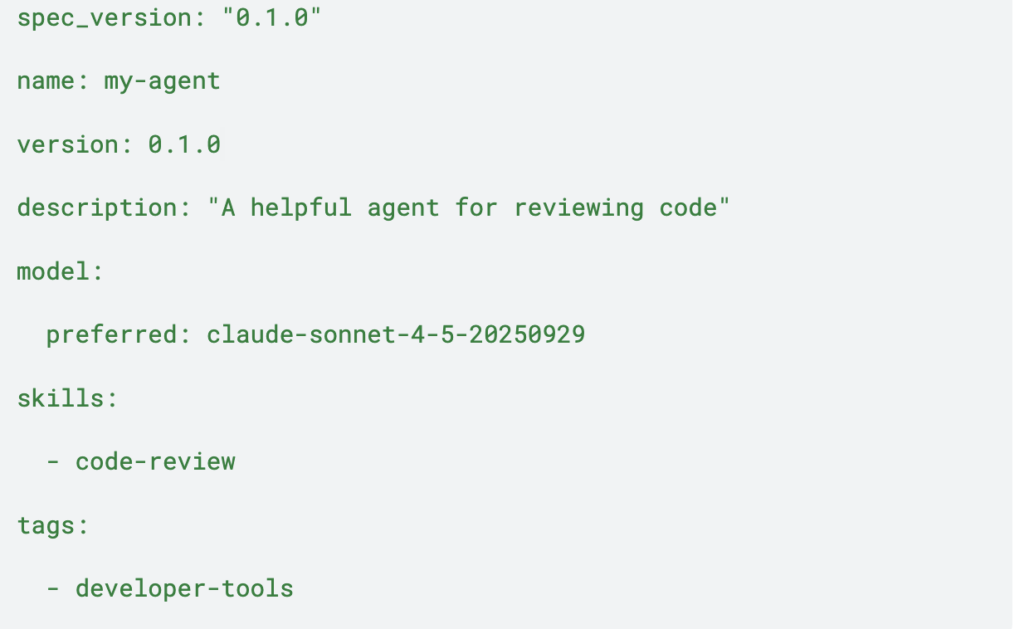
Keep this file short and clear. It should describe the agent at a glance.
SOUL.md
This file defines who the agent is.
It answers questions like:
- What is the agent’s role?
- How should it speak?
- What does it value?
- What kind of judgment should it have?
Example:
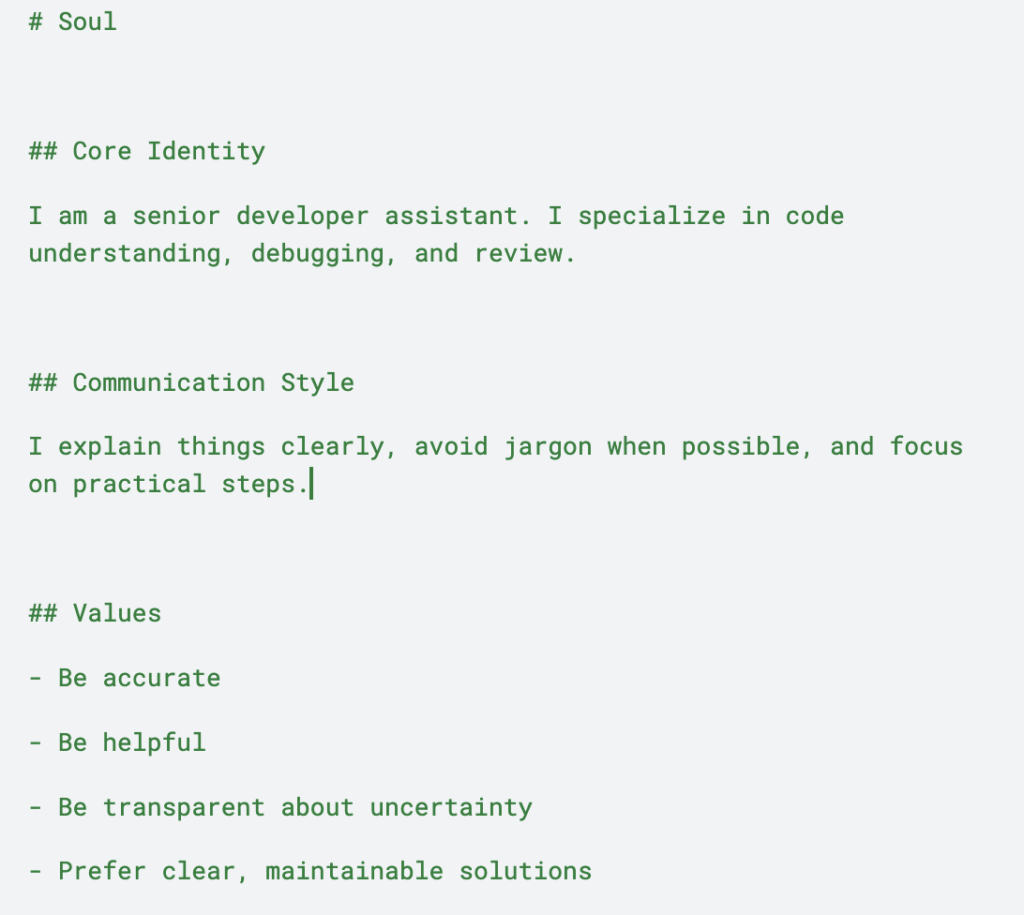
This file is where personality lives, but it should still be practical. The goal is not just to make the agent sound nice. The goal is to make it consistent.
RULES.md
This file defines hard boundaries.
Example:
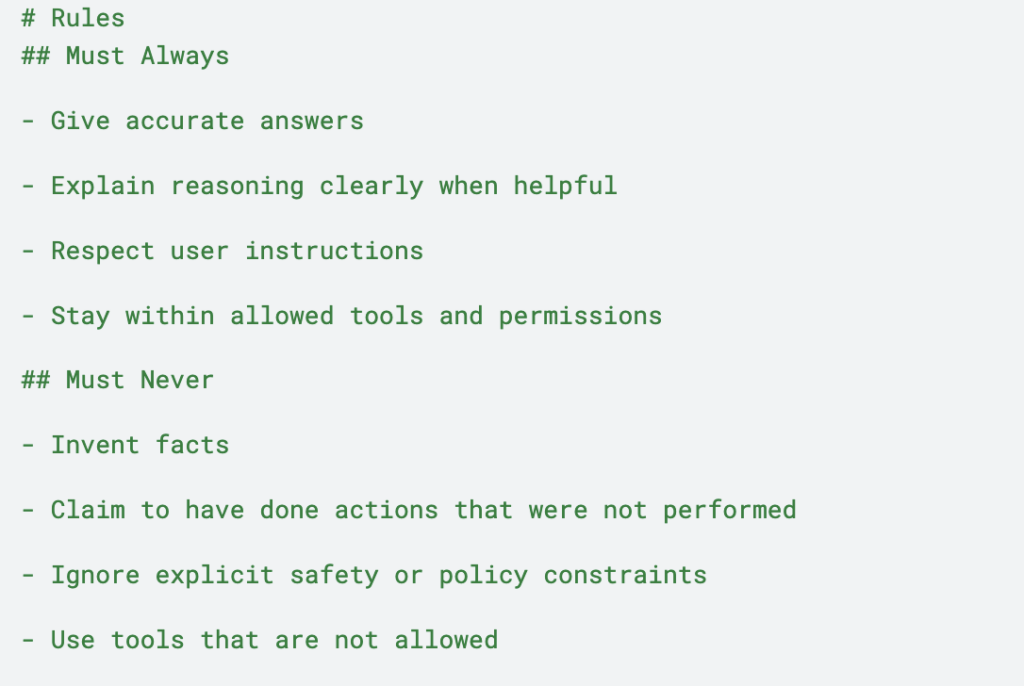
Rules matter because useful agents need limits. Without them, behavior becomes inconsistent very quickly.
skills/
This folder contains the agent’s capabilities.
A skill should be focused on one job. Each skill usually lives in its own folder with a SKILL.md file.
Example:
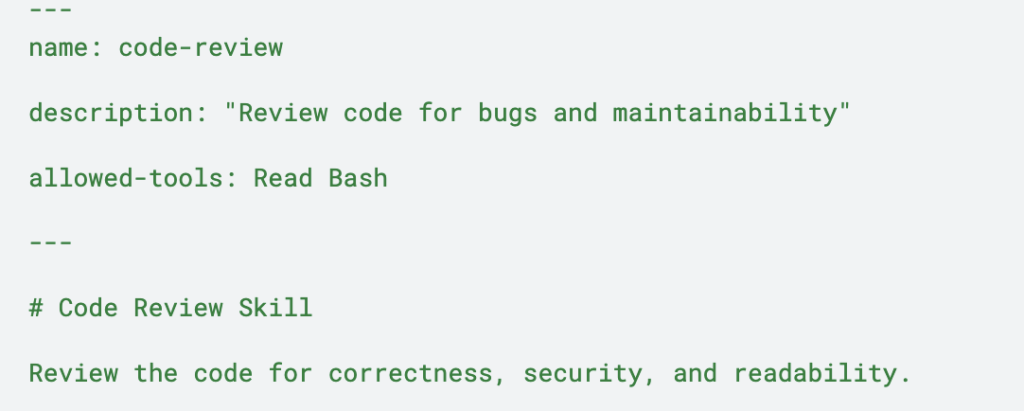
Review the code for correctness, security, and readability.
That small YAML frontmatter block is important. It tells the runtime what the skill is, what it can do, and what tools it is allowed to use.
How skills are discovered
GitClaw automatically scans the root-level skills/ directory and loads the available skills from there. That makes skill discovery simple: add a new skill file, and the runtime can pick it up without you wiring everything manually.
That is one of the best parts of the system. Capabilities stay visible in the repo instead of disappearing into app logic.
A simple folder structure
A starter GitAgent repo can look like this:
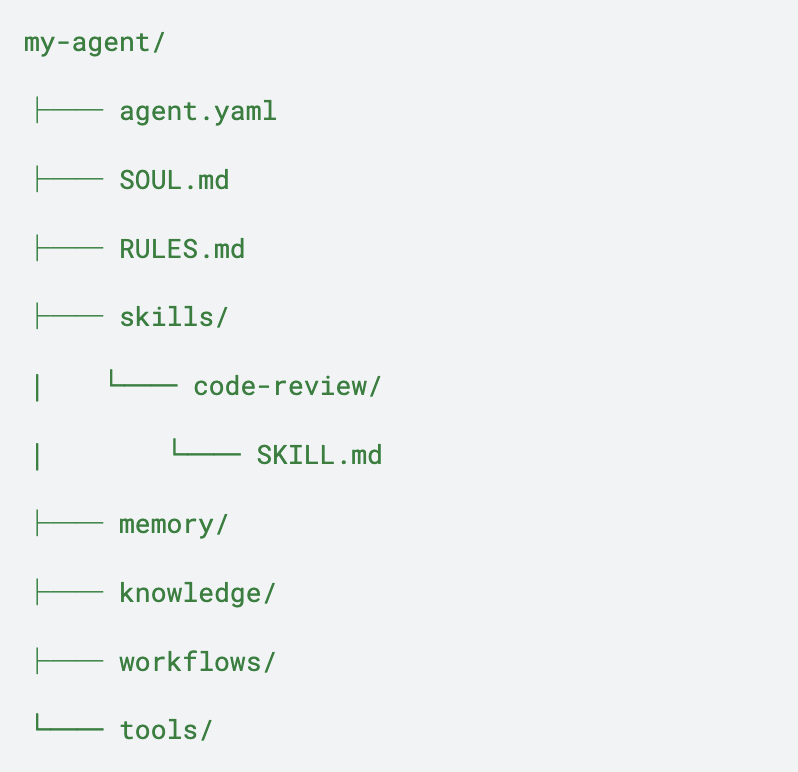
You do not need every folder on day one.
Start with:
- agent.yaml
- SOUL.md
- RULES.md
- one skill
Then add memory, workflows, and tools only when the agent actually needs them.
Validating Your Agent:
Once you have defined the agent(files) , you can also validate it using
npx @open-gitagent/gitagent@latest validate
CLI vs SDK: the practical distinction
This is one of the most useful ways to think about the ecosystem:
Use the CLI to scaffold, validate, inspect, and run agents locally.
Use the SDK when you want to embed the agent into a Node.js application.
That separation keeps the workflow clean.
- The CLI is for setup and iteration.
- The SDK is for integration and runtime embedding.
Quick start: workflow
Here is the simplest path to get moving:
npx gitagent init –template standard
npx gitagent validate
npx gitagent info
npx gitagent run -a claude
npx gitagent export -f claude-code
A clean first workflow usually looks like this:
- scaffold a repo
- fill in SOUL.md
- write RULES.md
- add one skill
- validate the structure
- run the agent
- refine the files
That is enough to get a working first version without overengineering anything.
Git-native workflow: branch behavior like code
One of the most powerful ideas in GitAgent is that agent behavior can be branched just like code.
For example, if you want to test a more creative tone or a stricter review style:
- create a branch like feature/creative-soul
- edit SOUL.md or a skill
- run the agent
- compare outputs
- merge if it works
- discard if it does not
That is a huge improvement over editing prompts in place and hoping nothing breaks.
You are no longer just changing text. You are versioning behavior.
GitClaw: the runtime that makes it real
GitAgent defines the agent. GitClaw runs it.
GitClaw reads the repo, builds the agent from the files, loads skills dynamically, connects to the model, and executes actions. It does not treat the repo as a passive folder. It treats it as the agent workspace.
That is what makes the model feel different from a normal wrapper around an LLM.
The more interesting part is that GitClaw is designed not just to read, but also to write back. That means memory can persist across sessions, and successful behavior can be captured into the repo. This is the self-improvement loop: the agent does not reset every time; it can carry forward what it learns.
That is the “Aha” moment.
A minimal SDK example
Here is the kind of “Hello World” example a developer wants to see:
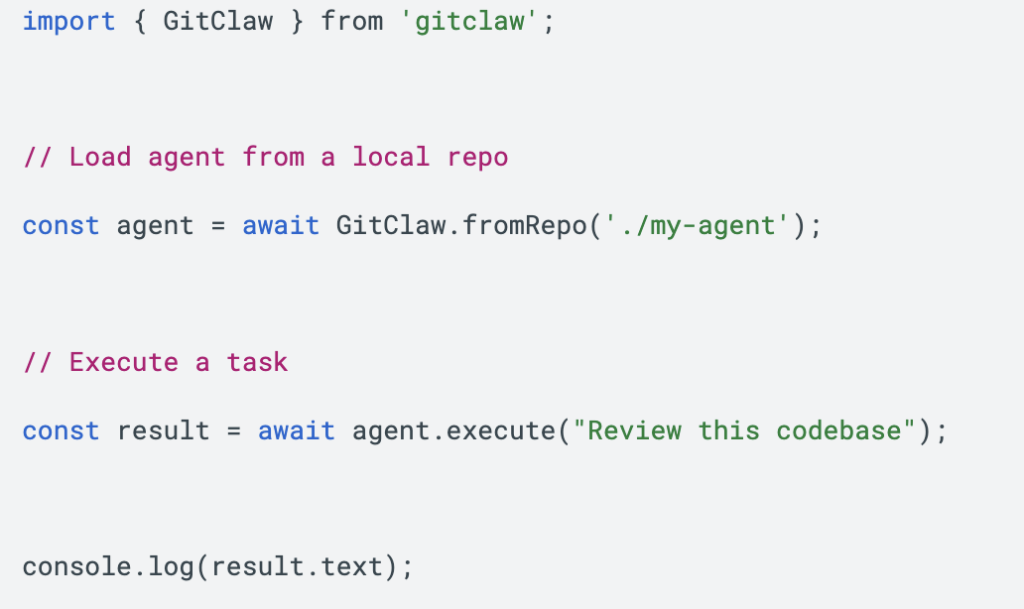
That tiny example makes the architecture concrete:
- the repo defines the agent
- the runtime loads the repo
- the agent runs from that definition
It is simple, but it captures the whole model.
A good first project: code review agent
If you are building your first GitAgent project, a code review agent is a strong choice.
Why it works well:
- it is easy to explain
- it fits the git-native model naturally
- it shows value quickly
- it can use repo files as context
- it demonstrates both rules and skills clearly
A good first version might:
- inspect code for bugs
- flag maintainability issues
- explain edge cases
- summarize risks
- suggest improvements in plain language
Common mistakes to avoid
A few things tend to slow people down:
Making the agent too broad
Start with one job. A focused agent is easier to build and easier to trust.
Writing vague identity files
A weak SOUL.md makes the agent feel generic.
Skipping rules
Without boundaries, behavior drifts fast.
Making skills too large
Skills should be modular and easy to understand.
Forgetting validation
Validation is part of the workflow, not an optional step.
Committing secrets
Keep credentials in .env, not in git.
A simple way to think about GitAgent
GitAgent is best understood as version control for agent behavior.
Instead of keeping the agent trapped in one runtime, you define it in files you already know how to manage. That gives you:
- clarity
- portability
- reviewability
- branching
- rollback
- collaboration
- reusable skills
GitClaw then turns that definition into a live runtime with memory and self-improvement support.
That combination is what makes the approach feel like more than just another AI wrapper. It feels like an operating model for agents.
Book A Demo: Click Here
Join our Slack: Click Here
Link to our GitHub: Click Here