


The Complete Field Guide for Analysts Who Build Their Own Intelligence
What This Playbook Is
Most AI guides for analysts answer one question: what can I build?
They give you a list of tools, show you a before and after, and stop there.
This one picks up where those guides end. Building the tool is the easy part. What’s harder, and what nobody talks about, is everything that comes after: what to do when the output looks wrong, how to verify agent-produced analysis before it reaches a client, what changes about your role when you’re no longer the bottleneck, and where human judgment remains irreplaceable regardless of how good the tools get.
This is a field guide, not a menu. It’s written for the analyst who is either about to build their first agent and wants to understand the full picture before they start, or who has already built one or two and wants to do it properly.
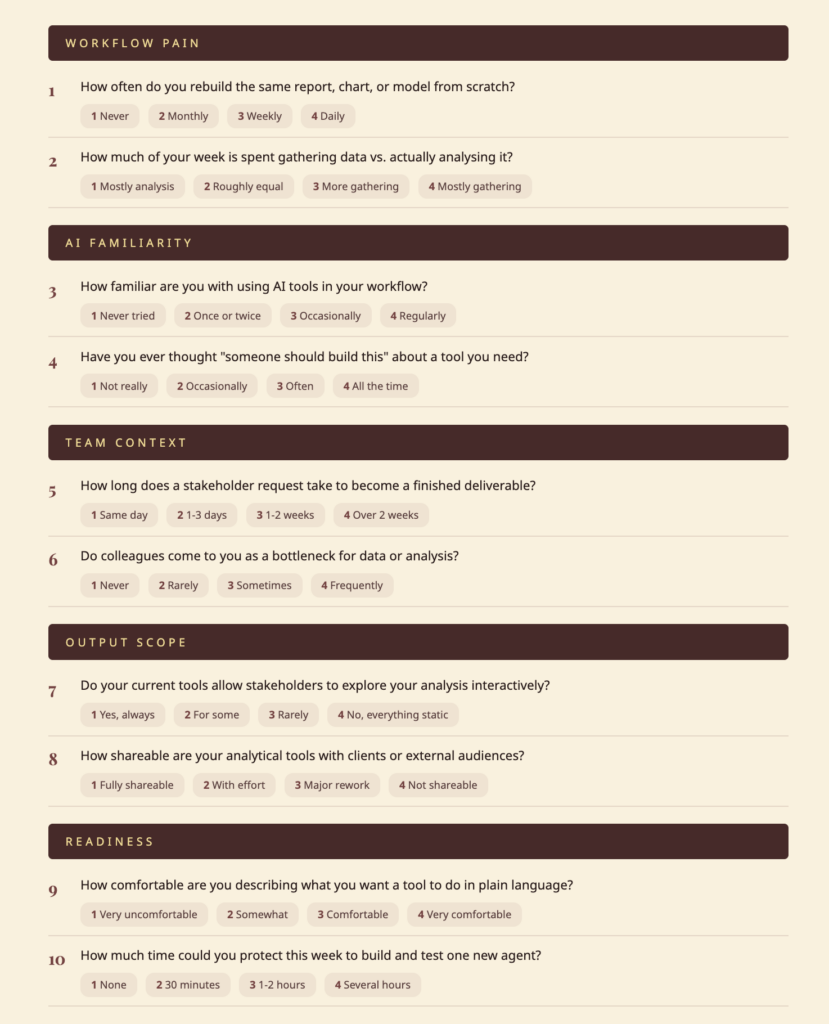
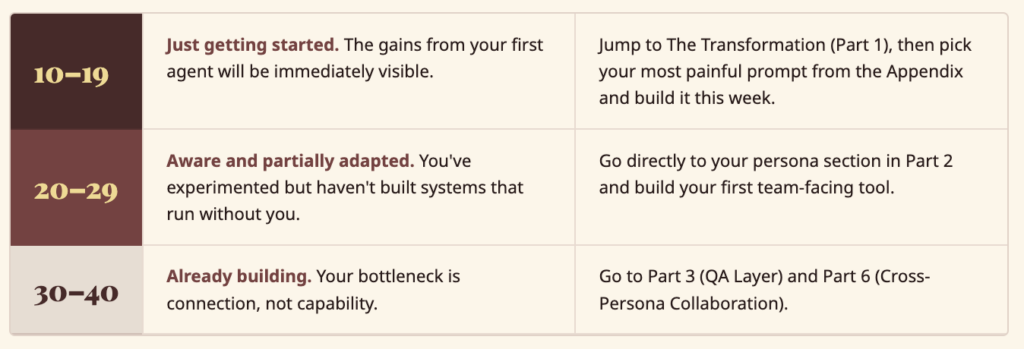
Analyst AI Readiness Scorecard
Answer honestly. Score 1 (never/no) to 4 (always/yes). Your total tells you exactly where to start.
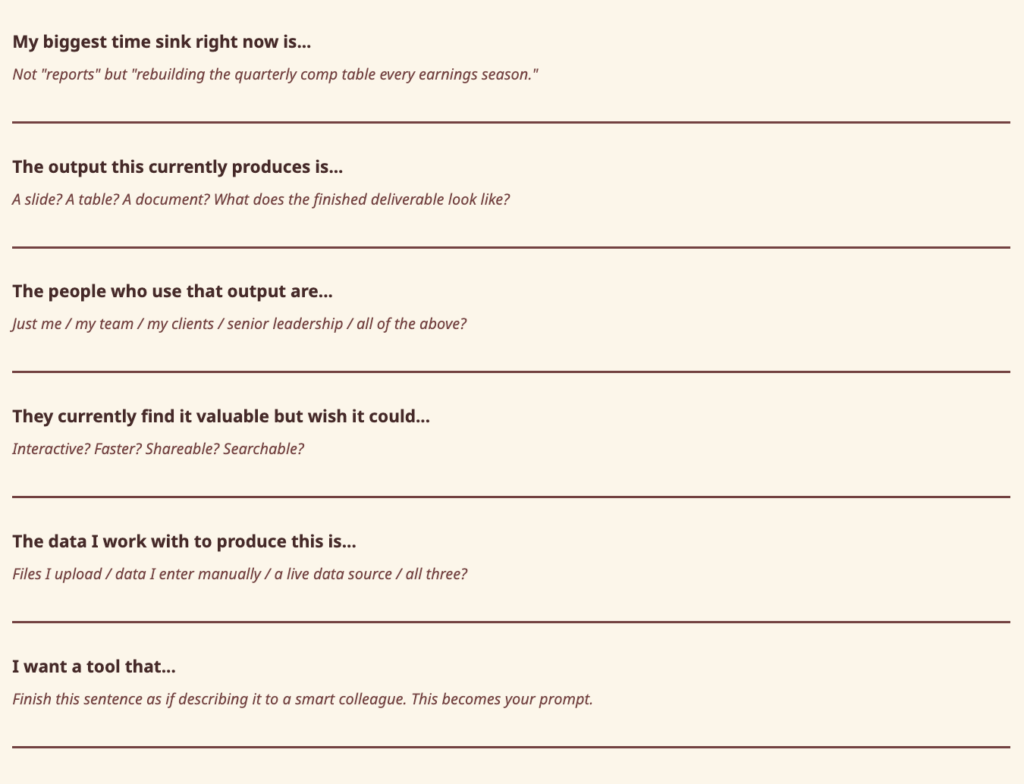
My First Agent Template
Fill this in before you open Architect. The completed sentences become your first prompt.

The Numbers Behind the Gap
The time problem is structural, not personal. Analyst work sits at the intersection of every gap AI is best positioned to close, yet most of those gains aren’t being captured at the individual level.
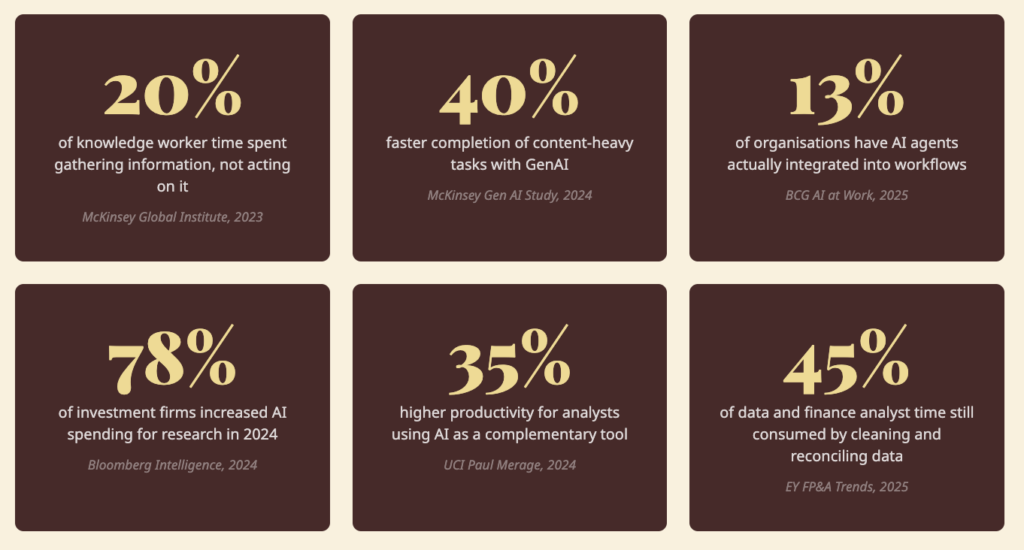
The analyst who builds their own tools captures more of the gain, faster, than the one waiting for their organisation to figure it out.
Where Your Week Goes vs. Where Your Value Lives
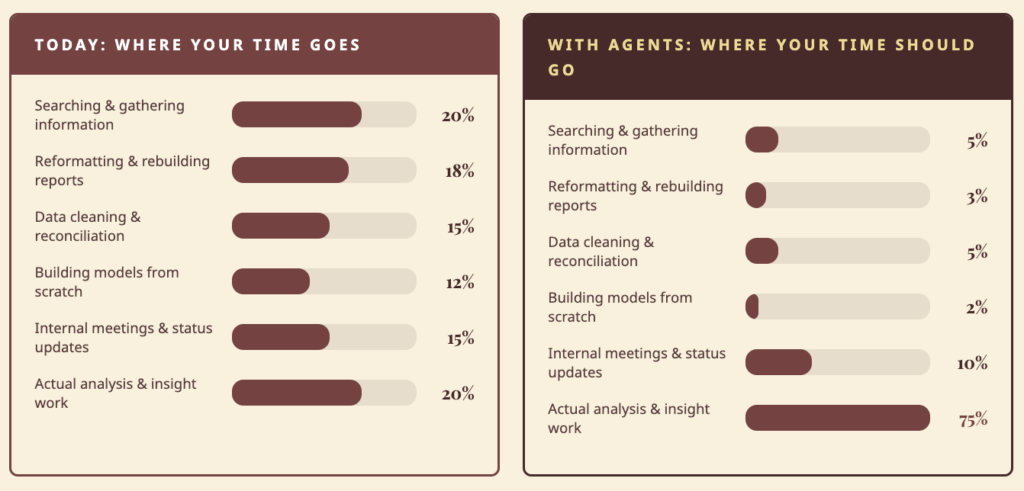
Sources: McKinsey Global Institute (2023); McKinsey Gen AI Study (2024); BCG AI at Work 2025; Bloomberg Intelligence (2024); UCI Paul Merage School of Business (2024); Norges Bank Investment Management (2024); EY FP&A Trends Research (2025).
The Mindset Shift
From an analyst who uses tools to an analyst who builds systems.
For most of the history of knowledge work, there were two types of people: those who defined what needed to be built, and those who built it. Analysts sat firmly in the first category. If you wanted a custom tool, you wrote a requirements document, waited in the engineering queue, and received something six months later that was 60% of what you described. That separation is gone.
Three things have changed:
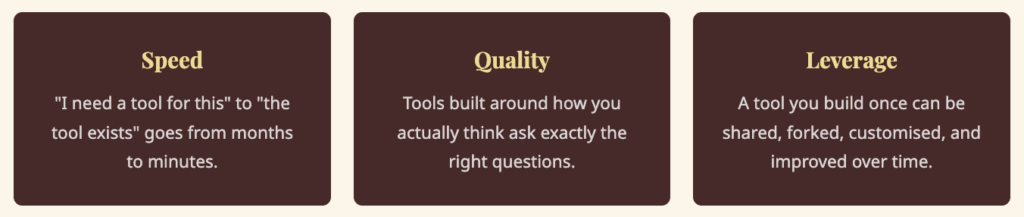
One principle governs everything in this playbook: describe the outcome, not the architecture. You don’t need to know how agents work. You need to know what you want the finished tool to do.
How Architect Works for Analysts
Architect is an agentic app builder. You describe what you want, and it builds a complete, working application, agents included.
Step 1: Choose your build mode.
- One-Shot Mode: Type a clear description. Architect builds the entire application in one pass. Best for most prompts in this playbook.
- Guided Mode: Architect walks you through Plan, then Agents, then App. Review and adjust at each stage before moving forward.
Step 2: Review the plan.
Before building anything, Architect analyses your requirements and generates a full plan including user stories, data flows, and integration requirements. You review before anything gets built. Fix it here, not after.
Step 3: Agents and app go live.
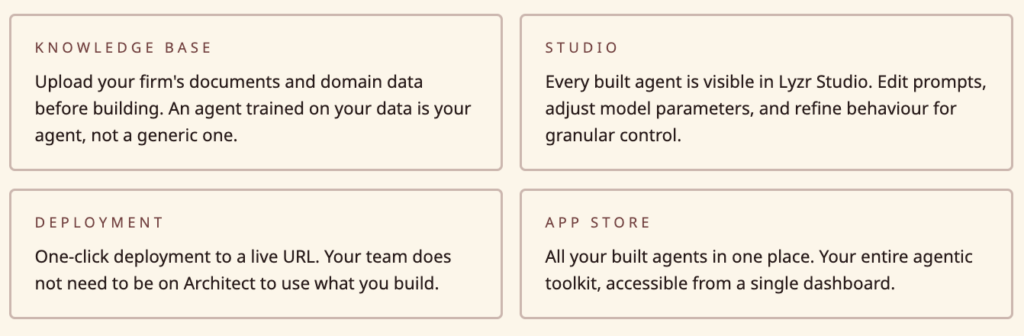
Architect builds the agent system and interface simultaneously. Each agent gets a specific role, instructions, and knowledge base. You get a live, working tool you can interact with immediately, and deploy to a shareable URL in one click.
Part 1: The Transformation
What Actually Changes, and When
The most common question analysts ask before building their first agent is: “Will it actually save me time?” That’s the wrong question. The right question is: “What does my working day look like six months from now if I build this seriously, versus if I don’t?”
Week 1: The First Build
The first build is almost always faster than expected and more limited than expected at the same time. You paste a prompt, Architect builds something, and it works. Then you realise the thing you described was only half of what you actually needed.
This is not a failure, it’s the most useful moment in the process. You now know something about your own workflow that you didn’t know before you built the tool: the part you described was not the actual bottleneck. The real one was one step earlier, or one step later.
This is why the first build should always be the most obvious build, not the most ambitious one. The first version reflects how you think the process works. The second version reflects how it actually works. The only way to get to the second version faster is to build the first version now.
What to do: Pick the single most repetitive task in your current workflow. Build a tool that handles it. Use it once. Note the first thing it doesn’t do that you expected it to. That is your Week 2 brief.
Weeks 2–4: The Team Test
Sharing with a colleague is the fastest feedback loop available. They will find things wrong with it that you never would have found yourself, because they approach it with different assumptions, different data, and different questions.
The most valuable feedback is not “this is broken.” It is “I tried to do X and it wouldn’t let me.” That tells you something about how your colleague thinks about the problem that is different from how you think about it.
Here’s a consistent pattern across analyst types: the first question a colleague can’t answer using your tool is the most important feature you haven’t built yet.
This is also when something important shifts about your role. When a colleague can get to an output without asking you, your relationship to that piece of work changes. You are no longer the person who produces the comp table. You are the person who built the system that produces it.
What to do: Deploy the tool to a URL, share it with two or three people, and pay close attention to the first question they ask when something doesn’t behave as expected. That question is your next build brief.
Month 2: The Connected System
At some point around the second month, two of the tools you’ve built naturally start feeding each other. The output of one becomes the input of another. When that happens, something changes in how you think about your work. You stop thinking in deliverables and start thinking in systems.
Individual tools have linear value. Connected tools have compounding value. The system becomes more useful the more you use it, because each use adds to the knowledge base the next use draws from.
There’s a related pattern worth naming: the deliverable you spend the most time producing is often not the thing that creates the most value. It’s the artifact that generates questions about itself. When you build a second tool that handles the follow-up questions the first tool generates, you’ve changed the model from “I produce reports” to “I maintain a system that keeps people informed.” That reframe changes how your work is perceived, and how sticky your client relationships become.
What to do: Look at the tools you’ve built. Where does the output of one become the input of another? What questions does each tool generate that you’re still answering manually? Both answers are build briefs.
Month 3+: The Practice Asset
By month three, something has changed about how your colleagues see you. The person who builds tools becomes the person who understands the workflow more deeply than anyone else, not because they’re smarter, but because building a tool requires you to articulate every step of a process you previously did on autopilot.
That articulation is valuable in itself. When you have to specify exactly what a good analysis requires, the inputs, the logic, the edge cases, the output format, your mental model of that analysis becomes more precise. The tool is useful. The precision is more useful.
What to do: Document what you’ve built, not technically, narratively. What does each tool do, when do you use it, what does it replace, what questions does it answer? That document is institutional knowledge and the brief for the next six months of building.
Part 2: The Six Personas
The shift that matters across all six personas is the same: you stop being the bottleneck and become the architect of the system that removes it. What’s different for each type is what gets automated, what that frees up, and what you should build first.
Industry and Technology Analyst
Ten briefings a week. No system to search them.
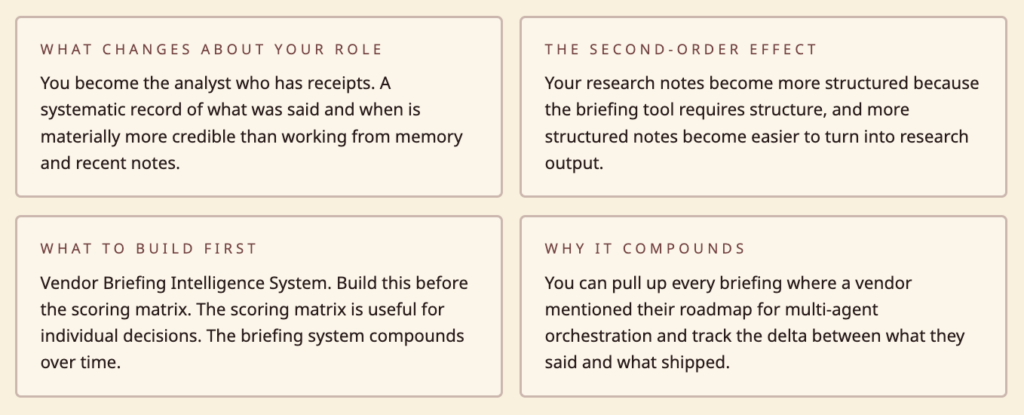
The shift that changes your work most isn’t building a scoring matrix or a market sizing calculator. It’s building a briefing intelligence system and actually using it for six months.
After six months of structured briefings, you have something almost no analyst has: a searchable record of what every vendor in your coverage area claimed, when they claimed it, and whether it turned out to be true. You can pull up every briefing where a vendor mentioned their roadmap for multi-agent orchestration and track the delta between what they said and what shipped. You can answer inquiry calls faster because you’re not relying on memory.
The 5 agents to build
| # | Agent | What it does |
| 01 | Vendor Comparison Engine | Dynamic scoring matrix where you define criteria, set weights, and get auto-ranked comparisons with a visual quadrant. Readers adjust weights and watch rankings shift in real time. |
| 02 | Market Sizing Calculator | Enter assumptions (buyer universe, deal size, adoption rate, growth rate) and get TAM, SAM, SOM with a breakdown chart. Save and compare multiple scenarios. |
| 03 | Vendor Briefing Intelligence System | Log every briefing with key claims, product updates, differentiators, and your assessment. Search across all briefings and compare what different vendors said about the same topic. |
| 04 | Inquiry Tracker and Trend Spotter | Log inquiry calls with topic, industry, company size, and underlying question. Over time, surface which topics are trending and which patterns should shape your next research note. |
| 05 | Technology Hype Cycle Builder | Plot emerging technologies on a customisable hype cycle curve, estimate time to mainstream adoption, and produce a clean, report-ready visual without rebuilding in PowerPoint each time. |
Equity and Investment Analyst
You know what you should be doing. You know what you are actually doing.
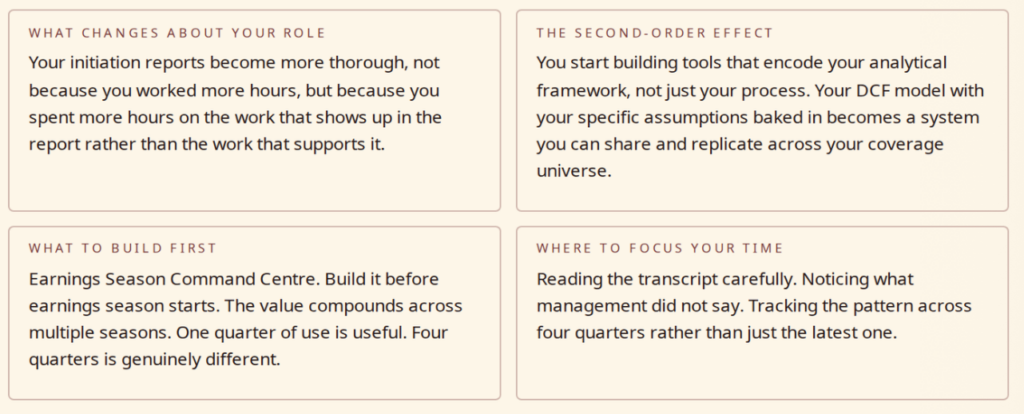
The shift that changes your work most isn’t the earnings tracker or the comp table, it’s what happens to your edge when you reclaim the time those tools were consuming.
The non-consensus insight doesn’t come from having more data. It comes from having more time to think about the data you already have. Every hour reclaimed from model maintenance is an hour available for the work that actually generates alpha: reading the transcript carefully, noticing what management didn’t say, tracking the pattern across four quarters rather than just the latest one.
The equity analyst who builds agentic infrastructure is not competing on speed of data entry. She is competing on quality of insight. The infrastructure is not the edge. The time the infrastructure creates is the edge.
The 5 agents to build
| # | Agent | What it does |
| 01 | Earnings Season Command Centre | Track your coverage universe through earnings. Enter reported revenue, EPS, and guidance alongside consensus estimates and see instant beat/miss/surprise indicators. Log management quotes and flag meaningful guidance changes. |
| 02 | Comparable Company Analyzer | Enter companies with revenue, EBITDA, net income, market cap, and growth rates to get auto-calculated multiples including EV/Revenue, EV/EBITDA, and P/E, with median/mean and outlier flagging. |
| 03 | DCF Model Builder | Input revenue projections, margins, capex, working capital, discount rate, and terminal growth rate to get free cash flows, present values, and implied share price. Clients and colleagues can adjust assumptions and see the valuation shift. |
| 04 | Sector Performance Tracker | Track 20 stocks, their YTD return, 3-month return, and performance versus the S&P 500 and NASDAQ. See a ranked table with a visual comparison for immediate identification of outperformers and laggards. |
| 05 | IPO Readiness Scorecard | Score a pre-IPO company across financial performance, governance readiness, market positioning, competitive moat, and risk factors. Get an overall readiness score and flagged areas requiring attention before filing. |
Market Research Analyst
The analysis is done. The formatting isn’t.
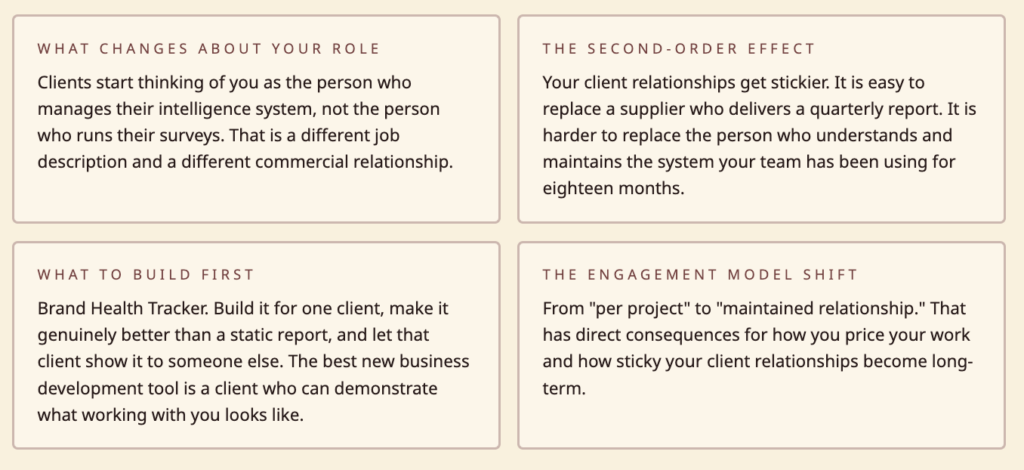
The shift that changes your work most is changing the relationship between you and your clients from “analyst who delivers reports” to “analyst who maintains intelligence infrastructure.”
The deliverable model is fundamentally limiting. You do work, produce a document, present it, the client’s team looks at it once. Three weeks later, a question comes up and nobody can find the number. You get an email asking you to re-run the analysis. You spend two hours doing work you already did.
The infrastructure model is different. You build a living system your client’s team can consult between waves. The quarterly presentation becomes a conversation about interpretation rather than a transmission of findings. Your engagement model shifts from “per project” to “maintained relationship.”
The 5 agents to build
| # | Agent | What it does |
| 01 | Survey Results Analyzer | Upload survey results and get response distributions for every question, dynamic cross-tabulation by demographics, and filterable charts ready to drop into a client report immediately. |
| 02 | Consumer Segmentation Builder | Define customer segments based on purchase behaviour, demographics, and attitudes. Size each segment, describe key characteristics, and visualise how they differ across important dimensions. |
| 03 | Competitive Landscape Mapper | Plot competitors on a customisable 2×2 matrix where you define the axes. Add company names, adjust positions, and annotate strategy. Updated in seconds rather than reformatting an entire PowerPoint slide. |
| 04 | Brand Health Tracker | Enter brand health metrics (awareness, consideration, purchase intent, NPS, satisfaction) for multiple brands each quarter. See trend lines over time and compare brands side by side. |
| 05 | Pricing Research Analyzer | Enter Van Westendorp data and automatically get the optimal price point, indifference price point, and the range of acceptable prices on the classic chart, replacing the one-off Excel model built for every pricing study. |
BI and Data Analyst
You’re the intelligence layer. You’re also the bottleneck.
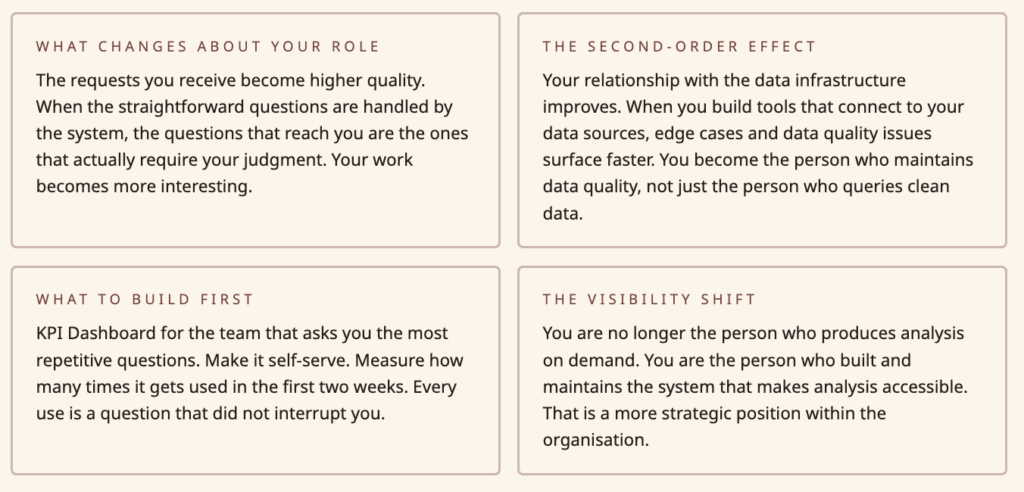
The shift that changes your work most isn’t eliminating the Monday report, it’s changing who can access the intelligence that used to only exist in your head and your tools.
Right now, your colleagues know you’re the person to ask when they need a number. That’s a compliment and a constraint simultaneously. Every “can you quickly pull…” is an interruption of whatever you were actually working on. With the right infrastructure, most of those requests would never need to reach you.
When colleagues can self-serve, your role changes. You’re no longer the person who produces analysis on demand. You’re the person who built and maintains the system that makes analysis accessible. That is a more strategic position.
The 5 agents to build:
| # | Agent | What it does |
| 01 | KPI Dashboard Builder | Define KPIs with current value, target, and trend direction. Organise them into categories. Get a clean dashboard view that updates when you change the numbers and is presentable enough to share with senior leadership without further design. |
| 02 | A/B Test Calculator and Reporter | Enter visitors and conversions for control and variant groups. Get conversion rates, absolute and relative lift, statistical significance, and confidence interval. Get a plain-language verdict: winner, loser, or need more data. |
| 03 | SQL Query Result Visualiser | Paste tabular data from a SQL query and instantly choose from chart types. Charts are presentation-ready for Slack or email, replacing the paste-to-spreadsheet-then-chart workflow that burns 20 minutes per query. |
| 04 | Stakeholder Report Generator | Enter this week’s numbers and last week’s numbers for your standard metrics and get a formatted report with trend, week-over-week change, and a summary of what moved. Replaces the Monday morning report assembly ritual. |
| 05 | Data Quality Scorecard | Score each data source across completeness, accuracy, timeliness, and consistency. Track scores over time. Get an overall data health score. Flag sources that drop below threshold for investigation. |
Policy and Government Analyst
High-stakes work. 2009 tools.
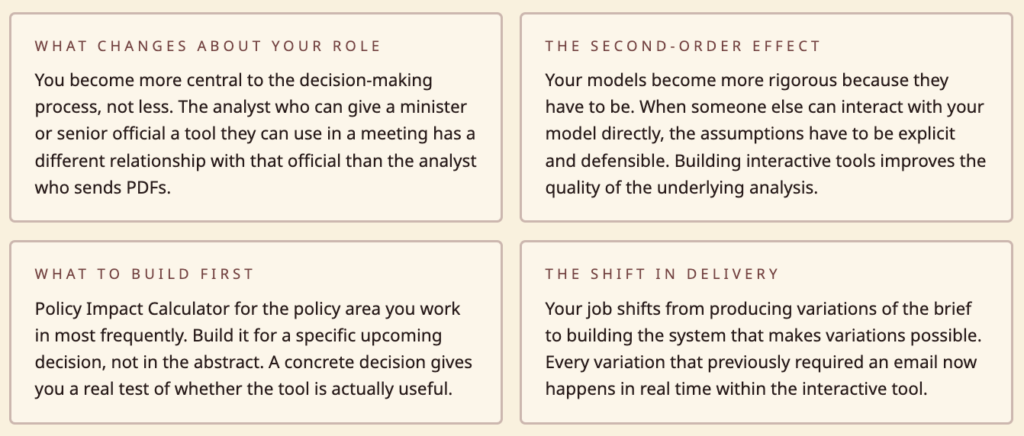
The shift that changes your work most is giving decision-makers the ability to explore your analysis rather than just receive it.
The fundamental limitation of a static policy brief is that it answers the question you anticipated. But decision-makers rarely have the question you anticipated. They have a variation of it: what if the rate were slightly higher? What does this look like for this specific income bracket? What happens to the revenue projection if adoption is slower than assumed?
When your analysis lives in a spreadsheet only you can manipulate, every variation requires another email, another day of turnaround, another version of the brief. When it lives in an interactive tool, the decision-maker can explore it themselves. Your job shifts from producing variations to building the system that makes variations possible.
The 5 agents to build:
| # | Agent | What it does |
| 01 | Policy Impact Calculator | Input parameters for a proposed policy change and see estimated revenue impact, who benefits, who pays more, and the net effect on the budget. Decision-makers can adjust proposed rates and see the impact change in real time. |
| 02 | Regulatory Compliance Tracker | List regulations across jurisdictions, map them to business practices, score compliance level, and flag gaps. When a regulation changes, update it and see how the overall compliance posture shifts. |
| 03 | Demographic Trend Explorer | Upload population data broken down by age, region, income, and education. Explore trends over time, project forward using different growth assumptions, and create visualisations for policy briefs. |
| 04 | Grant and Funding Tracker | Track each grant’s total budget, amount spent, remaining balance, key deadlines, and reporting status. See which grants are at risk, which reports are due, and get a portfolio-level view of funding health. |
| 05 | Public Comment Analyzer | Upload public comments on a proposed regulation, have them categorised by theme and sentiment, surface the most frequently raised issues, and get a structured summary of arguments for and against. Thorough enough for an official response. |
Strategy and Consulting Analyst
Three hours to think it. Three hours to format it.
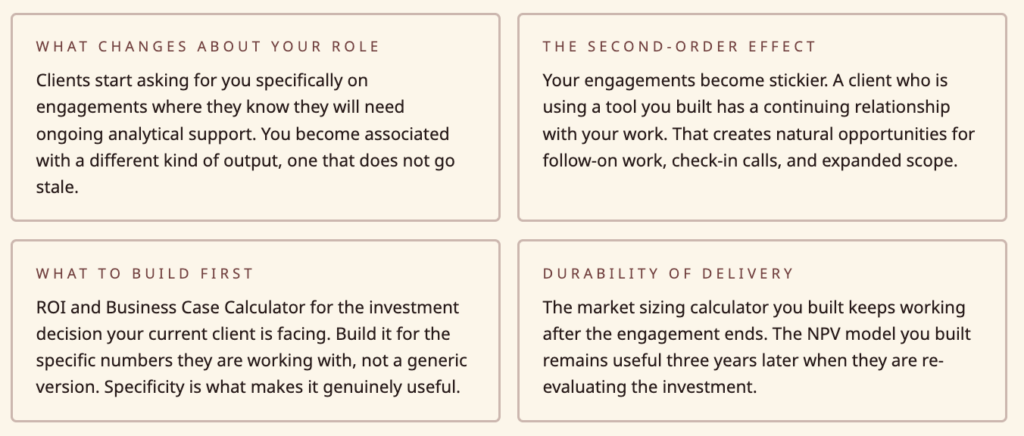
The shift that changes your work most is changing what you deliver from a document to a system.
The document model is the default for consulting work. You do the analysis, write the deck, present, and leave. The client now has a document that represents your thinking at a point in time. When the situation changes, the document is out of date. When a new team member joins, they read the document but can’t interact with the model behind it.
When you deliver an interactive tool alongside your analysis, you deliver something that ages better. The market sizing calculator you built for the client’s strategy team keeps working after the engagement ends. They update assumptions when the market changes. The NPV model you built remains useful three years later when they’re re-evaluating the investment. Your work has a longer half-life.
The 5 agents to build:
| # | Agent | What it does |
| 01 | Strategy Framework Builder | Pick a framework (SWOT, Porter’s Five Forces, value chain, PESTLE), fill in your analysis, and get a clean professional visual output ready to share with clients or drop into a presentation, no formatting overhead. |
| 02 | ROI and Business Case Calculator | Input upfront cost, ongoing costs, expected benefits per year, and a discount rate. Get NPV, IRR, payback period, and a cumulative cash flow chart. Clients can adjust assumptions and see how the business case changes. |
| 03 | Process Efficiency Benchmarker | Enter metrics for your client (cycle time, cost per transaction, error rate, throughput) and for industry benchmarks. See where the client is above or below standard, calculate the gap, and estimate the value of closing it. |
| 04 | Client Health Scorecard | Score each client across satisfaction, engagement level, contract value, renewal likelihood, and growth potential. Get an overall health score per client, flag at-risk accounts, and see a portfolio view for prioritisation. |
| 05 | Meeting Cost Calculator | Enter attendees, average hourly cost, meeting duration, and weekly frequency. Get weekly, monthly, and annual cost with organisational scale-up. Simple but powerful for the meeting culture change conversation. |
Part 3: The QA Layer
How to Verify Agent Outputs Before They Reach a Stakeholder
This is the section most AI playbooks skip. This one won’t.
Agent outputs fail in ways that are different from spreadsheet errors. Spreadsheet errors are usually obvious: a formula is broken, a reference is wrong, the number is wildly implausible. Agent outputs can be plausible and wrong. They can be internally consistent and based on flawed assumptions. They can be accurate on the main question and incorrect on a supporting detail that a sharp client will notice.
For analysts, where your credibility depends on the accuracy of your outputs, understanding how agent outputs fail is not optional.
The Four Failure Modes
Failure Mode 1: Confident fabrication
Agents don’t know what they don’t know. When asked to produce an output that requires information the agent doesn’t have, it will sometimes produce a plausible-sounding answer rather than a gap. This is most dangerous in research contexts: a briefing intelligence system asked to summarise a vendor’s position on a topic it has no information about may produce a summary that sounds credible but is based on nothing.
The fix: Always design tools that surface their sources explicitly. If an agent produces a summary, it should be able to show you which specific input documents that summary is based on. If it can’t, treat the output as unverified.
Failure Mode 2: Anchoring to the first plausible number
In market sizing, financial modelling, and any quantitative output, agents will anchor to the first plausible number they encounter and reason from there. If your market sizing tool is given an industry report that contains an outdated TAM estimate, the tool will incorporate that estimate into its calculations even if better data exists elsewhere in the knowledge base.
The fix: For quantitative tools, audit the inputs as carefully as the outputs. Build tools that surface their source data prominently. Before trusting a market sizing output, verify that the assumptions it’s working from are the ones you intended it to use.
Failure Mode 3: Structural accuracy, numerical error
An agent can produce a perfectly structured comp table, correctly formatted columns, correct calculation logic, with incorrect underlying data. This failure mode is particularly dangerous because the professionalism of the format creates confidence in the numbers.
The fix: For any tool that produces numbers going to a client, build in a spot-check step. Manually verify two or three outputs against source data before the first time you use the tool with a client. Make this a standing check, not a one-time verification.
Failure Mode 4: Recency bias in knowledge bases
If your knowledge base has documents from different time periods, agents will often weight more recent documents more heavily, even when older documents contain more authoritative information. An equity analyst’s knowledge base might contain a recent analyst note referencing old consensus estimates alongside the actual current consensus. The agent may synthesise these in a way that produces a misleading picture.
The fix: Date-stamp your knowledge base documents and periodically audit which documents are driving outputs. When a tool produces an unexpected output, check whether outdated documents are the cause before assuming the reasoning is wrong.
The Pre-Client Checklist
Before any agent-produced output goes to a stakeholder, run through these five checks:
- Source audit. Can you trace every specific claim, number, or recommendation back to an explicit source? If not, identify which elements are unverified and either verify them or flag them explicitly in the output.
- Assumption surfacing. What did the agent assume that you didn’t specify? For quantitative tools, run a sensitivity check: what happens to the output if key assumptions are wrong by 20% in either direction? If the conclusion changes materially, it needs to be flagged.
- Edge case check. Is there anything in the input data that is unusual, incomplete, or potentially corrupted? An earnings tracker that works perfectly for 17 of your 18 coverage companies may produce unexpected results for the 18th if that company has an unusual fiscal year, a restatement, or a one-time item.
- Consistency check. Do outputs from different parts of the tool agree with each other? A business case calculator that shows a positive NPV but a negative IRR is internally inconsistent. Agents can produce internally inconsistent outputs and present them as coherent.
- Plausibility check. Step back from the specific numbers and ask: does this make sense given what you know about this company, market, or policy area? An agent can produce numbers that are technically correct but tell a story that doesn’t make sense. Catching that requires domain knowledge no tool can substitute for.
Building Calibration Over Time
The right relationship with agent-produced outputs is not trust or distrust, it’s calibration. Over time, you develop a model of what kinds of outputs from which tools are reliable in which circumstances, and where failure modes are most likely to appear.
Keep a log of errors your tools have produced. Not to create anxiety about the tools, but to build your own calibration model. After six months, you’ll know exactly where to spend your verification time and where you can rely on the output directly.
Part 4: What Agents Cannot Replace
The Honest Version of This Conversation
There are things agents genuinely cannot do that are central to analyst work. Not because the technology isn’t good enough yet, but because they are fundamentally human activities. Understanding what those activities are isn’t just honesty, it’s strategically useful, because it tells you where to invest your own development as the infrastructure work gets automated.
The non-consensus view
An agent can tell you what the consensus is. It can identify where current estimates cluster, what the median analyst forecast is, what the prevailing narrative has been. What it cannot do is form the view that the consensus is wrong, and why.
That view requires a combination of things no agent can produce: pattern recognition across disparate domains, the ability to weigh contradictory evidence in a way that is specific to your own analytical framework, and the willingness to hold a position that is uncomfortable. The last one is not a technical limitation. It is a fundamental characteristic of judgment.
The analyst whose edge is forming non-consensus views and being right about them has a durable advantage that agent infrastructure cannot erode. What the infrastructure does is remove the time spent on everything else, so more time is available for the view.
The unasked question
Analysis is typically commissioned to answer a specific question. What agents cannot do is notice that the question you were asked is not the question that matters.
This happens constantly in consulting and advisory work. A client asks for a market sizing estimate. While building the model, an experienced analyst notices that the market size question is the wrong question, because the market isn’t the constraint, the distribution channel is. An agent doing market sizing will produce a market sizing output. The experienced analyst asks whether market sizing was the right question to be answering.
That meta-level judgment about problem framing is not automatable. It comes from experience, from knowing what questions tend to matter, from understanding a client’s real situation rather than their stated question. It is the most valuable thing an analyst does and the thing least at risk from automation.
The room-reading
Research findings, policy recommendations, and strategic advice are not delivered into a vacuum. They’re delivered to specific people in specific contexts with specific political pressures and histories. The analyst who can read the room, anticipate the objection before it’s raised, adjust the emphasis of their recommendation based on what they’re seeing, is doing something no agent can do.
This is not just presentation skill. It’s the ability to translate analytical work into decisions that stick, which requires understanding human dynamics that cannot be captured in a knowledge base.
The ethics check
Agents will produce what you ask them to produce. They will not tell you that what you’re producing is misleading, that the framing of your analysis serves a particular conclusion, or that the way you’ve structured a policy impact model understates the distributional consequences for a specific population. Those observations require ethical judgment that is outside the scope of analytical tools.
The analyst who builds strong agentic infrastructure and has sharp judgment is significantly more powerful than the analyst who has only one or the other. The infrastructure makes the judgment more accessible. The judgment makes the infrastructure outputs useful.
The activities above are where you should be investing your development time as infrastructure handles more of the mechanical work. This means actively developing your ability to form views, not just process data. Getting better at problem framing, not just problem solving. Developing the ability to read situations, not just analyse them.
Part 5: The Career Angle
What Building Your Own Intelligence Stack Means for How You’ve Perceived, Priced and Described
Inside an Organisation
The positioning shift
There is a meaningful difference between being known as an analyst who is good at analysis and being known as an analyst who builds systems that make the whole team more effective. The first is valued. The second is rarer and valued differently.
When you build a tool that three of your colleagues use daily, you’ve created value that extends beyond your individual output. A well-built internal tool has a name, gets mentioned in meetings, and creates a visible footprint that a well-written report often doesn’t. Analytical work is often opaque in its value because the connection between the analysis and the decision it influenced is hard to trace. A tool your team uses every day has an obvious and visible impact.
The career trajectory difference
Analysts who build internal tools tend to move faster into roles that involve managing analytical infrastructure: Head of Analytics, Head of Research, Chief Data Officer. These are filled by people who understand both the analytical work and the systems that support it. That combination is rare and increasingly valued.
How to describe it internally
Avoid the generic framing, “I’ve been using AI tools” is easy to dismiss. What works: “I built a system that allows our team to get to [specific output] without manual intervention. Here’s what it replaced, here’s what it produces, here’s the time it saves.”
Specificity is credibility. When you can say “our earnings tracker covers 20 companies, runs in real time during earnings season, and saved the team approximately 40 hours last quarter,” you’re describing a piece of infrastructure with a specific value. That is a different conversation.
As a Freelancer or Independent Consultant
The pricing implication
When you deliver a tool alongside your analysis, you’re delivering something with ongoing value beyond the engagement. The standard consulting model prices time. When you deliver infrastructure, the model can shift: you charge for building the tool, and you charge for maintaining and improving it. That is a retainer relationship, not a project relationship.
Retainers are more valuable than projects in almost every way: more predictable revenue, deeper client relationships, fewer business development cycles, and compounding knowledge about the client’s domain that makes each subsequent engagement more valuable.
How to describe it on a CV or proposal
Avoid the technology framing. “Experience with AI tools” is noise. The useful framing is output-first: what did you build, what did it do, what happened as a result.
Examples:
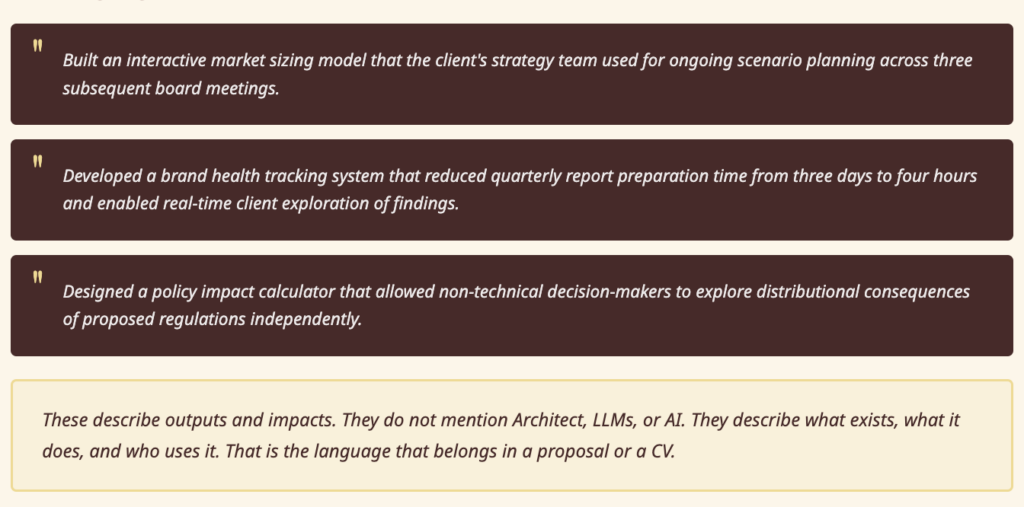
These describe outputs and impacts. They don’t mention Architect, LLMs, or AI. They describe what exists, what it does, and who uses it.
The skill description for both contexts: Whether you’re inside an organisation or working independently, the skill you’re developing is best described as: the ability to translate analytical workflows into reusable systems. That skill has value independent of whatever tools are used to build those systems. It doesn’t become obsolete when the tools change.
Part 6: Cross-Persona Collaboration
Where Two Analyst Types Can Build Shared Infrastructure
Most analytical tools are built for one analyst and used by that analyst. The opportunity most analysts miss is the tools that two different types can build together and both benefit from.
The Equity Analyst and the Market Research Analyst
The shared problem: Both need to understand consumer sentiment. The equity analyst wants to know how consumer perception is affecting purchase intent and whether that shows up in the financials. The market researcher has consumer sentiment data but doesn’t know how to connect it to financial outcomes.
The shared tool: A consumer sentiment to financial signal connector. Market research data on brand health, purchase intent, and NPS feeds into a model that tracks correlation with revenue performance over time. The equity analyst gets early signals that show up in consumer data before they appear in the financials. The market researcher gets a framework that connects their work to business outcomes in a way clients find compelling.
How to build it: The market researcher builds and maintains the consumer data layer. The equity analyst builds the financial correlation layer.
The BI Analyst and the Strategy Consultant
The shared problem: Strategy work is often disconnected from operational data. The strategy consultant produces recommendations that, once the engagement ends, are not embedded in the systems the operating team actually uses. The BI analyst has access to the operational data but is not typically involved in strategic decision-making.
The shared tool: A strategy-to-operations bridge. The strategy consultant’s frameworks, market share targets, unit economics models, growth scenarios, are built as interactive tools that connect to the BI analyst’s operational data sources. When actuals come in each month, the strategic model updates automatically. Variance from strategic targets is visible in real time, not at the quarterly review.
How to build it: The strategy consultant builds the strategic framework layer. The BI analyst connects it to the operational data sources they already maintain.
The Market Research Analyst and the Policy Analyst
The shared problem: Policy work often lacks the consumer and citizen voice that would make it more robust. Market research analysts understand survey methodology but don’t typically work in the policy domain. Policy analysts need public sentiment data but rarely have the methodology skills to collect and interpret it properly.
The shared tool: A public sentiment intelligence system. The market researcher designs the survey methodology and builds the analysis tools. The policy analyst provides the policy context and the specific questions that matter for the decisions being made.
How to build it: This is most naturally a commercial collaboration, the market researcher and policy analyst working as partners on specific policy research commissions.
The general principle
Cross-persona collaboration works when two analysts have complementary data and complementary analytical frameworks that, combined, produce something neither could produce alone. The test is simple: is there a specific question that your data and their data, combined, would answer better than either of you could alone? If yes, build the tool that combines them.
Appendix: Prompt Checklist and All 30 Prompts
Prompt Quality Checklist
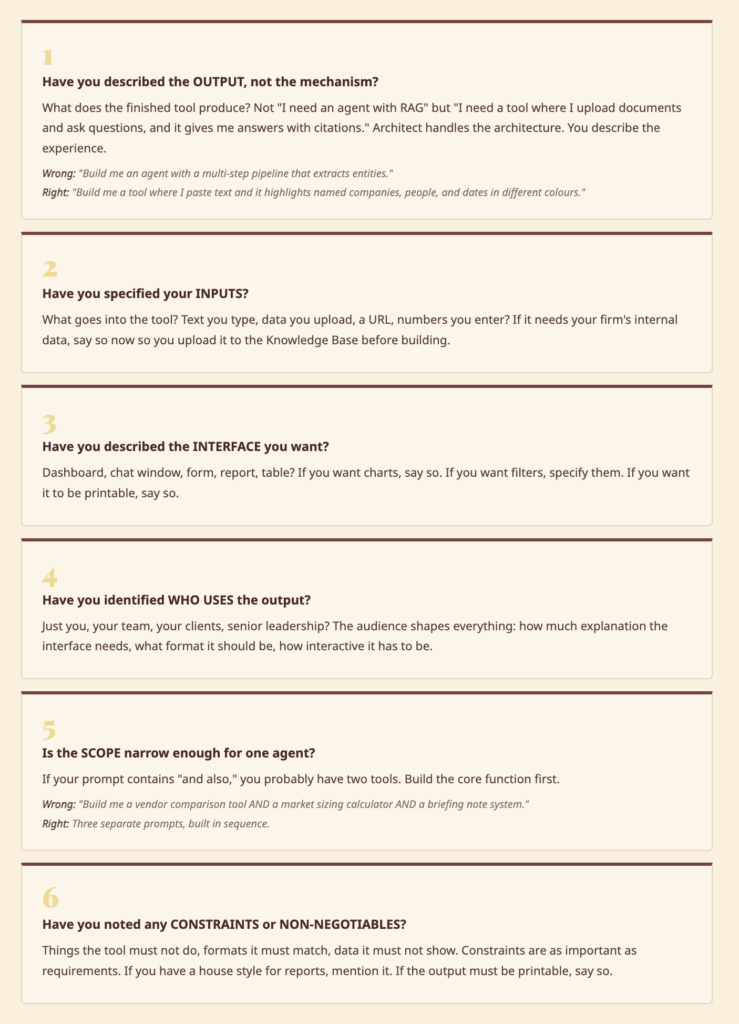
Before you paste any prompt into Architect, run through these six questions. A prompt that passes all six will almost always build something usable on the first pass.
The Five Common Mistakes
1. Over-specifying the architecture. Analysts are trained to be precise and comprehensive. In this context, that instinct works against you. Describe the output, not the mechanism. What do you want the finished tool to do? What does the interface look like? What do you put in, what comes out? Architect handles the architecture.
2. Building a tool that replicates the spreadsheet. If your first instinct is to rebuild your existing Excel model in Architect, pause. Ask what the Excel model cannot do that would make it genuinely better. Can it be interactive? Can it be shared? Can it update dynamically? Build for the capability you don’t currently have, not the one you already do.
3. Trying to solve everything in one agent. A vendor comparison tool, a market sizing calculator, and a briefing note system are three separate agents. Keep each tool focused on one job. Complex multi-function tools take longer to build, are harder to debug, and harder to share. Build narrow and deep, then connect tools as needed.
4. Skipping the Knowledge Base. An agent with no knowledge base is generic. An agent loaded with your firm’s historical assessments, evaluation criteria, and domain documents is yours. The five minutes spent uploading relevant files before you build pays off immediately in output quality.
5. Not deploying. Every tool you build and don’t deploy to a URL stays a personal tool forever. Deployment takes one click. The moment you deploy, you can share. The moment you share, you can get feedback. The moment you get feedback, the tool gets better.
Ready-to-use Prompts
Paste any of these directly into Architect at architect.new. Each prompt is written to be complete and self-contained.
Industry and Technology Analysts
01 · Vendor Comparison Scorecard I evaluate software vendors for a living. I need something where I can define my own evaluation criteria with custom weights, enter scores for each vendor, and get an auto-ranked comparison with a visual quadrant-style plot. Readers should be able to toggle criteria weights and see rankings shift in real time.
02 · Market Sizing Calculator I regularly estimate market sizes for technology segments. I want a tool where I enter assumptions like number of potential buyers, average deal size, adoption rates, and growth rates, and it calculates TAM, SAM, and SOM with a breakdown chart. I need to be able to save different scenarios and compare them side by side.
03 · Technology Hype Cycle Builder I track emerging technologies and want to plot them on a hype cycle curve. I need to add technology names, place them along the curve stages (trigger, peak of inflated expectations, trough, slope, plateau), and estimate time to mainstream adoption. The output should look clean enough to put in a report.
04 · Vendor Briefing Intelligence System I take vendor briefings all week and I need a structured way to capture notes. For each briefing I want to log the company name, date, key claims they made, product updates, their differentiators, and my assessment. Then I want to search across all my briefing notes and compare what different vendors said about the same topic.
05 · Inquiry Tracker and Trend Spotter I get a lot of inquiry calls from enterprise clients asking about technology decisions. I want to log each inquiry with the topic, industry, company size, and what they were trying to solve. Over time I want to see which topics are trending, which industries are asking about what, and spot patterns that should inform my next research note.
Equity and Investment Analysts
06 · Earnings Season Command Centre During earnings season I cover about 15 tech companies. I want to enter each company’s reported revenue, EPS, and guidance alongside the consensus estimates, and see an instant view of beats, misses, and surprises. I also want to jot down key management quotes and flag companies where guidance changed meaningfully.
07 · Comparable Company Analyzer I need a quick way to build comp tables. I want to enter a list of companies with their revenue, EBITDA, net income, market cap, and growth rates, and automatically get calculated multiples like EV/Revenue, EV/EBITDA, and P/E ratio. Show me the median and mean for the group and highlight outliers.
08 · DCF Model Builder I build valuation models for tech companies. I want to input revenue projections, margins, capex, working capital changes, a discount rate, and terminal growth rate, and have it calculate free cash flows, present values, and an implied share price. Readers should be able to adjust assumptions and see how the valuation changes.
09 · Sector Performance Tracker I follow about 20 stocks in the cloud software sector. I want to track each stock’s YTD return, 3-month return, and performance vs. the S&P 500 and NASDAQ. Show me a ranked table and a chart so I can quickly see which names are outperforming and which are lagging.
10 · IPO Readiness Scorecard I help evaluate companies that are considering going public. I need a structured assessment tool where I can score a company across categories like financial performance, governance readiness, market positioning, competitive moat, and risk factors. Give me an overall readiness score and flag areas that need attention before filing.
Market Research Analysts
11 · Survey Results Analyzer I run surveys for brand and product research. After I upload my survey results, I want to see response distributions for each question, cross-tabulate answers by demographics like age, income, and region, and filter results dynamically. I want charts that I can put straight into a client report.
12 · Consumer Segmentation Builder I do consumer segmentation for CPG brands. I want to define customer segments based on purchase behaviour, demographics, and attitudes, then size each segment, describe their key characteristics, and visualise how they differ on important dimensions. The output should help marketing teams understand who to target and why.
13 · Competitive Landscape Mapper I map competitive landscapes for clients. I want to plot competitors on a customisable 2×2 matrix where I define the axes (like price vs. innovation, or breadth vs. depth). I should be able to add company names, adjust their positions, and add annotations about each competitor’s strategy.
14 · Brand Health Tracker I run quarterly brand tracking studies. I want to enter brand health metrics like awareness, consideration, purchase intent, NPS, and satisfaction for multiple brands each quarter. Show me trend lines over time, highlight significant changes between waves, and let me compare brands side by side.
15 · Pricing Research Analyzer I do pricing research using Van Westendorp methodology. I collect responses about what price is too cheap, a bargain, getting expensive, and too expensive. I want to enter this data and automatically get the optimal price point, indifference price point, and the range of acceptable prices plotted on the classic Van Westendorp chart.
BI and Data Analysts
16 · KPI Dashboard Builder My team asks me for dashboards constantly. I want a fast way to define KPIs with their current value, target, and trend direction, organise them into categories, and present a clean dashboard view. It should update when I change the numbers and look good enough to share with my VP without further design work.
17 · Data Quality Scorecard I manage data quality across our company’s systems. I want to score each data source on dimensions like completeness, accuracy, timeliness, and consistency, track these scores over time, and produce an overall data health score. When a source drops below threshold, it should be flagged so I can investigate.
18 · A/B Test Calculator and Reporter I evaluate A/B tests for our product team. I want to enter the number of visitors and conversions for control and variant groups, and instantly see the conversion rates, absolute and relative lift, statistical significance (p-value), and confidence interval. Tell me plainly whether we have a winner or need more data.
19 · SQL Query Result Visualiser I pull data from our database with SQL queries and I’m tired of copying results into Google Sheets to make charts. I want to paste in tabular data and instantly pick from chart types like bar, line, pie, or scatter. The charts should look presentable enough to drop into a Slack message or email to my stakeholders.
20 · Stakeholder Report Generator Every Monday I pull the same set of business metrics for our weekly review: revenue, active users, churn, support tickets, and NPS. I want to enter this week’s numbers and last week’s numbers and automatically get a formatted report showing the trend, week-over-week change, and a summary of what’s up and what’s down.
Policy and Government Analysts
21 · Policy Impact Calculator I analyse the impact of proposed tax policy changes. I want to input parameters like current tax rates, proposed rates, income brackets, and population data, then see the estimated revenue impact, who benefits, who pays more, and the net effect on the budget. Decision-makers should be able to adjust the proposed rates and see impacts change.
22 · Demographic Trend Explorer I study demographic trends for policy research. I want to upload population data broken down by age, region, income, and education level, and explore trends over time. I should be able to project forward using different growth assumptions and create clear visualisations for policy briefs.
23 · Grant and Funding Tracker I manage research grants across our department. I need to track each grant’s total budget, amount spent, remaining balance, key deadlines, and reporting status. Show me which grants are at risk of underspending or overspending, which reports are due soon, and give me a portfolio-level view of our funding health.
24 · Regulatory Compliance Tracker I track regulatory requirements across multiple jurisdictions for our compliance team. I want to list regulations, map them to our business practices, score our compliance level for each, and flag gaps. When a regulation changes, I should be able to update it and see how our overall compliance posture shifts.
25 · Public Comment Analyzer Our agency received hundreds of public comments on a proposed regulation. I want to upload the comments, have them categorised by theme and sentiment, see which issues came up most frequently, and get a summary of the main arguments for and against the proposal. This needs to be thorough enough for our official response document.
Strategy and Consulting Analysts
26 · Strategy Framework Builder I do strategy consulting and I’m always building frameworks like SWOT, Porter’s Five Forces, and value chain analysis. I want to pick a framework, fill in my analysis, and get a clean, professional visual output that I can share with clients or drop into a presentation. No formatting hassle.
27 · ROI and Business Case Calculator I build business cases for technology investments. I want to input the upfront cost, ongoing costs, expected benefits per year, and a discount rate, and automatically get NPV, IRR, payback period, and a cumulative cash flow chart. My clients should be able to adjust the assumptions and see how the business case changes.
28 · Process Efficiency Benchmarker I help companies benchmark their operations against industry peers. I want to enter metrics like process cycle time, cost per transaction, error rate, and throughput for my client and for industry benchmarks. Show me where my client is above or below standard, calculate the gap, and estimate the value of closing that gap.
29 · Meeting Cost Calculator I’m helping a company reduce unnecessary meetings. I want a tool where I enter the number of attendees, their average hourly cost, meeting duration, and frequency per week. Calculate the weekly, monthly, and annual cost of this meeting and show what it adds up to across the organisation.
30 · Client Health Scorecard I manage multiple consulting client relationships. I want to score each client on dimensions like satisfaction, engagement level, contract value, renewal likelihood, and growth potential. Give me an overall health score per client, flag at-risk accounts, and show me a portfolio view so I can prioritise my attention.
Start Building
The first build will not be the best build. It will be the build that teaches you what the best build should be.
Paste any prompt from the Appendix into Architect at architect.new. Use it once. Find the thing it doesn’t do that you expected it to. Build that next.
That is the process. There is no shortcut to it, and there doesn’t need to be.