A shutdown button is only useful if you know what it shuts down.
If an automated system starts making unauthorized API calls, changing production records, or running up unexpected costs, stopping its visible process may not be enough. A worker could restart it. A queued task could continue running. An existing credential could still allow access to an external service.
This is the problem an AI agent kill switch is designed to address. It gives an authorized operator or automated control a way to stop an agent from taking further actions when its behavior becomes unsafe, unauthorized, or unpredictable.
Building one requires more than adding a stop command to an application. You need independent enforcement, revocable access, clear activation rules, and a tested procedure for handling work already in progress. Here’s how to design that control and make it part of your production architecture.
What Is an AI Agent Kill Switch?
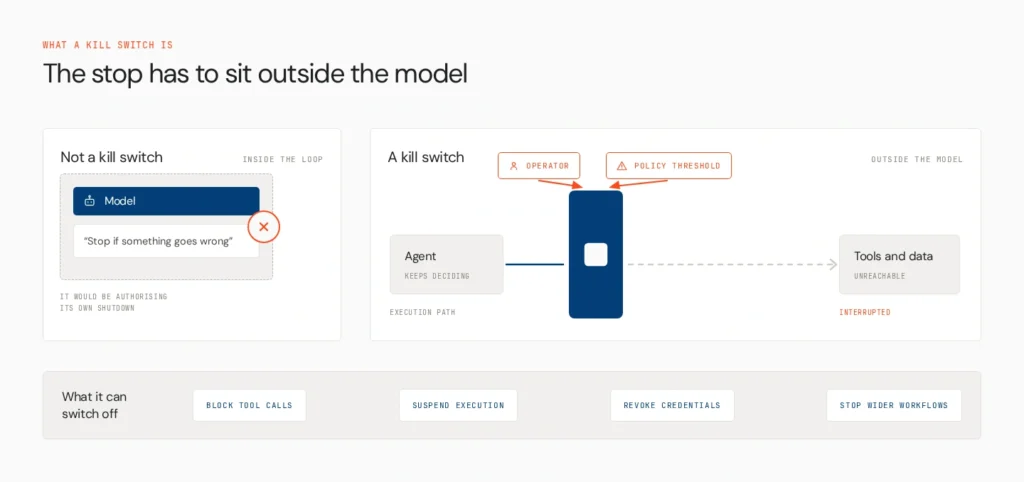
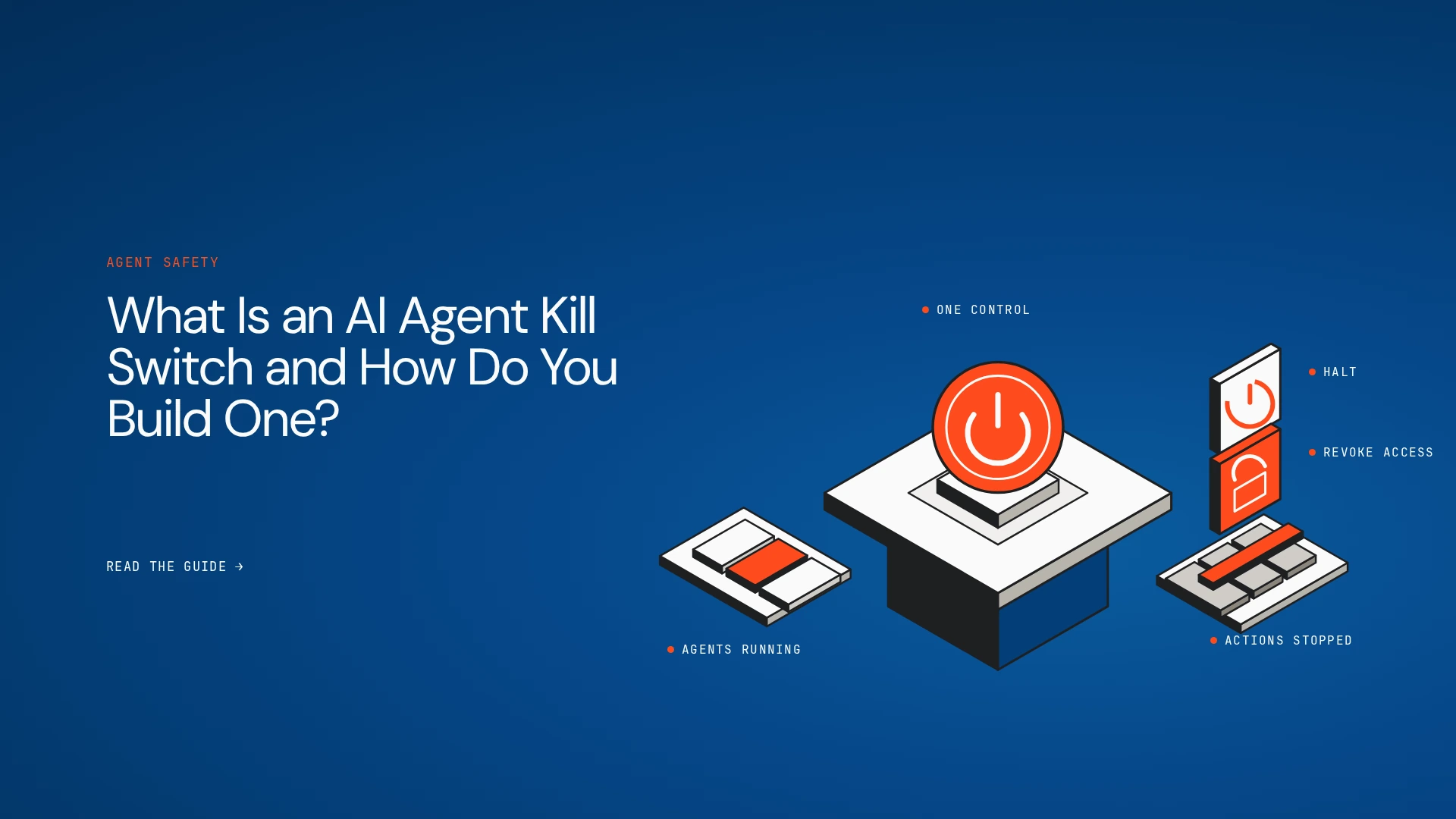
An AI agent kill switch is a control that stops or restricts an agent’s ability to act when a predefined risk or incident requires intervention. Depending on the system, it may block tool calls, suspend execution, revoke credentials, or stop a wider set of agent workflows.
The defining feature is that the control operates independently of the model’s decision-making. An instruction in a system prompt asking the agent to stop when something goes wrong is not an emergency mechanism. The same model that made the problematic decision should not be responsible for authorizing its own shutdown.
A kill switch can be manual, activated by an authorized operator, or automated, triggered by a policy violation or a defined risk threshold. In either case, the enforcement mechanism must be able to interrupt the relevant execution path.
This connects to the wider principles of AI agent governance, where identity, permissions, ownership, and runtime controls determine what an agent is allowed to do.
Why Does an AI Agent Need a Kill Switch?
Traditional software can also require emergency shutdown controls, but agentic systems introduce additional complexity. An agent may make repeated decisions, invoke several tools, delegate tasks, and continue working without a person approving every step.
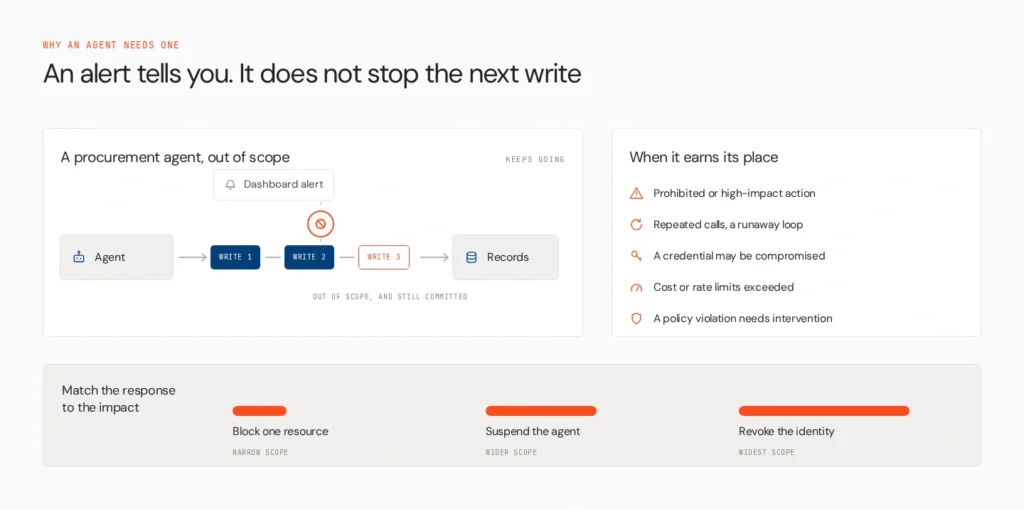
Consider a procurement agent that starts modifying supplier records outside its assigned scope. A dashboard might alert the operations team, but the alert does not stop the next database write. A prompt telling the agent to be careful does not revoke its access.
A kill switch becomes useful when:
- An agent attempts a prohibited or high-impact action.
- Repeated tool calls suggest a runaway execution loop.
- A credential or agent identity may have been compromised.
- Costs, request rates, or resource consumption exceed defined limits.
- A policy violation requires immediate intervention.
Not every anomaly requires a complete shutdown. The appropriate response depends on the potential impact. A suspicious read operation might justify blocking access to one resource, while a compromised identity could require broader revocation.
Lyzr’s guide to real-time AI agent control and intervention explores the wider range of controls available when teams need to intervene while an agent is running.
What Are the Different Types of AI Agent Kill Switches?
A kill switch can operate at three levels, depending on the scope of the incident.
| Level | What it stops | Example |
|---|---|---|
| Capability-level | A specific tool or action | Block payment execution while allowing read-only analysis |
| Agent-level | One agent’s execution or access | Suspend a misbehaving procurement agent |
| System-level | A defined group of agents or wider environment | Stop multiple agents and suspend shared execution queues during a major incident |
A capability-level switch is useful when the problem is limited to one action. An agent-level switch isolates the affected agent while allowing unrelated workflows to continue. A system-level switch is reserved for incidents that affect shared infrastructure or multiple agents.
These controls should work together. A team might block one tool call first, suspend the affected agent if the behavior continues, and activate a broader stop only when the incident warrants it.
The important distinction is that a system-wide shutdown is not always the safest response. For more on isolating one agent without disrupting the wider environment, see How to Quarantine a Misbehaving AI Agent Without Downtime.
How Do You Build an AI Agent Kill Switch?
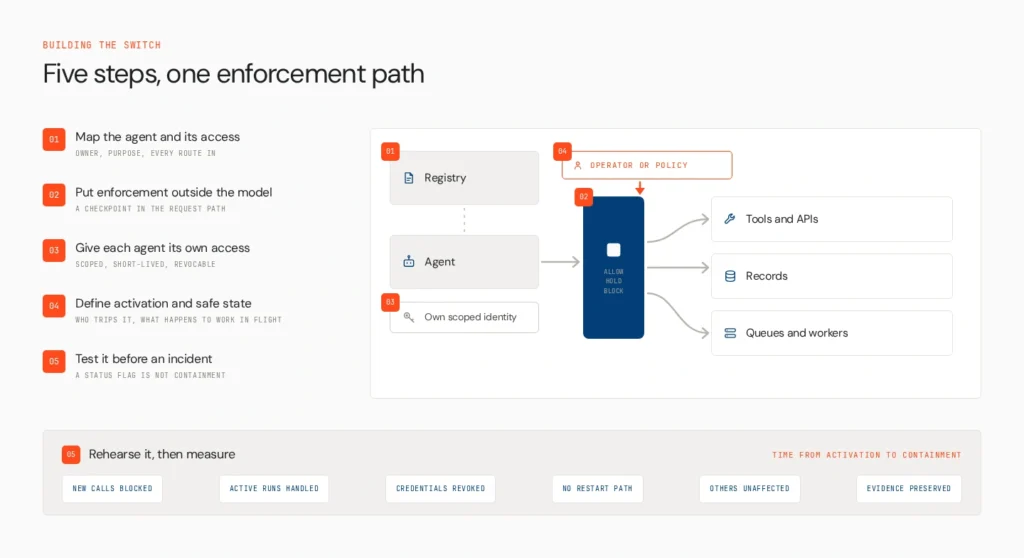
A reliable design needs to cover the agent’s identity, execution path, access permissions, activation rules, and recovery process. These five steps provide a practical starting point.
1. Map the agent and its access
Start by documenting every agent you operate, its owner, its purpose, and the systems it can reach. Include APIs, databases, external tools, delegated credentials, background jobs, and downstream services.
Identify which operations can cause consequential changes, such as modifying customer records, issuing refunds, sending external messages, or updating financial information. Map dependencies so that stopping one agent does not accidentally disable an unrelated service.
This inventory also helps determine where the kill switch must operate. If an agent can access a database directly and through a separate service, blocking only one route leaves another path open.
Use the principles in Lyzr’s AI agent governance guide to connect each agent to a clear owner, defined permissions, and operational responsibility.
2. Put the enforcement outside the model
The kill switch must be able to interrupt the agent without asking the model to cooperate.
One approach is to place an enforcement checkpoint between the agent and its tools. Before an action executes, the checkpoint evaluates whether the request is permitted. Depending on the policy, it can allow the action, hold it for approval, or block it.
A separate orchestrator or execution controller may also be needed to pause active runs and stop pending jobs. The enforcement design should cover all relevant paths, including retries, delegated tasks, and background workers.
This distinction matters because blocking future tool calls does not necessarily terminate a running process. Similarly, terminating a process does not guarantee that a queue or scheduler will not restart it.
Lyzr’s Opencontroller is designed around control in the request path, allowing configured policies to govern agent interactions. The broader architectural principle is to make enforcement independent of the agent’s own reasoning.
3. Give each agent revocable, least-privilege access
A kill switch becomes much harder to operate if several agents share the same credentials. Revoking a shared service account may stop the problematic agent, but it can also interrupt unrelated applications.
Assign each agent a distinct identity and grant only the permissions needed for its task. Where supported, use short-lived credentials and a clear revocation mechanism. Ensure that delegated access and alternative execution paths are accounted for.
For example, if a customer-service agent can read order records but should not issue refunds above a specified amount, enforce that limit at the authorization layer. Do not rely on the model to remember the restriction.
Credential revocation is an important part of containment, but it is not a universal stop mechanism. A downstream service may already have accepted a request, and a queued task may still execute. Those cases need separate controls.
For a practical guide to reducing reliance on persistent credentials, see How to Give AI Agents Cloud Access Without Long-Lived Keys.
4. Define activation rules and safe-state behavior
Decide who can activate the kill switch and which conditions can trigger it automatically. Possible triggers include confirmed policy violations, repeated unauthorized requests, unusual tool access, or resource consumption that crosses a defined limit.
Set different responses for different levels of risk. A single suspicious action might trigger a block or human approval. Evidence of a compromised identity may justify suspending the agent and revoking its credentials.
You also need a plan for work already in progress. Determine whether active tasks should finish, pause, or be cancelled; whether queued actions should be held; and how partial operations will be reconciled. A database write or external payment that has already completed cannot simply be undone by stopping the agent.
Record the triggering event, the policy applied, the action taken, and the responsible operator. This gives the team evidence for incident investigation and helps prevent an unsafe restart.
For related guidance on preserving state and containing an agent while keeping other services available, read How to Quarantine a Misbehaving AI Agent Without Downtime.
5. Test the switch before an incident happens
A kill switch should be tested like any other production safety control. A button that changes an agent’s status to “stopped” does not prove that its access has been cut off.
Use controlled exercises to test whether the switch:
- Blocks new tool calls after activation.
- Handles active executions and queued tasks as intended.
- Revokes the relevant credentials or permissions.
- Prevents the agent from restarting through another execution path.
- Leaves unrelated agents and services operational when the incident is isolated.
- Preserves enough evidence to reconstruct the event.
Measure the time between activation and effective containment. Test a single-agent incident separately from a wider incident involving shared infrastructure.
Repeat these exercises after significant changes to the agent architecture, permissions, or enforcement mechanisms. Lyzr’s How to Take Agents to Production playbook provides a related resource for teams building production-ready agent workflows.
Kill Switch vs. Quarantine vs. Rollback
These controls solve different parts of an incident, and a reliable response plan may use all three.
| Control | Primary purpose |
|---|---|
| Kill switch | Stops or restricts further actions |
| Quarantine | Isolates the affected agent while preserving evidence and limiting disruption |
| Rollback | Returns a deployment or configuration to a known-good version |
A kill switch addresses the immediate need to stop an action. Quarantine focuses on containing the affected agent while the team investigates. Rollback addresses a faulty deployment or configuration.
For example, a team might block a risky tool call, quarantine the agent for investigation, and then roll back the prompt or version responsible for the behavior. The exact sequence depends on the incident. A rollback alone will not necessarily stop a running agent, and a kill switch will not reverse actions already completed.
For detailed procedures, see Lyzr’s guides to quarantining a misbehaving agent and rolling back a bad AI agent deployment.
Where Does Opencontroller Fit Into a Kill-Switch Architecture?
Building an enforcement mechanism for one agent is manageable. Maintaining consistent controls across dozens of agents, multiple frameworks, and different cloud environments is a larger operational challenge.
An AI control plane provides a centralized layer for discovering agents, applying governance policies, evaluating agents before production, and monitoring runtime activity. It helps teams understand which agents exist, what controls apply, and what happened when an incident occurred.
Lyzr Opencontroller is designed to govern agents across different clouds, frameworks, models, and runtimes. Its documented capabilities include agent discovery, pre-production evaluation and governance, runtime monitoring, and policy enforcement around agent interactions.
In a kill-switch architecture, this can help teams apply consistent controls across their agent estate rather than implementing an entirely separate governance model for every agent. Where requests pass through configured enforcement points, policies can be used to block or restrict actions. Teams still need to ensure that the relevant execution paths are covered and that process termination, credential revocation, queue handling, and recovery are addressed where required.
The distinction is important: a control plane can help govern and intervene in agent activity, but it should not be treated as a universal operating-system shutdown mechanism. Effective containment depends on the architecture and integrations in place.
For teams looking to connect agent discovery, governance, and production operations, the Opencontroller platform offers a way to explore that control-plane approach. You can also review the agent control plane buyer’s guide to understand where a centralized layer fits alongside existing infrastructure.
Make the Stop Mechanism Part of the Architecture
A kill switch is only dependable when the team knows what it can stop, where enforcement happens, and how access is cut off. Independent controls, individual agent identities, explicit activation rules, and regular testing make emergency intervention more predictable.
As agent deployments expand, centralized governance can help teams apply consistent controls and investigate incidents across different environments. Explore Lyzr Opencontroller to see how an AI control plane can support runtime governance across your agent estate, or book a demo to discuss how it could fit into your existing architecture.
Frequently Asked Questions
An AI agent kill switch is a control that stops or restricts an agent’s ability to act when a risk or incident requires intervention. It may block tool calls, pause execution, or revoke access.
Yes, if the architecture supports per-agent identity, permissions, and execution controls. These let teams isolate one agent while keeping unrelated services operational.
No. A kill switch prevents or restricts further actions, but completed operations may require compensating transactions, manual remediation, or a rollback.
Test it before production and repeat controlled exercises after significant changes to permissions, execution paths, or infrastructure. Higher-risk systems may require more frequent drills.
Book A Demo: Click Here
Join our Slack: Click Here
Link to our GitHub: Click Here
Got a use case in mind?
8 weeks from use case to agents running in production.
Platform, people and FDEs, all in. Bring your environment. We'll co-build and stay until it's live.
Talk to UsFree resource
101 AI Agents Use Cases
100+ production-ready AI agent use cases across Marketing, Sales, HR, Banking, Insurance, Operations and a lot more
Download now