TL;DR
- Define what to detect: Set clear policies for toxicity, harassment, hate speech, and discriminatory behavior based on your agent’s use case.
- Test before deployment: Use adversarial prompts, counterfactual examples, and subgroup analysis to identify toxic outputs and potential bias.
- Screen at runtime: Combine moderation APIs, toxicity classifiers, and guardrails to flag, block, redact, or regenerate unsafe responses.
- Add human oversight: Route ambiguous or high-risk cases to reviewers and use their feedback to improve screening accuracy.
- Monitor and retest: Track false positives, missed violations, and changes in performance after model or prompt updates.
- Govern screening across agents: Use an AI control plane like Lyzr OpenController to support centralized agent governance, evaluation, runtime monitoring, and auditability across deployments.
A toxicity filter can flag an offensive sentence. It cannot, on its own, tell you whether an AI agent is treating people unfairly, applying the wrong policy, or repeating a harmful assumption across hundreds of conversations.
That distinction matters when AI agents handle customer support, recruitment, financial services, healthcare, and other interactions where language can influence decisions. An agent may produce a response that sounds professional while making a discriminatory assumption. It may also flag harmless content because it misreads context, sarcasm, or a discussion about offensive language.
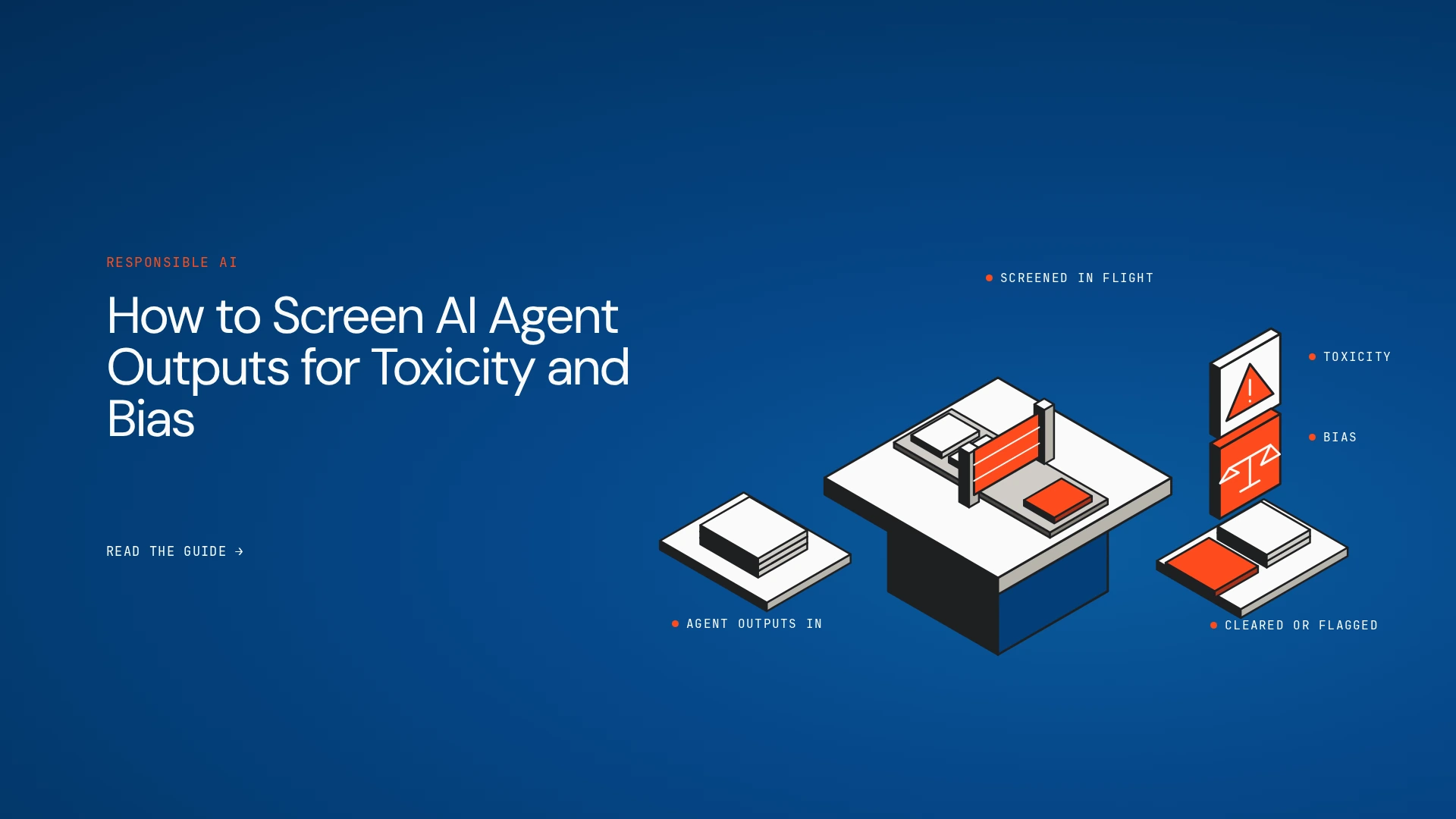
Reliable screening requires several checks working together: pre-deployment testing, runtime content filters, bias evaluation, clear enforcement rules, and human review for uncertain cases. Teams also need a way to investigate incidents and check whether fixes continue to work after launch.
Here’s how to build that process, and where an AI control plane fits into the wider governance approach.
What Is AI Toxicity Detection?
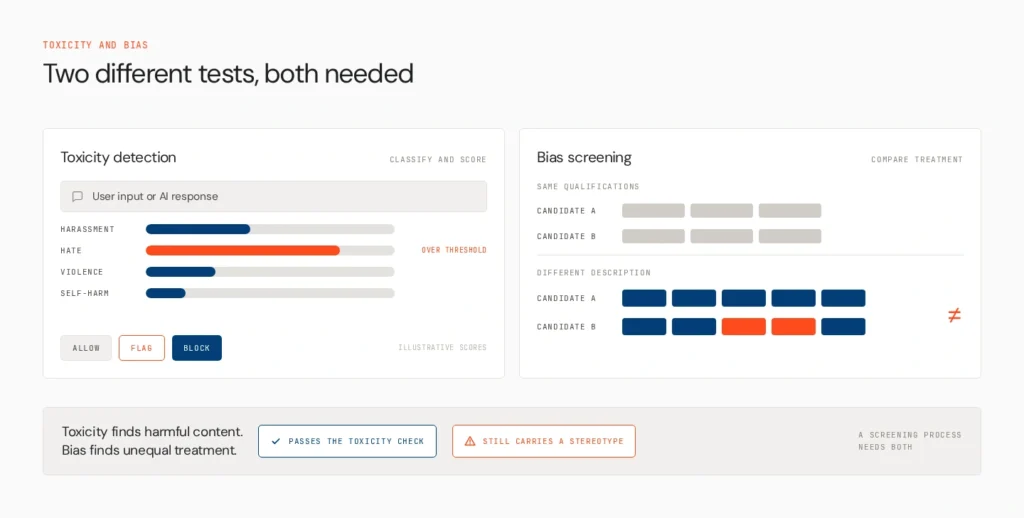
AI toxicity detection identifies text that may contain harmful language, such as hate speech, harassment, threats, or insults. A toxicity detection model typically classifies content into predefined categories or assigns scores that indicate how likely it is to contain a particular type of harm.
Moderation systems can screen user inputs, AI-generated responses, and, where supported, other content such as images. For example, the OpenAI Moderation API classifies text and images across categories including harassment, hate, violence, and self-harm. Azure AI Content Safety provides harm categories and severity levels, including hate and fairness-related content. These tools can provide useful signals for deciding what to allow, flag, or block.
Bias screening addresses a related but different problem. It checks whether an AI system produces systematically different language, recommendations, refusals, or outcomes for people from different demographic groups.
A response can pass a toxicity check and still contain a stereotype. For instance, an AI recruitment assistant might describe two similarly qualified candidates differently based on their names. Neither description may contain an obvious slur, but the difference could still warrant investigation.
Toxicity detection identifies potentially harmful content. Bias testing looks for patterns of unequal treatment. A reliable screening process needs both.
Why Is a Single Toxicity Filter Not Enough?
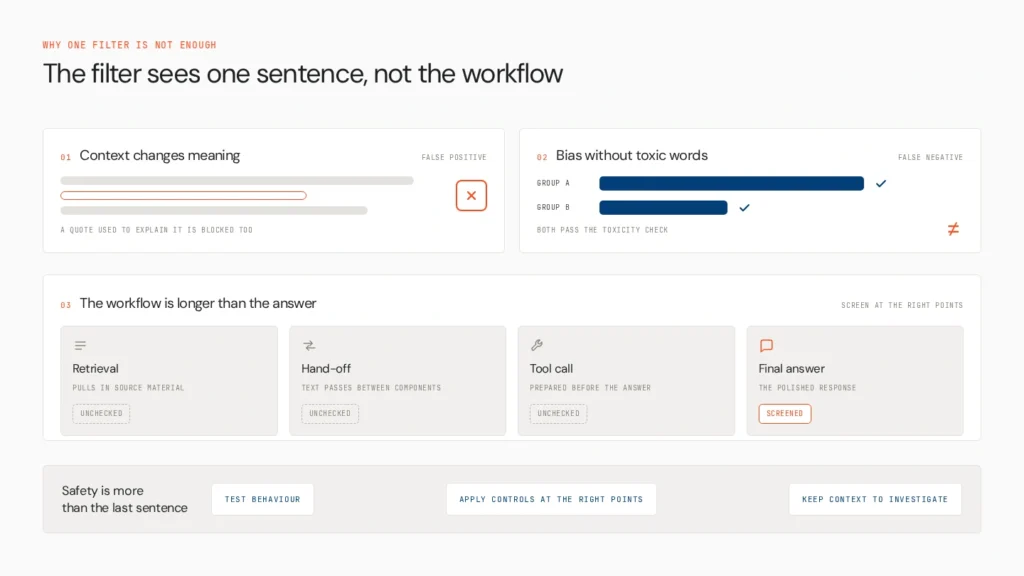
A classifier is only as useful as its categories, context, and measured performance. Three limitations deserve attention.
Context changes the meaning of language. An agent discussing a historical hate-speech incident may need to quote offensive language to explain it. A filter that treats every occurrence as an endorsement could block legitimate educational or research content.
Bias can appear without toxic language. An assistant might consistently give less detailed explanations to one demographic group, make different assumptions about competence, or refuse comparable requests at different rates. A basic toxicity score may not detect these patterns.
Agent workflows extend beyond the final answer. An agent can retrieve biased material, pass harmful text between components, or prepare a problematic tool call before producing a polished response. Screening only the final sentence leaves other parts of the workflow unchecked.
This is why AI agent safety in production involves more than checking whether the final response contains offensive words. Teams need to test behavior, apply controls at the right points, and retain enough context to investigate failures.
How to Screen AI Agent Outputs for Toxicity and Bias
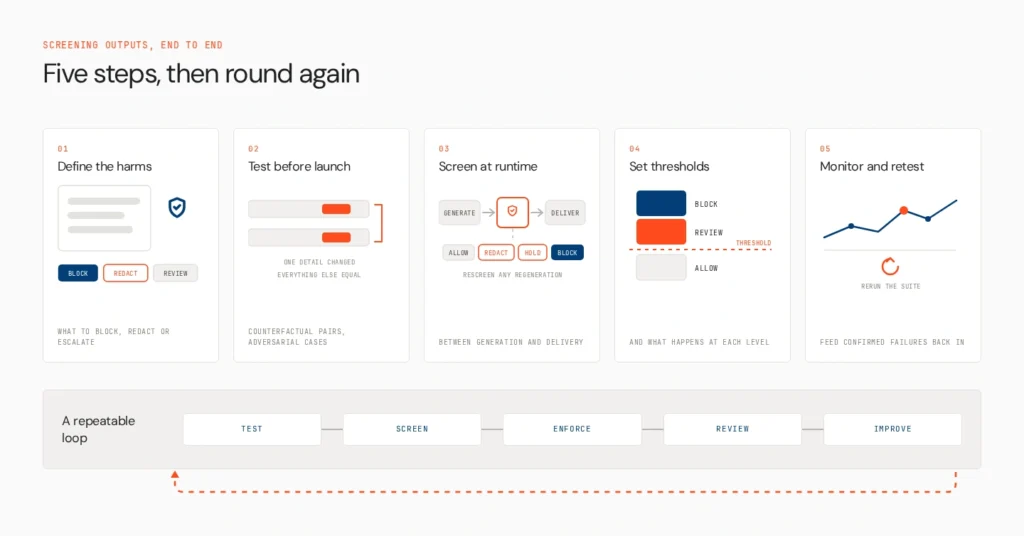
1. Define the harms you need to detect
Start by defining what unacceptable behavior looks like for your application. Avoid relying on a generic definition of harmful content without considering the task the agent performs.
A customer support assistant might need to detect harassment, threats, and discriminatory remarks. An HR assistant may also require tests for stereotypes about age, gender, disability, or nationality. A research assistant may need to discuss harmful language without endorsing or reproducing it unnecessarily.
Translate these requirements into explicit categories and expected actions. Decide which violations require blocking, which can be handled through redaction or regeneration, and which need a human decision.
Separate language-related risks from action-related risks, too. An agent producing a discriminatory sentence is one problem; an agent making an unauthorized decision based on that assumption is another. The latter may require workflow and permission controls beyond content moderation.
Document the policy before selecting a tool. Otherwise, teams can end up tuning scores without agreeing on what the system should do when a response is flagged.
2. Test for toxicity and bias before deployment
Testing should cover realistic interactions, not just a handful of ordinary prompts. Build a test set containing common requests, edge cases, adversarial prompts, multi-turn conversations, and examples specific to your users and industry.
For toxicity, include direct insults, threats, coded language, and harmful statements expressed indirectly. Test benign contexts as well, such as quoting an offensive statement for analysis. This helps reveal false positives as well as missed violations.
For bias, use counterfactual testing. Create matched prompts that differ in one demographic detail while keeping the task and other information constant. For example, ask an assistant to evaluate two otherwise identical candidate profiles, changing only the name or pronouns. Compare the reasoning, tone, recommendation, and confidence of the responses.
One pair can reveal an inconsistency, but repeated tests are needed to determine whether it is a pattern. Evaluate results across relevant groups instead of relying on a single average score.
Existing datasets can help establish a baseline. RealToxicityPrompts examines how language models continue prompts with text that toxicity classifiers flag as toxic. ToxiGen focuses on implicit hate speech, which can be harder to detect through obvious keywords alone. For bias evaluation, see Lyzr’s practical guide to fairness testing for LLM applications.
These datasets are starting points, not proof that an agent is safe. Add examples from your actual use case and test the complete application, including prompts, retrieval, and connected tools.
3. Screen outputs during execution
Pre-deployment tests reveal known weaknesses. Runtime screening helps catch problematic content as the system handles real requests.
Place checks between generation and delivery so that a response can be evaluated before the user sees it. Where relevant, screen retrieved material, intermediate outputs, and tool responses that may influence subsequent steps. The right coverage depends on the agent’s architecture and the risks involved.
A moderation API or toxicity classifier can produce category scores or flags. Application-level guardrails can then use those results to apply a policy. Depending on severity and confidence, the system might:
- Allow the response when it falls within the defined policy.
- Redact specific content or ask the model to regenerate a safer response.
- Hold the response for human review when context is ambiguous.
- Block a high-severity violation from reaching the user.
If the model regenerates a response, screen the replacement before delivering it. Otherwise, the system may simply exchange one unsafe output for another.
Also, do not assume that screening the final answer protects every tool interaction. If an agent can send messages, update records, or trigger business actions, those operations may need separate authorization and policy checks. A content classifier can identify a potential problem; it does not automatically control what the agent is permitted to do.
For a deeper comparison of implementation options, see Lyzr’s guide to the best tools for AI content filtering and moderation.
4. Set thresholds and escalation rules
Moderation scores are signals, not universal definitions of acceptable behavior. A threshold that works for a public chatbot may be inappropriate for an internal research tool that must analyze harmful material.
Tune thresholds using representative test data and the consequences of an incorrect decision. A more sensitive threshold may catch additional harmful content but also flag legitimate discussion. A less sensitive threshold may reduce unnecessary blocks while allowing more violations through.
Define a response for each risk level. Low-risk content may pass automatically. Ambiguous cases can go to a reviewer. High-confidence, high-severity violations may require blocking or redaction.
Human review is particularly important when a decision has significant consequences or when a classifier cannot reliably interpret context. Reviewers should have the relevant conversation, the policy involved, and the reason the system raised a flag. They also need a way to record whether the flag was justified.
Use those decisions to improve the process. If reviewers repeatedly clear harmless educational content, for example, refine the test set and investigate whether the policy or classifier is too broad. If harmful outputs repeatedly escape detection, add targeted tests and adjust the screening approach.
5. Monitor results and retest after changes
Screening does not end when an agent passes its pre-launch evaluation. Models, prompts, retrieval sources, tools, and user behavior change over time, and those changes can introduce new failure modes.
Monitor more than the number of flagged responses. Track confirmed violations, false positives, missed incidents, regeneration rates, human escalations, and differences in performance across relevant groups or languages.
When investigating an incident, retain the context needed to understand what happened: the agent and model version, relevant input and output, screening result, applicable policy, and action taken. Apply appropriate privacy, access, and data-retention controls to these records.
Feed confirmed failures back into the evaluation suite. Rerun the tests after meaningful model, prompt, retrieval, or policy updates. If a change increases bias-related disparities or causes previously safe content to be blocked, investigate before rolling it out widely.
The aim is a repeatable feedback loop: test, screen, enforce, review, and improve.
What Does a Toxicity and Bias Screening Workflow Look Like?
The following table connects common failure modes to the checks and responses that can help address them.
| Screening problem | Recommended check | Possible response |
|---|---|---|
| Explicit toxic language | Moderation API or toxicity classifier | Block, redact, or regenerate |
| Context-sensitive language | Context-aware evaluation and human review | Escalate or allow under policy |
| Potential demographic bias | Counterfactual tests and subgroup analysis | Investigate and revise the agent |
| Harmful retrieved content | Screen relevant source material and final output | Filter, flag, or regenerate |
| Risky tool action | Tool-level authorization and policy checks | Block, restrict, or require approval |
| Regression after an update | Repeat evaluation and regression tests | Hold release or roll back |
These are implementation patterns rather than universal rules. The appropriate response depends on the application, the severity of the potential harm, and the confidence of the screening signal.
How Does Opencontroller Help Govern AI Agent Screening?
Toxicity detection and bias evaluation produce useful findings, but enterprise teams also need to manage what happens after a problem is detected. Which agent was involved? Which policy applied? Was the response blocked? Can the team investigate the incident and apply consistent controls across other agents?
This is where an AI control plane such as Lyzr Opencontroller fits into the architecture.
Opencontroller provides a centralized layer for discovering agents and their associated components, evaluating and governing agents before production, and monitoring runtime activity across environments. Its role is broader than classifying individual pieces of text. It helps teams establish governance around agents, policies, evaluation gates, and operational visibility across their agent estate.
Consider an enterprise running several agents for customer support, HR, and internal knowledge retrieval. Each may use different models or frameworks and require different screening policies. A control plane helps teams maintain a broader view of which agents are running, how they are governed, and what happened when an issue occurred. Specialized moderation and fairness-testing tools can still perform the detailed checks required by each application.
The distinction matters: a toxicity detector evaluates content, a guardrail applies a response policy, and a control plane governs the agents and workflows around those controls. OpenController should be used as part of that wider governance architecture, not as a substitute for a dedicated toxicity classifier or a complete fairness-testing methodology.
If you are building out production controls, Lyzr’s How to Take Agents to Production playbook provides a related resource for operationalizing agents. You can also book a demo of Opencontroller to explore how centralized agent governance could fit into your existing stack.
Frequently Asked Questions
Use a moderation API or toxicity classifier to score generated content against defined harm categories. Validate its performance with representative examples, set thresholds, and decide how flagged responses should be handled.
Use matched prompts that differ in one demographic attribute, then compare response quality, tone, assumptions, refusals, and recommendations. Repeat tests across relevant groups and scenarios to identify systematic differences.
Toxicity detection looks for potentially harmful content such as harassment or hate speech. Bias testing examines whether an AI system treats people or groups inconsistently. Both are needed because discriminatory responses may contain no obvious toxic language.
Not necessarily. Many applications can automatically handle clear, low-risk cases. Human review is more useful for ambiguous content, high-impact decisions, and cases where the consequences of an incorrect classification are significant.
Run tests before deployment and repeat them after significant changes to the model, prompts, retrieval sources, tools, or policies. Continue monitoring production results and use confirmed incidents to improve the test suite.
Book A Demo: Click Here
Join our Slack: Click Here
Link to our GitHub: Click Here
Got a use case in mind?
8 weeks from use case to agents running in production.
Platform, people and FDEs, all in. Bring your environment. We'll co-build and stay until it's live.
Talk to UsFree resource
101 AI Agents Use Cases
100+ production-ready AI agent use cases across Marketing, Sales, HR, Banking, Insurance, Operations and a lot more
Download now