TL;DR
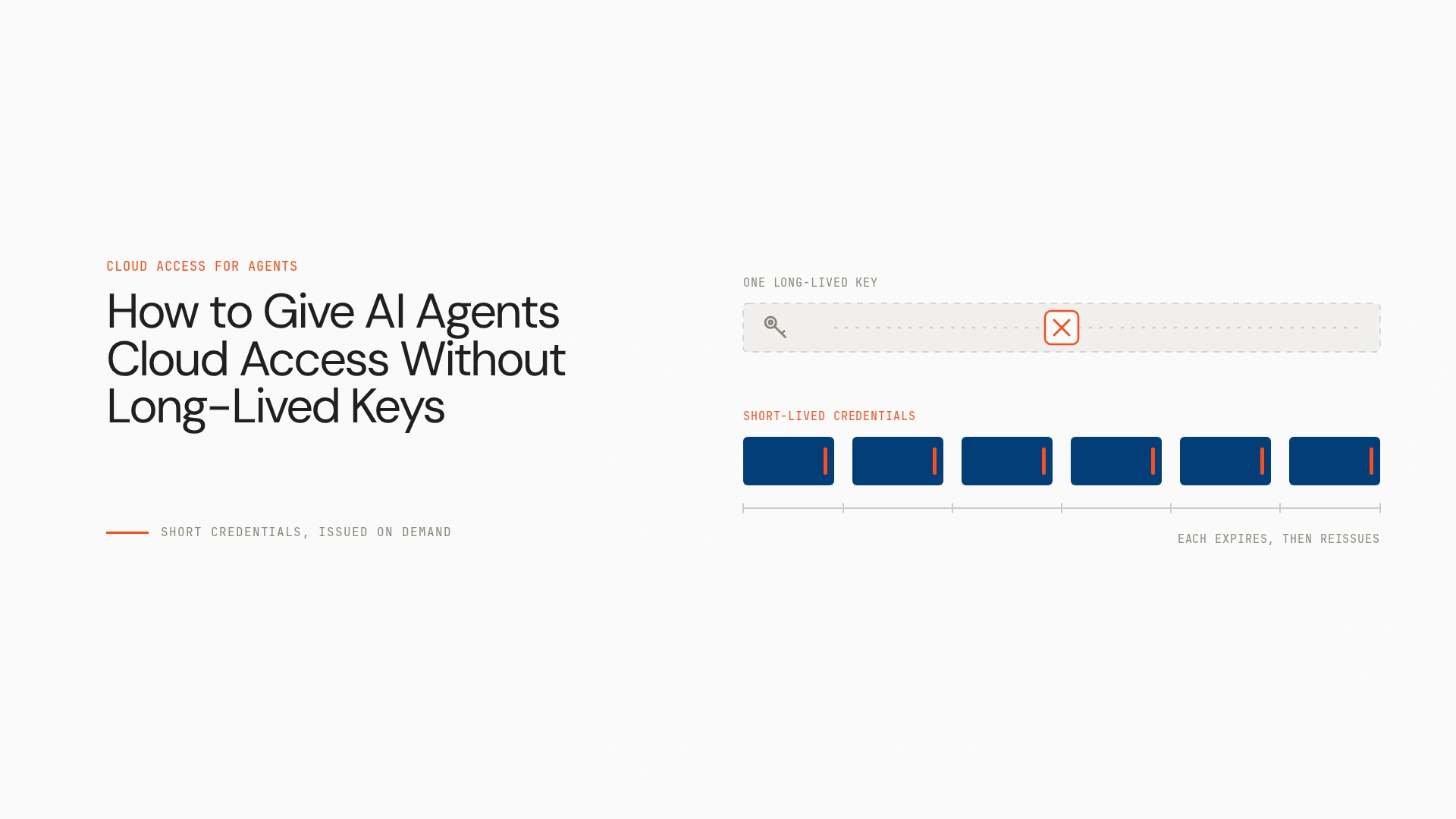
- Replace static keys with workload identity, an attached role or federation, so the agent obtains temporary credentials on demand.
- Workload identity lets a trusted system authenticate the agent’s runtime, and federation exchanges that identity for short-lived access.
- Scope every credential by resource, action and duration. A short lifetime doesn’t make an overprivileged role safe.
- Patterns differ by cloud: IAM roles and STS on AWS, Workload Identity Federation on Google Cloud, managed identities and federation on Azure.
- Identity and temporary credentials aren’t governance. Teams still need authorisation, monitoring and control over what agents do with the access they get.
An agent needs to read a storage object, inspect cloud resources or call an internal service. A developer creates an access key, drops it in an environment variable and the workflow runs. The key then outlives the task, carries broader permissions than the job needs and can leak through logs, configuration or a compromised runtime.
The way to give AI agents cloud access without long-lived keys is workload identity or federation. The agent proves who it is to a trusted identity system and receives temporary credentials, scoped by least-privilege policy. Sensitive actions can then run through a controlled path that keeps raw credentials away from the agent. This guide covers the architecture, the steps and the cloud-specific details.
Why long-lived keys are risky for agents
Static keys tend to end up in environment variables, source code, configuration files and deployment secrets. They can surface through logs, debug output or a compromised tool. They often carry more permission than the task needs, they don’t tell you which agent used a shared credential, and they stay valid after the task or deployment has ended.
Consider an agent that must read one object in a bucket but receives credentials covering the whole bucket or account. If that agent is manipulated, the blast radius is the credential’s scope, not the task’s.
Secure storage helps protect a secret, and a secrets manager is far better than a plaintext file. Neither removes the risk created by issuing a credential that stays valid indefinitely. AWS’s own guidance is to require workloads to use temporary credentials with IAM roles, and to rely on long-term access keys only for use cases that can’t use roles.
The architecture: identity in, temporary access out
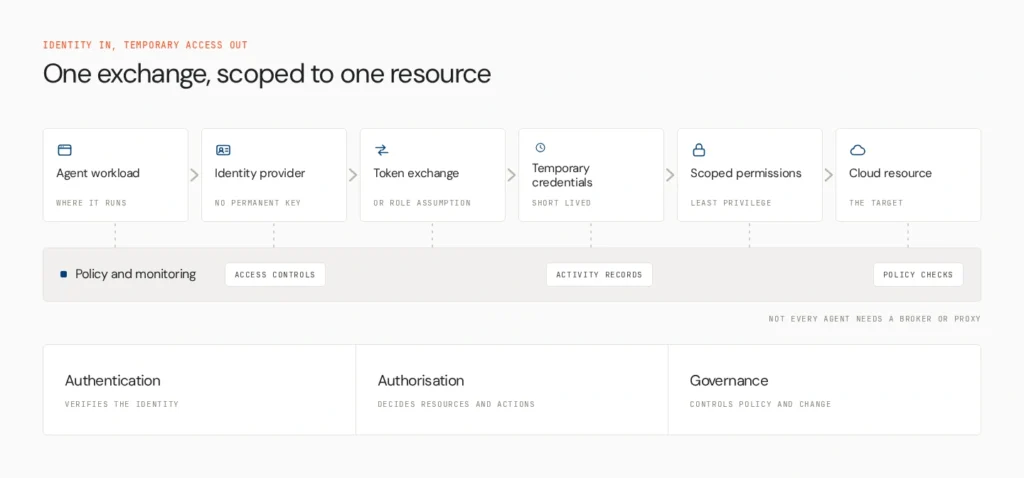
- Workload identity: establishes which agent or runtime is making the request.
- Federation or native identity: lets a trusted system authenticate that workload without a permanent key.
- Credential exchange: produces short-lived credentials or a scoped token.
- Least-privilege authorisation: limits which resources and actions the identity can reach.
- Execution and monitoring: records activity and applies controls.
The exact design depends on where the agent runs, which cloud it reaches and which services support federation. Not every agent needs a separate broker or proxy.
Keep three concepts apart. Authentication verifies the workload’s identity. Authorisation decides which resources and actions that identity may use. Governance controls access, actions, policy compliance and change over time.
A practical implementation path
Step 1: Identify the agent’s runtime
Is it on cloud compute, Kubernetes, a virtual machine, a CI/CD runner or an external platform? Cloud-native workloads can usually use an attached role or managed identity. External workloads typically use workload identity federation with a trusted OIDC or other supported identity provider.
Step 2: Replace static credentials with workload identity
Choose the mechanism that fits the runtime, and let the agent obtain an identity without a permanent key in its application. A workload’s identity is separate from the credentials it uses for a particular request.
Step 3: Issue temporary, least-privilege access
Restrict permissions to the resource and action the task needs. For an agent that reads one object from a bucket, use resource-level permissions, plus a narrowly scoped time-limited mechanism where the service supports one. Expiry doesn’t replace scoping, because a temporary credential with excessive permissions is dangerous while it’s valid.
Step 4: Mediate sensitive tool calls
For sensitive operations, third-party APIs or environments where credential exposure must be minimised, let the agent request an allowed operation and have a trusted component, such as a tool server, API gateway or proxy, authenticate the workload, check permissions and execute. A proxy isn’t mandatory everywhere, and it adds value where the agent shouldn’t hold raw credentials at all.
Step 5: Monitor, expire and revoke
Track which workload made each request, which resource it touched and whether it attempted anything unauthorised. Know the difference between waiting for a credential to expire and revoking the role or trust relationship that issues it. Have an incident-response path for each.
Cloud-specific guidance
AWS
For AWS-native workloads, an attached IAM role provides temporary credentials through AWS STS, and SDKs discover them automatically, so no long-term IAM user key needs distributing. For workloads outside AWS, there are two documented routes. IAM Roles Anywhere issues temporary credentials against an X.509 certificate from your PKI. The AssumeRoleWithWebIdentity call exchanges a JWT from a configured identity provider for temporary credentials, which also covers multi-cloud workloads. Session length is configurable within limits, so set the shortest that works.
See AWS’s guidance on temporary credentials and IAM security best practices.
If you’re migrating off keys, note two separate actions. Removing a profile from the local AWS CLI configuration only changes that machine. A copied key keeps working until it’s disabled in IAM:
bash
aws iam update-access-key –user-name agent-user –access-key-id AKIA… –status Inactive
aws iam delete-access-key –user-name agent-user –access-key-id AKIA…
The first command deactivates the key, so you can confirm nothing breaks. The second deletes it permanently. Run them against the right user and key.
Google Cloud
Workload Identity Federation lets external workloads authenticate with an OIDC, SAML or AWS identity and receive short-lived access, so you avoid downloading service-account key files. Supported Google Cloud workloads can use an attached service account. Grant narrow, resource-level IAM roles. See Workload Identity Federation and workload identities.
Microsoft Azure
Managed identities serve supported Azure-hosted workloads, and Microsoft Entra workload identity federation serves supported external workloads. Assign only the roles required, and keep authentication separate from resource authorisation. See Microsoft Entra workload ID.
These aren’t interchangeable products. They share a principle and differ in implementation.
What can go wrong
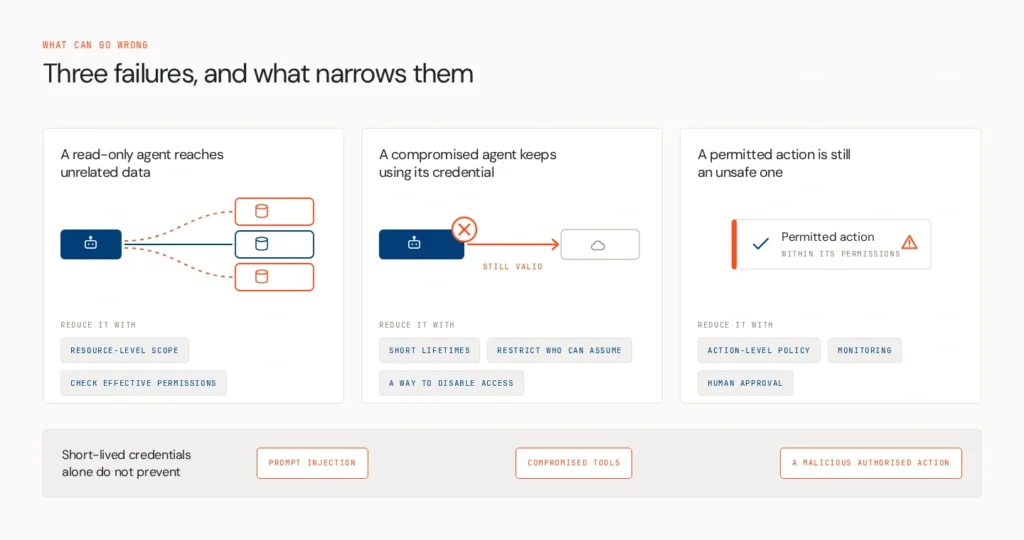
- A read-only agent can reach unrelated data. Narrow resource-level permissions and check effective permissions before deployment.
- A compromised agent keeps using its credential. Use short lifetimes, restrict who can assume the role and have a way to disable access.
- An agent uses legitimate permissions for an unsafe action. Apply action-level policy, monitoring and human approval for sensitive operations.
Short-lived credentials alone don’t prevent prompt injection, compromised tools or a malicious action by an authorised agent.
Opencontroller as the governance layer
Workload identity establishes which agent is making a request. Cloud IAM decides which resources and actions that identity may use. A governance layer helps teams understand agent activity, apply policy and manage behaviour across environments and the agent lifecycle.
Opencontroller is Lyzr’s AI agent control plane. Lyzr positions it around discovering agents and their surrounding systems, evaluating and governing agents before production, and monitoring agents, applications, APIs and infrastructure at runtime. It gives centralised visibility and control across agent environments. It doesn’t replace cloud IAM or secrets management, and it doesn’t issue STS credentials or configure federation.
Once several agents access cloud services, teams need to know which are running, what they can reach, how their actions are governed and how to investigate unexpected behaviour. See AI agent governance, AI agent identity management and the AI control plane.
How to choose the right pattern
| Situation | Starting point |
| Agent runs on the cloud it accesses | Native workload identity, attached role or managed identity |
| Agent runs outside the target cloud | Workload identity federation through a trusted identity provider |
| Agent needs one object or operation | Resource-level permissions with a scoped, temporary mechanism |
| Agent calls sensitive APIs or third-party apps | A controlled tool server, proxy or integration layer |
| Many agents across clouds and teams | Central visibility, policy governance and runtime monitoring on top of IAM |
The right design depends on the runtime, supported authentication methods, resource sensitivity and required operations.
Safe access starts with identity
Safe agent access depends on a verifiable identity, short-lived credentials, least-privilege permissions and controls over agent behaviour. Teams that manage agents across environments also need a governance layer on top of identity. See how Opencontroller connects agent visibility, policy and lifecycle governance, read the Agents to Production playbook, or book a demo to see how it fits your cloud architecture.
Common implementation questions
Use resource-level permissions and temporary credentials, or a time-limited mechanism the service supports. On AWS, a presigned URL grants a specific operation on one object for a set period, and its validity is also limited by the credentials that signed it. It isn’t a general workload identity.
Yes. Workloads authenticate non-interactively through workload identity, federation, attached roles or managed identities. That is authenticated access without a person signing in, and it isn’t anonymous or unrestricted.
The principles still apply. A no-code platform needs a secure integration mechanism, supported federation or a controlled connector. If it accepts only a permanent API key, it adds credential-management risk.
Scope access to the specific API or data set, using a dedicated identity or integration where supported. Cloud IAM doesn’t automatically govern every SaaS application.
Book A Demo: Click Here
Join our Slack: Click Here
Link to our GitHub: Click Here
Got a use case in mind?
8 weeks from use case to agents running in production.
Platform, people and FDEs, all in. Bring your environment. We'll co-build and stay until it's live.
Talk to UsFree resource
101 AI Agents Use Cases
100+ production-ready AI agent use cases across Marketing, Sales, HR, Banking, Insurance, Operations and a lot more
Download now