TL;DR
- Store prompts in version-controlled files or a prompt registry, not scattered strings.
- Record changes with meaningful commits and metadata such as model and parameters.
- Test every version against representative examples before deployment.
- Promote approved versions through environments and keep a rollback path.
- When prompts power production agents, add broader governance on top.
A team tweaks a prompt to make an LLM’s answers more complete. The next day a workflow that used to work starts returning malformed JSON, and a downstream step breaks. Now they have three questions. What changed? Which version caused it? How do we get the old behaviour back?
Prompts shape output structure, accuracy, tone and tool choice, so they deserve the same discipline as code. Versioning makes changes traceable, evaluation makes them measurable and rollback makes failures recoverable. This guide walks through prompt version control best practices, from a basic Git setup to safe production deployment.
What is prompt versioning in AI?
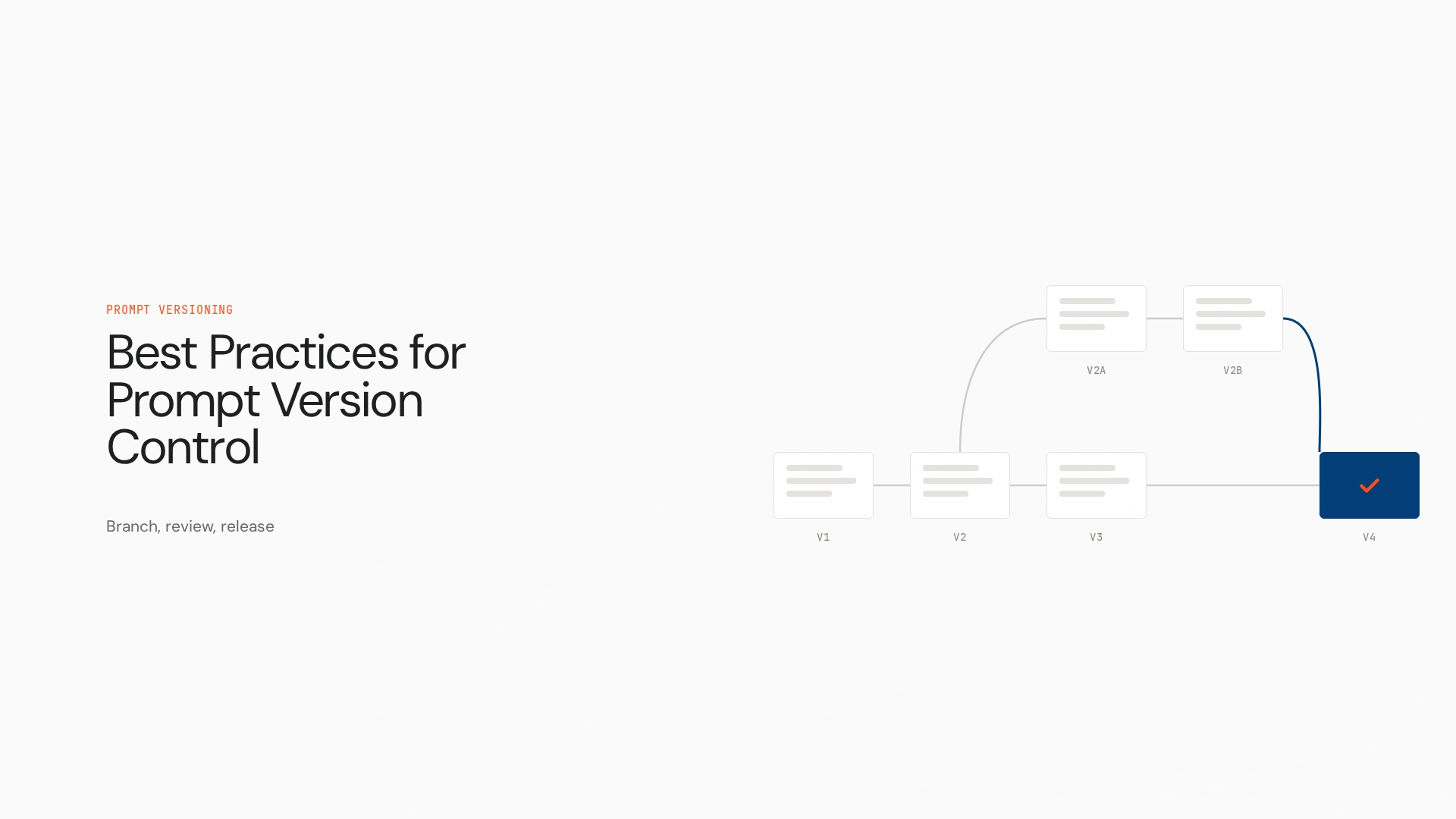
Prompt versioning is the practice of recording, identifying and managing successive versions of prompts so teams can track changes, reproduce configurations, compare behaviour and restore earlier versions. It differs from keeping copies in documents or chat histories. A useful history shows what changed, who changed it, why and how the new version performed.
Take a support prompt. Version 1 says “Answer the customer’s question politely.” Version 2 adds “Return a JSON object with answer and escalate fields.” That small change affects every system parsing the output, so it should be a recorded version with a reason.
A version label alone isn’t enough. Behaviour also depends on the model, parameters, input variables, retrieved context, tools and application logic.
Why prompt version control matters
- Traceability: find the exact revision tied to a behaviour change.
- Reproducibility: keep enough configuration to recreate a past run as closely as possible.
- Collaboration: let engineers and prompt writers review changes without overwriting each other.
- Regression prevention: compare new versions against known test cases.
- Safer deployment: promote reviewed changes and restore earlier versions when needed.
Versioning doesn’t guarantee identical output. Models, settings and context all play a part.
Best practices for prompt version control
Keep prompts separate from application code
Long prompt strings buried in application logic are hard to review, test and reuse. Store each prompt in its own Markdown, YAML or text file. The right format depends on your team and tooling.
Use Git to track prompt changes
Git preserves history, makes diffs readable and supports branches and pull requests. A small repository might look like this:
text
ai-app/
  prompts/
    support_assistant.md
  tests/
    test_support_prompt.py
  evals/
    support_cases.jsonl
  README.md
Write commit messages that explain intent, such as fix(support-prompt): enforce valid JSON output, not prompt update.
Use meaningful version identifiers
Commits, release tags or a version field all work. One common convention borrows semantic versioning: major for a change to purpose or expected behaviour, minor for a backward-compatible addition such as a new input field, patch for a small correction. This is a team convention, not an official prompt standard. Even a one-word change can shift model behaviour, so test patch-level changes too.
Track metadata and dependencies
Keep context next to the prompt, for example in YAML frontmatter:
---
name: support_assistant
version: 2.0.0
model: <model-id>
temperature: 0.2
inputs: [customer_message]
output: json
changelog: Require valid JSON output
---
Useful fields include author, model and parameters, input variables, output format, referenced tools or retrieval sources, evaluation results and approval status. There’s no required schema. Never store secrets, API keys or sensitive production data in prompt files.
Make prompts modular, with care
Shared components, such as an output schema or tone guidance, reduce inconsistent copies of the same instruction. The trade-off is that updating a shared component changes every prompt that uses it, so track dependencies and evaluate downstream prompts before promoting.
Review prompt changes like code
In a pull request, the author explains the intended behaviour change and attaches representative examples and evaluation results. Reviewers catch ambiguous instructions, conflicting constraints and format breaks that one manual test misses. Match the process to the risk. An internal experiment needs less review than a prompt driving customer-facing actions.
How to test and deploy prompt versions safely
Version control records what changed. Evaluation shows whether the change helped.
- Define the improvement you want and the behaviour that must stay the same.
- Run the current prompt against representative inputs to set a baseline.
- Run the new version on the same cases.
- Compare quality, format compliance, task success, latency and cost.
- Review edge cases and failures.
- Promote to staging, then production, through your release process.
- Monitor production and keep a path back to the previous version.
Imagine a new prompt that makes answers more complete but starts breaking the JSON schema. A regression test with a schema check catches it in the pull request, before users see it. Tools such as Promptfoo and LangSmith can support testing and tracing, so check their current features. For staged rollouts, feature flags or canary releases help where your architecture supports them, but not every prompt management system offers them natively. See AI agent evaluation for tooling.
A practical Git, GitHub and Python workflow
- Edit the prompt file on a feature branch.
- Commit with a meaningful message.
- Run evaluations against a stable test set.
- Open a pull request stating the reason for the change and attaching results.
- Run automated checks in CI, and require review before merging production-bound changes.
- Merge, tag or record the approved revision and deploy.
- Redeploy the previous revision if the new one regresses.
GitHub gives you history, branches, reviews, tags and automation. It doesn’t judge whether a prompt is good. In Python, load the template from a file rather than hardcoding it:
from pathlib import Path
from string import Template
import yaml

def load_prompt(path):
    _, meta, body = Path(path).read_text().split("---", 2)
    return yaml.safe_load(meta), Template(body.strip())

meta, template = load_prompt("prompts/support_assistant.md")
prompt = template.substitute(customer_message=message)
string.Template avoids clashes with the curly braces in JSON examples. Log the prompt version or commit with each application release, validate required variables and expected output, and keep sensitive user input out of evaluation records.
Common prompt versioning mistakes
- Overwriting a prompt without keeping its history
- Testing one example before shipping
- Tracking prompt text while ignoring model and parameter changes
- Writing vague commit messages
- Sharing snippets without tracking dependencies
- Sending experimental prompts straight to production
- Assuming an old prompt behaves the same after a model update
- Having no record of which version is live
Prompt versioning vs prompt chaining
Prompt versioning tracks changes to a prompt over time. Prompt chaining links several prompts or model calls so one step’s output feeds the next. For example, one prompt extracts fields from a document and a second summarises them. You version each prompt and the chain configuration. Chains raise the stakes for dependency tracking and regression tests, because a change in one step can break later ones.
When Git is enough, and when it isn’t
Git often suffices for smaller teams that can manage prompt files, reviews, tests and releases in their normal workflow. A prompt registry or management platform helps when you need central access, runtime updates, environment-specific settings, collaborative experiments or integrated evaluation. Choose by how your prompts are used and deployed.
Where Opencontroller fits
Prompt version control manages how prompt configurations change. When prompts belong to agents running across applications and environments, teams also need to know which agents are live, what they can access, which policies apply and how activity is monitored. Opencontroller is Lyzr’s AI control plane for that wider layer, built around agent identity, policy, evaluation gates and lifecycle governance. It complements prompt versioning and doesn’t replace Git or evaluation tools. See AI agent governance and rollback patterns for agents.
Putting it together
The workflow is simple: store prompts clearly, track changes, record context, evaluate revisions, deploy safely and keep rollback options. You can start with Git and a small set of representative tests, then add tooling as collaboration needs grow.
Prompt version control gives teams a reliable way to track and test changes. As those prompts become part of production agents, teams also need visibility and governance across the systems those agents operate in. Explore how Opencontroller supports AI agent governance, read the Agents to Production playbook, or book a demo to see how the control plane fits your architecture.
FAQs
Recording and managing successive versions of prompts so you can track changes, compare behaviour and restore earlier versions.
Traceability, reproducibility, easier collaboration, regression prevention and safer deployment.
Store prompts in a dedicated directory, change them on branches, review pull requests with test results and tag approved releases.
Load templates from versioned files, substitute variables, validate inputs and outputs and record the prompt revision with each release.
One prompt extracts fields from a document and a second prompt summarises those fields.
A clear task, relevant context, constraints, a desired output format and examples where useful, then testing and iteration.
There’s no single standard. The label varies across sources, so check which framework a source means.
Redeploy the previous approved version from version control or your registry, then confirm behaviour has returned to baseline.
Book A Demo: Click Here
Join our Slack: Click Here
Link to our GitHub: Click Here