TL;DR
- Git records changes to files and who reviewed them. Runtime is the environment where the code and agent actually execute.
- A committed version doesn’t automatically describe everything a live execution used.
- Environment settings, dependencies, model versions, permissions and external services can all change agent behaviour.
- Git, CI/CD, deployment records and runtime observability each answer a different question, and they work best linked together.
- To investigate unexpected behaviour, teams need the commit, the deployed release, the effective configuration and the execution trace.
- An AI control plane coordinates identity, evaluation, policy and visibility across agents, complementing Git.
An agent that passed review last week starts behaving differently in production. It picks a tool it rarely used before and its answers drift in tone. The team opens the repository, and the prompt file hasn’t changed. The last commit is days old and every check passed.
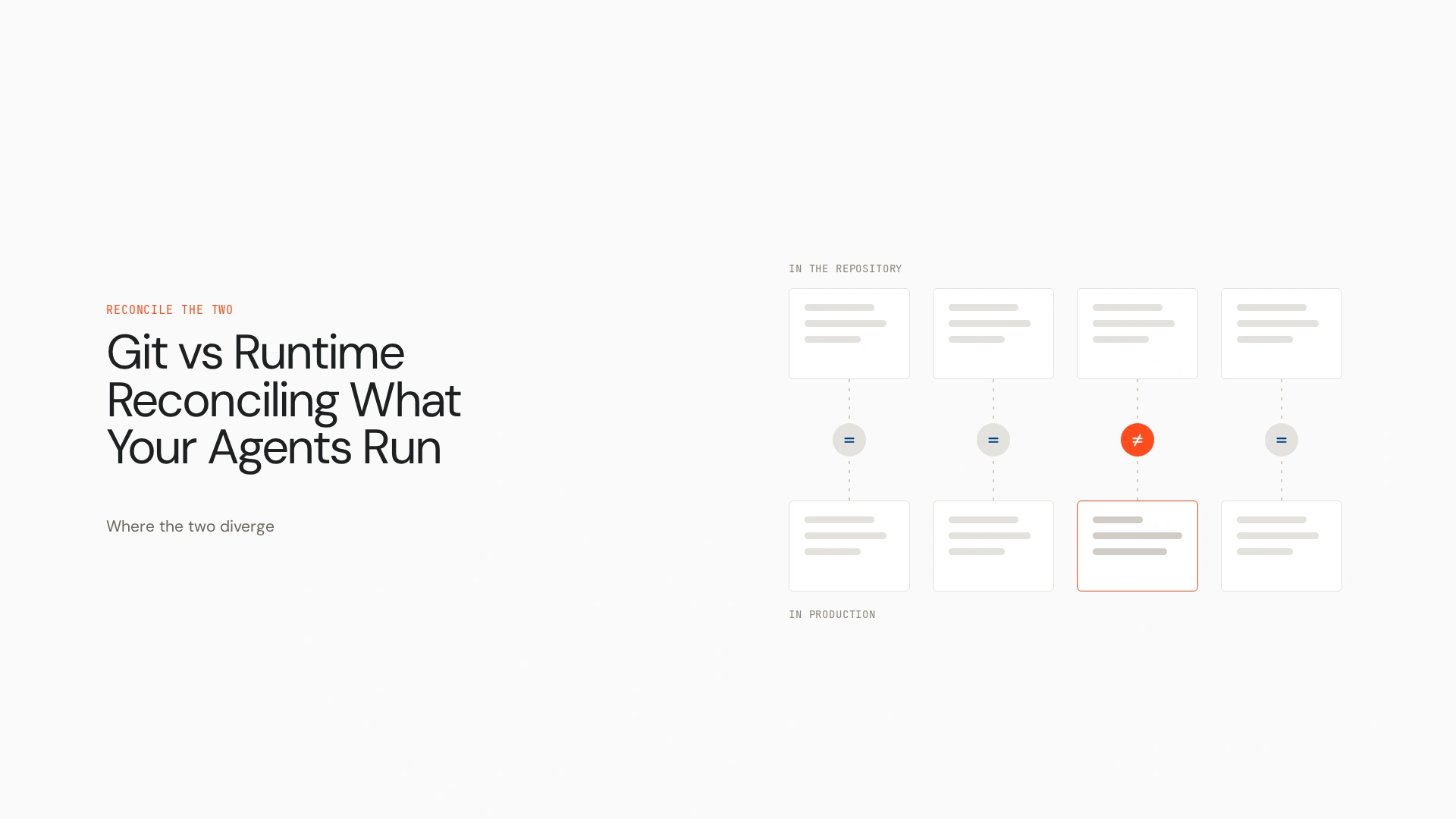
The gap is between the approved version of an agent and the environment where it actually executes. In the git vs runtime question, Git tells you what the team intended to ship, and runtime tells you what ran. This guide explains the difference, why it matters more for AI agents than for ordinary software, and how to connect the two.
What is the difference between Git and runtime?
Git is a distributed version control system. It tracks changes to files, records commits, supports branches and helps teams review code and configuration. Runtime is the execution phase and environment in which an application or agent runs, using code, configuration, dependencies, permissions and external services to do work.
Git is a tool, and runtime describes execution. They aren’t competing alternatives. One records the path to a release, and the other is where the release lives.
Git vs runtime at a glance
| Dimension | Git | Runtime |
|---|---|---|
| Primary purpose | Track and manage changes | Execute software and agent workflows |
| Main record | Commits, branches, files, reviews | Live execution state, events, traces, telemetry |
| Lifecycle stage | Development and change management | Testing, deployment, live execution |
| Helps answer | What changed in the repository? | What happened during execution? |
| Failure signals | Merge conflicts, faulty changes, build failures | Exceptions, timeouts, unexpected actions, latency |
| Recovery | Revert changes or restore a revision | Roll back a deployment or restore configuration |
| Main limitation | Doesn’t prove what is running | Doesn’t replace source history and review |
Deployment pipelines connect these stages. Runtime evidence is only useful for investigation when it links back to release and version metadata, and actual visibility depends on what has been instrumented.
Why the distinction matters more for AI agents
An agent’s behaviour depends on more than its committed source. Several inputs can change without a single new commit:
- Prompts and instructions: a prompt may be versioned in Git, but the deployed agent could load a different version from a registry or configuration service.
- Model and inference settings: model identifiers, parameters and provider updates all affect output.
- Tools and integrations: agents call APIs, databases and business systems whose responses and availability change.
- Permissions and identity: an agent’s real access depends on its deployed credentials, entitlements and enforcement.
- Retrieved context and memory: RAG results, conversation state and external data change the input to an otherwise unchanged agent.
- Environment configuration: feature flags, environment variables and dependency versions create differences between staging and production.
Consider this illustrative case. A support agent’s prompt is unchanged in Git. A production setting points it at a different retrieval index, and a newly enabled tool gives it access to a refund action. Its behaviour changes though the prompt file hasn’t. Platforms handle configuration in different ways, so treat this as an example of the pattern, not a claim about every system.
What can go wrong between Git and production?
- Configuration drift between development, staging and production
- An unexpected prompt or model in the deployed agent
- Tool permissions that differ from the reviewed setup
- Updates made outside the release workflow
- Missing links between a runtime trace and the version that produced it
- Irreproducible issues because model settings, tool responses or retrieved context weren’t captured
- Partial rollbacks that restore application code but leave external configuration unchanged
Git isn’t the cause. The problem is incomplete coordination across systems.
Picture an investigation. A customer complains that an agent sent a wrong reply. The repository shows no relevant change. Deployment history shows a release two days earlier. The configuration service shows a changed retrieval setting from the same day. The trace shows the agent called a tool the reviewed configuration didn’t list. Finding the cause took evidence from source control, deployment records, configuration management and runtime telemetry.
How should teams reconcile Git with runtime?
- Version the intended state. Keep agent code, prompts, configuration templates and policies under version control. Keep secrets out of the repository.
- Review and test changes. Use branches, pull requests, automated tests and evaluations. Test behaviour, not only code correctness, when prompts or agent logic change.
- Record what is deployed. Link each deployment to its commit, build, release and configuration version, and record model and dependency identifiers where available.
- Observe actual execution. Capture traces, events, tool calls, errors and latency, with suitable access controls and retention rules.
- Investigate discrepancies. Compare the intended version, deployed release, effective configuration and recorded execution.
- Control remediation. Use reviewed changes, controlled deployments and rollbacks, and confirm whether external configuration or dependencies also need restoring.
No single tool covers every step. They belong to source control, CI/CD, observability, identity and access management and broader agent governance. See AI agent observability.
Git vs GitHub vs SVN
- Git is the distributed version control system.
- GitHub is a platform for hosting Git repositories and collaborating through pull requests and code review.
- SVN (Apache Subversion) is a different version control system that traditionally uses a centralised repository.
All three concern managing changes, and none of them governs runtime. Using GitHub doesn’t give you production governance.
Version control workflows and their limits
Branches, commits, pull requests, code review, release tags and CI/CD pipelines make intended changes easier to review, and versioned rollback restores earlier states. These workflows don’t independently show what an agent did in a particular live execution. Declarative approaches such as GitOps narrow the gap between the repository and deployed state, but they don’t remove every runtime discrepancy.
What runtime evidence do you need?
To make an execution diagnosable, capture:
- Agent and deployment identifiers
- Commit, release, prompt and configuration versions
- Model and relevant inference settings
- Tool calls and outcomes
- Workflow steps, timestamps, errors and latency
- Policy decisions and permission checks
- Evaluation results and links to known test cases
Logging everything isn’t necessary and isn’t always appropriate. Prompts, customer data, credentials and retrieved content may need redaction, restricted access or limited retention. The aim is enough context to explain an execution without creating needless privacy, security or cost risk.
Where does an AI control plane fit?
Source control, CI/CD, runtime observability and an AI control plane solve related but different problems. Three questions separate them:
- Git: what changed, and what was reviewed?
- Runtime observability: what happened when the agent executed?
- AI control plane: how are agents identified, governed, monitored and managed across environments and their lifecycle?
Lyzr’s Opencontroller is an AI control plane for governing agents across their lifecycle. Lyzr positions it around an agent registry and discovery, identity, evaluation gates, staged promotion, runtime policy and observability. Connecting version and deployment context with agent identity, evaluation, policy and runtime evidence helps teams investigate behaviour and manage changes more consistently. It sits alongside Git rather than replacing it, and it doesn’t replace GitHub, CI/CD or specialised telemetry tools.
It also depends on what is instrumented. A control plane can only connect evidence that systems expose to it, and it doesn’t guarantee deterministic execution. See AI agent governance.
How to choose the right approach
- Small development team: Git, code review, automated tests and a repeatable deployment process.
- First production agents: versioned prompts and configuration, behavioural evaluations, deployment metadata and basic runtime tracing.
- Enterprise running many agents: consistent identity and access controls, environment-level governance, evaluation and promotion processes, runtime monitoring, auditability and a way to coordinate them across the estate.
The right setup depends on agent autonomy, business risk, the number of environments, integrations, regulatory obligations and the cost of a failed execution. Not every team needs the same platform complexity. The Agents to Production playbook covers how teams stage this.
Connect what was committed to what ran
Git gives teams a record of intended changes, and runtime evidence explains actual execution. Reliable AI operations need a connection between the two. When an agent misbehaves, the team should be able to trace what was committed, what was deployed and what the agent did.
See how Opencontroller helps teams govern AI agents across their lifecycle, from evaluation and deployment to runtime visibility and continuous improvement. Book a demo to explore how the control plane can fit into your existing engineering stack.
FAQs
Git is a version control system that records changes to files. Runtime is the environment where software and agents execute. One tracks intended changes, the other is where behaviour happens.
No. Git doesn’t execute your application. Runtime is the execution environment, which uses code and configuration that Git may have tracked.
Git is the version control system. GitHub is a platform that hosts Git repositories and adds collaboration features such as pull requests and code review.
Both are version control systems. Git is distributed, so each clone holds the full history. SVN traditionally uses a centralised repository.
Not by itself. Git records commits, not deployments. You need deployment records that link a release to a commit, plus the effective configuration.
Prompts, model settings, retrieved context, tool responses, permissions and environment configuration can all change without a new commit.
By recording the commit, release, configuration and model identifiers with each deployment, and attaching them to runtime traces.
It’s when the live agent’s configuration diverges from the reviewed or intended setup, for example a changed prompt source, model setting or tool permission.
Git records intended changes, CI/CD builds and deploys them, and observability records what happened. Linking release metadata to traces ties them together.
It coordinates identity, evaluation, policy and visibility across agents and environments, giving individual records a governed context.
Book A Demo: Click Here
Join our Slack: Click Here
Link to our GitHub: Click Here