An AI agent can process thousands of requests, complete workflows in minutes, and operate around the clock. But how much business value is it actually creating?
For enterprise teams, that question is becoming increasingly important. A successful AI agent deployment isn’t measured by the number of tasks it handles or the number of hours it runs. It’s measured by what it costs to complete a task, how reliably it delivers the expected outcome, and what the business gains in return.
Consider two AI agents handling the same workflow. One costs less per model call but requires multiple retries and frequent human intervention. The other uses a more expensive model but completes tasks with fewer steps and less supervision. Looking at their API bills alone could lead to the wrong investment decision.
This is where cost per task becomes a useful starting point for calculating AI agent ROI.
Instead of measuring AI expenditure in isolation, it connects operational costs with completed business outcomes. It gives finance, operations, and engineering teams a common way to evaluate whether an AI agent is economically viable and whether it makes sense to scale.
Let’s break down how to calculate it.
1. Why traditional AI ROI calculations miss the bigger picture
Most AI ROI discussions begin with two questions:
- How much does the AI model cost?
- How many hours can the agent save?
Both are important, but neither tells the complete story.
An AI agent doesn’t simply generate an answer. It may retrieve information, call external APIs, execute multiple steps, validate its output, retry failed actions, and request human approval before completing a workflow.
Each of these activities contributes to the actual cost of getting a task done.
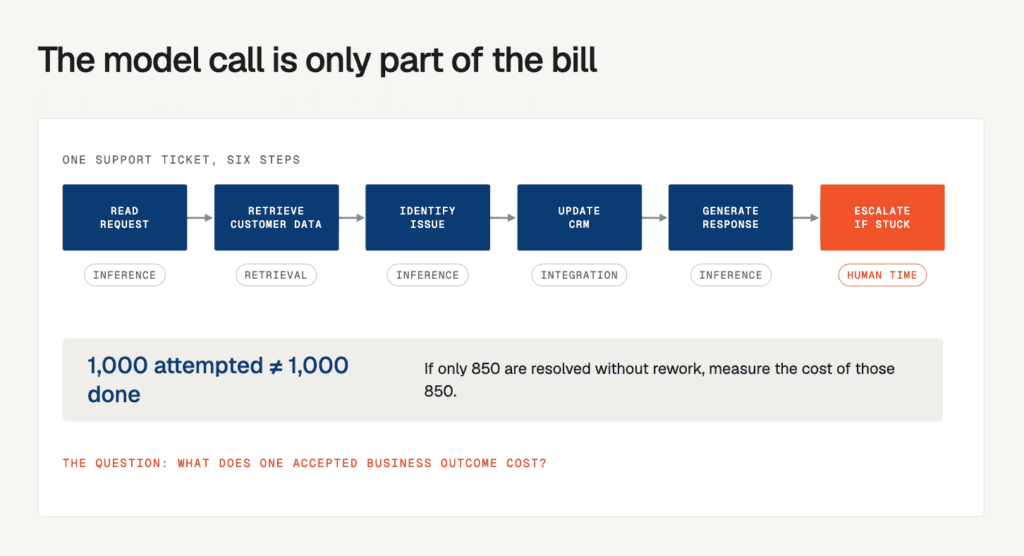
For example, consider an AI agent handling customer support tickets. Its workflow might involve:
- Reading an incoming support request.
- Retrieving relevant customer and order information.
- Identifying the issue and determining the next action.
- Updating the CRM or ticketing system.
- Generating a response.
- Escalating the request if it cannot resolve the issue.
The model inference cost might be small, but the entire workflow has additional expenses associated with retrieval, integrations, retries, infrastructure, and human supervision.
There is another important distinction: a task being attempted doesn’t mean it has been completed successfully.
If an agent processes 1,000 tickets but only resolves 850 without requiring rework, the business should evaluate the cost of those 850 successful outcomes, not simply divide expenditure by 1,000 attempts.
This changes how ROI should be calculated.
Rather than asking how much an AI agent costs to run, businesses need to ask:
How much does it cost to deliver one accepted business outcome?
2. What is cost per task in AI agent deployments?
Cost per task is the total expenditure associated with running an AI agent divided by the number of successfully completed tasks.
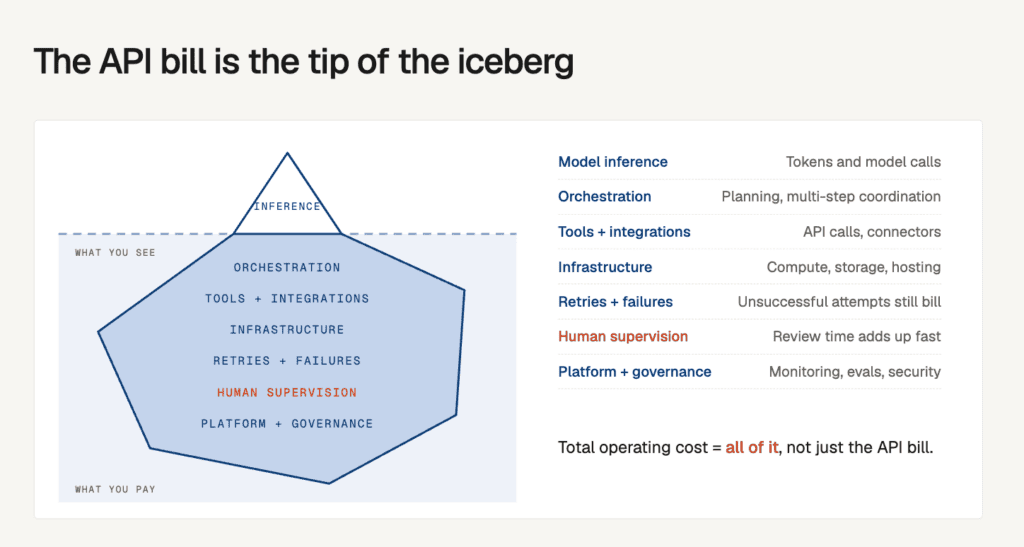
It captures the cost of the entire execution process, rather than just the model’s API usage.
The basic formula is:
Cost Per Completed Task = Total Agent Operating Cost ÷ Successfully Completed Tasks
However, calculating the total operating cost requires looking beyond model inference.
What goes into the total cost?
| Cost component | What it includes | Why it matters |
| Model inference | Input tokens, output tokens, and model calls | Every reasoning or execution step can add to the bill |
| Orchestration | Agent coordination, planning, and execution | Multi-step workflows introduce additional processing |
| Tools and integrations | API calls, external services, and connectors | Each action may have its own usage cost |
| Infrastructure | Compute, GPU usage, storage, and hosting | Production workloads require resources beyond inference |
| Retries and failures | Repeated calls, failed executions, and recovery | Unsuccessful attempts still consume resources |
| Human supervision | Reviewing, correcting, and approving outputs | Human involvement can significantly change the economics |
| Platform and governance | Platform fees, monitoring, evaluations, and security controls | These costs support reliable production operations |
One frequently overlooked expense is human intervention.
An agent might complete most of a workflow independently but still require an employee to review every result. If that review takes several minutes per task, the accumulated labour cost can become significant.
This is why the calculation should account for both successful execution and the effort required to achieve it.
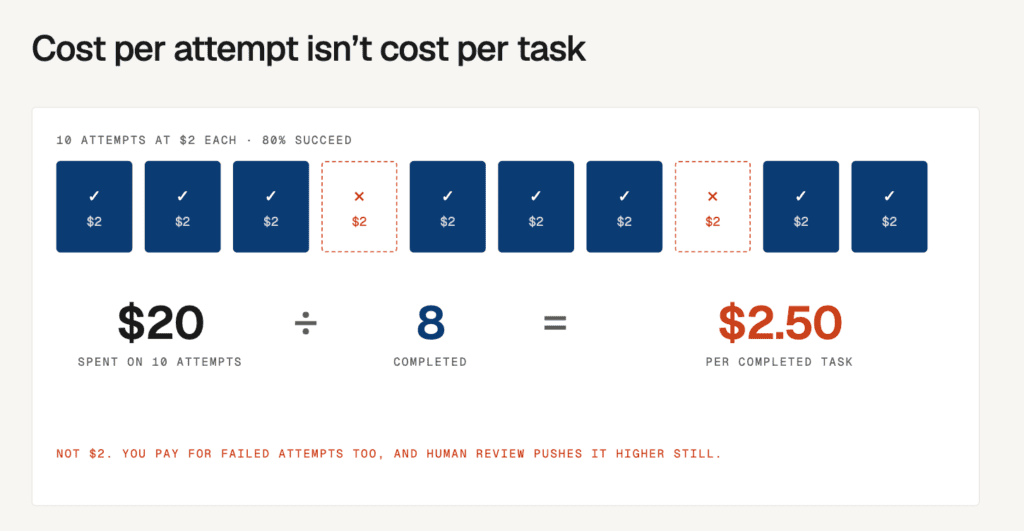
Cost per attempt vs. cost per completed task
These two metrics are not interchangeable.
- Cost per attempt: What the agent spends each time it tries to execute a task.
- Cost per completed task: What the business spends after accounting for unsuccessful attempts, retries, and the resources required to achieve a successful outcome.
For example, if an agent costs $2 per attempt and successfully completes 80% of its attempts, the cost of successful execution is higher than $2.
If human review costs are excluded, the calculation is:
Cost per completed task = $2 ÷ 0.80 = $2.50.
Add the cost of human supervision and the actual figure increases further.
The distinction matters because businesses pay for unsuccessful attempts too, even when those attempts don’t produce usable outcomes.
3. How to calculate cost per task for an AI agent
Now that the cost components are clear, the next step is to turn them into a repeatable calculation.
Step 1: Define the task and its success criteria
Start by identifying one specific business workflow.
Avoid measuring an entire department or a broad category such as customer service. Instead, choose a task with a clear beginning, end, and measurable outcome.
Examples include:
- Processing an invoice.
- Resolving a customer support ticket.
- Qualifying an inbound sales lead.
- Extracting information from a contract.
- Generating a compliance report.
- Reconciling financial records.
Next, define what successful completion means.
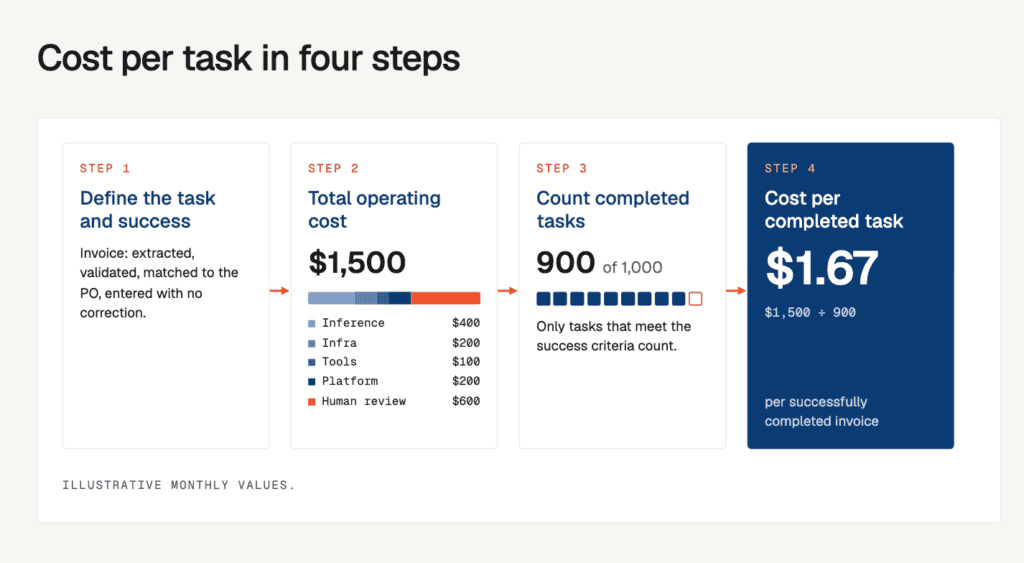
For an invoice-processing agent, success might mean that the invoice has been extracted, validated, matched against the purchase order, and entered into the accounting system without requiring correction.
A generated response or partially completed workflow should not automatically count as a successful task.
Step 2: Calculate the total operating cost
Add up all the expenses incurred during a defined measurement period.
For example:
| Expense | Monthly cost |
| Model inference | $400 |
| Infrastructure and hosting | $200 |
| Tools and integrations | $100 |
| Platform and monitoring allocation | $200 |
| Human review | $600 |
| Total | $1,500 |
These are illustrative values. Actual costs will vary depending on the model, workload, deployment architecture, and level of human supervision.
Step 3: Count successfully completed tasks
Now determine how many tasks the agent actually completed to the agreed quality standard.
Suppose the agent attempted 1,000 tasks during the month, but only 900 met the acceptance criteria.
Your completed-task count is 900, not 1,000.
Step 4: Calculate cost per completed task
Using the figures above:
[
\text{Cost per task} = \frac{$1,500}{900}
]
[
\boxed{\text{Cost per task} = $1.67}
]
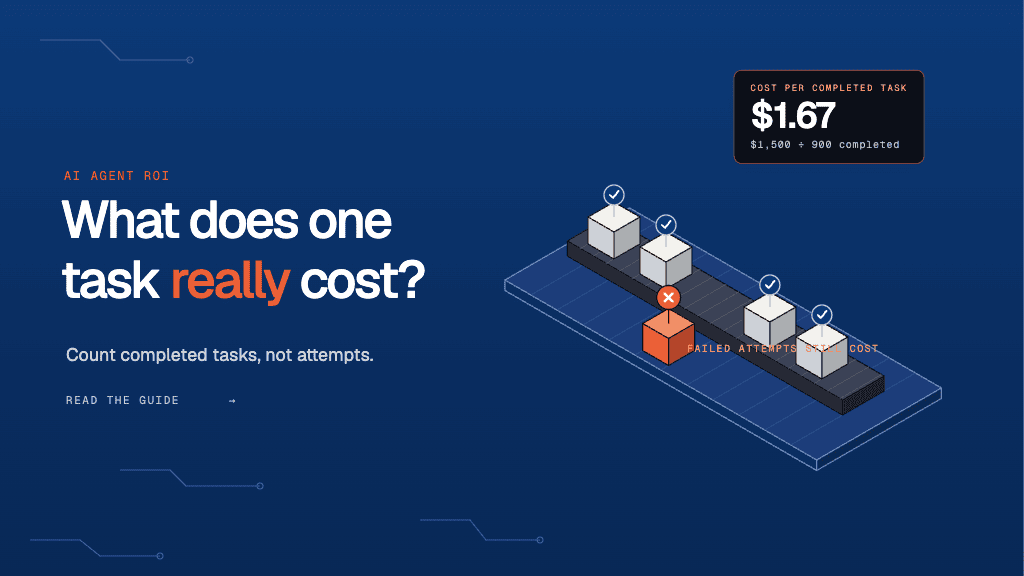
The agent costs approximately $1.67 for every successfully completed task.
This is a much more useful operational metric than simply reporting a $400 monthly model bill.
However, the number becomes meaningful only when compared with what the same task costs the business today.
4. Compare AI agent costs with the existing human-led process
An AI agent’s cost per task doesn’t tell you whether it delivers ROI on its own.
You need a baseline.
That baseline is the fully loaded cost of completing the same task through the existing process.
Let’s consider an invoice-processing workflow.
A finance employee spends 12 minutes processing and validating each invoice. Their fully loaded hourly cost, including employment overhead, is $30.
The cost of processing one invoice manually is:
[
\frac{12}{60} \times $30 = $6
]
Now compare that with the AI agent’s cost of $1.67 per successfully completed invoice.
| Evaluation metric | Manual process | AI agent |
| Cost per completed task | $6.00 | $1.67 |
| Task completion | Human-completed | 90% successful attempts |
| Execution time | 12 minutes of employee time | Depends on workflow and review |
| Human involvement | Full execution | Review and exception handling |
| Cost at 900 completed tasks | $5,400 | $1,500 |
| Operational cost difference | $3,900 saved |
The agent reduces the operating cost by $4.33 per completed task in this illustrative scenario.
Across 900 tasks, that’s $3,900 in monthly operating cost savings.
But there is one more consideration.
If the agent’s implementation required a one-time investment, that expense must also be accounted for before declaring the project profitable.
This brings us to the actual ROI calculation.
5. Calculate the ROI of your AI agent
Once cost per task has been established, calculating ROI becomes much easier.
The standard ROI formula is:
[
\text{ROI (%)} =
\frac{\text{Total Benefits} – \text{Total Investment}}
{\text{Total Investment}} \times 100
]
For an AI agent, the investment should include:
- Initial development and implementation.
- Integration with existing enterprise systems.
- Infrastructure and deployment.
- Ongoing operating expenses.
- Maintenance, monitoring, and human supervision.
The benefits should include verified financial gains, such as reduced operating expenditure or additional productive capacity that the business can actually redeploy.
A worked example
Let’s continue with the invoice-processing agent.
Assume the following:
| Input | Value |
| Manual cost per invoice | $6.00 |
| AI agent cost per completed invoice | $1.67 |
| Successfully completed invoices per month | 900 |
| Monthly operational savings | $3,900 |
| One-time implementation investment | $25,000 |
Step 1: Calculate monthly savings
[
(6 – 1.67) \times 900 = $3,897
]
Step 2: Calculate annual operational savings
[
$3,897 \times 12 = $46,764
]
Step 3: Calculate first-year ROI
[
\frac{46,764 – 25,000}{25,000} \times 100
]
[
\boxed{\text{First-year ROI} = 87.1%}
]
Step 4: Calculate the payback period
[
\text{Payback Period} =
\frac{\text{One-time Investment}}
{\text{Monthly Net Operating Savings}}
]
[
\frac{25,000}{3,897} \approx 6.4 \text{ months}
]
In this scenario, the investment is recovered in approximately 6.4 months, with a positive first-year ROI.
Note: All figures are illustrative. The calculation assumes consistent task volumes, operating costs, and savings throughout the year. It also assumes that the reduction in manual processing expenditure translates into an actual financial benefit. If employees simply spend their released time on other work, that should be reported as capacity gained rather than direct cash savings.
The important takeaway is that ROI isn’t determined by how inexpensive an AI agent looks during a pilot. It depends on how much value it delivers consistently once it becomes part of a business process.
6. Five metrics to evaluate before scaling an AI agent
Cost per task is the foundation, but it shouldn’t be the only metric used to evaluate an AI agent.
An agent that delivers a low cost per task but produces unreliable results can create additional operational expenses. Similarly, an agent that performs well in a controlled pilot may become expensive when exposed to real production traffic.
A more complete evaluation should consider the following metrics.
| Metric | What it measures | What to evaluate |
| Cost per completed task | Total cost of delivering an accepted outcome | Is the agent cheaper than the existing process? |
| Task success rate | Share of attempts that meet the success criteria | Does the agent complete work reliably? |
| Human intervention rate | Share of tasks requiring review or correction | How much work still depends on employees? |
| Average handling time | Time required to complete a task | Is the overall workflow becoming faster? |
| Rework and error rate | Share of tasks requiring correction or re-execution | Is the agent creating additional downstream work? |
These metrics should be evaluated together rather than independently.
For example, a lower cost per task accompanied by a higher error rate might indicate that the agent is cutting corners. A higher success rate accompanied by rising inference costs might indicate that the agent is using more expensive reasoning or additional verification steps.
The objective is to find the right balance between cost, quality, and operational efficiency.
Evaluate performance across different task types
A blended average can hide important differences.
Consider an AI agent handling two types of invoices:
- Standard invoices with predictable formats.
- Complex invoices requiring additional validation and exception handling.
If standard invoices make up most of the workload, the overall cost per task might look attractive even when complex invoices remain expensive.
Track cost and success rates separately for each task category. This helps identify where automation is economically viable and where additional improvements are needed.
7. Your turn: Calculate the ROI of an AI agent
The easiest way to understand the economics of an AI agent is to calculate them using your own workflow.
Pick one repetitive business task and answer the following questions.
Part A: Understand the existing process
| Input | Your value |
| What task are you automating? | |
| How many tasks are completed monthly? | |
| How many minutes does one manual task take? | |
| What is the fully loaded hourly employee cost? | |
| What is the current manual cost per task? |
Part B: Understand the AI agent’s operating cost
| Input | Your value |
| Monthly model and inference costs | |
| Infrastructure and hosting costs | |
| Platform and integration costs | |
| Monthly human review costs | |
| Number of successfully completed tasks |
Part C: Calculate the economics
Use these formulas to evaluate your results:
- Manual cost per task
(Minutes per task ÷ 60) × Fully loaded hourly cost. - AI agent cost per task
Total monthly agent operating cost ÷ Successfully completed tasks. - Savings per task
Manual cost per task − AI agent cost per task. - Monthly operating savings
Savings per task × Monthly successfully completed tasks. - ROI
(Annual financial benefit − Total first-year investment) ÷ Total first-year investment × 100.
What should you do with the result?
Once you have the numbers, use this evaluation matrix to decide what happens next.
| What your calculation shows | What it means | Recommended action |
| Lower cost, high success rate | Strong economic case | Validate at higher production volumes |
| Lower cost, high human intervention | Potentially misleading savings | Reduce review and exception-handling effort |
| Higher cost, high success rate | Reliable but expensive execution | Optimize model calls, context, and workflow steps |
| Lower cost, poor task quality | Cost advantage without reliable outcomes | Improve agent instructions, evaluations, and validation |
| Higher cost, poor task quality | Weak business case | Reassess the workflow before scaling |
The goal isn’t to make every AI agent cheaper than a human employee immediately. Some workflows deliver value through faster turnaround, greater coverage, or the ability to process work that would otherwise remain unattended.
But those benefits need to be measured separately and connected to an actual business outcome.
8. How to improve cost per task without compromising quality
Once the numbers are available, the next question is how to improve them.
Reducing the cost of an AI agent isn’t simply about switching to a cheaper LLM. In many cases, the biggest savings come from improving how the agent executes a workflow.
Here are five areas to investigate.
1. Reduce unnecessary model calls
Multi-step agents can generate additional inference costs through redundant reasoning, repeated planning, and unnecessary validation.
Review the execution flow to identify steps that can be consolidated or handled through deterministic logic.
2. Optimize context and token usage
Large prompts, repeated conversation histories, and unnecessary retrieval results increase inference costs.
Use relevant context instead of sending entire knowledge bases or conversation histories with every request.
Lyzr’s guide on how to cut LLM costs without changing models explores practical ways to reduce token consumption and eliminate unnecessary model calls.
3. Improve task completion rates
A failed execution still consumes resources.
If an agent frequently retries tasks or requires human corrections, its cost per completed task increases.
Test common failure scenarios, improve tool selection, and refine the agent’s instructions before increasing production traffic.
4. Monitor agent performance continuously
A cost calculation performed during a pilot may not reflect production economics.
Track execution traces, token consumption, latency, retries, and task outcomes over time. This helps teams identify unexpected cost increases and understand which workflows need optimization.
5. Establish governance across agents
As organizations deploy more agents, tracking expenditure at the individual agent and workflow level becomes increasingly important.
Without visibility into who owns an agent, what it executes, and what it costs, it becomes difficult to attribute expenditure or understand whether the investment is producing measurable returns.
This is where centralized agent governance becomes part of the ROI equation.
9. How Lyzr helps enterprises build and measure production-ready AI agents
Calculating ROI is only one part of the process. Enterprises also need the infrastructure to build, evaluate, deploy, and govern agents in production.
Lyzr provides an environment for developing and operating AI agents, with capabilities that support different stages of this lifecycle.
Building and deploying agents with Agent Studio
Lyzr Agent Studio provides a platform for designing, testing, and deploying AI agents. Teams can build workflow-specific agents and connect them with the systems required to execute business tasks.
This provides a foundation for moving from isolated experiments to operational workflows.
Evaluating agent quality before production
Cost per task is meaningful only when the agent meets an agreed quality standard.
Lyzr’s Simulation Engine allows teams to test agents against synthetic conversations and scenarios. It evaluates dimensions such as task completion, hallucination, faithfulness, toxicity, bias, and tool accuracy.
This helps teams identify failure patterns before deploying agents into real business workflows.
Monitoring execution and identifying inefficiencies
Understanding why an agent is expensive requires visibility into its execution.
Lyzr supports agent monitoring and tracing, helping teams inspect execution behaviour, model calls, and workflow performance. These insights can help identify unnecessary calls, repeated actions, and other sources of operational inefficiency.
Governing agents across the enterprise with OpenController
As AI adoption expands, enterprises need more than individual agent monitoring. They need visibility and control across their entire agent estate.
Lyzr OpenController helps enterprises manage agent discovery, governance, access, and deployment controls across their AI environments.
This is particularly relevant when multiple teams build and deploy agents across different systems. Centralized governance helps enterprises establish accountability and maintain control as their agent deployments grow.
Together, these capabilities support a more measurable approach to enterprise AI adoption: build the agent, evaluate its performance, understand its operating costs, and govern it as it scales.
10. The real measure of AI agent ROI is the work it gets done
AI agent ROI shouldn’t be calculated using the number of agents deployed, the number of API calls made, or the number of tasks attempted.
It should be calculated using the business outcomes those agents consistently deliver.
Cost per task provides a practical way to connect technology expenditure with operational performance. It helps enterprises understand whether an agent is reducing the cost of existing processes, improving productivity, and delivering enough value to justify its investment.
But the calculation needs to be comprehensive. Model costs, infrastructure, retries, human supervision, and implementation expenses all belong in the evaluation. So do task quality and the actual financial value captured by the business.
As enterprises move more workflows into production, the ability to measure these economics will become just as important as the ability to build the agents themselves.
The question is no longer how many tasks an AI agent can handle. It’s how much it costs to complete each one, how reliably it does so, and what that outcome is worth to the business.
Book A Demo: Click Here
Join our Slack: Click Here
Link to our GitHub: Click Here
Got a use case in mind?
8 weeks from use case to agents running in production.
Platform, people and FDEs, all in. Bring your environment. We'll co-build and stay until it's live.
Talk to UsFree resource
101 AI Agents Use Cases
100+ production-ready AI agent use cases across Marketing, Sales, HR, Banking, Insurance, Operations and a lot more
Download now