
Enterprise billing rarely fails because of the billing system itself. The real complexity lies in how data flows across enterprise platforms.
Large financial and insurance firms depend on multiple internal systems to validate every invoice, revenue management platforms, client account databases, policy records, routing systems, and industry classification services.
But when these systems don’t communicate directly, billing teams step in to bridge the gap.
This often raises practical questions during every billing cycle:
- Is the client data consistent across systems?
- Has the policy activity been validated before invoicing?
- Are there exceptions that could delay invoice publication?
For organizations processing thousands of invoices each cycle, answering these questions manually becomes a major operational challenge.
This was the situation faced by a global insurance advisory firm.
Client Overview
The client is a leading global advisory, broking, and solutions firm in the insurance and financial services sector.
| Attribute | Details |
| Global presence | 140+ countries |
| Workforce | 45,000+ professionals |
| Operational focus | Insurance advisory, broking, and benefits solutions |
Within its North America Benefits, Broking, and Solutions practice, the organization processes tens of thousands of invoices each billing cycle.
Every invoice requires multiple validations before publication, including:
- client account verification
- policy and activity validation
- billing classification checks
- routing verification
Maintaining accuracy across these steps is critical for compliance, auditability, and financial integrity.
However, the workflow supporting these validations had become heavily manual.
The Billing Workflow Before Automation
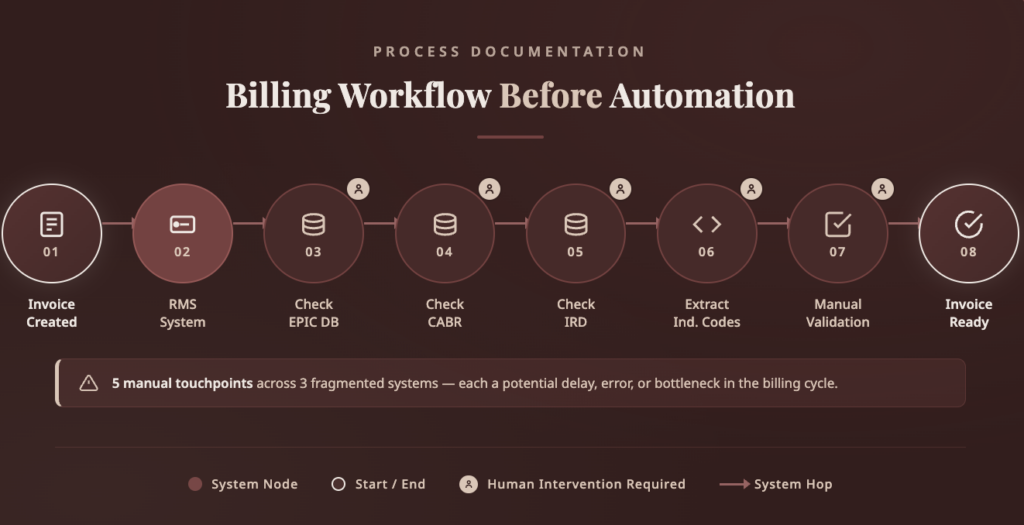
The billing pipeline relied on six enterprise systems, none of which were connected through a unified workflow.
Before an invoice could be finalized, billing analysts had to manually gather information from multiple systems.
Breaking Points in the Billing Workflow
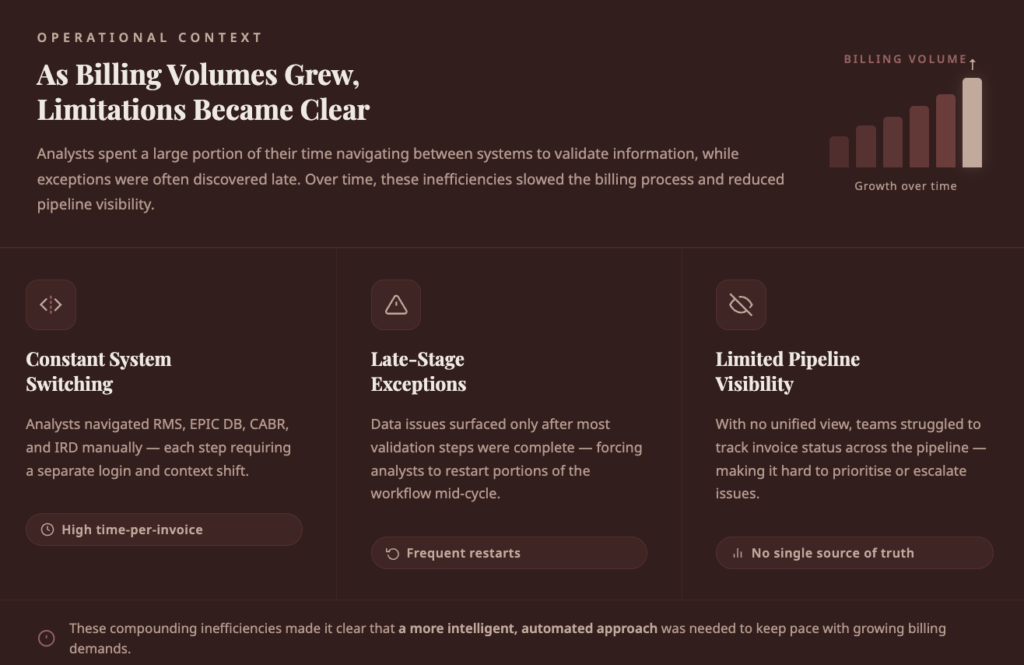
As billing volumes grew, the existing workflow began to show clear operational limitations.
Analysts spent a large portion of their time navigating between systems to validate information, while exceptions and data inconsistencies were often discovered late in the billing cycle.
Over time, these inefficiencies slowed the billing process and made it difficult for teams to maintain consistent visibility across the pipeline.
1. Manual Cross-System Validation
Preparing a single invoice required analysts to gather and verify information across several internal systems. Because these systems were not directly connected, validation depended entirely on manual checks.
This meant billing teams spent more time retrieving information than resolving billing issues.
Key challenges included:
- Switching between multiple systems to verify invoice data
- Manually reconciling client accounts and activity records
- Repeating the same validation steps for every invoice
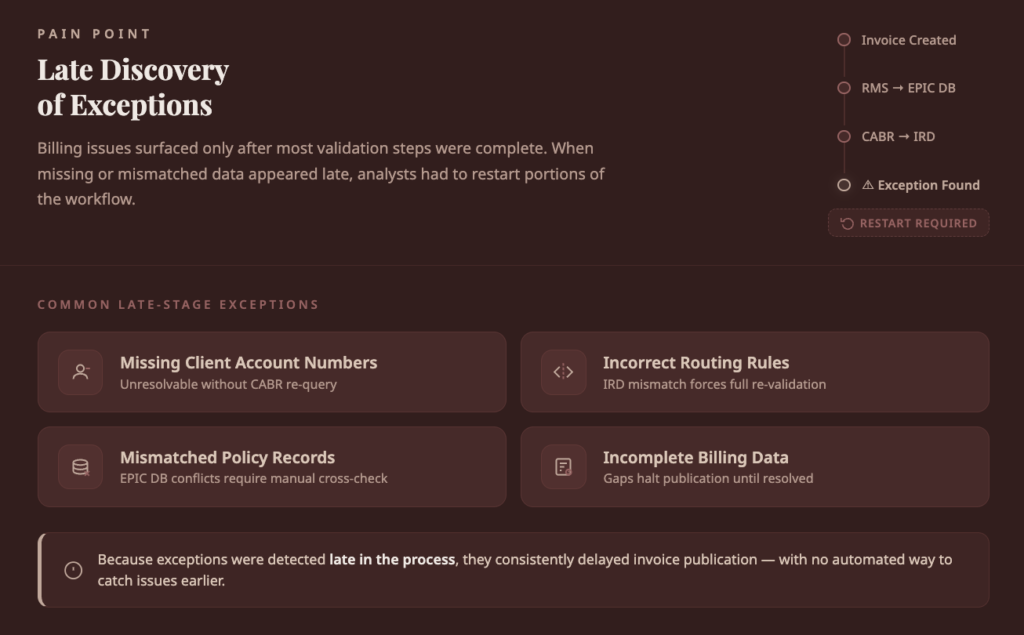
2. Late Discovery of Exceptions
Many billing issues surfaced only after most validation steps had already been completed. When missing data or mismatched records appeared late in the process, analysts had to restart portions of the workflow.
3. Fragmented Exception Handling
There was no standardized system for capturing and managing billing exceptions. Analysts typically escalated issues through email threads or manually created tickets.
As a result:
- exception details were scattered across different channels
- resolution ownership was unclear
- tracking issue status became difficult
This fragmented approach slowed down resolution cycles and reduced audit visibility.
4. Lack of Workflow Visibility
Billing teams and supervisors lacked a unified view of the invoice pipeline. Each system showed only a part of the process, making it difficult to track overall progress.
| Operational Area | Challenge |
|---|---|
| Invoice progress | No centralized status view |
| Validation stages | Hard to track completed checks |
| Exception monitoring | Issues spread across emails and tickets |
| Team coordination | Supervisors lacked real-time updates |
Without a single operational view, identifying bottlenecks required manual coordination.
5. No Structured Learning Loop
Billing analysts frequently encountered recurring issues during validation, but these insights were rarely captured in a structured way.
This meant:
- repeated errors continued across billing cycles
- operational insights remained informal
- process improvements relied on manual observation
Without a feedback loop, the billing workflow had limited ability to improve over time.
The organization needed a solution that could automate cross-system validation, detect exceptions earlier in the billing cycle, provide real-time visibility into workflow progress, and still maintain human oversight for complex or judgment-based cases. To address these operational challenges, the firm partnered with Lyzr AI.
The Lyzr Approach
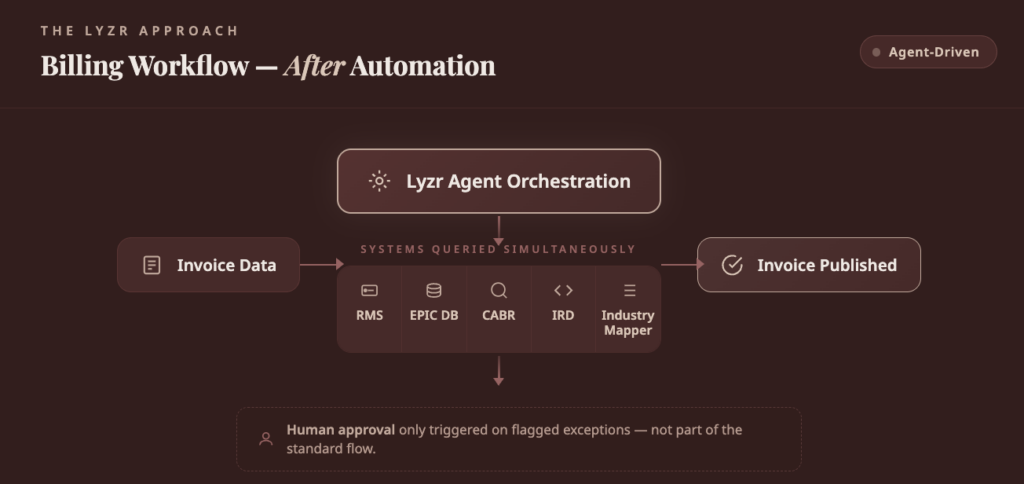
Instead of building another integration layer, Lyzr redesigned the billing workflow as an agent-orchestrated process.
In this architecture:
- agents retrieve data across enterprise systems
- agents validate billing records automatically
- exceptions are detected and categorized in real time
- structured tickets are created for resolution
- human approval is required only when judgment is needed
This approach allowed the client to automate complex workflows while preserving existing enterprise systems.
Implementation Journey
The transformation followed a three-phase rollout, allowing billing teams to gradually transition from manual workflows to agent-managed automation.
Phase 1: Automated Data Retrieval and Validation
The first phase focused on eliminating manual data collection.
Agents connected to:
- Revenue Management System (RMS)
- EPIC policy and activity database
Key outcomes
- Automated retrieval of invoice and activity data
- Data validation across systems
- Consolidated results displayed through a unified dashboard
This reduced the need for analysts to manually navigate multiple systems.
Phase 2: Automated Exception Management
The second phase expanded the agent network to integrate additional systems.
| System | Role |
| IRD | Routing information for invoices |
| CABR | Client account records |
| Industry Mapper | Industry classification codes |
Exception handling improvements
- Agents automatically detect validation failures
- Structured tickets are created in ServiceHub
- Tickets include full context for faster resolution
- Status updates appear in real time on the dashboard
Billing teams could now track all exceptions from a single interface.
Phase 3: Full Agentic Billing Pipeline
The final phase introduced a fully orchestrated workflow with monitoring and feedback mechanisms.
Additional capabilities introduced
- Workflow tracking: A Tracker module monitors billing activities and resumes automation after biller intervention.
- Continuous improvement: A Recommendation Agent collects biller feedback and generates improvement suggestions.
- Human-in-loop governance: Approval checkpoints ensure that complex cases are reviewed before invoice publication.
Solution Architecture
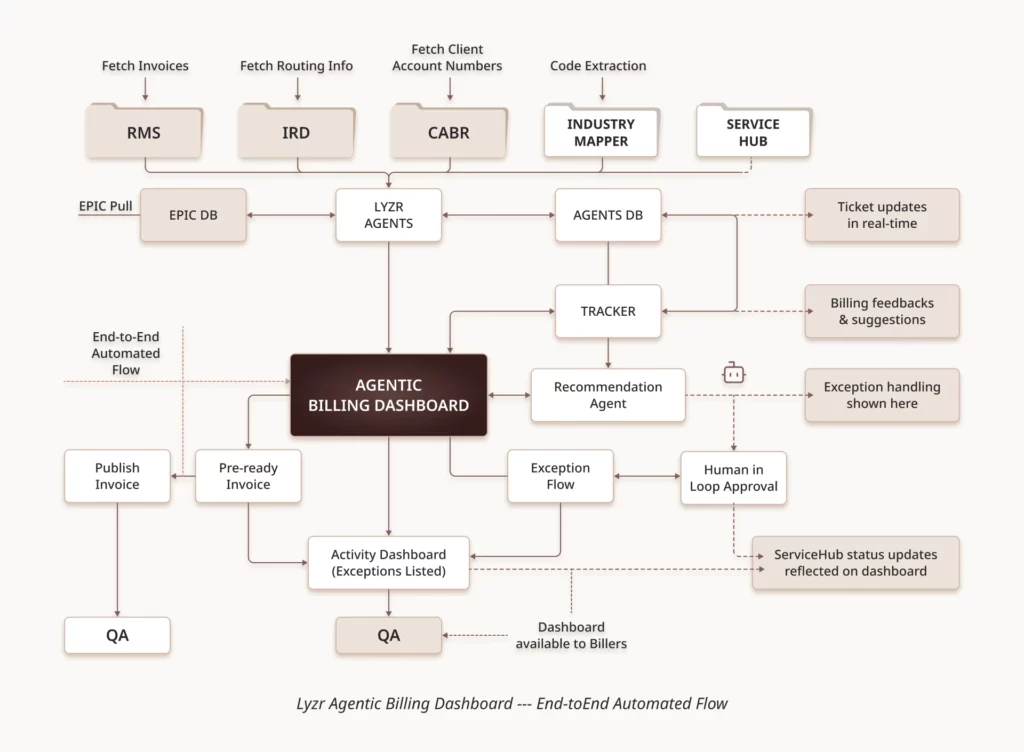
The final solution positioned Lyzr agents as the orchestration layer across the billing ecosystem.
Core Architecture Components
| Layer | Systems | Role in Billing Workflow |
| Invoice Source | RMS | Provides invoice data for processing |
| Core Enterprise Systems | EPIC DB, CABR | Store policy, activity, and client account data |
| Validation & Routing | IRD, Industry Mapper | Apply invoice routing rules and classification logic |
| Exception Management | ServiceHub | Manages tickets for billing exceptions |
| Orchestration Layer | Lyzr Agents | Coordinate validation workflows across systems |
| Monitoring & Insights | Tracker, Recommendation Agent, Agentic Dashboard | Provide workflow visibility, monitoring, and improvement insights |
Infrastructure Design
The solution was deployed on Microsoft Azure to align with the client’s enterprise cloud architecture.
Key Infrastructure Components
- Frontend: React-based billing dashboard hosted as Azure Static Web App
- Backend: FastAPI services running in Azure Container Apps
- Agent runtime: Secure containerized Lyzr agent environment
- Document access: SharePoint integration via Microsoft Graph API
- Security: Azure Key Vault and Managed Identity for credential management
Outcomes
The implementation significantly improved billing efficiency and operational visibility.
Operational Improvements
- ~80% reduction in manual validation steps
- Real-time exception detection and visibility
- Faster invoice publication
- Structured exception management through ServiceHub
- Continuous automation improvement through analyst feedback
Workflow Improvements
| Before | After |
| Manual cross-system validation | Automated agent validation |
| Email-based exception escalation | Structured ticket creation |
| Limited pipeline visibility | Real-time billing dashboard |
| Repeated errors across cycles | Continuous improvement loop |
Strategic Impact
By transitioning from analyst-driven workflows to agent-managed billing orchestration, the organization achieved:
- higher billing accuracy
- improved operational efficiency
- faster billing cycles
- better visibility across the billing pipeline
The billing process evolved from a manual validation workflow into a governed, scalable automation system.
Wrapping Up
Enterprise billing challenges rarely stem from the billing system itself but from coordinating data across multiple platforms. For the client, manual validation across several systems made billing slow, fragmented, and difficult to manage at scale.
By introducing an agent-orchestrated workflow with Lyzr, the organization moved from manual coordination to an automated, structured billing pipeline.
Agents now validate data, detect exceptions early, and provide real-time visibility, while human oversight remains for complex cases.
The result is a faster, more transparent billing operation that can scale efficiently with growing billing volumes.
Book A Demo: Click Here
Join our Slack: Click Here
Link to our GitHub: Click Here