
TL;DR
- An agent trace hierarchy organizes AI agent telemetry into sessions, traces and spans, each tagged with the agent that produced it.
- A session groups the traces of one conversation or workflow through a shared conversation ID. It’s an attribute, not a node in the tree.
- A trace is one end-to-end run, usually a single user turn. Spans are the steps inside it: model calls, tool calls, retrieval and handoffs.
- Agents appear twice: as
invoke_agentspans in the tree, and as attributes you filter and roll up by. - Build on the OpenTelemetry GenAI conventions, still at Development stability as of November 2026.
- Traces show what happened and why. Ownership and permission need a control layer such as Lyzr Opencontroller.
An AI agent can give a wrong answer while every span in its trace looks healthy. The model call succeeds and the tools return results, because the mistake happened elsewhere: an earlier turn, a sub-agent, or a retrieval step that pulled the wrong document. Finding it depends less on your tracing tool than on how your telemetry is structured.
That structure is the agent trace hierarchy: how telemetry is grouped into sessions, nested into traces and spans, and attributed to agents. It’s the data model under AI agent observability. This guide covers each level, a default design, and the one question a hierarchy can’t answer alone.
What is an agent trace hierarchy?
An agent trace hierarchy is the structure that organizes AI agent telemetry into sessions, traces and spans. A session groups related traces, such as one conversation. A trace captures one end-to-end agent run. Spans record each step inside it, such as model calls, tool calls, retrieval and handoffs, tagged with the agent responsible.

A good hierarchy answers three questions: what happened, why, and who is responsible. Spans answer the first. Traces and sessions answer the second. The third is where most teams get stuck.
The four levels: sessions, traces, spans and agents
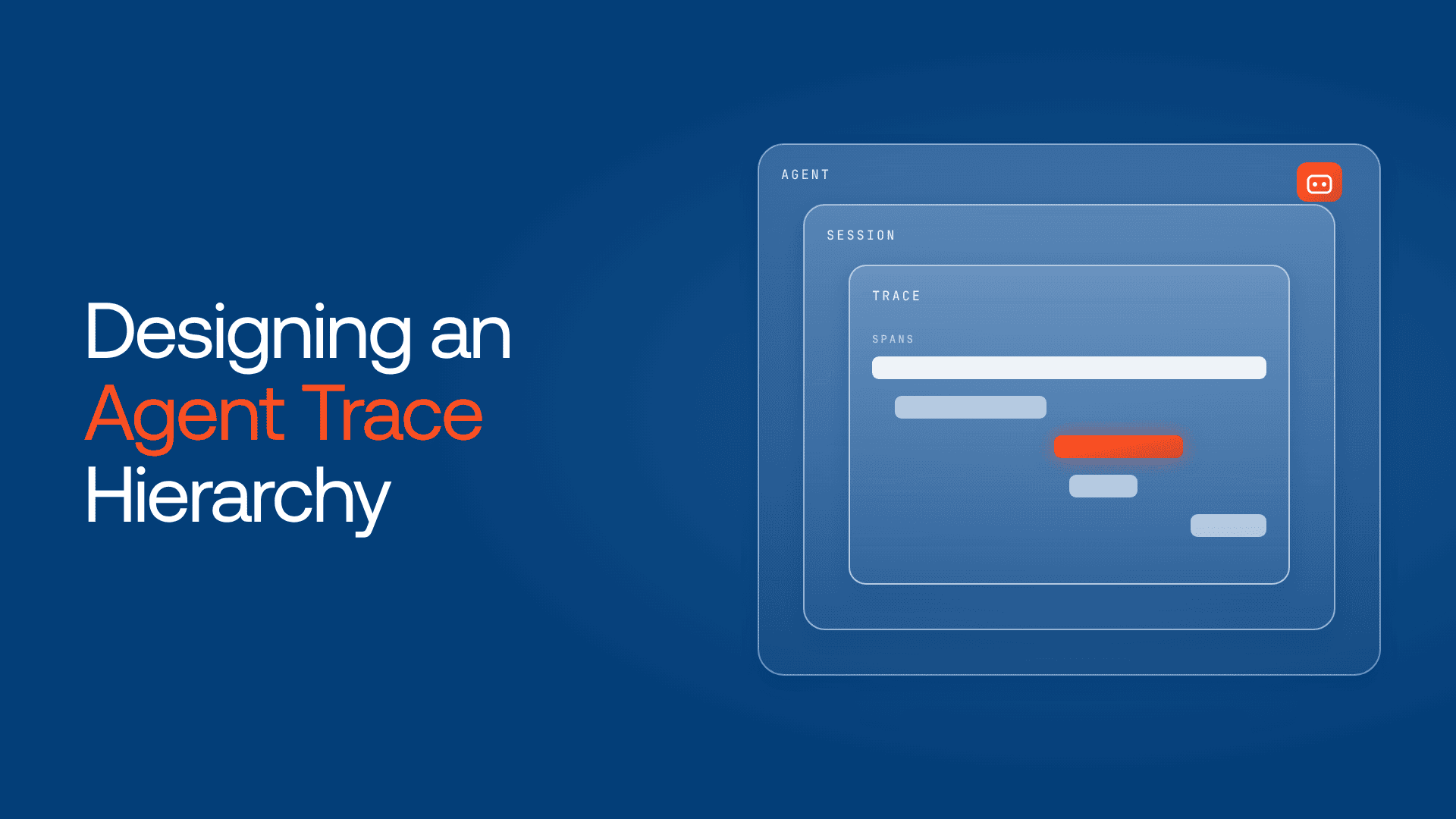
Some guides put the session at the top; others start at the trace. Both are right, as the agent trace hierarchy diagram below shows.
Diagram of an agent trace hierarchy: a session groups traces, each trace is a tree of spans, and agents are tagged across spans
Session
A session is a conversation or long-running workflow made of many traces. Track cost, tokens, duration and traces per session; a high count can mean users are rephrasing.
A session isn’t a node in the tree. It’s a shared ID. The OpenTelemetry GenAI semantic conventions define gen_ai.conversation.id as the unique identifier for a conversation (session, thread), and you carry it on the spans of every trace in that conversation.
Trace
A trace is one request-to-response run, such as a single user turn, with its end-to-end latency, status and chain of steps.
Span
A span is one unit of work, such as a model call, tool call or retrieval. Each has a parent, which forms the tree, and carries inputs, outputs, timing, tokens and errors.
Agent
In the tree, an agent is an invoke_agent span. The GenAI agent spans spec uses a client span when the agent runs as a remote service and an INTERNAL span when it runs in the same process. Across the tree, the agent is a set of attributes (gen_ai.agent.name, gen_ai.agent.id, gen_ai.agent.version) you filter and roll up by. Copying them onto child spans is your design choice, not a spec rule.
Agents map to runs and models to calls, so never compare an agent’s trace count with a model’s span count.
| Level | Scope | Identified by | Key metrics | Answers |
|---|---|---|---|---|
| Session | A conversation or workflow | Conversation ID attribute | Cost, tokens, duration, traces per session | Did the user get what they needed? |
| Trace | One agent run | Trace ID | End-to-end latency, status | What happened on this request? |
| Span | One operation | Span ID and parent span ID | Latency, tokens, errors | Which step went wrong? |
| Agent | Every run and step it owns | Agent name, ID, version | Runs, success rate, cost per run | Who is responsible? |
What spans go inside an agent trace?
An agent trace contains spans for orchestration, agent runs, planning, model calls, tools and retrieval, most with standard OpenTelemetry operation names.
| Span type | Operation name | What to record |
|---|---|---|
| Workflow or orchestrator | invoke_workflow | Workflow name, overall status |
| Agent or sub-agent | invoke_agent | Agent name, ID, version |
| Planning | plan | Task breakdown, chosen steps |
| Model call | chat | Model, provider, input and output tokens, finish reason |
| Tool call | execute_tool | Tool name, arguments, result, error |
| Retrieval | retrieval | Query, data source, documents returned |
Here’s turn one of the refund conversation as an example trace tree:
invoke_agent support-agent          conversation.id = c-481, agent.version = 3.2
├── plan support-agent
├── retrieval refund-policies       returns: refund_policy_2025.pdf
├── chat gpt-4o                     1,840 input tokens
└── execute_tool order_lookup
The stale document shows in the retrieval span, and the conversation ID links it to turn three.
One span type has no standard name yet: the policy decision. If something checks a call before it runs, record that check as its own span. It matters later.
How to design an agent trace hierarchy: six defaults
- One trace per turn, joined by a session ID. Conversation-long traces are hard to sample and read.
- Open the root span when the request arrives, with session ID, user and agent version, so setup failures are captured.
- Put agent identity on every span, not just the root, so rollups by agent work.
- Connect handoffs. The calling agent records the
invoke_agentspan; the called agent’s spans sit under it. Propagate trace context across MCP and A2A boundaries, and use a span link for queued or async work. - Record inputs, outputs and errors on every span, with message content off or redacted in production.
- Keep span names low-cardinality, like
execute_tool order_lookup, with IDs in attributes.
Can you name the owner of every agent you trace? Take the AI Agent Sprawl Audit: 29 questions on visibility, ownership, access and cost that estimate how many agents run beyond your view, and what to fix first. Take the audit:
How to roll up cost and quality across the hierarchy
Sum cost, tokens and latency upward from spans, and judge quality where it means something. Spans show the slowest tool call, traces show what a run costs, sessions show how many turns users need, and the agent view shows whether version 3.2 helped.
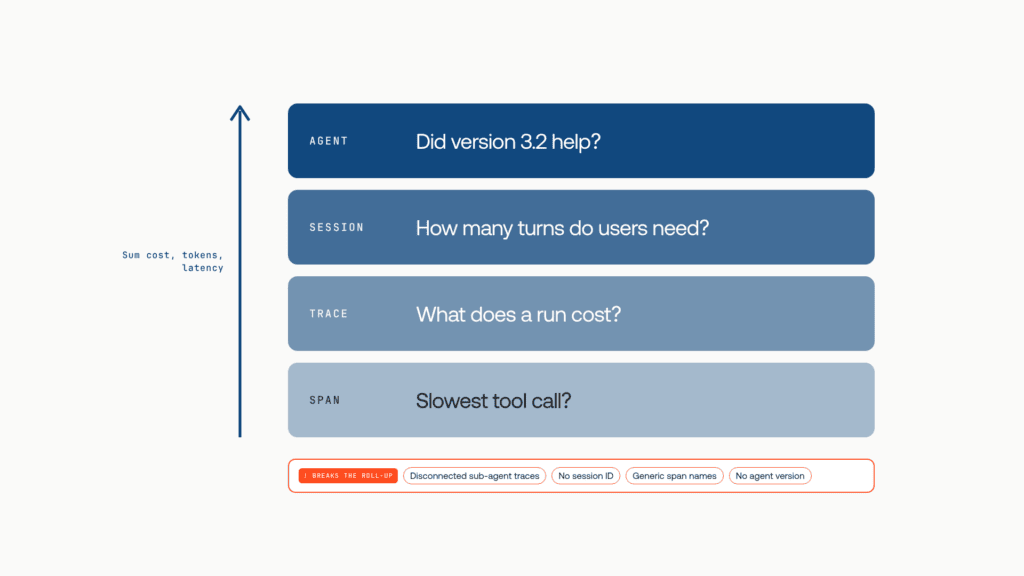
The usual ways hierarchies break: a disconnected trace for each sub-agent, no session ID, generic names like “llm_call”, and no agent version on spans.
Build on OpenTelemetry GenAI conventions
The GenAI conventions keep your hierarchy portable across frameworks and vendors. They live in a dedicated repository, and agent spans are still at Development stability, so pin instrumentation versions.
What a trace hierarchy can’t tell you
Back to the refund agent. With a session ID, the team finds the stale retrieval in minutes. Then the incident review asks: who owns this agent? Which version was approved, and on what evidence? Was it allowed to promise a refund? Could the call have been stopped before it reached the customer?
The hierarchy can’t answer those. It records what already happened, and a name on a span isn’t an owner, just as a trace isn’t a permission. That’s the third question, and it gets harder as agents multiply.
Turning the hierarchy into control with Lyzr Opencontroller
Lyzr Opencontroller works at the agent level, where tracing tools stop. It discovers agents, models, tools, data and workflows across clouds and frameworks, attributes every action to an identity, and enforces identity, spend and policy in the request path, before the call reaches the model or tool. Here’s how that maps onto each level:
| Level | What tracing gives you | What Opencontroller adds |
|---|---|---|
| Span | Tokens, latency and cost per step | Spend limits per agent, checked before the call |
| Trace | A replayable record of one run | OpenTelemetry-standard telemetry with tokens and cost on every trace, kept in your cloud or on-prem |
| Agent | A name and version attribute | Discovery, plus an attributable identity and owner for every agent; spend shown by developer, project and agent |
In the refund case, the agent has a named owner, and a policy can check a refund promise before it reaches the customer. That check is the policy decision span from earlier.
Opencontroller works above the tracing tools you already run. Agents built in Lyzr Studio also get a root trace and span waterfall for every run.
Start with three traces: Open three traces from your busiest agent. Can you tell each one’s session, the agent and version behind every span, and each step’s cost? If not, fix your agent trace hierarchy first. Then ask: if that agent did the wrong thing tomorrow, what would stop it?
Book a demo to see Opencontroller on your own agents.
Frequently asked questions
An agent trace hierarchy organizes AI agent telemetry into sessions, traces and spans. Sessions group related runs, such as a conversation. Traces capture one end-to-end run. Spans record each step, such as model calls, tool calls and retrieval, tagged with the agent responsible.
A session is a conversation or workflow containing many traces. A trace is one agent run, usually a single user turn. A span is one operation inside that run, such as a model call. A shared ID groups traces into sessions.
No. One trace per turn is the safer default, because long-lived traces are hard to sample, store and read. Link turns by putting the same session ID, such as gen_ai.conversation.id, on every span.
The calling agent records an invoke_agent span, and the called agent’s spans nest beneath it. Propagate trace context across process boundaries so the handoff stays in one trace, and use span links for asynchronous work.
Yes. The OpenTelemetry GenAI semantic conventions define agent operations such as invoke_agent, plan and execute_tool, plus attributes for agents and conversations. They’re still at Development stability, so pin instrumentation versions.
Record token counts on every model span and tag every span with the agent’s name. Sum costs from spans to traces, then group by agent, counting runs as traces, not spans. A control layer such as Opencontroller can also enforce spend limits before the call.
Book A Demo: Click Here
Join our Slack: Click Here
Link to our GitHub: Click Here
Got a use case in mind?
8 weeks from use case to agents running in production.
Platform, people and FDEs, all in. Bring your environment. We'll co-build and stay until it's live.
Talk to UsFree resource
101 AI Agents Use Cases
100+ production-ready AI agent use cases across Marketing, Sales, HR, Banking, Insurance, Operations and a lot more
Download now