TL;DR: Best No-Code Agentic Process Automation Platforms
- Lyzr Agent Studio: Best for building custom AI agents and multi-step business workflows with enterprise deployment requirements.
- Relevance AI: Best for creating AI agents and coordinating teams of specialized agents.
- MindPal: Best for non-technical teams building agents and multi-agent workflows.
- MindStudio: Best for creating custom AI agents and connecting them to business applications.
- n8n: Best for teams combining AI agents with visual, integration-heavy workflows.
- Zapier with AI by Zapier: Best for adding AI-driven steps to existing business app automations.
- FlowForma: Best for structured business processes that require forms, approvals, and Microsoft 365 integration.
- Langflow: Best for visually building AI applications and agent workflows with room for technical customization.
- Microsoft Copilot Studio: Best for organizations building agents around Microsoft business applications and workflows.
A supplier invoice lands in your inbox. Someone needs to extract the details, match them against a purchase order, check for discrepancies, update the finance system, and send exceptions to the right person for approval. Connecting these steps is only part of the problem. The workflow also needs to interpret documents, handle missing information, and know when to ask for help.
That is where agentic process automation comes in. AI agents can interpret context, retrieve information, use tools, and make bounded decisions inside a larger business process. No-code and low-code platforms make these capabilities more accessible through visual builders, templates, and configurable integrations.
But not every visual automation platform is designed for the same job. Some focus on connecting applications, while others support multi-agent workflows, knowledge retrieval, and enterprise deployment.
This guide compares nine platforms for no-code agentic process automation, including their strengths, limitations, and best-fit use cases.
What Is No-Code Agentic Process Automation?
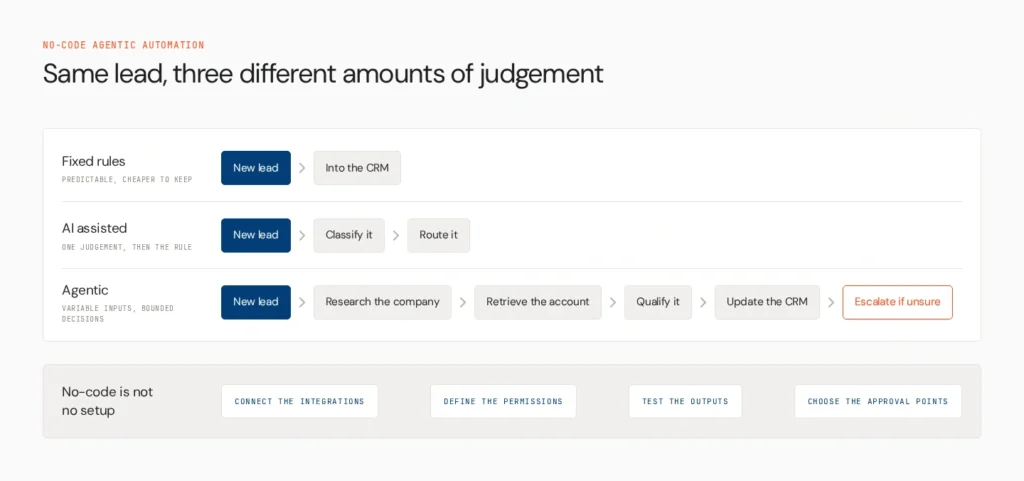
No-code agentic process automation uses configurable AI agents to handle business processes involving multiple steps, information sources, tools, and decisions, with little or no conventional programming.
Traditional workflow automation follows predefined rules. For example, a workflow might send every new lead from a form into a CRM. An AI-assisted workflow could classify the lead before routing it. An agentic workflow might research the company, retrieve relevant account information, qualify the lead against defined criteria, update the CRM, and escalate uncertain cases to a sales representative.
The distinction matters because not every process needs an agent. Predictable tasks are often cheaper and easier to manage with fixed rules. AI agents are more useful when a process involves variable inputs, interpretation, or decisions within clearly defined boundaries.
No-code also does not mean no setup. Teams still need to configure integrations, define permissions, test outputs, and decide which actions require human approval.
For a deeper look at the category, see Lyzr’s guide to agentic workflow automation.
How We Compared the Platforms
This comparison considers the capabilities that matter when moving from a visual prototype to a working business process.
- Ease of building: Can a business user create and modify workflows without writing substantial code?
- Agent capabilities: Can the platform support tool use, knowledge retrieval, and decisions based on context?
- Workflow complexity: Does it support branching, multiple steps, and exception handling?
- Integrations: Can it connect to the applications and data sources a process depends on?
- Human oversight: Can teams add approvals, reviews, and escalation paths?
- Testing and deployment: Can teams inspect runs, troubleshoot errors, and deploy workflows in an appropriate environment?
The platforms below are compared by their documented capabilities and intended use cases, rather than by identical hands-on tests of every product. Check current plans and documentation before making a purchase decision.
1. Lyzr Agent Studio

Lyzr Agent Studio is a low-code and no-code environment for building, testing, and deploying AI agents. It supports configurable agent instructions, knowledge bases, tools, model selection, and API-based integration.
For example, a sales operations team could build an agent that researches an incoming lead, retrieves relevant company information, checks qualification criteria, and prepares a CRM update. A more involved workflow could divide research, qualification, and review between specialized agents.
The platform supports integrations through tools and APIs, while its documentation describes options for testing agents before deployment. Lyzr also documents deployment choices that include private infrastructure options, depending on the product configuration.
Its main advantage is the ability to build custom agent behavior rather than limiting automation to predefined app-to-app actions. Teams should still account for integration configuration, testing, and technical support when connecting complex internal systems.
Explore Lyzr Agent Studio to see how it fits your workflow requirements.
Best for: Building custom AI agents and multi-step business workflows
2. Relevance AI

Relevance AI lets teams create agents, equip them with tools and knowledge, and coordinate multiple agents through its workforce approach. Its visual builder and templates can help users get started without building every component from scratch.
Consider a market research process in which one agent gathers company information, another organizes findings, and a third prepares a summary for review. Relevance AI’s workforce model is designed to coordinate specialized agents across multi-step tasks.
The platform also documents human oversight and approval workflows, which can be useful when a process needs a person to review an output before the next action.
Relevance AI is worth evaluating for teams that want an AI workforce rather than a single-purpose assistant. Before committing, check how its integrations, usage limits, and administrative features align with your existing systems and expected workload.
Best for: Building AI workforces with specialized agents
3. MindPal

MindPal focuses on creating AI agents and connecting them into workflows. Users can start with an agent description, adapt a template, or configure an agent from scratch.
A content operations team, for instance, could create a research agent, a drafting agent, and a review agent, then organize their work into a repeatable process. Knowledge sources can help agents work with business-specific information rather than relying entirely on general model knowledge.
MindPal is a candidate for teams that want to experiment with agent-based workflows without starting with a code-first framework. The key evaluation is whether its integrations, review controls, and workflow complexity support the process you actually need to automate.
For enterprise use, validate data access, administrative controls, and deployment requirements before moving sensitive processes into production.
Best for: Non-technical teams building multi-agent workflows
4. MindStudio

MindStudio allows users to create AI agents by describing what they want to build and refining the resulting workflow. It also promotes integrations with business applications, including the ability to connect to services that expose APIs.
A team could build an agent that monitors competitor websites, summarizes changes, and prepares a report for review. Another use case might involve analyzing incoming customer messages and preparing structured information for a CRM.
MindStudio is useful when a business needs a tailored AI workflow without building the entire application from scratch. However, the level of technical effort can vary with the process. Simple agents may be straightforward to configure, while custom integrations and more complicated logic can require additional setup.
Review the available integrations and deployment options against your specific requirements, especially if the workflow needs to interact with internal systems or sensitive data.
Best for: Creating custom AI agents for business tasks
5. n8n
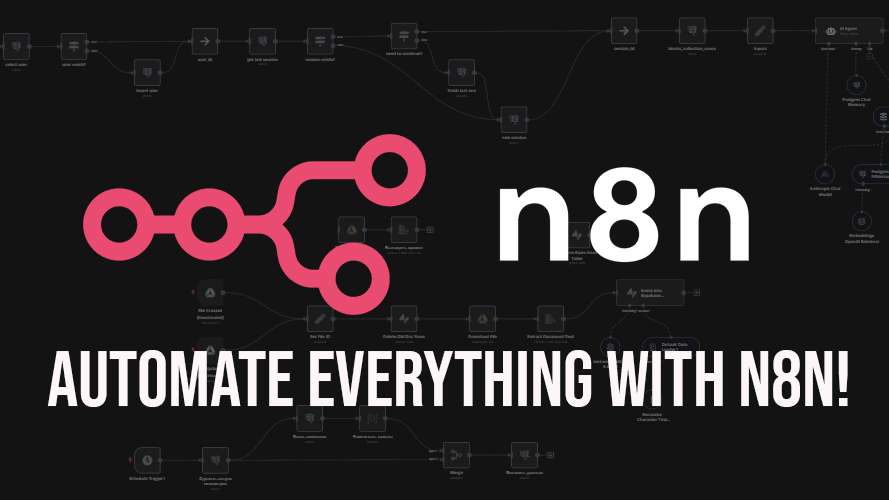
n8n combines a visual workflow editor with application integrations and AI-agent capabilities. Teams can connect triggers, data transformations, AI steps, and downstream actions in one workflow.
For example, an incoming support request could trigger a workflow that retrieves customer details, uses an agent to classify the issue, routes routine cases, and sends uncertain cases to a support representative.
One advantage is that teams can keep predictable operations deterministic and use AI only where interpretation or judgment is needed. This can make workflows easier to inspect and help avoid unnecessary model calls.
n8n also supports self-hosting, which may appeal to teams that want more control over their infrastructure. That flexibility comes with operational responsibility: teams must account for setup, maintenance, credentials, and workflow reliability. It is often a stronger fit for technically comfortable teams than for users who want a completely managed, no-configuration experience.
Best for: Combining AI agents with complex application workflows
6. Zapier with AI by Zapier

Zapier is known for connecting business applications through triggers and actions. Its AI capabilities let teams incorporate reasoning and AI-powered tasks into these workflows.
A lead-management workflow could receive a form submission, use AI to classify the lead, enrich the record with available information, and route it to the appropriate sales representative. The surrounding automation can still handle predictable steps through conventional rules.
Zapier is a practical starting point for businesses that already depend on its application ecosystem and want to add AI without introducing a separate agent-development environment.
One distinction is important for buyers: Zapier announced that its standalone Agents capabilities are moving into AI by Zapier, where AI steps can be combined with triggers, actions, and other workflow logic. Teams researching older Zapier Agents tutorials should confirm that the instructions and features still apply to the current product.
For highly customized multi-agent systems, compare the available orchestration and control options with a dedicated agent-building platform.
Best for: Adding AI-driven actions to existing app automations
7. FlowForma

FlowForma is a no-code process automation platform focused on business workflows, forms, and process management within Microsoft 365 and SharePoint Online environments.
It can be relevant when the primary challenge is standardizing a process such as employee onboarding, document review, or compliance approvals. Its AI-powered process creation features are designed to help users turn process information into working forms and workflows that can then be refined.
FlowForma belongs in this comparison because agentic process automation often needs more than an AI agent. It also needs clear responsibilities, review steps, and repeatable business rules.
However, buyers should distinguish AI-assisted process automation from autonomous agent orchestration. If a use case depends on multiple agents making context-sensitive decisions and calling tools dynamically, verify that the required functionality is supported rather than assuming all AI process automation is agentic.
Best for: Structured business processes with approvals and Microsoft 365 integration
8. Langflow

Langflow provides a visual environment for building AI applications, connecting components, and creating agent workflows. It supports major model providers and a range of AI tools and data components.
A team could use a visual flow to retrieve information from a knowledge source, pass it to an agent, and return a structured answer. More advanced workflows can incorporate custom components and code, giving technical teams greater control over how the system behaves.
Langflow may suit organizations that want the speed of visual development but still have developers available for customization and deployment. It is less appropriate for buyers who expect every complex integration and production requirement to be handled without technical involvement.
Evaluate how much of the intended workflow can be built with existing components and what your team would need to maintain itself.
Best for: Visually building AI applications with technical flexibility
9. Microsoft Copilot Studio

Microsoft Copilot Studio is a low-code platform for creating agents and connecting them to business knowledge, actions, and workflows. It is particularly relevant to organizations already using Microsoft 365, Power Platform, and Azure services.
A business team could build an agent that answers internal policy questions, retrieves approved information, and initiates a process through supported connectors or Power Automate workflows.
Its appeal lies in its fit with the Microsoft ecosystem and the ability to combine conversational agent experiences with existing business processes. Organizations should still examine licensing, connector availability, environment setup, and the permissions required for each action.
For businesses with a mixed technology stack, assess whether the platform can reach the systems the workflow depends on without creating additional integration overhead.
Best for: Building agents around Microsoft business applications
No-Code Agentic Process Automation Platforms Compared
| Platform | Best fit | Main approach | What to check |
| Lyzr Agent Studio | Custom business agents and multi-step workflows | Agent building, tools, knowledge, APIs | Integration configuration and deployment requirements |
| Relevance AI | Coordinated AI workforces | Agents, tools, visual multi-agent workflows | Governance and enterprise fit |
| MindPal | Accessible multi-agent workflows | Agent builder and workflow coordination | Integrations and administrative controls |
| MindStudio | Custom AI task automation | Visual agent creation and integrations | Technical effort for advanced workflows |
| n8n | Integration-heavy automation | Visual workflows with AI steps | Hosting and maintenance responsibilities |
| Zapier with AI by Zapier | Connecting AI to business apps | AI steps within app automations | Current product features and usage costs |
| FlowForma | Structured process automation | Forms, workflows, approvals | Whether required agent capabilities are supported |
| Langflow | Custom AI applications | Visual components and agent flows | Technical customization and operations |
| Microsoft Copilot Studio | Microsoft-centric environments | Low-code agents and business connectors | Licensing and cross-platform integration |
The table is a starting point, not a universal ranking. The strongest choice depends on the workflow, required integrations, and who will maintain it.
How to Choose the Right Platform
Start with the process you want to improve, not the platform’s feature list.
For straightforward app-to-app tasks: Consider tools such as Zapier or n8n when the process follows a predictable sequence and needs broad application connectivity.
For processes that require interpretation: Look for agent-building capabilities, knowledge retrieval, tool use, and the ability to handle incomplete or ambiguous information. Lyzr Agent Studio, Relevance AI, MindPal, and MindStudio are candidates to evaluate.
For multi-agent workflows: Check how agents pass tasks and context between each other, how failures are handled, and whether you can inspect individual steps. A visual canvas alone does not guarantee reliable orchestration.
For structured processes and approvals: Evaluate how the platform handles human review, permissions, auditability, and exception routing. FlowForma may suit structured process management, while Microsoft Copilot Studio can be relevant in Microsoft-centric environments.
For sensitive enterprise workflows: Review deployment options, access controls, data handling, logging, and the level of oversight available. Confirm the specific plan and configuration rather than relying on general security claims.
Before committing, pilot one real process. Measure completion quality, error rates, time saved, integration reliability, and how often a human must intervene. Include unusual inputs and failure scenarios in the test, not just the happy path.
For guidance on moving beyond a prototype, see Lyzr’s How to Take Agents to Production playbook.
Build AI Workflows Around Your Business Processes
Choosing a platform is only the first step. The real work is translating a business process into reliable agent behavior, connecting the right systems, testing edge cases, and defining when a person should step in.
Lyzr Agent Studio helps teams build, test, and deploy AI agents tailored to their workflows, with tools and APIs for connecting agents to existing applications.
Explore Lyzr Agent Studio to see how it could fit your automation requirements, or book a demo to discuss a specific use case.
Frequently Asked Questions
It depends on the process. Lyzr Agent Studio is worth evaluating for custom AI agents and multi-step business workflows. Relevance AI and MindPal focus on agent teams, while n8n and Zapier are strong candidates when application integration is central to the workflow.
Yes. No-code and low-code builders let users configure agent instructions, connect data, and create workflows visually. More complex integrations, security requirements, and production deployments may still require technical support.
Start with a small process that has a clear input and expected output. Use a visual builder or template, connect only the tools needed, test typical and unusual cases, and add human review before allowing consequential actions.
Traditional no-code automation connects predefined steps and follows configured rules. Agentic process automation adds AI agents that can interpret context, retrieve information, use tools, and make bounded decisions within the workflow. Many platforms combine both approaches.
They can automate substantial portions of a process, but full automation depends on data quality, integrations, reliability, and the consequences of an incorrect action. Processes involving money, sensitive data, or important business decisions may still require approval and escalation steps.
Book A Demo: Click Here
Join our Slack: Click Here
Link to our GitHub: Click Here
Got a use case in mind?
8 weeks from use case to agents running in production.
Platform, people and FDEs, all in. Bring your environment. We'll co-build and stay until it's live.
Talk to UsFree resource
101 AI Agents Use Cases
100+ production-ready AI agent use cases across Marketing, Sales, HR, Banking, Insurance, Operations and a lot more
Download now