TL;DR
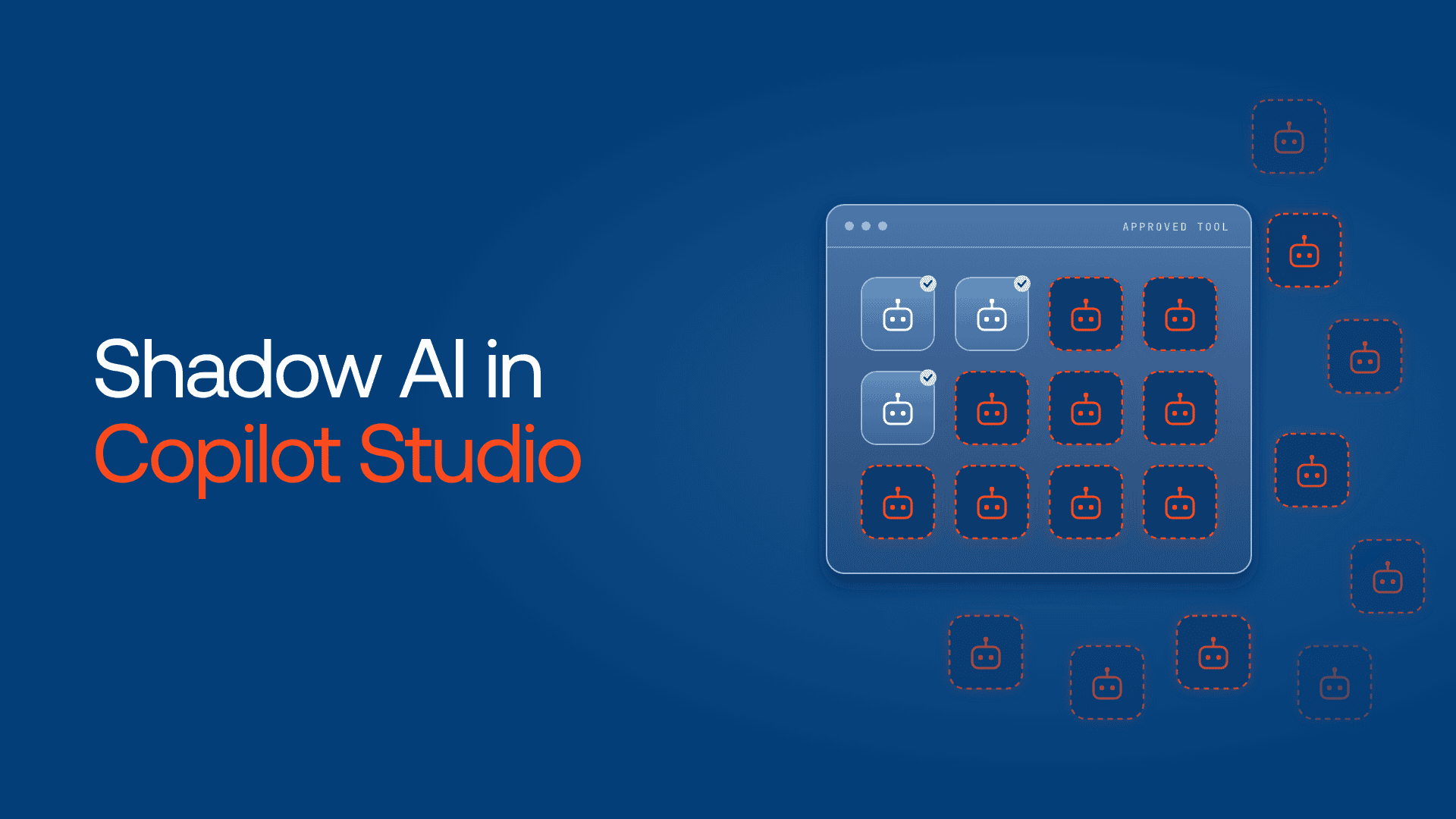
- Shadow AI in Copilot Studio means agents employees build, connect and share in Copilot Studio without IT or security review.
- It’s different from unapproved consumer AI apps. Microsoft’s Shadow AI page in the Microsoft 365 admin center tracks those apps, not Copilot Studio agents.
- Shadow agents grow out of defaults: a shared default environment, tools that can run on the maker’s own credentials, and wide sharing.
- Switching Copilot Studio off doesn’t remove the demand. The work moves to flows, SaaS AI features and agents on other platforms.
- Microsoft’s controls govern agents built on Power Platform well. Agents everywhere else need one control plane in the call path.
Picture an IT team that gives a handful of approved builders access to Copilot Studio. A few months later, someone opens the agent inventory in the Power Platform admin center and finds far more agents than builders. One, an invoice helper, reads a finance SharePoint library through its maker’s own connection and is shared with a Teams channel that includes contractors.

Nobody broke a rule. Every agent was built in an approved tool, on settings Microsoft allows by default. That’s what makes shadow AI in Copilot Studio different from the shadow AI agents most guides describe: it grows inside the platform you approved.
What is shadow AI in Copilot Studio?
Shadow AI in Copilot Studio means AI agents that employees build, connect and share in Microsoft Copilot Studio without IT or security review. They often run on broad connectors, sometimes with the builder’s own credentials, so anyone they’re shared with can reach the builder’s data. They’re different from consumer AI apps used outside Microsoft 365.
The term covers two different things, and Microsoft tracks them in different places.
| Shadow AI apps around Microsoft 365 | Shadow agents in Copilot Studio | |
| What it is | Consumer or desktop AI apps used without approval | Agents built in an approved builder without review |
| Who creates it | Employees installing an app | Makers in Copilot Studio or Agent Builder |
| Where it runs | Employee devices and browsers | Power Platform environments in your tenant |
| Where Microsoft shows it | Shadow AI page, Microsoft 365 admin center (preview) | Power Platform inventory and the Agent 365 registry |
Microsoft’s Shadow AI page, a Frontier preview, uses Microsoft Defender for Endpoint to detect desktop apps such as ChatGPT Desktop and Ollama. Blocking works today for only one listed app, on Intune-enrolled Windows devices. The page doesn’t mention Copilot Studio agents. Those appear in the Power Platform inventory, which lists agents built in Copilot Studio and Agent Builder.
How shadow agents form inside an approved tool
Mostly through defaults. A maker builds in the shared default environment, connects a tool with their own credentials and shares widely. Each step is allowed until an admin turns it off.
The default environment
Every tenant comes with a default environment. Microsoft’s environment strategy guidance says you can’t block access to it, and that it isn’t meant for work beyond personal productivity. Environment routing, a premium governance feature, can send makers to their own developer environments instead. It’s off by default, and only a Power Platform admin can turn it on.
Maker-provided credentials
Each tool authenticates either as the person chatting or as the maker. Copilot Studio’s security scan uses end-user credentials as the default for connectors and flows, and warns if a maker switches. But at the environment level, both options are enabled by default. Once a maker picks their own credentials, everyone using the agent borrows the maker’s access.

Sharing and channels
An agent shared org-wide, or published to Teams or a website, reaches people the maker never pictured. The same scan warns on org-wide sharing and on agents with no authentication, which anyone with the link can use. Warnings inform makers; they don’t stop them.
Reaching outside Microsoft
Connectors, HTTP requests, flows and MCP servers let an agent call systems far beyond Microsoft 365. Microsoft’s own documentation notes that when you connect an external MCP server, you’re responsible for the tools and data you access.
The invoice helper hit all four.
Copilot Studio security risks from shadow agents
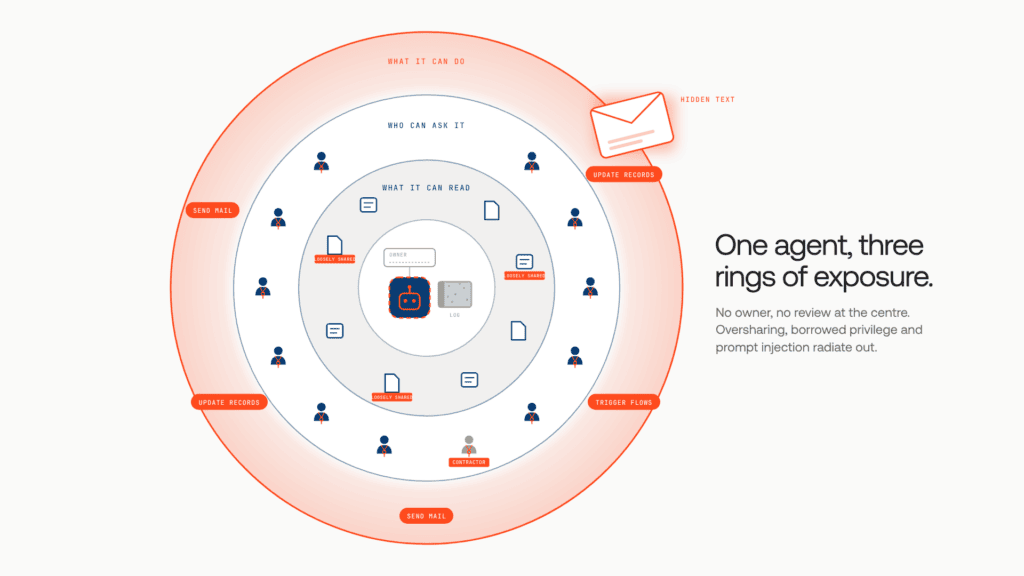
The risk isn’t that agents exist. It’s that they act with access nobody reviewed, for audiences nobody approved.
Oversharing through broad connectors
An agent grounded in a SharePoint site or a CRM answers with whatever its connection can see. Loose permissions on the source become searchable in plain language.
Borrowed privilege
With maker-provided credentials, a contractor in a Teams channel can read what a finance analyst can. Nobody granted that access. The agent did.
Prompt injection that reaches actions
Hidden instructions in a document or email can steer an agent with tools. When that agent can send mail, update records or trigger flows, a successful injection becomes an action, not just a wrong answer.
No owner, no review
Makers change roles and drafts linger. An ownerless agent keeps its connections, and its activity sits in logs nobody watches. For regulated teams, that’s an audit gap before it’s a security one.
Why switching off Copilot Studio doesn’t end shadow AI
Because the demand stays. Block maker access and the same work moves somewhere you can see less.
Disabling agent creation is the obvious reflex, but the builders’ needs don’t vanish. They become a Power Automate flow, a SaaS AI feature, a browser extension, a personal chatbot account or a quick Python agent on a team’s cloud account, each further from Copilot Studio’s controls.
Microsoft’s own FastTrack guidance makes the same case: offer sanctioned agents so people stop reaching for unsanctioned ones. It’s the shadow IT lesson, repeated. Keep Copilot Studio open, govern it, and plan for agents that appear elsewhere anyway.
How to find shadow agents in Copilot Studio
Start with Microsoft’s inventory, narrow it to risky agents, then match each one to an owner.
- Open the inventory. In the Power Platform admin center, go to Manage > Inventory. It lists agents built in Copilot Studio and Agent Builder, drafts included. Start with the default environment.
- Know which count you need. The Microsoft 365 admin center also lists agents your organization didn’t build, so the numbers won’t match.
- Check connectors. The inventory shows the connectors each agent uses. Flag sensitive data sources, HTTP requests and non-business connectors.
- Look for borrowed access. Review published agents for maker-provided credentials, no authentication and org-wide sharing.
- Read the trail. Pull maker audit logs from Microsoft Purview, and agent activity alerts from Microsoft Sentinel if you use it, as Microsoft’s security and governance overview describes.
- Assign or retire. Each agent gets an owner, a purpose and a review date, or it’s switched off.
Any inventory is a snapshot: it shows what exists today, not what an agent calls tomorrow.
Find the shadow agents Copilot Studio can’t show you. Power Platform inventory stops at Power Platform. Our white paper, The Shadow Agent Crisis, shows how to find agents across clouds, Kubernetes and developer laptops, and bring each one under a registry, an identity and an enforcement point. Get the white paper →
Copilot Studio governance: the controls to set
Most of what you need already sits in Microsoft’s admin centers. The work is turning it on.
| Control | What it prevents | Where to set it |
| Environment routing | Every maker building in the shared default environment | Power Platform admin center, tenant settings |
| Data policies | Unapproved connectors, HTTP requests, channels and authentication modes | Power Platform admin center |
| Maker credential options | Users borrowing a maker’s access | Power Platform admin center, per environment or environment group |
| Generative AI publishing | Agents with generative AI features being published | Power Platform admin center, tenant-wide |
| Agent availability in Microsoft Copilot | Users finding agents nobody approved | Microsoft 365 admin center |
| Audit and alerts | Activity nobody can reconstruct | Microsoft Purview and Microsoft Sentinel |
| Agent 365 | Agents without an Entra identity, owner or access policy | Microsoft 365 admin center |
One caveat: once maker credentials are blocked, Microsoft says scheduled and autonomous agents fail, because every tool call needs a live user sign-in. Plan for them first.
Where Microsoft’s controls stop
They’re strong for agents built on Power Platform and thinner for everything around it, which is where shadow AI goes next.
- Inventory has edges. Power Platform inventory shows only agents built on Power Platform. The Agent 365 registry aims wider, but a list isn’t a checkpoint. It can’t decide an agent’s next call.
- Policies have edges. Data policies govern Power Platform connectors, not a Python agent on another cloud, a vendor’s built-in agent or an agent in a pipeline.
- Agents call agents. Copilot Studio agents increasingly call, and get called by, agents built elsewhere. Gartner predicts that by 2028 an average global Fortune 500 enterprise will have over 150,000 agents in use, up from less than 15 in 2025.
Picture the estate after cleanup: governed Copilot Studio agents, flows calling outside APIs, data science agents on another cloud and a vendor’s CRM agent. Microsoft governs the first group well. Nothing governs all of them in one place.
How Lyzr Opencontroller governs agents beyond Copilot Studio
That missing place is the call path, where every governed agent request passes. It’s where Lyzr Opencontroller sits.
Opencontroller is a control plane for AI agents: find every AI agent across your clouds, give each one an owner, and control what it can call, spend and touch. Every governed action can be authenticated, authorized, budgeted and checked before it reaches a model, tool or enterprise system. Agents stay on their current runtimes, and Opencontroller enforces policy wherever their traffic passes through its gateways. You change an endpoint, not your application.
It doesn’t replace Power Platform data policies or Agent 365. It adds one policy layer across everything else, and at the boundary where other agents call yours.
| The gap Microsoft’s tools leave | How Opencontroller handles it |
| Agents spread across clouds and builders | Finds AI agents across your clouds and gives each one an owner |
| A different policy model on each platform | One policy, checked before a call reaches a model, tool or system |
| Calls to systems nobody approved | Model and tool calls go only to destinations you authorize |
| Other agents calling a Copilot Studio agent | Logs the outgoing request and the returned response, and checks them against policy at the boundary |
| A risky request | Refuses, masks or redirects it before the action completes |
That boundary is deliberate. Opencontroller treats a Copilot Studio agent as a black box: it governs what goes in and what comes back, not what happens inside Microsoft’s runtime. It runs inside your trust boundary, across clouds, private infrastructure and developer devices.
Back to the invoice helper. Rebuilt with end-user credentials, it stays under Microsoft’s controls. The flows and cloud agents that call it route through Opencontroller, so every request is checked against policy and logged with the calling agent’s identity. Four kinds of agents, one place to answer the CISO.
Book a demo to see how Opencontroller governs agents across Copilot Studio and every other platform you run.
Frequently asked questions
Shadow AI in Copilot Studio is AI agents that employees build, connect and share in Microsoft Copilot Studio without IT or security review. They often use broad connectors or the maker’s own credentials, so they can expose data to people who shouldn’t see it.
No. Shadow AI in Microsoft 365 usually means unapproved consumer AI apps, which Microsoft’s Shadow AI page detects on devices. Shadow Copilot Studio agents are built inside your tenant and appear in the Power Platform inventory.
In the Power Platform admin center, go to Manage > Inventory. It lists Copilot Studio and Agent Builder agents, drafts included, with their connectors. Then review sharing, credentials and Purview audit logs.
Usually not. It pushes the same work into flows, SaaS AI features and other platforms. Route makers to their own environments, set data policies and block maker-provided credentials where you don’t need them.
Copilot Studio agents register in the Agent 365 registry automatically when they’re created, with publisher details and an Entra identity. The separate Shadow AI page, still in preview, targets desktop AI apps instead.
In the Power Platform admin center, set an environment’s maker credential options to end-user credentials only. Plan separately for scheduled and autonomous agents, which fail without a live user sign-in.
Book A Demo: Click Here
Join our Slack: Click Here
Link to our GitHub: Click Here
Got a use case in mind?
8 weeks from use case to agents running in production.
Platform, people and FDEs, all in. Bring your environment. We'll co-build and stay until it's live.
Talk to UsFree resource
101 AI Agents Use Cases
100+ production-ready AI agent use cases across Marketing, Sales, HR, Banking, Insurance, Operations and a lot more
Download now