An AI agent can identify a customer refund request, check the transaction history, validate the refund policy, and prepare the transaction in seconds. But should it actually issue the refund without anyone reviewing it?
The same question applies when an agent wants to update a customer record, send a contract, modify a production database, approve an expense, or trigger a financial transaction.
The problem isn’t necessarily whether the agent can perform these actions. It’s whether the organization is comfortable letting it execute them without human intervention.
This is where human-in-the-loop (HITL) workflows for AI agents become important.
HITL introduces human decision points into an agent’s execution process. Instead of allowing an agent to independently complete every task, the workflow pauses at specific stages and waits for a person to review, approve, reject, or modify the proposed action.
However, not every HITL solution works the same way. Some provide developers with execution-level controls, some offer visual approval workflows, and others help enterprises establish consistent oversight across multiple agents.
In this guide, we’ll compare the best tools for AI agent HITL workflows, examine how their approval mechanisms work, and help you determine which solution fits your technical requirements, operational processes, and governance needs.
What Is Human-in-the-Loop (HITL) in AI Agent Workflows?
Human-in-the-loop is an approach to AI system design in which a human participates in an AI agent’s decision-making or execution process.
In a conventional automation workflow, an action follows a predefined sequence. Once triggered, the system executes the next steps automatically.
An AI agent operates differently. It can interpret instructions, choose which tools to call, gather information, and decide what action to take next. This flexibility makes agents useful for complex tasks, but it also introduces uncertainty around what they might execute.
HITL addresses this by introducing explicit human checkpoints.
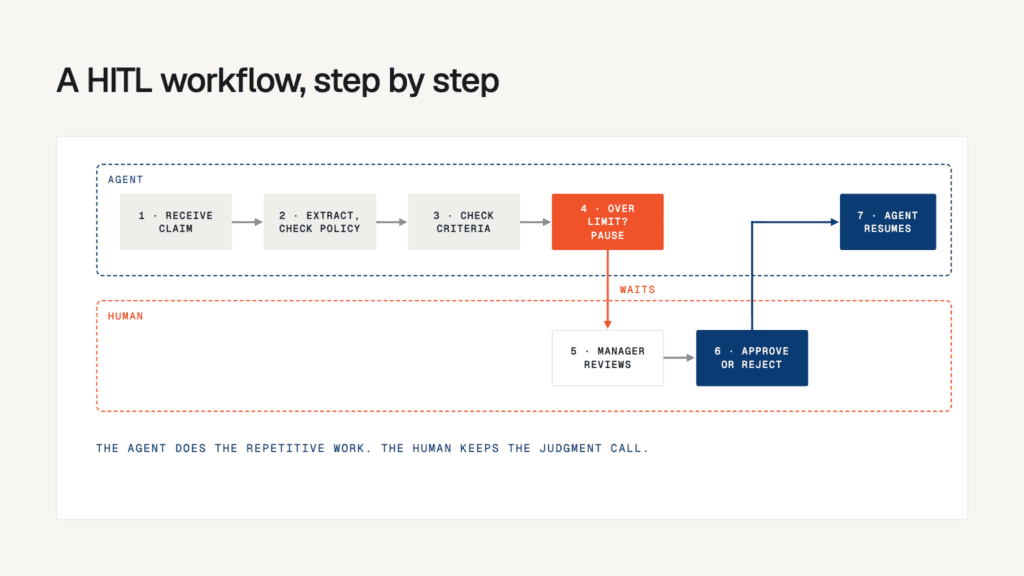
Consider an AI agent responsible for processing employee expense claims:
- The agent receives an expense submission.
- It extracts the transaction details and checks the expense policy.
- It identifies whether the expense meets the approval criteria.
- If the expense exceeds a predefined threshold, the agent pauses execution.
- A finance manager reviews the expense, supporting information, and proposed decision.
- The manager approves or rejects the request.
- The agent resumes execution based on the decision.
The agent still handles the repetitive work. The human retains control over the decision that requires judgment or authorization.
HITL vs. Human-on-the-Loop: What’s the Difference?
These terms are related, but they describe different levels of human involvement.
| Approach | How it works | Human involvement | Best suited for |
|---|---|---|---|
| Human-in-the-loop (HITL) | Agent pauses and waits for a human decision before proceeding | Direct approval or intervention | Financial transactions, sensitive updates, high-risk actions |
| Human-on-the-loop (HOTL) | Agent operates autonomously while a human monitors its activity | Continuous supervision and intervention when needed | Customer support, operational monitoring, routine automation |
| Human-out-of-the-loop | Agent executes tasks without requiring routine human intervention | Minimal or no direct involvement | Low-risk, predictable, well-tested tasks |
The distinction matters because adding a notification to an agent workflow doesn’t automatically make it a human-in-the-loop system.
If an agent sends a message saying it is about to delete a record but continues executing regardless of the response, the human doesn’t actually control that action.
A meaningful HITL workflow must make human intervention part of the execution logic. The agent should not proceed with a restricted action until the required decision has been received.
Why Do AI Agent Workflows Need Human Approval?
The need for human oversight becomes clearer when agents move from answering questions to taking actions.
An agent that summarizes an internal report has a different risk profile from one that can approve payments or modify customer records. Applying the same level of supervision to both creates two problems: too much manual intervention in routine tasks and too little control over consequential actions.
Consider three scenarios:
| AI agent task | Potential risk | Recommended human involvement |
|---|---|---|
| Summarizing internal documents | Low | Review samples or monitor outputs |
| Sending customer communications | Medium | Review sensitive or unusual messages |
| Issuing refunds or processing payments | High | Mandatory approval before execution |
| Modifying production databases | High | Authorization and validation before execution |
| Updating compliance policies | High | Expert review and documented sign-off |
The objective isn’t to put a human in front of every agent action. That would defeat much of the purpose of automation.
Instead, teams need to identify which decisions can be automated, which require supervision, and which must remain under human authority.
Five capabilities every AI agent HITL workflow should have
Before comparing platforms, it’s useful to establish what a proper human-in-the-loop system needs to support.
1. Execution pause and resume
The agent must be able to stop at a defined decision point without losing its progress. Once a reviewer responds, the workflow should resume from the appropriate state rather than restarting the entire task.
2. Context-rich approval requests
A reviewer should see what the agent intends to do, why it proposes the action, what information it used, and what could happen next. An approval request containing only an Approve button is rarely sufficient for consequential decisions.
3. Flexible human decisions
The workflow should ideally support approval, rejection, modification, and requests for additional information. Rejecting an action and correcting its proposed parameters are different operations.
4. Role-based approval routing
Not every employee should be able to approve every agent action. A financial transaction might require finance authorization, while a change to customer-facing content might require a marketing or compliance reviewer.
5. Auditability and traceability
The system should record the proposed action, relevant context, reviewer identity, decision, timestamp, and final execution status. This becomes particularly important when organizations need to investigate incidents or demonstrate compliance.
These capabilities form the basis for evaluating the tools below.
Quick Comparison: Best Tools for AI Agent HITL Workflows
The following comparison covers agent frameworks, automation platforms, enterprise workflow solutions, and dedicated approval infrastructure. They solve different parts of the HITL problem, so the best choice depends on where your agents run and how much approval infrastructure you want to build yourself.
Legend: ✅ Supported capability · ❌ Not a native, documented capability of the core solution · ⚠️ Depends on configuration, integrations, or additional development.
| Platform | Execution pause / approval | Human review interface | Workflow persistence | Best suited for |
|---|---|---|---|---|
| Lyzr Agent Studio | ⚠️ Workflow-dependent | ⚠️ Configurable | ⚠️ Depends on implementation | Enterprise agent development and supervised workflows |
| LangGraph | ✅ | ⚠️ Build your own | ✅ With checkpointers | Custom, stateful AI agents |
| OpenAI Agents SDK | ✅ | ⚠️ Build your own | ⚠️ Application-managed | OpenAI-based agent applications |
| n8n | ✅ | ✅ Via connected channels | ✅ For supported wait workflows | Low-code automation and tool approvals |
| Microsoft Copilot Studio | ✅ | ✅ Via Microsoft workflow integrations | ⚠️ Depends on workflow configuration | Microsoft-centric enterprises |
| Amazon Bedrock Agents | ✅ | ⚠️ Application-dependent | ⚠️ Depends on implementation | AWS-based enterprise agents |
| CrewAI | ✅ | ⚠️ Custom implementation | ⚠️ Depends on flow and persistence setup | Multi-agent systems |
| Temporal | ⚠️ Implemented through signals and workflow logic | ⚠️ Build your own | ✅ Durable workflow execution | Long-running approval processes |
| HumanLayer | ✅ | ✅ Via supported integrations | ⚠️ Depends on integration and setup | Dedicated human approval infrastructure |
Comparison reflects the documented capabilities and product architecture, not a claim that every platform provides an identical, ready-to-use approval experience. In particular, Lyzr’s documented Approval Flows govern agent promotion between environments; they should not be confused with per-action runtime approval.
10 Best Tools for AI Agent HITL Workflows
1. LangGraph – Best for Custom, Stateful Human-in-the-Loop Workflows
Best for developer-led implementations
When developers build AI agents that perform multiple operations, a simple approval prompt isn’t always enough. They need to control exactly where execution stops, what information gets passed to the reviewer, and how the agent continues after a decision.
This is where LangGraph is particularly useful.
LangGraph is a framework for building stateful, multi-step agent workflows. Its human-in-the-loop capabilities allow developers to interrupt execution at specific points, wait for human input, and resume the workflow using its existing state.
One of its important mechanisms is interrupt(). Developers can use it to pause a graph node and surface a request for human intervention. Once the reviewer responds, execution resumes using Command(resume=...).
Key HITL capabilities:
- Execution interruption: Pause an agent before a sensitive tool call or decision.
- State persistence: Use checkpointers to preserve workflow state while waiting for approval.
- Human feedback: Pass reviewer input back into the workflow.
- Custom approval logic: Implement different approval conditions for different actions.
- Flexible orchestration: Add human checkpoints to complex, multi-agent processes.
Example use case:
Imagine a procurement agent that identifies suitable vendors, compares quotations, and prepares purchase orders.
The agent can automate vendor research and quotation analysis. However, before submitting an order, it triggers an interruption. The procurement manager reviews the vendor, pricing, and proposed order before allowing the workflow to continue.
Where LangGraph fits best: Teams building custom AI applications that need granular control over execution, state management, and human intervention.
What to consider: LangGraph provides the execution primitives, not an entire enterprise approval department. Teams generally need to develop the reviewer interface, notification system, identity checks, and audit processes themselves.
Official resource: LangGraph Human-in-the-Loop Documentation.
2. OpenAI Agents SDK – Best for Tool-Level Approval in OpenAI-Based Agents
Best for OpenAI-based applications
OpenAI Agents SDK Part 2: How to Build Approvals, Orchestration, MCP, Tracing, and Evals
AI agents often have access to external functions that allow them to interact with business systems. These functions might retrieve customer records, send emails, update databases, or initiate transactions.
The challenge is deciding which of these operations should execute automatically and which require human authorization.
The OpenAI Agents SDK supports human approval for tool calls through its approval mechanisms.
Developers can configure tools to require approval before execution. When an approval-required tool is called, the workflow can pause and expose a pending approval request. The application can then approve or reject the request before continuing.
Key HITL capabilities:
- Tool-level approval: Require authorization for selected tool calls.
- Approval and rejection: Allow applications to handle pending requests.
- Selective intervention: Apply approval requirements to specific tools rather than every agent operation.
- Application-controlled review: Integrate approval decisions into a custom interface.
- State handling: Preserve and resume agent execution through the SDK’s run-state mechanisms.
Example use case:
A customer service agent can retrieve order information, check refund eligibility, and calculate the refundable amount.
However, issuing a refund above a defined threshold requires manager approval. The SDK’s tool approval mechanism can hold the refund operation until the application receives an authorized decision.
Where it fits best: Development teams building agents with the OpenAI Agents SDK that want approval controls close to the agent’s tool-execution layer.
What to consider: The SDK doesn’t automatically provide a complete enterprise reviewer portal, notification infrastructure, or organization-wide approval governance. Those responsibilities remain with the application.
Official resource: OpenAI Agents SDK Documentation.
3. n8n – Best for Low-Code Human Approval Automation
Best for visual workflows
Production AI Playbook: Human Oversight – n8n Blog
Not every organization has a development team available to build custom approval interfaces and agent execution logic.
Operations teams, marketing teams, and business analysts often need a simpler way to introduce human approvals into existing automations.
n8n addresses this through its visual workflow automation environment.
It supports human review for AI agent tool calls. When an agent attempts to execute a tool that requires approval, the workflow pauses and sends an approval request through a configured channel.
A reviewer can approve or deny the proposed operation before it proceeds.
Key HITL capabilities:
- Human review for tool calls: Configure approval requirements for selected agent tools.
- Multiple communication channels: Route requests through supported channels such as Slack, Microsoft Teams, and email.
- Visual workflow design: Connect approval stages with existing business automations.
- Conditional execution: Define what happens after approval or rejection.
- Integration flexibility: Connect AI agents with external applications and business systems.
Example use case:
An AI agent handles inbound sales enquiries. It qualifies leads, updates CRM information, and drafts personalized follow-up emails.
Before sending a high-value sales proposal, the workflow routes the draft to the sales manager. Once approved, n8n continues the workflow and sends the communication.
Where it fits best: Teams that want to introduce human approval into visual automation workflows without developing an entire approval system from scratch.
What to consider: Approval logic is closely tied to the workflows built in n8n. Organizations operating agents across several independent platforms may need additional integration work to establish consistent oversight.
Official resource: n8n Human-in-the-Loop Documentation.
4. Microsoft Copilot Studio – Best for Microsoft-Centric Enterprises
Best for Microsoft ecosystems
From Prompts to Autonomous: How Copilot Agents are Revolutionizing AI
For enterprises already using Microsoft 365, Teams, and Power Automate, introducing another standalone approval platform may create unnecessary operational complexity.
Microsoft Copilot Studio provides a way to incorporate human decision-making into agent workflows within the Microsoft ecosystem.
Its workflow capabilities support human approval steps and requests for additional information. A workflow can pause, collect a decision from a designated person, and continue based on the response.
This is useful when the agent needs more than a simple yes-or-no answer. Sometimes, a reviewer needs to provide missing information or clarify an instruction before the agent can proceed.
Key HITL capabilities:
- Human approval steps: Introduce explicit approval requirements into workflows.
- Information collection: Pause execution and request information from a human.
- Conditional branching: Route subsequent steps according to the reviewer’s response.
- Microsoft integrations: Connect review workflows with Microsoft business applications.
- Workflow orchestration: Combine agent activities with predefined business processes.
Example use case:
An HR agent processes employee onboarding requests. It verifies submitted information, prepares account creation requests, and identifies missing documentation.
If the request involves privileged system access, the workflow routes it to an IT administrator. The administrator can approve the request or provide additional information before the workflow continues.
Where it fits best: Enterprises already using Microsoft tools that want human approval to become part of their existing business processes.
What to consider: Advanced agent orchestration and cross-platform approval requirements may need additional components. Organizations should also distinguish Copilot Studio’s workflow approvals from broader agent-estate governance.
Official resource: Microsoft Copilot Studio.
5. Amazon Bedrock Agents – Best for AWS-Based Agent Workflows
Best for AWS environments
Implement human-in-the-loop confirmation with Amazon Bedrock Agents – DevStackTips
Enterprises building AI agents on AWS often need approval mechanisms that work alongside their existing cloud infrastructure, APIs, and security configurations.
Amazon Bedrock Agents supports action confirmation and return-of-control mechanisms that allow applications to manage certain agent actions before they are executed.
This is particularly relevant when an agent needs to interact with business applications through action groups.
Rather than treating every action as an unrestricted operation, developers can introduce confirmation requirements and return control to the application for further handling.
Key HITL capabilities:
- Action confirmation: Require confirmation for configured agent actions.
- Return of control: Allow the application to take over execution at designated points.
- Action groups: Connect agents with external APIs and business operations.
- AWS integration: Work within the wider AWS ecosystem.
- Application-level supervision: Build additional approval and authorization logic around agent actions.
Example use case:
An insurance claims agent collects information, checks policy details, and prepares a claim assessment.
Before submitting a final decision to the claims management system, the application can require human confirmation. An authorized claims specialist reviews the assessment before the action is completed.
Where it fits best: Organizations developing agents on AWS that want to incorporate human authorization into agent actions.
What to consider: The application still needs to handle important parts of the reviewer experience, including routing, notifications, identity verification, and approval records.
Official resource: Amazon Bedrock Agents Documentation.
6. CrewAI – Best for Human Oversight in Multi-Agent Systems
Best for multi-agent workflows
AI Agent Frameworks 2026: CrewAI vs AutoGen vs More
Multi-agent systems introduce another layer of complexity.
An individual agent might research information, another might analyze it, and a third might prepare a recommendation. If these agents operate as a coordinated team, deciding where human intervention belongs becomes an important part of workflow design.
CrewAI provides a framework for creating collaborative AI agents through Crews and Flows.
Its human input and feedback mechanisms allow developers to introduce human participation into tasks and processes.
This is useful when human review needs to happen between agent activities rather than only at the end of the entire workflow.
Key HITL capabilities:
- Human input: Introduce human responses into agent tasks.
- Multi-agent coordination: Combine specialized agents with human review stages.
- Flow-based orchestration: Structure workflows around defined execution steps.
- Conditional routing: Use human feedback to influence subsequent workflow actions.
- Custom integrations: Connect human review processes with external systems.
Example use case:
A research workflow uses three agents: one gathers market information, another evaluates competitors, and a third prepares an investment recommendation.
Before the final recommendation is generated, a human analyst reviews the collected evidence and corrects inaccurate or incomplete findings.
The workflow then continues with the revised information.
Where it fits best: Development teams building collaborative multi-agent applications that need human feedback at different stages.
What to consider: CrewAI provides building blocks for human interaction, but a production-ready enterprise approval system requires additional work around reviewer management, persistence, authorization, and audit trails.
Official resource: CrewAI Documentation.
7. Temporal – Best for Long-Running Human Approval Processes
Best for durable workflows
How Durable Execution works | Temporal
Some human approval requests are resolved in seconds. Others can take hours or even days.
For example, an AI agent might prepare a compliance report that needs to pass through legal, finance, and executive review. The workflow cannot simply disappear because a reviewer hasn’t responded immediately.
This is where Temporal becomes relevant.
Temporal is a durable execution platform designed to maintain workflow progress across failures and interruptions. Developers can implement human approval processes using signals or updates that allow external systems to communicate decisions to running workflows.
Key HITL capabilities:
- Durable execution: Maintain workflow progress across process failures.
- Human approval through signals: Receive external approval decisions.
- Long-running workflows: Support processes that remain open for extended periods.
- Workflow history: Track execution events and state transitions.
- Retry handling: Manage failures and retry eligible operations.
Example use case:
An AI agent prepares a regulatory filing and routes it through legal, compliance, and finance.
Each department reviews the relevant information and submits its decision. Temporal maintains the workflow while the approvals are pending and advances it when the required conditions are met.
Where it fits best: Enterprises building complex workflows where approvals can remain pending for hours or days.
What to consider: Temporal is workflow infrastructure rather than a ready-made HITL review application. Developers must build the approval interface, routing rules, and human interaction layer.
Official resource: Temporal Documentation.
8. HumanLayer – Best for Dedicated Human Approval Infrastructure
Best for approval integrations
Building an AI agent and building the infrastructure to supervise that agent are two separate engineering problems.
A development team may already have an agent running on its preferred framework. What it needs is a way to introduce human approval without rebuilding the agent architecture.
HumanLayer focuses on this problem.
It provides approval mechanisms that can be integrated into AI applications, allowing developers to request human authorization before certain operations proceed.
It is particularly relevant for teams that want to connect agent actions with existing communication channels and reviewer workflows.
Key HITL capabilities:
- Approval requests: Route selected agent actions for human authorization.
- Developer integration: Add approval logic to existing agent applications.
- Communication integrations: Support human review through channels such as Slack, email, and Discord.
- Approval policies: Configure when human intervention is required.
- Framework flexibility: Integrate approval infrastructure with different agent implementations.
Example use case:
A coding agent can inspect a repository, identify an issue, and prepare a code change.
Before executing a sensitive operation, such as modifying a production environment or initiating a deployment, it requests human approval. A reviewer receives the request and decides whether the action should proceed.
Where it fits best: Engineering teams that already have an agent framework and need dedicated approval infrastructure.
What to consider: HumanLayer addresses the approval layer, not the entire agent lifecycle. Organizations may still need separate infrastructure for discovery, monitoring, governance, and deployment controls.
Official resource: HumanLayer.
9. Agno – Best for Approval-Centric Agent Applications
Best for developer-friendly approvals
Human-in-the-Loop Example – Agno
For some teams, introducing approval into an AI agent should be as straightforward as marking a particular operation as requiring authorization.
Agno provides approval capabilities that allow developers to define which tool calls need human intervention.
Instead of creating an approval mechanism from scratch for every agent, developers can use the framework’s approval primitives to manage sensitive operations.
Key HITL capabilities:
- Tool-level approval: Identify operations that require human authorization.
- Approval APIs: Integrate approval decisions into application workflows.
- Selective intervention: Keep routine operations automated while restricting sensitive ones.
- Developer control: Configure approval behavior around agent actions.
- Audit support: Maintain approval records through the available approval infrastructure.
Example use case:
A financial analysis agent retrieves account information, calculates portfolio changes, and prepares a transaction recommendation.
The analysis can happen automatically. However, executing a transaction requires human approval through the configured approval mechanism.
Where it fits best: Developers building agents with Agno who want approval controls without implementing every approval primitive themselves.
What to consider: Teams should evaluate the available approval interfaces, persistence, and integration requirements against their own production architecture.
Official resource: Agno Documentation.
10. Lyzr Agent Studio – Best for Enterprise Agent Development and Governed Workflows
Best for enterprise agent lifecycle management
For enterprises, implementing human-in-the-loop workflows is only one part of the larger challenge.
Organizations also need to build agents, connect them with business systems, test their behavior, manage versions, and ensure that changes are reviewed before reaching production.
This is where Lyzr becomes relevant.
Lyzr provides an enterprise agent development and orchestration environment through Agent Studio. Teams can create single agents and multi-agent workflows, connect external tools and knowledge sources, and configure Responsible AI guardrails.
For human-supervised processes, the platform’s approach spans agent execution and lifecycle controls.
There are two important capabilities to understand:
1. Human-supervised agent workflows
Lyzr’s AI agents for human-in-the-loop systems focus on workflows where humans can intervene, pause, redirect, or review agent activity.
The approach includes:
- Human intervention at defined workflow stages.
- Escalation of ambiguous decisions to human reviewers.
- Role-based review and approval responsibilities.
- Feedback loops that incorporate human corrections.
- Traceability of agent actions for accountability.
2. Approval Flows for agent promotion
Lyzr Agent Studio also provides Approval Flows through GitAgent.
This is particularly important when an organization needs human approval before an agent version moves from development to production.
For example, a developer updates a customer service agent. The revised version passes through a development environment before being submitted for promotion.
A configured approval gate can require two reviewers before the version moves into production. If a reviewer requests changes, the promotion remains blocked until the changes are addressed and approved.
This creates a controlled release process rather than allowing every agent update to move directly into production.
Key capabilities:
- Agent development: Build and manage single-agent and multi-agent applications.
- Visual orchestration: Design workflows using SuperFlow.
- Responsible AI: Configure guardrails for agent behavior.
- Approval Flows: Introduce reviewer requirements between development and production branches.
- Version control: Manage agent changes through GitAgent.
- Agent visibility: Use traces to inspect agent execution, latency, and token usage.
Example use case:
A banking organization develops an AI agent that assists with internal compliance checks.
Before the updated agent is deployed, the development team submits its version for review. Compliance and engineering reviewers inspect the changes, verify that the required checks have passed, and approve the promotion.
The production version is released only after the configured approval requirements are met.
Where Lyzr fits best: Enterprises that need an environment for building and orchestrating agents alongside structured lifecycle controls, human supervision, and production governance.
What to consider: Approval Flows for promoting agent versions are not the same as a runtime approval queue for every individual tool call. Teams should identify whether they need release-stage approval, in-execution human intervention, or both.
Useful resources:
- Lyzr Agent Studio
- Lyzr Human-in-the-Loop Systems
- Lyzr Approval Flows Documentation
- Lyzr Opencontroller
How to Choose the Right HITL Tool for Your AI Agent Workflow
Looking at features alone won’t help you select the right platform.
For example, LangGraph and n8n both support human approval, but they approach the problem differently. LangGraph gives developers control over the agent’s execution state, while n8n makes it easier to introduce approval into a visual automation workflow.
Similarly, Temporal and HumanLayer solve different problems. One focuses on durable workflow execution, while the other provides approval infrastructure.
The right choice depends on what you’re trying to control.
Decision Matrix: Which HITL Tool Should You Choose?
Use this matrix to narrow down the options based on your organization’s requirements.
| If your primary requirement is… | Recommended platform | Why |
|---|---|---|
| Custom execution-level human intervention | LangGraph | Offers granular control over pauses, state, and workflow resumption |
| Tool-level approval in OpenAI agents | OpenAI Agents SDK | Provides approval mechanisms for selected tool calls |
| Visual, low-code approval automation | n8n | Supports approval steps within visual workflows |
| Approval within Microsoft business processes | Microsoft Copilot Studio | Integrates human decisions into Microsoft workflows |
| Human confirmation in AWS agent applications | Amazon Bedrock Agents | Supports confirmation and application-level control |
| Human feedback in multi-agent systems | CrewAI | Supports human input within agent tasks and flows |
| Long-running approval processes | Temporal | Provides durable workflow execution |
| A dedicated approval layer | HumanLayer | Adds human authorization to existing agent applications |
| Approval-centric agent development | Agno | Provides approval mechanisms for agent tool calls |
| Enterprise agent development and lifecycle governance | Lyzr | Combines agent development, orchestration, guardrails, and release approval capabilities |
A Practical Decision Tree
The following questions can help you make the decision without evaluating every platform in equal depth.
Step 1: Where are your agents built?
- If you’re developing custom agents with Python and need execution-level control, start with LangGraph or CrewAI.
- If you’re building on OpenAI’s agent framework, evaluate the OpenAI Agents SDK.
- If you’re already using AWS or Microsoft infrastructure, evaluate their respective agent and workflow ecosystems.
- If your team prefers visual automation, consider n8n.
Step 2: What exactly needs human approval?
This is an important distinction.
- If you need approval before individual tool calls, consider LangGraph, OpenAI Agents SDK, n8n, or Agno.
- If you need a person to review an entire workflow or provide additional information, evaluate Microsoft Copilot Studio or a custom workflow implementation.
- If you need approval before deploying an agent version, look at lifecycle and release-management capabilities such as Lyzr Approval Flows.
- If multiple agents require a shared approval mechanism, evaluate dedicated approval infrastructure such as HumanLayer.
Step 3: How long can an approval remain pending?
If a workflow needs to wait for several hours or days, execution persistence becomes important.
A simple in-memory pause may not be sufficient. You need a mechanism that preserves workflow state, handles failures, and resumes execution when the decision arrives.
Temporal and LangGraph with persistent checkpointers are worth evaluating for these requirements.
Step 4: Do you need oversight across multiple agents?
If you’re managing only one or two agents, application-level approval logic might be sufficient.
But if several teams are deploying agents across different frameworks and environments, individual approval mechanisms may not provide enough visibility or consistency.
You may need a broader governance layer that handles agent discovery, permissions, policy enforcement, monitoring, and lifecycle management.
This is where platforms such as Lyzr Opencontroller become relevant.
What Does a Production-Ready Human-in-the-Loop Architecture Look Like?
Choosing an HITL platform is only half the problem. The way you implement human approval determines whether the system actually prevents unauthorized actions.
Let’s return to the refund example.
A customer service agent receives a request for a $2,000 refund. It checks the customer’s purchase history, verifies the refund policy, and prepares the transaction.
The agent has the information it needs, but the refund exceeds the organization’s automatic approval threshold.
A production-ready HITL architecture should handle this process in a controlled sequence.
The Five Stages of a Human-in-the-Loop Workflow
Human-in-the-Loop Agents: when to require review, when to automate, how to log decisions
Stage 1: Agent execution
The agent receives a request, interprets the instruction, retrieves relevant information, and determines the next action.
At this stage, it can perform operations that fall within its permitted scope.
Stage 2: Risk and policy evaluation
Before a consequential action is executed, the workflow checks whether the operation requires human approval.
For example:
- Refunds below a predefined threshold may be processed automatically.
- Refunds above the threshold require manager approval.
- Refunds involving flagged transactions may require additional verification.
The important point is that approval requirements should be defined by policy, not left entirely to the agent’s judgment.
Stage 3: Human review
The workflow pauses and creates an approval request.
The reviewer should receive enough information to make an informed decision:
| Information | Why the reviewer needs it |
|---|---|
| Customer details | Understand who is affected |
| Proposed refund amount | Verify the financial impact |
| Transaction history | Check supporting information |
| Agent recommendation | Understand the proposed action |
| Policy checks | Confirm whether requirements are met |
| Approval deadline | Understand when a decision is needed |
The reviewer can then approve, reject, or request changes.
Stage 4: Workflow resumption
The agent receives the decision and follows the corresponding execution path.
- Approved: The refund operation proceeds.
- Rejected: The operation is canceled.
- Changes requested: The agent revises the proposal and submits it for review again.
- No response: The workflow follows its configured escalation or timeout policy.
A critical implementation detail: the approval must be bound to the specific proposed action and its parameters. If the amount or destination changes after approval, the system should require a fresh authorization where appropriate.
Stage 5: Audit and monitoring
Once the operation is completed, the system records the entire sequence.
This includes the original request, proposed action, reviewer, approval decision, execution result, and relevant timestamps.
This record helps organizations investigate incidents, understand agent behavior, and demonstrate that required approval controls were followed.
The architecture therefore does more than insert a human into an automated process. It creates a controlled path from agent decision-making to authorized execution.
Common Mistakes to Avoid When Implementing AI Agent HITL Workflows
Even when organizations select the right platform, poor implementation can weaken the entire approval process.
Here are five mistakes worth avoiding.
1. Requiring approval for every agent action
If every minor operation requires human intervention, employees end up spending more time reviewing agent activity than performing their actual responsibilities.
A better approach is risk-based approval.
Routine, reversible operations can run automatically within defined boundaries. Sensitive or irreversible actions should trigger stronger review requirements.
2. Providing reviewers with insufficient context
An approval notification that simply says “The agent needs permission” isn’t enough.
Reviewers need to understand what the agent intends to do, what information supports the action, and what happens if they approve it.
Without this context, approvals become a formality rather than a meaningful control.
3. Allowing agents to continue before approval
This is one of the most serious implementation mistakes.
Sending an approval request does not mean an action is being controlled.
The execution path must enforce the approval requirement. If an agent can independently execute the operation before the reviewer responds, the approval mechanism is ineffective.
4. Ignoring reviewer identity and permissions
An approval system must verify who is making the decision.
A junior employee shouldn’t automatically have the authority to approve a high-value financial transaction simply because they received the notification.
Use role-based access, reviewer authorization, and separation of duties for sensitive operations.
5. Treating approval as a substitute for agent governance
Human approval is an important safety mechanism, but it doesn’t address every risk associated with production agents.
An agent might still have excessive permissions, access sensitive information, generate unnecessary API calls, or behave unexpectedly outside the approval workflow.
Organizations need additional controls around identity, permissions, execution, monitoring, and policy enforcement.
This brings us to an important distinction: HITL controls individual decisions, while AI agent governance addresses how agents operate across the organization.
HITL vs. AI Agent Governance: Why Enterprises Need Both
Imagine an enterprise running 100 AI agents across finance, HR, customer support, and operations.
Some agents require approval before sending customer communications. Others need authorization before modifying financial records. A few operate independently within restricted environments.
Individual HITL workflows can control these specific actions. However, they don’t necessarily answer broader organizational questions:
- How many AI agents are currently running?
- Which employees or teams own them?
- What systems and data can they access?
- Are agents following organizational policies?
- Can administrators restrict an agent that starts behaving unexpectedly?
- Can the organization trace agent activity across different frameworks and environments?
These are governance questions.
HITL and AI agent governance operate at related but different levels.
| Dimension | Human-in-the-loop (HITL) | AI agent governance |
|---|---|---|
| Primary purpose | Introduce human decisions into agent execution | Establish controls across the agent lifecycle |
| Main focus | Individual actions and decisions | Agents, identities, permissions, policies, and environments |
| Intervention | Approve, reject, modify, or redirect | Enforce policies, restrict access, monitor, or isolate |
| Scope | Workflow or action level | Organization or agent-estate level |
| Typical use | Approving a payment | Enforcing which agents can access financial systems |
| Audit requirements | Reviewer decisions and execution records | Agent activity, ownership, permissions, and policy history |
For enterprises operating agents across different frameworks, a centralized governance layer becomes increasingly important.
Lyzr Opencontroller addresses this broader requirement by providing a control plane across agents, models, and environments.
It focuses on agent discovery, deployment governance, runtime visibility, and policy enforcement.
For example, a company can use an agent framework to build its customer service agent, introduce HITL checkpoints before sensitive actions, and use a governance layer to manage access and enforce organizational policies across its agent estate.
The layers complement one another:
- Agent frameworks determine how agents execute tasks.
- HITL mechanisms determine when a human must intervene.
- Governance platforms establish and enforce organizational controls around agent operations.
This distinction becomes especially important when moving from individual agent experiments to enterprise-wide deployments.
For a deeper understanding, see our guide to AI agent governance tools.
How to Build an Effective HITL Strategy for Your Organization
Before implementing a platform, establish a clear approval strategy. The following steps provide a practical starting point.
1. Identify actions that need human supervision.
Start by mapping the operations your agents perform.
Separate them into three categories:
| Risk category | Example actions | Recommended control |
|---|---|---|
| Low | Summarizing reports, retrieving internal information | Automated execution with monitoring |
| Medium | Updating CRM records, drafting external communications | Conditional review or approval |
| High | Transferring money, modifying sensitive records, changing production configurations | Mandatory authorization before execution |
The classification should account for financial impact, reversibility, data sensitivity, and business consequences.
2. Define approval ownership.
Identify who can authorize each type of operation.
For example, financial operations may require finance approval, while access-related changes may need an IT administrator.
For high-impact operations, consider requiring two independent approvals.
3. Decide where the approval mechanism should operate.
An approval gate can exist at different levels:
- Inside the agent framework, before a specific tool executes.
- Within a workflow platform, between two automation steps.
- At the application or infrastructure layer, before a restricted operation is permitted.
- During agent deployment, before a new version reaches production.
Choosing the correct layer prevents teams from building approval mechanisms that fail to cover important execution paths.
4. Define what happens when a reviewer doesn’t respond.
An approval request should have a defined lifecycle.
Set response deadlines, escalation rules, fallback behavior, and cancellation conditions.
For sensitive operations, the safest default is to keep the action blocked until an authorized decision is received.
5. Test the complete approval process.
Don’t test only whether the approval notification appears.
Test what happens when:
- A reviewer rejects the action.
- A reviewer modifies the proposed parameters.
- Two reviewers provide conflicting decisions.
- An approval request expires.
- The workflow restarts while waiting for approval.
- An agent attempts to execute the same action twice.
- The underlying data changes after approval.
These scenarios help identify weaknesses before the workflow reaches production.
Frequently Asked Questions About AI Agent HITL Workflows
1. What are the best tools for AI agent human-in-the-loop workflows?
Some of the leading options include LangGraph, OpenAI Agents SDK, n8n, Microsoft Copilot Studio, Amazon Bedrock Agents, CrewAI, Temporal, HumanLayer, Agno, and Lyzr.
The right choice depends on whether you need developer-level execution controls, visual approval workflows, long-running orchestration, dedicated approval infrastructure, or enterprise-wide agent governance.
2. How does human-in-the-loop work in AI agents?
Human-in-the-loop introduces a human decision point into an agent’s execution process.
When an agent reaches an action that requires authorization, the workflow pauses and sends the relevant information to a designated reviewer. The reviewer can approve, reject, or modify the proposed action. The workflow then resumes based on the decision.
3. What is the difference between HITL and AI agent monitoring?
HITL allows humans to actively influence an agent’s execution by approving or rejecting specific actions.
Monitoring provides visibility into agent behavior, including execution traces, errors, latency, and performance.
Monitoring helps teams understand what happened. HITL gives them a way to intervene before or during an action.
Both are important for production AI systems.
4. Can human-in-the-loop workflows work with multiple AI agents?
Yes. HITL can be incorporated into multi-agent workflows.
For example, one agent can gather information, another can analyze it, and a third can prepare a recommendation. A human reviewer can validate the findings before the final agent performs a consequential action.
Frameworks such as LangGraph and CrewAI provide ways to incorporate human intervention into multi-step agent workflows.
5. Can AI agents operate without human approval?
Yes. Not every agent action needs human approval.
Organizations can automate low-risk, predictable operations while requiring human authorization for sensitive, irreversible, or high-impact actions.
The important requirement is to establish clear policies that determine which operations can run autonomously and which require intervention.
6. Does human-in-the-loop make AI agents more secure?
HITL can reduce the risk of unauthorized or incorrect actions by introducing human authorization at critical stages.
However, it isn’t a complete security solution.
Organizations must also implement access controls, least-privilege permissions, input and output guardrails, monitoring, and policy enforcement.
7. What should enterprises look for in an AI agent HITL platform?
Enterprises should evaluate the platform across several dimensions:
- Ability to pause and resume agent execution.
- Context-rich approval requests.
- Approval, rejection, and modification support.
- Role-based reviewer authorization.
- Persistent workflow state.
- Audit logs and decision history.
- Integration with existing business applications.
- Support for multiple agents and frameworks.
- Security and governance capabilities.
The platform should fit the organization’s existing agent architecture rather than introducing another isolated approval process.
8. Is HITL required for every AI agent?
No. The level of human involvement should depend on the agent’s responsibilities and the potential consequences of its actions.
An agent that summarizes internal documents may only need periodic monitoring. An agent that processes payments or modifies sensitive business records may require mandatory approval.
The objective is to apply human oversight where it adds meaningful control without unnecessarily slowing down routine automation.
Final Thoughts: Human Oversight Is Part of Production-Ready AI
AI agents are becoming capable of handling increasingly complex business operations. But the ability to execute a task doesn’t automatically mean an agent should have unrestricted authority to complete it.
Human-in-the-loop workflows provide a practical way to introduce accountability into agent execution.
The best approach isn’t to make every decision dependent on a human. It’s to identify the decisions that require human judgment, establish clear approval responsibilities, and ensure that restricted actions cannot proceed without authorization.
For development teams, frameworks such as LangGraph and OpenAI Agents SDK provide the flexibility to build custom approval mechanisms. Automation platforms such as n8n and Microsoft Copilot Studio make it easier to introduce human decisions into existing workflows. Temporal helps manage long-running processes, while dedicated solutions such as HumanLayer provide approval infrastructure.
For enterprises, however, the challenge extends beyond individual approval requests. They also need visibility into their agent estate, consistent policies, controlled deployments, and the ability to enforce organizational rules across environments.
That’s why human-in-the-loop workflows should be treated as one component of a broader AI agent governance strategy.
The goal isn’t simply to build agents that can work independently. It’s to build agents that know when they can act, when they need authorization, and when a human must take control.
Explore Lyzr Agent Studio to learn more about building and orchestrating enterprise AI agents, and Lyzr Opencontroller to understand how enterprises can govern agents across their environments.
Recommended Internal Linking Map
These links are already incorporated into the draft. Here’s a consolidated reference for the WordPress publishing team.
| Anchor text | Destination |
|---|---|
| AI agent governance tools | Best Tools for AI Agent Governance |
| Lyzr Opencontroller | Opencontroller |
| Lyzr Agent Studio | Agent Studio |
| AI agents for human-in-the-loop systems | HITL Systems |
| Lyzr Approval Flows | Approval Flows Documentation |
SEO Publishing Recommendations
| Element | Recommendation |
|---|---|
| H1 | Best Tools for AI Agent HITL (Human-in-the-Loop) Workflows |
| URL | /best-tools-ai-agent-human-in-the-loop-workflows/ |
| Primary keyword | Best tools for AI agent HITL workflows |
| Search intent | Commercial investigation |
| Suggested schema | Article + FAQPage, where eligible |
| Featured image | AI agent workflow with a human approval checkpoint |
| Suggested image alt text | Human-in-the-loop workflow for AI agents with approval and review stages |
A few final SEO considerations:
- Keep the primary keyword in the H1, introduction, one H2, and meta description without forcing repetition.
- Add a table of contents with jump links. This is a long-form comparison article, so navigation will help readers.
- Add screenshots of actual product interfaces for LangGraph, n8n, Microsoft Copilot Studio, and Lyzr rather than relying entirely on generic stock images.
- Link the comparison table entries to their respective official documentation.
- Use descriptive image alt text and compress images before uploading to WordPress.
- Make sure the article distinguishes runtime HITL from deployment approval. This is an important technical distinction and also gives the article more depth than a conventional listicle.
Editorial note: The comparison is deliberately based on different product categories rather than claiming all ten products offer identical native HITL capabilities. In particular, Lyzr’s documented GitAgent Approval Flows are release-stage controls, whereas runtime approval is a separate requirement. This distinction should be preserved during technical review.
Book A Demo: Click Here
Join our Slack: Click Here
Link to our GitHub: Click Here
Got a use case in mind?
8 weeks from use case to agents running in production.
Platform, people and FDEs, all in. Bring your environment. We'll co-build and stay until it's live.
Talk to UsFree resource
101 AI Agents Use Cases
100+ production-ready AI agent use cases across Marketing, Sales, HR, Banking, Insurance, Operations and a lot more
Download now