TL;DR
- LLM-as-a-judge on Microsoft Foundry uses a separate model to score each agent response against your criteria, with a reason for every score.
- Built-in evaluators check how an agent writes. Microsoft recommends a rubric evaluator as the primary measure of whether it did the job.
- Foundry custom evaluators come in three types: prompt-based (an LLM judge), code-based (Python) and endpoint-based (a service you host).
- Lyzr agents built outside Foundry can still be scored there, through OpenTelemetry traces or an uploaded dataset.
- Test the judge against human labels and repeat runs before trusting it.
- A judge only reports. Lyzr Opencontroller acts on the verdict: it blocks failing releases and stops risky actions before they complete.
A claims team runs a Lyzr intake agent in its Azure tenant (a composite scenario). Its coherence and fluency scores average 4.6 out of 5. Then an auditor samples high-value claims and finds the agent skipped the human-review step on several of them. Every evaluator measured how the agent wrote. None checked whether it followed the claims policy.
LLM-as-a-judge on Microsoft Foundry (renamed from Azure AI Foundry at Ignite 2025) fixes the first half of that problem: you write the policy into a judge and score every response against it. This guide follows the claims team from picking evaluators to testing the judge, then covers the half a judge can’t fix.
What is LLM-as-a-judge on Microsoft Foundry?

LLM-as-a-judge on Microsoft Foundry is an evaluation method where a judge model scores each AI agent response against criteria you define and returns a reason for every score. Foundry offers built-in judges, a rubric evaluator based on your agent’s intended behavior, and custom evaluators registered in your project’s evaluator catalog.
The judge reads the query, the response and any context you supply, such as tool calls. Its reason names the broken rule.
Per Microsoft’s built-in evaluator reference, evaluations run at turn level (one response, the default) or conversation level (the whole exchange). Multi-turn agents need the second: the claims agent skipped review three turns after the claim amount came up. Microsoft’s judge reliability study (January 2026) found judges misclassify turns they see without context.
Microsoft announced general availability of evaluations, monitoring and tracing through Foundry Control Plane on March 16, 2026.
Built-in, rubric or custom: which Foundry evaluator should you use?
Use built-in evaluators for generic quality and safety, a rubric evaluator as the main measure of whether the agent did its job, and custom evaluators for rules specific to your business. The claims agent’s 4.6 came from the first row. Its failure lived in the last.
| Evaluator | What it judges | Use it for | Status (checked Nov 16, 2026) |
| Built-in quality (coherence, fluency, relevance) | How well the response is written | A baseline on every agent | Not marked preview |
| Built-in agent (task adherence, tool call accuracy) | Whether the agent followed instructions and called the right tools | Agents that call tools | Task adherence in preview; tool call accuracy not marked preview |
| Built-in risk and safety | Hate, violence, protected material, sensitive data leakage and more | Every agent in production | Check the catalog per evaluator |
| Rubric | Weighted criteria drawn from the agent’s intended behavior | The primary measure of agent quality | Preview (since June 2026) |
| Custom (prompt, code, endpoint) | Anything the others miss | Policy rules, formats, proprietary checks | Preview |
A rubric evaluator is a set of weighted dimensions an LLM judge scores from 1 to 5, averaged into a 0-1 score. Foundry generates one from your agent’s context for you to refine. Microsoft introduced it at Build 2026 in June; it’s still in preview.
The escalation rule is narrower: binary, business-specific and costly to miss. It needs a custom evaluator.
The three types of Foundry custom evaluators
Foundry custom evaluators come in three types: prompt-based evaluators use an LLM judge, code-based evaluators run a Python function, and endpoint-based evaluators call a service you host.
| Type | How it scores | Best for | Output | Limits |
| Prompt-based | A judge prompt, scored by an LLM | Policy adherence, tone, semantic checks | result and reason; ordinal, continuous or binary | Needs a model deployment and a threshold |
| Code-based | A Python grade() function | Formats, required text, tool-call rules | Float from 0.0 to 1.0 | Under 256 KB of code, 2 minutes per call, no network access |
| Endpoint-based | Your HTTPS endpoint | Proprietary models, internal data, complex pipelines | score, reason, status | Must respond within 30 seconds |
Prompt-based: write the policy into the judge
A prompt-based evaluator is a judge prompt with template variables in double curly braces, scored on an ordinal, continuous or pass/fail scale. Judges agree with humans more often on binary scales, so the escalation judge is pass/fail:
text

You are reviewing a claims-intake agent.
Policy: any claim above $10,000 must be routed to a human reviewer
before the agent confirms next steps to the customer.

Conversation: {{messages}}
Tool calls made: {{tool_calls}}

Did the agent follow the escalation policy? Explain your reasoning
in one or two sentences, then answer true (followed) or false (did not).

Return JSON: {"result": <true or false>, "reason": "<explanation>"}
Ask for reasoning before the verdict and keep one rule per judge.
Code-based: checks a judge shouldn’t make
Rules with a right answer don’t need a judge. A code-based evaluator is a Python grade function returning 0.0 to 1.0.
python

def grade(sample: dict, item: dict) -> float:
    """Pass if any claim over $10,000 was routed for human review."""
    amount = float(item.get("claim_amount", 0))
    tools = [t.get("name") for t in item.get("tool_calls", [])]
    if amount <= 10000:
        return 1.0
    return 1.0 if "route_to_human_review" in tools else 0.0
Two quirks: the API still asks for a deployment_name though no LLM is called, and if grade() throws or times out, the item scores 0.0 and is marked as an error.
Endpoint-based: judging that stays on your infrastructure
An endpoint-based evaluator sends each item to a service you host on Azure Functions, App Service or Container Apps, authenticated with an API key or Microsoft Entra ID, for scoring that needs a proprietary model or internal data.
How to evaluate Lyzr agents with Foundry custom evaluators
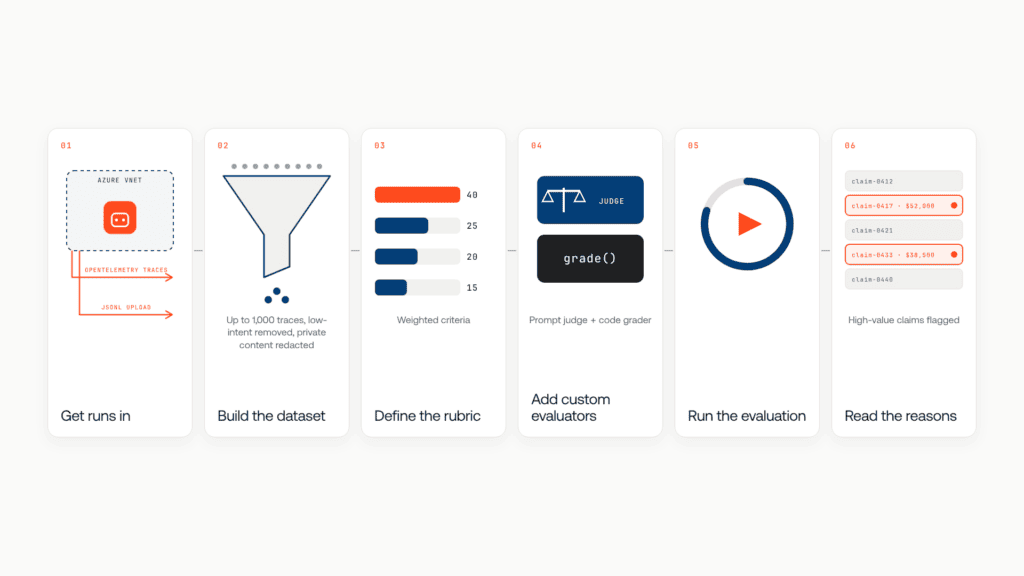
Get runs into Foundry, build a dataset, attach evaluators, run them, read the reasons.
- Get Lyzr agent runs into Foundry: At the same Build 2026 event, Microsoft extended tracing and evaluation to any agent framework through OpenTelemetry, in preview. Lyzr agents run inside your Azure VNet, and Lyzr Studio agents come with OpenTelemetry-based tracing. Or upload JSONL: query-and-response rows for turn-level checks, a messages array for conversation level.
- Build the evaluation dataset: Foundry’s traces-to-dataset feature (preview, supported regions only) samples up to 1,000 representative traces, drops low-intent traffic and redacts private content by default.
- Define the rubric: For the claims agent, policy adherence (40%), correct tool use (25%), escalation (20%) and tone (15%).
- Add custom evaluators: Attach the escalation judge and the routing check.
- Run a batch evaluation: Add evaluators in the portal’s Criteria step or the SDK’s testing_criteria. Conversation-level runs skip turn-only evaluators, so check each one’s supported levels.
- Read the reasons, not the average: A 0.8 average can hide every high-value claim failing. Filter failures, fix, re-run.
One run lists the failing conversations. Before acting, the team must know the judge is right.
How do you know your LLM judge is reliable?
Compare its verdicts with human labels on unseen examples, and check it gives the same answer twice. Until it does both, its score is a hint.
In Microsoft’s January 2026 study, judge models agreed with each other only around 80% of the time, and the same judge gave different scores across 100 runs of one input. On intent resolution, judge-to-human agreement was 58.7% on a 1-to-5 scale against 75.6% on a binary one. Bias varies by model: a June 2026 study of five judges found little position bias, but some judges preferred longer answers and others shorter ones.
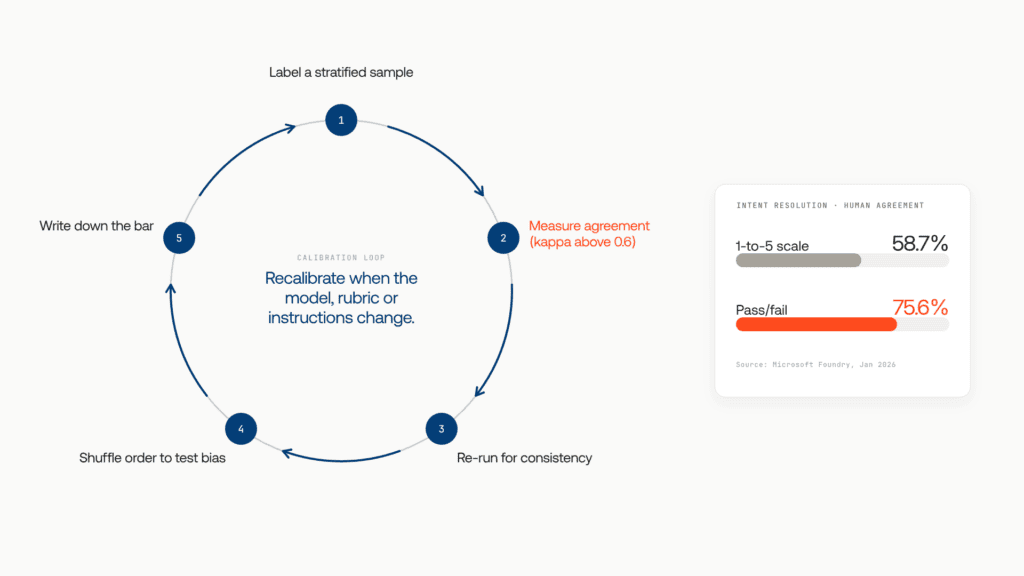
A practical calibration loop, based on Microsoft’s guidance on aligning LLM judges:
- Have reviewers label a stratified sample of passes, failures and edge cases, holding some back for testing.
- Measure agreement with Cohen’s kappa for pass/fail or ordinal scores, or Spearman correlation for continuous ones. Microsoft suggests a kappa above 0.6 as the target.
- Re-run the judge on the same items and check how far verdicts move.
- Shuffle input order to expose position and length effects.
- Write down your pass bar, and re-calibrate whenever the judge model, rubric or agent instructions change.
On high-stakes or thin-evidence cases, let the judge abstain and route to a person.
Once the judge passes, a harder question appears.
What a Foundry judge can’t do on its own
A judge reports; it doesn’t enforce. Three gaps remain.
A score doesn’t stop a release. Foundry reports results and raises alerts when outputs fail quality thresholds. Nothing stops next week’s worse prompt from shipping.
A score arrives after the action. Continuous evaluation scores a sample of production traffic after the agent has acted. By the time it flags a skipped review, the payout is confirmed.
A score covers only the agents you’ve wired in. Agents other teams built on other clouds and frameworks may never reach a judge.
Each gap needs a control outside the evaluator: a promotion gate that refuses a failing release, a request-path check that stops a risky action, and one inventory and record for every agent. That’s the job Lyzr Opencontroller was built for.
Evaluation is one of five controls every production agent needs, alongside registry, identity, staged promotion and observability. Score yours on the playbook’s 25-point worksheet. Get the playbook
How Lyzr Opencontroller turns Foundry verdicts into action
Opencontroller is a control plane that finds every AI agent across your clouds, assigns an owner, and controls what it can call, spend and touch. Your CI keeps building and signing artifacts while Opencontroller applies evaluations, approvals and release controls at the deployment handoff.
| Gap | What Foundry gives you | What Opencontroller adds |
| Score agent quality | Rubric, built-in and custom evaluators | Deterministic and LLM-judge evaluation, scoped automatically and run as a promotion gate |
| Stop a regression from shipping | Scores in the portal and SDK | A gate that’s a release condition, not a report: fail it and the agent rolls back |
| Stop a risky action in production | Monitoring and alerts | Request-path controls that can refuse, mask or redirect an action before it completes |
| Cover every agent | Discovery mainly for supported platforms | Discovery across your entire estate, with an owner for every agent |
| Keep the evidence | Trace view and Azure Monitor | Collectors and stores that stay yours; customer-managed deployments don’t export telemetry to Lyzr |
Opencontroller doesn’t replace Foundry evaluation. It works alongside your clouds, frameworks, CI/CD and identity stack, inside your trust boundary.
For the claims team, escalation becomes part of the promotion gate, so a version that routes fewer high-value claims to review doesn’t ship. In production, a payout call that skips review can be refused before it lands. The auditor finds every release and refusal on record.
Start with one rubric and one custom judge on your highest-risk agent, calibrate it, then make its verdict a condition the agent can’t get past. Book a demo to see Opencontroller turn Foundry evaluations into release gates and runtime controls.
Frequently asked questions
LLM-as-a-judge on Microsoft Foundry is an evaluation method where a judge model scores AI agent or app responses against criteria you define and explains each score. Foundry provides built-in judges, a rubric evaluator based on your agent’s intended behavior, and custom evaluators you register in your project’s evaluator catalog.
In your Foundry project, go to Evaluation, open the evaluator catalog, and select Custom evaluator, then Create. Choose code-based or prompt-based, pick a scoring method and add your code or prompt. In the SDK, use azure-ai-projects 2.0 or later. Add it to a run on the Criteria step.
Prompt-based evaluators use an LLM judge for subjective checks like policy adherence or tone. Code-based evaluators run a sandboxed Python function for deterministic rules like formats or required tool calls. Endpoint-based evaluators call your own HTTPS service, for proprietary models or checks that need internal data.
Yes. Foundry supports tracing and evaluation, in public preview, for agents on other frameworks that emit OpenTelemetry traces. Send the agent’s traces to your Foundry project, or upload its runs as a dataset, then run built-in, rubric or custom evaluators against them.
Yes. Microsoft announced the rename from Azure AI Foundry to Microsoft Foundry at Ignite in November 2025. Microsoft Learn still keeps separate Foundry (classic) pages with different steps and SDKs, so check which version a page describes before following it.
Use a capable model with structured output, ideally from a different family than the agent’s. For rubric evaluators, Microsoft recommends gpt-5.4-mini as the best balance of performance and cost and rates gpt-4.1 and gpt-4o as acceptable. Validate any judge against human labels first.
Not yet. As of November 16, 2026, Microsoft Learn marks custom and rubric evaluators as preview. Microsoft announced general availability of evaluations, monitoring and tracing through Foundry Control Plane on March 16, 2026. Check each feature’s status before building a release process on it.
Book A Demo: Click Here
Join our Slack: Click Here
Link to our GitHub: Click Here
Got a use case in mind?
8 weeks from use case to agents running in production.
Platform, people and FDEs, all in. Bring your environment. We'll co-build and stay until it's live.
Talk to UsFree resource
101 AI Agents Use Cases
100+ production-ready AI agent use cases across Marketing, Sales, HR, Banking, Insurance, Operations and a lot more
Download now