TL;DR: Best Platforms for RPA and AI Agent Automation
- Lyzr Agent Studio: Best for building custom AI agents that complement existing RPA and workflow systems.
- UiPath: Best for combining established RPA capabilities with agentic automation.
- Automation Anywhere: Best for enterprise-scale automation across business processes and systems.
- Microsoft Power Automate and Copilot Studio: Best for organizations invested in Microsoft applications.
- SS&C Blue Prism: Best for controlled, enterprise-grade RPA operations.
- Pega Platform: Best for complex workflows, case management, and decision-driven processes.
- IBM watsonx Orchestrate: Best for deploying and coordinating enterprise AI agents.
- n8n: Best for technically capable teams combining AI workflows with application integrations.
A finance team can automate invoice entry with an RPA bot. But what happens when an invoice arrives in an unfamiliar format, the purchase order is missing, or the amount does not match the records?
Traditional robotic process automation (RPA) excels at executing predictable, repetitive tasks. AI agents add another capability: interpreting information, retrieving context, using tools, and deciding what to do when a process does not follow the expected path.
Combining these technologies can help enterprises automate more of a business process, from reading incoming documents to updating legacy systems and routing exceptions for review. The challenge is choosing a platform that fits the systems, controls, and workflows already in place.
Some platforms combine RPA and AI agents in one enterprise automation suite. Others specialize in process orchestration or AI-agent development that can complement existing automation infrastructure.
This guide compares eight platforms to help you choose the right approach.
The best choice depends on whether you need traditional software robots, AI-driven decision-making, or a combination of both.
How Do RPA and AI Agents Work Together?
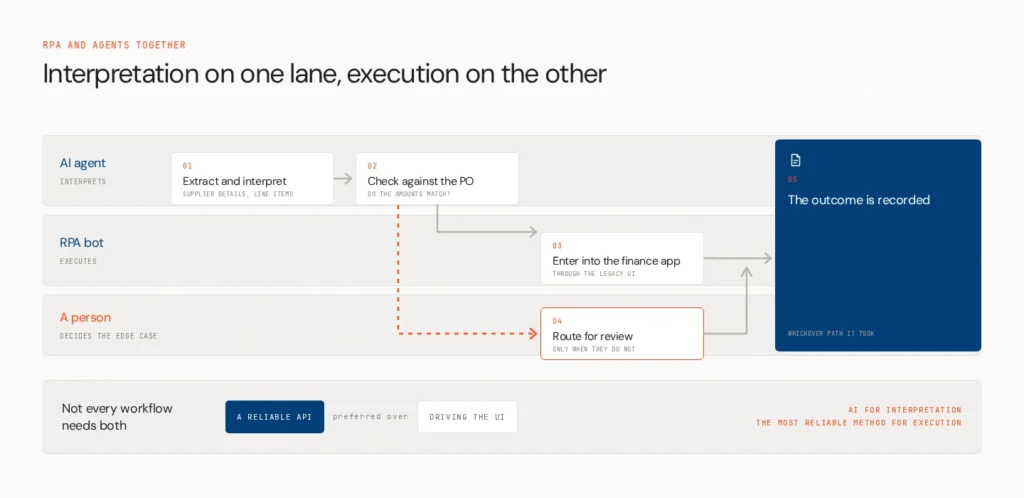
RPA and AI agents address different parts of an automation process.
RPA bots execute predefined instructions. They can enter data into enterprise applications, transfer records, process structured files, and interact with legacy systems through their user interfaces.
AI agents handle tasks that require interpreting context, retrieving information, using tools, and making bounded decisions. They can help classify documents, identify missing information, and determine which workflow step should follow.
Consider an invoice-processing workflow:
- An AI component extracts supplier details and interprets the invoice.
- A validation step checks the extracted information against purchase-order data.
- An RPA bot enters approved details into a legacy finance application.
- If the amounts do not match, the process routes the invoice to a person for review.
- The system records the outcome for auditing and follow-up.
Not every workflow needs both technologies. When an API provides a reliable way to interact with an application, it may be preferable to UI-based RPA. The goal is to use AI for interpretation and the most reliable available method for execution.
For a broader look at this approach, see Lyzr’s guide to AI-driven business process automation.
1. Lyzr Agent Studio

Lyzr Agent Studio is a no-code and low-code environment for creating, testing, and deploying AI agents. Teams can configure agent instructions, models, knowledge bases, tools, and integrations, then deploy agents through APIs or supported publishing options.
In an RPA-based finance process, an agent built with Lyzr could interpret an incoming request, retrieve relevant business information, identify the next appropriate step, and pass structured information to an existing workflow or connected application.
Its role is different from that of a traditional RPA suite. Agent Studio is designed to build the agent layer, not to replace a dedicated RPA engine for desktop interaction. This can be useful for enterprises that want to introduce AI capabilities without rebuilding their entire automation stack.
Teams should verify the integration work required to connect agents to their RPA platform, APIs, and internal systems. They should also test how the agent handles ambiguous inputs and exceptions before allowing it to trigger consequential actions.
For organizations exploring custom agent workflows, the Lyzr Agent Studio documentation explains the available building and deployment options.
Best for: Building custom AI agents that complement existing automation
2. UiPath

UiPath combines established RPA capabilities with a growing portfolio of AI and agentic automation tools. Its robots can execute repeatable tasks across modern applications, legacy systems, and virtual environments, while its agentic capabilities address more variable tasks and complex scenarios.
This makes UiPath worth evaluating when an organization already has a substantial RPA programme and wants to extend it rather than replace its existing bots.
For example, an enterprise could use AI to interpret incoming documents, then rely on a robot to transfer validated information into a legacy application. Exceptions can be routed for human review instead of forcing the automation to proceed with uncertain data.
UiPath is particularly relevant for enterprises that need centralized automation management, controlled execution, and support for a wide range of application interfaces. Buyers should compare licensing, implementation effort, and the specific agentic features available in their intended package.
Best for: Enterprises combining RPA with agentic automation
3. Automation Anywhere

Automation Anywhere combines RPA with AI-driven automation and agentic capabilities. Its platform is designed to connect software bots, AI, and business workflows, helping organizations extend automation beyond predictable, rule-based tasks.
A procurement team, for instance, could use AI to interpret supplier documents and identify discrepancies while bots handle routine updates across enterprise applications.
The platform is worth considering for organizations that want to expand an established automation programme across multiple departments. Buyers should evaluate how agent orchestration, document processing, human oversight, and integrations work together in the specific edition being considered.
As with other enterprise automation suites, deployment and maintenance effort matter. A platform with extensive capabilities may require more planning and specialist support than a simple workflow automation tool.
Best for: Large-scale enterprise automation across business systems
4. Microsoft Power Automate and Copilot Studio
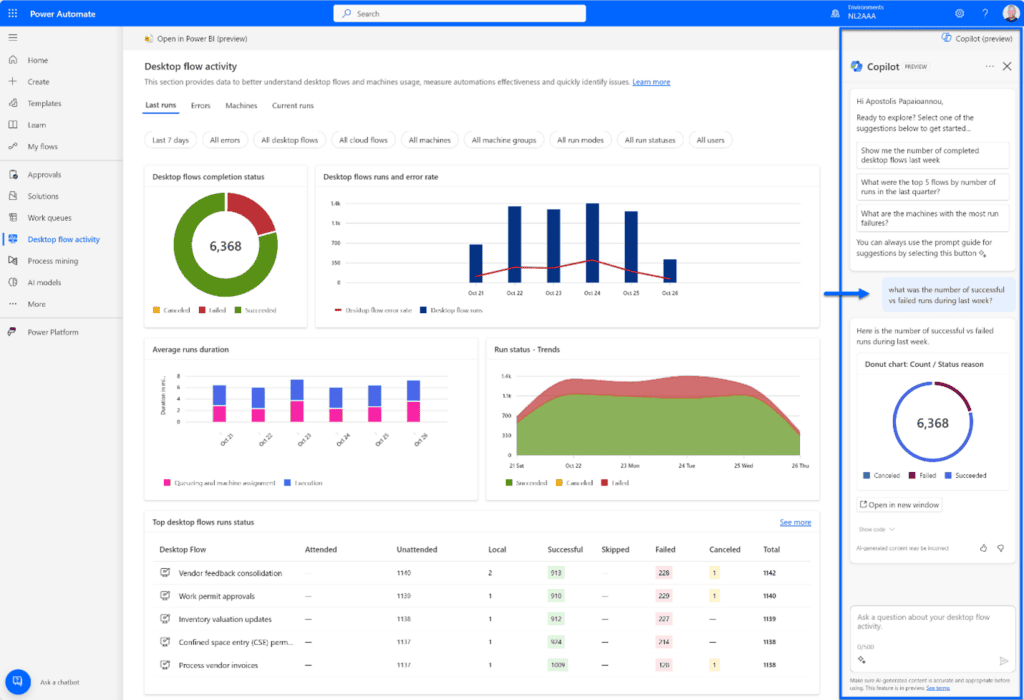
Microsoft Power Automate supports cloud-based workflows and desktop RPA, while Microsoft Copilot Studio supports the creation of AI agents. Together, they can help Microsoft-centric organizations combine application automation with agent-driven tasks.
For example, an agent could interpret an employee’s request and retrieve relevant information, while Power Automate executes supported actions across connected systems or desktop applications.
The advantage is the fit with the Microsoft ecosystem, including its business applications and automation tools. Organizations should still verify connector availability, licensing, permissions, and which capabilities are available in their environment. Some Copilot features for desktop-flow creation are documented as preview features, so confirm production readiness before relying on them.
This combination is most relevant when the existing technology stack is already heavily invested in Microsoft services.
Best for: Organizations built around Microsoft 365 and Azure
5. SS&C Blue Prism
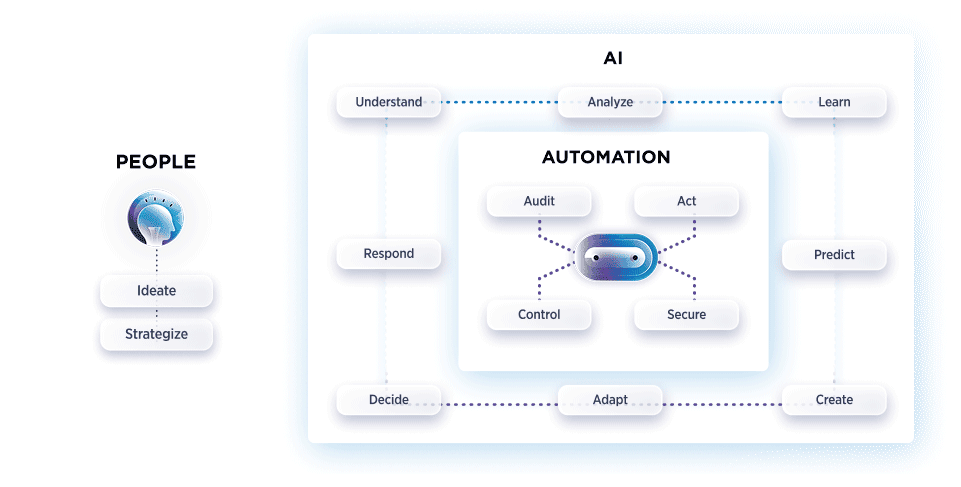
SS&C Blue Prism focuses on enterprise automation, combining digital workers with AI integrations and process orchestration. Its traditional RPA capabilities are useful for repetitive tasks that depend on structured rules and interactions with systems that may not expose suitable APIs.
For regulated organizations, the ability to control execution and maintain an auditable process is especially important. AI can help interpret documents or identify exceptions, while RPA executes the repeatable steps according to defined rules.
Blue Prism is worth considering for organizations with established RPA operations, particularly where governance and process consistency are priorities. Buyers should verify how the desired AI-agent capabilities are delivered, since some functionality may depend on integrations or related products rather than the core RPA platform alone.
Best for: Controlled and highly governed enterprise RPA
6. Pega Platform

Pega Platform combines process orchestration, business rules, decisioning, and AI capabilities to coordinate work across people and systems. Its focus on structured business processes makes it relevant when automation must account for changing circumstances, policies, and human decisions.
Consider an insurance claim that requires document review, policy checks, additional information, and a decision about whether to escalate the case. A process platform can coordinate the steps, while AI capabilities help interpret information and support decision-making.
Pega is not simply a traditional RPA suite, so buyers should assess it based on the broader process architecture they need. It may be a strong fit for complex case-driven operations, but organizations seeking primarily desktop-bot automation should compare its RPA capabilities and implementation requirements against dedicated RPA vendors.
Best for: Complex business processes and case management
7. IBM watsonx Orchestrate
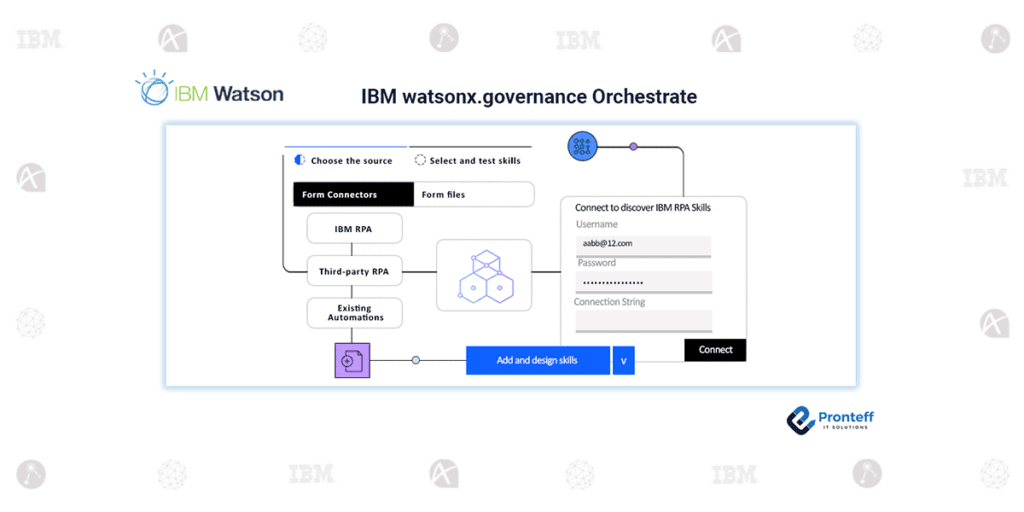
IBM watsonx Orchestrate provides prebuilt and customizable AI agents that can connect to business applications, data, tools, and workflows. IBM’s current agent offering focuses on helping organizations deploy agents that can perform multi-step tasks and coordinate work across business functions.
For example, an HR agent could handle an employee request, retrieve relevant information, and initiate supported actions across HR systems.
IBM is worth evaluating when the main priority is introducing and managing enterprise AI agents across existing systems. However, buyers should distinguish agent orchestration from traditional UI-based RPA. If the process depends on desktop automation or legacy screens, confirm whether the required RPA functionality is available directly or through a separate integration.
Best for: Enterprise AI-agent deployment and orchestration
8. n8n
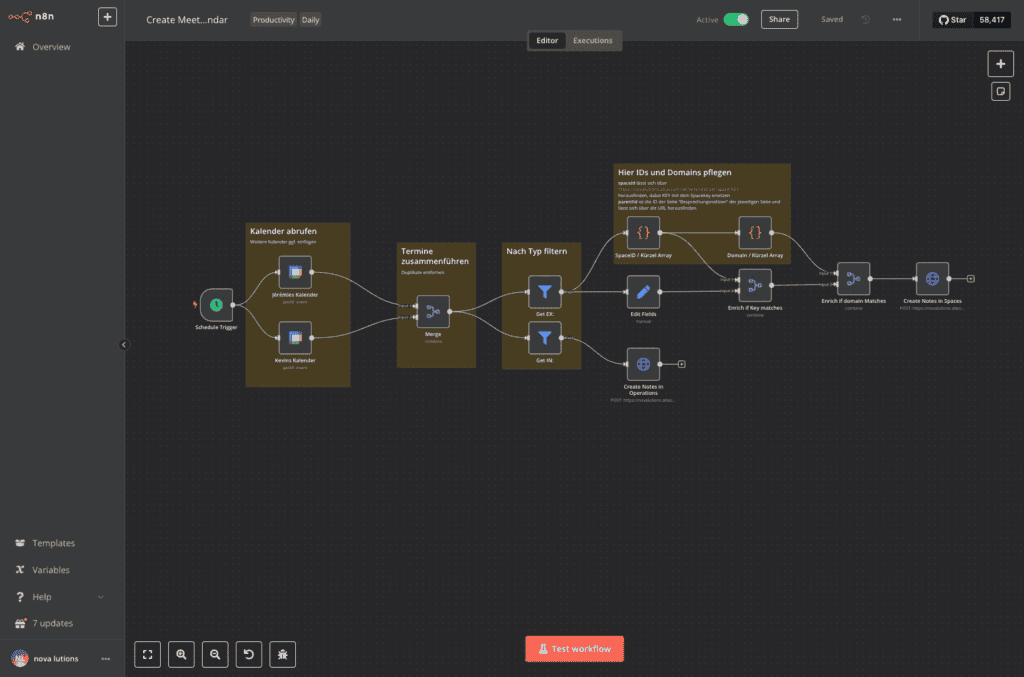
n8n provides a visual workflow builder that can connect application triggers, data transformations, AI components, and downstream actions.
For example, a workflow could receive a supplier email, pass its contents to an AI agent for classification, validate the result, and send structured data to an enterprise system through an API.
This approach can be useful when a team wants to combine deterministic steps with AI-driven interpretation while retaining flexibility over integrations. n8n also supports self-hosting, which may appeal to teams that want more control over their deployment environment.
However, n8n should not automatically be treated as equivalent to a full enterprise RPA suite. Teams that rely on desktop UI automation, centralized robot management, or specialized RPA governance should verify whether the required capabilities are available or need another tool.
Its flexibility is most useful when the team has the technical skills to configure integrations and maintain the workflow.
Best for: Technical teams connecting AI workflows and business applications
RPA and AI Agent Platforms Compared
| Platform | Primary strength | Traditional RPA | AI-agent capabilities | Best fit |
| Lyzr Agent Studio | Custom AI-agent development | Not a traditional RPA engine | Agent building, tools, knowledge, APIs | Adding AI agents to existing systems |
| UiPath | Integrated enterprise automation | Yes | Agentic automation capabilities | Established RPA programmes |
| Automation Anywhere | Enterprise bot and AI automation | Yes | Agentic automation capabilities | Large-scale automation |
| Microsoft Power Automate + Copilot Studio | Microsoft ecosystem | Yes, through desktop flows | AI-agent building and orchestration | Microsoft-centric organizations |
| SS&C Blue Prism | Governed enterprise RPA | Yes | AI integrations and agentic automation options | Controlled RPA operations |
| Pega Platform | Process orchestration and decisioning | Verify specific requirements | AI and agentic orchestration | Complex case-driven workflows |
| IBM watsonx Orchestrate | Enterprise agent orchestration | Verify required RPA integration | Prebuilt and custom agents | Enterprise agent deployment |
| n8n | Flexible visual workflows | Not a full traditional RPA suite | AI workflows and integrations | Technically capable teams |
This comparison reflects each platform’s main role, not a universal ranking. The availability of individual features can vary by edition, deployment model, and integration.
How to Choose the Right Platform
Start by mapping the process you want to automate. Identify which steps are predictable, which require interpretation, which systems must be accessed, and where human approval is necessary.
- If you already use RPA: Prioritize integration with existing bots, robot orchestration, credential management, and exception handling.
- If legacy applications are central to the process: Verify reliable UI automation and recovery options for the exact applications involved.
- If documents and variable inputs are the main challenge: Evaluate AI capabilities for extraction, knowledge retrieval, classification, and validation.
- If you need custom AI behavior: Consider an agent-building platform such as Lyzr Agent Studio, and confirm how it will connect to your current automation tools.
- If governance is critical: Assess permissions, audit trails, human approvals, testing, and deployment controls before choosing a platform.
Before rolling out automation broadly, pilot a single process. Test routine cases, incomplete inputs, unexpected values, failed integrations, and scenarios that should require human review. Measure the quality of the outcome as well as time saved.
Lyzr’s How to Take Agents to Production playbook is a useful next step for teams planning to move from an agent prototype to a production workflow.
Combine Reliable Automation with AI Agents
RPA and AI agents solve different parts of the automation problem. Bots are useful for predictable execution, while agents help interpret information and handle context-dependent tasks. The challenge is connecting them in a way that fits existing systems and keeps important actions controlled.
Lyzr Agent Studio gives teams a way to build and deploy custom AI agents that connect to tools, knowledge sources, and APIs. For organizations that already have RPA infrastructure, it can be an option for adding agent capabilities without treating the agent builder as a replacement for the RPA engine.
Explore Lyzr Agent Studio to see how custom agents could fit your business workflows, or book a demo to discuss a use case.
Frequently Asked Questions
RPA executes predictable, rule-based actions, while AI agents interpret context, retrieve information, and help decide what to do next. A combined workflow can use an agent to understand an invoice and an RPA bot to enter validated information into a legacy finance system.
There is no single best platform for every organization. UiPath and Automation Anywhere combine agentic capabilities with traditional RPA, IBM watsonx Orchestrate focuses on enterprise agents, and Lyzr Agent Studio supports custom agent development. The right choice depends on the existing technology stack and the workflow requirements.
Yes. RPA remains useful for repeatable tasks, especially when systems rely on desktop interfaces or do not provide suitable APIs. AI agents extend automation to more variable tasks, but they do not remove the need for deterministic execution in every process.
UiPath, Automation Anywhere, Microsoft Power Automate, and SS&C Blue Prism are established options to evaluate for traditional RPA. Pega and IBM watsonx Orchestrate are also relevant for broader process and agent orchestration, while Lyzr Agent Studio can complement existing systems with custom AI agents.
Not in every situation. Agents can call APIs and use tools directly, but RPA remains valuable for UI-driven tasks and legacy applications. Many enterprises will benefit from combining agents, bots, APIs, and human review rather than replacing one technology with another.
Book A Demo: Click Here
Join our Slack: Click Here
Link to our GitHub: Click Here
Got a use case in mind?
8 weeks from use case to agents running in production.
Platform, people and FDEs, all in. Bring your environment. We'll co-build and stay until it's live.
Talk to UsFree resource
101 AI Agents Use Cases
100+ production-ready AI agent use cases across Marketing, Sales, HR, Banking, Insurance, Operations and a lot more
Download now