TL;DR
- The three layers catch different repetition: an identical request, the same meaning, and a repeated prompt prefix.
- The two gateway caches skip the model entirely. Provider caching still runs it and discounts only input tokens.
- Provider caching still generates a fresh answer, which makes it the safest place to start for agents. Semantic caching is the only one that can return the wrong answer, so roll it out one flow at a time.
- Check write prices too: OpenAI now charges for cache writes on GPT-5.6 and later models.
- A gateway cache hit skips every check placed after it, so identity and policy must run first.
Finance has flagged the inference bill for your support agent, and the planning meeting produces three fixes. One engineer wants a semantic cache. Another says the provider already caches prompts. A third says plain exact-match caching is enough. Each catches a different kind of repetition.
It’s a decision worth getting right: Gartner predicts AI inference costs per agentic workflow will increase more than fivefold through 2028. Here’s how the three compare, and why the answer is usually all three, in a specific order.
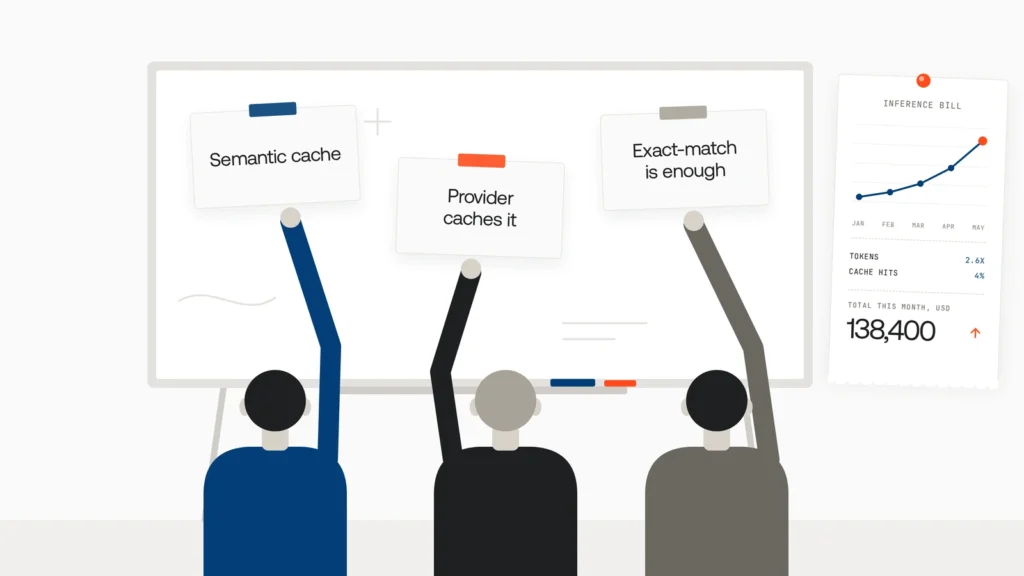
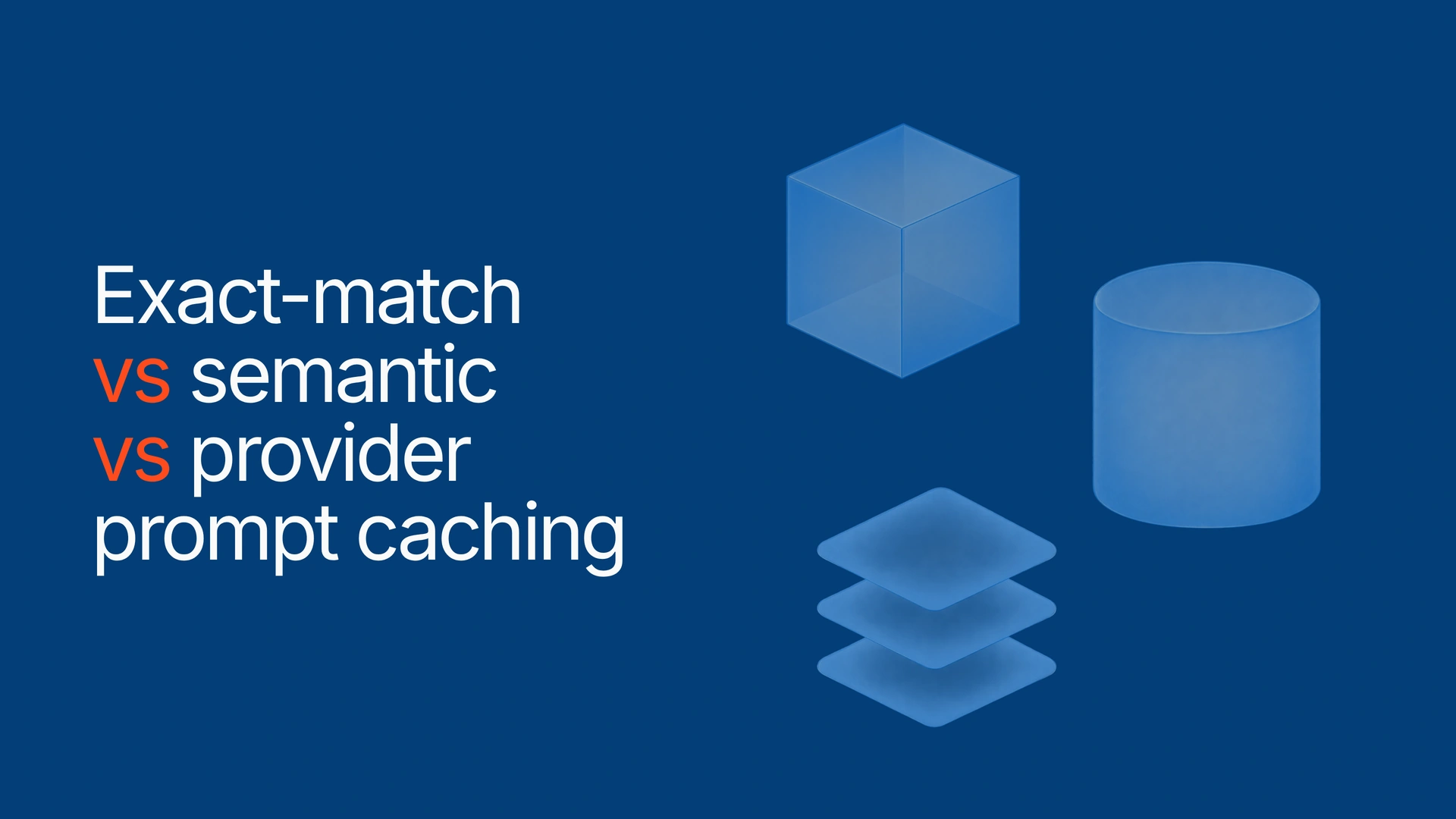
The short answer: exact-match vs semantic vs provider prompt caching comes down to what repeats. Exact-match caching returns a stored response for an identical request. Semantic caching returns one for a request with the same meaning. Provider prompt caching still runs the model but discounts a repeated prompt prefix. The three can run together, cheapest first.
Exact-match vs semantic vs provider prompt caching at a glance
Exact-match and semantic caching run in your application or LLM gateway and skip the model entirely. Provider caching runs inside the model provider and makes the model cheaper to run.
| Exact-match caching | Semantic caching | Provider prompt caching | |
| Where it runs | Your gateway or application | Your gateway, backed by a vector store | Inside the model provider |
| What has to repeat | The whole request, after normalization | The meaning, above a similarity threshold | A long, identical prompt prefix |
| What’s reused | A stored response | A stored response | The computed attention state (KV cache) for the prefix |
| Model called on a hit? | No | No, but each lookup needs an embedding | Yes, and it writes a fresh answer |
| Cost on a hit | A storage lookup | A lookup plus an embedding | Discounted input on the prefix; output billed in full |
| Main risk | Stale answers after a model or prompt change | The right answer to the wrong question; leakage across tenants | A write premium if the prefix isn’t reused; one cache shared by everything behind a provider key |
| Best for | Retries, batch reruns, unchanged eval cases | FAQ and support questions asked many ways | Agents, long system prompts, tool catalogs, RAG context |
Now test each column against one team’s traffic: a support agent with a 9,000-token system prompt and tool catalog, a help-center bot, and a nightly batch job.
Exact-match caching: the cheapest hit and the narrowest net
An exact-match cache hashes the normalized request and returns the stored response on a match. No model call, no embedding, no chance of matching the wrong question. Change one word, though, and it misses.
What goes into the key decides whether it’s safe:
- the model ID and version
- sampling parameters such as temperature
- the system prompt version and tool definitions
- the tenant or user, wherever answers differ by account
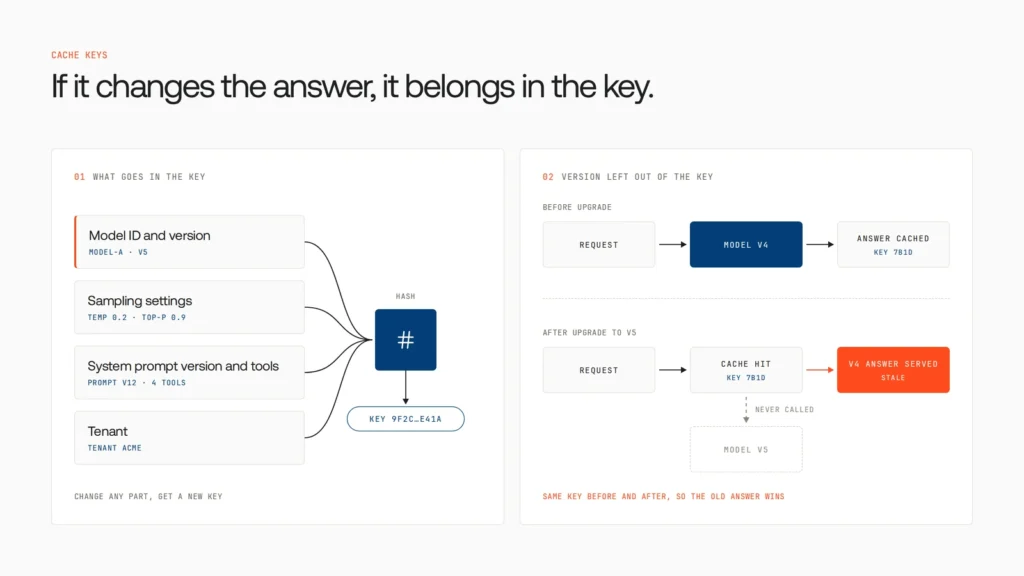
On the support agent it barely registers; customers rarely type the same sentence twice. On the batch job and on retries after timeouts, it hits constantly. Then a model upgrade ships, and for a day the cache serves the old model’s answers, because the model version wasn’t in the key.
An exact-match cache is only as fresh as its key. Leave the model version out and you’ve pinned yesterday’s model without telling anyone.
Semantic caching: catches paraphrases, and sometimes the wrong question
Semantic caching embeds the request and returns a stored response when an earlier request is close enough in meaning, so “How do refunds work here?” can reuse the answer to “What’s your refund policy?” (We’ve published a full walkthrough of how semantic caching works.) It’s also the only layer that can confidently return the wrong answer.
The threshold is a guess until you measure it
There’s no single safe similarity cutoff. The vCache researchers (ICLR 2026) found that one static threshold for every request gives no correctness guarantee and can produce unexpected error rates. vCache, which learns a separate threshold for each cached entry, beat static-threshold baselines with up to 12.5 times more hits and 26 times fewer errors on their benchmarks. Set it loose, and the help-center bot answers “refund policy for electronics” with the stored answer for “refund policy for subscriptions.”
A shared semantic cache is a shared data store
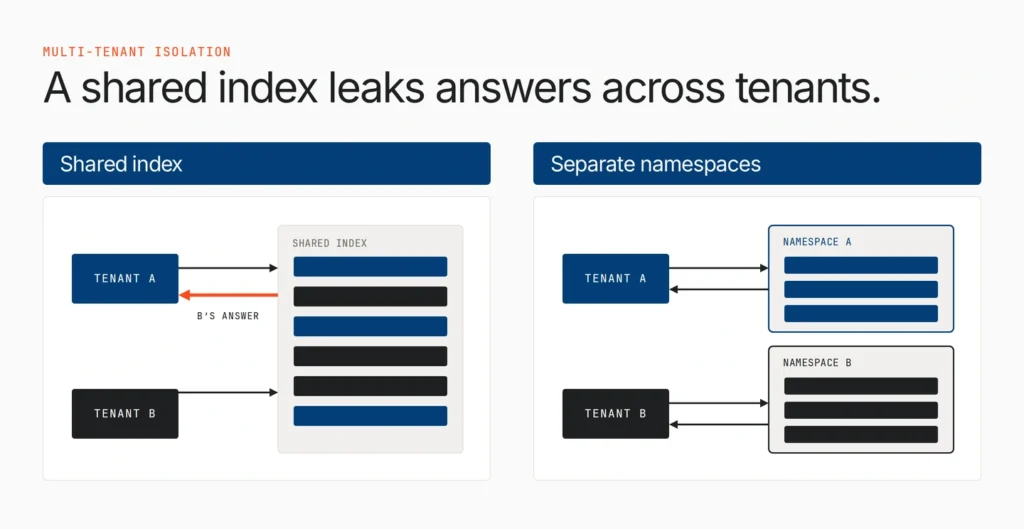
A semantic cache is a store of past answers, and if two tenants share an index, one can receive the other’s answer. That can happen on purpose, too: a 2026 study (ICML 2026) planted cache entries that matched other users’ queries and hijacked responses at an 86% hit rate. Give each tenant its own namespace, and keep account-specific answers out.
Provider prompt caching: the model still runs, but the prefix gets cheap
Provider prompt caching stores the computed attention state (the KV cache) for a repeated prompt prefix, such as a system prompt, tool definitions or a long document, so later requests skip that work. The model still writes a fresh answer; Anthropic’s docs say it’s identical to an uncached one. Only input gets cheaper.
Three major providers each do it differently; the OpenAI and Gemini API docs give their terms. Rates vary by model, so check yours.
| Anthropic (Claude) | OpenAI (GPT-5.6 and later) | Google (Gemini) | |
| How it’s turned on | cache_control: explicit breakpoints, or one top-level field for automatic caching | Automatic | Implicit caching on by default for Gemini 2.5 and newer; explicit caches optional |
| Cache write | 1.25x base input (5-minute), 2x (1-hour) | 1.25x (30-minute default), 2.5x (12-hour, Responses API) | Explicit caches add a storage charge based on how long they’re kept |
| Cache read | 0.1x on most models; 0.05x on Opus 5.5 and Sonnet 5.5 | 0.1x | Billed at a reduced rate (see Gemini pricing) |
| Minimum prefix | 512 to 4,096 tokens, by model | 1,024 tokens | 2,048 to 4,096 tokens, by model |
OpenAI’s older models never charged for cache writes; GPT-5.6 and later do.
Do the break-even math before you choose a longer cache
With Anthropic’s multipliers, a 5-minute write plus one reuse costs 1.35x the base input price, against 2x for two uncached calls, so it pays off on the first reuse. A 1-hour write plus one reuse costs 2.1x, worse than not caching, so it needs two reuses. Ten calls inside the window cost 2.15x instead of 10x, roughly 78% off the prefix.
That’s where the support agent’s real savings are: its 9,000-token prefix repeats on every turn. Keep static content first and dynamic content last; with a timestamp at the top of the system prompt, no two calls share a prefix, so nothing is ever read from the cache.
The risk is scope, not correctness
A Stanford audit at ICML 2025 detected prompt caches shared across users at seven API providers, a timing side channel: cached prompts return faster, so an attacker can probe for what others sent. Providers’ current docs set the boundaries. Anthropic isolates caches by organization and, on the Claude API, by workspace; OpenAI’s caches aren’t shared across organizations.
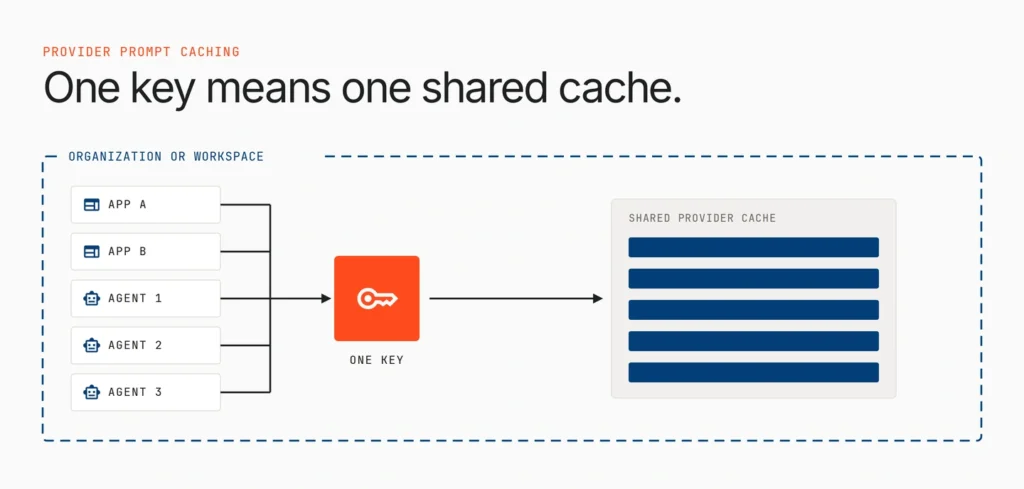
The practical point: everything behind one provider organization or workspace shares a cache. The key a request uses decides who it shares a cache with.
How to run all three in order, and where the checks belong
Cheapest first: exact-match, then semantic on a miss, then the provider, where a cached prefix still cuts input cost.
The catch: a gateway cache hit skips everything downstream, including any guardrail, permission or budget check placed after it. The full order:
- Identify the caller and tenant.
- Apply policy and input guardrails, including PII detection.
- Look up the caches, scoped to that tenant, model version and prompt version.
- Call the provider on a miss.
- Record the hit or miss against the right team’s budget.
The team’s first build put the semantic cache in front of the permission check. A basic-plan user asked what an enterprise customer had asked an hour earlier, and got the enterprise answer from the cache. The check never ran.
Step five gets skipped too. Unrecorded hits make the bill drop unexplained, until a cache flush sends it back up. Record avoided cost per team next to actual spend.
A cache hit is an answer nobody re-checked. Put your checks in front of it.
Are your checks in the right place? Take the AI agent governance maturity assessment to see where identity, policy and budget controls sit across your agents today.
Which caching layer to turn on first for your workload
| Workload | Turn on first | Add next | Avoid |
| Agent with a long system prompt and tool catalog | Provider prompt caching | Exact-match for retries | Caching tool calls that change data |
| Support or FAQ bot | Exact-match | Semantic, one flow at a time, namespaced per tenant | Account-specific answers in a shared index |
| RAG over shared documents | Provider caching on the document prefix | Exact-match for repeated queries | Cached answers that outlive the document’s update cycle |
| Batch jobs, eval reruns, retries | Exact-match with versioned keys | Provider caching on shared instructions | Leaving the model version out of the key |
| Personalized or real-time answers | Provider caching only | Semantic, only if scoped per user | Serving live data, such as prices or status, from any response cache |
Our team used the first row for the agent, the second for the bot and the fourth for the nightly job. All three engineers were right, about different traffic.
Lyzr Opencontroller: caching as one step in a governed request path
Even with every layer in place, questions remain that no cache can answer. Who is this caller, and for whom? May this answer reach them? Which team pays for the miss? Which provider key, and so which provider cache, does the request use? Those belong to the path in front of the caches. Lyzr Opencontroller is built on that idea: “Control has to happen in the path.”
Opencontroller’s architecture says every governed action can be “authenticated, authorized, budgeted and checked before it reaches a model, tool or enterprise system.” It lists caching under routing, after the identity, authorization, budget and guardrail checks.
| Step in Opencontroller’s path | What the page says it answers | What a caching layer needs from it |
| Identity | “Who is acting, and for whom?” | Knowing which tenant a cached answer is for |
| Authorization | “Is this action allowed?” | Confirming the caller may see a stored answer |
| Budget | “Can this request spend?” | Charging each miss to the right team |
| Guardrails | “PII, secrets, injection, policy.” | Checking inputs before anything is served |
| Routing | “Provider, fallback, cache.” | A place for the cache decision, listed after the checks above |
| Evidence | “Trace, outcome, cost, verdict.” | A record of each request’s outcome and cost |
Credentials close the last gap. On the architecture page, secrets are “resolved from your approved secret store.” A provider cache is shared by everything behind one key, so resolving keys from one store lets you decide who shares it, rather than whichever key a developer happened to paste.
Around that path, Opencontroller discovers agents, models and tools (Find), evaluates and governs every agent and workflow before it reaches production (Ship), monitors in real time from one control plane (Run), and turns usage, cost and security signals into insights (Improve). It runs inside your trust boundary, and adoption starts small: “Change an endpoint. Not your application.”
For our team, the agent and bot now point at an Opencontroller endpoint, so each request is identified, authorized, budgeted and checked in the path, and leaves a trace with its outcome and cost.
Book a demo to see it on your own stack.
What to do this sprint
Move static content to the front of every prompt, then watch your provider’s cached-token fields for a week. Add exact-match caching with model and prompt versions in the key. Then pilot semantic caching on one high-volume FAQ flow, namespaced per tenant, with identity and policy checks in front.
Caching is one cost lever; routing easy requests to smaller models is another. But as agent workflows consume more tokens, the question shifts from whether to cache to who decides what a cache may answer. That makes exact-match vs semantic vs provider prompt caching a governance decision as much as a performance one.
FAQ
Exact-match and semantic caching reuse a stored response, for an identical request or one with the same meaning. Provider prompt caching still calls the model but discounts a repeated prefix.
Yes. A semantic cache answers paraphrased repeats without calling the model, and misses still get the provider’s prefix discount.
No. Anthropic documents that responses are identical with or without caching. Only the input cost of the cached prefix drops.
When a prefix isn’t reused before it expires. On Anthropic, a 1-hour cache write needs two reuses to pay off.
It treats caching as part of routing in a governed request path. Its architecture lists routing (“provider, fallback, cache”) after the identity, authorization, budget and guardrail checks.
Book A Demo: Click Here
Join our Slack: Click Here
Link to our GitHub: Click Here
Got a use case in mind?
8 weeks from use case to agents running in production.
Platform, people and FDEs, all in. Bring your environment. We'll co-build and stay until it's live.
Talk to UsFree resource
101 AI Agents Use Cases
100+ production-ready AI agent use cases across Marketing, Sales, HR, Banking, Insurance, Operations and a lot more
Download now