An AI agent can call a tool once, get the result it needs, and move on.
Or it can call the same tool again. Then again. Then call a second tool to interpret the result, return to the first tool, and keep repeating the cycle until the task times out, the budget is exhausted, or someone notices the spike in activity.
This is a runaway tool loop.
The problem is not simply that an agent made too many tool calls. The deeper issue is that the agent has lost a reliable path toward task completion. Once that happens, adding more tools or giving the agent more autonomy can make the failure harder to detect and more expensive to contain.
For teams running agents in production, the goal is therefore not to eliminate repeated tool calls. Some workflows legitimately require several calls to the same system. The goal is to distinguish necessary iteration from uncontrolled repetition, detect it early, and give the agent a safe way to stop.
What Is a Runaway Tool Loop?
A runaway tool loop happens when an agent repeatedly invokes one or more tools without making meaningful progress toward its objective.
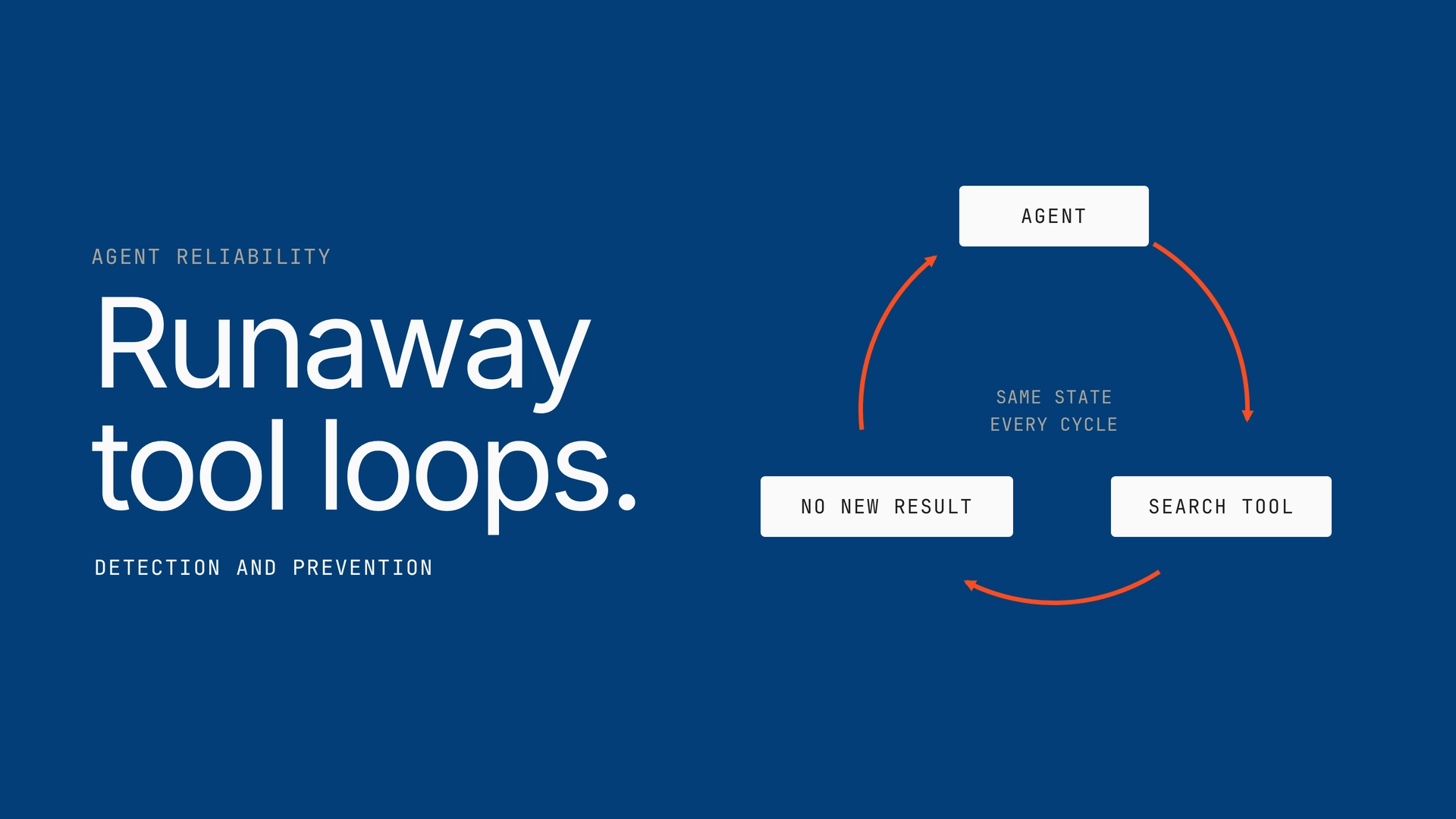
A simple loop might look like this:
The more dangerous cases are not always obvious repetitions. A loop can move between several tools while still cycling through the same state:
From the outside, every individual action may look valid. The problem only becomes visible when the sequence is viewed as a whole.
That makes runaway loops different from a simple tool failure.
| Situation | What happens | Primary concern |
| Tool failure | A tool returns an error | Reliability |
| Slow tool | A tool takes too long to respond | Latency |
| Invalid tool call | Agent sends incorrect arguments | Accuracy |
| Repeated tool call | Agent keeps calling the same tool | Efficiency |
| Runaway tool loop | Agent repeatedly cycles through actions without meaningful progress | Control, cost, and reliability |
The distinction matters because retrying a failed call can be the correct behavior. Repeating a sequence that is not changing the outcome is not.
How Runaway Loops Form
Most loops do not begin as obvious failures. They emerge from the way an agent reasons about incomplete results.
Consider an agent that needs to find a customer record. It calls a search tool, receives no matching record, and decides to search again with slightly different parameters.
That second attempt may be reasonable.
But if the agent keeps modifying the query without learning anything from previous attempts, the workflow can become:
Search → No result → Modify query → Search → No result → Modify query → Search
Now consider a multi-agent workflow. One agent retrieves information, another validates it, and a third updates a system. If the validation agent rejects the output and sends it back to the retrieval agent, the same state can repeat indefinitely:
Retrieve → Validate → Reject → Retrieve → Validate → Reject
Several conditions make these loops more likely:
- Ambiguous success criteria: The agent does not know what “done” looks like.
- Weak state tracking: Previous attempts are not represented clearly enough for the agent to recognize repetition.
- Unbounded retries: There is no limit on how many times a tool or workflow can be retried.
- Poor tool responses: A tool returns incomplete, ambiguous, or non-actionable results.
- Conflicting agent objectives: Different agents keep handing work back to one another.
- No progress measurement: The system tracks calls but not whether those calls are producing new information or changing the task state.
This leads to an important shift in how loops should be monitored:
Counting tool calls is useful, but it is not enough. Production systems need to understand the sequence and progress behind those calls.
Why Tool-Call Count Alone Cannot Detect Loops
A fixed call limit is one of the simplest safeguards an agent can have.
For example:
Maximum tool calls per task = 20
If the agent reaches 20 calls, the workflow stops.
That protects the system from an unlimited execution path, but it does not tell you whether the agent is behaving normally.
Compare two workflows with 12 tool calls each:
| Workflow | Call sequence | Calls | Result |
| A | Search → CRM → Validate → Update → Confirm | 12 | Task completed |
| B | Search → Search → Search → Search → Search → Search | 12 | No progress |
| C | Search → Transform → Search → Transform → Search → Transform | 12 | Repeating cycle |
All three use the same number of calls.
Only the sequence reveals the problem.
This is why effective loop detection usually combines several signals instead of relying on a single threshold.
The Signals That Reveal a Runaway Loop
A production monitoring system should look for patterns across the entire execution trace.
| Signal | What it tells you | Example |
| Repeated tool calls | The same tool is being invoked unusually often | search_customer called 15 times |
| Repeated arguments | The agent is making effectively identical requests | Same customer ID and query repeated |
| Cycle patterns | Multiple tools are repeating in the same order | Search → Validate → Search → Validate |
| No state change | Calls are happening without changing workflow state | Record remains unresolved after every call |
| Retry bursts | Calls increase rapidly after failures | 8 calls within 10 seconds |
| Increasing latency | The workflow is spending more time without progress | Each cycle takes longer |
| Cost accumulation | Tokens or API spend rise without task completion | $0.20 → $0.80 → $2.40 |
| Unfinished runs | Sessions repeatedly terminate at limits or timeouts | Many executions end at max-call threshold |
These signals become more useful when they are evaluated together.
For example, five calls to a search tool may be completely normal if each call returns new information. Five identical calls with the same arguments, no state change, and rising latency are a very different pattern.
A Practical Detection Model
A useful way to think about loop detection is to evaluate every tool call against three questions:
- Has this action happened before?
- Has the workflow state changed since the previous attempt?
- Is the agent getting closer to completion?
This can be represented as a simple execution trace:
| Step | Tool | Input | State change | Progress |
| 1 | search_customer | id=4821 | Customer found | High |
| 2 | get_orders | customer=4821 | Orders retrieved | High |
| 3 | validate_orders | orders=… | Validation failed | Medium |
| 4 | get_orders | customer=4821 | No new data | Low |
| 5 | validate_orders | orders=… | Same failure | None |
| 6 | get_orders | customer=4821 | No new data | None |
At step 6, the problem is no longer simply “six tool calls.”
The agent is repeating a state transition without producing new information.
That gives the monitoring layer a stronger basis for intervention.
Detection Should Happen at Multiple Levels
Runaway behavior can appear inside one agent, across agents, or across an entire application.
That means detection needs more than one scope.
| Detection level | What to monitor | Example |
| Tool level | Repeated calls, errors, latency, arguments | Same API called repeatedly |
| Agent level | Tool sequence, state changes, task completion | Agent cycles between two tools |
| Workflow level | Handoffs, retries, dependencies | Agent A repeatedly sends work to Agent B |
| Application level | Aggregate executions, spend, failures | One workflow generates abnormal API usage |
This layered view also explains why a loop can be missed by individual tool monitoring.
A CRM API may report every request as valid. The model may also report every decision as valid. The loop only becomes obvious when the full execution trace is reconstructed.
Preventing Loops Before They Become Expensive
Detection tells you that a loop is happening. Prevention determines what happens next.
The safest approach is not a single hard stop. It is a set of controls that progressively restrict an agent as its behavior becomes less reliable.
1. Set Execution Boundaries
Every autonomous workflow should have explicit limits.
These can include:
- Maximum tool calls
- Maximum execution time
- Maximum token budget
- Maximum retry count
- Maximum spend per execution
- Maximum calls to a high-risk tool
For example:
Task budget
├── 30 total tool calls
├── 5 retries per tool
├── 10-minute execution window
└── $2 maximum estimated execution cost
These limits do not solve the underlying loop, but they prevent an individual failure from becoming an uncontrolled execution.
2. Detect Duplicate Actions
A system can hash or normalize tool calls and compare them against recent execution history.
For example:
search_customer(id=4821)
search_customer(id=4821)
search_customer(id=4821)
A repeated call does not automatically mean failure. But repeated calls with no state change should increase the loop risk score.
A simple policy might look like this:
| Pattern | Suggested response |
| Same call once | Allow |
| Same call twice with progress | Allow |
| Same call repeatedly with new results | Monitor |
| Same call repeatedly with no new results | Warn or redirect |
| Same call repeatedly with identical output | Stop or escalate |
The important part is that the system evaluates repetition alongside progress, rather than treating repetition itself as the failure.
3. Track State, Not Just History
An agent needs enough state to understand whether it is actually moving forward.
A useful execution state can include:
Goal
Current state
Completed actions
Failed actions
Recent tool calls
Last meaningful state change
Remaining budget
Without this information, an agent can keep trying the same strategy because each individual call looks plausible.
With state tracking, the system can recognize:
“This action has already been attempted, produced the same result, and did not change the task state.”
That is a much stronger basis for stopping or changing strategy.
4. Add Progress-Based Guards
A maximum-call limit asks:
“How many times has the agent acted?”
A progress guard asks:
“What changed because the agent acted?”
That distinction is critical.
For example, a workflow could require one of these conditions after a defined number of actions:
- New information was retrieved.
- A workflow state changed.
- A required field was completed.
- A subtask was completed.
- The confidence or validation status changed.
If none of these happen after several iterations, the workflow can pause, switch strategy, or escalate.
A Better Response Than “Stop the Agent”
Stopping is sometimes necessary, but it should not always be the first response.
A mature control strategy can escalate based on the severity of the loop.
| Loop severity | Example | Response |
| Low | Repeated call with new results | Continue and monitor |
| Moderate | Repeated call with no meaningful change | Ask agent to change strategy |
| High | Same cycle repeated several times | Break the cycle and terminate the step |
| Critical | Loop involves sensitive or high-cost actions | Immediately stop and escalate |
This is particularly important for agents that can perform external actions.
A loop that repeatedly reads data is undesirable.
A loop that repeatedly sends emails, creates tickets, updates records, executes transactions, or invokes expensive APIs can become an operational or security incident.
Prevention Needs Guardrails Around High-Impact Tools
Not every tool deserves the same execution policy.
A read-only search and a tool that changes production data should not have identical limits.
| Tool type | Example | Recommended control |
| Read-only | Search, retrieval | Higher call tolerance |
| Compute-heavy | Data processing, model execution | Cost and time limits |
| External communication | Email, messaging | Approval or action limits |
| Data mutation | CRM/database update | Idempotency + strict retries |
| Financial/transactional | Payment or purchase | Strong authorization + hard limits |
| Administrative | Access or permission changes | Human approval + audit trail |
This makes loop prevention part of the broader execution policy rather than an isolated monitoring feature.
Design Tools to Fail Clearly
Tool design itself can reduce the likelihood of runaway behavior.
A tool response should make it clear:
- What happened
- Whether the operation succeeded
- Whether retrying is useful
- What changed
- What the agent should do next
Compare these two responses.
Weak response:
{
“status”: “error”
}
More actionable response:
{
“status”: “not_found”,
“retryable”: false,
“message”: “No customer matched the provided ID.”,
“next_action”: “Request a valid customer ID.”
}
The second response gives the agent a reason to stop trying the same action.
This is especially important because many loops begin when the agent interprets an ambiguous failure as an invitation to retry.
Make Retries Explicitly Different From Loops
Retries are necessary in distributed systems. A temporary network failure, rate limit, or service timeout may justify another attempt.
The system should therefore distinguish between recoverable failures and non-progressing behavior.
| Retry reason | Retry? | Why |
| Temporary network timeout | Usually | Failure may be transient |
| Rate limit with retry guidance | Usually | Service explicitly supports retry |
| Authentication failure | No, until credentials change | Repeating the same request will not fix it |
| Invalid input | No | Input needs correction |
| Empty result with same parameters | Usually no | Repeating the same request adds no information |
| Same workflow state after several attempts | No | Indicates possible loop |
Exponential backoff can reduce the pressure created by repeated retries, but backoff alone does not prevent a loop. The workflow still needs a condition that says when to stop retrying.
Observability Turns Loop Prevention Into an Operational Control
Once an agent is in production, teams need to answer more than “did the task fail?”
They need to know:
- Which agent is looping?
- Which tools are involved?
- How often does it happen?
- What was the repeated sequence?
- How much did the execution cost?
- Did the loop affect external systems?
- Did the guardrail stop it?
- What happened after the workflow was stopped?
A useful execution trace should therefore connect the model decision, tool call, tool response, state change, and final outcome.
Task
↓
Agent decision
↓
Tool call
↓
Tool response
↓
State change
↓
Next decision
↓
Outcome
When that chain is visible, teams can move from simply observing failures to identifying the exact point where an agent stopped making progress.
A Practical Runaway Loop Prevention Checklist
Before putting an agent into production, check whether the workflow has controls across the full execution path.
| Control | Question to ask |
| Call limits | Is there a maximum number of tool calls per execution? |
| Retry limits | Can individual tools be retried indefinitely? |
| Cycle detection | Can the system recognize repeated tool sequences? |
| Duplicate detection | Can identical calls and arguments be identified? |
| State tracking | Can the system tell whether each call changed the workflow state? |
| Progress checks | Is there a definition of meaningful progress? |
| Time limits | Can an execution run indefinitely? |
| Cost limits | Is there a budget for expensive workflows? |
| Tool risk controls | Do high-impact tools have stricter policies? |
| Escalation | What happens when the agent cannot make progress? |
| Audit trail | Can the complete execution sequence be reviewed later? |
If several of these answers are “no,” the agent may be able to execute correctly under normal conditions but still lack the controls needed for unpredictable behavior.
The Goal Is Controlled Autonomy
Runaway tool loops are ultimately a control problem.
An autonomous agent needs freedom to decide which actions to take, but that freedom needs boundaries. The system should know what the agent is trying to accomplish, what actions it has already taken, whether those actions produced progress, and when continued execution is no longer justified.
The strongest approach combines:
execution limits + state tracking + sequence detection + progress checks + tool-specific controls + observability.
That changes the question from:
“How do we stop an agent from making too many tool calls?”
to:
“How do we know when an agent is no longer making meaningful progress—and intervene before that becomes a production problem?”
That is the foundation for running agents with autonomy without giving uncontrolled execution a path to continue indefinitely.
Book A Demo: Click Here
Join our Slack: Click Here
Link to our GitHub: Click Here