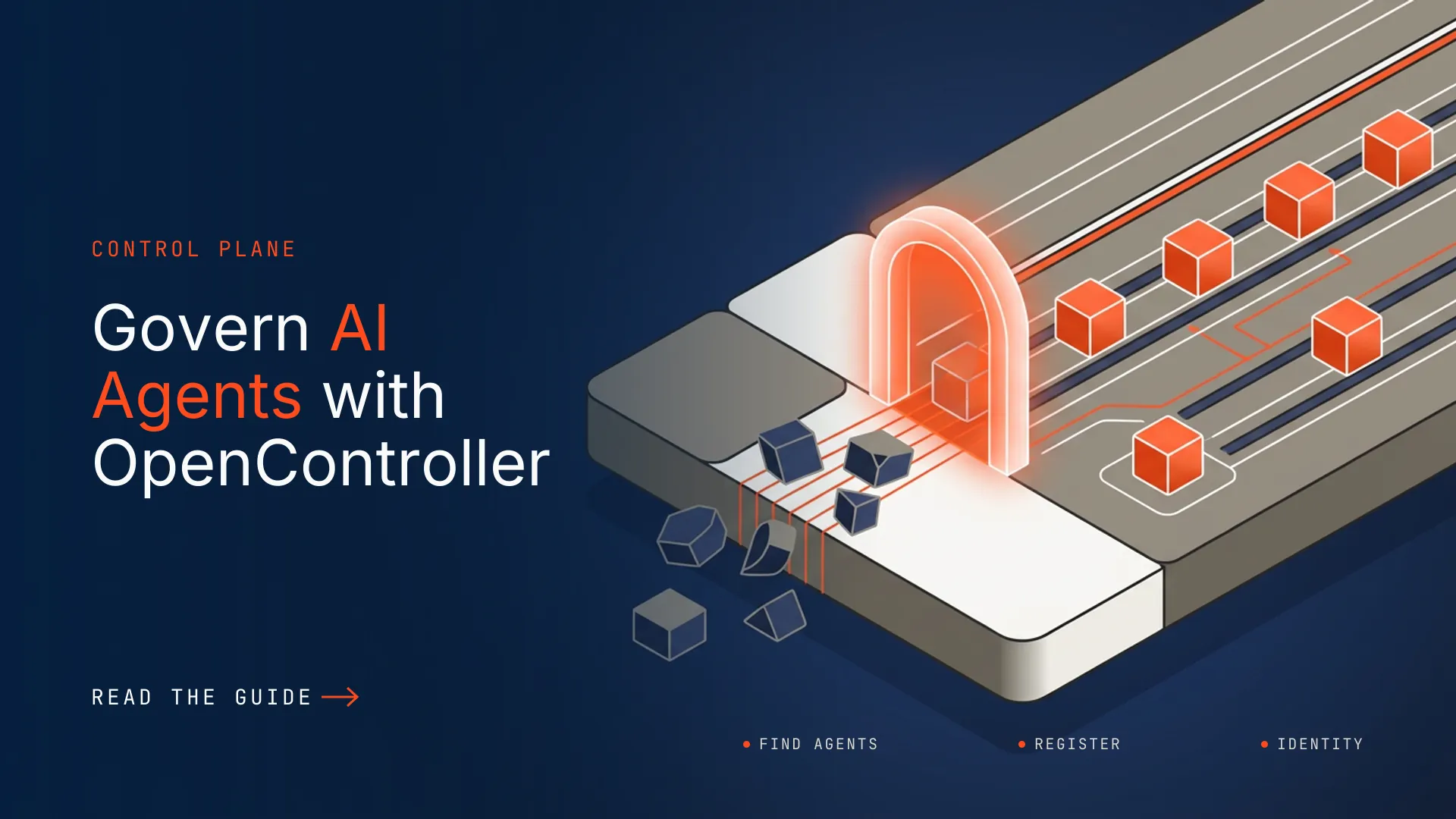
Eight things cover it, done in this order: find what is running, register it, give it an identity, gate its releases, route its calls, check its content, trace it, and cap its spend.
OpenController by Lyzr, the control plane for enterprise AI agents, runs inside your own cloud account and gives each of those steps a screen you can open and try.
Every screenshot below comes from the interactive demo. The data belongs to a fictional company, so read the numbers as illustration, not as results.
Step 1: Find every agent that is already running
Start with what exists, not with what you planned.
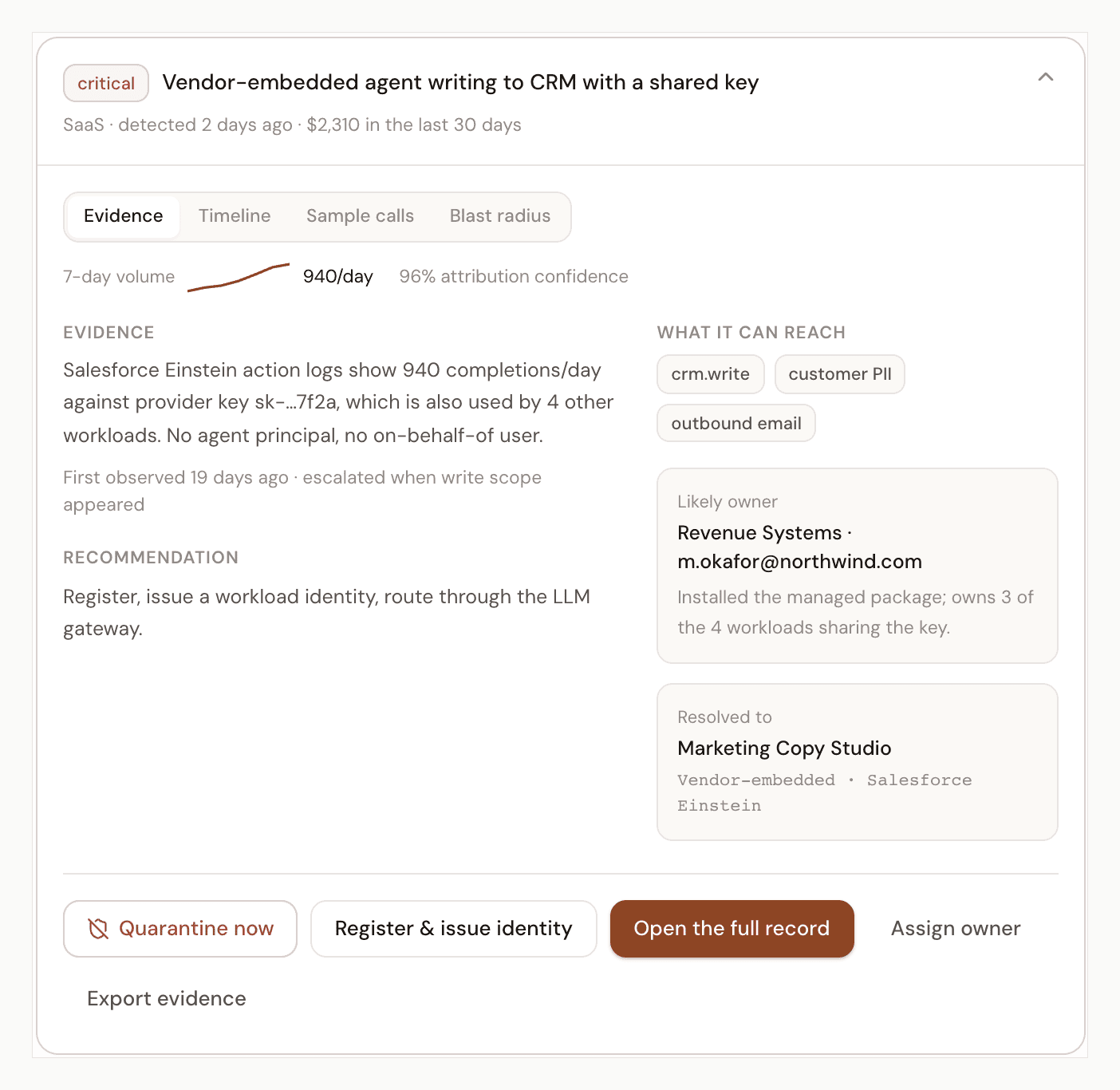
A finding carries evidence, reach, a likely owner and a reversible action. Demo environment, sample data.
Read-only connectors scan your clusters, cloud accounts, SaaS apps and managed devices, and your model provider usage. They change nothing in your accounts.
In the demo estate, 142 agents turn up and only 101 were registered. The other 41 were calling models with nobody accountable for them.
Each finding is something you can act on. It opens with evidence, then Sample Calls and Blast Radius tabs: a real call sample and what the agent can reach. It names a likely owner and offers an action you can reverse.
One of those actions is quarantine. The gateway refuses the agent’s next call, nothing is deleted, and one click undoes it.
Step 2: Register each one with an owner and a second approver
An agent without an owner cannot be reviewed, budgeted or retired. So registration requires one.
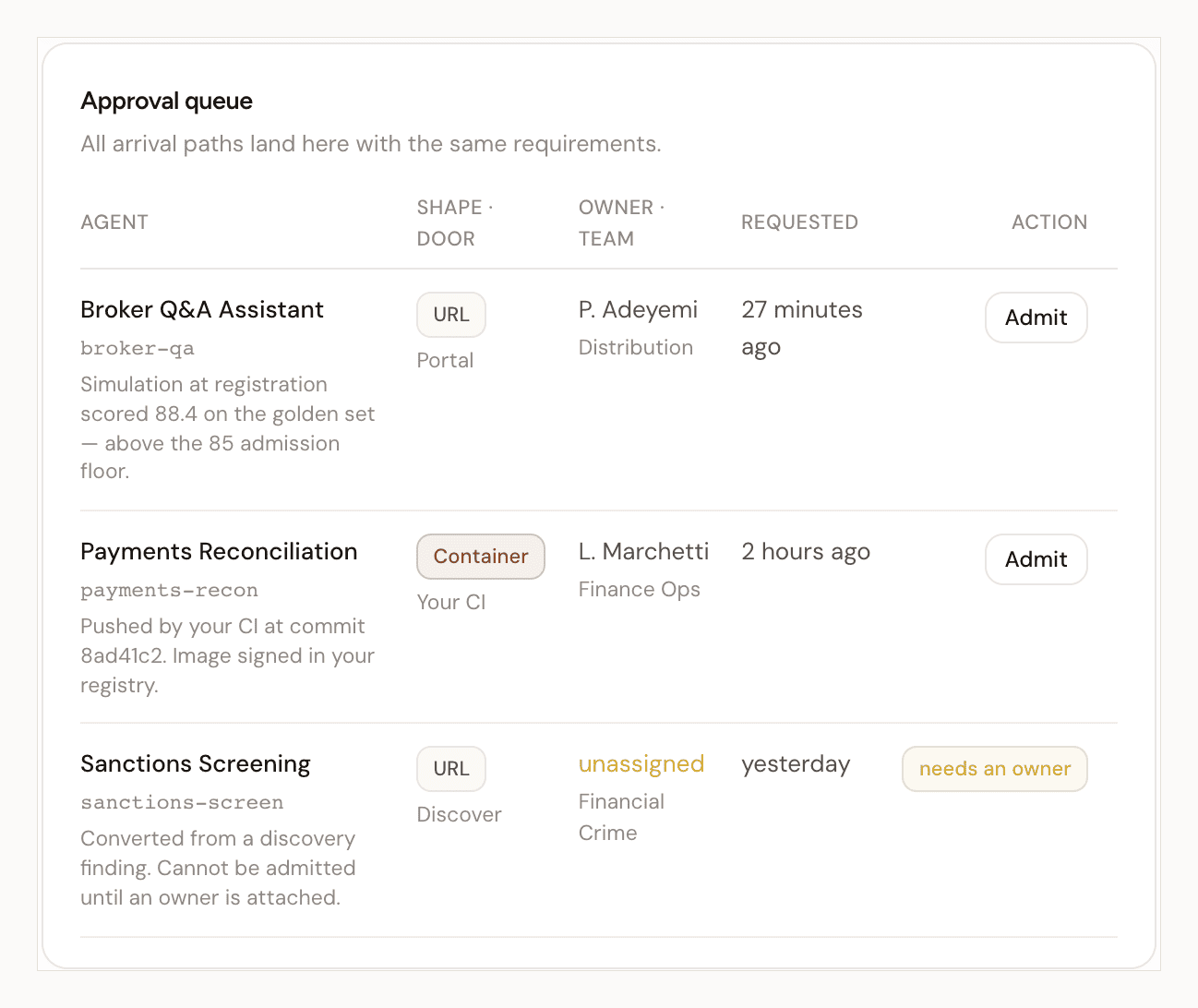
The approval queue shows what is waiting, from which door, and what blocks admission. Demo environment, sample data.
You choose a shape. A Container Agent is one you point at a repository, and OpenController runs it in your cloud. A URL Agent is already running elsewhere, and OpenController governs the doorways, not the box.
Three doors lead to the same record: the portal, a single Release Hook call at the end of your existing pipeline, or a discovery finding you convert. No SDK goes into the agent.
The record waits in the Approval Queue until a second person admits it.
Step 3: Give every agent its own identity
A shared API key tells you nothing about who did what.

An agent has its own workload identity and short-lived brokered credentials. Demo environment, sample data.
Registration issues each agent a Workload Identity, federated to your identity provider. Credentials are short-lived, 15 minutes in the demo, and brokered from your vault. Static secrets are removed.
Every call carries two names: the agent, and the human it acts for. The call is authorised on the intersection of both.
That means an agent can do less than the person using it, never more. Agents also show up in your access reviews next to people.
Step 4: Put a release gate in front of production
A new version of an agent should have to beat the one that is live.

The candidate is measured against the live version, and a 4.1 point groundedness drop blocks it. Demo environment, sample data.
The Evaluation Gate runs your Golden Set and other suites against the candidate and compares it with what is serving today, not with a fixed score. In the demo, one candidate lost 4.1 points of groundedness and was stopped.
The gate is not a role. No approver can waive it.
Even a passing version needs a second person to enter production. Every promotion records who asked, who approved and what evidence was current, and rolling back is picking a row in Version History.
Step 5: Send every call through the gateways
Policy only works if it sits in the path of every call, so each call goes through the same fixed pipeline.

Every call is authenticated, authorised, checked, metered, invoked, checked again and recorded. Demo environment, sample data.
The Agent Gateway sits in front of the agent and decides who may call it. The Model Gateway sits in front of the models and decides which models and tools it may reach. Both run in your cloud.
Each call is authenticated, authorised, checked on the way in, metered, invoked, checked on the way out and recorded. Refusals are kept, not dropped.
For an agent OpenController does not run, both doors are opt-in. Calls that skip the gateway cannot be refused, and the product says so plainly.
Step 6: Add guardrails that act before the model sees anything
Catch a problem before it reaches the model, not after it has caused one.

The guardrail masks a name, date of birth and bank account before the model sees the prompt. Demo environment, sample data.
Guardrails run at both gateways. They mask personal data, refuse prompt injection and secret leaks, block banned topics and check tool arguments.
Open a verdict in Recent Verdicts and you see the prompt as received next to what actually continued, and the rule that fired, such as pii.mask. It is also written onto the trace as a span.
An auditor can answer what the agent saw, and what was withheld, from one record.
Step 7: Trace and classify every call
When something is slow or wrong, you need one record, not three systems.
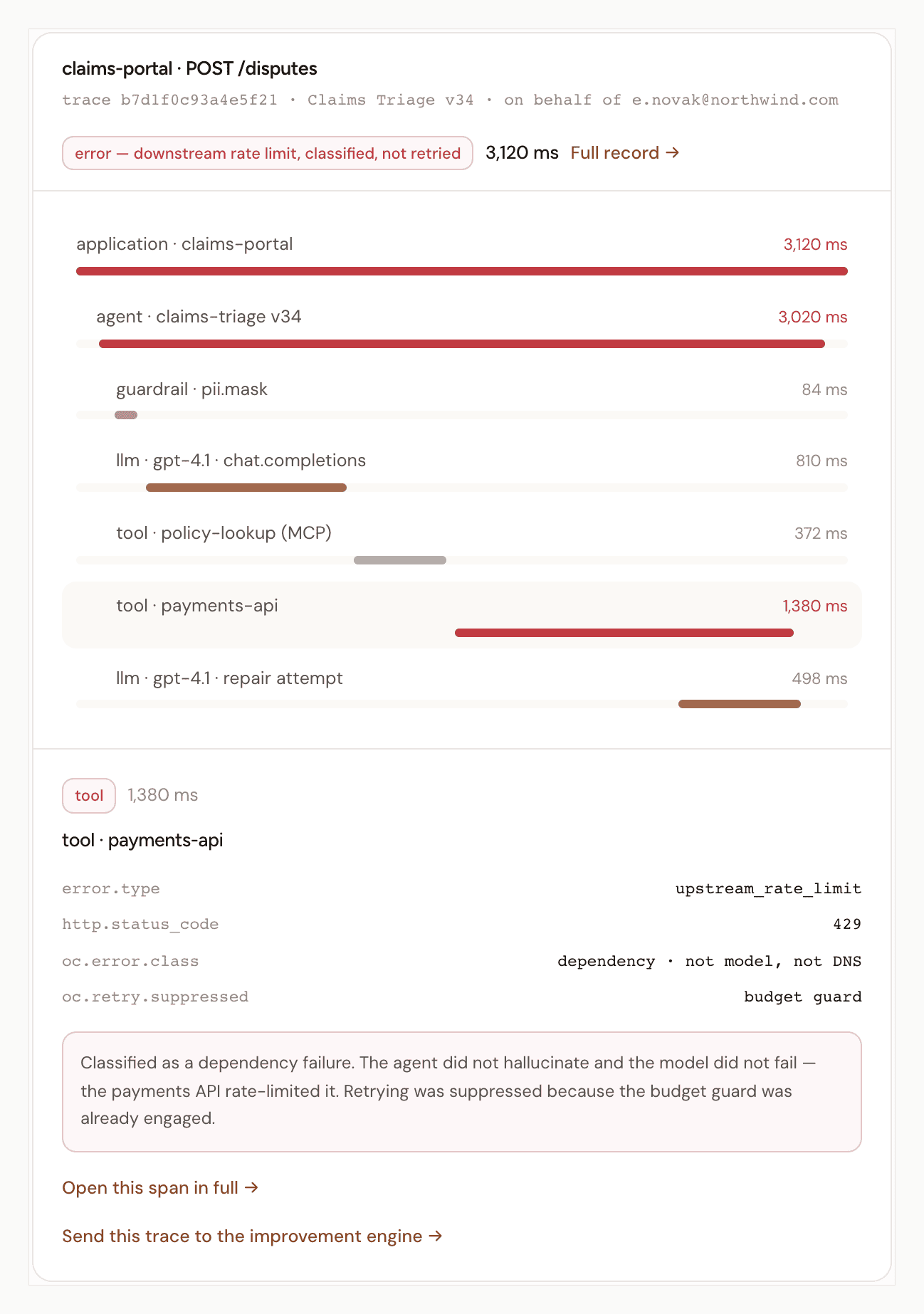
A trace shows every step of a request and classifies the failure as a dependency problem. Demo environment, sample data.
Every call becomes an OpenTelemetry trace: the user, the agent version, each model call, each tool call, each guardrail verdict and the cost. It exports to the backend you already run.
Errors are classified by the layer responsible, and Fleet Performance shows them across the whole fleet. In the demo trace, a payments service rate-limited the agent. The span carries oc.error.class and upstream_rate_limit, and the record says the agent did not hallucinate and the model did not fail. The right team gets the work.
Step 8: Cap spend with budgets that reject
A budget that only sends an email is a report.
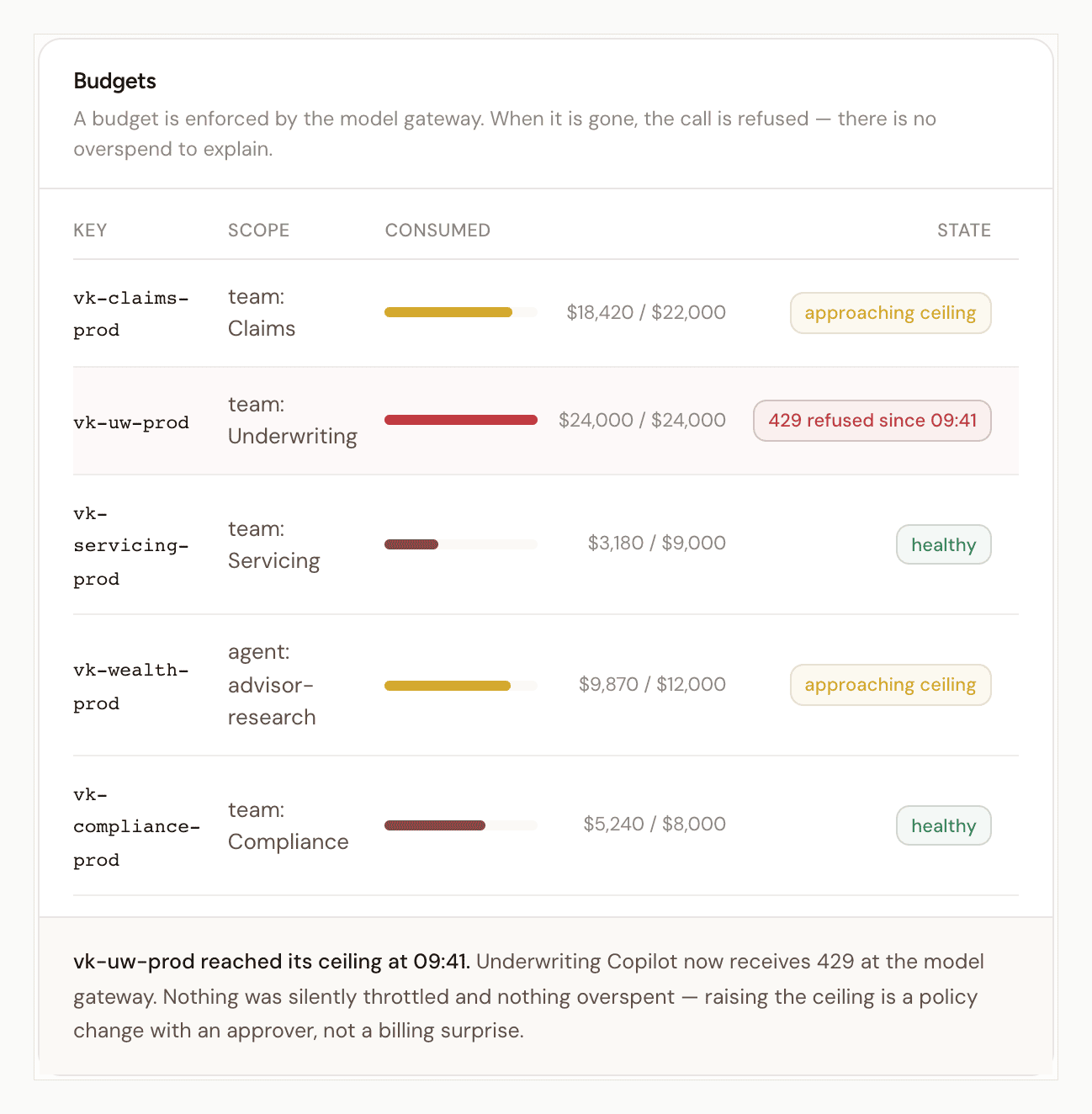
Budgets are enforced at the gateway, and a key at its ceiling is refused. Demo environment, sample data.
Give each team or agent one of the Virtual Keys on the Model Gateway, each with its own ceiling and rate limit. When the ceiling is reached, the gateway refuses the call and no provider call is made.
Raising a ceiling is a policy change with a named approver, not a surprise on a bill.
Track cost per successful task, with failures and retries counted, so the number holds up when finance asks.
What good looks like when it works
You can check it against a short list.
- Found and registered agents match, and any gap has an owner.
- Every promotion to production shows two names and the evidence.
- Every call has an identity, a trace and a verdict.
- Refusals are visible, with the reason.
- A team that hits its budget is told no, not billed.
Then close the loop. Production failures are graded into Failure Clusters by cause, and each cluster gets a Proposed Fix measured on real requests. The fix goes back through the same gate and the same second approver.
To go deeper on tracing, read how one trace follows a request across sub-agents. For the deployment model, see governance without migrating your runtime.
You can try every screen yourself in the interactive demo. No sign-in beyond an email.
Got a use case in mind?
8 weeks from use case to agents running in production.
Platform, people and FDEs, all in. Bring your environment. We'll co-build and stay until it's live.
Talk to UsFree resource
101 AI Agents Use Cases
100+ production-ready AI agent use cases across Marketing, Sales, HR, Banking, Insurance, Operations and a lot more
Download now