A business can receive hundreds or thousands of documents every day. Invoices arrive as PDFs, contracts come as scanned files, employees submit forms, and customers upload identity documents in different formats.
Extracting information from these documents is only the first challenge. Someone still needs to verify the extracted data, check it against business rules, update enterprise systems, and route exceptions to the right team.
This is where document processing agents become useful.
By combining Microsoft Foundry Tools for OCR and document extraction with Lyzr workflows for orchestration and business process automation, organizations can build a document processing pipeline that goes beyond reading files. It can extract information, validate results, trigger actions, and involve human reviewers when necessary.
The distinction is important: OCR makes documents readable, while workflows make the extracted information operational.
Why Traditional Document Processing Is No Longer Enough
Traditional document processing typically follows a predictable sequence: upload a document, extract text, enter information into a system, and send it for approval.
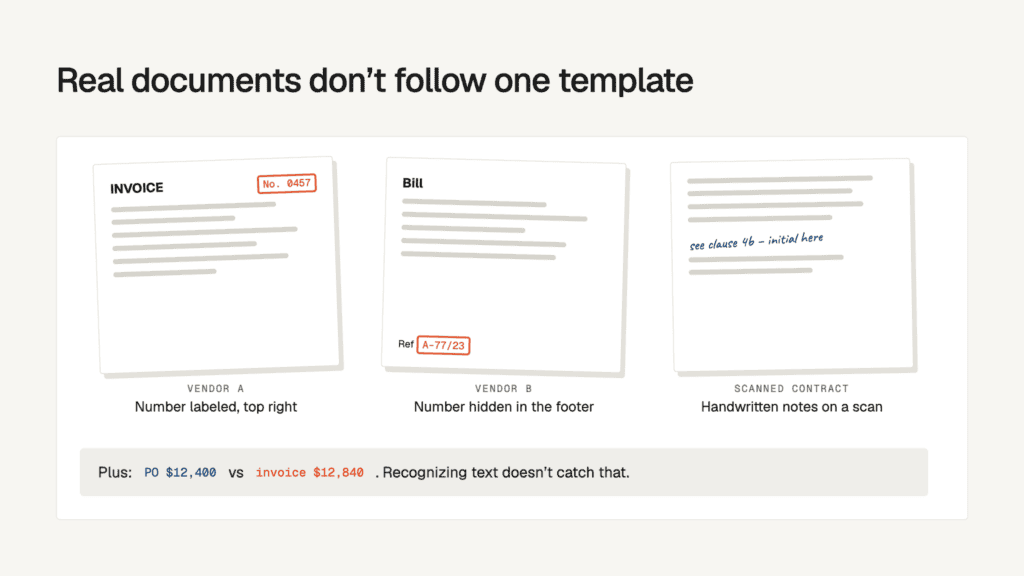
The problem starts when documents don’t follow the same structure.
An invoice from one vendor might have a clearly labeled invoice number, while another places it in a different section. A scanned contract might contain handwritten annotations. A purchase order might have missing fields or values that don’t match the corresponding invoice.
Traditional OCR can recognize text, but recognition alone doesn’t resolve these operational problems.
A document processing agent needs to handle four connected responsibilities:
- Read: Identify text, tables, fields, and document structure.
- Understand: Interpret extracted information in its business context.
- Validate: Check values against policies, records, and business rules.
- Act: Update systems, initiate approvals, or escalate exceptions.
This is why combining document extraction capabilities with workflow orchestration creates a more complete architecture.
What Microsoft Foundry Tools Bring to Document Processing
Microsoft Foundry Tools provide the document intelligence capabilities required to read and extract information from different document types.
One of the key services is Azure Document Intelligence, which uses machine learning and OCR to extract text, tables, key-value pairs, and document structure from PDFs, scanned images, and supported Office documents.
It offers three important capabilities:
OCR and text recognition: The Read model extracts printed and handwritten text, including individual words, lines, and their locations within a document.
Prebuilt extraction models: Ready-made models support common document types such as invoices, receipts, identity documents, and business cards.
Custom extraction models: Organizations can train models for document formats and fields specific to their business processes.
Microsoft also offers Azure Content Understanding within Foundry Tools. While Document Intelligence is particularly useful for structured documents and established templates, Content Understanding supports more complex, variable-layout, and unstructured content through LLM-powered analyzers.
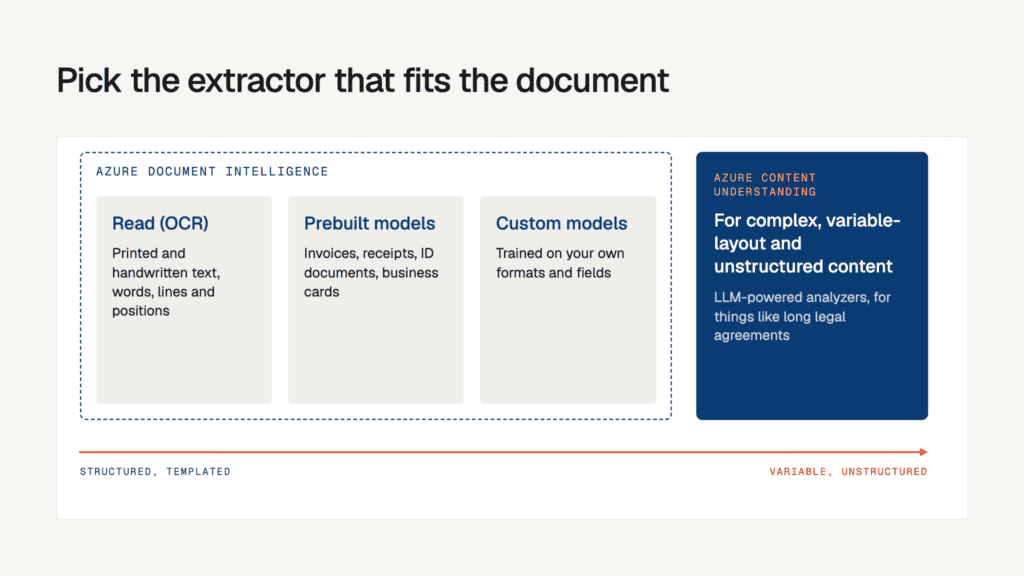
The choice depends on the documents being processed. A standard invoice and a lengthy legal agreement don’t necessarily need the same extraction approach. Microsoft Learn+2
Why Add Lyzr Workflows to the Architecture?
Extracting information is only one part of document automation.
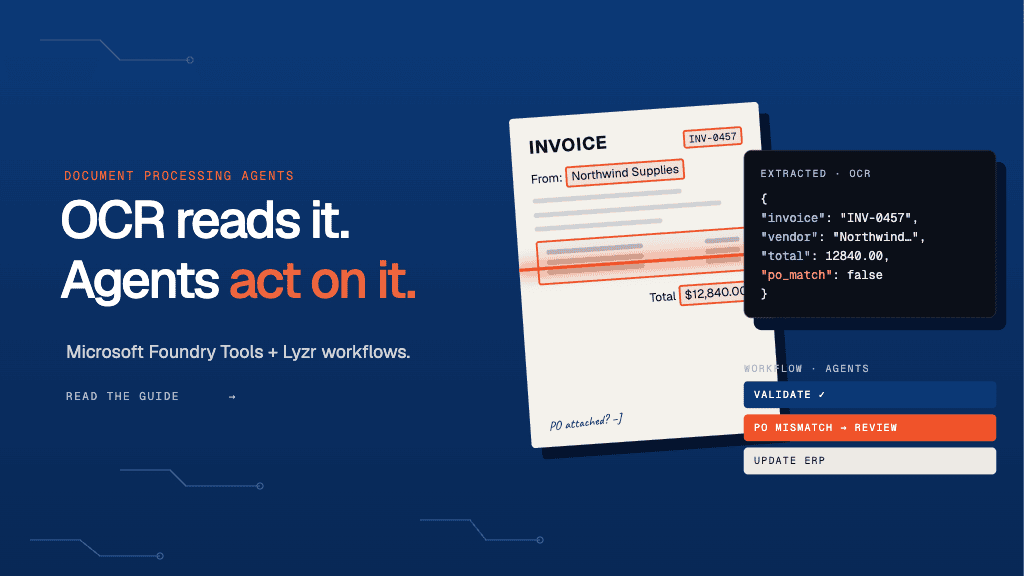
Consider an invoice processing scenario. Microsoft Document Intelligence extracts the vendor name, invoice number, tax details, line items, and total amount. But what happens next?
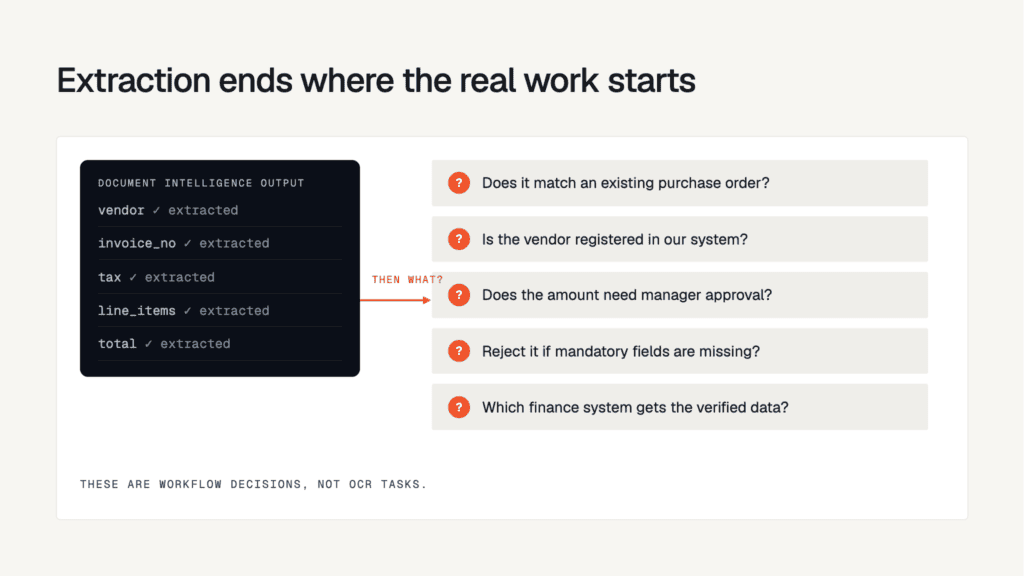
- Does the invoice match an existing purchase order?
- Is the vendor registered in the company’s system?
- Does the amount require manager approval?
- Should the invoice be rejected if mandatory information is missing?
- Which finance system should receive the verified information?
These are workflow decisions, not OCR tasks.
This is where Lyzr Agent Studio and its visual workflow orchestration capabilities become relevant.
Lyzr allows teams to connect AI agents, APIs, conditional logic, and other workflow components into a coordinated execution process. Its SuperFlow provides a directed workflow structure, allowing teams to define how tasks depend on one another.
For document processing, this means extracted information can move through validation, decision-making, approval, and downstream system updates without requiring someone to manually coordinate every step.
Explore Lyzr’s AI document processing capabilities to see how agents can support document-centric business operations. Lyzr+2
How Foundry Tools and Lyzr Workflows Work Together
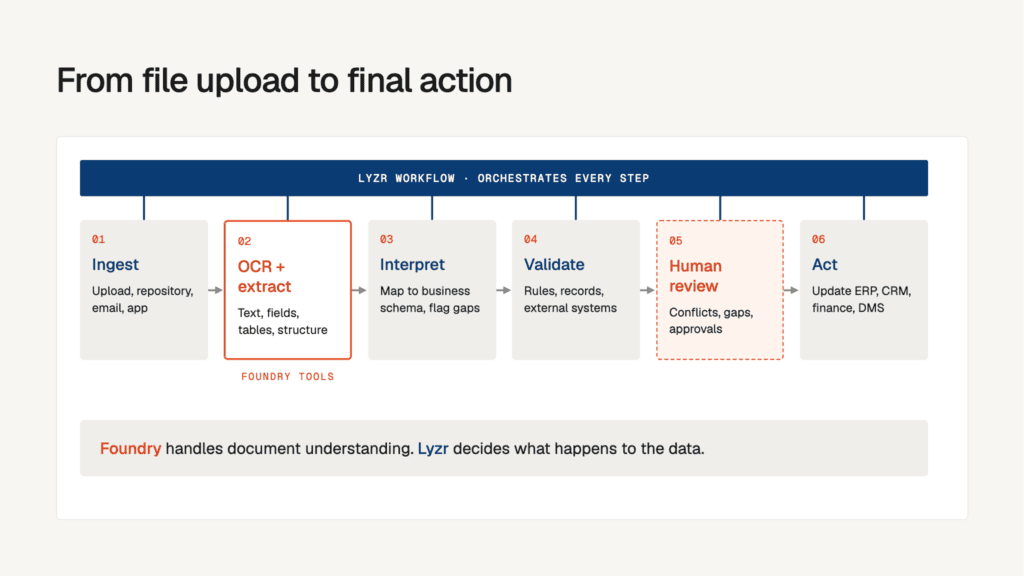
The most effective architecture separates document intelligence from business process orchestration.
Here’s how a document processing agent can work from file upload to final action.
Step 1: Document ingestion
A document enters the system through an upload form, shared repository, email integration, or application. The workflow identifies the incoming file and initiates processing.
Step 2: OCR and extraction
Azure Document Intelligence processes the document and returns extracted text, fields, tables, and structural information. Depending on the document, a prebuilt or custom model can be selected.
Step 3: Data interpretation
An AI agent interprets the extracted information against a predefined business schema. It identifies missing fields, categorizes the document, and prepares structured output.
Step 4: Validation and decision-making
Lyzr workflows coordinate validation tasks, including checking extracted values against business rules, connected records, and external systems.
Step 5: Human approval and exception handling
If a document contains conflicting information, missing fields, or an approval requirement, the workflow can route it to the appropriate reviewer rather than proceeding automatically.
Step 6: Downstream execution
Once approved, the workflow can trigger API calls to update ERP, CRM, finance, or document management systems. Processing status and execution results can also be tracked.
The important point is that each stage has a defined responsibility. Foundry handles document understanding, while Lyzr coordinates what happens to the extracted information.
Decision Matrix: Which Capabilities Should You Use?
Not every document processing requirement needs the same combination of technologies.
| Business requirement | Recommended capability | Why |
|---|---|---|
| Extract text from scanned PDFs | Azure Document Intelligence OCR | ✅ Suitable |
| Extract standard invoice fields | Prebuilt invoice model | ✅ Suitable |
| Process documents with custom fields | Custom extraction model | ✅ Suitable |
| Understand complex, variable-layout documents | Azure Content Understanding | ✅ Suitable |
| Validate extracted information against business rules | Lyzr workflows + agents | ✅ Suitable |
| Route documents for approval | Lyzr workflow orchestration | ✅ Suitable |
| Extract text and automatically complete an entire business process using OCR alone | OCR only | ❌ Insufficient |
| Make final financial or compliance decisions without defined validation or review | Fully autonomous processing | ❌ Risky |
The decision is straightforward: use Foundry for the document intelligence layer and Lyzr for the operational workflow layer. Use human review wherever the consequences of an incorrect decision justify it.
Practical Use Cases for Document Processing Agents
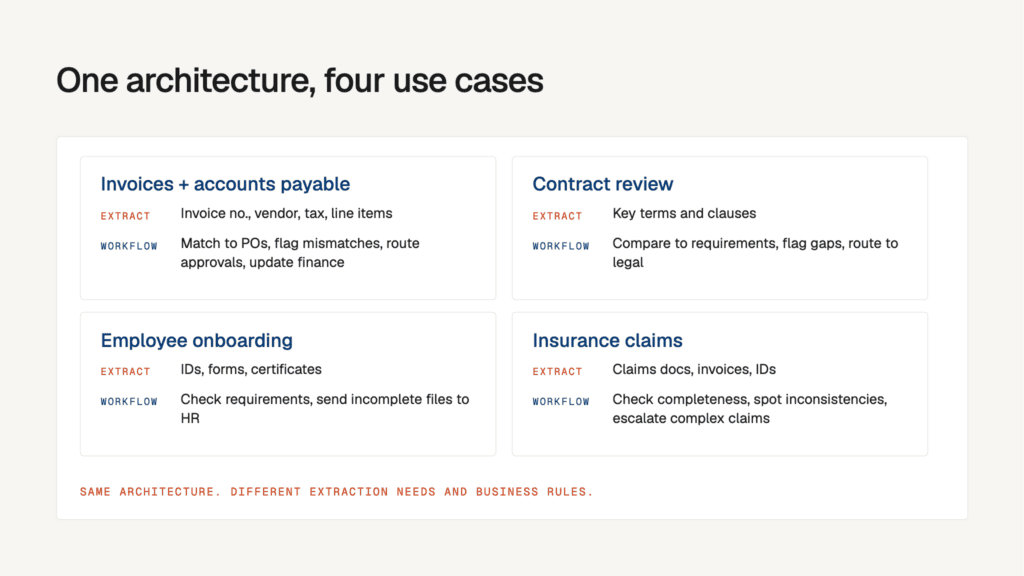
The architecture becomes particularly useful when document processing is connected to an existing business operation.
Invoice processing and accounts payable
Foundry extracts invoice numbers, vendor details, tax information, and line items. Lyzr workflows validate the extracted information against purchase orders, flag mismatches, route invoices for approval, and initiate updates in finance systems.
Contract review and management
Document Intelligence or Content Understanding extracts relevant contract information. Lyzr agents can then identify important clauses, compare extracted terms against internal requirements, flag missing information, and route contracts to legal teams.
Employee onboarding
Identity documents, employment forms, and supporting certificates enter the processing pipeline. Extracted information is validated against onboarding requirements, and the workflow routes incomplete applications to HR for review.
Insurance claims processing
Claims documents, supporting invoices, and identity records are processed and classified. Agents can check whether required documents are present, identify inconsistencies, and route complex claims to human reviewers.
These use cases share the same architecture, even though their extraction requirements and business rules differ.
What Should Enterprises Consider Before Deploying?
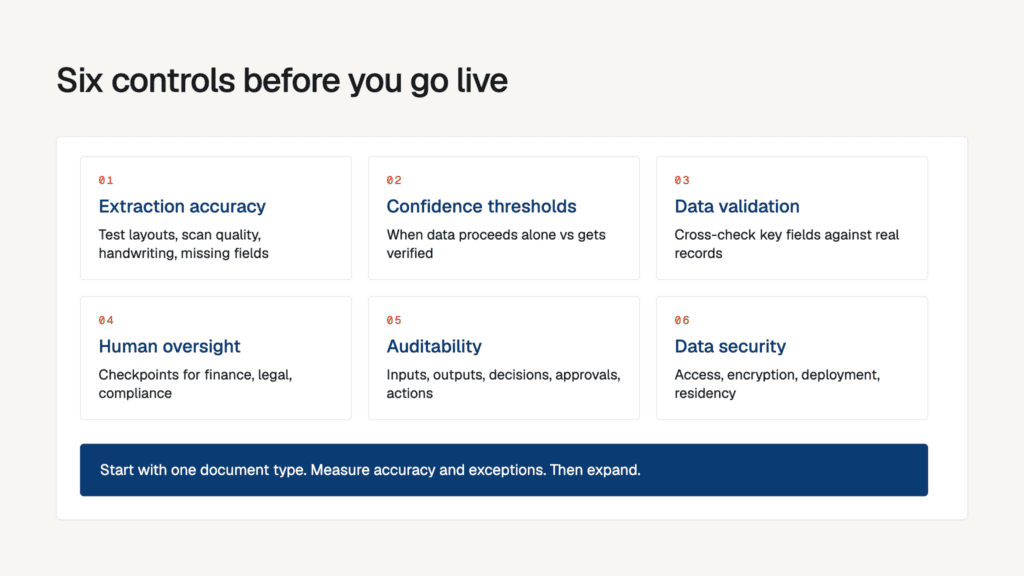
Automating document processing requires more than connecting an OCR service to an AI workflow. A production-ready implementation needs clear controls.
- Extraction accuracy: Test different document layouts, scan qualities, handwriting, and missing fields before deployment.
- Confidence thresholds: Define when extracted information can proceed automatically and when it needs verification.
- Data validation: Cross-check important fields against authoritative business records rather than trusting extracted values alone.
- Human oversight: Keep approval checkpoints for financial transactions, legal documents, and compliance-sensitive decisions.
- Auditability: Track document inputs, extraction outputs, workflow decisions, approvals, and downstream actions.
- Data security: Consider access permissions, encryption, deployment architecture, and data residency requirements when processing sensitive documents.
A useful starting point is to automate a single document category, measure extraction quality and exception rates, and expand once the workflow performs reliably.
Building the Complete Document Processing Architecture with Lyzr
The combination of Microsoft Foundry Tools and Lyzr addresses two different but connected challenges in enterprise automation.
Foundry provides the OCR, document parsing, and extraction capabilities needed to convert documents into structured information. Lyzr adds the orchestration layer that determines how this information moves through business operations.
With Lyzr SuperFlow, teams can build structured agent workflows with conditional execution and connected components. They can also incorporate approval steps, API integrations, and agents into the same process.
For organizations processing invoices, contracts, onboarding forms, or insurance claims, this architecture offers a practical path from document extraction to end-to-end process automation.
The objective isn’t simply to reduce the time spent reading documents. It’s to eliminate the manual coordination that happens after documents have been read.
Microsoft Foundry Tools help agents understand documents. Lyzr workflows help enterprises turn that understanding into business action.
To explore how Lyzr can support enterprise document automation, visit Lyzr AI.
Frequently Asked Questions
1. What are document processing agents?
Document processing agents are AI-driven systems that read, classify, extract, validate, and process information from documents. They combine OCR, language models, and workflow orchestration to automate document-centric business operations.
2. What is Microsoft Foundry Tools OCR?
Microsoft Foundry Tools include Azure Document Intelligence, which uses OCR and machine learning to extract text, tables, key-value pairs, and document structure from PDFs, scanned images, and other supported document formats.
3. What is the role of Lyzr in document processing?
Lyzr provides agent development and workflow orchestration capabilities. It can coordinate extraction outputs, validation tasks, conditional routing, human approvals, and integrations with downstream enterprise systems.
4. Can document processing agents handle unstructured documents?
Yes. Azure Content Understanding supports complex and variable-layout documents through LLM-powered analyzers. AI agents can subsequently interpret extracted information and route it through business workflows.
5. Can document processing agents include human approvals?
Yes. Lyzr workflows can incorporate approval steps and conditional execution, allowing organizations to send exceptions or sensitive decisions to human reviewers before downstream actions are completed.
Suggested internal links included: Lyzr homepage, AI document processing, and Agent Studio documentation.
Book A Demo: Click Here
Join our Slack: Click Here
Link to our GitHub: Click Here
Got a use case in mind?
8 weeks from use case to agents running in production.
Platform, people and FDEs, all in. Bring your environment. We'll co-build and stay until it's live.
Talk to UsFree resource
101 AI Agents Use Cases
100+ production-ready AI agent use cases across Marketing, Sales, HR, Banking, Insurance, Operations and a lot more
Download now