TL;DR
- Continuous evaluation on Microsoft Foundry scores a sample of a production agent’s live responses for quality, safety and tool use.
- Scores land on the agent’s Monitor tab and in Application Insights, where alerts can fire.
- Each evaluation rule scores up to 100 responses an hour by default. Runs over the cap are skipped.
- On live traffic, run evaluators that need no reference answer. Keep ground-truth checks for scheduled runs on a fixed dataset.
- Agents built outside Foundry can be evaluated too, if they send OpenTelemetry traces to the project’s Application Insights.
- A score arrives after the agent has acted. Lyzr Opencontroller turns it into release gates and request-path controls.
An IT service-desk agent passed every pre-launch evaluation (a composite scenario). Five weeks into production, the backend team renamed a field in the ticketing API. The lookup tool kept returning 200 OK with an empty body, and the agent kept telling employees their access requests were “approved and in progress”. Latency was normal. The error rate was zero. Nothing was scoring the answers.

Continuous evaluation on Microsoft Foundry (renamed from Azure AI Foundry in November 2025) closes that gap. It scores a sample of live agent responses as they complete, so failures that only appear with real traffic get caught. This guide follows the team from setup to fix, then covers what a score can’t do alone.
What is continuous evaluation of production AI agents?
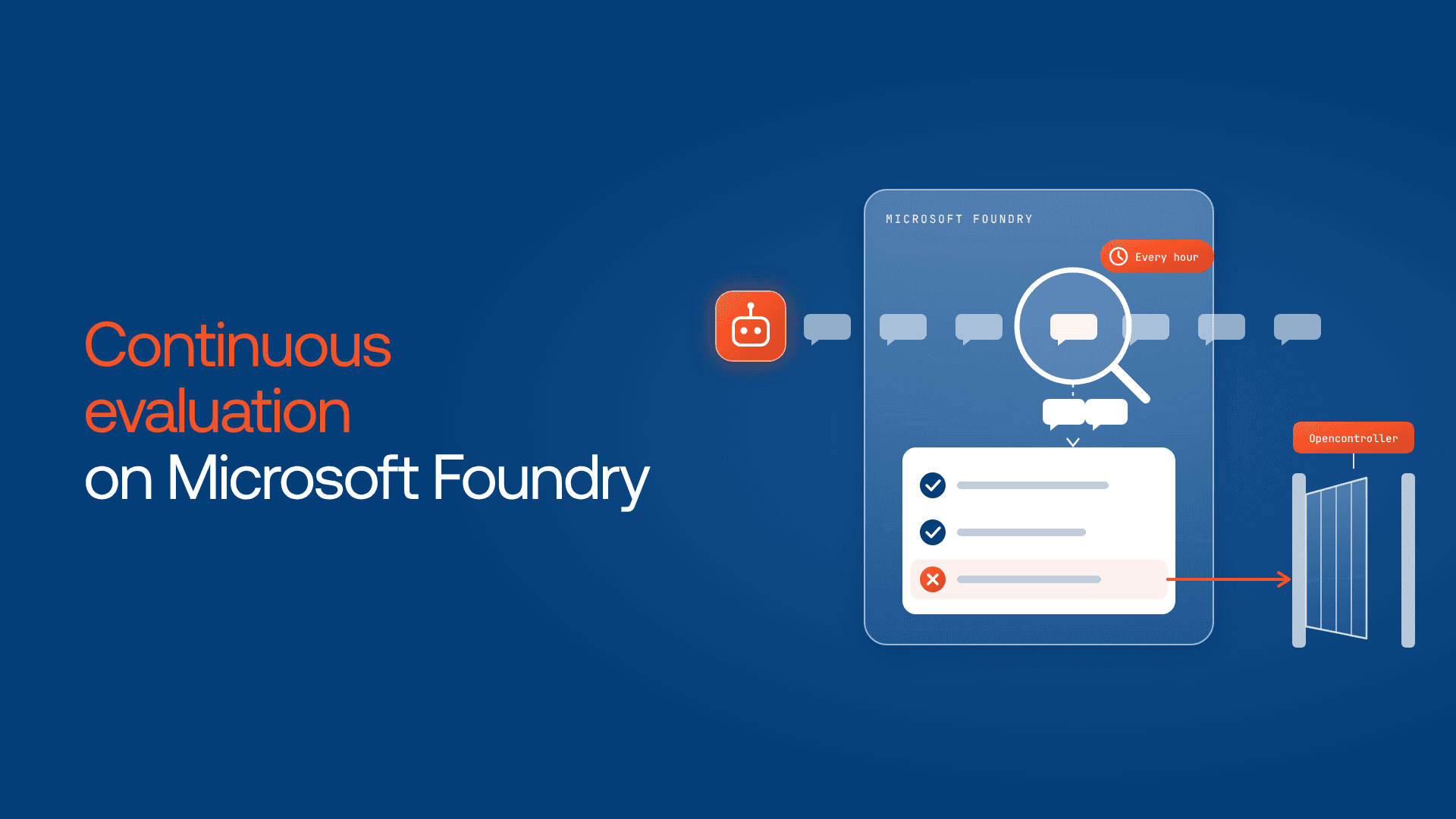
Continuous evaluation of production AI agents is the automatic scoring of a sample of live responses for quality, safety and tool use. On Microsoft Foundry, an evaluation rule fires when a response completes, runs your chosen evaluators up to an hourly cap, and posts scores to the agent’s Monitor tab and Application Insights.
It’s needed because conditions change after launch: users ask new things, and tools, data and models shift underneath the agent.
Foundry’s observability guidance separates three production checks:
| Check | Runs on | Triggered by | Catches | Status (checked Nov 17, 2026) |
| Continuous evaluation | A sample of live responses | Each completed response, up to an hourly cap | Failures on real traffic | Not labelled preview on the new monitoring page; preview in Foundry (classic) |
| Scheduled evaluation | A fixed test dataset | A schedule, such as daily | Drift against known answers | Preview (“recurring evaluations”) |
| Scheduled red teaming | Simulated adversarial attacks | A schedule | Safety and security weaknesses | Preview (“red team scans”) |
How continuous evaluation works on Microsoft Foundry
Continuous evaluation sits on top of tracing. Foundry traces agents with OpenTelemetry and stores the data in Azure Monitor Application Insights, so without Application Insights there’s nothing to score.
Setup in the new Foundry has four parts:
- Connect Application Insights to the Foundry project.
- Create an evaluation with your chosen evaluators as testing criteria.
- Create an evaluation rule that runs it on the RESPONSE_COMPLETED event for one agent, with a max_hourly_runs cap.
- Assign the Foundry User role (formerly Azure AI User) to the project’s managed identity, which continuous evaluation rules require.
In the SDK (azure-ai-projects 2.0 or later), the rule looks like this:
python
continuous_eval_rule = project_client.evaluation_rules.create_or_update(
   id="service-desk-continuous-eval",
   evaluation_rule=EvaluationRule(
       display_name="Service desk: live quality",
       action=ContinuousEvaluationRuleAction(
           eval_id=eval_object.id,
           max_hourly_runs=100,
       ),
       event_type=EvaluationRuleEventType.RESPONSE_COMPLETED,
       filter=EvaluationRuleFilter(agent_name=agent.name),
       enabled=True,
   ),
)
In the portal, the same settings sit under the agent’s Monitor tab. Alerts (preview) can fire on latency, token usage, evaluation scores or red team findings. Microsoft’s starting points: latency above 10 seconds might indicate model throttling, complex tool calls or network issues, and a run success rate below 95% warrants investigation.
Classic or new Foundry? The Foundry (classic) continuous evaluation page uses an older API with a samplingPercent and up to 1,000 requests an hour. It’s in preview and not recommended for production.
Which evaluators to run on live traffic
Live traffic has no reference answer, so run evaluators that judge a response on its own terms or against the context the agent retrieved.
Microsoft’s closed-loop evaluation walkthrough runs groundedness, task adherence, tool call accuracy, intent resolution and indirect attack on production traces. Here’s how they map to failures, with status from the built-in evaluator reference:
| Failure on live traffic | Evaluator | Needs a reference answer? | Where to run it |
| Answer not supported by tool results | Groundedness | No | Continuous |
| Wrong tool or wrong arguments | Tool call accuracy | No | Continuous |
| Agent drifts from its instructions | Task adherence (preview) | No | Continuous |
| Agent misreads what the user wanted | Intent resolution (preview) | No | Continuous |
| Prompt injection through a document or tool output | Indirect attack | No | Continuous |
| Wrong answer to a question with a known answer | Similarity | Yes | Scheduled |
| Business rules | Custom evaluator (preview) | Depends on the rule | Either |
Groundedness fits the service-desk failure best: the groundedness evaluator can extract context from tool call results, so “approved and in progress” scores low when the lookup returned nothing. Similarity requires a ground_truth input that live traffic doesn’t have.
A rule like “never confirm access without a ticket ID” needs a custom evaluator, written as a code check or an LLM judge.
Start with three or four evaluators. AI-assisted evaluators run on a model deployment you assign, so each adds token usage per sampled response.
How much traffic does Foundry evaluate?
Each rule scores up to max_hourly_runs responses an hour, 100 by default. Once the cap is reached, further runs that hour are skipped. The new monitoring guide documents no percentage-based sampling.
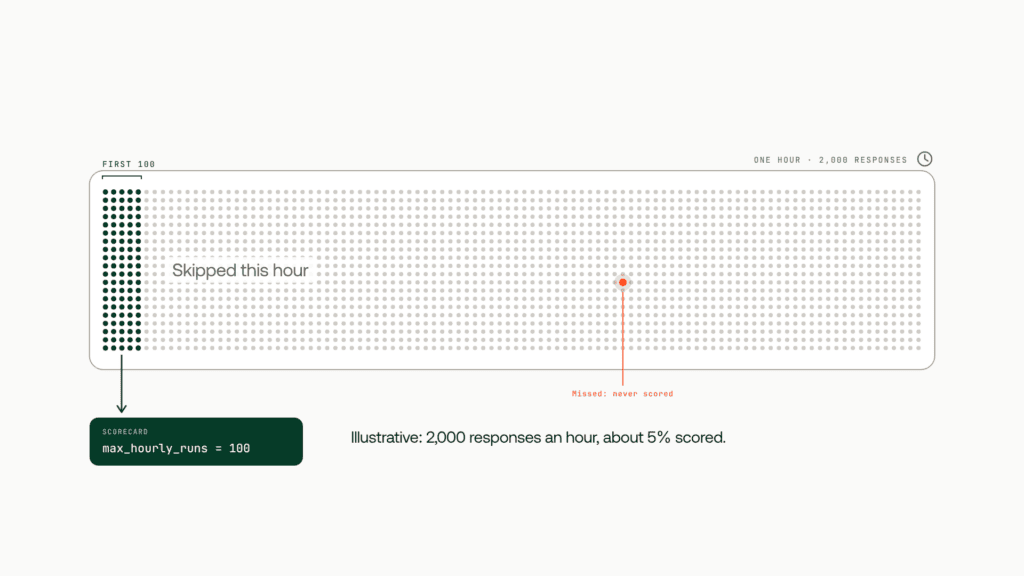
An illustrative example: the service-desk agent handles 2,000 responses an hour, so about 5% are scored. If 1 response in 500 fails in a specific way, the rule sees roughly one bad response every five hours. An alert that waits for several low scores could take a day.
To tighten coverage, raise the cap on high-risk agents and add a scheduled evaluation covering known rare cases. The docs don’t say how responses are picked within the hour, so check coverage before relying on it.
How much of your production traffic, and which failure types, do your evaluations actually cover? Take the 5-minute assessment to find your biggest blind spot. Take the assessment:
From a falling score to a fixed agent
A score drop starts the work. Microsoft’s walkthrough describes a loop the service-desk team can follow:
- Start the cycle. An Azure Monitor alert or a scheduled GitHub Actions workflow kicks it off. You set the thresholds and minimum sample count; Microsoft supplies no defaults.
- Triage first. Rule out backend or tool outages, traffic-mix shifts and evaluator or rubric updates before blaming the agent.
- Build a test set from failures. Trace dataset generation, available in supported regions, turns production traces into a versioned dataset. It can filter out low-intent traffic and redacts private content by default.
- Fix the agent. Change instructions, tool descriptions or the model, or let Agent Optimizer (azd ai agent optimize, preview) search those options.
- Gate the release. The walkthrough’s GitHub Actions job evaluates the old and new versions on a held-out suite and exits non-zero when the release policy fails.
- Roll out gradually. Canary routing sends 5%, then 25% of new sessions to the new version, while continuous evaluation keeps scoring.
Continuous evaluation for agents built outside Foundry
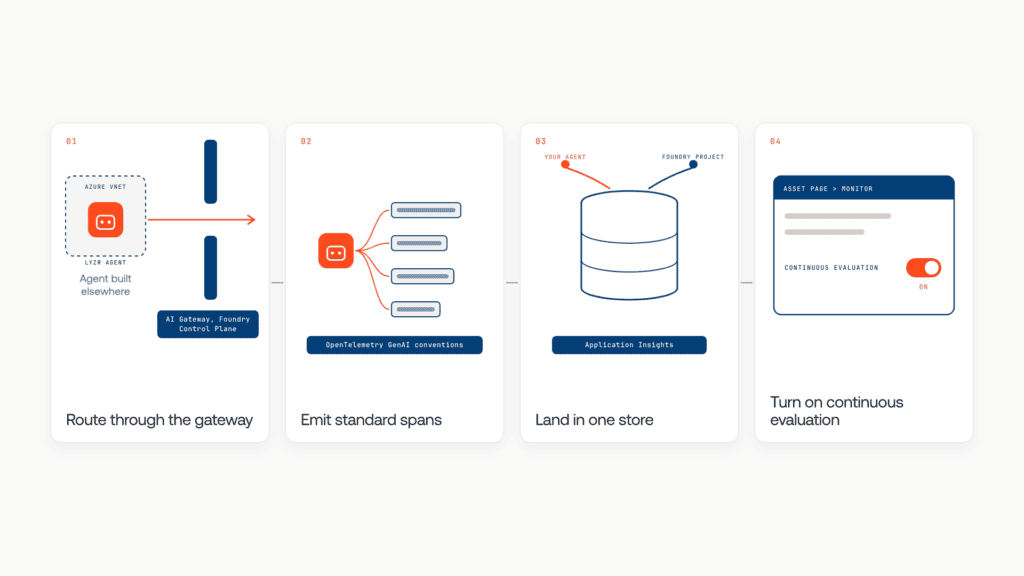
Foundry can score agents it doesn’t host. The monitoring guide lists the path:
- Onboard the agent through AI Gateway in Foundry Control Plane.
- Instrument it with the OpenTelemetry semantic conventions for generative AI.
- Send its telemetry to the same Application Insights instance as the Foundry project.
- Open the agent on the Control Plane Asset page, select Monitor and set up continuous evaluation.
Lyzr agents suit this path: every Lyzr module runs inside your Azure VNet, and Lyzr Studio traces are standardized with OpenTelemetry.
What continuous evaluation can’t do on its own
Even with evaluation running, three gaps remain.
The score arrives after the action. Continuous evaluation scores a response after it’s sent. By the time groundedness dropped, dozens of employees had been told their access was approved.
The score doesn’t block anything. Foundry reports results and raises alerts. The release gate is a script the team maintains, and a version deployed by another path skips it.
The score covers only agents you’ve wired in. Agents other teams built on other clouds are never scored.
Each needs a control outside the evaluator: a release gate, a request-path check and one inventory of every agent. That’s what Lyzr Opencontroller was built for.
How Lyzr Opencontroller turns scores into control
Opencontroller is a control plane that finds every AI agent, gives each one an owner and controls what it can call, spend and touch, across any cloud and framework. Your CI keeps building, scanning and signing artifacts, while Opencontroller applies evaluations, approvals and release controls around the deployment handoff. It answers each gap:
Before the action. In the request path, controls can refuse, mask or redirect an action before it completes.
Before the release. Its evaluation gate is a promotion gate, not a report. An agent that fails it rolls back on its own.
Across the estate. Discovery runs across your entire estate, where Foundry’s covers primarily supported platforms, and every agent gets an owner.
It doesn’t replace Foundry’s continuous evaluation. Existing runtimes stay untouched, and Opencontroller connects through standard interfaces including OpenTelemetry.
For the service-desk team, a request-path rule now refuses any “access approved” reply without a ticket ID, and the fix ships only after passing the gate.
Start with your highest-risk agent: three reference-free evaluators, a cap that fits its traffic and one scheduled run. Then make the score a condition the agent can’t get past. Book a demo to see Opencontroller turn Foundry’s continuous evaluation into release gates and runtime controls.
Frequently asked questions
Continuous evaluation on Microsoft Foundry automatically scores a sample of a production AI agent’s live responses with built-in or custom evaluators, up to an hourly cap. Results appear on the agent’s Monitor tab.
Connect Application Insights to your Foundry project and assign the Foundry User role to its managed identity. Then configure continuous evaluation in the agent’s Monitor settings, or create an evaluation rule with the azure-ai-projects SDK, version 2.0 or later.
In the new Foundry, each evaluation rule scores up to max_hourly_runs responses an hour, 100 by default, and skips runs beyond that. The classic portal allowed up to 1,000 evaluated requests an hour.
Yes. Onboard the agent through AI Gateway in Foundry Control Plane, instrument it with OpenTelemetry’s generative AI semantic conventions and send its telemetry to the project’s Application Insights.
Yes. Azure AI Foundry was renamed Microsoft Foundry in November 2025. Foundry (classic) docs still describe an older continuous evaluation API.
Book A Demo: Click Here
Join our Slack: Click Here
Link to our GitHub: Click Here
Got a use case in mind?
8 weeks from use case to agents running in production.
Platform, people and FDEs, all in. Bring your environment. We'll co-build and stay until it's live.
Talk to UsFree resource
101 AI Agents Use Cases
100+ production-ready AI agent use cases across Marketing, Sales, HR, Banking, Insurance, Operations and a lot more
Download now