Every AI assistant you have used has one thing in common. It needs the internet.
Ask it a question and your words leave your laptop. They cross networks you do not control and land in a data center you will never see. A model you do not own answers, and somewhere along the way, the question gets logged.
For a decade, that was the deal. If you wanted intelligence, you sent your data to it.
But what if the internet was never part of the answer? What if the models, the agents and even the sign-in lived on a machine you own, nothing ever had to leave, and it could still reason through your hardest problems?
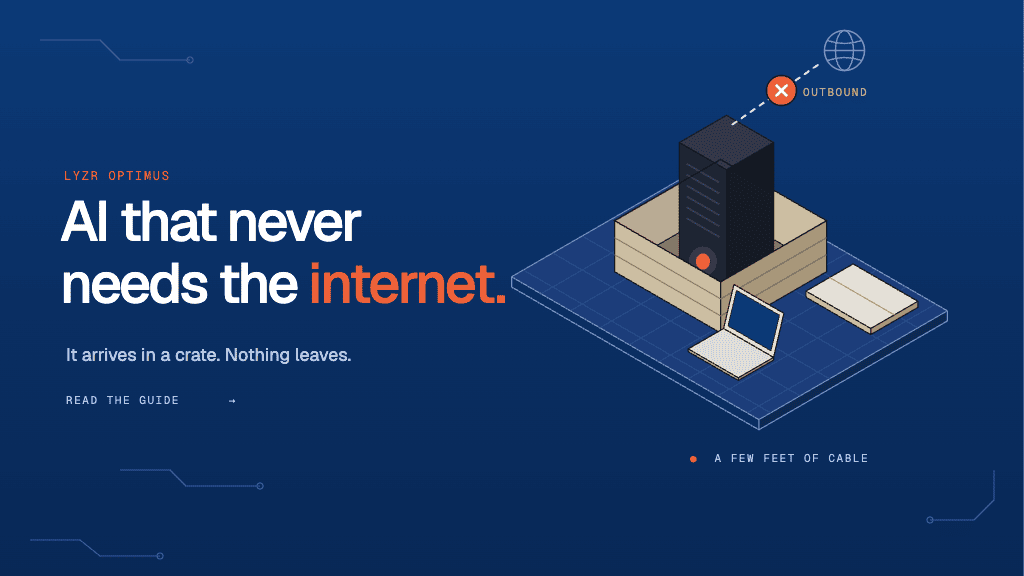
That is the idea behind Lyzr Optimus. The intelligence comes to the data. It arrives in a crate, and it stays.

What Optimus is
Optimus is an AI appliance. It is a single machine that holds everything an organisation needs to run AI on its own premises:
- Graphics processors that run the models
- Open-weight models, installed before it ships
- A gateway that every request passes through
- A sign-in system tied to your organisation’s identity
- An administrator’s console for people, models and policy
- A permanent audit record of everything the box has been asked
It does local inference, runs local agents and supports local fine-tuning. People use it through Lyzr Cowork, a desktop app that looks and feels like any modern AI assistant.
Air-gapped, with a door you own
Optimus is air-gapped by default. It has no internet connection, needs none to work, and has no way to send anything out.
After that, how far to open it is your choice. You can keep it fully sealed and carry updates in on signed physical media. Or you can open a single inbound path so new models and patches arrive over the wire.
Either way, outbound is not a setting. Nothing on the box knows how to call home.
Your people’s laptops keep their normal internet. The box never shares that connection and never becomes a path to it.
How it works
- Keep every service local. Optimus has no cloud model provider configured, so requests cannot fall back to an external model. Identity and other required services run on the box itself.
- Verify updates before installation. Every update is signed and verified before any changes are applied, helping prevent untrusted updates from being installed.
- Recover automatically after a reboot. All services restart on their own, without requiring an internet connection or external network access.

The box thinks. Your laptop remembers.
This is the part most people don’t expect. Optimus does not keep your work.
Your documents, your chats and the files the assistant creates all live on your own laptop, in a folder you choose. When you ask a question, only the text needed to answer it crosses to the box. The answer comes back into your folder. The box keeps the audit record: who asked, when, and which model answered.
The box is the engine. Your laptop is the filing cabinet. Sensitive files are never copied to a shared server or pooled with anyone else’s.
How it works. Cowork runs the assistant’s tools inside the user’s workspace folder, on the laptop. Only model calls cross the link. Large tool outputs are written to that folder, and the model pages through them instead of receiving them whole.

No router required
Optimus doesn’t need a network to be useful. A laptop can reach it three ways:
- The office network, like any other internal service
- Private Wi-Fi that the box broadcasts itself
- A single USB-C cable, with no network at all
Cowork finds whichever path is available and prefers the cable whenever it’s plugged in. It moves between paths on its own without signing anyone out.
That is what makes Optimus portable. Wherever a laptop can go, the box can go.
How it works. Over USB-C, a laptop presents itself as a network device. The installer adds two lines to the kernel’s USB network driver so the box recognises the laptop. It then rebuilds the module so the change survives kernel updates. The box gives the laptop an address with no gateway and no DNS. The laptop can never route its internet through the box, and the box forwards nothing in either direction.

No keys on laptops
Most AI tools hand you an API key. A key on a laptop is a secret that can be copied, shared or forgotten in a config file.
Optimus doesn’t hand out keys. You sign in with your organisation’s identity and get a pass that expires within minutes and renews itself while you work. On your first request, the box creates a governed account tied to you. That account has its own budget, its own model permissions and its own audit trail.
An administrator adds you once. From then on, every request carries your name.
How it works:
- Sign in through your organisation’s identity service. Cowork opens a standard browser-based sign-in flow against the identity service running on the Optimus box.
- Use short-lived tokens. Access tokens expire quickly and refresh every 90 seconds during long-running agent tasks, reducing the risk of long-lived credentials being exposed.
- Establish trust with the box. Optimus uses its own certificate authority to secure HTTPS connections. Cowork displays the authority’s fingerprint once and trusts it only for that specific box, without changing system-wide trust settings.
Any open-weight model, sized to fit
Optimus ships with several open-weight models from US and European labs, installed and ready the day it powers on. The default is a 27.9 billion parameter reasoning model that reads images and uses tools, pinned so it is always loaded.
It is a default, not a rule. The box runs any open-weight model you choose. Administrators add, swap and tune models from the catalog, and every chat is pinned to the model the user picks.
How it works
- Check each model’s limits. The gateway reports the actual context window and maximum output length supported by each model.
- Size conversations to fit. Cowork adjusts each conversation to the selected model’s limits, so requests stay within what the model can handle.
- Install and configure models. When an administrator installs a model from the catalog, Optimus downloads its weights, applies the catalog’s settings and, if requested, pins the model in GPU memory so it stays ready to use.
Air-gapped doesn’t mean frozen
Administrators shape the box from one console, with no vendor involved:
- Models. Install from a catalog, tune settings and pin the ones that must always be ready.
- People. Add staff, set budgets and control which models each person may use.
- Skills. Approve the library of skills the assistant is allowed to use.
- Tools. Choose which connectors are on, and whether each tool action needs human approval.

The code, request shape and streaming all stay the same. Only the destination changes.
Every token is yours, so spend it well
On your own hardware, working memory is a resource you own, and Cowork treats it that way. Connectors start switched off in new chats and turn on when a task needs them. The browser toolset is trimmed to the tools people actually use. Long outputs go to disk instead of into the conversation.
Together, these choices cut the hidden setup on a simple prompt from 8,805 tokens to 5,145. That leaves more of the window for the work itself.
Built for the rooms where data cannot leave
- Hospitals and health systems. Patient records, discharge summaries, clinical coding and prior authorisation, with every request tied to a named clinician.
- Military and defence. Classified networks, forward bases and ships, where there is no connectivity to lean on.
- Fintech. KYC, fraud scoring and transaction analysis, with no per-token bill as usage grows.
- Banks and insurers. Credit memos, claims triage and an audit trail an examiner can read.
- Government. Citizen records and casework that must stay inside a national border.
- Law firms. Privileged documents reviewed without a third party ever touching them.
- Manufacturing and research. Recipes, designs and test data that nobody would ever email.
Cloud AI and Optimus, side by side
| Cloud AI | Lyzr Optimus | |
| Where your question goes | Someone else’s data center | A box in your building |
| Where your files live | Uploaded to the provider | On your own laptop |
| Internet required | Always | Never |
| Who holds the keys | The provider | Your administrators |
| Who chooses the models | The provider | You |
| Cost as usage grows | Rises with every token | Stays flat |
Three promises
Your data stays private. Your token costs drop. Your IP stays yours.
The intelligence arrives in a crate. Nothing leaves.
Pre-order Lyzr Optimus or book a demo.
Book A Demo: Click Here
Join our Slack: Click Here
Link to our GitHub: Click Here